Page 100 of 308
5-14 I Navigation
Search
Places
You can enter POI Name, Address, or
Coordinates that you wish to search by.
Press the
NAVI head unit key. Ü
Select the
Destination tab. Ü
Select the
search bar.
Enter the POI Name, Address and
Coordinates of the location you want in
the input window above, and press the
Done button.
If you select a location from the search
result list, it will bring you to the point.
If you press the All Cities in MI button on the
search result screen, it will bring you to the
City search screen where you can filter the
search results by city names.
If you press the All Categories button from
the search result screen, it will bring you to
the POI Categories screen where you can
filter the search results by POI Categories.
)@-'��.:@(���<64"@/>�1BSU��JOEE������� )@-'��.:@(���<64"@/>�1BSU��JOEE������� �������������
Page 102 of 308
5-16 I Navigation
Enter the address to check the location
information on the map.
Previous Destination
Select from previously inputted addresses
and POI’s.
Press the
NAVI head unit key.▶
Select the
Destination tab. ▶
Select the
Previous Destinations icon.
Arrange by all, latest destinations, latest
searched places and latest departing
places.
Arrange in order of date and name.
Name Description
Set asDestinationSet the location as a des-
tination.
AddWaypointSet the location as a way-
point.
Add to Address BookSave the location
POISearch nearby POIs.
NameDescription
Display all destinations, depart-
ing places, and searched places.
Display previous destination
places for route guidance
Display previous departing
places for route guidance
Display previously searched
places for route guidance.
But, not displayed when the
searched places are set as
destination.
)@-'��.:@(���<64"@/>�1BSU��JOEE������� )@-'��.:@(���<64"@/>�1BSU��JOEE������� �������������
Page 104 of 308
5-18 I Navigation
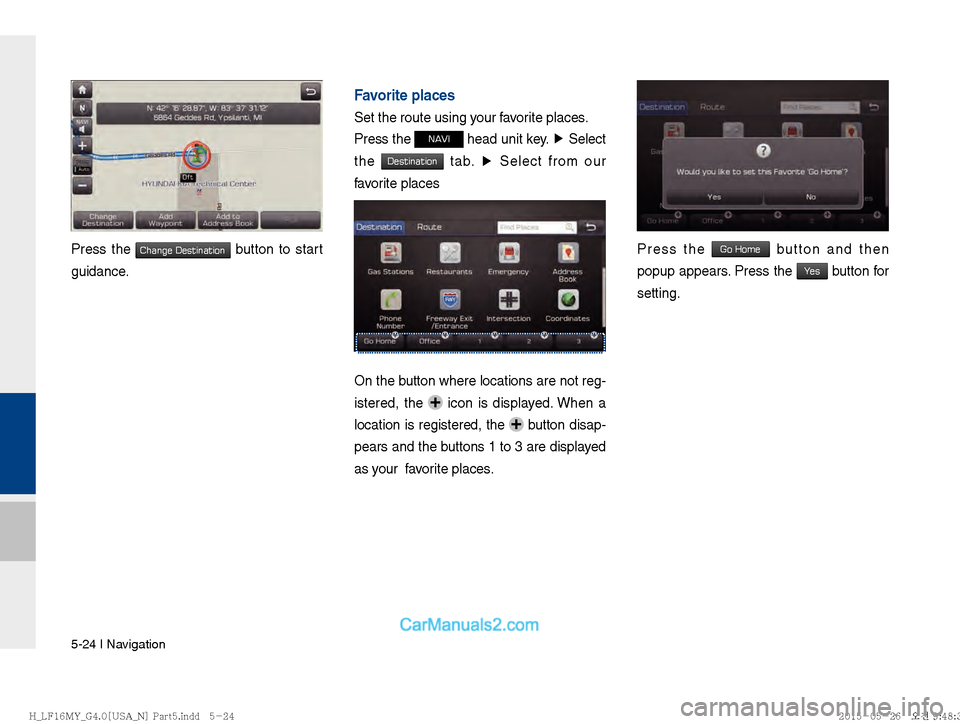
Press the Change Destination button to start
guidance.
If failed, the connection error message is
displayed as above. Please try again.
POI Categories
Press the NAVI head unit key. ▶
Select
the
Destination tab. ▶
Select the POI Categories
icon.
Select the desired item.
Select the desired item in the sub-catego-
ries.
)@-'��.:@(���<64"@/>�1BSU��JOEE������� )@-'��.:@(���<64"@/>�1BSU��JOEE������� �������������
Page 106 of 308
5-20 I Navigation
Emergency
Search emergency facilities.
Press the
NAVI head unit key. ▶
Select
the
Destination tab. ▶
Select the Emergency
Check the current location information
and select the desired item in the sub-
menu(ex. Police Station).
Select the desired destination among the
searched items.
Address Book
Search the destination with the address
book.
Press the
NAVI head unit key. ▶
Select
the
Destination tab. ▶
Select the Address Book
)@-'��.:@(���<64"@/>�1BSU��JOEE������� )@-'��.:@(���<64"@/>�1BSU��JOEE������� �������������
Page 108 of 308
5-22 I Navigation
Select the desired destination among the
searched items.
Press the Change Destination button to start
guidance.
Freeway Exit / Entrance
Press the NAVI head unit key. ▶
Select
the
Freeway Exit/Entrance to search by free-
way exit/entrance.
Type freeway name and exit/entrance.
Press the Set as Destination button to start
guidance.
)@-'��.:@(���<64"@/>�1BSU��JOEE������� )@-'��.:@(���<64"@/>�1BSU��JOEE������� �������������
Page 110 of 308
5-24 I Navigation
Press the Change Destination button to start
guidance.
Favorite places
Set the route using your favorite places.
Press the
NAVI head unit key. ▶
Select
the
Destination tab. ▶
Select from our
favorite places
On the button where locations are not reg-
istered, the
icon is displayed. When a
location is registered, the
button disap-
pears and the buttons 1 to 3 are displayed
as your favorite places.
Press the Go Home button and then
popup appears. Press the
Yes button for
setting.
)@-'��.:@(���<64"@/>�1BSU��JOEE������� )@-'��.:@(���<64"@/>�1BSU��JOEE������� �������������
Page 112 of 308
5-26 I Navigation
Route Setting
After searching the destination, set a
route.
While the destination is set, the buttons
Change Destination and Add Waypoint appear.
Press each button to change a destination or
add a waypoint.
Destination Setting(Change)
After searching the destination, press the
Set as Destination button to set the location
as a destination and search a route.
All Routes
When the alternative routes option is
enabled in navigation setting, two routing
options are displayed based on faster time
and shorter distance.
!Ÿ
Faster Time : Select time-optimized
route, being the fastest roads.
!Ÿ
Shorter Distance : Select short distance,
irrespective of how fast or slow progress will
be calculated.
)@-'��.:@(���<64"@/>�1BSU��JOEE������� )@-'��.:@(���<64"@/>�1BSU��JOEE������� �������������
Page 113 of 308
Search I 5-27
05
NameDescription
Display total distance,
travel time. Select the
desired route.
Start GuidanceStart the guidance
with the route.
Route OptionsChange the route
option.
Route PreviewPreview turn-by-turn
list.
Edit RouteEdit the route.
TotalDisplay total distance
of the route
Freeway Display length of
freeway on the route
Toll Road Display length of toll
road on the route
FerryDisplay length of Ferry
route on the route
The route will be calculated using the
option “Faster Time” by default.
Alternative routes can be suggested if
necessary,
SETUP head unit key.
▶
Navigation
Icon ▶
Route ▶
Alternative :
ON
Adding Waypoint
Press the Add Waypoint button to set the
position as a waypoint and search the
route.
)@-'��.:@(���<64"@/>�1BSU��JOEE������� )@-'��.:@(���<64"@/>�1BSU��JOEE������� �������������