Page 87 of 308
Basic FeaturesSearchRoute
Navigation Settings Troubleshooting
part.5 Navigation
05
)@-'��.:@(���<64"@/>�1BSU��JOEE������
)@-'��.:@(���<64"@/>�1BSU��JOEE������ �������������
Page 88 of 308
5-2 I Navigation
Navigation
Basic Features
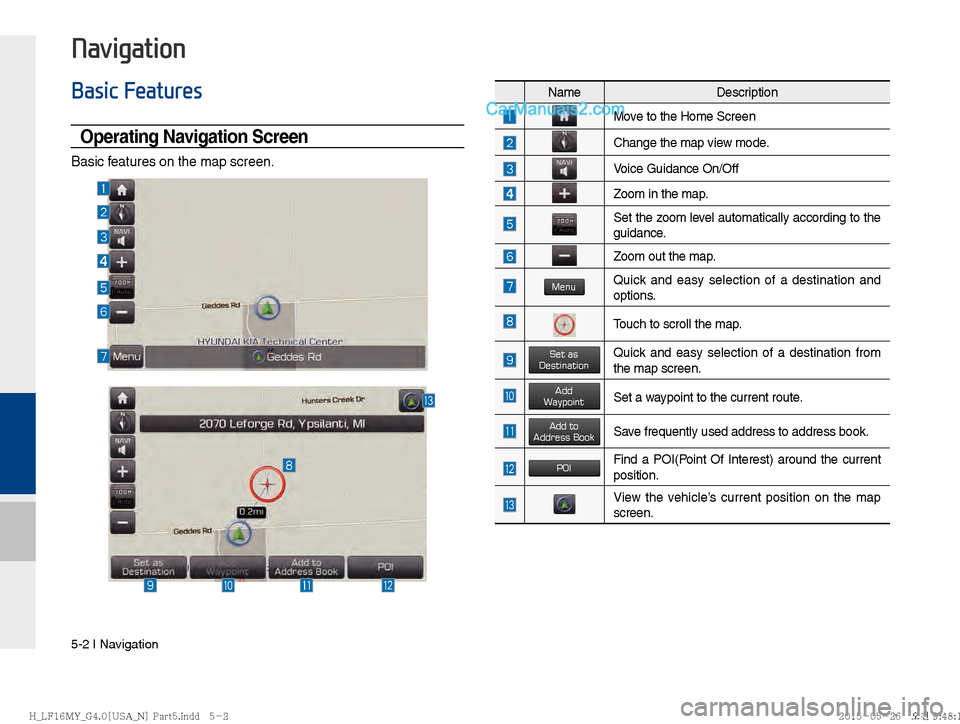
Operating Navigation Screen
Basic features on the map screen.
NameDescription
Move to the Home Screen
Change the map view mode.
Voice Guidance On/Off
Zoom in the map.
Set the zoom level automatically according to the
guidance.
Zoom out the map.
MenuQuick and easy selection of a destination and
options.
Touch to scroll the map.
Set as DestinationQuick and easy selection of a destination from
the map screen.
Add WaypointSet a waypoint to the current route.
Add toAddress BookSave frequently used address to address book.
POIFind a POI(Point Of Interest) around the current
position.
View the vehicle’s current position on the map
screen.
)@-'��.:@(���<64"@/>�1BSU��JOEE������ )@-'��.:@(���<64"@/>�1BSU��JOEE������ �������������
Page 90 of 308
5-4 I Navigation
Map Scale
Sets the zoom level automatically accord-
ing to the road class
NameDescription
Scale Fix Manually adjust the map
scale.
Auto Scale Change the map scale
automatically depending
on the road class
Menu
Route
Press Menu button on the bottom left of
the screen ▶
Press
Route button
Press the Route button to set Route Options
or
Detour .
Route Option
Name Description
Calculates the fastest time of
arrival
Calculates the shortest distance
to destination.
Save the option. Route will be
calculated based on the selected
option when setting a destination.
Set more route options.
)@-'��.:@(���<64"@/>�1BSU��JOEE������ )@-'��.:@(���<64"@/>�1BSU��JOEE������ �������������
Page 91 of 308
Basic Features I 5-5
05
Detour
The Detour button is active only when the
route is planned.
Selected distance is detoured from the
current location.
Press the Using Map button to select the
distance ahead to avoid. (Highlighted grey
indicates distance to avoid)
Navigation Volume
Press the Navi Volume button to adjust the
volume.
Press the Navi Volume button.Name Description
ShorterReduce the length of the
section to avoid.
LongerIncrease the length of the
section to avoid.
DetourConfirm detour
)@-'��.:@(���<64"@/>�1BSU��JOEE������ )@-'��.:@(���<64"@/>�1BSU��JOEE������ �������������
Page 92 of 308
5-6 I Navigation
Nearby POIs
Display nearby POIs on the map.
View Nearby POIs
Select the Menu on the bottom of the left
screen ▶
Select the
POI button.
Press ON, OFF button to set whether to
show nearby POIs or not.
When categories are selected, they will
appear on the map. (ex. Gas Station) The lists of nearby gas station are dis-
played.
Display in order of distance and name.
Name
Description
Set the volume to mute.
Turn the volume down
Turn the volume up
Slide to set the volume
)@-'��.:@(���<64"@/>�1BSU��JOEE������ )@-'��.:@(���<64"@/>�1BSU��JOEE������ �������������
Page 94 of 308
5-8 I Navigation
!Ÿ
Searching POI categories
Select the Menu button on the bottom
left of the screen. ▶
Select the
POI but-
ton. ▶
Select the
POI Categories button. ▶
Select the desired item.
Select the item to search.
Press the
History button to check the pre-
vious search result.
Press the Search button to search the
POI category by name.
Select the desired POI to check the loca-
tion and for detailed information.
Name Description
Search POI around the current
position.
Search POI around the destina-
tion.
Active only when a route’s
planned
Search POI along route.
Active only when a route’s
planned
Search POI around the current
cursor when the map scrolled.
Active only when the cursor
position is different from the
vehicle position
Search POI around the city
selected
)@-'��.:@(���<64"@/>�1BSU��JOEE������ )@-'��.:@(���<64"@/>�1BSU��JOEE������
�������������
Page 96 of 308

5-10 I Navigation
On the traffic list, the current basic traf-
fic/road event information is displayed in
order of distance.
Select the combo box to change the
arrangement in order of distance/cate-
gory.
Traffi c detail
Press the Menu button on the bottom left
of the screen. ▶
Select the
Traffic button.
Select the traffic information on the traffic
list to display the detailed screen as shown
in the screen.
Display the symbol of traffic event and
arrow which indicates the road from start
to end of the traffic event. Detailed infor-
mation is available on the right screen.
Name Description
Select the combo box to arrange.
Arrangement by category
: Display traffic information
arranged in order of traffic infor-
mation event type.
Arrangement by distance :
Display the traffic information in
order of distance closer to the
current location.
Name
Description
Symbol of traffic event
Event name of traffic information
Road name / road number includ-
ing direction
Direction and distance from the
current location
Intersection where traffic event
starts
Intersection where traffic event
ends
Total distance of traffic event
Estimated delay time
Check the previous traffic infor-
mation
Check the next traffic information
Detour the route based on the
traffic information
)@-'��.:@(���<64"@/>�1BSU��JOEE������� )@-'��.:@(���<64"@/>�1BSU��JOEE������� �������������
Page 98 of 308
5-12 I Navigation
Traffi c Pop-up
Press the Menu button on the bottom left
of the screen. ▶
Select the
Traffic button.
If there is “red traffic flow” on the route, a
traffic information pop-up is displayed.
On the traffic information popup window,
brief information is displayed and Details
and Detour can be selected.
If you do not want to pop up anything on
the current route, select Do not show for
this route.
On the traffic information pop-up, select
detour or details to perform action.
Press Detour to change the route.
Name Description
Pop-up Icon
Symbol of traffic event
Road Name / Road Number
Distance from current location
Estimated delay time
Search detour route
View the detailed information
regarding traffic event
Close the pop-up message
Set not to display pop-up on the
current route. (Maintained until
the destination is reset)
)@-'��.:@(���<64"@/>�1BSU��JOEE������� )@-'��.:@(���<64"@/>�1BSU��JOEE������� �������������