Page 367 of 661
366
uuCustomized Features u
Features
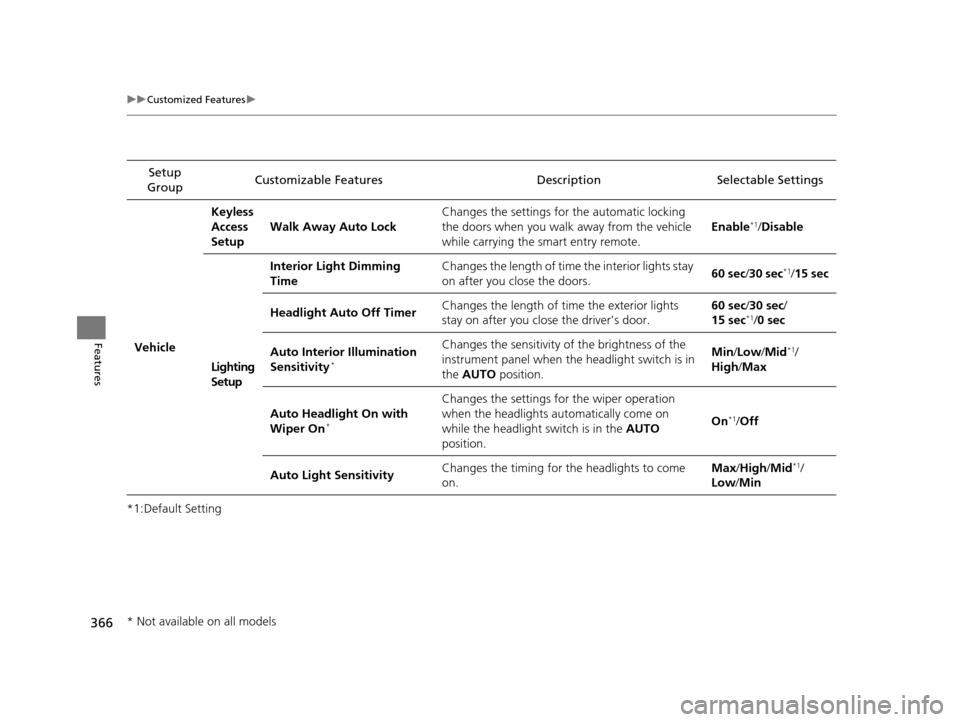
*1:Default SettingSetup
Group Customizable Features Descri
ption Selectable Settings
VehicleKeyless
Access
Setup
Walk Away Auto Lock Changes the settings for
the automatic locking
the doors when you walk away from the vehicle
while carrying the smart entry remote. Enable
*1/
Disable
Lighting
Setup Interior Light Dimming
Time
Changes the length of time the interior lights stay
on after you close the doors.
60 sec
/30 sec
*1/ 15 sec
Headlight Auto Off Timer Changes the length of time the exterior lights
stay on after you close the driver’s door. 60 sec
/30 sec/
15 sec
*1/ 0 sec
Auto Interior Illumination
Sensitivity
*
Changes the sensitivity of the brightness of the
instrument panel when th e headlight switch is in
the AUTO position. Min/
Low/Mid*1/
High /Max
Auto Headlight On with
Wiper On
*
Changes the settings fo r the wiper operation
when the headlights automatically come on
while the headlight switch is in the AUTO
position. On
*1/
Off
Auto Light Sensitivity Changes the timing for the headlights to come
on. Max
/High /Mid
*1/
Low /Min
* Not available on all models
16 PILOT-31TG76000.book 366 ページ 2015年6月15日 月曜日 午前11時30分
Page 368 of 661
367
uuCustomized Features u
Continued
Features
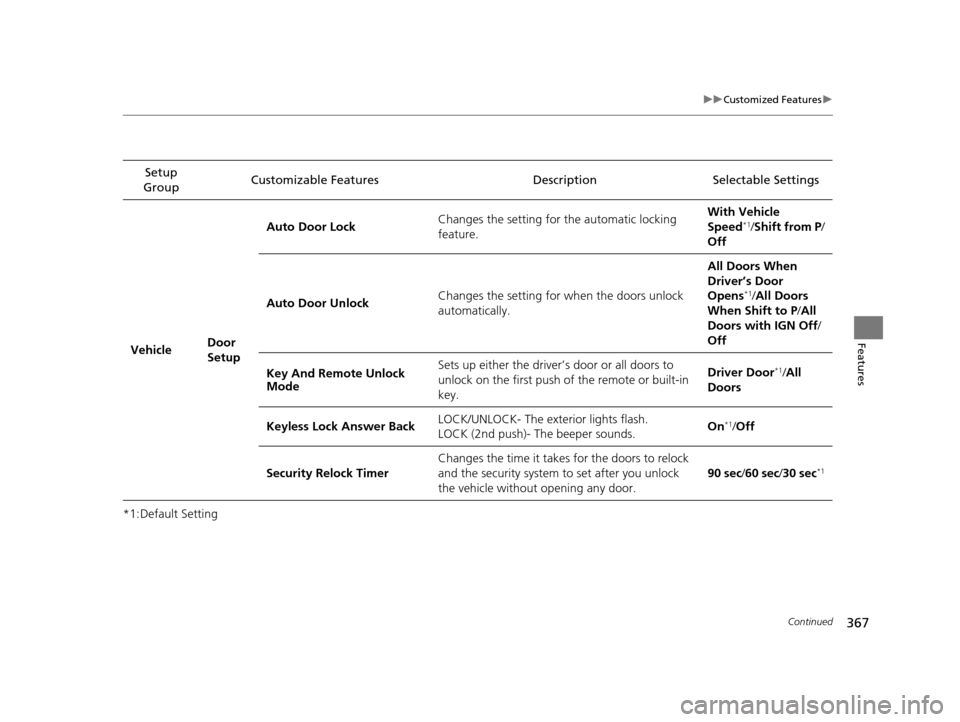
*1:Default SettingSetup
Group Customizable Features Description Selectable Settings
Vehicle Door
SetupAuto Door Lock
Changes the setting for the automatic locking
feature. With Ve
hicle
Speed
*1/ Shift from P /
Off
Auto Door Unlock Changes the setting for
when the doors unlock
automatically. All Doors When
Driver’s Door
Opens
*1/
All Doors
When Shift to P /All
Doors with IGN Off /
Off
Key And Remote Unlock
Mode Sets up either the driver’s door or all doors to
unlock on the first push of the remote or built-in
key. Driver Door
*1/
All
Doors
Keyless Lock Answer Back LOCK/UNLOCK- The exterior lights flash.
LOCK (2nd push)- The beeper sounds. On
*1/
Off
Security Relock Timer Changes the time it takes for the doors to relock
and the security system to set after you unlock
the vehicle without opening any door. 90 sec
/60 sec /30 sec
*1
16 PILOT-31TG76000.book 367 ページ 2015年6月15日 月曜日 午前11時30分
Page 369 of 661
368
uuCustomized Features u
Features
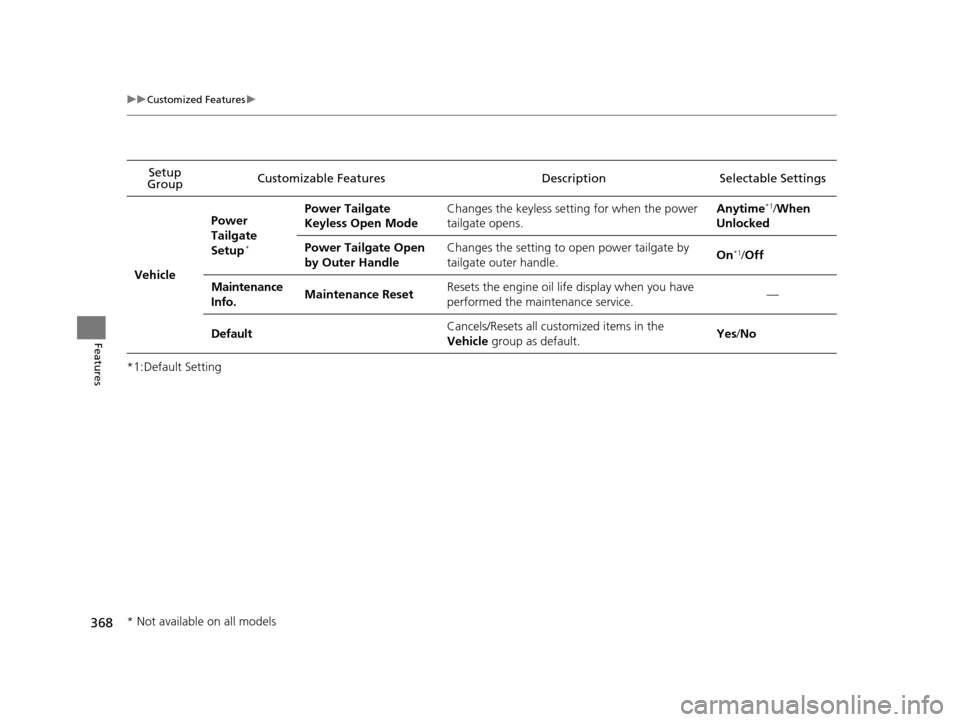
*1:Default SettingSetup
Group Customizable Features Descri
ption Selectable Settings
Vehicle
Power
Tailgate
Setup
*
Power Tailgate
Keyless Open ModeChanges the keyless setting for when the power
tailgate opens.Anytime*1/When
Unlocked
Power Tailgate Open
by Outer HandleChanges the setting to open power tailgate by
tailgate outer handle.On*1/ Off
Maintenance
Info.Maintenance ResetResets the engine oil life display when you have
performed the maintenance service.—
DefaultCancels/Resets all cust omized items in the
Vehicle group as default.Yes/No
* Not available on all models
16 PILOT-31TG76000.book 368 ページ 2015年6月15日 月曜日 午前11時30分
Page 371 of 661
370
uuCustomized Features u
Features
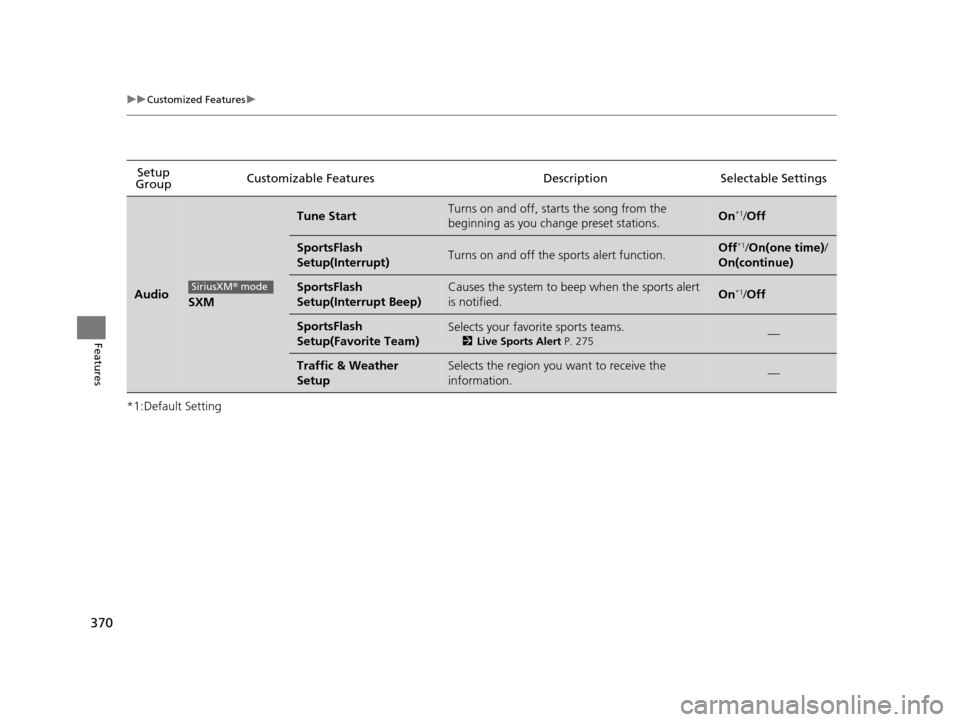
*1:Default SettingSetup
Group Customizable Features Desc
ription Selectable Settings
AudioSXM
Tune StartTurns on and off, starts the song from the
beginning as you change preset stations.On*1/ Off
SportsFlash
Setup(Interrupt)Turns on and off the sp orts alert function.Off*1/On(one time) /
On(continue)
SportsFlash
Setup(Interrupt Beep)Causes the system to beep when the sports alert
is notified.On*1/ Off
SportsFlash
Setup(Favorite Team)Selects your favorite sports teams.
2 Live Sports Alert P. 275—
Traffic & Weather
SetupSelects the region you want to receive the
information.—
SiriusXM® mode
16 PILOT-31TG76000.book 370 ページ 2015年6月15日 月曜日 午前11時30分
Page 374 of 661
373
uuCustomized Features u
Continued
Features
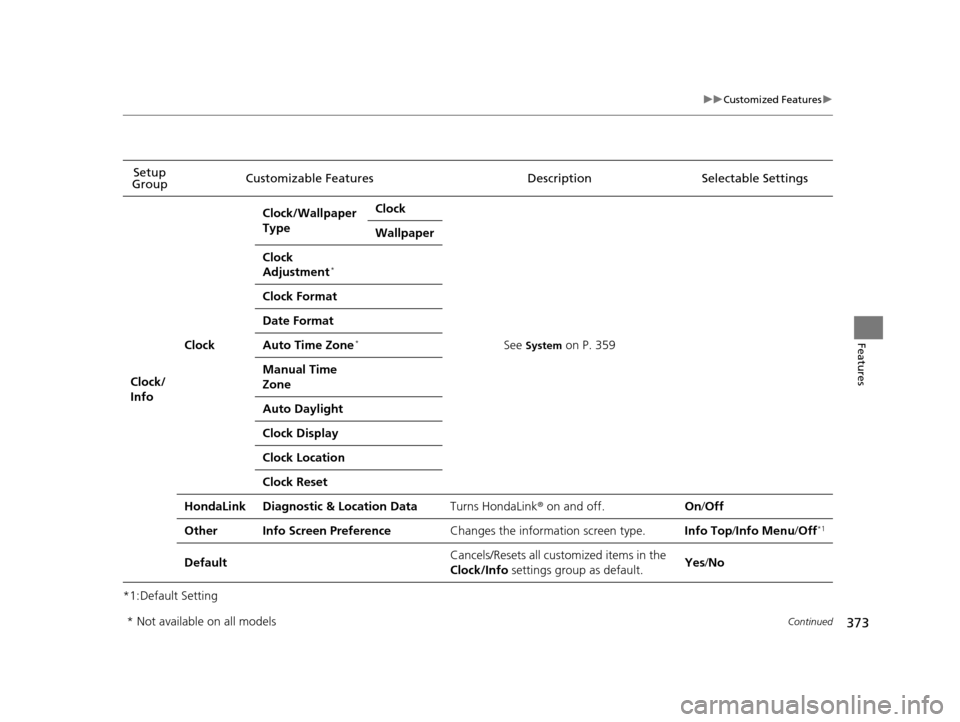
*1:Default SettingSetup
Group Customizable Features Description Selectable Settings
Clock/
Info
Clock
Clock/Wallpaper
TypeClock
See System on P. 359
Wallpaper
Clock
Adjustment*
Clock Format
Date Format
Auto Time Zone*
Manual Time
Zone
Auto Daylight
Clock Display
Clock Location
Clock Reset
HondaLinkDiagnostic & Location DataTurns HondaLink
® on and off.On /Off
OtherInfo Screen PreferenceChanges the information screen type.Info Top/ Info Menu /Off*1
DefaultCancels/Resets all cust omized items in the
Clock/Info settings group as default.Yes /No
* Not available on all models
16 PILOT-31TG76000.book 373 ページ 2015年6月15日 月曜日 午前11時30分
Page 376 of 661
375
uuCustomized Features u
Continued
Features
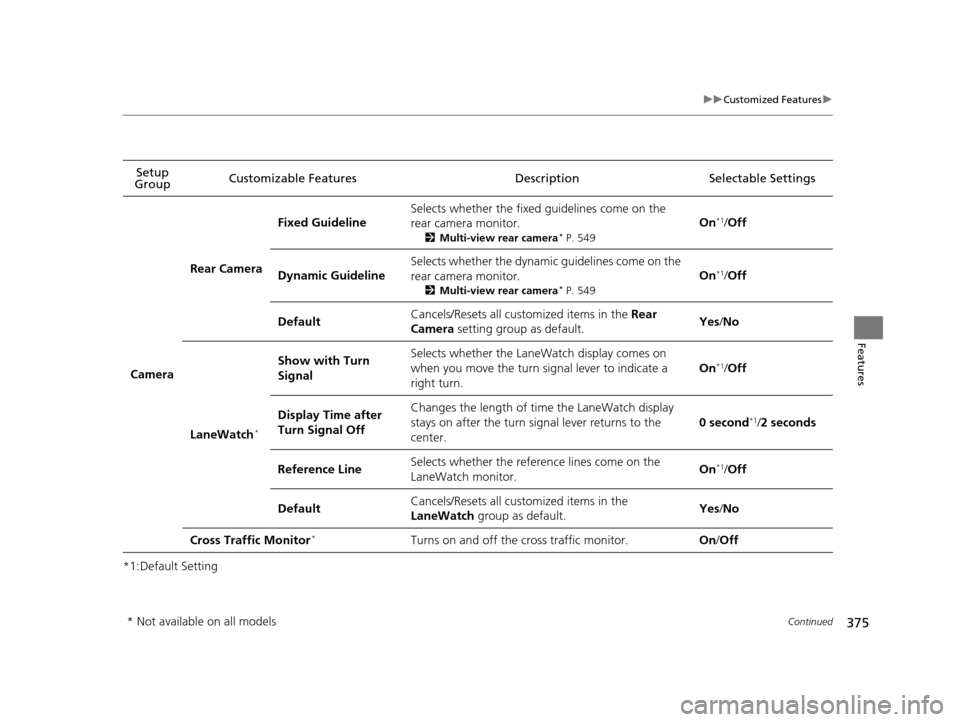
*1:Default SettingSetup
Group Customizable Features Descri
ption Selectable Settings
Camera
Rear Camera
Fixed Guideline
Selects whether the fixed guidelines come on the
rear camera monitor.
2Multi-view rear camera* P. 549
On*1/Off
Dynamic Guideline
Selects whether the dynamic guidelines come on the
rear camera monitor.
2 Multi-view rear camera* P. 549
On*1/Off
DefaultCancels/Resets all customized items in the Rear
Camera setting group as default.Yes /No
LaneWatch*
Show with Turn
SignalSelects whether the LaneWatch display comes on
when you move the turn signal lever to indicate a
right turn.
On*1/Off
Display Time after
Turn Signal OffChanges the length of time the LaneWatch display
stays on after the turn signal lever returns to the
center.
0 second*1/2 seconds
Reference LineSelects whether the reference lines come on the
LaneWatch monitor.On*1/ Off
DefaultCancels/Resets all customized items in the
LaneWatch group as default.Yes/No
Cross Traffic Monitor*Turns on and off the cross traffic monitor.On /Off
* Not available on all models
16 PILOT-31TG76000.book 375 ページ 2015年6月15日 月曜日 午前11時30分
Page 416 of 661
Continued415
uuBluetooth ® HandsFreeLink ®u HFL Menus
Features
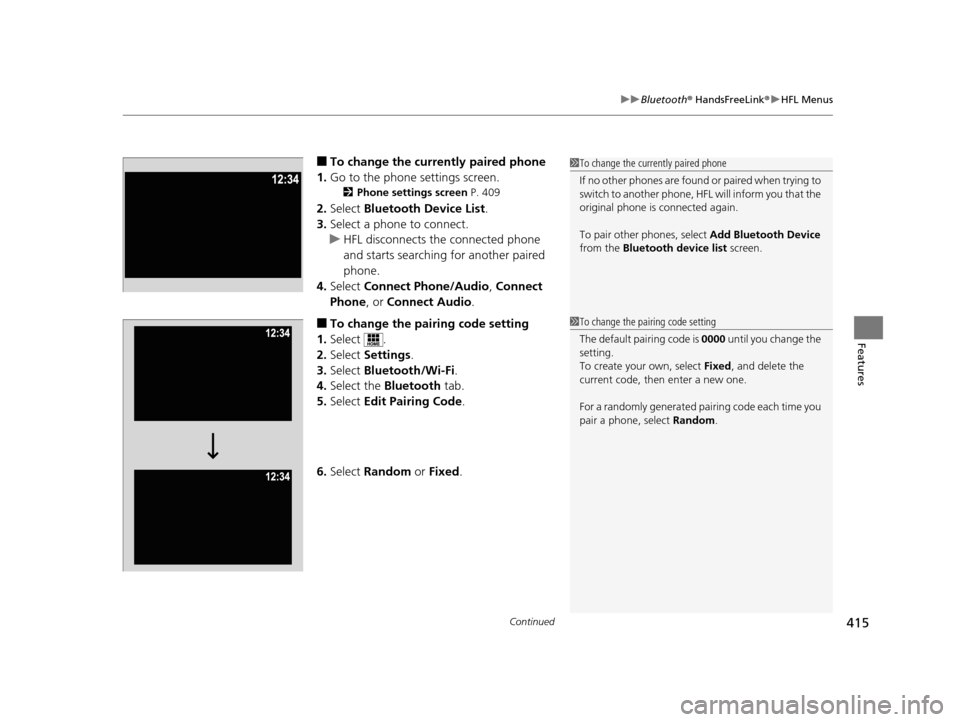
■To change the currently paired phone
1. Go to the phone settings screen.
2 Phone settings screen P. 409
2.Select Bluetooth Device List .
3. Select a phone to connect.
u HFL disconnects the connected phone
and starts searching for another paired
phone.
4. Select Connect Phone/Audio , Connect
Phone , or Connect Audio .
■To change the pairing code setting
1. Select .
2. Select Settings .
3. Select Bluetooth/Wi-Fi .
4. Select the Bluetooth tab.
5. Select Edit Pairing Code .
6. Select Random or Fixed .
1To change the currently paired phone
If no other phones are found or paired when trying to
switch to another phone, HFL will inform you that the
original phone is connected again.
To pair other phones, select Add Bluetooth Device
from the Bluetooth device list screen.
1To change the pairing code setting
The default pair ing code is 0000 until you change the
setting.
To create your own, select Fixed, and delete the
current code, then enter a new one.
For a randomly generated pa iring code each time you
pair a phone, select Random.
16 PILOT-31TG76000.book 415 ページ 2015年6月15日 月曜日 午前11時30分
Page 438 of 661
Continued437
uuBluetooth ® HandsFreeLink ®u HFL Menus
Features
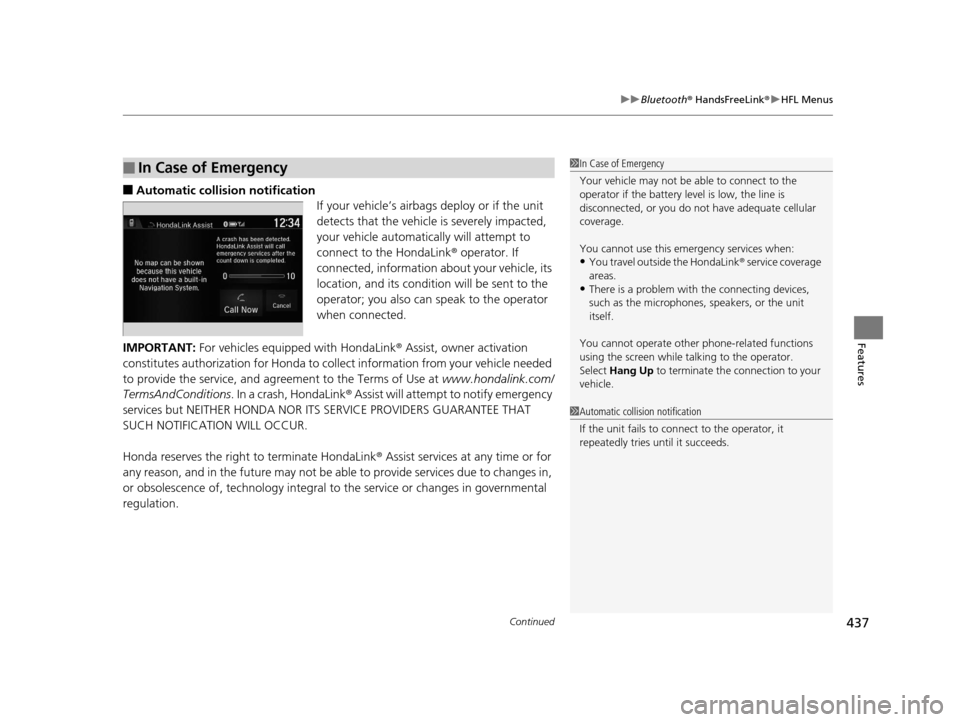
■Automatic collis ion notification
If your vehicle’s airbags deploy or if the unit
detects that the vehicle is severely impacted,
your vehicle automatically will attempt to
connect to the HondaLink ® operator. If
connected, information about your vehicle, its
location, and its condition will be sent to the
operator; you also can speak to the operator
when connected.
IMPORTANT: For vehicles equipped with HondaLink ® Assist, owner activation
constitutes authorization for Honda to collect information from your vehicle needed
to provide the service, and agreement to the Terms of Use at www.hondalink.com/
TermsAndConditions . In a crash, HondaLink ® Assist will attempt to notify emergency
services but NEITHER HONDA NOR I TS SERVICE PROVIDERS GUARANTEE THAT
SUCH NOTIFICATION WILL OCCUR.
Honda reserves the right to terminate HondaLink® Assist services at any time or for
any reason, and in the future may not be ab le to provide services due to changes in,
or obsolescence of, technology integral to the service or changes in governmental
regulation.
■In Case of Emergency1 In Case of Emergency
Your vehicle may not be able to connect to the
operator if the battery level is low, the line is
disconnected, or you do not have adequate cellular
coverage.
You cannot use this emergency services when:
•You travel outside the HondaLink ® service coverage
areas.
•There is a problem with the connecting devices,
such as the microphones, speakers, or the unit
itself.
You cannot operate othe r phone-related functions
using the screen while talking to the operator.
Select Hang Up to terminate the connection to your
vehicle.
1 Automatic collision notification
If the unit fails to connect to the operator, it
repeatedly tries until it succeeds.
16 PILOT-31TG76000.book 437 ページ 2015年6月15日 月曜日 午前11時30分