Page 81 of 409

80
uuIndicators u
Instrument Panel
IndicatorNameOn/BlinkingExplanationMessage
Immobilizer
System
Indicator
●Comes on briefly when you set
the power mode to ON, then goes
off.
●Comes on if the immobilizer
system cannot recognize the key
information.
●Blinks - You cannot start the engine. Set
the power mode to VEHICLE OFF (LOCK),
then select the ON mode again.
●Repeatedly blinks - The system may be
malfunctioning. Have your vehicle
checked by a dealer.
●Do not attempt to alter this system or
add other devices to it. Electrical
problems can occur.
—
Security System
Alarm Indicator
●Blinks when the Security System
Alarm has been set.
2 Security System Alarm P. 122—
CRUISE MAIN
Indicator●Comes on when you press the
CRUISE button.2Cruise Control P. 273—
CRUISE
CONTROL
Indicator●Comes on if you have set a speed
for cruise control.
2 Cruise Control P. 273—
Auto Idle Stop
Indicator●Blinks when Auto Idle Stop is in
operation. The engine
automatically shuts off.
2Auto Idle Stop P. 264, 267—
Indicator
16 CR-Z-31SZT6500.book 80 ページ 2015年9月11日 金曜日 午前11時47分
Page 86 of 409

85
uuIndicators uMulti-Information Display Warning and Information Messages
Continued
Instrument Panel
MessageConditionExplanation
●Comes on as soon as a problem is detected in the
smart entry system or keyless starting system.●Have your vehicle checked by a dealer.
●Appears when you close the door with the power
mode is in ON without the smart entry remote inside
the vehicle.●Disappears when you bring the smart entry remote
back inside the vehicle and close the door.
2 Smart Entry Remote Reminder P. 128
●Appears when the smart entry remote battery
becomes weak.●Replace the battery as soon as possible.
2Replacing the Button Battery P. 342
●Appears if the smart entry remote battery is too weak
to start the engine or the key is not within operating
range to start the engine.
The beeper sounds six times.●Bring the smart entry remote in front of the ENGINE
START/STOP button to be touched with.
2If the Smart Entry Remote Battery is Weak P. 364
16 CR-Z-31SZT6500.book 85 ページ 2015年9月11日 金曜日 午前11時47分
Page 245 of 409

244
Driving
Before Driving
Driving Preparation
Check the following items before you start driving.
• Make sure there are no obstructions on th e windows, door mirrors, exterior
lights, or other parts of the vehicle.
u Remove any frost, snow, or ice.
u Remove any snow on the roof, as this can slip down and obstruct your field of
vision while driving. If frozen solid , remove ice once it has softened.
u When removing ice from around the wheel s, be sure not to damage the wheel
or wheel components.
• Make sure the hood is securely closed.
u If the hood opens while driving, your front view will be blocked.
• Make sure the tires are in good condition.
u Check air pressures, and check for damage and excessive wear.
2Checking and Maintaining Tires P. 331
•Make sure there are no people or ob jects behind or around the vehicle.
u There are blind spots from the inside.
■Exterior Checks1Exterior Checks
NOTICE
When doors are frozen s hut, use warm water around
the door edges to melt any ice. Do not try to force
them open, as this can damage the rubber trim
around the doors. When done, wipe dry to avoid
further freezing.
Do not pour warm water into the key cylinder.
You will be unable to insert the key if the water
freezes in the hole.
Heat from the engine and exhaust can ignite
flammable material s left under the hood, causing a
fire. If you've parked y our vehicle for an extended
period, inspect and remove any debris that may have
collected, such as dried grass and leaves that have
fallen or have been carried in for use as a nest by a
small animal. Also check under the hood for leftover
flammable materials after you or someone else has
performed maintenance on your vehicle.
16 CR-Z-31SZT6500.book 244 ページ 2015年9月11日 金曜日 午前11時47分
Page 252 of 409
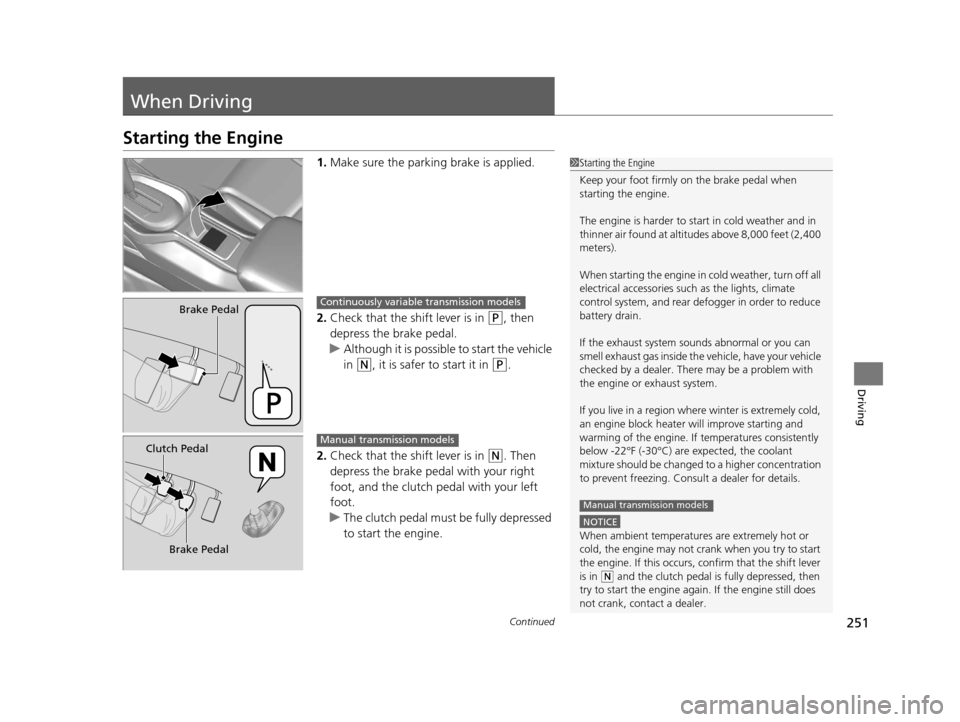
251Continued
Driving
When Driving
Starting the Engine
1.Make sure the parkin g brake is applied.
2. Check that the shift lever is in
(P, then
depress the brake pedal.
u Although it is possible to start the vehicle
in
(N, it is safer to start it in (P.
2. Check that the shift lever is in
(N. Then
depress the brake pedal with your right
foot, and the clutch pedal with your left
foot.
u The clutch pedal must be fully depressed
to start the engine.
1Starting the Engine
Keep your foot firmly on the brake pedal when
starting the engine.
The engine is harder to st art in cold weather and in
thinner air found at altitudes above 8,000 feet (2,400
meters).
When starting the engine in cold weather, turn off all
electrical accessories such as the lights, climate
control system, and rear de fogger in order to reduce
battery drain.
If the exhaust system sounds abnormal or you can
smell exhaust gas inside the vehicle, have your vehicle
checked by a dealer. There may be a problem with
the engine or exhaust system.
If you live in a region where winter is extremely cold,
an engine block heater will improve starting and
warming of the engine. If temperatures consistently
below -22°F (-30°C) are expected, the coolant
mixture should be changed to a higher concentration
to prevent freezing. Cons ult a dealer for details.
NOTICE
When ambient temperatures are extremely hot or
cold, the engine may not crank when you try to start
the engine. If this occurs, confirm that the shift lever
is in
(N and the clutch pedal is fully depressed, then
try to start the engine agai n. If the engine still does
not crank, contact a dealer.
Manual transmission models
Brake PedalContinuously variable transmission models
Clutch Pedal
Brake PedalManual transmission models
16 CR-Z-31SZT6500.book 251 ページ 2015年9月11日 金曜日 午前11時47分
Page 256 of 409

255
uuWhen Driving uContinuously Variable Transmission*
Driving
If there is a strong impact with something under the vehicle, stop in a safe location.
Check the underside of the vehicle for damage or any fluid leaks.
Continuously Variable Transmission*
The engine runs at higher id le speed and creeping increases.
Keep the brake pedal firmly depressed when stopped.
Quickly depressing the accelerator peda l while driving uphill may cause the
transmission to drop to a lower ratio, unexpectedly increasing vehicle speed.
Depress the accelerator pedal carefully, es pecially on slippery roads and curves.
■Other Precautions
■Creeping
■Kickdown
1Precautions While Driving
NOTICE
Following can damage the under spoiler:•Parking the vehicle by a parking block
•Parallel pa rking along the road shoulder
•Driving towards the bottom of a hill•Driving up or down to a different surface level
(such as a road shoulder)
•Driving on a rutted or bumpy road•Driving on a road with potholes
* Not available on all models
16 CR-Z-31SZT6500.book 255 ページ 2015年9月11日 金曜日 午前11時47分
Page 258 of 409

Continued257
uuWhen Driving uShifting
Driving
■Shift Lever Operation1Shift Lever Operation
NOTICE
When you change the shift lever from (D to ( R and
vice versa, come to a complete stop and keep the
brake pedal depressed.
Operating the shift lever be fore the vehicle has come
to a complete standstill can damage the transmission.
Use the shift lever position indicator to check the
lever position befo re pulling away.
Whichever position the shift lever is in when driving,
a blinking
( D indicator indicates a transmission
problem.
Avoid sudden acceleration and have the transmission
checked by a dealer as soon as possible.
The fuel supply may be cut of f if you drive at engine
speeds in or over the ta chometer red zone (engine
speed limit). If this happe ns, you may experience a
slight jolt.
It may not be possible to operate the shift lever if the
brake pedal is applied while the shift lever release
button is held down.
Depress the brake pedal first.
Tachometer's
Red Zone
Shift Lever Position Indicator Depress the brake pedal and
press the shift lever release
button to shift.
Shift without pressing the
shift lever release button.
Press the shift lever
release button and
shift. M
(7-Speed Manual Shift Mode) Indicator/
Shift Indicator
P
R
N
D
16 CR-Z-31SZT6500.book 257 ページ 2015年9月11日 金曜日 午前11時47分
Page 264 of 409
263
uuWhen Driving uShifting
Driving
The manual transmission has a lockout mechanism that stops you from accidentally
shifting into
(R from a forward gear while the ve hicle is moving above a certain
speed.
If you cannot shift to
(R when the vehicle is stopped, do the following: 1.Depress the clutch pedal, move the shift
lever all the way to the left, and shift to
(R.
2. If you still cannot shift into
(R, apply the
parking brake, and set the power mode to
ACCESSORY or VEHICLE OFF (LOCK).
3. Depress the clutch pedal and shift into
(R.
4. Keep depressing the clutch pedal and start
the engine.
Have the vehicle checked by a dealer if you
have to go through this procedure repeatedly.
■Reverse Lockout
16 CR-Z-31SZT6500.book 263 ページ 2015年9月11日 金曜日 午前11時47分
Page 277 of 409

276
uuWhen Driving uVehicle Stability Assist (VSA® ), aka Electronic Stability Control (ESC), System
Driving
Vehicle Stability Assist (VSA®), aka Electronic
Stability Control (ESC), System
Helps to stabilize the vehicle during cornerin g if the vehicle turns more or less than
what was intended. It also assists in mainta ining traction on slippery surfaces. It does
so by regulating engine output and selectively applying the brakes.
When VSA® activates, you may notice that the
engine does not respond to the accelerator.
You may also notice some noise from the
hydraulic system. You will also see the
indicator blink.
■VSA ® Operation
1 Vehicle Stability Assist (VSA ®), aka Electronic Stability Control
(ESC), System
VSA ® may not function properly if tire type and size
are mixed. Make sure to use the same size and type
of tire, and the air pr essures as specified.
When the VSA ® indicator comes on and stays on
while driving, there may be a problem with the
system. While this may not interfere with normal
driving, have your vehi cle checked by a dealer
immediately.
VSA ® cannot enhance stability in all driving situations
and does not control the entire braking system. You
still need to drive and corner at speeds appropriate
for the conditions and always leave a sufficient
margin of safety.
The main function of the VSA ® system is generally
known as Electronic Stab ility Control (ESC). The
system also includes a traction control function.
VSA® System
Indicator
16 CR-Z-31SZT6500.book 276 ページ 2015年9月11日 金曜日 午前11時47分
