2016 HONDA CIVIC COUPE check engine
[x] Cancel search: check enginePage 437 of 585
uuWhen DrivinguVehicle Stability Assist (VSA®), aka Electronic Stability Control (ESC), System
436
Driving
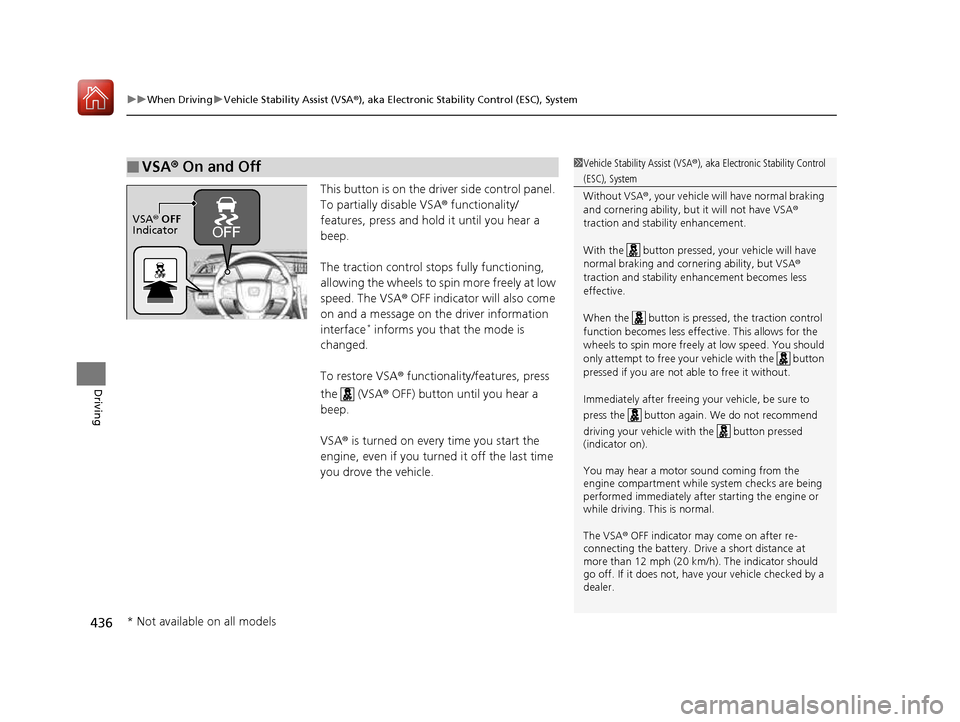
This button is on the driver side control panel.
To partially disable VSA ® functionality/
features, press and hold it until you hear a beep.
The traction control stops fully functioning, allowing the wheels to sp in more freely at low
speed. The VSA ® OFF indicator will also come
on and a message on the driver information interface *
informs you that the mode is
changed.
To restore VSA ® functionality/features, press
the (VSA ® OFF) button until you hear a
beep. VSA ® is turned on every time you start the
engine, even if you turned it off the last time
you drove the vehicle.
■VSA ® On and Off1Vehicle Stability Assist (VSA ®), aka Electronic Stability Control
(ESC), System Without VSA ®, your vehicle will have normal braking
and cornering ability, bu t it will not have VSA®
traction and stability enhancement.
With the button pressed, your vehicle will have normal braking and corn ering ability, but VSA®
traction and stability enhancement becomes less
effective.
When the button is pressed, the traction control
function becomes less effective. This allows for the
wheels to spin more freely at low speed. You should
only attempt to free your vehicle with the button
pressed if you are not ab le to free it without.
Immediately after freeing your vehicle, be sure to
press the button again. We do not recommend driving your vehicle wi th the button pressed
(indicator on).
You may hear a motor sound coming from the
engine compartment while system checks are being
performed immediately after starting the engine or
while driving. This is normal.
The VSA ® OFF indicator may come on after re-
connecting the battery. Drive a short distance at
more than 12 mph (20 km/h). The indicator should
go off. If it does not, have your vehicle checked by a
dealer.
VSA ® OFF
Indicator
* Not available on all models
16 CIVIC 2D HC2 (0A 01 0C)-31TBG6000.book 436 ページ >0>.>/6年>0月>/>0日 金曜日 午後4時>/6分
Page 441 of 585
440
uuWhen DrivinguTire Pressure Monitoring System (TPMS)
Driving
Tire Pressure Monitoring System (TPMS)
Instead of directly measuring the pressure in each tire, the TPMS on this vehicle
monitors and compares the rolling radius and rotational characteristics of each
wheel and tire while you are driving to determine if one or more tires are
significantly under-inflated. This will caus e the low tire pressure/TPMS indicator to
come on and a message to appear on the driver information interface*
.
You must start TPMS calibration every time you:• Adjust the pressure in one or more tires.
• Rotate the tires.
• Replace one or more tires.
Before calibrating the TPMS: • Set the cold tire pressu re in all four tires.
2 Checking Tires P. 510
Make sure: • The vehicle is at a complete stop.
• The shift lever is in
(N .
• The shift lever is in
(P .
• The ignition switch is in ON
(w *1
.
*1: Models with the smart entry system have an ENGINE START/STOP button instead of an
ignition switch.
■TPMS Calibration
U.S. models
1Tire Pressure Monitoring System (TPMS)
The system does not monitor the tires when driving
at low speed.
Conditions such as low ambient temperature and
altitude change directly a ffect tire pressure and can
trigger the low tire pressure/TPMS indicator to come on.
Tire pressure checked and inflated in: • Warm weather can beco me under-inflated in
colder weather.
• Cold weather can become over-inflated in warmer
weather.
The low tire pressure indica tor will not come on as a
result of over inflation.
The TPMS may not function pr operly if tire type and
size are mixed. Make sure to use the same size and
type of tire. 2 Checking and Maintaining Tires P. 510
The low tire pressure/TPMS indicator may come on
with a delay or may not come on at all when:
• You rapidly accelerate, decelerate, or turn the
steering wheel.
• You drive on snowy or slippery roads.
• Snow chains are used.
The low tire pressure/TPMS indicator may come on
under the following conditions:
• A compact spare tire is used.
• There is a heavier and une ven load on the tires,
such as when towing a trailer, than the condition at calibration.
• Snow chains are used.
Manual transmission models
Continuously variable transmission models
All models
* Not available on all models
16 CIVIC 2D HC2 (0A 01 0C)-31TBG6000.book 440 ページ >0>.>/6年>0月>/>0日 金曜日 午後4時>/6分
Page 448 of 585
Continued447
uuBrakinguBrake System
Driving
The parking brake automatically releases as you depress the accelerator pedal when:
• You are wearing the driver’s seat belt.
• The engine is running.
• The transmission is not in
(P or (N .
• The transmission is not in
(N .
Your vehicle is equipped with disc brakes at all four wheels. A vacuum power assist
helps to reduce the effort needed on th e brake pedal. The brake assist system
increases the stopping force when you depress the brake pedal hard in an
emergency situation. The an ti-lock brake system (ABS) helps you retain steering
control when brak ing very hard.
2 Brake Assist System P. 452
2 Anti-lock Brake System (ABS) P. 451
■Foot Brake
Continuously variable transmission models
Manual transmission models
1Foot Brake
Check the brakes after driving through deep water,
or if there is a buildup of road surface water. If
necessary, dry the brakes by lightly depressing the
pedal several times. If you hear a continuous me tallic friction sound when
applying the brakes, this is caused by the brake wear
indicator rubbing on the brake rotor and indicates
that the brake pads need to be replaced. Have the
vehicle checked by a dealer. If you hear only an
occasional squeak or squeal when you initially apply
the brake pedal, this may be normal and caused by
high frequency vibr ation of the brake pads against
the rotating brake disc. Constantly using the brak e pedal while going down a
long hill builds up heat, which reduces the brake
effectiveness. Apply engine braking by taking your
foot off the accelerator pe dal and downshifting to a
lower gear/speed position. With manual transmission
use a lower gear for gr eater engine braking.
Do not rest your foot on the brake pedal while
driving, as it will lightly apply the brakes and cause
them to lose effectiveness over time and reduce pad
life. It will also conf use drivers behind you.
16 CIVIC 2D HC2 (0A 01 0C)-31TBG6000.book 447 ページ >0>.>/6年>0月>/>0日 金曜日 午後4時>/6分
Page 452 of 585
451
uuBrakinguAnti-lock Brake System (ABS)
Driving
Anti-lock Brake System (ABS)
Helps prevent the wheels from locking up, and helps you retain steering control by
pumping the brakes rapidly, much faster than you.
The electronic brake distribu tion (EBD) system, which is part of the ABS, also
balances the front-to-rear braking distribution according to vehicle loading.
You should never pump the brake pedal. Let the ABS work for you by always
keeping firm, steady pressure on the brake pe dal. This is sometimes referred to as
“stomp and steer.” ■ ABS operation
The brake pedal may pulsate slightly when the ABS is working. Keep holding the
pedal firmly down. On dry pavement, you will need to press on the brake pedal very
hard before the ABS activates. However, you may feel the ABS activate immediately
if you are trying to stop on snow or ice.
When the vehicle speed goes under 6 mph (10 km/h), the ABS stops.
■ABS1Anti-lock Brake System (ABS)
NOTICE
The ABS may not function correctly if you use an
incorrect tire type and size.
When the ABS indicator comes on while driving,
there may be a problem with the system.
While normal braking is not affected, there is a
possibility of the ABS not operating. Have the vehicle
checked by a dealer immediately.
The ABS does not reduce the ti me or distance it takes
to stop the vehicle. It only helps with steering control
during hard braking.
In the following cases, yo ur vehicle may need more
stopping distance than a vehicle without the ABS:
• When driving on rough road surfaces, including
when driving on uneven surf aces, such as gravel or
snow.
• When snow chains are installed.
You may hear a motor sound coming from the
engine compartment while system checks are being
performed immediately after starting the engine or
while driving. This is normal.
16 CIVIC 2D HC2 (0A 01 0C)-31TBG6000.book 451 ページ >0>.>/6年>0月>/>0日 金曜日 午後4時>/6分
Page 457 of 585
uuBrakinguCollision Mitigation Braking SystemTM
(CMBS TM
)*
456
Driving
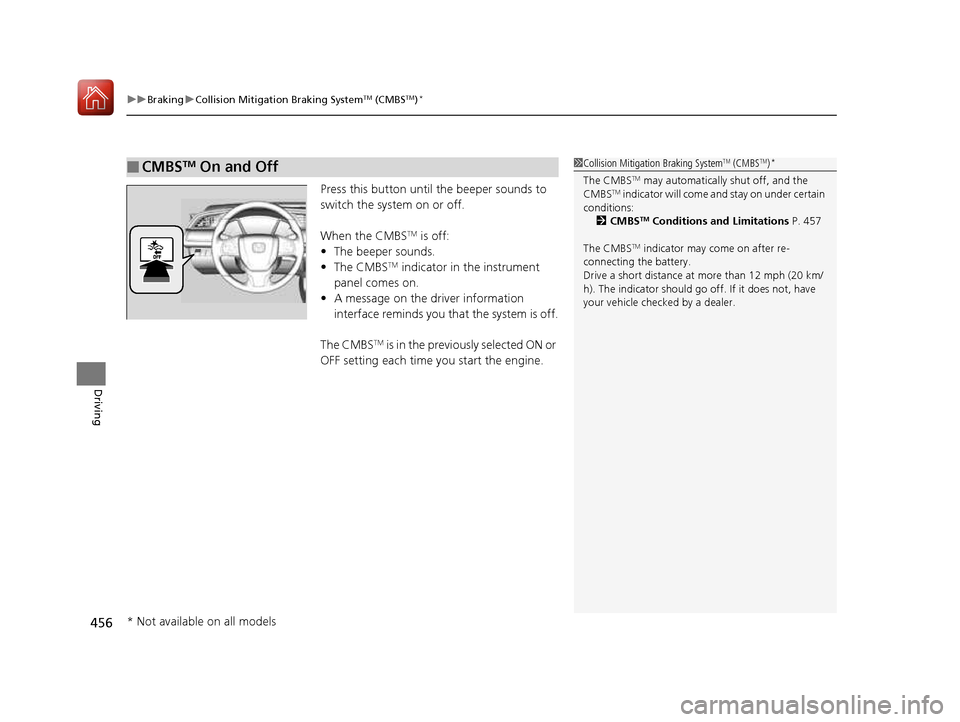
Press this button until the beeper sounds to
switch the system on or off.
When the CMBS TM
is off:
• The beeper sounds.
• The CMBS TM
indicator in the instrument
panel comes on.
• A message on the driver information
interface reminds you that the system is off.
The CMBS TM
is in the previously selected ON or
OFF setting each time you start the engine.
■CMBS TM
On and Off1Collision Mitigation Braking System TM
(CMBS TM
)*
The CMBS TM
may automatically shut off, and the
CMBS TM
indicator will come and stay on under certain
conditions:
2 CMBS TM
Conditions and Limitations P. 457
The CMBS TM
indicator may come on after re-
connecting the battery. Drive a short distance at more than 12 mph (20 km/
h). The indicator should go of f. If it does not, have
your vehicle checked by a dealer.
* Not available on all models
16 CIVIC 2D HC2 (0A 01 0C)-31TBG6000.book 456 ページ >0>.>/6年>0月>/>0日 金曜日 午後4時>/6分
Page 470 of 585
469
Maintenance
This chapter discusses basic maintenance.
Before Performing Maintenance Inspection and Maintenance ............ 470
Safety When Performing Maintenance .... 471Parts and Fluids Used in Maintenance Service ........................................... 472
Maintenance Minder TM
..................... 473
Maintenance Under the Hood
Maintenance Items Un der the Hood .... 483Opening the Hood ........................... 485
Recommended Engine Oil ................ 486
Oil Check ......................................... 487
Adding Engine Oil ............................ 489
Changing the Engine Oil and Oil Filter..... 490
Engine Coolant ................................ 493
Transmission Fluid ............................ 495
Brake/Clutch*
Fluid .......................... 496
Refilling Window Wa sher Fluid......... 497
Replacing Light Bulbs ....................... 498
Checking and Maintaining Wiper
Blades .......................................... 507
Checking and Maintaining Tires
Checking Tires ................................. 510
Tire and Loading Information Label ..... 511Tire Labeling .................................... 511DOT Tire Quality Grading (U.S. Vehicles) ...... 513Wear Indicators................................ 515 Tire Service Life ................................ 515
Tire and Wheel Replacement ........... 516
Tire Rotation .................................... 517
Winter Tires ..................................... 518
Battery ............................................... 519
Remote Transmitter Care
Replacing the Button Battery ........... 521
Climate Control System Maintenance.... 523Cleaning
Interior Care .................................... 524
Exterior Care.................................... 526
* Not available on all models
16 CIVIC 2D HC2 (0A 01 0C)-31TBG6000.book 469 ページ >0>.>/6年>0月>/>0日 金曜日 午後4時>/6分
Page 488 of 585
487
uuMaintenance Under the HooduOil Check
Continued
Maintenance
Oil Check
We recommend that you check the engine oil level every time you refuel.
Park the vehicle on level ground.
Wait approximately three minutes after turn ing the engine off before you check the
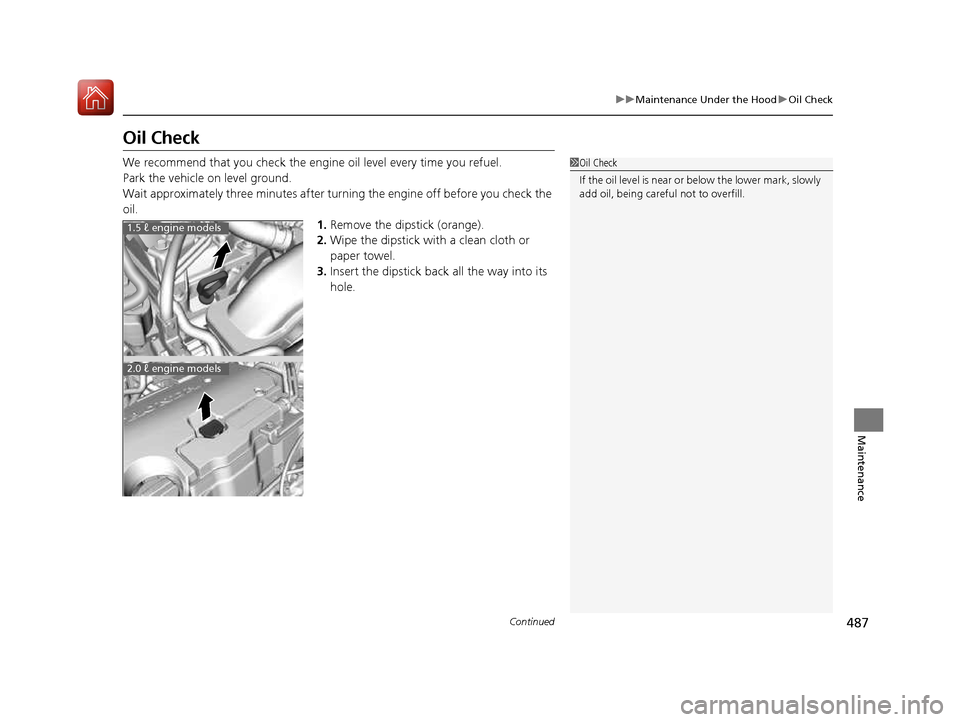
oil. 1.Remove the dipstick (orange).
2. Wipe the dipstick with a clean cloth or
paper towel.
3. Insert the dipstick back all the way into its
hole.
1Oil Check
If the oil level is near or below the lower mark, slowly
add oil, being carefu l not to overfill.
1.5 ℓ engine models
2.0 ℓ engine models
16 CIVIC 2D HC2 (0A 01 0C)-31TBG6000.book 487 ページ >0>.>/6年>0月>/>0日 金曜日 午後4時>/6分
Page 489 of 585
488
uuMaintenance Under the HooduOil Check
Maintenance
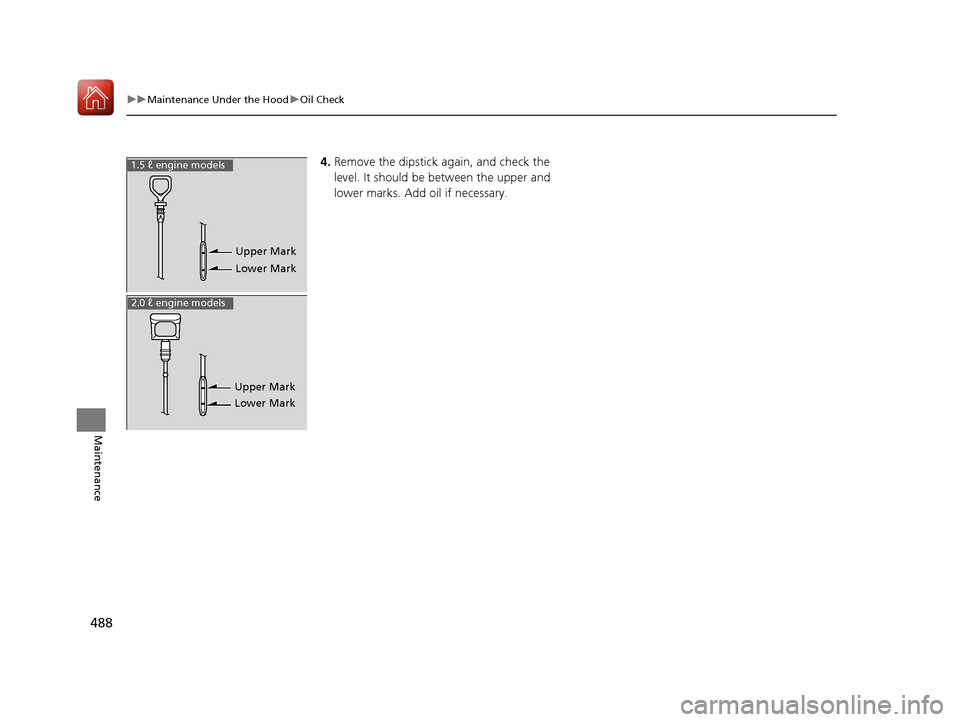
4.Remove the dipstick again, and check the
level. It should be between the upper and
lower marks. Add oil if necessary.
Upper Mark
Lower Mark
1.5 ℓ engine models
Upper Mark Lower Mark
2.0 ℓ engine models
16 CIVIC 2D HC2 (0A 01 0C)-31TBG6000.book 488 ページ >0>.>/6年>0月>/>0日 金曜日 午後4時>/6分