Page 382 of 585
Continued381
uuBefore DrivinguDriving Preparation
Driving
•Store or secure all items on board properly.
uCarrying too much cargo, or improperly storing it, can affect your vehicle’s
handling, stability, sto pping distance, and tires, and make it unsafe.
2 Maximum Load Limit P. 383
• Do not pile items higher than the seat height.
uThey can block your view and may be thrown forward in the event of sudden
braking.
• Do not place anything in the front seat footwells. Make sure to secure the floor
mat.
uAn object or unsecured floor mat can in terfere with your brake and accelerator
pedal operation while driving.
• If you have any animals on board, do not let them move around in the vehicle.
uThey may interfere with driving and a crash could occur.
• Securely close and lock all doors and the trunk.
2 Locking/Unlocking the Doors from the Inside P. 126
• Adjust your seating position properly.
uAdjust the front h ead restraint, too.
2 Adjusting the Seats P. 159
2 Adjusting the Front Head Restraints P. 162
• Adjust the mirrors and steering wh eel properly for your driving.
uAdjust them while sitting in the proper driving position.
2 Adjusting the Mirrors P. 157
2 Adjusting the Steering Wheel P. 156
■Interior Checks1Interior Checks
The headlight aim is set by the factory, and does not
need to be adjusted. Howeve r, if you regularly carry
heavy items in the trunk, have the aiming readjusted at a dealer or by a qualified technician.
16 CIVIC 2D HC2 (0A 01 0C)-31TBG6000.book 381 ページ >0>.>/6年>0月>/>0日 金曜日 午後4時>/6分
Page 391 of 585

uuWhen DrivinguStarting the Engine
390
Driving
You can remotely start the engine using the button on the smart entry remote.
■ To start the engine
When started remotely, the engine automati cally shuts off after 10 minutes of idling
and the brake pedal and ENGINE START/STOP button have not been pressed
simultaneously.
To extend the run time for another 10 mi nutes during the first run, press the
button, then press and hold the button.
uSome exterior lights flash six times if a 10-minute extension request was
transmitted successfully.
■Remote Engine Start with Vehicle Feedback1Remote Engine Start with Vehicle Feedback
The remote engine start may violate local laws.
Before using the remote e ngine start, check your
local laws.
If there are buildings an d obstacles between your
vehicle and the remote, th e range will be reduced.
The range may be less when the vehicle is running.
This distance may vary by external electrical
interference.
The engine may not start by the remote engine start
if: • You have disabled a remo te engine start setting
using the audio/information screen *
.
• The power mode is not in VEHICLE OFF (LOCK).
• The gear is in a position other than
(P .
• The hood is open, or eith er door or the trunk is
unlocked.
3WARNING
Engine exhaust contains toxic carbon
monoxide.
Breathing carbon monoxide can kill you or
cause unconsciousness.
Never use the remote engine starter when
the vehicle is parked in a garage or other
area with limited ventilation.
Press the button, then press and hold
the button.
Some exterior lights flash once.
Go within the range,
and try again.
LED: Blinks when any button is pressed.
Some exterior lights flash six
times if the engine runs
successfully. Some exterior lights will not
flash if the engine runs
unsuccessfully.
* Not available on all models
16 CIVIC 2D HC2 (0A 01 0C)-31TBG6000.book 390 ページ >0>.>/6年>0月>/>0日
金曜日 午後4時>/6分
Page 416 of 585
Continued415
uuWhen DrivinguAdaptive Cruise Control (ACC) with Low Speed Follow (LSF)*
Driving
The system may automatically shut off and the
ACC indicator will come on under
certain conditions. Some exam ples of these conditions are listed below. Other
conditions may reduce some of the ACC functions. 2 Front Sensor Camera *
P. 408
■ Environmental conditions
• Driving in bad weather (rain, fog, snow, etc.).
■ Roadway conditions
• Driving on a snowy or wet roadway (obs cured lane marking, vehicle tracks,
reflected lights, road spray, high contrast).
■ Vehicle conditions
• The outside of the windshield is blocked by dirt, mud, leaves, wet snow, etc.
• An abnormal tire or wheel condition (Wrong size, varied size or construction,
improperly inflated, co mpact spare tire, etc.).
• The camera temperature gets too high.
• The parking brake is applied.
• When the lower bumper next to the fog light *
is dirty.
• When the front of the vehicle tilts up due to heavy cargo in the trunk or rear seats.
• When tire chains are installed.
■ACC with LSF Conditions and Limitations1ACC with LSF Conditions and Limitations
The radar sensor for ACC with LSF is shared with the
collision mitigation braking system TM
(CMBS TM
).
2 Collision Mitigation Braking System TM
(CMBS TM
)*
P. 453
You can read about handling information for the
camera equipped with this system. 2 Front Sensor Camera *
P. 408
Do not put a sticker on the radar sensor cover or
replace the radar sensor cover.
Have your vehicle checked by a dealer if you find any unusual behavior of the sy stem (e.g., the warning
message appears too frequently). If the front of the vehicle is impacted in any of the
following situations, the ra dar sensor may not work
properly. Have your vehi cle checked by a dealer:
• The vehicle mounted onto a bump, curb, chock, embankment, etc.
• You drive the vehicle where the water is deep.
• Your vehicle has a frontal collision.
* Not available on all models
16 CIVIC 2D HC2 (0A 01 0C)-31TBG6000.book 415 ページ >0>.>/6年>0月>/>0日 金曜日 午後4時>/6分
Page 499 of 585
498
Maintenance
Replacing Light Bulbs
Headlight Bulbs
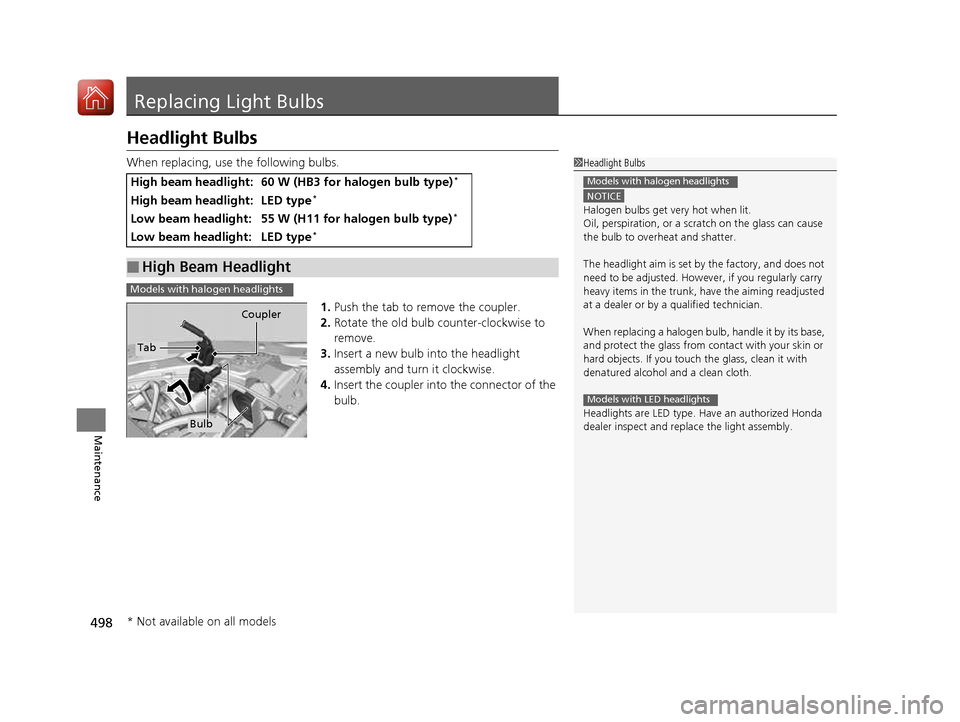
When replacing, use the following bulbs.1.Push the tab to remove the coupler.
2. Rotate the old bulb counter-clockwise to
remove.
3. Insert a new bulb into the headlight
assembly and turn it clockwise.
4. Insert the coupler into the connector of the
bulb.
High beam headlight:60 W (HB3 for halogen bulb type) *
High beam headlight:LED type*
Low beam headlight:55 W (H11 for halogen bulb type) *
Low beam headlight:LED type*
■High Beam Headlight
1Headlight Bulbs
NOTICE
Halogen bulbs get very hot when lit. Oil, perspiration,
or a scratch on the glass can cause
the bulb to overhe at and shatter.
The headlight aim is set by the factory, and does not
need to be adjusted. Howeve r, if you regularly carry
heavy items in the trunk, have the aiming readjusted at a dealer or by a qualified technician.
When replacing a halogen bu lb, handle it by its base,
and protect the glass from c ontact with your skin or
hard objects. If you touch the glass, clean it with
denatured alcohol and a clean cloth.
Headlights are LED type. Ha ve an authorized Honda
dealer inspect and replace the light assembly.
Models with halogen headlights
Models with LED headlights
Models with halogen headlights
Tab Coupler
Bulb
* Not available on all models
16 CIVIC 2D HC2 (0A 01 0C)-31TBG6000.book 498 ページ >0>.>/6年>0月>/>0日
金曜日 午後4時>/6分
Page 530 of 585
529
Handling the UnexpectedThis chapter explains how to handle unexpected troubles.
ToolsTypes of Tools .................................. 530
If a Tire Goes Flat
Changing a Flat Tire ......................... 531
Engine Does Not Start
Checking the Engine ........................ 537
If the Smart Entry Remote Battery is Weak .......................................... 538
Emergency Engine Stop ................... 539
Jump Starting .................................... 540
Shift Lever Does Not Move .............. 543
Overheating
How to Handle Overheating ............. 544 Indicator, Coming On/Blinking
If the Low Oil Pressure Indicator Comes On ............................................. 546
If the Charging System Indicator Comes On ................................................. 546
If the Malfunction Indicator Lamp Comes
On or Blinks ................................... 547
If the Brake System Indicator (Red) Comes
On or Blinks ................................... 548
If the Brake System Indicator (Red) Comes On or Blinks at the Same Time When the
Brake System Indicator (Amber) Comes
On ................................................. 549 If the Electric Power Steering (EPS) System
Indicator Comes On ....................... 550
If the Low Tire Pressure/TPMS Indicator Comes On or Blinks ....................... 551
Fuses Fuse Locations ................................. 552
Inspecting and Changing Fuses ........ 555
Emergency Towing ........................... 556
When You Cannot Unlock the Fuel Fill Door ................................................. 557
When You Cannot Open the Trunk.....558
Refueling ........................................... 559
16 CIVIC 2D HC2 (0A 01 0C)-31TBG6000.book 529 ページ >0>.>/6年>0月>/>0日 金曜日 午後4時>/6分
Page 531 of 585
530
Handling the Unexpected
Tools
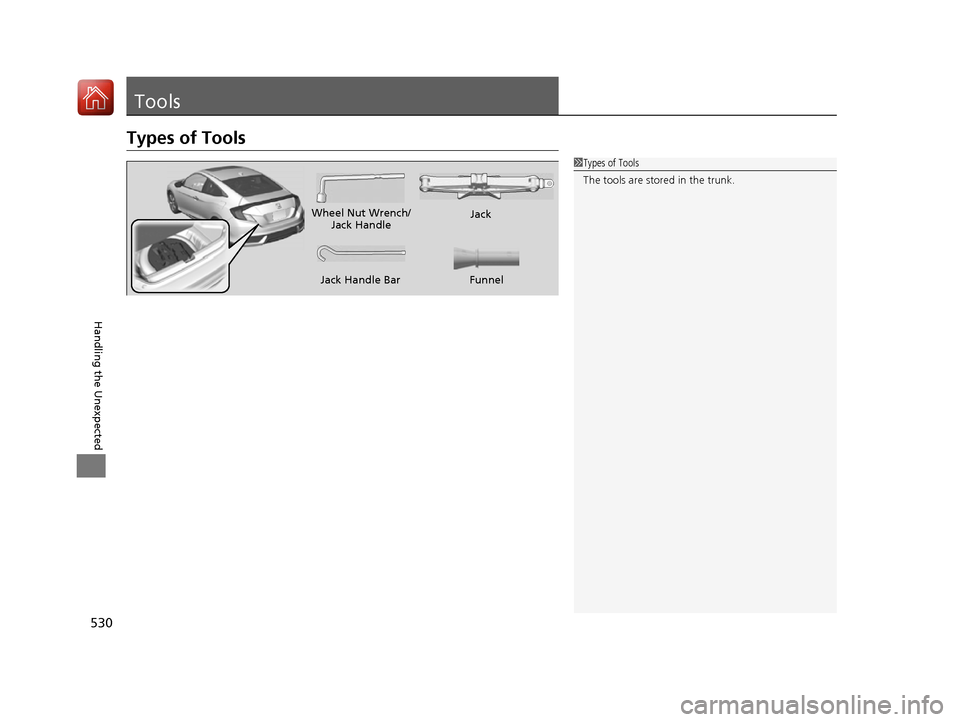
Types of Tools
1Types of Tools
The tools are stored in the trunk.
Wheel Nut Wrench/Jack Handle Jack
Jack Handle Bar
Funnel
16 CIVIC 2D HC2 (0A 01 0C)-31TBG6000.book 530 ページ >0>.>/6年>0月>/>0日 金曜日 午後4時>/6分
Page 533 of 585
uuIf a Tire Goes FlatuChanging a Flat Tire
532
Handling the Unexpected
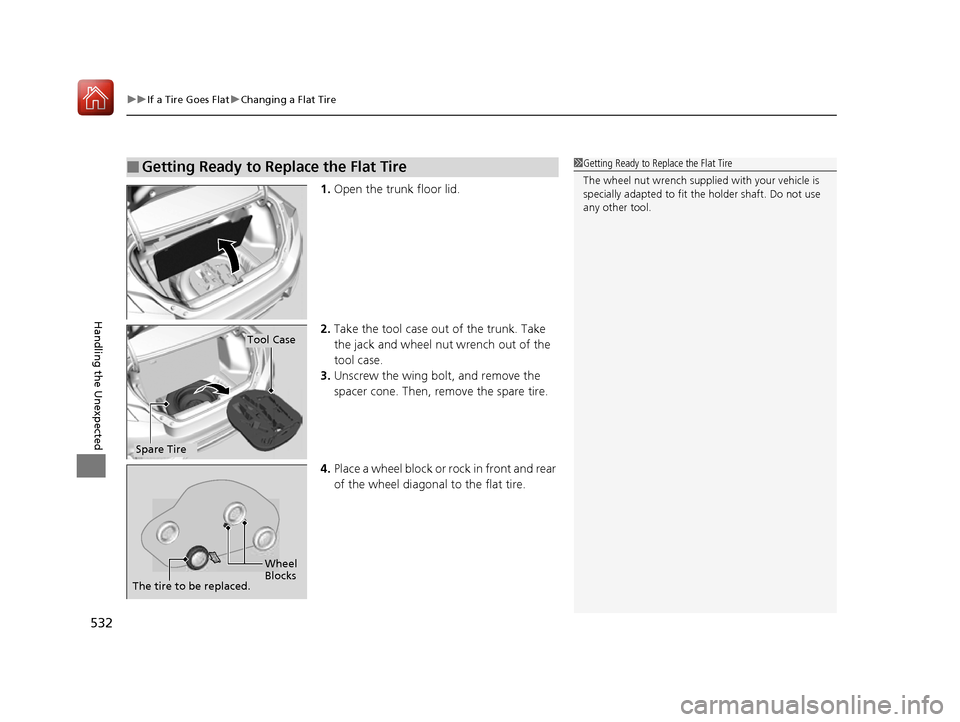
1. Open the trunk floor lid.
2. Take the tool case out of the trunk. Take
the jack and wheel nut wrench out of the tool case.
3. Unscrew the wing bolt, and remove the
spacer cone. Then, remove the spare tire.
4. Place a wheel block or ro ck in front and rear
of the wheel diagonal to the flat tire.
■Getting Ready to Replace the Flat Tire1Getting Ready to Replace the Flat Tire
The wheel nut wrench supplied with your vehicle is
specially adapted to fit th e holder shaft. Do not use
any other tool.
Tool Case
Spare Tire
Wheel
Blocks
The tire to be replaced.
16 CIVIC 2D HC2 (0A 01 0C)-31TBG6000.book 532 ページ >0>.>/6年>0月>/>0日 金曜日 午後4時>/6分
Page 537 of 585
uuIf a Tire Goes FlatuChanging a Flat Tire
536
Handling the Unexpected
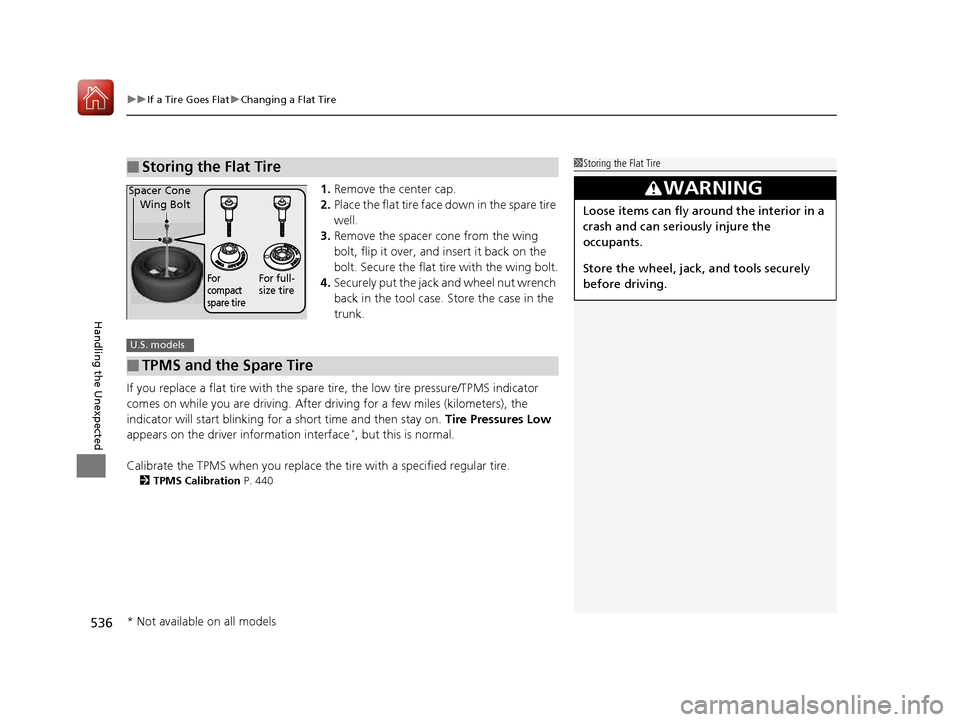
1. Remove the center cap.
2. Place the flat tire face down in the spare tire well.
3. Remove the spacer cone from the wing
bolt, flip it over, and insert it back on the
bolt. Secure the flat tire with the wing bolt.
4. Securely put the jack and wheel nut wrench
back in the tool case. Store the case in the
trunk.
If you replace a flat tire with the spare tire, the low tire pressure/TPMS indicator
comes on while you are driving. After driving for a few miles (kilometers), the
indicator will start blinking for a short time and then stay on. Tire Pressures Low
appears on the driver information interface *
, but this is normal.
Calibrate the TPMS when you replace the tire with a specified regular tire.
2 TPMS Calibration P. 440
■Storing the Flat Tire1Storing the Flat Tire
3WARNING
Loose items can fly around the interior in a
crash and can seriously injure the
occupants.
Store the wheel, jack, and tools securely
before driving.
Spacer Cone
Wing Bolt
For
compact
spare tireFor full-
size tire
■TPMS and the Spare Tire
U.S. models
* Not available on all models
16 CIVIC 2D HC2 (0A 01 0C)-31TBG6000.book 536 ページ >0>.>/6年>0月>/>0日 金曜日 午後4時>/6分