Page 123 of 585
uuLocking and Unlocking the DoorsuLocking/Unlocking the Doors from the Outside
122
Controls
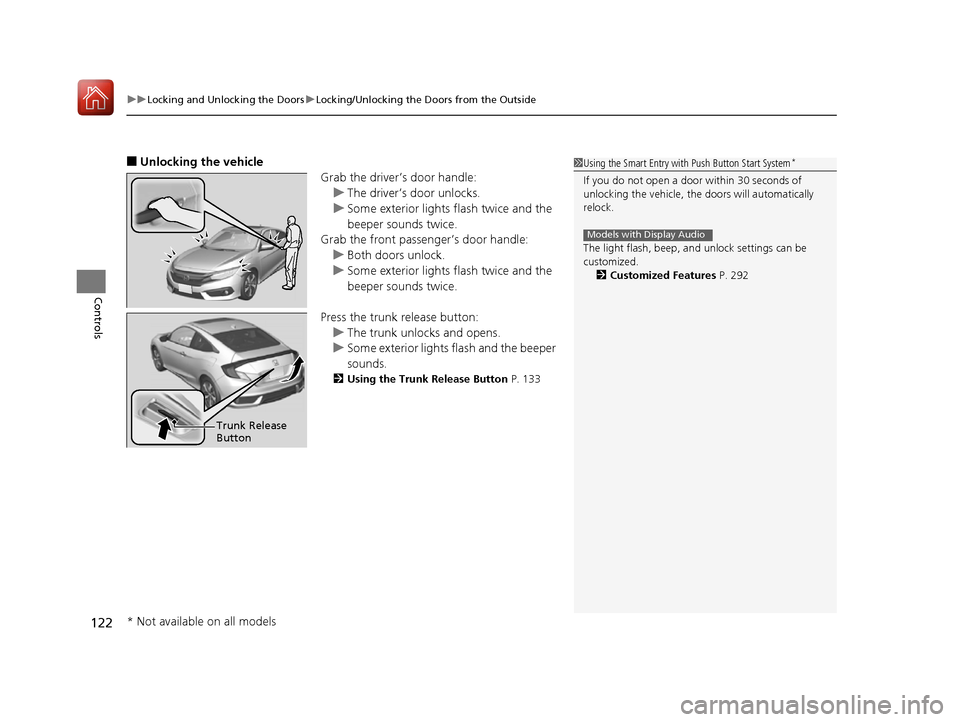
■ Unlocking the vehicle
Grab the driver’s door handle:
uThe driver’s door unlocks.
uSome exterior lights flash twice and the
beeper sounds twice.
Grab the front passenger’s door handle:
uBoth doors unlock.
uSome exterior lights flash twice and the
beeper sounds twice.
Press the trunk release button:
uThe trunk unlocks and opens.
uSome exterior lights flash and the beeper
sounds.
2 Using the Trunk Release Button P. 133
1Using the Smart Entry with Push Button Start System *
If you do not open a door within 30 seconds of
unlocking the vehicle, th e doors will automatically
relock.
The light flash, beep, a nd unlock settings can be
customized. 2 Customized Features P. 292
Models with Display Audio
Trunk Release Button
* Not available on all models
16 CIVIC 2D HC2 (0A 01 0C)-31TBG6000.book 122 ページ >0>.>/6年>0月>/>0日 金曜日 午後4時>/6分
Page 134 of 585
133
Continued
Controls
Opening and Closing the Trunk
Precautions for Openin
g/Closing the Trunk
■ Opening the trunk
Open the trunk all the way.
uIf it is not fully opened, the trunk lid may begin to close under its own weight.
■ Closing the trunk
Keep the trunk lid closed while driving to:
uAvoid possible damage.
uPrevent exhaust gas from leaking into the vehicle.
2 Exhaust Gas Hazard P. 70
Using the Trunk Release Button
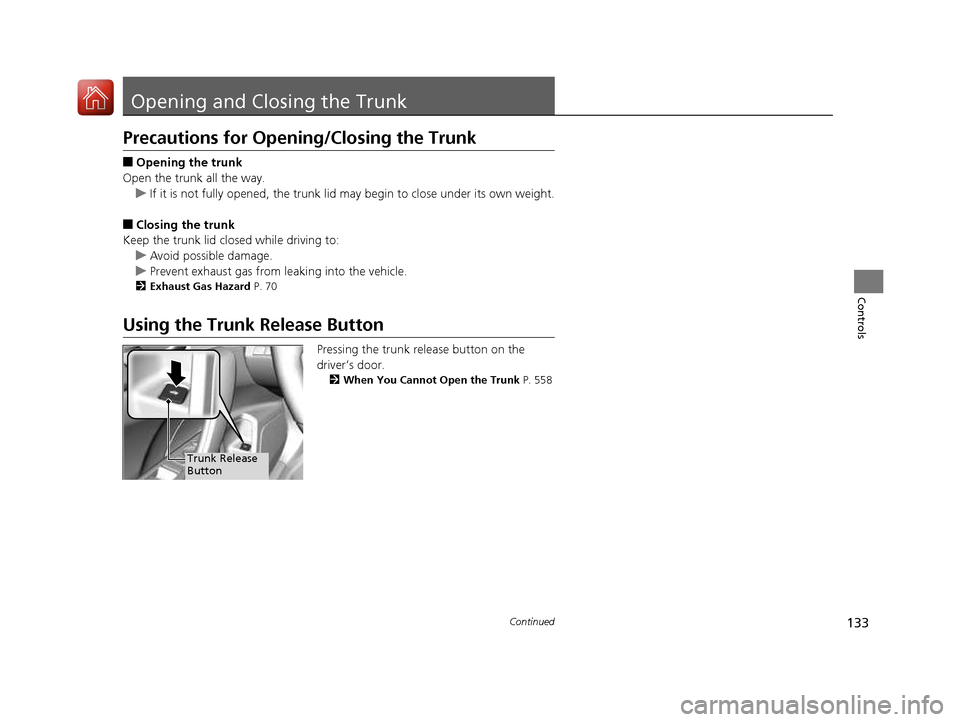
Pressing the trunk release button on the
driver’s door.2 When You Cannot Open the Trunk P. 558
Trunk Release
Button
16 CIVIC 2D HC2 (0A 01 0C)-31TBG6000.book 133 ページ >0>.>/6年>0月>/>0日 金曜日 午後4時>/6分
Page 135 of 585
uuOpening and Closing the TrunkuUsing the Remote Transmitter
134
Controls
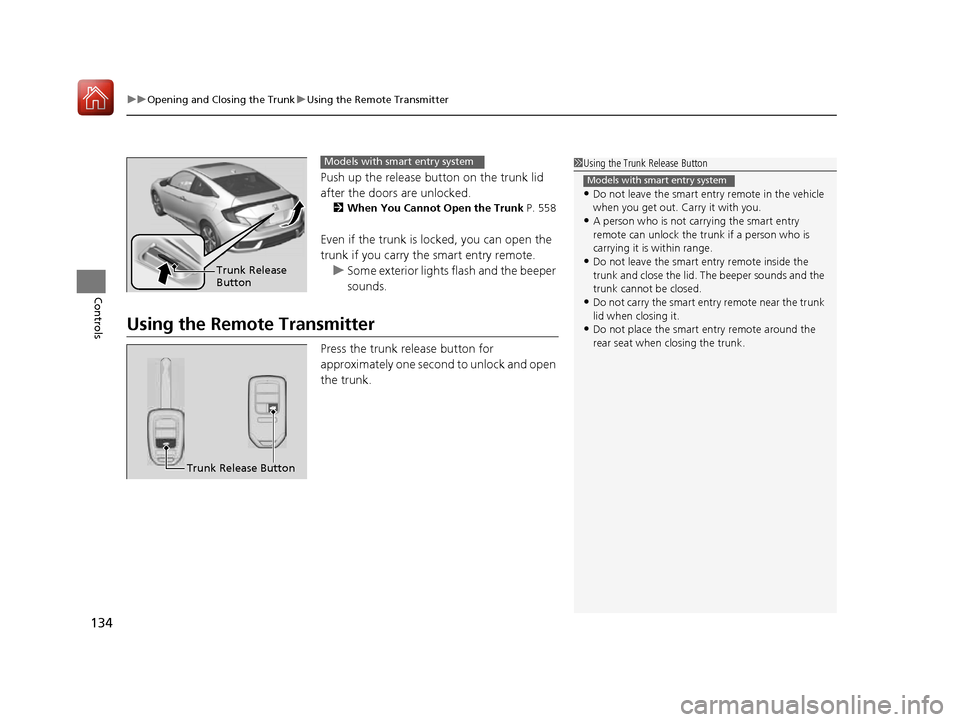
Push up the release button on the trunk lid
after the doors are unlocked. 2 When You Cannot Open the Trunk P. 558
Even if the trunk is locked, you can open the
trunk if you carry the smart entry remote.
uSome exterior lights flash and the beeper
sounds.
Using the Remote Transmitter Press the trunk release button for
approximately one second to unlock and open
the trunk.
1Using the Trunk Release Button
• Do not leave the smart entry remote in the vehicle
when you get out. Carry it with you.
• A person who is not carrying the smart entry
remote can unlock the tr unk if a person who is
carrying it is within range.
• Do not leave the smart entry remote inside the
trunk and close the lid. The beeper sounds and the
trunk cannot be closed.
• Do not carry the smart entry remote near the trunk lid when closing it.
• Do not place the smart entry remote around the
rear seat when closing the trunk.
Models with smart entry system
Trunk Release Button
Models with smart entry system
Trunk Release Button
16 CIVIC 2D HC2 (0A 01 0C)-31TBG6000.book 134 ページ >0>.>/6年>0月>/>0日 金曜日 午後4時>/6分
Page 136 of 585
135
uuOpening and Closing the TrunkuEmergency Trunk Opener
Controls
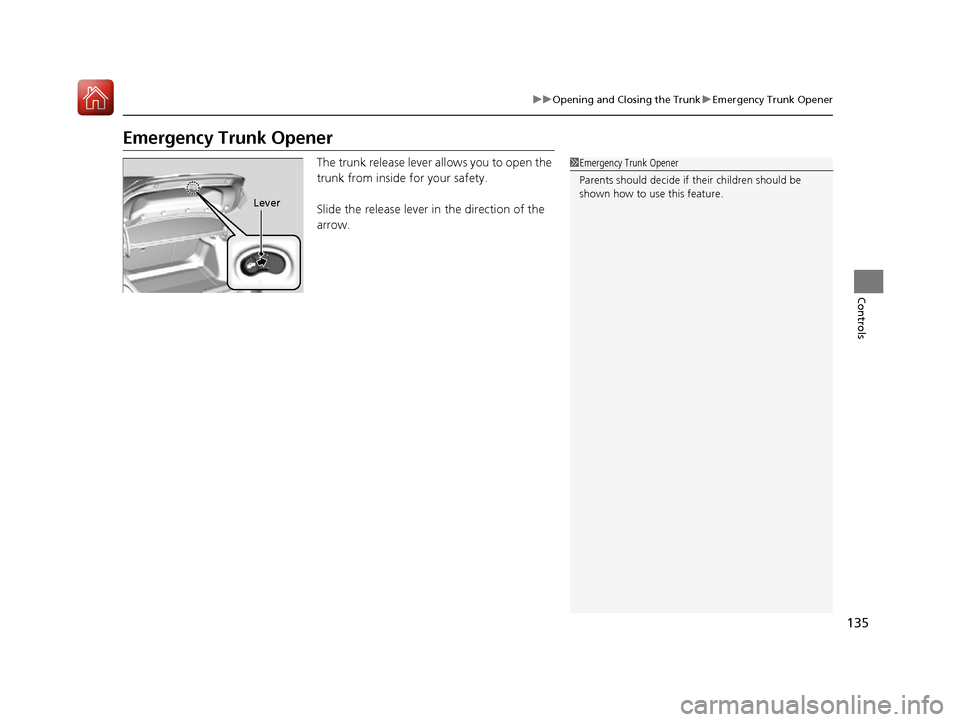
Emergency Trunk OpenerThe trunk release lever allows you to open the
trunk from inside for your safety.
Slide the release lever in the direction of the
arrow.
1Emergency Trunk Opener
Parents should decide if their children should be
shown how to use this feature.
Lever
16 CIVIC 2D HC2 (0A 01 0C)-31TBG6000.book 135 ページ >0>.>/6年>0月>/>0日 金曜日 午後4時>/6分
Page 137 of 585
136
Controls
Security System
Immobilizer System
The immobilizer system prevents a key that has not been pre-registered from
starting the engine. Each key contains el ectronic transmitters that use electronic
signals to verify the key.
Pay attention to the following when inserti ng the key into the ignition switch or
pressing the ENGINE START/STOP button:
• Do not allow objects that emit strong radio waves near the ignition switch or the
ENGINE START/STOP button.
• Make sure the key is not covered by or touching a metal object.
• Do not bring a key from anot her vehicle’s immobilizer system near the ignition
switch or the ENGINE START/STOP button.
• Do not put the key near magnetic items. Electronic devices, such as a television
set and audio system are strongly magneti c, or a key chain can become magnetic,
too.
Security System Alarm
The security system alarm activates wh en the trunk, hood or doors are forcibly
opened. The alarm does not go off if the trunk or doors are opened with the key,
remote transmitter or smart entry system.
However, the alarm goes off when a door is opened with the key, then the shift
lever is moved out of
(P (continuously variable transmission models) or the hood is
opened before the ignition switch is turned to ON (w*1
.
■ When the security sy stem alarm activates
The horn sounds intermittently and all the exterior lights flash. ■ To deactivate the security system alarm
Unlock the vehicle using the remote transmi tter, or smart entry system. The system,
along with the horn and flashing lights, is deactivated.
*1: Models with the smart entry system have an ENGINE START/STOP button instead of an
ignition switch.
1Security System
Do not alter the system or add other devices to it.
Doing so may damage the system and make your
vehicle inoperable.
1Immobilizer System
NOTICE
Leaving the key in the vehicl e can result in theft or
accidental movement of the vehicle.
Always take the key with you whenever you leave the
vehicle unattended.
Canadian models only: Apply and hold the brake
pedal before turning the vehicle on the first time after
the battery has been disconnected.
1Security System Alarm
The security alarm continues for a maximum of two
minutes until the security system deactivates.
16 CIVIC 2D HC2 (0A 01 0C)-31TBG6000.book 136 ページ >0>.>/6年>0月>/>0日 金曜日 午後4時>/6分
Page 138 of 585
Continued137
uuSecurity SystemuSecurity System Alarm
Controls
■Setting the security system alarm
The security system alarm automatically sets when the following conditions have
been met: • The ignition switch is in LOCK
(0 *1
, and the key has been removed from the
ignition switch.
• The hood and trunk are closed.
• Both doors are locked with the key, the remote transmitter, or smart entry
system.
■ When the security system alarm sets
The security system alarm indicator in the instrument panel blinks. When the
blinking interval changes after about 15 se conds, the security system alarm is set.
■ To cancel the security system alarm
The security system is canc eled when the vehicle is unlocked using the remote
transmitter, smart entry system, or th e ignition switch is turned to ON
(w*1
. The
security system indicator go es off at the same time.
*1: Models with the smart entry system have an ENGINE START/STOP button instead of an
ignition switch.
1Security System Alarm
Do not set the security system alarm when someone
is in the vehicle or a window is open. The system can
accidentally activate when: • Unlocking the door with the lock tab.
• Opening the trunk with th e trunk release button on
the driver’s door or the emergency trunk opener.
• Opening the hood with the hood release.
• Moving the shift lever out of
(P .
If the battery goes dead after you have set the
security system alarm, the security alarm may go off once the battery is re charged or replaced.
If this occurs, deactivate the security system alarm by
unlocking a door using th e remote transmitter.
Continuously variable transmission models
16 CIVIC 2D HC2 (0A 01 0C)-31TBG6000.book 137 ページ >0>.>/6年>0月>/>0日 金曜日 午後4時>/6分
Page 167 of 585
166
uuAdjusting the SeatsuRear Seats
Controls
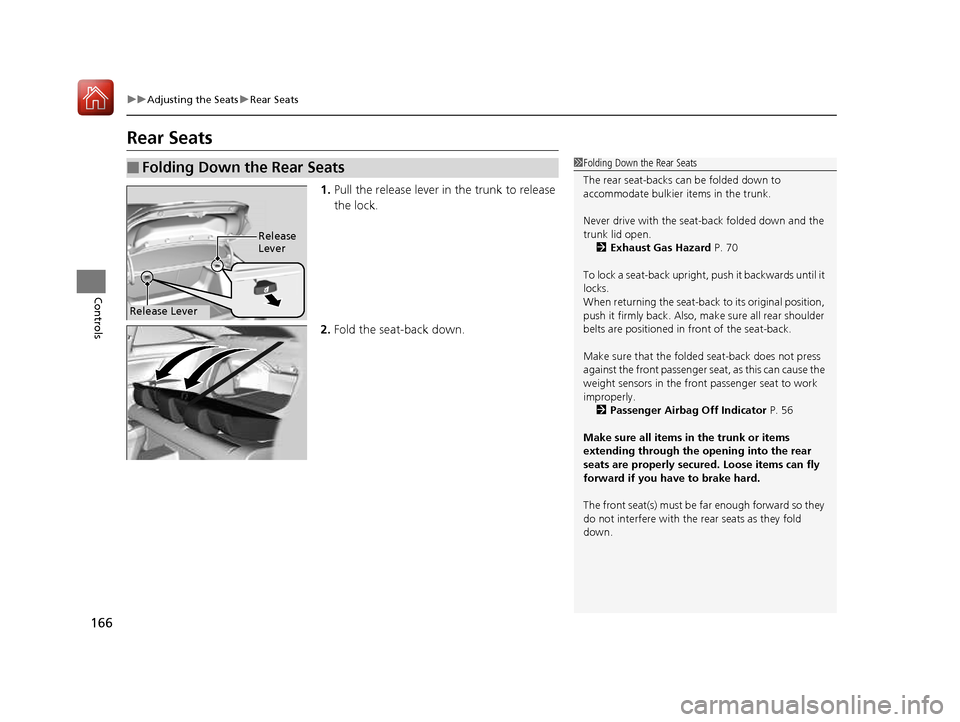
Rear Seats1.Pull the release lever in the trunk to release
the lock.
2. Fold the seat-back down.
■Folding Down the Rear Seats1Folding Down the Rear Seats
The rear seat-backs can be folded down to
accommodate bulkier items in the trunk.
Never drive with the seat-back folded down and the trunk lid open.
2 Exhaust Gas Hazard P. 70
To lock a seat-back upright, push it backwards until it
locks.
When returning the seat-back to its original position,
push it firmly back. Also, m ake sure all rear shoulder
belts are positioned in front of the seat-back.
Make sure that the folded seat-back does not press
against the front passenger se at, as this can cause the
weight sensors in the front passenger seat to work
improperly. 2 Passenger Airbag Off Indicator P. 56
Make sure all items in the trunk or items
extending through the opening into the rear
seats are properly secured. Loose items can fly
forward if you have to brake hard.
The front seat(s) must be far enough forward so they
do not interfere with the rear seats as they fold down.
Release Lever
Release Lever
16 CIVIC 2D HC2 (0A 01 0C)-31TBG6000.book 166 ページ >0>.>/6年>0月>/>0日 金曜日 午後4時>/6分
Page 177 of 585
uuInterior Lights/Interior Convenience ItemsuInterior Convenience Items
176
Controls
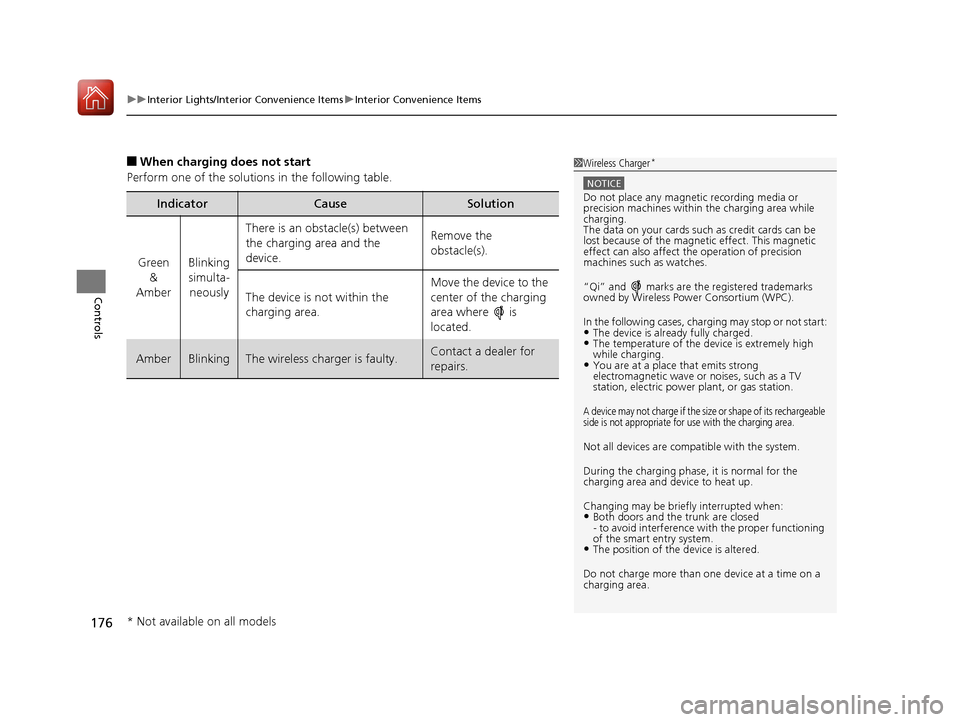
■ When charging does not start
Perform one of the solution s in the following table.
IndicatorCauseSolution
Green
&
AmberBlinking
simulta- neously
There is an obstacle(s) between
the charging area and the
device.Remove the
obstacle(s).
The device is not within the
charging area. Move the device to the
center of the charging
area where is
located.
AmberBlinkingThe wireless charger is faulty.Contact a dealer for repairs.
1Wireless Charger
*
NOTICE
Do not place any magneti
c recording media or
precision machines within the charging area while charging.
The data on your cards such as credit cards can be
lost because of the magnetic effect. This magnetic
effect can also affect th e operation of precision
machines such as watches.
“Qi” and marks are the registered trademarks
owned by Wire less Power Consortium (WPC).
In the following cases, ch arging may stop or not start:
• The device is already fully charged.
• The temperature of the device is extremely high while charging.
• You are at a place that emits strong
electromagnetic wave or noises, such as a TV
station, electric power plant, or gas station.
A device may not charge if the size or shape of its rechargeable
side is not appropriate for use with the charging area.
Not all devices are compatible with the system.
During the charging phase, it is normal for the charging area and device to heat up.
Changing may be briefl y interrupted when:
• Both doors and the trunk are closed
- to avoid interference with the proper functioning
of the smart entry system.
• The position of the device is altered.
Do not charge more than one device at a time on a
charging area.
* Not available on all models
16 CIVIC 2D HC2 (0A 01 0C)-31TBG6000.book 176 ページ >0>.>/6年>0月>/>0日 金曜日 午後4時>/6分