Page 225 of 585
uuAudio System Basic OperationuAudio/Information Screen
224
Features
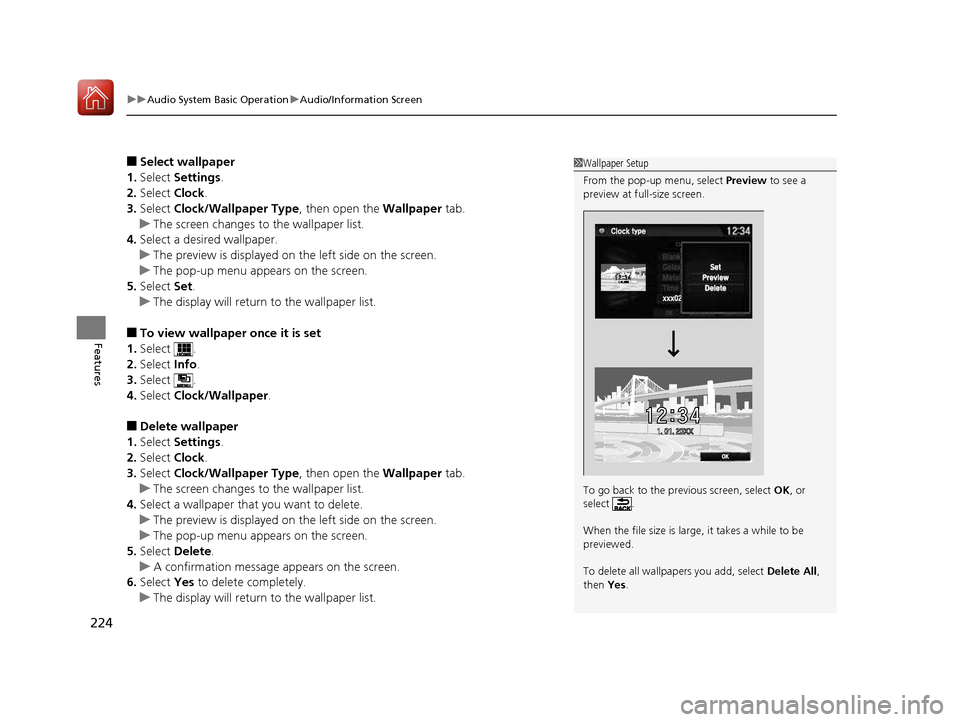
■ Select wallpaper
1. Select Settings .
2. Select Clock.
3. Select Clock/Wallpaper Type , then open the Wallpaper tab.
uThe screen changes to the wallpaper list.
4. Select a desired wallpaper.
uThe preview is displayed on the left side on the screen.
uThe pop-up menu appears on the screen.
5. Select Set.
uThe display will return to the wallpaper list.
■ To view wallpaper once it is set
1. Select .
2. Select Info.
3. Select .
4. Select Clock/Wallpaper .
■ Delete wallpaper
1. Select Settings .
2. Select Clock.
3. Select Clock/Wallpaper Type , then open the Wallpaper tab.
uThe screen changes to the wallpaper list.
4. Select a wallpaper that you want to delete.
uThe preview is displayed on the left side on the screen.
uThe pop-up menu appears on the screen.
5. Select Delete .
uA confirmation message appears on the screen.
6. Select Yes to delete completely.
uThe display will return to the wallpaper list.
1Wallpaper Setup
From the pop-up menu, select Preview to see a
preview at full-size screen.
To go back to the previous screen, select OK, or
select .
When the file size is large, it takes a while to be previewed.
To delete all wallpapers you add, select Delete All,
then Yes.
16 CIVIC 2D HC2 (0A 01 0C)-31TBG6000.book 224 ページ >0>.>/6年>0月>/>0日 金曜日 午後4時>/6分
Page 227 of 585
uuAudio System Basic OperationuAudio/Information Screen
226
Features
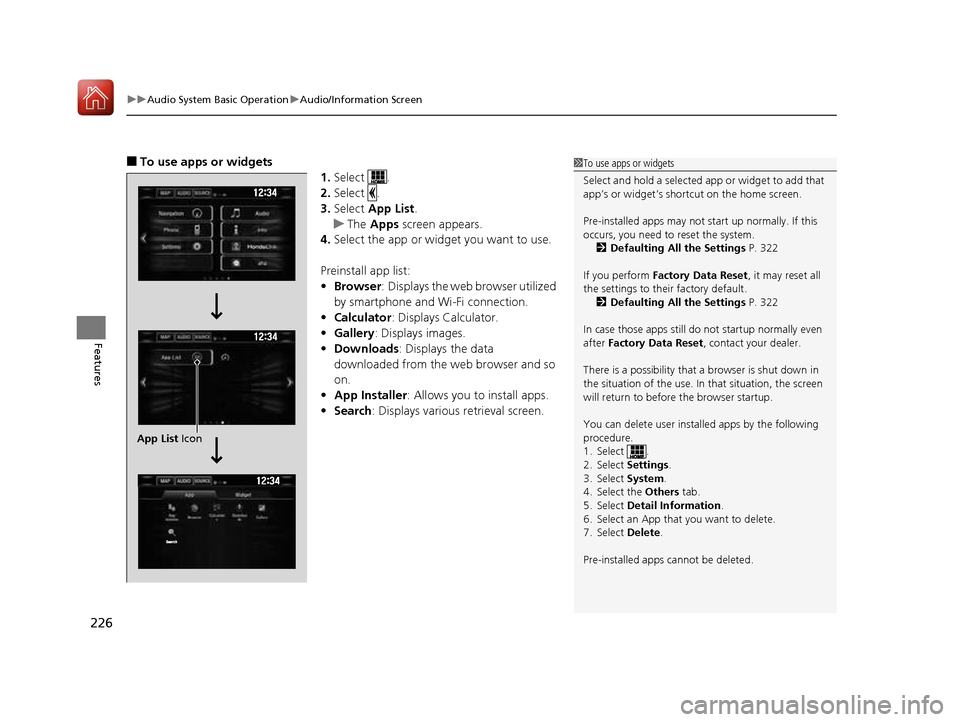
■ To use apps or widgets
1.Select .
2. Select .
3. Select App List .
uThe Apps screen appears.
4. Select the app or widget you want to use.
Preinstall app list: • Browser : Displays the web browser utilized
by smartphone and Wi-Fi connection.
• Calculator : Displays Calculator.
• Gallery : Displays images.
• Downloads : Displays the data
downloaded from the web browser and so
on.
• App Installer : Allows you to install apps.
• Search : Displays various retrieval screen.
1To use apps or widgets
Select and hold a selected app or widget to add that
app’s or widget’s shortcut on the home screen.
Pre-installed apps may not start up normally. If this
occurs, you need to reset the system.
2 Defaulting All the Settings P. 322
If you perform Factory Data Reset , it may reset all
the settings to their factory default.
2 Defaulting All the Settings P. 322
In case those apps still do not startup normally even
after Factory Data Reset , contact your dealer.
There is a possibility that a browser is shut down in
the situation of the use. In that situation, the screen
will return to before the browser startup.
You can delete user installed apps by the following
procedure.
1. Select .
2. Select Settings.
3. Select System.
4. Select the Others tab.
5. Select Detail Information .
6. Select an App that you want to delete.
7. Select Delete.
Pre-installed apps cannot be deleted.
App List Icon
16 CIVIC 2D HC2 (0A 01 0C)-31TBG6000.book 226 ページ >0>.>/6年>0月>/>0日 金曜日 午後4時>/6分
Page 235 of 585
uuAudio System Basic OperationuAudio/Information Screen
234
Features
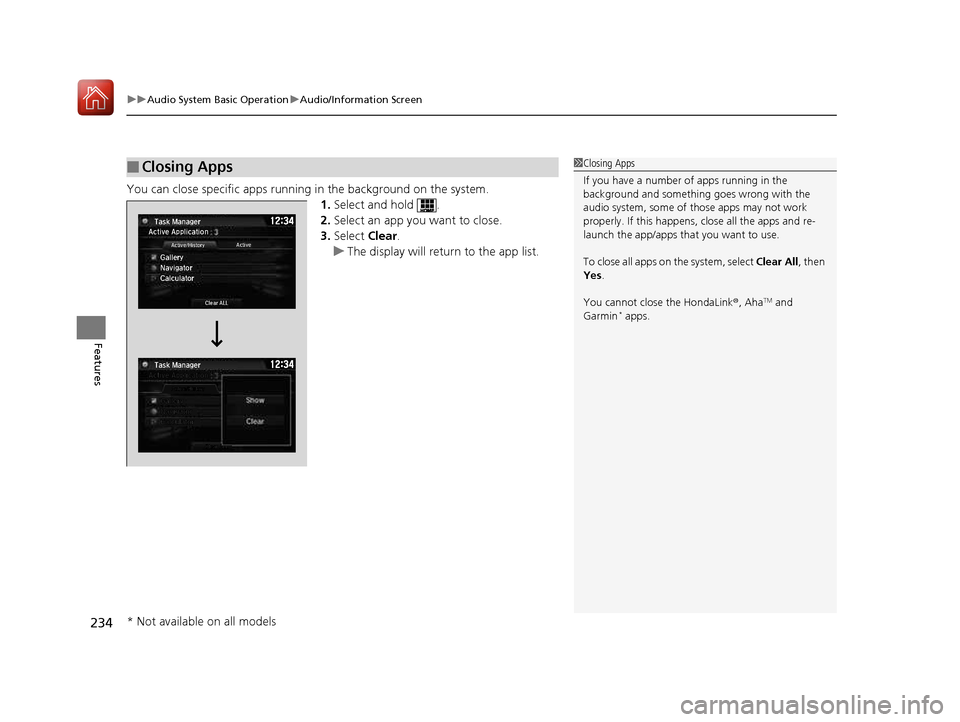
You can close specific apps running in the background on the system. 1.Select and hold .
2. Select an app you want to close.
3. Select Clear.
uThe display will return to the app list.
■Closing Apps1Closing Apps
If you have a number of apps running in the
background and somethi ng goes wrong with the
audio system, some of t hose apps may not work
properly. If this happens, close all the apps and re-
launch the app/apps that you want to use.
To close all apps on the system, select Clear All, then
Yes .
You cannot close the HondaLink ®, Aha TM
and
Garmin *
apps.
Active Application
Gallery Navigator CalculatorActive/History Active
Clear ALL
Task Manager
Task Manager
* Not available on all models
16 CIVIC 2D HC2 (0A 01 0C)-31TBG6000.book 234 ページ >0>.>/6年>0月>/>0日
金曜日 午後4時>/6分
Page 237 of 585
236
uuAudio System Basic OperationuDisplay Setup
Features
Display Setup
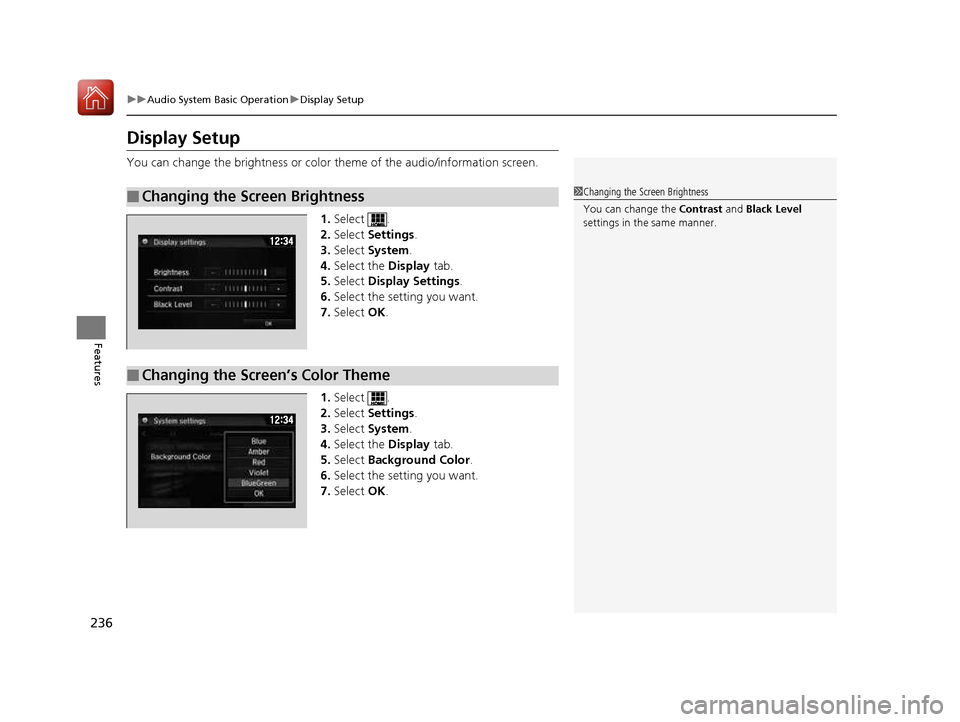
You can change the brightness or color theme of the audio/information screen.1.Select .
2. Select Settings .
3. Select System .
4. Select the Display tab.
5. Select Display Settings .
6. Select the setting you want.
7. Select OK.
1. Select .
2. Select Settings .
3. Select System .
4. Select the Display tab.
5. Select Background Color .
6. Select the setting you want.
7. Select OK.
■Changing the Screen Brightness1Changing the Screen Brightness
You can change the Contrast and Black Level
settings in the same manner.
12 �‰34
■Changing the Screen’s Color Theme
12 �‰34
16 CIVIC 2D HC2 (0A 01 0C)-31TBG6000.book 236 ページ >0>.>/6年>0月>/>0日 金曜日 午後4時>/6分
Page 238 of 585
237
uuAudio System Basic OperationuDisplay Setup
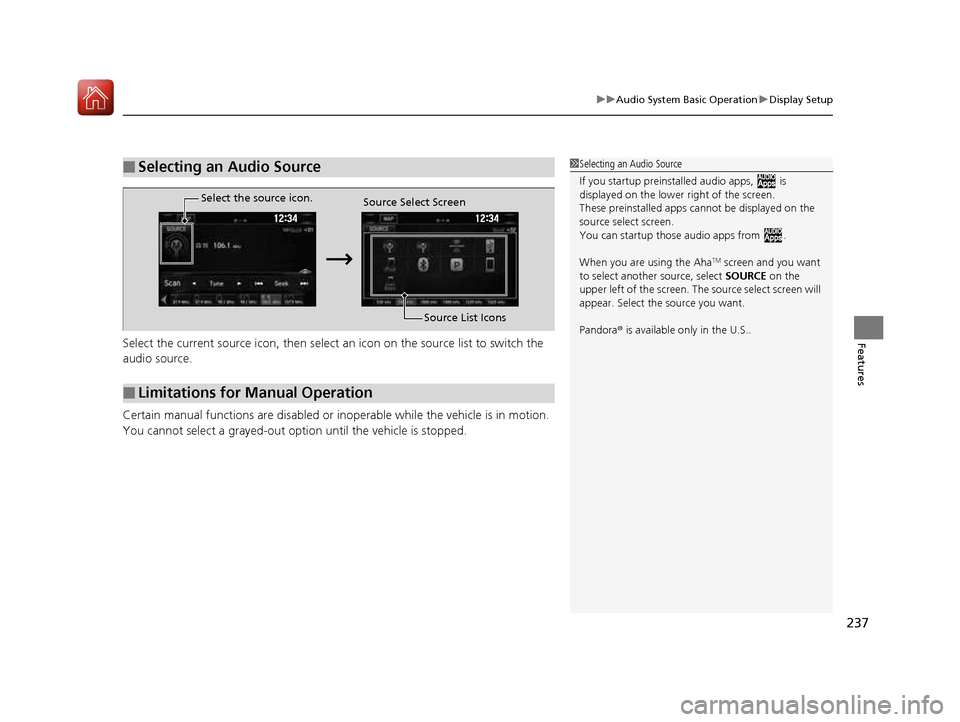
FeaturesSelect the current source icon, then select an icon on the source list to switch the
audio source.
Certain manual functions are disabled or inoperable while the vehicle is in motion.
You cannot select a grayed-out option until the vehicle is stopped.
■Selecting an Audio Source1Selecting an Audio Source If you startup preinstalled audio apps, is
displayed on the lower right of the screen.
These preinstalled apps ca nnot be displayed on the
source select screen.
You can startup thos e audio apps from .
When you are using the Aha TM
screen and you want
to select anothe r source, select SOURCE on the
upper left of the screen. The source select screen will
appear. Select the source you want. Pandora ® is available only in the U.S..
■Limitations for Manual Operation
Select the source icon.
Source Select Screen
Source List Icons
16 CIVIC 2D HC2 (0A 01 0C)-31TBG6000.book 237 ページ >0>.>/6年>0月>/>0日 金曜日 午後4時>/6分
Page 242 of 585
241
uuAudio System Basic OperationuVoice Control Operation
Features
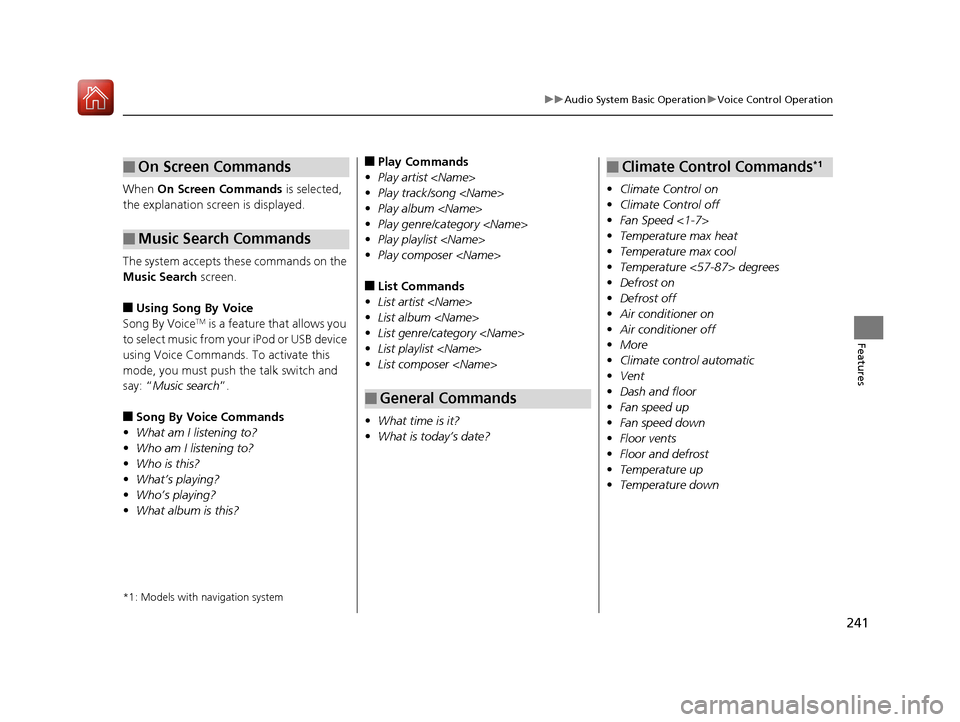
When On Screen Commands is selected,
the explanation scr een is displayed.
The system accepts these commands on the
Music Search screen.
■ Using Song By Voice
Song By Voice TM
is a feature that allows you
to select music from your iPod or USB device
using Voice Commands. To activate this
mode, you must push the talk switch and say: “ Music search ”.
■ Song By Voice Commands
• What am I listening to?
• Who am I listening to?
• Who is this?
• What
Page 243 of 585
242
uuAudio System Basic OperationuPlaying AM/FM Radio
Features
Playing AM/FM Radio
*1:Some or all of the lists may not be displayed.
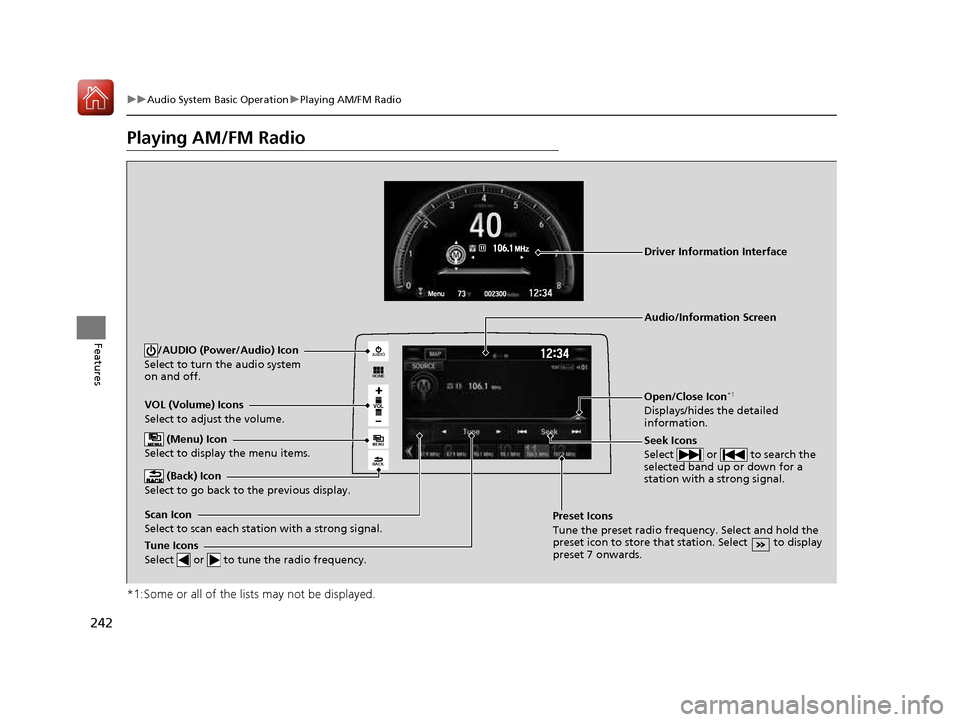
VOL
HOME
MENU
BACK
AUDIO
VOL (Volume) Icons
Select to adjust the volume.
(Back) Icon
Select to go back to the previous display.
Seek Icons
Select or to search the
selected band up or down for a
station with a strong signal.
/AUDIO (Power/Audio) Icon
Select to turn the audio system
on and off.
Open/Close Icon *1
Displays/hides the detailed
information.
(Menu) Icon
Select to display the menu items.
Tune Icons
Select or to tune the radio frequency.
Audio/Information Screen
Scan Icon
Select to scan each station with a strong signal. Preset Icons
Tune the preset radio frequency. Select and hold the
preset icon to store that station. Select to display
preset 7 onwards.
Driver Information Interface
16 CIVIC 2D HC2 (0A 01 0C)-31TBG6000.book 242 ページ >0>.>/6年>0月>/>0日
金曜日 午後4時>/6分
Page 244 of 585
Continued243
uuAudio System Basic OperationuPlaying AM/FM Radio
Features
To store a station: 1.Tune to the selected station.
2. Select and hold the preset number for the station you want to store.
You can also store a preset station by the following procedure.1. Tune to the selected station.
2. Select the open/close icon to display a list.
3. Select the Preset tab.
4. Select and hold the preset number for the station you want to store.
Lists the strongest stations on the selected band. 1. Select the open/close icon to display a list.
2. Select the Station List tab.
3. Select the station.
■ Manual update
Updates your available st ation list at any time.
1. Select the open/close icon to display a list.
2. Select the Station List tab.
3. Select Refresh .
■Preset Memory
■Station List
1Preset Memory
The ST indicator appears on the display indicating
stereo FM broadcasts.
Stereo reproduction in AM is not available.
Switching the Audio Mode
Press the or button on the steering wheel or
select SOURCE on the screen.
2 Audio Remote Controls P. 191
You can store 6 AM stations and 12 FM stations into
preset memory.
HD Radio Technology manufactured under license from iBiquity Digi tal Corporation. U.S. and Foreign
Patents. HD Radio TM
and the HD, HD Radio, and
“Arc” logos are proprietary trademarks of iBiquity
Digital Corp.
34
16 CIVIC 2D HC2 (0A 01 0C)-31TBG6000.book 243 ページ >0>.>/6年>0月>/>0日 金曜日 午後4時>/6分