2016 FORD EXPEDITION EL key
[x] Cancel search: keyPage 108 of 421
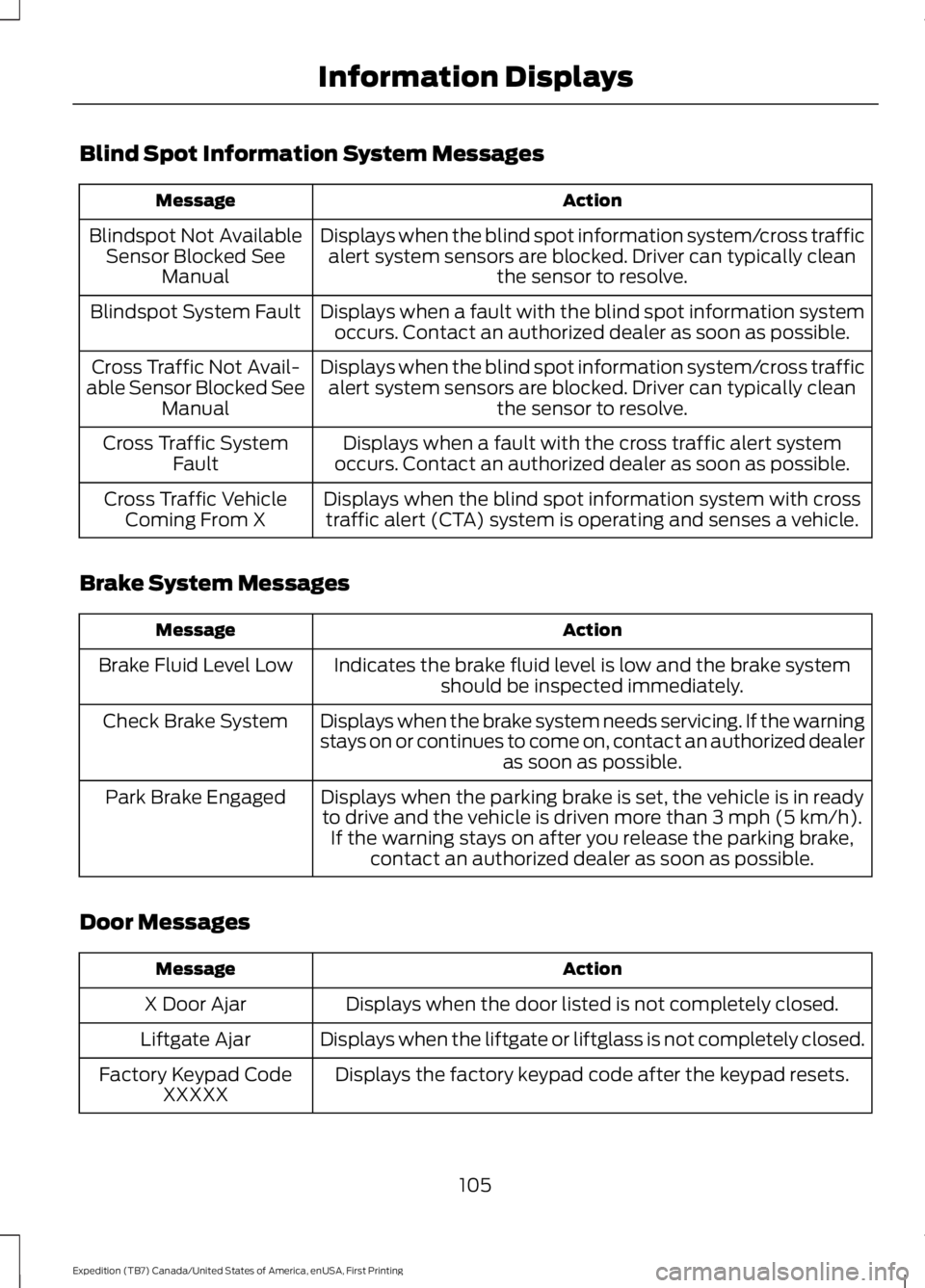
Blind Spot Information System Messages
ActionMessage
Displays when the blind spot information system/cross trafficalert system sensors are blocked. Driver can typically cleanthe sensor to resolve.
Blindspot Not AvailableSensor Blocked SeeManual
Displays when a fault with the blind spot information systemoccurs. Contact an authorized dealer as soon as possible.Blindspot System Fault
Displays when the blind spot information system/cross trafficalert system sensors are blocked. Driver can typically cleanthe sensor to resolve.
Cross Traffic Not Avail-able Sensor Blocked SeeManual
Displays when a fault with the cross traffic alert systemoccurs. Contact an authorized dealer as soon as possible.Cross Traffic SystemFault
Displays when the blind spot information system with crosstraffic alert (CTA) system is operating and senses a vehicle.Cross Traffic VehicleComing From X
Brake System Messages
ActionMessage
Indicates the brake fluid level is low and the brake systemshould be inspected immediately.Brake Fluid Level Low
Displays when the brake system needs servicing. If the warningstays on or continues to come on, contact an authorized dealeras soon as possible.
Check Brake System
Displays when the parking brake is set, the vehicle is in readyto drive and the vehicle is driven more than 3 mph (5 km/h).If the warning stays on after you release the parking brake,contact an authorized dealer as soon as possible.
Park Brake Engaged
Door Messages
ActionMessage
Displays when the door listed is not completely closed.X Door Ajar
Displays when the liftgate or liftglass is not completely closed.Liftgate Ajar
Displays the factory keypad code after the keypad resets.Factory Keypad CodeXXXXX
105
Expedition (TB7) Canada/United States of America, enUSA, First Printing
Information Displays
Page 109 of 421
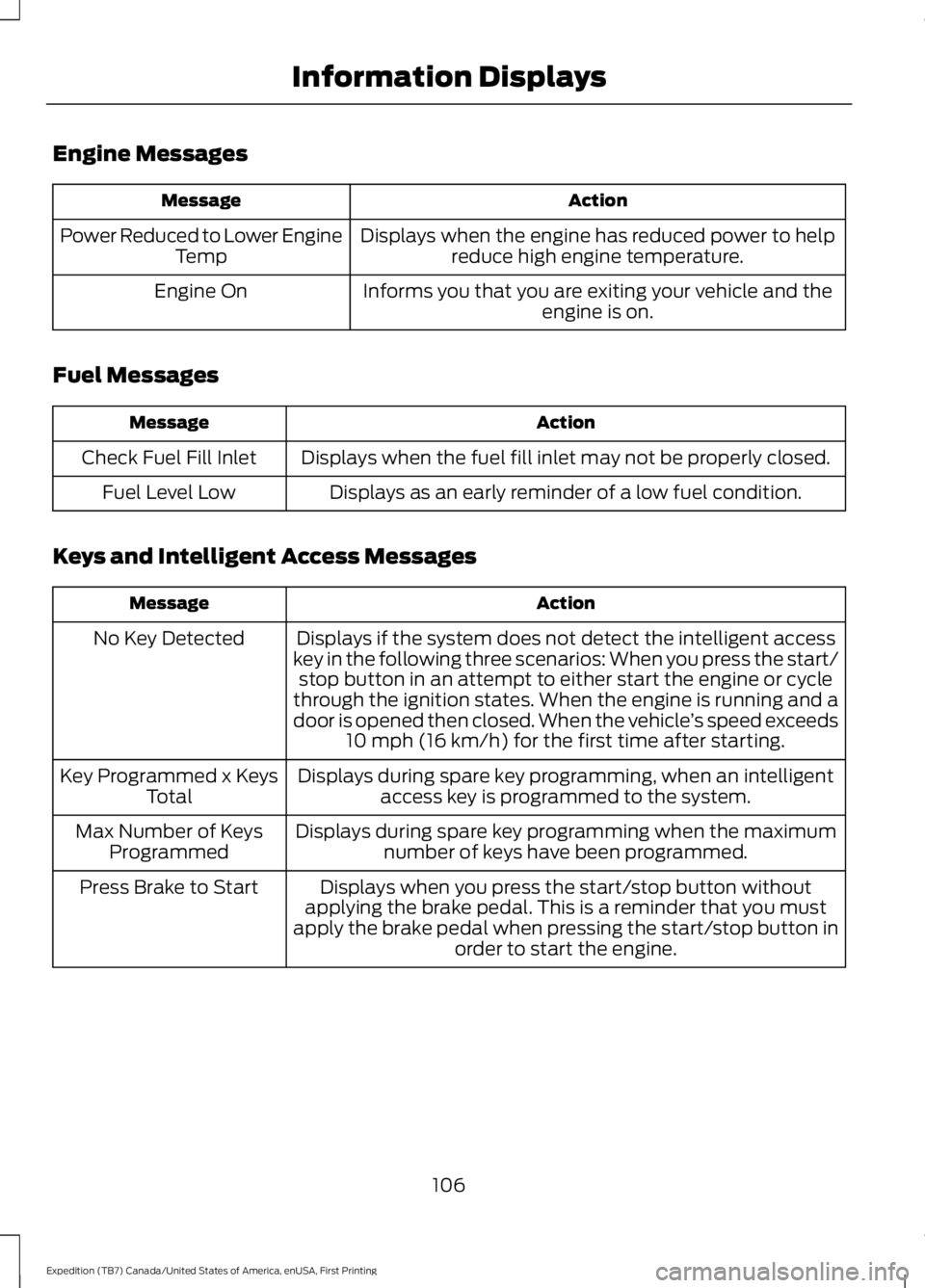
Engine Messages
ActionMessage
Displays when the engine has reduced power to helpreduce high engine temperature.Power Reduced to Lower EngineTemp
Informs you that you are exiting your vehicle and theengine is on.Engine On
Fuel Messages
ActionMessage
Displays when the fuel fill inlet may not be properly closed.Check Fuel Fill Inlet
Displays as an early reminder of a low fuel condition.Fuel Level Low
Keys and Intelligent Access Messages
ActionMessage
Displays if the system does not detect the intelligent accesskey in the following three scenarios: When you press the start/stop button in an attempt to either start the engine or cyclethrough the ignition states. When the engine is running and adoor is opened then closed. When the vehicle’s speed exceeds10 mph (16 km/h) for the first time after starting.
No Key Detected
Displays during spare key programming, when an intelligentaccess key is programmed to the system.Key Programmed x KeysTotal
Displays during spare key programming when the maximumnumber of keys have been programmed.Max Number of KeysProgrammed
Displays when you press the start/stop button withoutapplying the brake pedal. This is a reminder that you mustapply the brake pedal when pressing the start/stop button inorder to start the engine.
Press Brake to Start
106
Expedition (TB7) Canada/United States of America, enUSA, First Printing
Information Displays
Page 110 of 421
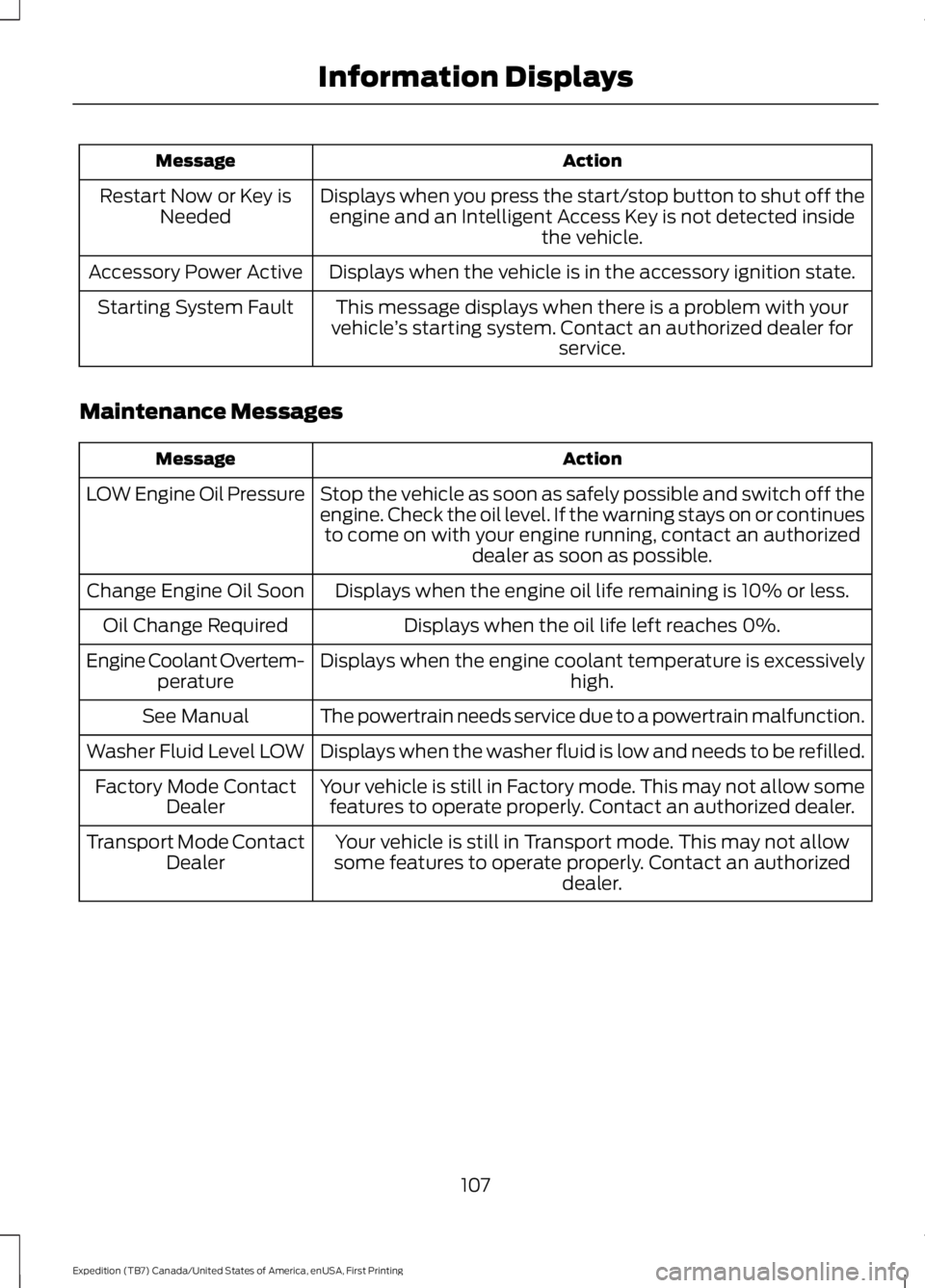
ActionMessage
Displays when you press the start/stop button to shut off theengine and an Intelligent Access Key is not detected insidethe vehicle.
Restart Now or Key isNeeded
Displays when the vehicle is in the accessory ignition state.Accessory Power Active
This message displays when there is a problem with yourvehicle’s starting system. Contact an authorized dealer forservice.
Starting System Fault
Maintenance Messages
ActionMessage
Stop the vehicle as soon as safely possible and switch off theengine. Check the oil level. If the warning stays on or continuesto come on with your engine running, contact an authorizeddealer as soon as possible.
LOW Engine Oil Pressure
Displays when the engine oil life remaining is 10% or less.Change Engine Oil Soon
Displays when the oil life left reaches 0%.Oil Change Required
Displays when the engine coolant temperature is excessivelyhigh.Engine Coolant Overtem-perature
The powertrain needs service due to a powertrain malfunction.See Manual
Displays when the washer fluid is low and needs to be refilled.Washer Fluid Level LOW
Your vehicle is still in Factory mode. This may not allow somefeatures to operate properly. Contact an authorized dealer.Factory Mode ContactDealer
Your vehicle is still in Transport mode. This may not allowsome features to operate properly. Contact an authorizeddealer.
Transport Mode ContactDealer
107
Expedition (TB7) Canada/United States of America, enUSA, First Printing
Information Displays
Page 111 of 421
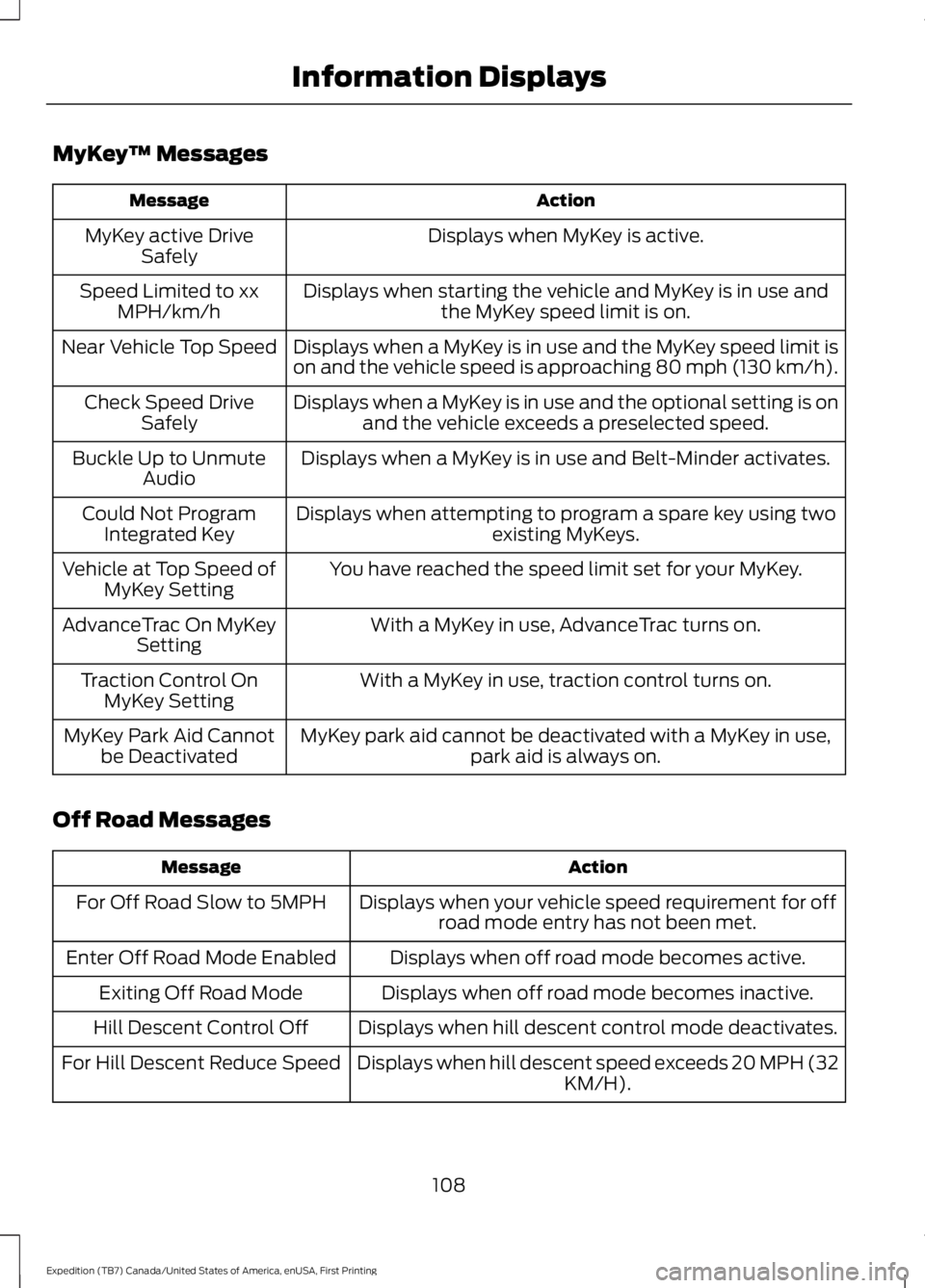
MyKey™ Messages
ActionMessage
Displays when MyKey is active.MyKey active DriveSafely
Displays when starting the vehicle and MyKey is in use andthe MyKey speed limit is on.Speed Limited to xxMPH/km/h
Displays when a MyKey is in use and the MyKey speed limit ison and the vehicle speed is approaching 80 mph (130 km/h).Near Vehicle Top Speed
Displays when a MyKey is in use and the optional setting is onand the vehicle exceeds a preselected speed.Check Speed DriveSafely
Displays when a MyKey is in use and Belt-Minder activates.Buckle Up to UnmuteAudio
Displays when attempting to program a spare key using twoexisting MyKeys.Could Not ProgramIntegrated Key
You have reached the speed limit set for your MyKey.Vehicle at Top Speed ofMyKey Setting
With a MyKey in use, AdvanceTrac turns on.AdvanceTrac On MyKeySetting
With a MyKey in use, traction control turns on.Traction Control OnMyKey Setting
MyKey park aid cannot be deactivated with a MyKey in use,park aid is always on.MyKey Park Aid Cannotbe Deactivated
Off Road Messages
ActionMessage
Displays when your vehicle speed requirement for offroad mode entry has not been met.For Off Road Slow to 5MPH
Displays when off road mode becomes active.Enter Off Road Mode Enabled
Displays when off road mode becomes inactive.Exiting Off Road Mode
Displays when hill descent control mode deactivates.Hill Descent Control Off
Displays when hill descent speed exceeds 20 MPH (32KM/H).For Hill Descent Reduce Speed
108
Expedition (TB7) Canada/United States of America, enUSA, First Printing
Information Displays
Page 113 of 421

Remote Start Messages
ActionMessage
Displays as a reminder to turn the key to on to drive the vehicleafter a remote start.To Drive: Turn Key to On
Displays as a reminder to apply the brake and the start buttonto drive the vehicle after a remote start.To Drive: Press Brakeand START Button
Suspension System Messages
ActionMessage
Displays when there is a problem with your vehicle’s suspen-sion system. Contact an authorized dealer for service.Driver Select Susp.malfunction Servicerequired
Tire Messages
ActionMessage
Displays when one or more tires on your vehicle have low tirepressure.Tire Pressure LOW
Displays when the tire pressure monitoring system ismalfunctioning. If the warning stays on or continues to comeon, contact an authorized dealer.
Tire Pressure MonitorFault
Displays when a tire pressure sensor is malfunctioning or yourspare tire is in use. See Wheels and Tires (page 272). If thewarning stays on or continues to come on, contact anauthorized dealer.
Tire Pressure SensorFault
Trailer Messages
ActionMessage
Displays the current gain setting for the trailer brakewhen a trailer is not connected.Trailer Brake Gain: XX.X NoTrailer
Displays and a chime sounds in response to faultssensed by the TBC.Trailer Brake Module Fault
Displays when a correct trailer connection is sensedduring a given ignition cycle.Trailer Connected
110
Expedition (TB7) Canada/United States of America, enUSA, First Printing
Information Displays
Page 130 of 421
You can also recall a preset memoryposition by:
•Pressing the unlock button on yourremote control if it is linked to a presetposition.
•Unlocking the intelligent driver doorhandle if a linked key fob is present.
•Entering a personal entry code on theSecuricode keypad. See Locks (page53).
Note:Using a linked key fob to recall yourmemory position when the ignition is offmoves the seat and steering column to theEasy Entry position.
Note:Pressing any active memory featurecontrol - power seat, mirror (or steeringcolumn switch) (or any memory button)during a memory recall cancels theoperation.
Linking a PreSet Position to yourRemote Control or Intelligent AccessKey Fob
Your vehicle can save the preset memorypositions for up to two remote controls.
1.With the ignition on, move the memorypositions to the desired positions.
2. Press and hold the desired presetbutton for about five seconds. A tonewill sound after about two seconds.Continue holding until a second toneis heard.
3. Within three seconds, press the lockbutton on the remote control you arelinking.
To unlink a remote control, follow thesame procedure – except in step 3, pressthe unlock button on the remote control.
Note:If more than one linked remotecontrol or intelligent access key is in range,the memory function moves to the settingsof the first key to initiate a memory recall.
Easy Entry and Exit Feature (If
Equipped)
This feature adjusts the position of the seatand steering column to allow easier exitand entry to the vehicle.
The driver seat automatically moves 2inches (5 centimeters) rearward when thetransmission is in park (P) and you removethe key from the ignition or you switch theignition off.
The driver seat returns to the previousposition when you put the key in theignition or switch the ignition on.
You can enable or disable this feature inthe information display. See InformationDisplays (page 92).
REAR SEATS
Folding Down the Second Row40% Seat
WARNINGS
Use caution when folding theseatback to the flat back position asthe system will move forward whenyou lift the release handle.
Before returning the seatback to itsoriginal position, make sure thatcargo or any objects are not trappedbehind the seatback. After returning theseatback to its original position, pull on theseatback to make sure that it has fullylatched. An unlatched seat may becomedangerous in the event of a sudden stopor crash.
Make sure that the head restraint is in thedown position and no objects such asbooks, purses or briefcases are on the floorin front of the second row seats beforefolding them down.
127
Expedition (TB7) Canada/United States of America, enUSA, First Printing
Seats
Page 136 of 421
To return the seatback to its originalposition, lift the seatback until it latchesinto place.
PowerFold™ Third Row Seat (If
Equipped)
Note:The power fold down seats operatefor 10 minutes after you switch the ignitionoff. The transmission must be in park (P)and the liftgate, or liftgate glass must beopen. Similar to the battery saver feature,the power third row seat disables 10 minutesafter you switch the ignition off.
Note:Be sure that the head restraints arefolded down before powering the third rowseat down.
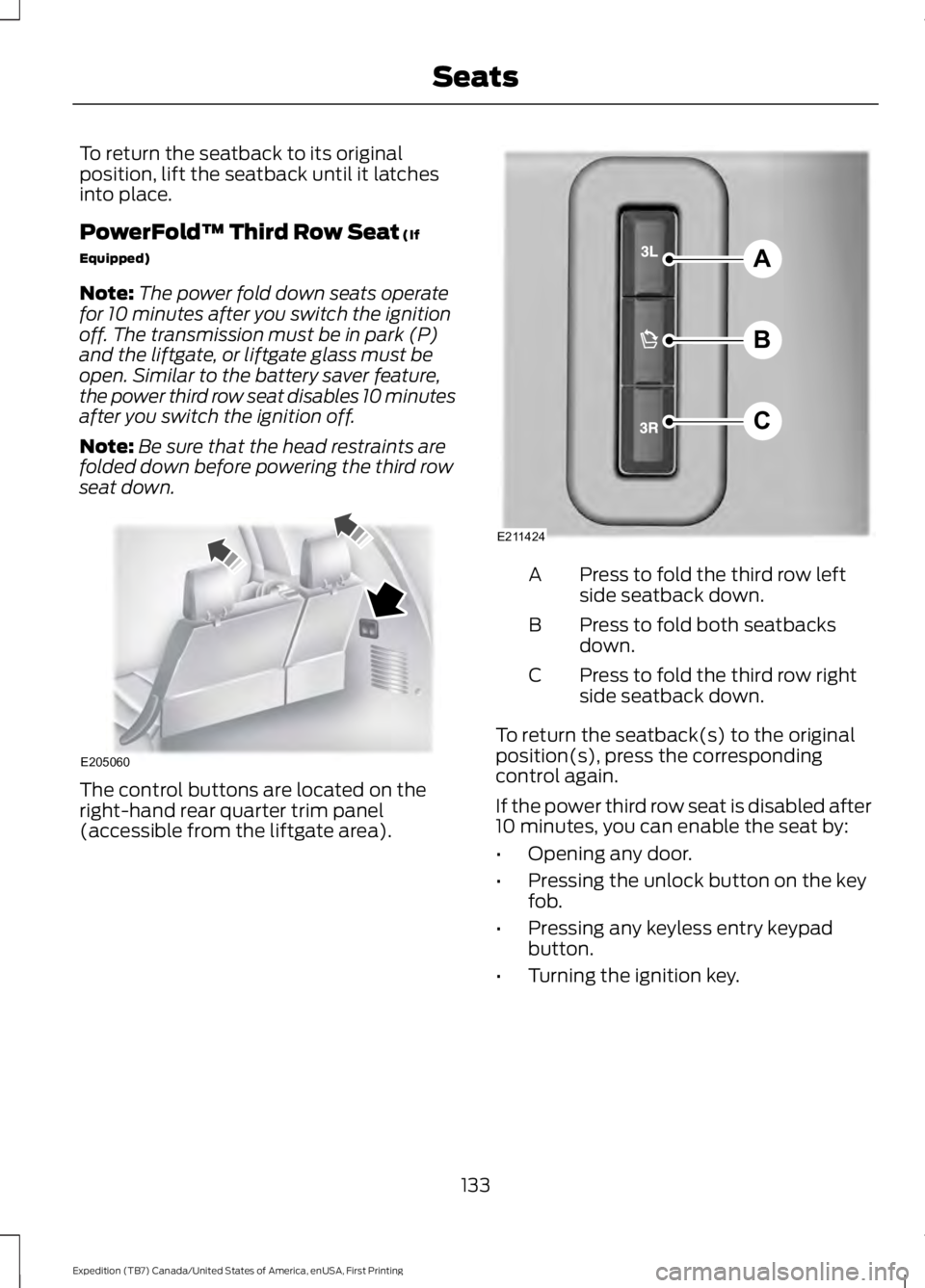
The control buttons are located on theright-hand rear quarter trim panel(accessible from the liftgate area).
Press to fold the third row leftside seatback down.A
Press to fold both seatbacksdown.B
Press to fold the third row rightside seatback down.C
To return the seatback(s) to the originalposition(s), press the correspondingcontrol again.
If the power third row seat is disabled after10 minutes, you can enable the seat by:
•Opening any door.
•Pressing the unlock button on the keyfob.
•Pressing any keyless entry keypadbutton.
•Turning the ignition key.
133
Expedition (TB7) Canada/United States of America, enUSA, First Printing
SeatsE205060 A
B
C
E211424
Page 148 of 421
GENERAL INFORMATION
WARNINGS
Extended idling at high enginespeeds can produce very hightemperatures in the engine andexhaust system, creating the risk of fire orother damage.
Do not park, idle or drive your vehicleon dry grass or other dry groundcover. The emission system heats upthe engine compartment and exhaustsystem, creating the risk of fire.
Do not start the engine in a closedgarage or in other enclosed areas.Exhaust fumes can be toxic. Alwaysopen the garage door before you start theengine.
If you smell exhaust fumes insideyour vehicle, have your vehiclechecked by an authorized dealerimmediately. Do not drive your vehicle ifyou smell exhaust fumes.
If you disconnect the battery, your vehiclemay exhibit some unusual drivingcharacteristics for approximately 5 miles(8 kilometers) after you reconnect it. Thisis because the engine management systemmust realign itself with the engine. You candisregard any unusual drivingcharacteristics during this period.
The powertrain control system meets allCanadian interference-causing equipmentstandard requirements regulating theimpulse electrical field or radio noise.
When you start the engine, avoid pressingthe accelerator pedal before and duringoperation. Only use the accelerator pedalwhen you have difficulty starting theengine.
IGNITION SWITCH (If Equipped)
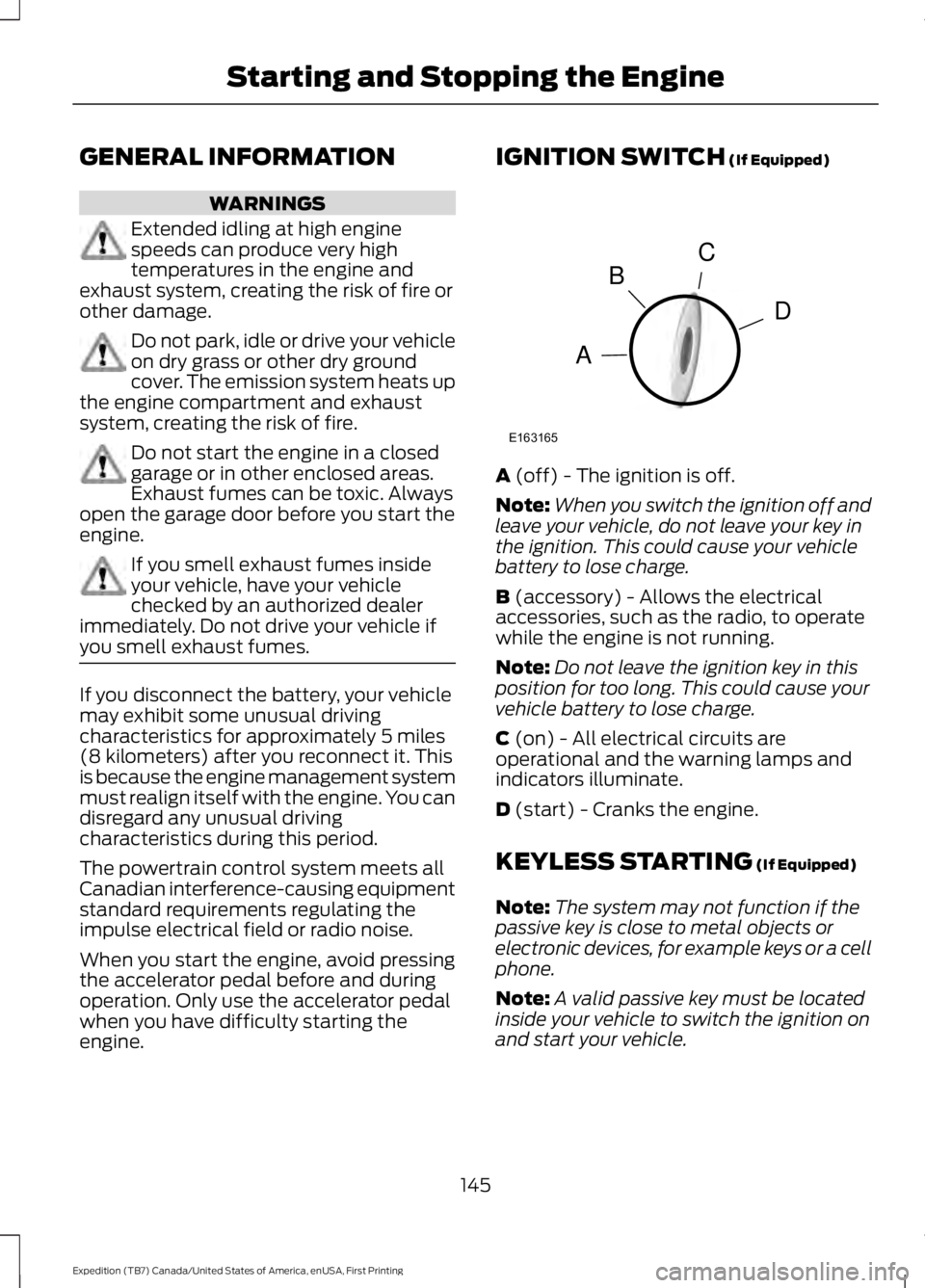
A (off) - The ignition is off.
Note:When you switch the ignition off andleave your vehicle, do not leave your key inthe ignition. This could cause your vehiclebattery to lose charge.
B (accessory) - Allows the electricalaccessories, such as the radio, to operatewhile the engine is not running.
Note:Do not leave the ignition key in thisposition for too long. This could cause yourvehicle battery to lose charge.
C (on) - All electrical circuits areoperational and the warning lamps andindicators illuminate.
D (start) - Cranks the engine.
KEYLESS STARTING (If Equipped)
Note:The system may not function if thepassive key is close to metal objects orelectronic devices, for example keys or a cellphone.
Note:A valid passive key must be locatedinside your vehicle to switch the ignition onand start your vehicle.
145
Expedition (TB7) Canada/United States of America, enUSA, First Printing
Starting and Stopping the EngineC
D
B
A
E163165