2016 FORD C MAX ENERGI mirror
[x] Cancel search: mirrorPage 114 of 395

5. Direct the outer instrument panel airvents toward the side windows.
6. To increase the airflow to the outerinstrument panel vents, close the airvents in the middle of the instrumentpanel and in the rear of the centerconsole.
HEATED WINDOWS AND
MIRRORS
Note:Make sure the engine is runningbefore operating the heated windows.
Heated Rear Window
The heated rear window buttonis below the climate control unit.
Press the button to clear theheated rear window of thin ice and fog.The heated rear window will automaticallyturn off after a short period of time.
Note: Do not use razor blades or othersharp objects to clean or remove decalsfrom the inside of the heated rear window.The vehicle warranty does not coverdamage caused to the heated rear windowgrid lines.
Heated Exterior Mirrors (If Equipped)
When you switch the heated rear windowon, the heated exterior mirrors willautomatically turn on.
Note:Do not remove ice from the mirrorswith a scraper or adjust the mirror glasswhen it is frozen in place.
Note:Do not clean the mirror housing orglass with harsh abrasives, fuel or otherpetroleum-based cleaning products.
CABIN AIR FILTER
Your vehicle is equipped with a cabin airfilter, which gives you and your passengersthe following benefits:
•It improves your driving comfort byreducing particle concentration.
•It improves the interior compartmentcleanliness.
•It protects the climate controlcomponents from particle deposits.
Your cabin air filter is located under theinstrument panel in the passenger footwellarea.
Note:Make sure you have a cabin air filterinstalled at all times. This prevents foreignobjects from entering the system. Runningthe system without a filter in place couldresult in degradation or damage to thesystem.
Replace the filter at regular intervals. SeeMaintenance (page 218).
For additional cabin air filter information,or to replace the filter, see an authorizeddealer.
REMOTE START (If Equipped)
The remote start feature allows you topre-condition the interior of your vehicle.The climate control system works toachieve comfort according to your previoussettings.
Note:You cannot adjust the system duringremote start operation.
Turn the ignition on to return the systemto its previous settings. You can now makeadjustments normally, but you need to turncertain vehicle-dependent features backon, such as:
•Heated seats.
•Cooled seats.
111
C-MAX (CCG) Canada/United States of America, enUSA, First Printing
Climate ControlE72507
Page 115 of 395

•Heated steering wheel.
•Heated mirrors.
•Heated rear window.
You can adjust the default remote startsettings using the information displaycontrols. See Information Displays(page 93).
Automatic Settings
In hot weather, the system is set to 72°F(22°C). The cooled seats are set to high(if available, and selected to AUTO in theinformation display).
In moderate weather, the system eitherheats or cools (based on previoussettings). The rear defroster, heatedmirrors and heated seats do notautomatically turn on.
In cold weather, the system is set to 72°F(22°C). The heated seats are set to high(if available, and selected to AUTO in theinformation display). The rear defrosterand heated mirrors automatically turn on.
112
C-MAX (CCG) Canada/United States of America, enUSA, First Printing
Climate Control
Page 179 of 395

REAR VIEW CAMERA (If Equipped)
WARNINGS
The rear view camera system is areverse aid supplement device thatstill requires the driver to use it inconjunction with the interior and exteriormirrors for maximum coverage.
Objects that are close to eithercorner of the bumper or under thebumper, might not be seen on thescreen due to the limited coverage of thecamera system.
Back up as slow as possible sincehigher speeds might limit yourreaction time to stop your vehicle.
Use caution when using the rearvideo camera and the liftgate is ajar.If the liftgate is ajar, the camera willbe out of position and the video image maybe incorrect. All guidelines have beenremoved when the liftgate is ajar.
Use caution when turning camerafeatures on or off while in reverse(R). Make sure your vehicle is notmoving.
The rear view camera system provides avideo image of the area behind yourvehicle.
During operation, lines appear in thedisplay which represent your vehicle’s pathand proximity to objects behind yourvehicle.
The camera is located on the liftgate.
Using the Rear View CameraSystem
The rear view camera system displayswhat is behind your vehicle when you placethe transmission in reverse (R).
The system uses three types of guides tohelp you see what is behind your vehicle:
•Active guidelines: Show the intendedpath of your vehicle when reversing.
•Fixed guidelines: Show the actual pathyour vehicle is moving in while reversingin a straight line. This can be helpfulwhen backing into a parking space oraligning your vehicle with anotherobject behind you.
•Centerline: Helps align the center ofyour vehicle with an object (forexample, a trailer).
Note:If the transmission is in reverse (R)and the luggage compartment is ajar, norear view camera features are displayed.
Note:If the image comes on while thetransmission is not in reverse (R), have thesystem inspected by your authorized dealer.
176
C-MAX (CCG) Canada/United States of America, enUSA, First Printing
Parking AidsE162528
Page 181 of 395

The fixed and active guidelines fade in andout depending on the steering wheelposition. The active guidelines are notshown when the steering wheel positionis straight.
Always use caution while reversing.Objects in the red zone are closest to yourvehicle and objects in the green zone arefarther away. Objects are getting closer toyour vehicle as they move from the greenzone to the yellow or red zones. Use theside view mirrors and rear view mirror toget better coverage on both sides and rearof your vehicle.
Enhanced Park Aids
Note:The reverse sensing system is noteffective at speeds above 7 mph (12 km/h)and may not detect certain angular ormoving objects.
When the sensing system detects anobject, it displays red, yellow and greenhighlights at the top of the image. The alerthighlights all objects detected.
Selectable settings for this feature are ONand OFF.
Manual Zoom
WARNING
When manual zoom is on, the fullarea behind your vehicle is notshown. Be aware of yoursurroundings when using the manual zoomfeature.
Note:Manual zoom is only available whenthe transmission is in reverse (R).
Note:When manual zoom is enabled, onlythe centerline is shown.
This allows you to get a closer view of anobject behind your vehicle. The zoomedimage keeps the bumper in the image toprovide a reference. The zoom is onlyactive while the transmission is in reverse(R). When the transmission is shifted outof reverse (R), the feature automaticallyturns off and must be reset when it is usedagain.
Selectable settings for this feature are +and -. The default setting for the manualzoom is OFF.
Rear Camera Delay (If Equipped)
When you shift the transmission out ofreverse (R) and into any gear while the rearcamera delay is active, the camera imagedisplays until:
•Your vehicle speed sufficientlyincreases.
•You shift your vehicle into park (P).
Selectable settings for this feature are ONand OFF. The default setting for the rearcamera delay is OFF.
178
C-MAX (CCG) Canada/United States of America, enUSA, First Printing
Parking Aids
Page 216 of 395
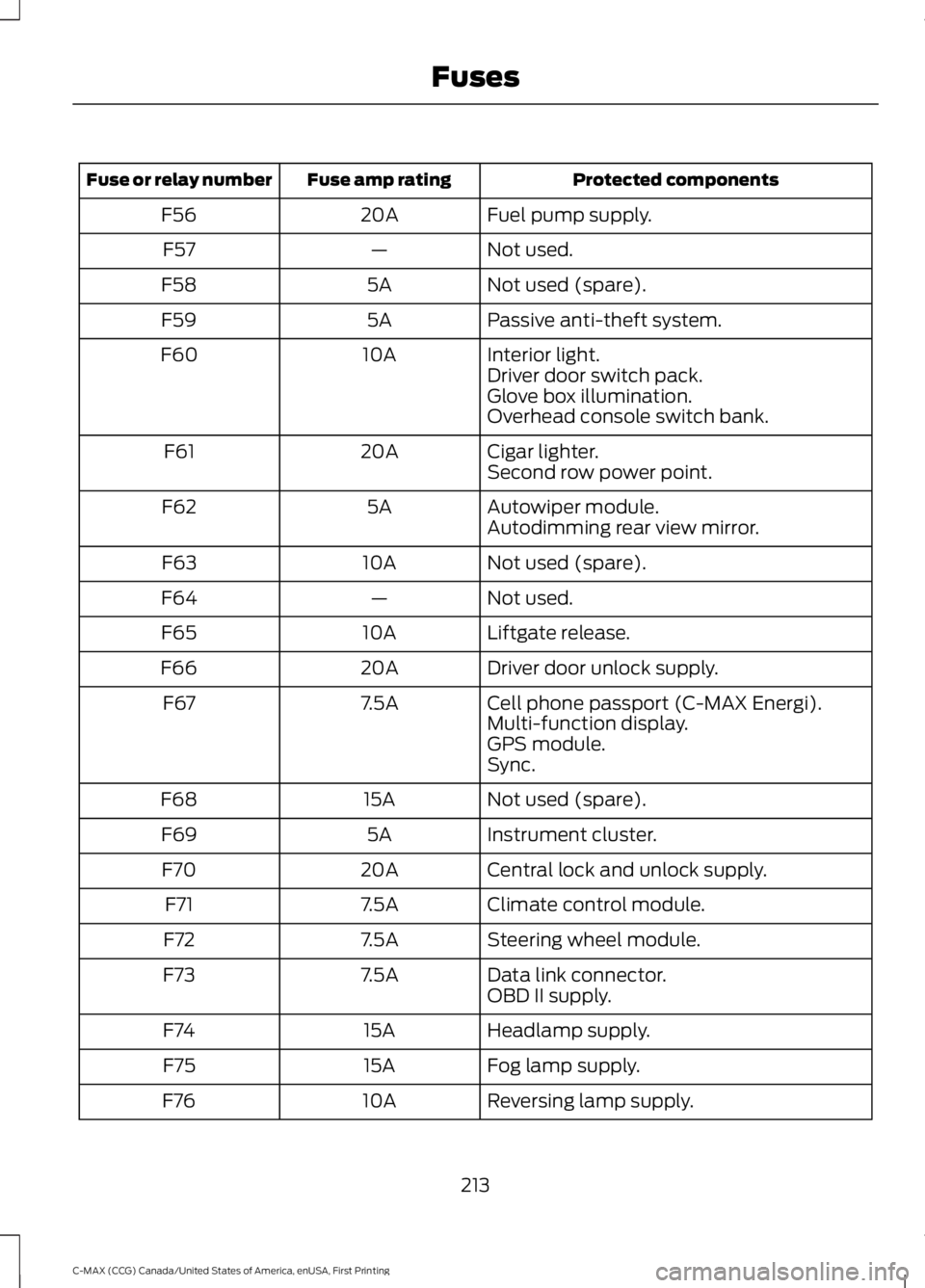
Protected componentsFuse amp ratingFuse or relay number
Fuel pump supply.20AF56
Not used.—F57
Not used (spare).5AF58
Passive anti-theft system.5AF59
Interior light.10AF60Driver door switch pack.Glove box illumination.Overhead console switch bank.
Cigar lighter.20AF61Second row power point.
Autowiper module.5AF62Autodimming rear view mirror.
Not used (spare).10AF63
Not used.—F64
Liftgate release.10AF65
Driver door unlock supply.20AF66
Cell phone passport (C-MAX Energi).7.5AF67Multi-function display.GPS module.Sync.
Not used (spare).15AF68
Instrument cluster.5AF69
Central lock and unlock supply.20AF70
Climate control module.7.5AF71
Steering wheel module.7.5AF72
Data link connector.7.5AF73OBD II supply.
Headlamp supply.15AF74
Fog lamp supply.15AF75
Reversing lamp supply.10AF76
213
C-MAX (CCG) Canada/United States of America, enUSA, First Printing
Fuses
Page 232 of 395

presets, are also maintained in memory bypower from the low voltage battery. Whena technician disconnects and connects thelow voltage battery, these settings areerased. Complete the following procedurein order to restore the settings:
1. With the vehicle at a complete stop,set the parking brake.
2. Shift into park (P).
3. Switch off all accessories.
4. Fully press the brake pedal and startthe vehicle.
5. Run the engine until it reaches normaloperating temperature. While theengine is warming up, complete thefollowing: Reset the clock. See AudioSystem (page 283). Reset the powerwindows bounce-back feature. SeeWindows and Mirrors (page 80).Reset the radio station presets. SeeAudio System (page 283).
6.Allow the engine to idle for at least oneminute. If the engine turns off, pressthe accelerator pedal to start theengine.
7. While the engine is running, press thebrake pedal and shift into neutral (N).
8.Allow the engine to run for at least oneminute by pressing on the acceleratorpedal.
9.Drive the vehicle at least 12 mi (20 km)to completely relearn the idle and fueltrim strategy.
Note:If you do not allow the engine torelearn the idle and fuel trim strategy, theidle quality of your vehicle may be adverselyaffected until the engine computereventually relearns the idle trim and fueltrim strategy.
Make sure that you dispose of old batteriesin an environmentally friendly way. Seekadvice from your local authority aboutrecycling old batteries.
CHECKING THE WIPER
BLADES
Run the tip of your fingers over the edge ofthe blade to check for roughness.
Clean the wiper blades with washer fluidor water applied with a soft sponge orcloth.
CHANGING THE WIPER
BLADES
Replace the wiper blades at least annuallyfor optimum performance.
You can improve poor wiper quality bycleaning the wiper blades and thewindshield.
Note: The windshield wiper blades aredifferent in length. If you install wiperblades of the wrong length, the wiper bladescan clash damaging the wiper system.
Service Position
Set the windshield wipers in the serviceposition to change the wiper blades.
Note:You can use the service position toprovide easier access to the wiper bladesfor freeing them from snow and ice.
Note:Make sure the windshield is free fromsnow and ice before you switch the ignitionon.
1. Switch the ignition on.
2. Switch the ignition off.
229
C-MAX (CCG) Canada/United States of America, enUSA, First Printing
MaintenanceE142463
Page 246 of 395
•Do not allow wax to come in contactwith any non-body (low-gloss black)colored trim. The wax will discolor orstain the parts over time.
•Roof racks.
•Bumpers.
•Grained door handles.
•Side moldings.
•Mirror housings.
•Windshield cowl area.
•Do not apply wax to glass areas.
•After waxing, your car's paint shouldfeel smooth, and be free of streaks andsmudges.
CLEANING THE ENGINE
Engines are more efficient when they areclean because grease and dirt buildup keepthe engine warmer than normal.
When washing:
•Take care when using a power washerto clean the engine. The high-pressurefluid could penetrate the sealed partsand cause damage.
•Do not spray a hot engine with coldwater to avoid cracking the engineblock or other engine components.
•Spray Motorcraft Engine Shampoo andDegreaser on all parts that requirecleaning and pressure rinse clean. InCanada, use Motorcraft EngineShampoo.
•Never wash or rinse the engine while itis hot or running; water in the runningengine may cause internal damage.
•Never wash or rinse any ignition coil,spark plug wire or spark plug well, orthe area in and around these locations.
•Cover the battery, power distributionbox, and air filter assembly to preventwater damage when cleaning theengine.
CLEANING THE WINDOWS AND
WIPER BLADES
Car wash chemicals and environmentalfallout can result in windshield and wiperblade contamination. Dirty windshield andwipers will result in poor windshield wiperoperation. Keep the windshield and wiperblades clean to maintain windshield wiperperformance.
To clean the windshield and wiper blades:
•Clean the windshield with anon-abrasive glass cleaner. Whencleaning the interior of the windshield,avoid getting any glass cleaner on theinstrument panel or door panels. Wipeany glass cleaner off these surfacesimmediately.
•For windshields contaminated withtree sap, chemicals, wax or bugs, cleanthe entire windshield using steel wool(no greater than 0000 grade) in acircular motion and rinse with water.
•Clean the wiper blades with isopropylrubbing alcohol or windshield washerconcentrate.
Note: Do not use razor blades or othersharp objects to clean or remove decalsfrom the inside of the heated rear window.The vehicle warranty does not coverdamage caused to the heated rear windowgrid lines.
243
C-MAX (CCG) Canada/United States of America, enUSA, First Printing
Vehicle Care
Page 388 of 395

Driver and Passenger Airbags...................36Children and Airbags..........................................36Proper Driver and Front Passenger SeatingAdjustment........................................................36Driver Knee Airbag.........................................40Driving Aids......................................................181Driving Hints...................................................192Driving Through Water................................193DRLSee: Daytime Running Lamps..........................77
E
Economical Driving......................................192EcoSelect.........................................................142Emission Control System..........................150On-Board Diagnostics (OBD-II).....................151Readiness for Inspection and Maintenance(I/M) Testing....................................................152End User License Agreement.................366VEHICLE SOFTWARE END USER LICENSEAGREEMENT (EULA) ................................366Engine Block Heater.....................................132Using the Engine Block Heater......................133Engine Coolant Check................................223Adding Coolant...................................................224Adding Engine Coolant....................................225Adding Inverter System ControllerCoolant.............................................................225Checking the Engine Coolant........................223Checking the Inverter System ControllerCoolant.............................................................224Engine Coolant and Inverter SystemController Coolant........................................223Recycled Engine Coolant................................225Severe Climates..................................................225What You Should Know About Fail-SafeCooling..............................................................226Engine ImmobilizerSee: Passive Anti-Theft System.....................65Engine Oil Check..........................................222Adding Engine Oil...............................................222Low Engine Use..................................................223Engine Oil Dipstick.......................................222Engine Specifications.................................276Environment......................................................14Event Data RecordingSee: Data Recording..............................................9
Export Unique Options..................................13Extended Service Plan (ESP).................346EXTENDED SERVICE PLAN (CANADAONLY)................................................................347EXTENDED SERVICE PLAN (U.S.Only)..................................................................346Exterior Mirrors.................................................81Fold-Away Exterior Mirrors...............................82Heated Exterior Mirrors......................................82Integrated Blind Spot Mirrors..........................82Power Exterior Mirrors.........................................81Signal Indicator Mirrors......................................82
F
Fastening the Seatbelts..............................28Safety Belt Extension Assembly....................30Safety Belt Locking Modes...............................29Using Safety Belts During Pregnancy...........28Flat Tire InflationSee: Tire Sealant and Inflator Kit.................249Floor Mats.......................................................194Fog Lamps - FrontSee: Front Fog Lamps.........................................77Ford Credit..........................................................11(U.S. Only).................................................................11Front Fog Lamps.............................................77Front Parking Aid............................................171Front Passenger Sensing System.............37Fuel and Refueling.......................................143Fuel Consumption.......................................150Calculating Fuel Economy..............................150Filling the Tank....................................................150Fuel Filler Funnel Location........................145Fuel Filter.........................................................227Fuel Quality....................................................144Choosing the Right Fuel...................................144Fuel Freshness Mode........................................144Fuel Shutoff...................................................196Fuses................................................................209Fuse Specification Chart..........................209Luggage Compartment Fuse Panel............214Passenger Compartment Fuse Panel.........212Power Distribution Box...................................209Pre-Fuse Box.......................................................209
385
C-MAX (CCG) Canada/United States of America, enUSA, First Printing
Index