Page 152 of 587
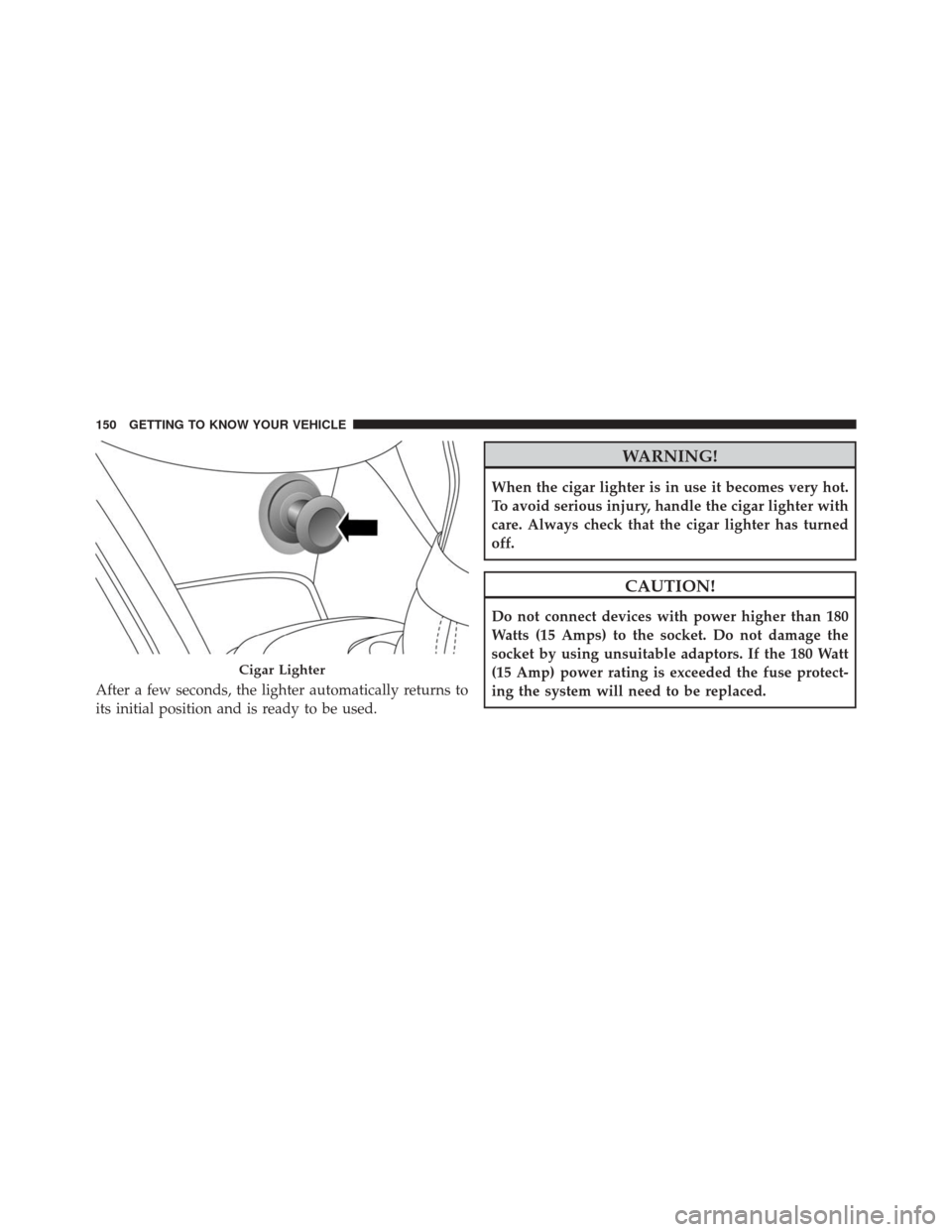
After a few seconds, the lighter automatically returns to
its initial position and is ready to be used.
WARNING!
When the cigar lighter is in use it becomes very hot.
To avoid serious injury, handle the cigar lighter with
care. Always check that the cigar lighter has turned
off.
CAUTION!
Do not connect devices with power higher than 180
Watts (15 Amps) to the socket. Do not damage the
socket by using unsuitable adaptors. If the 180 Watt
(15 Amp) power rating is exceeded the fuse protect-
ing the system will need to be replaced.
Cigar Lighter
150 GETTING TO KNOW YOUR VEHICLE
Page 162 of 587
ONBOARD DIAGNOSTIC SYSTEM (OBD II)
Your vehicle is equipped with a sophisticated onboard
diagnostic system called OBD II. This system monitors
the performance of the emissions, engine, and automatic
transmission control systems. When these systems are
operating properly, your vehicle will provide excellent
performance and fuel economy, as well as engine emis-
sions well within current government regulations.
If any of these systems require service, the OBD II system
will turn on the “Malfunction Indicator Light (MIL).” It
will also store diagnostic codes and other information to
assist your service technician in making repairs. Al-
though your vehicle will usually be drivable and not
need towing, see your authorized dealer for service as
soon as possible.
CAUTION!
•Prolonged driving with the MIL on could cause
further damage to the emission control system. It
could also affect fuel economy and driveability.
The vehicle must be serviced before any emissions
tests can be performed.
• If the MIL is flashing, while the engine is running,
severe catalytic converter damage and power loss
will soon occur. Immediate service is required.
160 GETTING TO KNOW YOUR INSTRUMENT CLUSTER
Page 172 of 587
Refer to “Uconnect Settings” in “Multimedia” for more
information.
Display
By selecting�Display,�you can access the following
settings:
• Screen Setup: Allows you to configure the display
screen.
• Language: Allows you to select the language in which
to display the information/warnings.
• Automatic Reset Trip B: Allows you to set the options
to reset the Trip B (never, always, every 2 hours or
every 8 hours);
• Phone Repetition: The instrument cluster display can
also display the information concerning phone mode.
The information that can be displayed is the connec-
tion status of the mobile phone (phone connected or disconnected), the active telephone calls/incoming/on
hold, and the management of double calls (first incom-
ing second waiting, etc.).
• Navigation Repetition: Allows you to view, on the
instrument cluster display, information relating to the
navigation mode.
Units
By selecting the item �Units Of Measure,” you can select
the unit of measure used in the display.
Possible options are:
• US
• Metric
• Custom
170 GETTING TO KNOW YOUR INSTRUMENT CLUSTER
Page 174 of 587

•Auto Wipers: Enabling/disabling the automatic opera-
tion of wipers in the event of rain
• LaneSense Warning: A selection of the �readiness�of
intervention of LaneSense
• Warning Buzzer Volume: Increase or decrease the
volume of the buzzer.
• Maintenance Brakes — If Equipped: Activation of the
procedure to carry out braking system maintenance
• Auto Park Brake — If Equipped: Enable/disable auto-
insertion of the Electric Parking Brake
Lights
By selecting the item �Lights,�you can make the follow-
ing adjustments:
• Headlight Off Delay: Set the delay for headlight shut-
off after engine shutoff •
Headlight Sensor: Adjust the sensitivity of headlight
brightness
• Interior Ambient Lights: Increase of decrease the
brightness of the Interior Ambient Lights
• Greeting Lights: Enable/disable the vehicle’s Greeting
Lights
• Auto. High Beam: Activate/deactivate the automatic
main beam headlights — If Equipped
• Daytime Lights: Activate/deactivate the daytime run-
ning lights
• Cornering Lights: activate/deactivate the cornering
lights — If Equipped
172 GETTING TO KNOW YOUR INSTRUMENT CLUSTER
Page 175 of 587
Doors And Locks
By selecting the item�Doors & Locks,�you can make the
following adjustments:
• Auto Door Lock: Activate/deactivate the automatic
locking of the doors with the vehicle moving
• Auto Unlock On Exit: Automatic unlocking of the
doors when exiting the vehicle
• Flash Light With Lock: Activate the direction indica-
tors when closing the doors
• Sound Horn With Lock: Activate/deactivate the horn
when pushing the LOCK button on the RKE. The
options are �Off,��First Press,” and �Second Press.�
• Horn With Remote Start: activate/deactivate the horn
at the Remote Starting of the engine with the RKE. •
Unlock On First Press Of Key Fob (vehicles without
Passive Entry): allows you to choose whether to un-
lock all the doors or only the driver’s side door on the
first push of the UNLOCK button on the RKE
• Remote Door Unlock: Allows you to open the driver
door only on the first push of the UNLOCK button on
the RKE
• Passive Entry — If Equipped: Activate the automatic
locking of the doors
TRIP COMPUTER
The Trip computer is used to display information on car
operation when the key is turned to the MAR/RUN
position.
This function allows you to define two separate trips
called “Trip A” and “Trip B” where the car’s �complete
trips� are monitored in an independent manner.
5
GETTING TO KNOW YOUR INSTRUMENT CLUSTER 173
Page 176 of 587
Both trips can be reset (reset - start of a new trip). To
perform a reset, push and hold the OK button on the
steering wheel controls.
“Trip A” is used to display the figures relating to:
•Distance Travelled
• Average Consumption
• Travel Time (driving time)
• Average Speed
Quantities Displayed
Distance Travelled
Indicates the distance travelled by the start of the new
trip.
Average Consumption
Represents the average fuel consumption since the start
of the new trip. Travel Time
Elapsed time since the start of the new trip.
OK Button
Short Push Of The Button: display of various parameters.
Long Push Of The Button: reset quantities and begin a
new trip.
New trip
Starts after reset:
•
�Manual� by pushing the OK button.
• �Automatic� when the�distance� reaches the value is
62140 (99999.9 km) or when the �time travel�reaches
the value of 999.59 (999 hours and 59 minutes).
• After each disconnection and reconnection of the bat-
tery.
174 GETTING TO KNOW YOUR INSTRUMENT CLUSTER
Page 178 of 587
•Five Second Unstored Messages
When the appropriate conditions occur, this type of
message takes control of the main display area for five
seconds and then returns to the previous screen. Ex-
amples of this message type are �Memory System Un-
available - Not in Park� and�Automatic High Beams On.�
Telltales On The EVIC Instrument Cluster
Low Brake Fluid
•What Does It Mean
The light comes on when the brake fluid
level in the reservoir drops below the mini-
mum level, due to a possible loss of liquid
from the circuit.
• What To Do
Restore the brake fluid level, and then
check that the indicator light goes off.
If the light remains on, see an authorized dealer. Electric Park Brake (EPB) Engaged
•What Does It Mean
The light comes on with Electric Park Brake
(EPB) engaged.
• What To Do
Switch off the EPB and check that the
indicator light goes off.
If the light remains on, see an authorized dealer.
Red
Warning Light
Red
Warning Light
176 GETTING TO KNOW YOUR INSTRUMENT CLUSTER
Page 185 of 587

ESC System Disabled•What Does It Mean
By placing the ignition in the MAR/RUN
position, the indicator light illuminates, but
should go out as soon as the engine is
started.
The warning light will come on to indicate
the safety systems have been partially or
totally disabled. For more information of the system,
refer to �Electronic Stability Control (ESC)� in the
�Safety� section.
By reactivating the ESC system, the light goes out.
Engine Malfunction •What Does It Mean
The light is an integral part of the diagnos-
tic system of the vehicle, called OBD II. This system monitors the performance of the emis-
sions, engine, and automatic transmission control
systems.
The light comes on briefly (as a bulb check) when the
ignition is turned to the MAR/RUN. If the light does
not illuminate, it means that there is a failure.
In some conditions, such as the poor quality of the
fuel, the light may come on only after starting the
engine.
•
What To Do
Under these conditions, you can continue driving.
Avoid heavy efforts to the engine or high speeds. The
prolonged use of the car with the light illuminated
can cause damage to the engine.
Please contact your authorized dealer as soon as
possible.
Amber
Warning Light
Amber
Warning Light
5
GETTING TO KNOW YOUR INSTRUMENT CLUSTER 183