Page 53 of 587

To Disarm The System
The Vehicle Security Alarm can be disarmed using any of
the following methods:
•Push the UNLOCK button on the Remote Keyless
Entry (RKE) transmitter.
• Grasp the Passive Entry Unlock Door Handle with a
valid Key Fob available in the same exterior zone (if
equipped). Refer to �Keyless Enter-N-Go� in�Getting
To Know Your Vehicle� for further information.
• Cycle the vehicle ignition system out of the STOP/OFF
position.
– For vehicles equipped with Keyless Enter-N-Go, push the Keyless Enter-N-Go START/STOP button
(requires at least one valid Key Fob in the vehicle).
– For vehicles not equipped with Keyless Enter-N-Go, insert a valid key into the ignition switch and turn
the key to the MAR/RUN position. NOTE:
•
The driver’s door key cylinder cannot arm or disarm
the Vehicle Security Alarm.
• When the Vehicle Security Alarm is armed, the interior
power door lock switches will not unlock the doors.
The Vehicle Security Alarm is designed to protect your
vehicle. However, you can create conditions where the
system will give you a false alarm. If one of the previ-
ously described arming sequences has occurred, the
Vehicle Security Alarm will arm regardless of whether
you are in the vehicle or not. If you remain in the vehicle
and open a door, the alarm will sound. If this occurs,
disarm the Vehicle Security Alarm.
If the Vehicle Security Alarm is armed and the battery
becomes disconnected, the Vehicle Security Alarm will
remain armed when the battery is reconnected.
4
GETTING TO KNOW YOUR VEHICLE 51
Page 56 of 587
Locking/Unlocking From The Inside
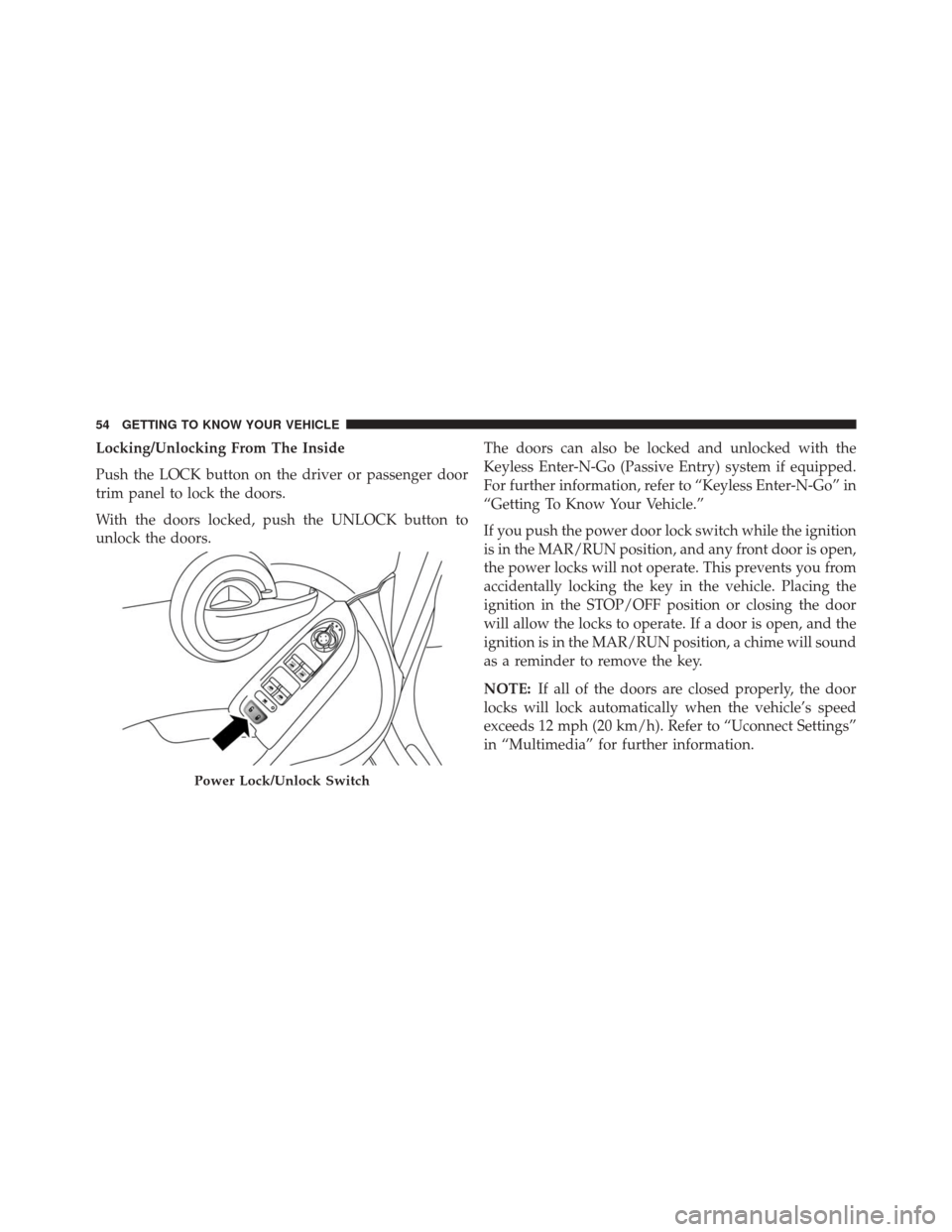
Push the LOCK button on the driver or passenger door
trim panel to lock the doors.
With the doors locked, push the UNLOCK button to
unlock the doors.The doors can also be locked and unlocked with the
Keyless Enter-N-Go (Passive Entry) system if equipped.
For further information, refer to “Keyless Enter-N-Go” in
“Getting To Know Your Vehicle.”
If you push the power door lock switch while the ignition
is in the MAR/RUN position, and any front door is open,
the power locks will not operate. This prevents you from
accidentally locking the key in the vehicle. Placing the
ignition in the STOP/OFF position or closing the door
will allow the locks to operate. If a door is open, and the
ignition is in the MAR/RUN position, a chime will sound
as a reminder to remove the key.
NOTE:
If all of the doors are closed properly, the door
locks will lock automatically when the vehicle’s speed
exceeds 12 mph (20 km/h). Refer to “Uconnect Settings”
in “Multimedia” for further information.
Power Lock/Unlock Switch
54 GETTING TO KNOW YOUR VEHICLE
Page 57 of 587
Keyless Enter-N-Go
The Passive Entry system is an enhancement to the
vehicle’s Remote Keyless Entry (RKE) system and a
feature of Keyless Enter-N-Go. This feature allows you to
lock and unlock the vehicle’s door(s) without having to
push the RKE transmitter LOCK or UNLOCK buttons.
NOTE:
•Passive Entry can be enabled or disabled. Refer to
“Uconnect Settings” in “Multimedia” for further infor-
mation.
• If wearing gloves on your hands, or if it has been
raining on the Passive Entry door handle, the unlock
sensitivity can be affected, resulting in a slower re-
sponse time. •
If the vehicle is unlocked by the Passive Entry Door
Handle, and no door goes ajar within 60 seconds, the
vehicle will re-lock and if equipped, the security alarm
will arm.
To Unlock From The Driver’s Side
With a valid Passive Entry RKE transmitter within 5 ft
(1.5 m) of the driver’s door handle, grab the front driver
door handle to unlock the driver’s door automatically.
4
GETTING TO KNOW YOUR VEHICLE 55
Page 61 of 587
Emergency Unlocking Driver Door
If the Remote Keyless Entry (RKE) transmitter battery is
low or dead, the emergency key can be used to unlock the
driver side door lock cylinder.
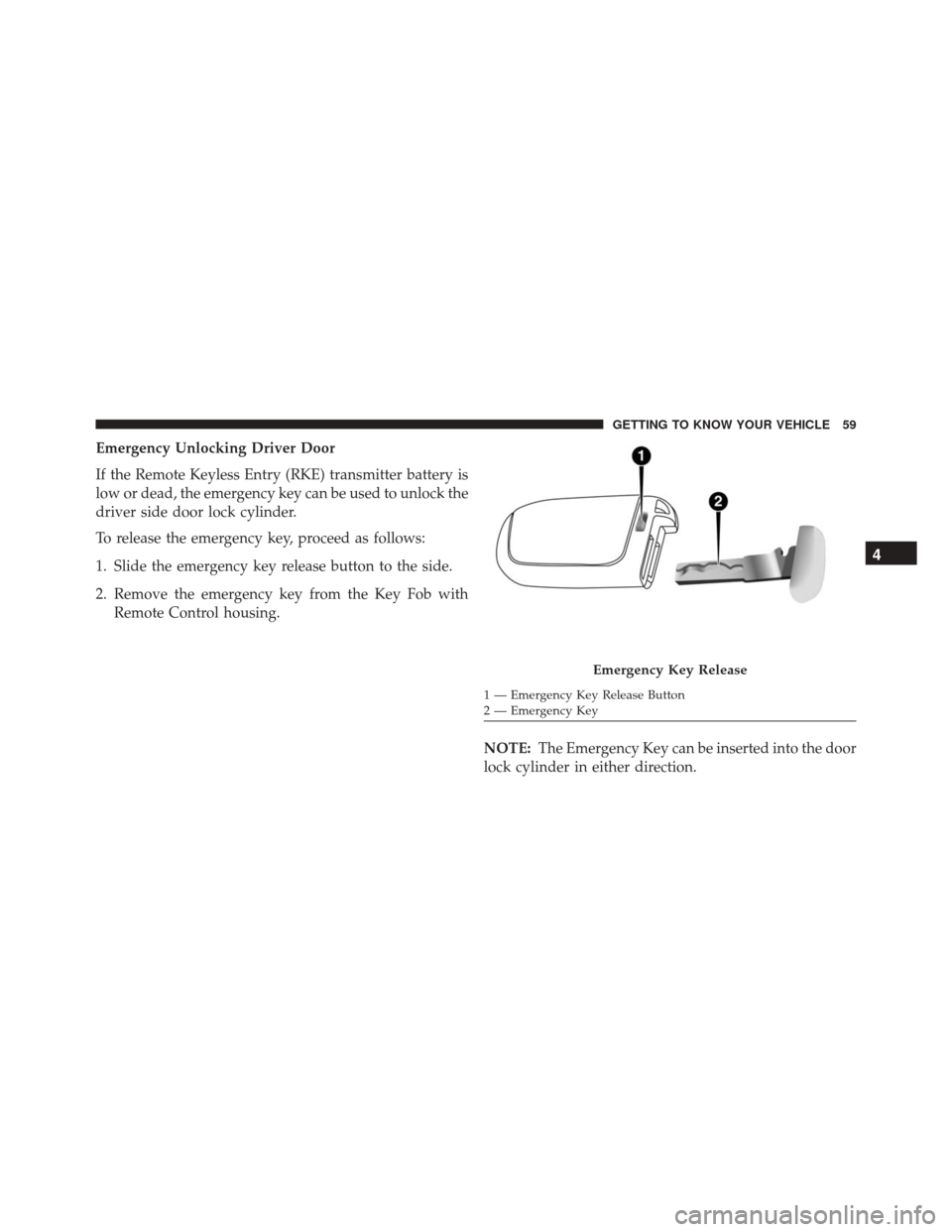
To release the emergency key, proceed as follows:
1. Slide the emergency key release button to the side.
2. Remove the emergency key from the Key Fob withRemote Control housing.
NOTE:The Emergency Key can be inserted into the door
lock cylinder in either direction.
Emergency Key Release
1 — Emergency Key Release Button
2 — Emergency Key
4
GETTING TO KNOW YOUR VEHICLE 59
Page 62 of 587
WARNING!
•Never leave children alone in a vehicle, or with
access to an unlocked vehicle. Allowing children to
be in a vehicle unattended is dangerous for a
number of reasons. A child or others could be
severely injured or killed. Children should be
warned not to touch the parking brake, brake
pedal, or the gear selector. Do not leave the Key Fob
in or near the vehicle, or in a location accessible to
children, and do not leave the ignition of a vehicle
equipped with Keyless Enter- N-Go in the MAR/
RUN mode. A child could start the vehicle, operate
power windows, other controls, or move the ve-
hicle.
• Do not leave children or animals inside parked
vehicles in hot weather. Interior heat build-up may
cause them to be severely injured or killed. To Unlock/Enter The Liftgate
The liftgate Passive Entry unlock feature is built into the
electronic liftgate release. With a valid Passive Entry RKE
transmitter within 3 ft (1.0 m) of the liftgate, push the
Electronic Liftgate release to open with one fluid motion.
Electronic Liftgate Release Button
60 GETTING TO KNOW YOUR VEHICLE
Page 63 of 587
NOTE:If “Unlock All Doors 1st Press” is programmed in
EVIC/DID, if equipped, all doors will unlock when you
push the Electronic Release. If �Unlock Driver Door 1st
Press� is programmed in Uconnect, the liftgate will
unlock when you push the electronic lock/unlock button
on the liftgate. For further information, refer to
“Uconnect Settings” in “Multimedia.”
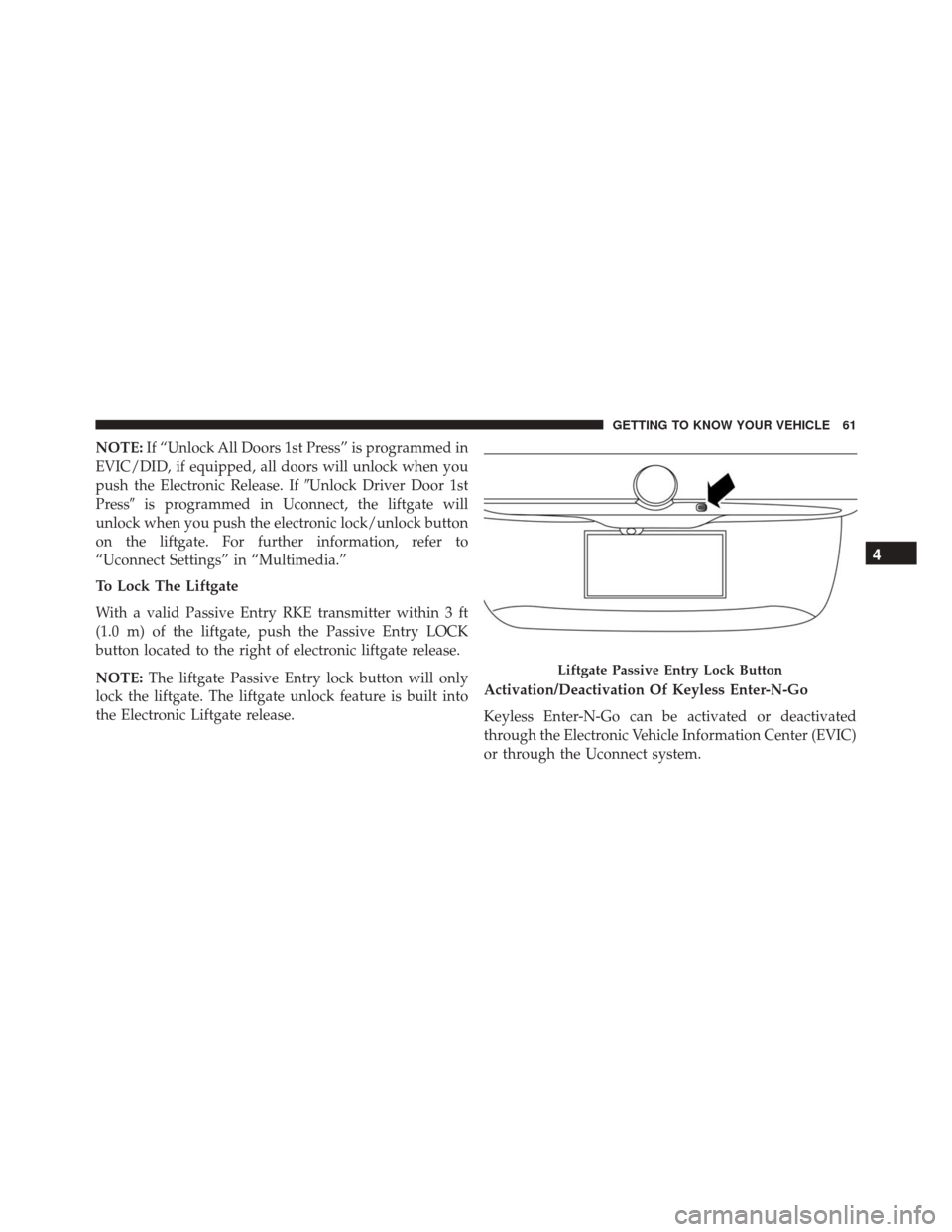
To Lock The Liftgate
With a valid Passive Entry RKE transmitter within 3 ft
(1.0 m) of the liftgate, push the Passive Entry LOCK
button located to the right of electronic liftgate release.
NOTE: The liftgate Passive Entry lock button will only
lock the liftgate. The liftgate unlock feature is built into
the Electronic Liftgate release. Activation/Deactivation Of Keyless Enter-N-Go
Keyless Enter-N-Go can be activated or deactivated
through the Electronic Vehicle Information Center (EVIC)
or through the Uconnect system.
Liftgate Passive Entry Lock Button
4
GETTING TO KNOW YOUR VEHICLE 61
Page 527 of 587
•Auto High Beams — If Equipped
When this feature is selected, the high beam headlights
will activate/deactivate automatically under certain con-
ditions. To make your selection, press the “Auto High
Beams” button on the touchscreen, then select from “On”
or “Off.”
• Daytime Running Lights
When this feature is selected, the headlights will turn on
while the engine is running. To make your selection,
press the “Daytime Running Lights” button on the touch-
screen, then choose “Yes” or “No.” The button will
highlight indicating that the setting has been selected.
• Cornering Lights
When this feature is selected, if the steering wheel
rotation angle is large or the turn signal indicators are on,
a light (incorporated in the fog light) will turn on, on the
relevant side to improve visibility at night. To change the Cornering Lights setting, press the “On” or “Off” button
on the touchscreen to select your desired Cornering
Lights setting.
•
Flash Lights With Lock — If Equipped
When this feature is selected, the exterior lights will flash
when the doors are locked or unlocked with the Remote
Keyless Entry (RKE) transmitter. This feature may be
selected with or without the Sound Horn on Lock feature
selected. To make your selection, press the “Flash Lights
w/Lock” button on the touchscreen, then choose “On” or
“Off.”
Doors & Locks
After pressing the “Doors & Locks” button on the touch-
screen the following settings will be available.
• Auto Door Locks
When this feature is selected, all doors will lock auto-
matically when the vehicle reaches a speed of 12 mph
11
MULTIMEDIA 525
Page 528 of 587
(20 km/h). To make your selection, press the “Auto Door
Locks” button on the touchscreen and select from “On”
or “Off.”
•Auto Unlock On Exit
When this feature is selected, all doors will unlock when
the vehicle is stopped and the transmission is in the
PARK or NEUTRAL position and the driver’s door is
opened. To make your selection, press the “Auto Unlock
on Exit” button on the touchscreen and select from “On”
or “Off.”
• Flash Lights With Lock
When this feature is selected, the exterior lights will flash
when the doors are locked or unlocked with the Remote
Keyless Entry (RKE) transmitter or the Passive Entry
Feature. To make your selection, press the “Flash Lights
w/Lock” button on the touchscreen and select from “On”
or “Off.” •
Horn With Lock
When this feature is selected, the horn will sound when
the Key Fob Lock button is pressed. To make your
selection, press the “Horn w/Lock” button on the touch-
screen and select from �Off,” “1st Press,” or “2nd Press”
• Horn With Remote Start — If Equipped
Press the “Horn w/Remote Start” button on the touch-
screen to change this display. When this feature is se-
lected, the horn will sound when the remote start is
activated. To make your selection, press the “Sound Horn
With Remote Start” button on the touchscreen and select
“ON” or “OFF.”
• Passive Entry
This feature allows you to lock and unlock the vehicle’s
door(s) without having to press the Remote Keyless
Entry (RKE) transmitter lock or unlock buttons. To make
your selection, press the “Passive Entry” button on the
526 MULTIMEDIA