2016 Citroen C1 RHD all
[x] Cancel search: allPage 2 of 268

On-line handbook
If the "MyCITROËN" function is not available on the CITROËN public\
website for your country,
you can find your handbook at the following address:
http://service.citroen.com/ddb/ Find your handbook on the CITROËN website, under "MyCITROËN".
Select:
Select
one
of
the
following
means
of
access
to
view
your
handbook
on-line...
This personal and customisable space allows you to establish direct and special contact with
the manufacturer
.
the language,
the
vehicle, its body style,
the
print edition of your handbook appropriate for the date of registration of your vehicle.
Scan
this code for direct access to your handbook.
Referring
to
the
handbook
on-line
also
gives
you
access
to
the
latest
information
available,
easily
identified
by
the
bookmark,
associated
with
this
symbol:
Page 3 of 268

Keysafety warning
additional
in
formation
contributes
to the protection of the environment
CITROËN has a presence on every continent,
a complete product range,
bringing
together technology and a permanent spirit of innovation,
for
a modern and creative approach to mobility.
We
thank you and congratulate you on your choice.
Happy motoring!
At the wheel of your new vehicle,
getting to know each system,
each
control, each setting,
makes
your trips, your journeys
more
comfortable and more enjoyable.
This handbook has been designed to help to make the most of your C1 in all circumstances and in complete
s
afety.
Take
the time to read through it so as to familiarise
y
ourself with your vehicle.
This
handbook covers all of the variations in equipment
a
vailable across the whole C1 range.
Your
vehicle will be fitted with only some of the
e
quipment described in this document, depending on its
t
rim level, version and the specification for the country in
w
hich it was sold.
The
descriptions and illustrations are given as indications
o
n l y.
Automobiles
CITROËN reserves the right to modify the
t
echnical characteristics, equipment and accessories
w
ithout having to update this edition of the handbook.
This
document forms an integral part of your vehicle.
R
emember to pass it on to the new owner in the event of
t
he sale of the vehicle.
Page 11 of 268
9
Optimise the use of your gearbox
With a manual gearbox, move off gently and change up without waiting. During acceleration change up early.
With
an ETG electronic gearbox, give preference to automatic (Easy)
m
ode and avoid pressing the accelerator pedal heavily or suddenly.
Control the use of your electrical
equipment
Before moving off, if the passenger compartment is too warm, ventilate it by opening the windows and air vents before using the air conditioning.
Above
30 mph (50 km/h), close the windows and leave the air vents
ope
n.
Remember
to make use of equipment that can help keep the
t
emperature in the passenger compartment down (sunroof and window
b
linds...).
Switch
off the air conditioning, unless it has automatic regulation, as
s
oon as the desired temperature is attained.
Switch
off the demisting and defrosting controls, if not automatic.
Switch
off the heated seat as soon as possible.
Switch
off the headlamps and front foglamps when the level of light
d
oes not require their use.
Avoid
running the engine before moving off, particularly in winter; your
v
ehicle will warm up much faster while driving.
As
a passenger, if you avoid connecting your multimedia devices
(
film, music, video game...), you will contribute towards limiting the
c
onsumption of electrical energy, and so of fuel.
Disconnect
your portable devices before leaving the vehicle.
Eco-driving
Eco-driving is a range of everyday practices that allow the motorist to optimise their fuel consumption and CO2 emissions.
The
gear
shift
indicator
invites
you
to
engage
the
most
suitable
gear:
a
s
soon
as
the
indication
is
displayed
in
the
instrument
panel,
follow
it
s
traight
away.
For
vehicles
fitted
with
an
ETG
electronic
gearbox,
this
indicator
a
ppears
only
in
manual
mode.
Drive smoothly
Maintain a safe distance between vehicles, use engine braking rather t han the brake pedal, and press the accelerator progressively. These
p
ractices contribute towards a reduction in fuel consumption and CO
2
emissions
and
also
helps
reduce
the
background
traffic
noise.
.
Eco-driving
Page 17 of 268

15
Indicator and warning lamps
Certain warning lamps may come on in one of two modes: fixed (continuous) or
f
lashing.
Only
by relating the type of illumination
t
o the operation of the vehicle can it
be
determined whether the situation is
n
ormal or a fault has occurred.
Refer
to the tables in the following
p
ages
f
or
m
ore
i
nformation.
Visual
indicators
informing
the
driver
that
a
system
is
in
operation
or
is
switched
off
(indicator
lamp)
or
has
a
fault (warning lamp).When the ignition is switched on
Certain warning lamps come on for a few s
econds in the instrument panel when the
v
ehicle's ignition is switched on.
When the engine is star ted, these same
warning lamps should go off.
If
they remain on, before moving off, refer to the
i
nformation on the warning lamp concerned.
Associated warnings
The illumination of certain warning lamps may be accompanied by an audible signal.
The
warning lamps may come on continuously
(
fixed) or flash.
Warning lamps
STOP flashing, associated w
ith another warning
lam
p.It
is associated with the engine o
il pressure or the engine coolant
t
emperature.Stop
as soon as it is safe to do so.
Park, switch off the ignition and call a CITROËN
d
ealer or qualified workshop.
When
the engine is running or the vehicle is being driven, illumination of one of the following warning lamps indicates a fault which requires action on
t
he
part
of the driver.
Any
fault
resulting in the illumination of a warning lamp must be investigated further.
If
you
encounter any problems, do not hesitate to contact a CITROËN dealer or a qualified workshop.
Warning
/ indicator lamp
State Cause Action
/ Observations
1
Instruments
Page 24 of 268

22
Parking brakefixed, accompanied by a
n audible signal.The
parking brake is applied or not p
roperly r eleased.Release
the parking brake to switch off the warning l
amp, keeping your foot on the brake pedal.
Observe
the safety recommendations.
For
more information on the parking brake, refer to the
c
orresponding
s
ection.
Warning
/ indicator lamp
State Cause Action
/ Observations
Passenger's
front airbag fixed
in the seat belt
a
nd passenger's front
a
irbag
w
arning
lam
ps
d
isplay. The
control switch, located in the
g
love box, has been placed in
t
he "ON"
p
osition.The
passenger's front airbag is activated.
In
this case, do not install a rear ward facing child seat.
Stop & Star t
(VTi 68 S&S
engine) fixed.
When
the vehicle stops (red lights,
t
raffic jams...) the Stop & Start system
h
as put the engine into STOP mode.The
indicator lamp goes off and the engine restarts
a
utomatically in START mode, as soon as you want to
m
ove off.
Keyless Entr y
and Starting
system fixed.
The
conditions for starting are met. For more information, refer to the "Starting - switching
o
ff the engine with the Keyless Entry and Starting
s
ystem" section.
flashing
s
lowly.The
vehicle is in "ACC" mode.
The
accessories (audio system,
1
2V socket...) can be used.
Instruments
Page 26 of 268

24
Passenger's
front airbagfixed,
in the seat belt a
nd front passenger's
a
irbag
w
arning
lam
ps
d
isplay. The
control switch, located in the g
love box, is set to the OFF p osition.The
passenger's front airbag is deactivated.
You can install a rear ward facing child seat on the
f
ront seat unless there is a fault with the airbags
(
Airbag warning lamp on).
Traction control
(TRC) fixed.
A
brief press has been made on the
b
utton.
The
traction control (TRC) system is
d
eactivated.Press
the button to activate the system.
The
TRC system is activated automatically when the
v
ehicle is started.
If
deactivated, the system is reactivated automatically
f
rom around 30 mph (50 km/h).
For
more information, refer to the corresponding
s
ection.
Dynamic
stability control
(DSC) fixed.
Vehicle stationary, the button
has
been pressed for more than
3 s
econds.
The
traction control (TRC) and
d
ynamic stability control (DSC)
s
ystems are deactivated.Press
this button to activate the systems.
The
DSC system is activated automatically when the
v
ehicle is started.
For
more information, refer to the corresponding
s
ection.
Warning
/ indicator lamp
State Cause Action
/ Observations
Deactivation indicator lamps
If one of the following indicator lamps comes on, this confirms that the corresponding system has been switched off intentionally.
T his may be accompanied by an audible signal.
Instruments
Page 29 of 268

27
Trip computer
System that gives you information on the journey in progress (range, fuel consumption…).
Information display
F Press one of theses buttons to display the v
arious trip computer tabs in turn:
-
T
he total distance.
-
T
he trip "A".
-
T
he trip "B".
-
T
he Stop & Start partial time counter*.
-
T
he Stop & Start global time counter*.
-
T
he ambient temperature*.
-
T
he current fuel consumption.
-
T
he average fuel consumption.
-
T
he remaining range.
-
T
he average speed.
-
T
he lighting dimmer.
Trip reset
F When the trip required is displayed, press o
ne of the two " DISP"
buttons for more
t
han two seconds.
Tr i p s "A"
and "B"
are independent but their
u
se is identical.
For
example, trip "A"
can be used for daily
f
igures, and trip "B"
for monthly figures.
* Depending
on version.
Ambient temperature
In certain situations, the ambient temperature may only be displayed after a delay or not at all,
in par
ticular:
-
w
hen stationary or at low speed (less than
a
bout 16 mph (25 km/h),
-
where there is too much variation in temperature (
entering or leaving a garage, a tunnel...),
- during very short journeys (less than about 2
minutes).
Lighting dimmer
When driving at night, this function allows certain displays in the instrument panel to be
s
witched off to reduce visual fatigue for the
d
river.
It
operates only when the sidelamps are on.
F
W
hen the "Lighting dimmer" menu
i
s displayed, press and hold one of
t
he "DISP " buttons for access to the
adjustment.
F
T
hen make repeated presses on one of the
t
wo "DISP "
buttons to increase or reduce
t
he brightness.
T
he display flashes to show you the
b
rightness chosen.
1
Instruments
Page 30 of 268
28
With the touch screen tablet
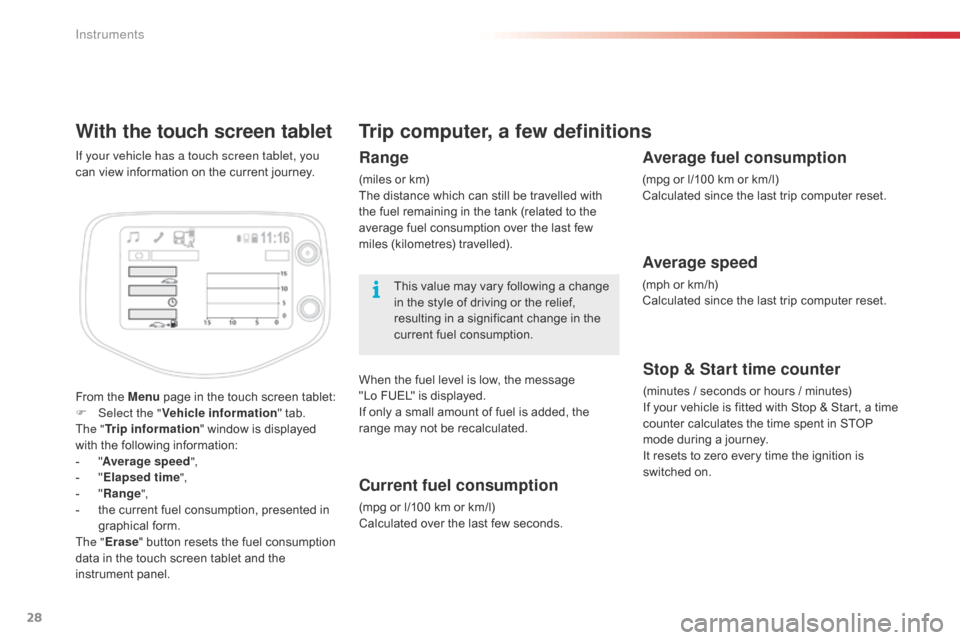
From the Menu page in the touch screen tablet:
F Sel ect the " Vehicle information "
tab.
The " Trip information "
window is displayed
w
ith the following information:
-
"A
verage speed ",
-
" E
lapsed time ",
-
" R
ange",
-
t
he current fuel consumption, presented in
g
raphical
fo
rm.
The " Erase "
button resets the fuel consumption
d
ata in the touch screen tablet and the
in
strument
pan
el.
If your vehicle has a touch screen tablet, you
can
view information on the current journey.
Trip computer, a few definitions
Range
(miles or km)
T he distance which can still be travelled with
t
he fuel remaining in the tank (related to the
a
verage fuel consumption over the last few
m
iles
(
kilometres)
t
ravelled).
This
value may vary following a change
i
n the style of driving or the relief,
r
esulting in a significant change in the
c
urrent fuel consumption.
When
the fuel level is low, the message
"
Lo FUEL" is displayed.
If
only a small amount of fuel is added, the
r
ange may not be recalculated.
Current fuel consumption
(mpg or l/100 km or km/l)
C alculated over the last few seconds.
Stop & Start time counter
(minutes / seconds or hours / minutes)
I f your vehicle is fitted with Stop & Start, a time
c
ounter calculates the time spent in STOP
m
ode during a journey.
It
resets to zero every time the ignition is
s
witched on.
Average fuel consumption
(mpg or l/100 km or km/l)
C alculated since the last trip computer reset.
Average speed
(mph or km/h)
C alculated since the last trip computer reset.
Instruments