2016 Citroen C1 RHD all
[x] Cancel search: allPage 67 of 268

65
It permits the connection of a portable device to listen to your music files via the vehicle's
s
peakers.
The
management of the files is done using your
p
ortable
d
evice.
It
permits
the
connection
of
a
portable
device,
s
uch
as
a
digital
audio
player
of
the
iPod® type
or
USB
memory
stick.
It
reads
the
audio
files,
which
are
sent
to
your
a
udio
system
to
be
heard
via
the
vehicle's
s
peakers.
You
can
manage
these
files
using
the
steering
m
ounted
controls
or
those
on
the
audio
system
c
ontrol
panel.
Auxiliary socket
USB port
For more information on the use of t
his equipment, refer to the "Audio and
t
elematics"
se
ction.
For
more
information
on
the
use
of
t
his
equipment,
see
the
"Audio
and
t
elematics"
se
ction.
Connected
to
the
USB
port,
the
p
ortable
device
charges
automatically
w
hile
in
use. The
USB port and auxiliary Jack socket
a
lso allow connection of a smartphone.
-
e
ither by MirrorLink
TM connection
using
the
USB
port
only,
-
o
r
by
iPhone
® connection using b
oth
the
USB
port and the auxiliary
J
ack
socket.
These connections allow you to use
certain applications on the telephone in
the
touch
screen
tablet.
3
Ease of use and comfort
Page 68 of 268

66
To remove the mat on the driver's side:
F m ove the seat as far back as possible,
F
u
nclip the fixings,
F
r
emove the mat.
Mats
When fitting the mat for the first time, on the driver's side use only the fixings provided in the
w
allet attached.
The
other mats are simply placed on the
c
arpet. To
avoid any risk of jamming of the
ped
als:
-
o
nly use mats which are suited to
t
he fixings already present in the
v
ehicle; these fixings must be used,
-
n
ever fit one mat on top of another.
The
use of mats not approved by
C
ITROËN may inter fere with access
t
o the pedals and hinder the operation
o
f the speed limiter or ETG electronic
g
earbox.
To
refit the mat on the driver's side:
F
p
osition the mat correctly,
F
r
efit the fixings by pressing,
F
c
heck that the mat is secured correctly.
Fitting
Removal
Refitting
Ease of use and comfort
Page 72 of 268

70
A few driving recommendations
Observe the driving regulations at all times and remain vigilant whatever the traffic conditions.
Pay
close attention to the traffic and keep your
h
ands on the wheel so that you are ready to
r
eact at any time to any eventuality.
On
a long journey, a break every two hours is
s
trongly
re
commended.
In
difficult weather, drive smoothly, anticipate
t
he need to brake and increase the distance
f
rom other vehicles. Never
drive with the parking brake
a
pplied - Risk of overheating and
d
amage to the braking system!
Do
not park or run the engine when
s
tationary in areas where inflammable
s
ubstances and materials (dry grass,
d
ead leaves...) might come into
c
ontact with the hot exhaust system -
R
isk of fire!
Never
leave a vehicle unsupervised
w
ith the engine running. If you have
t
o leave your vehicle with the engine
r
unning, apply the parking brake
a
nd put the gearbox into neutral or
p
osition
N,
depending on the type of
g
earbox.
Driving on flooded
roads
We strongly advise against driving on flooded roads, as this could cause serious damage
t
o the engine or gearbox, as well as to the
e
lectrical systems of your vehicle.
Important!If you are obliged to drive through water:
-
c
heck that the depth of water does not
e
xceed 15 cm, taking account of waves
t
hat might be generated by other users,
-
d
eactivate the Stop & Start system,
-
d
rive as slowly as possible without
s
talling. In all cases, do not exceed 6 mph
(
10 km/h),
-
d
o not stop and do not switch off the
e
ngine.
On
leaving the flooded road, as soon as
c
ircumstances allow, make several light brake
a
pplications to dry the brake discs and pads.
If
in doubt on the state of your vehicle, contact
a
CITROËN dealer or a qualified workshop.
Driving
Page 73 of 268

71
Starting - switching off the engine with the key
1. "LOCK " position. T
he steering column is unlocked.
2.
" AC
C"
position.
T
he ancillaries (audio system,
1
2V socket...) can be used.
3.
"ON " position
I
gnition on.
4.
" S
TA R T"
position.
E
ngine
s
tarting.
Ignition switch
For vehicle fitted with a manual gearbox:
F I nsert the key in the ignition switch.
F
T
urn the key to position 2.
F
U
nlock the steering column, by turning the
w
heel slightly.
F
F
ully depress the clutch pedal.
F
P
ut the gear lever into neutral.
F
O
perate the starter by turning the key to
p
osition 4 (S TA R T ) .
F
O
nce the engine is running, release
t
he key.
The key returns automatically to position 3 (ON) .
Starting using the key
For vehicles fitted with an ETG gearbox:
F
I nsert the key in the ignition switch.
F
T
urn the key to position 2.
F
U
nlock the steering column, by turning the
w
heel slightly.
F
P
ress and hold the brake pedal .
F
P
ut the gear selector into position N.
F
O
perate the starter by turning the key to
p
osition 4 (S TA R T ) .
F
O
nce the engine is running, release
t
he key.
The key returns automatically to position 3 (ON) .
If you use the ancillaries for a prolonged p
eriod (key in position 2 or 3),
you risk
d
ischarging the battery. Starting your
v
ehicle will then no longer be possible.
B
e aware.
Never
leave
the
engine
running
in
a
n
enclosed
area
without
adequate
v
entilation:
in
ternal
c
ombustion
e
ngines
emit
toxic
exhaust
gases,
s
uch
as
carbon
monoxide.
Danger
of
i
ntoxication
and
death.
In
very
severe
w
inter
conditions
(temperatures
b
elow -23°C),
it
is
necessary
to
allow
t
he
engine
to
run
for
4
minutes
before
s
etting
off,
in
order
to
ensure
the
c
orrect
operation
and
durability
of
t
he
mechanical
components
of
your
v
ehicle,
the
engine
and
gearbox.
4
Driving
Page 74 of 268

72
If you use the ancillaries for a prolonged period, the vehicle will automatically
s
witch to " OFF"
mode after about
2
0 minutes.
Be aware
in order to avoid discharging
t
he battery.
Starting - switching off the engine
w ith the Keyless Entry and Starting
system
Changing the mode of the
vehicle
With the electronic key inside the v
ehicle; each press on the "S TA R T/
STOP " button, with no action on the
pedals,
changes the vehicle's mode:
F
F
irst
press ("ACC "
mode).
T
he
ancillaries (radio, 12V socket...) can
be
used.
F
S
econd press ("ON "
mode).
I
gnition on.
F
T
hird
press ("OFF "
mode).
Avoid
attaching
heavy
objects
to
the
k
ey,
which
would
weigh
down
on
its
b
lade
in
the
ignition
switch
and
could
c
ause
a
malfunction.
F
I
mmobilise
the
vehicle.
Switching off
F With
a manual gearbox: put the gear lever i
nto neutral.
F
W
ith an ETG gearbox: place the selector at
p
osition N .
F
T
urn the key towards you to position 2 (ACC).
F
Press in and turn the key to position 1 (LOCK) .F Remove the key from the ignition switch.
F T urn the steering until the steering column
l
ocks.
Driving
Page 81 of 268

79
Temporarily taking control of
gear changes
You can temporarily take control of gear changes using the "+" and "-" steering
m
ounted control paddles.
Gear
change commands are only acted on if
t
he engine speed allows. There is an audible
s
ignal if a command is not accepted.
The
gear engaged is displayed in the
in
strument
pan
el.
This function allows you to anticipate certain
situations
such as overtaking a vehicle or
a
pproaching a corner.
After
a few moments with no action on the
c
ontrols, the gearbox returns to automatic
c
ontrol of the gears. It
is possible to change mode at any time, by
m
oving the gear selector from position E to
position M
and the other way round.
Never select neutral N when the vehicle
is
moving.
F
P
lace the gear selector in position M
.
F
C
hange up or down using:
- t he gear selector, pushing:
- b ack, "+" to change up,
-
f
or ward, "-"
to change down.
-
o
r the "+" or "-"
steering mounted
c
ontrol paddle.
The
gear engaged is displayed.
Gear
change commands are only acted on if
t
he engine speed allows.
It is not necessary to release the accelerator
peal
during gear changes. There is an audible
s
ignal if a command is not accepted.
When
braking or slowing down, the gearbox
a
utomatically changes down so that pick-up is
i
n the right gear.
Manual mode
Under sharp acceleration, the gearbox will not change up without action by the driver on
t
he gear selector or steering mounted control
p
addles (unless the engine speed is close to
m
aximum).
To
engage reverse, the vehicle must be
s
tationary with your foot on the brake pedal.
F
Sel
ect position R .
Reverse
There is an audible signal on engaging reverse.
4
Driving
Page 82 of 268

80
The vehicle can be stopped whatever the position of the gear selector (N , E or R ).
However,
there is an audible signal on opening
t
he driver's door if the gear selector is not at
p
osition N .
Switching off
When the vehicle is stopped with the e
ngine running, always put the gear
s
elector to neutral N .
There
is a continuous audible signal
i
f you turn the ignition switch to "OFF "
with
the vehicle in 2
nd, 3rd, 4th or 5th ge a r.
In
this
case
return
the
ignition
switch
t
o " ON ",
move
the
gear
selector
to
p
osition
N , then to position E , M or R,
then
turn
the
ignition
switch
to
" OFF ".
On
a
slope,
use
the
brakes
to
i
mmobilise
the
vehicle
and
place
the
g
ear
selector
in
position
N , E or R . With
the ignition on, illumination
o
f this warning lamp indicates a
g
earbox fault.
Contact a CITROËN dealer or a
q
ualified
w
orkshop.
Operating faults
In all cases, it is essential
that you
apply the parking brake to immobilise
t
he vehicle.
Before
doing anything under the
b
onnet, check that the gear selector is
i
n neutral N and the parking brake is
a
pplied.
Limits of operation
On a gradient, or when hill start assist is activated, n ever hold the vehicle using the
accelerator :
you could damage the clutch.
In
these situations there is an audible signal.
F
M
ove the gear selector to position N.
F
W
ait 15 minutes to allow the clutch to cool
d
own before setting off. -
c
heck that the ignition switch is at the
"
O
N
"
position,
-
p
lace the gear selector at N
, then move it
t
o E
, M or R .
If 1 is flashing in the instrument panel:
- p lace the gear selector at E or M
, then
move it to N.
If R
is flashing in the instrument panel:
-
p
lace the gear selector at R,
then move it
t
o N.
If
N is flashing in the instrument panel
a
ccompanied by an audible signal for a long time:
Driving
Page 84 of 268
82
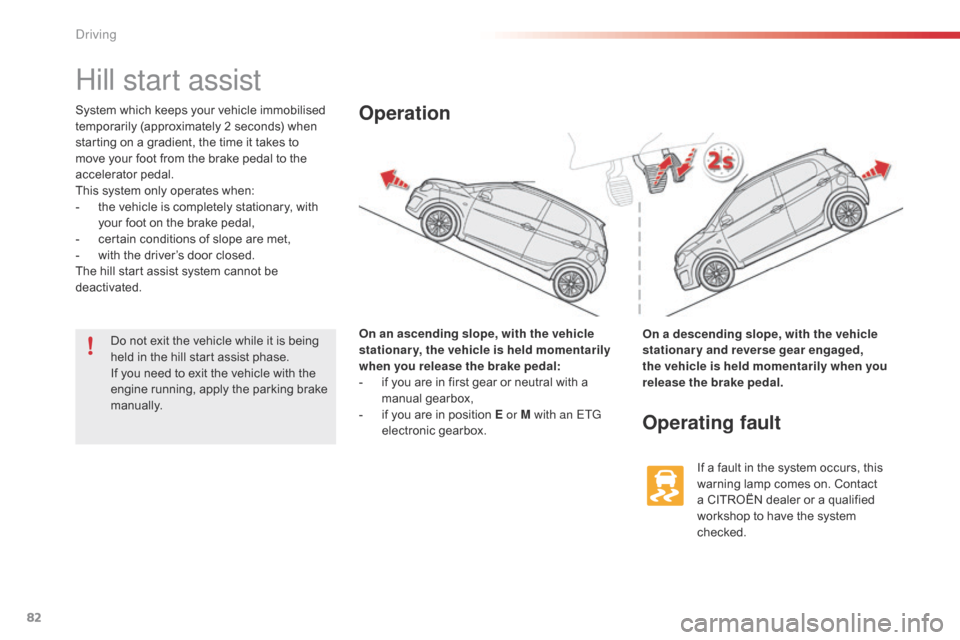
Hill start assist
System which keeps your vehicle immobilised temporarily (approximately 2 seconds) when
s
tarting on a gradient, the time it takes to
m
ove your foot from the brake pedal to the
a
ccelerator
ped
al.
This
system only operates when:
-
t
he vehicle is completely stationary, with
y
our foot on the brake pedal,
-
c
ertain conditions of slope are met,
-
w
ith the driver’s door closed.
The
hill start assist system cannot be
d
eactivated. On an ascending slope, with the vehicle
stationary, the vehicle is held momentarily
when you release the brake pedal:
-
i
f you are in first gear or neutral with a
m
anual
g
earbox,
-
i
f you are in position E or M with an ETG
electronic
ge
arbox.Operation
On a descending slope, with the vehicle
stationary and reverse gear engaged,
the vehicle is held momentarily when you
release the brake pedal.
Operating fault
If a fault in the system occurs, this warning lamp comes on. Contact
a
CITROËN dealer or a qualified
w
orkshop to have the system
c
hecked.
Do
not
exit
the
vehicle
while
it
is
being
h
eld
in
the
hill
start
assist
phase.
If
you
need
to
exit
the
vehicle
with
the
e
ngine
running,
apply
the
parking
brake
m
anually.
Driving