2016 Citroen C1 RHD all
[x] Cancel search: allPage 103 of 268

101
Automatic illumination of
headlamps
Switching on
F Turn the ring to the "AUTO " position.
Using
a
sunshine
sensor,
if
a
low
level
of
a
mbient
light
level
is
detected,
the
sidelamps
a
nd
dipped
beam
headlamps
come
on
a
utomatically,
without
any
action
by
the
driver.
When
the
ambient
light
returns
to
a
sufficient
l
evel
or
the
wipers
are
switched
off,
the
lighting
i
s
switched
off
automatically.
The
sensor
is
located
at
the
base
of
the
w
indscreen.
Switching off
F Turn the ring to another position.
In foggy weather or in snow, the
s
unshine sensor may detect sufficient
l
ight. The lighting will not come on
au
tomatically.
Do not cover the sunshine sensor, the
associated
functions will no longer be
c
ontrolled.
5
Lighting and visibility
Page 108 of 268

106
Horn
Audible warning to alert other road users to an imminent d anger.
When
manoeuvring the vehicle,
t
ake care not to operate the horn
u
nintentionally.
F
P
ress one of the steering wheel spokes.F
P
ress the central part of the steering
w
heel.
Hazard warning lamps
Visual warning with of all the direction i
ndicators flashing to alert other road users to a
v
ehicle breakdown, towing or accident.
F
P
ress this button, all of the direction
in
dicators
f
lash.
They
can operate with the ignition off.
Safety
Page 109 of 268
107
Electronic Stability Control (ESC) incorporating the following systems:
-
a
nti-lock braking system (ABS) and the
e
lectronic brake force distribution (EBFD),
-
em
ergency
b
raking
a
ssistance,
-
t
raction control (TRC),
-
d
ynamic stability control (DSC).
Electronic stability control (ESC)
Definitions
Anti-lock braking system (ABS)
and electronic brake force
distribution (EBFD)
These systems improve the stability and manoeuvrability of your vehicle when braking
a
nd contribute towards better control in
c
orners, in particular on poor or slippery road
su
rfaces.
The
ABS prevents wheel lock in the event of
em
ergency
b
raking.
The
electronic brake force distribution system
m
anages the braking pressure wheel by wheel.
Emergency braking assistance
In an emergency, this system enables you to reach the optimum braking pressure more
q
uickly and therefore reduce the stopping
di
stance.
It
is triggered according to the speed at which
t
he brake pedal is pressed. This is felt by a
r
eduction in the resistance of the pedal and an
i
ncrease in the effectiveness of the braking.
Traction control (TRC)
This system optimises traction in order to limit wheel slip by acting on the brakes of the driving
w
heels and on the engine. It also improves
t
he directional stability of the vehicle on
a
cceleration.
Dynamic stability control (DSC)
If there is a difference between the path followed by the vehicle and that required by the
d
river, this system monitors each wheel and
a
utomatically acts on the brake of one or more
w
heels and on the engine to return the vehicle
t
o the required path, within the limits of the laws
o
f physics.
6
Safety
Page 110 of 268
108
Illumination of this warning lamp, accompanied by an audible signal,
i
ndicates that there is a fault with the
e
lectronic brake force distribution
(
EBFD), which could cause loss of
c
ontrol of the vehicle when braking.
Operation
Illumination of this warning lamp, accompanied by an audible signal,
i
ndicates that there is a fault with
t
he ABS system, which could cause
l
oss of control of the vehicle when
braking.
Anti-lock braking system (ABS)
and electronic brake force
distribution (EBFD)When changing w heels ( tyres a nd r ims), m
ake sure that these are approved for
y
our vehicle.
Normal
operation of the ABS may make
i
tself felt by slight vibration of the brake
ped
al.
In emergency braking, press
very firmly without releasing
the
pressure.
Yo u must
stop
as
soon
as
it
is
safe
to
do
so.
Contact
a
CITROËN
dealer
or
a
qualified
w
orkshop
as
soon
as
possible.
Dynamic stability control (DSC)
and traction control (TRC)
Activation
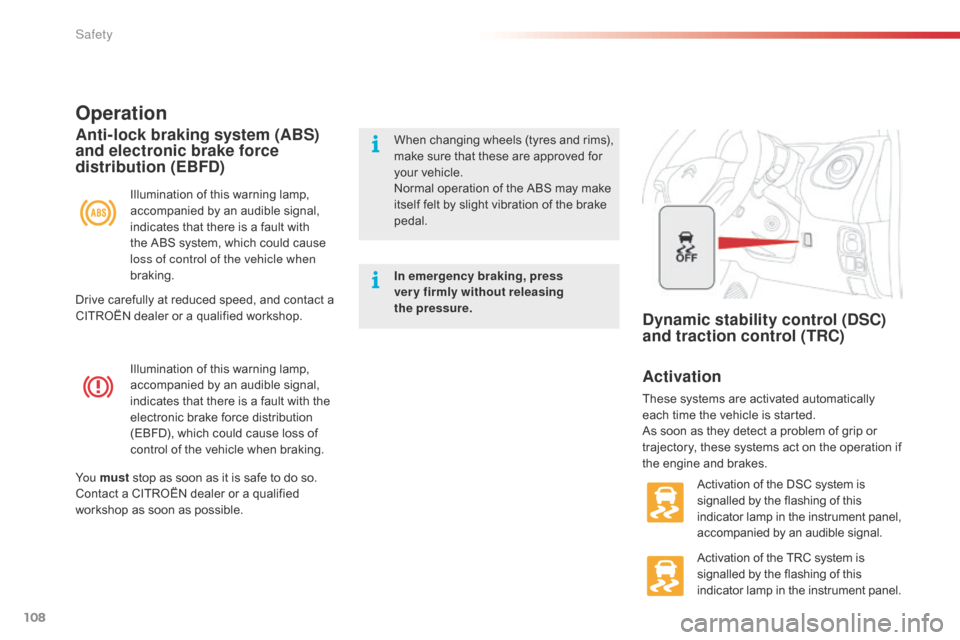
These systems are activated automatically e ach time the vehicle is started.
As
soon as they detect a problem of grip or
t
rajectory, these systems act on the operation if
t
he engine and brakes.
Activation
of the DSC system is
s
ignalled by the flashing of this
i
ndicator lamp in the instrument panel,
a
ccompanied by an audible signal.
Activation
of the TRC system is
s
ignalled by the flashing of this
i
ndicator lamp in the instrument panel.
Drive
carefully
at
reduced
speed,
and
contact
a
C
ITROËN
dealer
or
a
qualified
workshop.
Safety
Page 111 of 268

109
The TRC and DSC systems offer increased safety in normal driving, but
s
hould not encourage the driver to take
e
xtra risks or drive at high speed.
The correct operation of these
systems
depends on observation of
t
he
ma
nufacturer's
r
ecommendations
r
egarding the wheels (tyres and rims),
t
he braking components, the electronic
c
omponents and the assembly and
r
epair procedures used by CITROËN
d
ealers.
After
an impact, have the system
c
hecked by a CITROËN dealer or a
q
ualified
w
orkshop.
Deactivation
In exceptional conditions (starting a vehicle which is bogged down, stuck in snow, on soft
g
round...), it may be advisable to deactivate the
D
SC and TRC systems, so that the wheels can
s
pin freely and regain grip.
Operating fault
However, it is recommended that these systems be reactivated as soon as possible.
F
P
ress this button briefly.
This
warning lamp comes on: the
T
RC system no longer acts on the
o
peration of the engine.
Reactivation
The TRC and DSC control systems are reactivated automatically every time the engine
i
s started. F
P
ress the button again to
r
eactivate it manually. Illumination
of this warning lamp, a
ccompanied by an audible signal,
i
ndicates a fault with the system.
Drive
carefully at reduced speed and contact
a
CITROËN dealer or a qualified workshop to
h
ave the system checked.
Deactivation of the TRC system only
Deactivation of the TRC and DSC systems F
V
ehicle stationary , press this
button
for
at
least
than
3
seconds.
These
warning
lamps
come
o
n:
the
TRC
and
DSC
s
ystems
no
longer
act
on
t
he
operation
of
the
engine. When
the TRC system only is deactivated, it is
r
eactivated as the vehicle's speed increases.
When
both the TRC and DSC systems are
d
eactivated, they do not reactivate themselves
e
ven if the speed of the vehicle increases.
6
Safety
Page 112 of 268

110
Active City Brake
Active City B rake i s a d riving a ssistance s ystem t
hat aims to avoid a frontal collision or reduce
t
he speed of an impact if the driver does not
r
eact or reacts too late (brake application too
l
ate). This
system is designed to improve
d
riving safety.
It
remains the driver's responsibility to
c
ontinuously monitor the state of the
t
raffic and to assess the distances and
r
elative speeds of other vehicles.
Active
City Brake can in no
c
ircumstances replace the need for
v
igilance on the part of the driver.
Never
look at the laser sensor through
a
n optical instrument (magnifying glass,
m
icroscope...) at a distance of less than
1
0 centimetres: risk of eye injury.Automatic
braking occurs later than if
d
one by the driver, so as to intervene
o
nly when there is a high risk of
c
ollision.Principle
Using a laser sensor and a camera located at the top of the windscreen, this system detects
a
vehicle running in the same direction or
s
tationary ahead of your vehicle.
When
necessary, the vehicle's braking system
i
s operated automatically to reduce the speed
o
f impact or to help avoid a collision with the
v
ehicle
a
head.
Conditions for activation
Active City Brake only operates if the following
c onditions are met:
●
t
he engine is running,
●
t
he vehicle is in a for ward gear,
●
t
o trigger the pre-collision alert :
-
t
he speed is between 9 and 87 mph
(
15 and 140 km/h),
-
t
he difference in speed between your
v
ehicle and the one ahead is more than
a
bout 9 mph (15 km/h),
●
f
or braking assistance :
-
t
he speed is between about 18 and
5
0 mph (30 and 80 km/h),
-
t
he difference in speed between your
v
ehicle and the one ahead is more than
a
bout 18 mph (30 km/h),
●
f
or automatic pre-collision braking:
-
t
he speed is between about 6 and
5
0 mph (10 and 80 km/h),
-
t
he difference in speed between your
v
ehicle and the one ahead is more than
a
bout 6 mph (10 km/h),
●
t
he braking assistance systems (ABS,
E
BFD, EBA) are not faulty,
●
t
he trajectory control systems (TRC, DSC)
a
re not deactivated or faulty,
●
t
he vehicle is not in a tight corner,
●
t
he system has not been triggered during
t
he previous 10 seconds.
Safety
Page 113 of 268

111
Operation
Three levels of operation are possible:
● P re-collision alert :
if a risk of collision w
ith a vehicle is detected, a warning lamp
c
omes on in the instrument panel together
w
ith an audible signal to encourage the
d
river to make an avoiding manoeuvre. The
t
hresholds for triggering the alert can be set.
●
Br
aking assistance :
increases the
b
raking started by the driver, only if a risk
o
f collision is detected.
●
A
utomatic pre-collision braking:
when
y
our vehicle is too close to or closing
t
oo quickly on the vehicle ahead of you,
t
he system automatically operates the
b
rakes to reduce the speed of impact. A
c
ollision can be avoided automatically if the
d
ifference in speed between your vehicle
a
nd
t
he
o
ne
a
head
i
s
n
ot
m
ore
t
han
1
8
m
ph
(
30 km/h).You
are then alerted by the display of
t
his warning lamp, accompanied by
a
n audible signal. The
automatic braking may bring the vehicle to a
complete stop if the situation requires it.
The
brake lamps on your vehicle come on to
w
arn other road users. The
triggering of the system may cause
t
he engine to stall, unless the driver
d
epresses the clutch pedal quickly
e
nough during automatic braking.
6
Safety
Page 114 of 268

112
Setting the alert thresholds
Press this button repeatedly to cycle through the thresholds.
The
default setting is "Normal".
The
alert
thresholds determine how you want to be warned of the imminent risk of collision with the
v
ehicle
ahead of you.
You
can
choose one of three thresholds:
A.
"
Far",
to be given early warning (cautious driving).
B.
"
Normal".
C.
"
Close", for a later warning (sporty driving).
Deactivation / Reactivation
Press this button for more than 3 seconds.
P ress the button again to reactivate the system.
The
system is automatically reactivated every
t
ime the engine is started with the key or the
"
START/STOP" button.
This
indicator lamp comes on in the
in
strument
pan
el.
This
indicator lamp comes on in the
i
nstrument panel and the message
"
PCS OFF" is displayed.
Safety