2016 Citroen C1 RHD all
[x] Cancel search: allPage 251 of 268
249
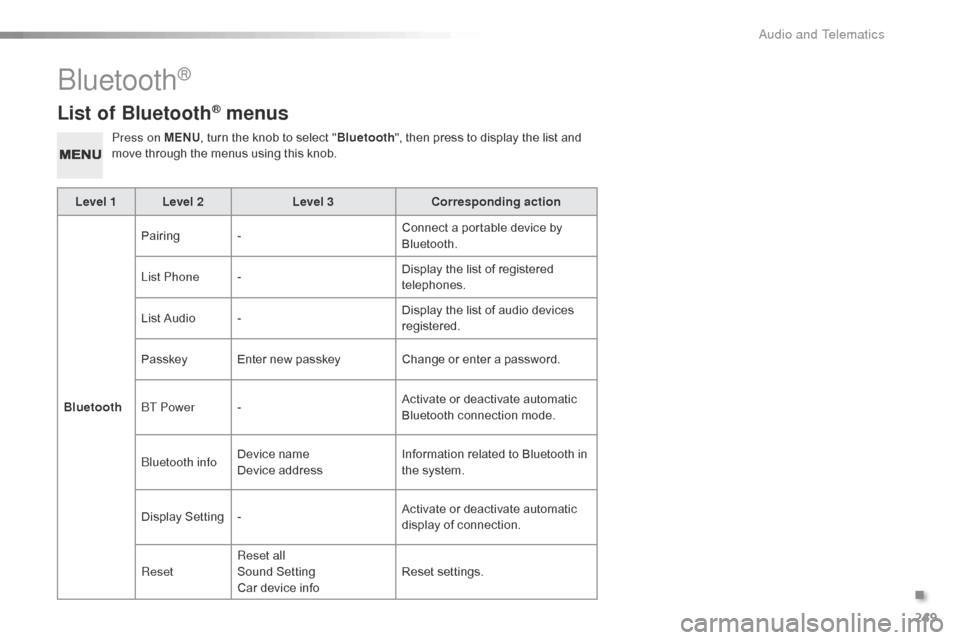
List of Bluetooth® menus
Press on MENU, turn the knob to select "Bluetooth ", then press to display the list and m
ove through the menus using this knob.
Level 1 Level 2 Level 3Corresponding action
Bluetooth Pairing
- Connect
a portable device by
Bl
uetooth.
List Phone - Display
the list of registered
t
elephones.
List
Audio - Display
the list of audio devices
re
gistered.
Passkey Enter
new passkeyChange
or enter a password.
BT Power - Activate
or deactivate automatic
B
luetooth connection mode.
Bluetooth info Device
n
ame
Device
addressInformation
related to Bluetooth in
t
he system.
Display
S
etting- Activate
or deactivate automatic
d
isplay of connection.
Reset Reset all
Sound
S
etting
Car
device infoReset
se
ttings.
Bluetooth®
.
Audio and Telematics
Page 253 of 268

251
The following table groups together the answers to the most frequently asked questions concerning your audio system.
Frequently asked questions
Telephone, Bluetooth®
QUESTIONANSWER SOLUTION
I
cannot connect my
B
luetooth
t
elephone. The
telephone's Bluetooth function may be switched off or the
t
elephone may not be visible. -
C
heck that your telephone's Bluetooth
f
unction is switched on.
-
C
heck in the telephone settings that it is
"
visible to all".
The
Bluetooth telephone is not compatible with the system.You
can check the compatibility of your
t
elephone at www.citroen.co.uk (services).
The
volume of the
t
elephone
c
onnected
i
n
Bluetooth mode is
ina
udible. The
volume depends both on the system and on the telephone. Increase the volume of the audio system, to
m
aximum if required, and increase the volume of
t
he telephone if necessary.
The
ambient noise level has an influence on the quality of
t
elephone
c
ommunication. Reduce
the ambient noise level (close the
w
indows, reduce the booster fan speed, slow
d
own,
...
).
Contacts are not shown in
alphabetical
o
rder. Some
telephones offer display options. Depending on the settings
c
hosen, contacts can be transferred in a specific order.Modify
the display setting in the telephone
d
i r e c to r y.
The
system does
n
ot
receive SMS text
m
essages. The
Bluetooth mode on your telephone does not permit sending
S
MS text messages to the system.
.
Audio and Telematics
Page 254 of 268

252
USB, portable player
QUESTIONANSWER SOLUTION
There is a long waiting period f
ollowing the connection of a U
SB memory stick.When a new m edium i s i nserted, t he s ystem r eads a c ertain a mount o
f data (directory, title, artist, etc.). This may take from
a
few seconds to a few minutes. This
phenomenon is normal.
Some
characters
in
the
m
edia
information
are
not
d
isplayed
correctly
while
p
laying. The
audio system does not display some types of characters. Use standard characters to name tracks and
f
olders.
Playing
of
streaming
files
d
oes
not
start. The
peripheral device connected does not support automatic play. Start the playback from the device.
The
names
of
tracks
and
t
he
track
length
are
not
d
isplayed
on
the
screen
w
hen
s
treaming
a
udio. The
Bluetooth profile does not allow the transfer of this information.
Audio and Telematics
Page 255 of 268

253
Radio
QUESTIONANSWER SOLUTION
The
quality of reception of
t
he
radio station listened
t
o
gradually deteriorates
o
r
the
stored stations do
n
ot
function (no sound,
87
.5 Mhz is displayed...). The
vehicle is too far from the transmitter used by the station
l
istened to or there is no transmitter in the geographical area
t
hrough which the vehicle is travelling.Activate
the "RDS" function to enable the system
t
o check whether there is a more power ful
t
ransmitter in the geographical area.
The
environment (hills, buildings, tunnels, basement car parks...)
b
lock reception, including in RDS mode.This
phenomenon is normal and does not
i
ndicate a fault with the audio system.
The
aerial is absent or has been damaged (for example when going
t
hrough a car wash or into an underground car park).Have
the aerial checked by a CITROËN dealer.
I
cannot find some radio
s
tations in the list of
stations
r
eceived. The
station is not received or its name has changed in the list.
The
name of the radio
s
tation
c
hanges. Some
radio stations send other information in place of their name
(
the title of the song for example).
The
system interprets this information as the name of the station.
.
Audio and Telematics
Page 257 of 268
255
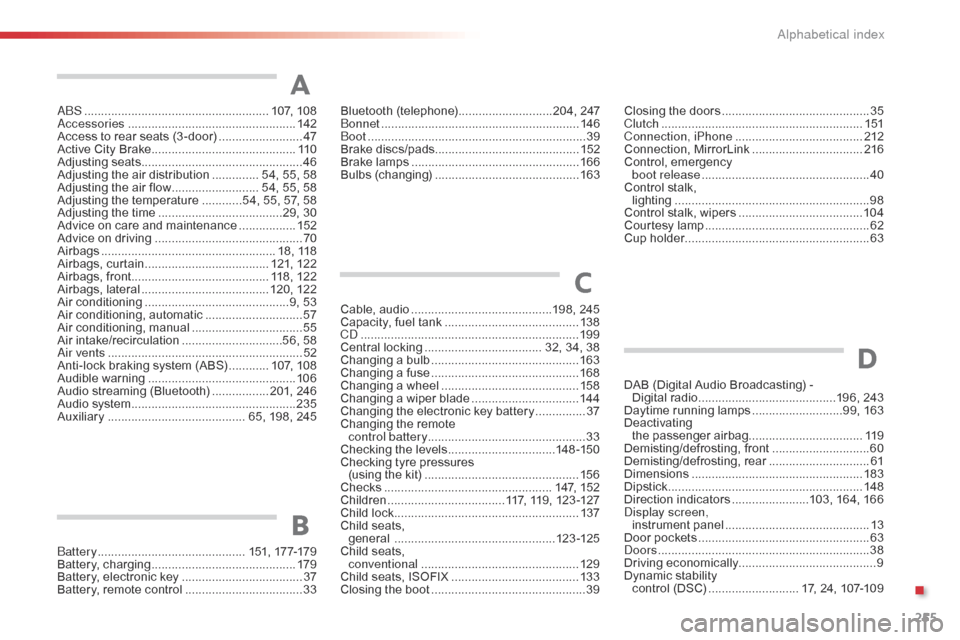
ABS .......................................................107, 10 8
Accessories .............................. ....................142
Access
to rear seats (3 -door)
.........................47
A
ctive City Brake
........................................... 11
0
Adjusting
s
eats
................................................ 46
A
djusting the air distribution
.............. 5
4, 55, 58
Adjusting
the air flow
.......................... 5
4, 55, 58
Adjusting
the temperature
............5
4, 55, 57, 58
Adjusting
the time
.....................................2
9, 30
Advice
on care and maintenance
.................15
2
Advice
on driving
..............................
..............70
Airbags
...............
..................................... 18,
1
18
Airbags,
c
urtain
..................................... 12
1,
12
2
Airbags,
front......................................... 118, 122
Airbags,
la
teral
...................................... 12
0,
12
2
Air
c
onditioning
...............................
............9, 53
Air
conditioning, automatic
.............................57
A
ir
c
onditioning,
m
anual
................................. 55
A
ir
in
take/recirculation
..............................5
6, 58
Air vents
..............................
............................52
Anti-lock
braking system (ABS)
............10
7,
10
8
Audible
w
arning
............................................ 10
6
Audio
streaming (Bluetooth)
................. 2
01, 246
Audio
system
...............................
..................235
Auxiliary
......................................... 6
5, 198, 245Cable,
audio
..........................................1
98, 245
Capacity,
fuel tank
..............................
..........13 8
CD
..............................
...................................19 9
Central
locking
................................... 3
2, 34, 38
Changing
a bu
lb
............................................16
3
Changing
a f
use
............................................16
8
Changing
a wheel
...............................
..........15 8
Changing
a wiper blade
................................14
4
Changing
the electronic key battery
...............37
C
hanging the remote
control battery ............................................... 33
Checking
the levels
................................1
4 8 -15 0
Checking
tyre pressures
(using
the kit)
..............................
................15 6
Checks
...............
...................................147,
15
2
Children
...............................
....117, 119, 123 -127
Child
lock
...............................
........................137
Child
seats,
general
................
................................123 -125
Child
seats,
conventional
............................................... 12
9
Child
seats, ISOFIX
......................................13
3
Closing
the boot
...............................
...............39
A
C
Closing the doors ............................... .............35
Clutch ............................................................ 1
51
Connection, iPhone
...................................... 2
12
Connection,
M
irrorLink
................................. 2
16
Control,
em
ergency
b
oot release
...............................
...................40
Control
stalk,
lighting
..............................
............................98
Control
stalk, wipers
..................................... 10
4
Courtesy
lamp
...............................
..................62
Cup
holder
...............................
........................63
Bluetooth (
telephone) ............................2
04,
247
Bonnet ...............
............................................ 146
Boot
........
......................................................... 39
Brake
d
iscs/pads ........................................... 152
Brake
lamps
...............................
................... 166
Bulbs
(
changing)
...............................
............ 163
Battery
...............................
............. 151,
17
7-179
Battery,
c
harging
...............................
............ 179
Battery,
electronic
key
.................................... 37
B
attery,
remote
control
................................... 33
B
DAB (Digital Audio Broadcasting) -
D igital r adio .........................................1 96, 243
Daytime
running lamps
...........................9
9, 163
Deactivating
t
he
p
assenger
a
irbag.................................. 11 9
Demisting/defrosting,
f
ront
.............................60
D
emisting/defrosting,
r
ear
..............................61
D
imensions
..............................
.....................183
Dipstick
................
.......................................... 148
Direction
i
ndicators
.......................1
03, 164, 166
Display screen, instrument
pan
el
...............................
............13
Door
pockets
................................................... 63
D
oors
..............................................................
.38
Driving
e
conomically ......................................... 9
Dynamic
s
tability
c
ontrol (DSC)
........................... 1
7, 24, 107-109
D
.
Alphabetical index
Page 267 of 268

01-16
Labels are fitted in various areas of your vehicle. They carry
safety warnings as well as vehicle identification
information.
Do
not
remove
them:
they
form
an
integral
part
of
your vehicle.
Automobiles
CITROËN declares, by application of the
provisions
of the European regulation (Directive 2000/53)
relating
to End of Life Vehicles, that it achieves the
objectives
set by this regulation and that recycled materials
are
used in the manufacture of the products that it sells.
Reproduction
or translation of all or part of this document
is
prohibited without written authorisation from
Automobiles
CITROËN. W
e draw your attention to the following points:
-
The
fitting of electrical equipment or accessories not
listed
by CITROËN may cause faults and failures
with
the electrical system of your vehicle. Contact
a
CITROËN dealer for information on the range of
recommended
accessories.
-
As
a safety measure, access to the diagnostic socket,
used
for the vehicle's electronic systems, is reserved
strictly
for CITROËN dealers or qualified workshops,
equipped
with the special diagnostic tool required (risk
of
malfunctions of the vehicle's electronic systems that
could
cause breakdowns or serious accidents).
The
manufacturer
cannot be held responsible if this advice is
not
followed.
-
Any
modification or adaptation not intended or
authorised
by
Automobiles
CITROËN or carried out
without
meeting the technical requirements defined by
the
manufacturer would lead to the suspension of the
legal
and contractual warranties.Printed
in the EU
Anglais
For
any
work
on
your
vehicle,
use
a
qualified
workshop
that
has
the technical information, competence and equipment
required,
which a CITROËN dealer is able to provide.
* Subject to official publication of the results by the FIA.