Page 211 of 268
209
Level 1Level 2 Level 3 Comment
Configuration General Clock
OKSave
se
ttings.
Language Select
the language.
Beep Activate
or deactivate beep mode.
Personalise the star tup image Tr a n s f e r
Store images in a folder initially called "
Startupimage", before copying them to the system.
Delete all
OKSave
the settings.
Animation Activate
or deactivate animation mode.
Delete personal data Delete
Choose
settings, activate or deactivate options.
Do
not delete
Update software
Software information
Configuration Audio
Bluetooth audio sound configurationChoose settings.
iPod
® sound input USB
Activate or deactivate iPod® sound inputs.
AU
X
Video input mode NTSC
Activate
or
deactivate
the
video input modes.
PA L
Sleeve configuration Activate
or
deactivate
sleeve configuration.
Automatic sound adjustment Off
Activate
or
deactivate
the
automatic sound
a
djustment
modes.
Low
Medium
High
Configuration
Display General
Select
the
display
configuration.
Video
.
Audio and Telematics
Page 213 of 268
211
Level 1Level 2 Level 3 Comment
Configuration Bluetooth Telephone
Select the services to use on the peripheral
device.
Audio player
Add Connect
a new peripheral device.
System configuration Telephone
Select the services to use on the peripheral
device.
Audio
player
Cancel
Remove Disconnect
and remove a peripheral device
f
rom the list.
Configuration Telephone Connect the telephone
See
the telephone section.
Sounds configuration
Contacts/call history configuration
Message configuration
Telephone display configuration
Configuration Screen off Select
this mode to switch off the screen, touch
t
he screen to restore.
.
Audio and Telematics
Page 214 of 268
212
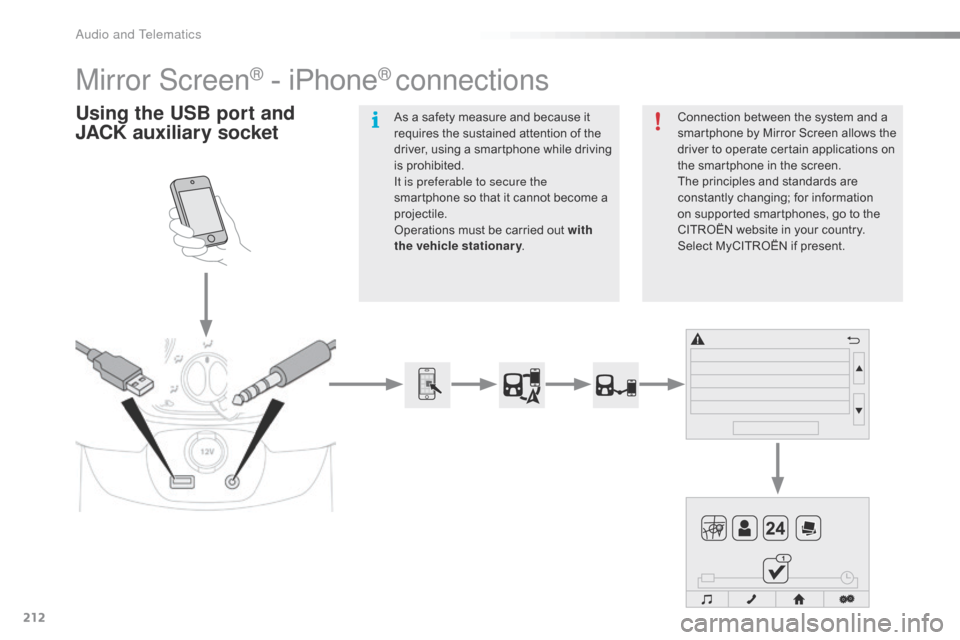
Mirror Screen® - iPhone® connections
Using the USB port and
J ACK auxiliary socketConnection between the system and a s
martphone by Mirror Screen allows the
d
river to operate certain applications on
t
he smartphone in the screen.
The
principles and standards are
c
onstantly
c
hanging;
fo
r
in
formation
o
n supported smartphones, go to the
C
ITROËN website in your country.
S
elect MyCITROËN if present.
As
a
safety
measure
and
because
it
r
equires
the
sustained
attention
of
the
d
river,
using
a
smartphone
while
driving
i
s
prohibited.
It is preferable to secure the
smartphone
so
that
it
cannot
become
a
pro
jectile.
Operations
must
be
carried
out
with
the vehicle stationary .
Audio and Telematics
Page 217 of 268
215
Level 1Level 2Level 3Comments
Connection
Audio source FM
Choose
the audio source.
Choose
settings, activate or deactivate
op
tions.
AM
DAB
USB
Bluetooth audio
A / V
Connection Telephone Contacts
After
making choices, start the call.
Choose
settings, activate or deactivate
op
tions.
Favorites
Call history
Enter a number
Telephone/message configuration
Connection
AppinCar
®
Use the "AppinCar®" applications via the
system.
Connection Home Return
to
the
"Connection" menu home
pag
e.
Connection
Display (video) Brightness
Choose
t
he
se
ttings.
Contrast
To n e
Color
OK
Save
the
settings.
.
Audio and Telematics
Page 218 of 268
216
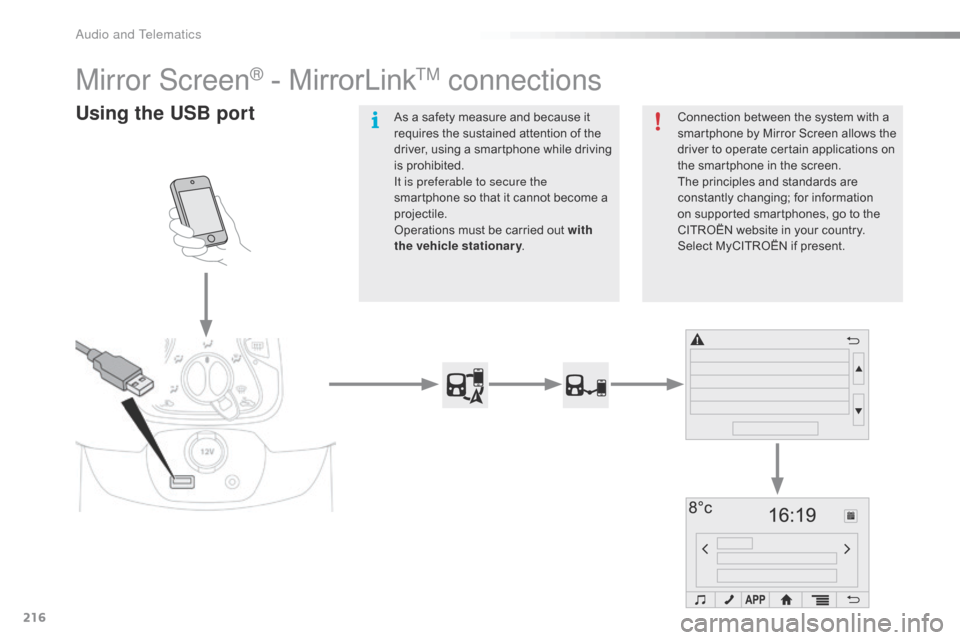
Mirror Screen® - MirrorLinkTM connections
Using the USB portConnection between the system with a smartphone by Mirror Screen allows the
d
river to operate certain applications on
t
he smartphone in the screen.
The
principles and standards are
c
onstantly
c
hanging;
fo
r
in
formation
o
n supported smartphones, go to the
C
ITROËN website in your country.
S
elect MyCITROËN if present.
As
a
safety
measure
and
because
it
r
equires
the
sustained
attention
of
the
d
river,
using
a
smartphone
while
driving
i
s
prohibited.
It is preferable to secure the
smartphone
so
that
it
cannot
become
a
pro
jectile.
Operations
must
be
carried
out
with
the vehicle stationary .
Audio and Telematics
Page 221 of 268
219
Level 1Level 2Level 3Comments
Connection
Audio source FM
Choose
the audio source.
Choose
the settings, activate or deactivate
op
tions.
AM
DAB
USB
Bluetooth audio
A / V
Connection Telephone Contacts
After
making choices, start the call.
Choose
the settings, activate or deactivate
op
tions.
Favorites
Call history
Enter a number
Telephone/message configuration
Connection
MirrorLink™ Use
the "MirrorLink™" applications via the
system.
Connection Home Return
to the "Connection" menu home page.
.
Audio and Telematics
Page 227 of 268

225
Level 1Level 2 Comments
Navigation
User settings Language
Display
the list of text languages available.
Time zone Display
the list of time zones.
Volume Set
the volume for voice instructions, with "Test" and "Mute" (off)
b
uttons.
Units Change
between metric and imperial units for distance and altitude.
Date and time format dd/mm/yyyy
or mm/dd/yyyy 12.00 (midday) + 12.00 (midnight) or 24.00.
Regarding Display
information on the navigation system: mapping software
ve
rsion.
Delete recent items Delete
recent destinations.
Reinitialisation Return
the navigation system to the default settings.
This
does not affect your list of "Favorites".
Navigation
Map settings Route settings
Route
calculation options: this allows certain types of roads to be
a
voided, such as toll roads or pedestrianised areas.
Map display Display
options: north up in 2D, vehicle direction up in 2D or 3D.
Icons on the map Hide
or display icons for POIs on the map.
Colours Map
colour options: daylight or night view.
Automatic zoom Activate
or deactivate the automatic zoom option.
Speed check Activate
or deactivate the speed check alert.
.
Audio and Telematics
Page 229 of 268
227
Level 1Level 2 Level 3 Comments
Navigation Go to Address or postcode
Select
settings and enter the destination
a
ddress.
POI Nearby
Select
settings and enter the destination
a
ddress.
Near city Allows
a town or city to be entered using a
v
irtual
k
eypad.
Near
d
estinationAvailable
only with an active route.
Favorites Displays
the list of favorites. At first use, the
l
ist is empty.
Select on map Allows
the map to be explored and an item
t
o be set as the destination.
Return to the point of
departure Allows
a route to be calculated back to
t
he last point of departure.
Recent items Displays
the list of recent destinations.
Coordinates Latitude
Allows
a destination to be set using its
la
titude
an
d
l
ongitude
c
oordinates.
Longitude
.
Audio and Telematics