2016 CHEVROLET MALIBU lock
[x] Cancel search: lockPage 29 of 94
Chevrolet Malibu Limited/Cruze Limited MyLink Infotainment System
(GMNA-Localizing-U.S./Canada-9282853) - 2016 - crc - 4/16/15
28 Radio
.For iPhone, iPod touch, or iPad
devices, check that the USB
cable is connected to the USB
port and the screen is unlocked.
. Close Pandora on the device
and launch again. Devices that
allow multitasking may require
an extra step to quit the Pandora
application. See the cell phone
manufacturer's user guide.
Thumbs Up or Thumbs Down
Error
If there is an error trying to rate a
track with the
,or-buttons, an
error message will display. Touch
OK to retry.
Loss of Audio
Loss of Pandora audio can happen
in different ways:
. Weak or lost data connection.
. Device needs to be charged.
. Application needs to be
relaunched.
. Connection between phone and
radio lost. .
The volume is too low. Turn up
the volume on the device.
. The battery saver and task
manager applications on the
phone can cause Pandora to
function incorrectly. Remove
those apps from the phone or
remove Pandora and Bluetooth
from the task lists.
If the connection is lost between the
application and device, a message
“Please Unlock the Phone or
Restart the App and Try Again” will
display. Touch OK to retry.
If touching OK does not clear the
issue on the phone, see "Please
unlock the phone or restart phone
App and try again” under "Common
Pandora Messages" following.
Common Pandora Messages
Please See Device : When not
logged in or when authentication
failed, see the device. Touch OK to
continue.
Paused or Audio Paused :
Playback is paused on the radio or
on the device. Touch
kor play on
the device. No Stations Found :
Logged in but
no stations have been created.
Touch OK to continue.
Please Unlock the Phone or
Restart Phone App and Try
Again : Communication failure
between the radio and the phone
application or the device is locked.
Devices that allow multitasking may
require an extra step to quit the
Pandora application. Close Pandora
on the device and launch again.
Unlock the phone and check that
Home Page is shown on the phone/
device.
See the cell phone manufacturer's
user guide.
See www.pandora.com/help for
more information. If the service will
not work, see your dealer for
assistance.
Page 30 of 94
Chevrolet Malibu Limited/Cruze Limited MyLink Infotainment System
(GMNA-Localizing-U.S./Canada-9282853) - 2016 - crc - 4/16/15
Radio 29
Stitcher Internet Radio
Stitcher SmartRadio®is an Internet
radio service that streams news,
sports, and entertainment shows
through the audio system. Create
personalized, on-demand stations or
discover new shows through
Stitcher's preset stations. To set up
an account, download the
application from the Android Market
or iTunes Store, or go to
www.stitcher.com.
A phone or tablet with Internet
connection is required for this
application. Personal cell phone
data plans are used. Make sure the
latest version is installed on the
device and the volume on the
device is turned up.
BlackBerry phones are not
supported for this application.
To install Stitcher:
. On an Android phone or Tablet
with Internet connection, go to
the Android Play Store, search
for Stitcher, and install to the
phone, not to the SD card. .
On an iPhone, iPad, or iPod
touch, go to the iTunes Store
and search for Stitcher.
Launching Stitcher
Connect the iPhone, iPad, or iPod
touch to the USB port, or connect
Android through Bluetooth. See
Auxiliary Devices 041 orBluetooth
0 75. For first-time use, set up the
stations before connecting to the
vehicle. The Stitcher icon will be
available on the Home Page and
source pop-up displays if the latest
application is installed on the
device.
Using the iPhone, iPod touch,
or iPad
1. Plug the device into the USB port. The phone screen must
be unlocked.
2. Use one of the following to launch:
.Touch the application on
the device.
. Touch Stitcher on the
Home Page. .
Press
b/gand say
“Stitcher” or“Tune Stitcher.”
. Accept any notifications on
the screen of the device.
3. If Stitcher does not begin playing, select a category and
then a station.
After Stitcher has been launched,
press SRCE or SRC on the steering
wheel controls to access Stitcher
features.
If nothing happens when the
available Stitcher screen button is
touched, download the latest
Stitcher application and retry.
Stitcher will always be highlighted
on the Home Page when an iPhone,
iPad, or iPod touch is connected
using the USB port. To use, log into
your account.
If the “Please See Device” message
is shown, the login screen may
display on the device.
If the “Please unlock the phone or
restart the App and try again”
message is shown, then the phone
may be locked. Unlock the phone,
Page 31 of 94
Chevrolet Malibu Limited/Cruze Limited MyLink Infotainment System
(GMNA-Localizing-U.S./Canada-9282853) - 2016 - crc - 4/16/15
30 Radio
close the app, then restart the app
and make sure the Home Page is
visible on the phone/device.
Using an Android Phone1. Pair the Android phone using Bluetooth.
2. Use one of the following to launch:
.Touch the application on
the device.
. Touch Stitcher on the
Home Page.
. Press
b/gand say
“Stitcher” or“Tune Stitcher.”
3. If Stitcher does not begin playing, select a category and
then a station.
After Stitcher has been launched,
press SRCE or SRC on the steering
wheel controls to access Stitcher
features.
If nothing happens when the
available Stitcher screen button is
touched, download the latest
Stitcher application and retry. If the
“Please See Device” message
is shown, the login screen may
display on the device.
If the “Please unlock the phone or
restart the App and try again”
message is shown, then your phone
may be locked. Unlock the phone,
close the app, then restart the app
to ensure proper communication.
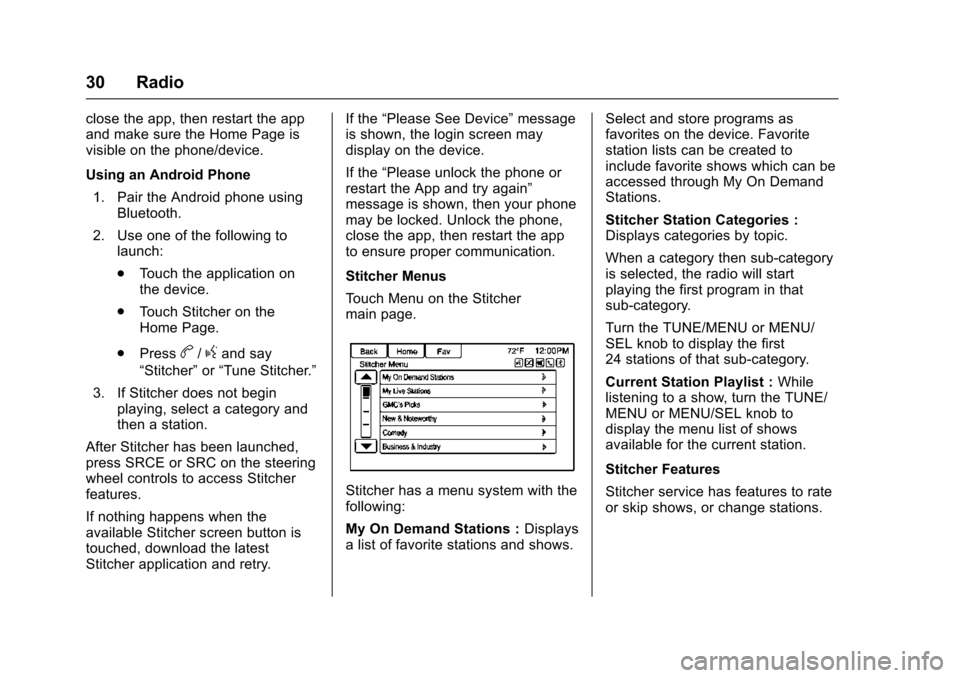
Stitcher Menus
Touch Menu on the Stitcher
main page.
Stitcher has a menu system with the
following:
My On Demand Stations : Displays
a list of favorite stations and shows. Select and store programs as
favorites on the device. Favorite
station lists can be created to
include favorite shows which can be
accessed through My On Demand
Stations.
Stitcher Station Categories :
Displays categories by topic.
When a category then sub-category
is selected, the radio will start
playing the first program in that
sub-category.
Turn the TUNE/MENU or MENU/
SEL knob to display the first
24 stations of that sub-category.
Current Station Playlist :
While
listening to a show, turn the TUNE/
MENU or MENU/SEL knob to
display the menu list of shows
available for the current station.
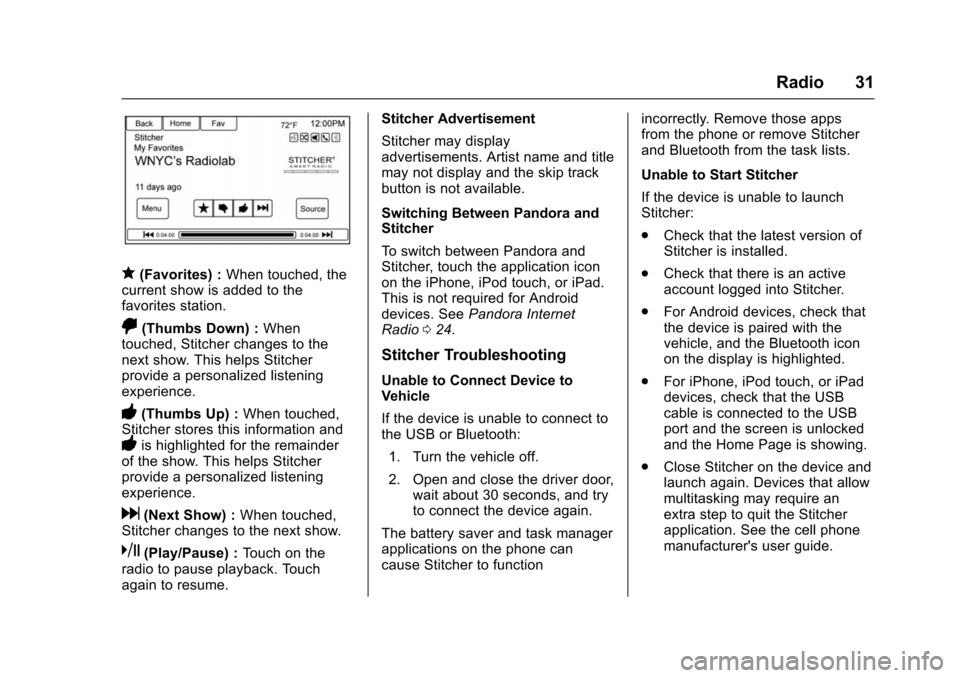
Stitcher Features
Stitcher service has features to rate
or skip shows, or change stations.
Page 32 of 94
Chevrolet Malibu Limited/Cruze Limited MyLink Infotainment System
(GMNA-Localizing-U.S./Canada-9282853) - 2016 - crc - 4/16/15
Radio 31
q(Favorites) :When touched, the
current show is added to the
favorites station.
,(Thumbs Down) : When
touched, Stitcher changes to the
next show. This helps Stitcher
provide a personalized listening
experience.
-(Thumbs Up) : When touched,
Stitcher stores this information and
-is highlighted for the remainder
of the show. This helps Stitcher
provide a personalized listening
experience.
d(Next Show) : When touched,
Stitcher changes to the next show.
k(Play/Pause) : Touch on the
radio to pause playback. Touch
again to resume. Stitcher Advertisement
Stitcher may display
advertisements. Artist name and title
may not display and the skip track
button is not available.
Switching Between Pandora and
Stitcher
To switch between Pandora and
Stitcher, touch the application icon
on the iPhone, iPod touch, or iPad.
This is not required for Android
devices. See
Pandora Internet
Radio 024.
Stitcher Troubleshooting
Unable to Connect Device to
Vehicle
If the device is unable to connect to
the USB or Bluetooth:
1. Turn the vehicle off.
2. Open and close the driver door, wait about 30 seconds, and try
to connect the device again.
The battery saver and task manager
applications on the phone can
cause Stitcher to function incorrectly. Remove those apps
from the phone or remove Stitcher
and Bluetooth from the task lists.
Unable to Start Stitcher
If the device is unable to launch
Stitcher:
.
Check that the latest version of
Stitcher is installed.
. Check that there is an active
account logged into Stitcher.
. For Android devices, check that
the device is paired with the
vehicle, and the Bluetooth icon
on the display is highlighted.
. For iPhone, iPod touch, or iPad
devices, check that the USB
cable is connected to the USB
port and the screen is unlocked
and the Home Page is showing.
. Close Stitcher on the device and
launch again. Devices that allow
multitasking may require an
extra step to quit the Stitcher
application. See the cell phone
manufacturer's user guide.
Page 33 of 94
Chevrolet Malibu Limited/Cruze Limited MyLink Infotainment System
(GMNA-Localizing-U.S./Canada-9282853) - 2016 - crc - 4/16/15
32 Radio
Loss of Audio
Loss of Stitcher audio can happen
due to:
.Weak or lost data connection.
. Device needs to be charged.
. Application needs to be
relaunched.
. Connection between phone and
radio is lost.
. The volume is too low. Turn up
the volume on the device.
If the connection is lost between the
application and device, a message
“Please Unlock the Phone or
Restart the Phone App and Try
Again” will display. Touch OK to
retry.
If touching OK does not clear the
issue, see “Please Unlock the
Phone or Restart Phone App and
Try Again” under“Common Stitcher
Messages” following.
Common Stitcher Messages
Please Try Again Later : A general
error has occurred. A data
connection may be unavailable due to a weak or lost signal or the
Stitcher service being temporarily
down. Touch OK to continue.
Paused or Audio Paused :
Playback is paused on the radio or
on the device. Touch
kor play on
the device.
Please See Device : When not
logged in or when authentication
failed, see the device. Touch OK to
continue. Disconnect the phone
from the radio and follow the
Stitcher account login process on
the phone.
No Stations Found : Logged in but
no stations have been created.
Touch OK to continue.
Please Choose a New Station :
The end of the station has been
reached and there is no more
content to play. Select a new station
through the Stitcher menu.
Please unlock the phone or
restart the App and try again :
Communication failure between the
radio and the phone application or
the device is locked. See www.stitcher.com/help for more
information. If the service will not
work, send an e-mail to
[email protected] or see your
dealer for assistance.Pictures
Pictures can only be viewed using
USB devices. If pictures are on an
SD card, transfer to a USB device
or use a USB-SD adapter. File sizes
above approximately four mega
pixels may not show. Only jpeg,
bmp, gif, and png files are
supported.
1. Touch the Pictures screen button on the Home Page.
2. The system does a search to find the picture folders.
A“Please wait” message
displays until the search is
finished.
Page 34 of 94
Chevrolet Malibu Limited/Cruze Limited MyLink Infotainment System
(GMNA-Localizing-U.S./Canada-9282853) - 2016 - crc - 4/16/15
Radio 33
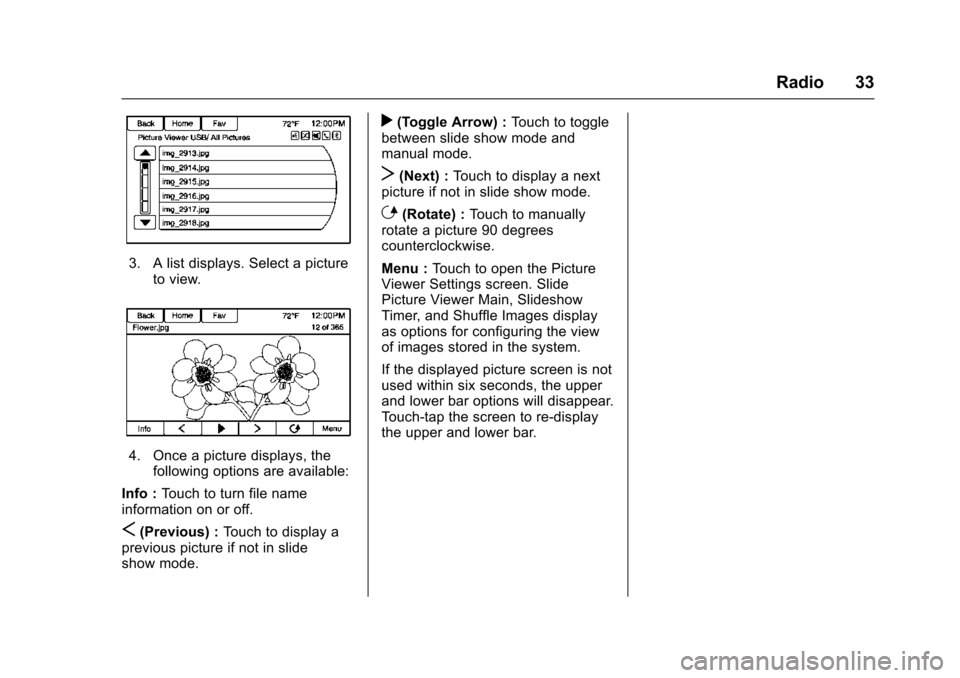
3. A list displays. Select a pictureto view.
4. Once a picture displays, thefollowing options are available:
Info : Touch to turn file name
information on or off.
S(Previous) : Touch to display a
previous picture if not in slide
show mode.
r(Toggle Arrow) : Touch to toggle
between slide show mode and
manual mode.
T(Next) : Touch to display a next
picture if not in slide show mode.
E(Rotate) : Touch to manually
rotate a picture 90 degrees
counterclockwise.
Menu : Touch to open the Picture
Viewer Settings screen. Slide
Picture Viewer Main, Slideshow
Timer, and Shuffle Images display
as options for configuring the view
of images stored in the system.
If the displayed picture screen is not
used within six seconds, the upper
and lower bar options will disappear.
Touch-tap the screen to re-display
the upper and lower bar.
Page 44 of 94
Chevrolet Malibu Limited/Cruze Limited MyLink Infotainment System
(GMNA-Localizing-U.S./Canada-9282853) - 2016 - crc - 4/16/15
Audio Players 43
When playing music on the radio
from a Bluetooth device, make sure
the Bluetooth device is unlocked
and the intended music application
is showing on the home screen.
For iPhone/iPod touch and iPad
devices, Bluetooth Audio will not
work if the device is connected
through the USB and Bluetooth at
the same time.
Page 48 of 94
Chevrolet Malibu Limited/Cruze Limited MyLink Infotainment System
(GMNA-Localizing-U.S./Canada-9282853) - 2016 - crc - 4/16/15
Navigation 47
Touch to display a search list of
nearby POIs. Select the
desired POI.
POIs Along Route
Touch to display a search list of
POIs that lie along or near the route
to the destination. Select the
desired POI.
Exit List
Touch to display a list of the next
three highway exits if available.
Selecting an exit to display a list of
routable POIs associate with
that exit.
Switch Route Time/Destination
Touch to customize the arrival/travel
time and waypoint/destination
information displayed in the main
map screen.
Current Position Info
Touch to display a split screen
showing detailed information about
the vehicle position. This feature
can also be accessed by touching
the vehicle information tab on the
lower center of the display. Thelocation can be saved to the
Address Book by touching Save in
the split screen.
Destination Info
Touch to display a split map screen
showing the final destination. The
location can be saved to the
Address Book by touching Save in
the split screen.
Map Adjustments
The system lets you adjust the scale
of view on the map. Also, as you
drive, the map scrolls automatically
based on the direction of travel.
Map Scales
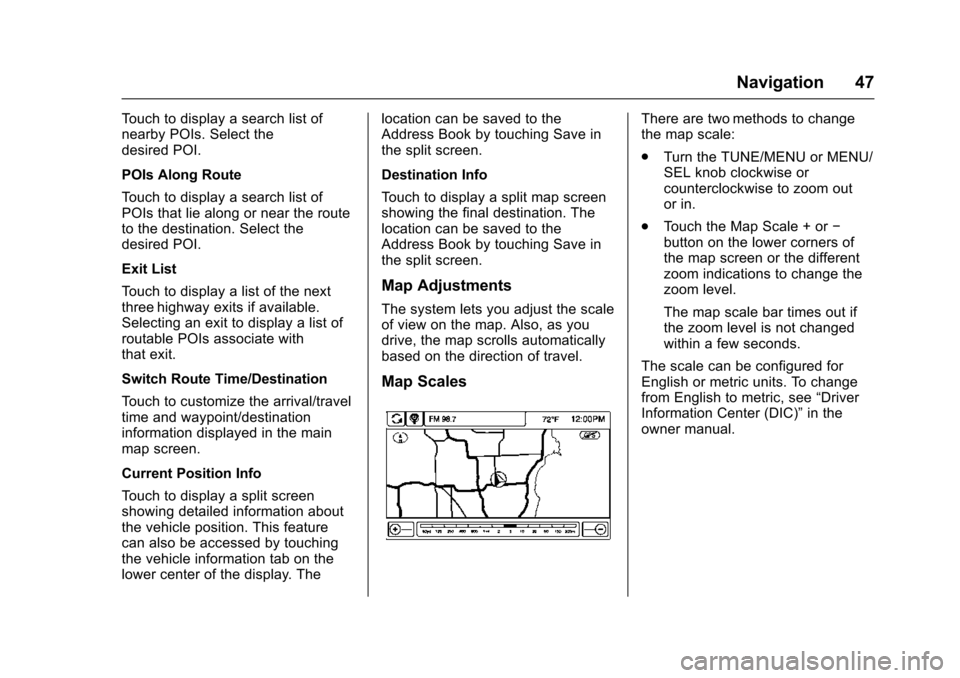
There are two methods to change
the map scale:
.
Turn the TUNE/MENU or MENU/
SEL knob clockwise or
counterclockwise to zoom out
or in.
. Touch the Map Scale + or −
button on the lower corners of
the map screen or the different
zoom indications to change the
zoom level.
The map scale bar times out if
the zoom level is not changed
within a few seconds.
The scale can be configured for
English or metric units. To change
from English to metric, see “Driver
Information Center (DIC)” in the
owner manual.