2016 AUDI RS7 SPORTBACK wheel
[x] Cancel search: wheelPage 78 of 282

Driving
back. The braking force of the parking brake is
only released if sufficient drive power has been built up at the wheels.
(D Tips
For safety reasons, the parking brake is only
released automatically when the driver's safe
ty belt is buckled.
Emergency braking function
This is used if the conventional brake system
fails or locks up.
... To brake your vehicle in an emergency , pull the
~ switch and hold it pulled .
... As soon as you release the~ switch or acceler-
ate, the braking stops.
If you pull the switch(®) and hold it above a
speed of about 5 mph (8 km/h), the emergency
braking function is initiated. The vehicle is braked
at all four wheels by activating the hydraulic brake system. The brake performance is similar
to making an emergency stop¢.&..
In order not to activate the emergency braking by
mistake, an audible warning tone (buzzer)
sounds when the~ switch is pulled. As soon as
the ~ switch is released, or the accelerator pedal
is depressed, emergency braking stops .
A WARNING
Emergency braking should only be used in an
emergency, when the normal brake pedal has
failed or the brake pedal is obstructed. Using
the parking brake for emergency braking will
slow your vehicle down as if you had made a
full braking maneuver. ESC and the associat
ed components (ABS, ASR, EDL) cannot over
come the laws of physics. In corners and
when road or weather conditions are bad, a
full brake application can cause the vehicle to
skid or the rear end to break away, which in
creases the risk of an accident.
76
Speed warning system
' Introduction
The speed warning system helps you to stay un
der a specified maximum speed .
The speed warning system warns you if you are
exceeding the maximum speed that you have set.
You will hear a warning tone when your speed ex ceeds the stored value by approximately 3 mph
(3 km/h) . An indicator light. (USA models)/.
(Canada models) in the instrument cluster dis
play also turns on at the same time. The indicator
light./. turns off when the speed decreases
below the stored maximum speed.
Setting a threshold is recommended if you would
like to be reminded when you reach a certain
maximum speed. Situations where you may want
to do so include driving in a country with a gener
al speed limit or if there is a specified maximum
speed for winter tires.
(D Tips
Even though your vehicle is equipped with a
speed warning system, you should still watch
the speedometer to make sure you are not
driving faster than the speed limit.
' Setting the threshold
You can set, change and delete the warning
threshold in the Infotainment system.
... Select: the I CARI function button > (Car)* Sys
tems
control button > Driver assistance >
Speed warning .
You can set any threshold between 20 mph
(30 km/h) and 150 mph (240 km/h). Settings
can each be adjusted in increments of 5 mph (10
km/h).
Page 84 of 282
Audi adaptive cruise control and braking guard
• You must also press the brake pedal when the
vehicle is stopped.
Switching adaptive cruise control off
• Push the lever away from you into position @
until it clicks into place. The message
ACC off
appears.
@ Indicator lights
• • Adaptive cruise control is switched on. No
vehicles are detected up ahead. The stored speed
is maintained .
• · A moving vehicle is detected up ahead. The
adaptive cruise control system regulates the
speed and distance to the moving vehicle ahead
and accelerates/brakes automatically.
r -.j · Adaptive cruise control is switched on . A
moving vehicle up ahead was detected. Your vehi
cle remains stopped.
• • When automatic braking is not able to keep
enough distance to a previously detected moving
vehicle up ahead, you must take control and brake
9 page 84, Prompt for driver interven
tion.
© Display
If adaptive cruise contro l is not shown in the dis
play, you can call it up with the multifunction
steering wheel buttons
9 page 22.
Based on the symbols in the display, you can de
termine if the system is maintaining a distance to
the vehicle ahead and what that distance is.
No vehicle· No vehicle ahead was detected.
White vehicle· A vehicle ahead was detected.
Red vehicle · Prompt for the driver to take action
9page84.
Both arrows on the scale© indicate the distance
to the vehicle ahead. No arrow appears when the
vehicle is on an open road and there is no object
ahead . If an object is detected ahead, the arrow
moves on the scale.
The green zone on the scale shows the stored dis·
tance. For information on changing the stored
distance, refer to
9 page 83. If the distance se·
82
lected is too close or may soon become too close,
the arrows move into the red zone on the scale.
A WARNING
Improper use of the adaptive cruise control
can cause collisions, other accidents and seri
ous personal injuries.
- Pressing the
ISETI button when driving at
speeds below 20 mph (30 km/h), will auto
matically accelerate the vehicle to 20 mph (30 km/h), which is the minimum speed
that can be set.
@ Tips
-If you switch the ignition or the adaptive
cruise control off, the set speed is erased
from the system memory.
- The electronic stabilization control (ESC)
and the anti-slip-regulation (ASR) are auto·
matically turned on when the adaptive
cruise control is turned on. Both systems
cannot be turned off if the adaptive cruise
control is turned on .
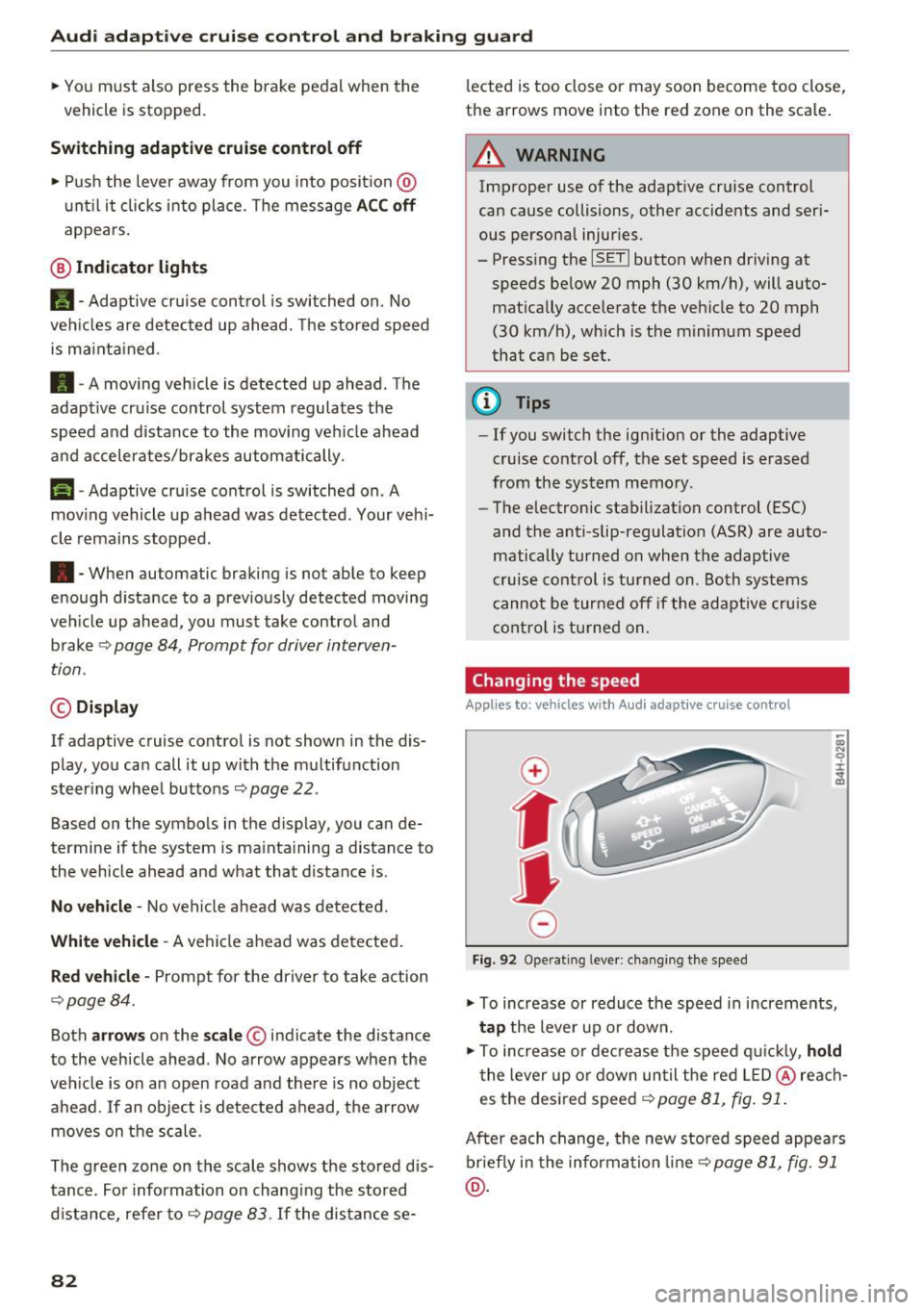
Changing the speed
Applies to: vehicles with Audi adapt ive cru ise control
0
f
JJ
0
Fig. 92 Operating lever: changing the speed
;;; N 9 :c .., m
• To increase or reduce the speed in increments,
tap the lever up or down.
• To increase or decrease the speed quickly,
hold
the lever up or down until the red LED@reach
es the desired speed
9 page 81, fig. 91.
After each change, the new stored speed appears
briefly in the information line¢
page 81, fig. 91
@.
Page 90 of 282

Audi acti ve la n e ass is t
Audi active lane assist
Lane assist
Description
A pp lies to: ve hicles w ith Audi active lane assist
Active lane ass ist detects lane marker lines with
in the limits of the system us ing a camera in the
windshie ld. If you are approaching a detected
lane marker line and it appears likely that you
will leave the lane, the system will warn you with
corrective steering. You can override this steering
at any time. If you pass over a line, the steering
wheel will vibrate lightly. In order for this warn ing vibration to occur, it must first be switched
on in the Infotainment system. Act ive lane assist
is operable when the lane marker line is detected
on at least one side of the vehicle.
The system is designed for driving on freeways
and expanded highways and thus works only at
speeds of 40 mph (65 km/h) or more.
Applies to vehicles w ith side assist*: if you act i
vate a turn s ignal when active lane assist is ready
and it classif ies a lane change as critical because
of vehicles traveling alongside you or approach ing you, there w ill be not iceable correct ive steer
i n g short ly before you leave the lane. This will at
tempt to keep your vehicle in the lane.
Appl ies to veh icles w ithout s ide ass ist* : the sys
tem does not warn when it is ready if you activate
the t urn signa l before crossing the lane marker
line. In this case, it ass umes that you a re chang
ing lanes intentionally.
Applies to vehicles w ith adapt ive cr uise control*
or pa rk ing aid*: the co rrective steering is ta rget
ed based on the d riving situation. In addition to
the lane marker lines, the system can also take
into account other objects such as guard rails. If
they are detected in close proximity to the vehi
cle, active lane assist helps prevent the vehicle
from dr iv ing too close to them. There is a lso
passing assistance . The system does not provide
any corrective steer ing if it detects that you are
passing anothe r vehicle.
88
A WARNING
-
- The system warns the driver that the vehicle
is leaving the lane using correct ive steering.
The driver is always responsible for keeping
the vehicle within the lane.
- The system can help you keep the vehicle in the lane, but it does not drive by itse lf. Al
ways keep your hands on the steering
wheel.
- Cor rective steering may not occur in certain
situations, such as du ring heavy braking.
- There may be cases whe re the camera does
not recognize all lane marker lines. Correc
tive stee ring can only take place on the s ide
of the vehicle where lane marker lines are
detected.
- Othe r road stru ctures or objects could poss i
bly be identified un intent ionally as lane
marker lines . As a result, corrective steering
may be unexpected or may not occ ur.
- The camera view can be restricted, for ex
ample by vehicles driving ahead or by rain,
snow, heavy spray or lig ht shining into t he
camera. Th is can result in active lane ass ist
not detecting the lane marker lines or de
tect ing them incorrectly.
- Under certain cond it ions such as r uts in the
road, a banked roadway or crosswinds, the
corrective steer ing alone may not be enough
to keep the vehicle in the m iddle of the lane .
- For safety reasons, act ive lane assist must
not be used when there are poor road and/
or weather conditions such as slippery
roads, fog, gravel, heavy rain, snow and the po tential fo r hydrop laning. Using active lane
assist under these cond it ions may increase
the risk of a crash .
Page 91 of 282
Switching on and off
App lies to: ve hicles with Audi active lane assist
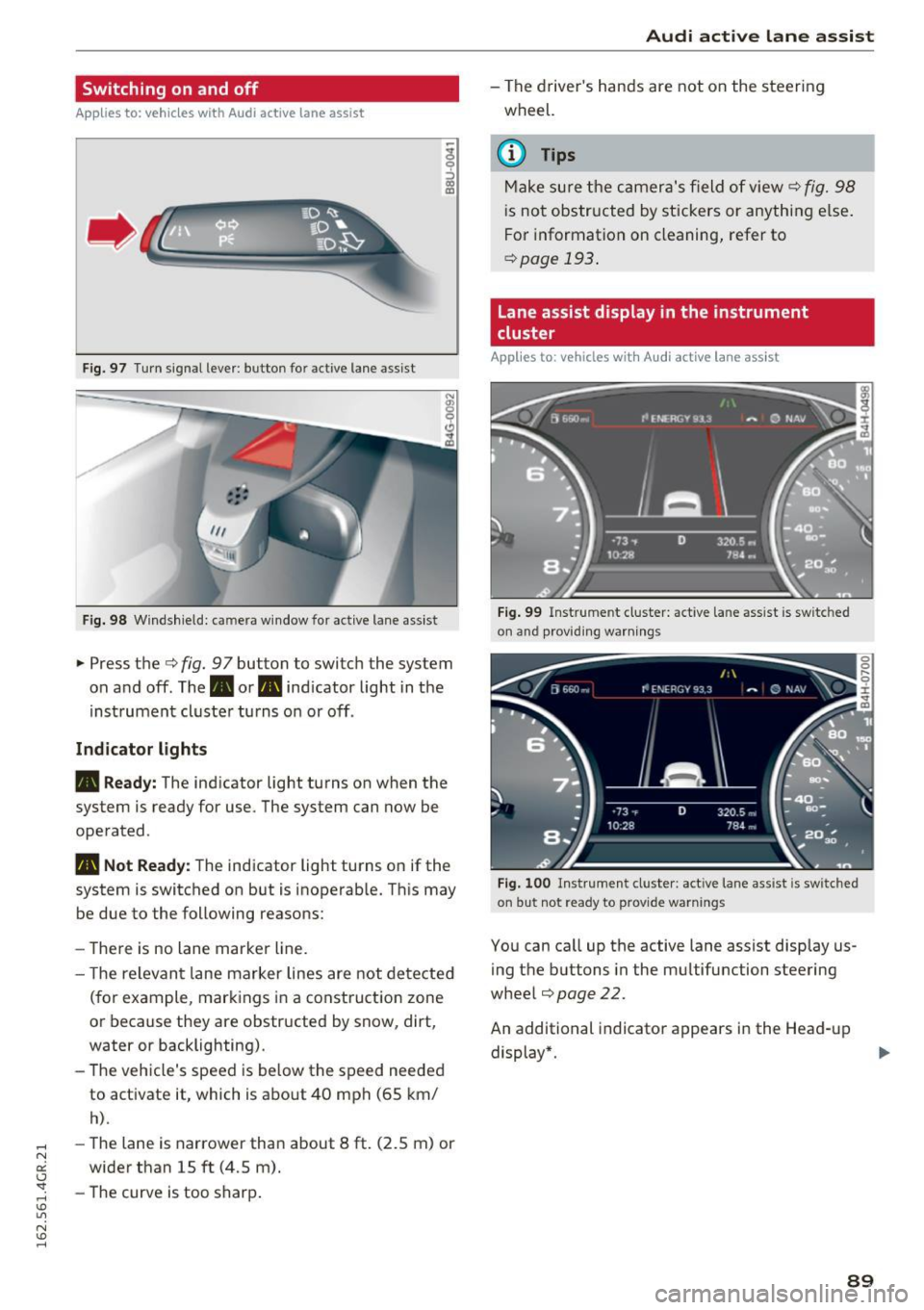
Fig. 97 T urn signal lever: button for act ive lane assist
F ig. 98 W indsh ield: camera window for active lane assist
... Press the c:> fig. 9 7 button to switch the system
on and off. The. or
Pl1 indicator light in the
instrument cluster turns on or off.
Indic ator light s
• Rea dy : The indicator light turns on when the
system is ready for use. The system can now be
operated .
Pl1 Not Read y: The indicator light turns on if the
system is switched on but is inoperable. Th is may
be due to the following reasons:
- There is no lane marker line.
- T he relevant lane marker lines are not detected
(for example, markings in a construction zone
or because they are obstructed by snow, dirt,
water or backlighting).
- The vehicle's speed is below the speed needed
to activate it, which is about 40 mph (65 km/
h).
-The lane is narrower than about 8 ft. (2.5 m) or
wider than 15 ft (4.5 m).
- The curve is too sharp.
Audi act ive lane ass is t
- The driver 's hands are not on the steering
wheel.
(D Tips
Make sure the camera's field of view c:> fig. 98
is not obstructed by stickers or anything else.
For information on cleaning, refer to
c:> page
193 .
Lane assist display in the instrument
cluster
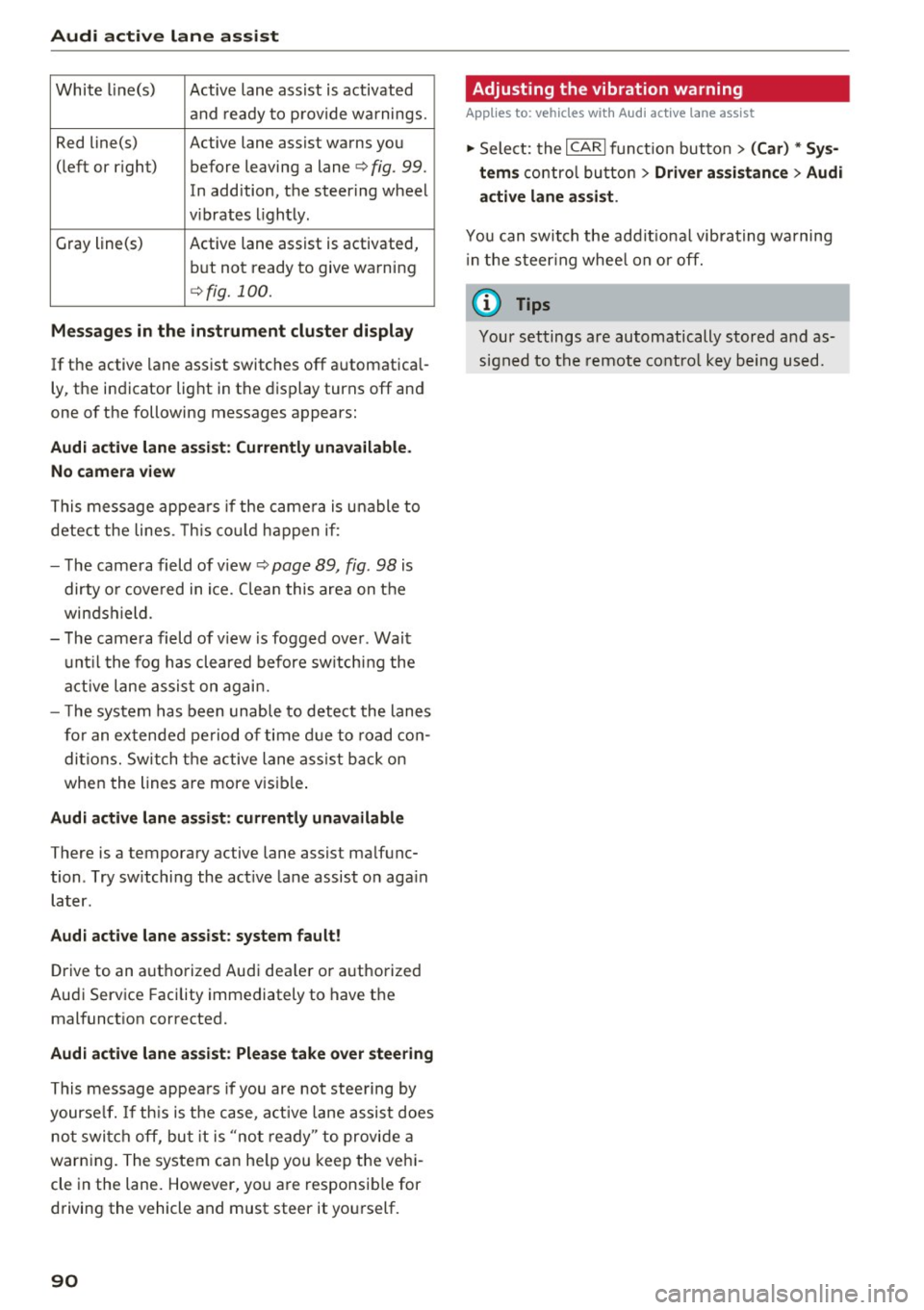
App lies to: vehicles wit h Audi active la ne ass ist
F ig . 99 Inst rum ent clus ter: active la n e assis t is switc hed
on and provid ing warn ing s
Fig. 100 Instrument cluster: act ive lane assist is sw itched
on but not ready to provide warnings
You can ca ll up the active lane assist display us
ing the buttons in the mu ltifunction steering
wheel
c:> page 22.
An additional indicato r appears in the Head-up
display*.
8 9
Page 92 of 282
Audi active lane assist
White line(s) Active lane assist is activated
and ready to provide warnings.
Red line(s) Active lane assist warns you
(left or r ig ht) before leaving a lane¢
fig. 99.
In addition, the steering wheel
v ib rates lightly.
Gray line(s)
Active lane assist is activated,
but not ready to give warning
¢fig. 100.
Messages in the instrument cluster display
If the active lane assist switches off automatical
ly, the indicator light in the display turns off and
one of the following messages appears:
Audi active lane a ssist: Currently unavailable.
No camera view
This message appears if the came ra is unable to
detect the lines. This could happen if:
- The camera field of view ¢
page 89, fig. 98 is
dirty o r covered in ice. Clean this area on the
windshield.
- The camera field of v iew is fogged over . Wait
until the fog has cleared before switching the
active lane assist on again.
- T he system has been unable to detect the lanes
for an extended period of time due to road con
ditions. Switch the active lane assist back on
when the lines are more vis ible.
Audi active lane assist: currently unavailable
There is a temporary active lane assist malfunc
tion . Try sw itching the act ive lane assist on aga in
later.
Audi active lane assist: system fault!
Drive to an authorized Aud i dea ler or authorized
Audi Service Facility immediately to have the
malfunct ion corrected.
Audi active lane assist: Please take over steering
This message appears if you are not steering by
yourse lf. If th is is the case, active lane assist does
not switch off, but it is "not ready" to provide a
warn ing. The system can he lp you keep the vehi
cle in the lane. However, you are responsib le for
driving the vehicle and must steer it yourself.
90
· Adjusting the vibration warning
Applies to: vehicles with Audi active lane assist
.,. Select: the I CARI function button > (Car) * Sys
tems
control button > Driver assistance > Audi
active lane assist .
You can switch the addit ional vibrating warning
i n the steer ing whee l on or off.
(D Tips
Your settings are automatically stored and as
signed to the remote control key being used.
Page 94 of 282

Audi side assist
General information
Applies to: vehicle s with s ide assist
®
@
©
Fig . 103 Driving s itu atio ns
~ AUD I
• 0 0 •
Fig. 104 Rear of the vehicle: pos it ion of the sensors
Side assist functions at speeds above approxi
mately
19 mph (30 km/h).
(D Vehicles that are approaching
In certain cases, a vehicle will be classified as
cr itical for a lane change even if it is still some
what far away. The faster a veh icle approaches ,
the sooner the display in the exterior mirror w il l
turn on.
@Vehicles traveling with you
Vehicles traveling with you are indicated in the
exterior mirror if they are classified as critical for
a lane change. All vehicles detected by side assist
92
are indicated by the time they enter your "blind
spot", at the latest .
@ Vehicles left behind
If you slow ly pass a vehicle that side assist has
de tected (the diffe rence in speed between the
vehicle and your vehicle is less than 9 mph or 15
km/h), the display in the exterior mirror turns on
as soon as the vehicle enters your blind spot.
The display will not turn on if you quickly pass a
vehicle that side ass ist has detected (the differ
ence in speed between the vehicle and your vehi
cle is greater than 9 mph or 15 km/h).
Functional limitations
The radar sensors are designed to detect the left
and right adjacent lanes when the road lanes are
the normal width . In certa in situations, the dis
play in the exterior mirror may turn on even
thou gh there is no vehicle located in the area
that is crit ica l for a lane change. For example:
- if the lanes a re narrow or if your are driving on
the edge of your lane . If this is the case, the
system may have detected the vehicle in anoth
er lane that is
not adjacent to your current lane.
- if yo u are driving through a curve. Side assist
may react to a vehicle that is one lane over
from the adjacent lane.
- if side assist reacts to other objects (such as
high or displaced guard rai ls).
- In poor weather conditions. The side assist
functions are limited.
Do not cover the radar sensors <=?
fig. 104 with
stickers, deposits, bicycle wheels or other ob
jects, because this wi ll affect the function. For in
format ion on cleaning, refer to <=?
page 193.
_& WARNING
-Always pay attention to traffic and to the
area around your vehicle. Side assist cannot
replace a driver's attention . The driver alone
is always responsible for lane changes a nd
similar driving maneuvers .
- Improper reliance on the side ass ist system
can cause collis ions and serious pe rsonal in-
-
Jury: .,,.
Page 95 of 282
-Never rely only on side assist when chang
ing lanes.
- Always check rear view mirrors to make
sure that it is safe to change lanes.
- Side assist cannot detect all vehicles under
all conditions- danger of accident!
- Please note that side assist indicates there
are approaching vehicles, or vehicles in your
blind spot, only after your vehicle has
reached a driving speed of at least 19 mph
(30 km/h).
- In certain situations, the system may not function or its function may be limited. For
example:
- if vehicles are approaching or being left
behind very quickly. The display may not
turn on in time.
- in poor weather conditions such as heavy
rain, snow or heavy mist.
- on very w ide lanes, in tight curves or if
there is a rise in the road surface. Vehicles
in the adjacent lane may not be detected
because they are outside of the sensor
range.
(D Note
The sensors can be displaced by impacts or
damage to the bumper, wheel housing and
underbody. This can affect the system. Have
your authorized Audi dealer or authorized
Audi Serv ice Facility check their function .
(!j) Tips
-If the window g lass in the driver's doo r or
front passenger's door has been t inted, the
display in the exterior mirror may be misin
terpreted.
- For Declaration of Compliance to United
States FCC and Industry Canada regulations
¢ page 265.
Aud i side assist
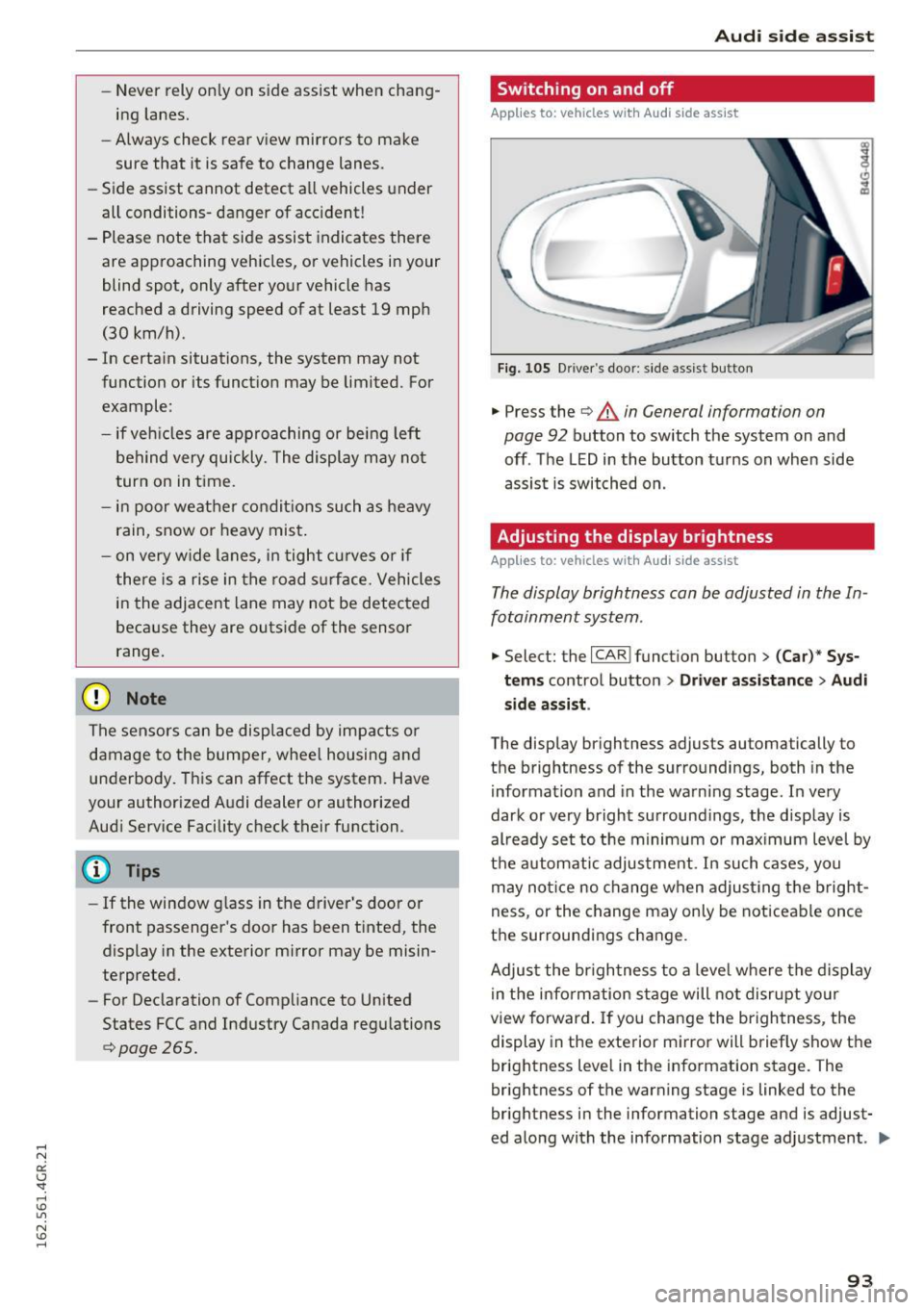
Switching on and off
App lies to : vehicles wi th Audi side ass ist
Fig. 105 Driver 's door : s ide assist button
" Press the ¢ & in General information on
page 92
button to switch the system on and
off . The LED in the button turns on when side
assist is switched on .
Adjusting the display brightness
Applies to: vehicles wi th Audi side ass ist
The display brightness can be adjusted in the In
fotainment system .
.,. Select: the I CAR I funct ion button > (Car)* Sys
tems
control button > Driver assistance > Audi
side assis t.
The display brightness adjusts automatically to
the brightness of the surroundings, both in the
information and in the warning stage. In very
dark or very bright surroundings, the d isplay is
al ready set to the minim um o r max imum level by
the automatic adjustment. In such cases, you
may not ice no change when adjusting the bright
ness, or the change may only be noticeable once
the surroundings change.
Adjust the br igh tness to a level where the display
in the information stage will not disrupt your
view forward . If you change the brightness, the
display in the exterior mirror will briefly show the
brightness level in the information stage. The
brightness of the warning stage is linked to the
brightness in the information stage and is adjust
ed along with the information stage adjustment .
II>-
93
Page 96 of 282

Audi side assist
(D Tips
-Si de assist is not active w hile you are mak
i ng t he a dju stment .
- You r settings are automatic ally store d an d
assi gned to t he remote co ntrol key being
u sed.
Driver messages
A ppl ies to : ve hicles w ith Audi side assis t
If side ass ist switches off by itself, the LED in the
button turns off a nd a message will appear in the
i n str ument cluster d isp lay :
Audi side assist not available: sensor blocked
The rada r senso rs ' vision is affected. Do not cove r
the area in front of the sensors with b ike wheels,
stickers, dirt o r other objects. Clean the area in
fron t of the senso rs, if necessary
c:> page 92,
fig . 104.
Audi side assist: currently unavailable
Side assist cannot be switched on tempo rar ily be
cause there is a malfunction (for example, the battery charge level may be t oo low).
Audi side assist: System fault!
T he system cannot guarantee that it w ill detect
ve hicl es co rrectly and it is switc hed off. The sen
sors have been disp lace d or are fa ulty. Have the
system checked by an a uthorized Audi dealer or
author ized Audi Se rvice Facility soon.
94