Page 180 of 576
1804-2. Driving procedures
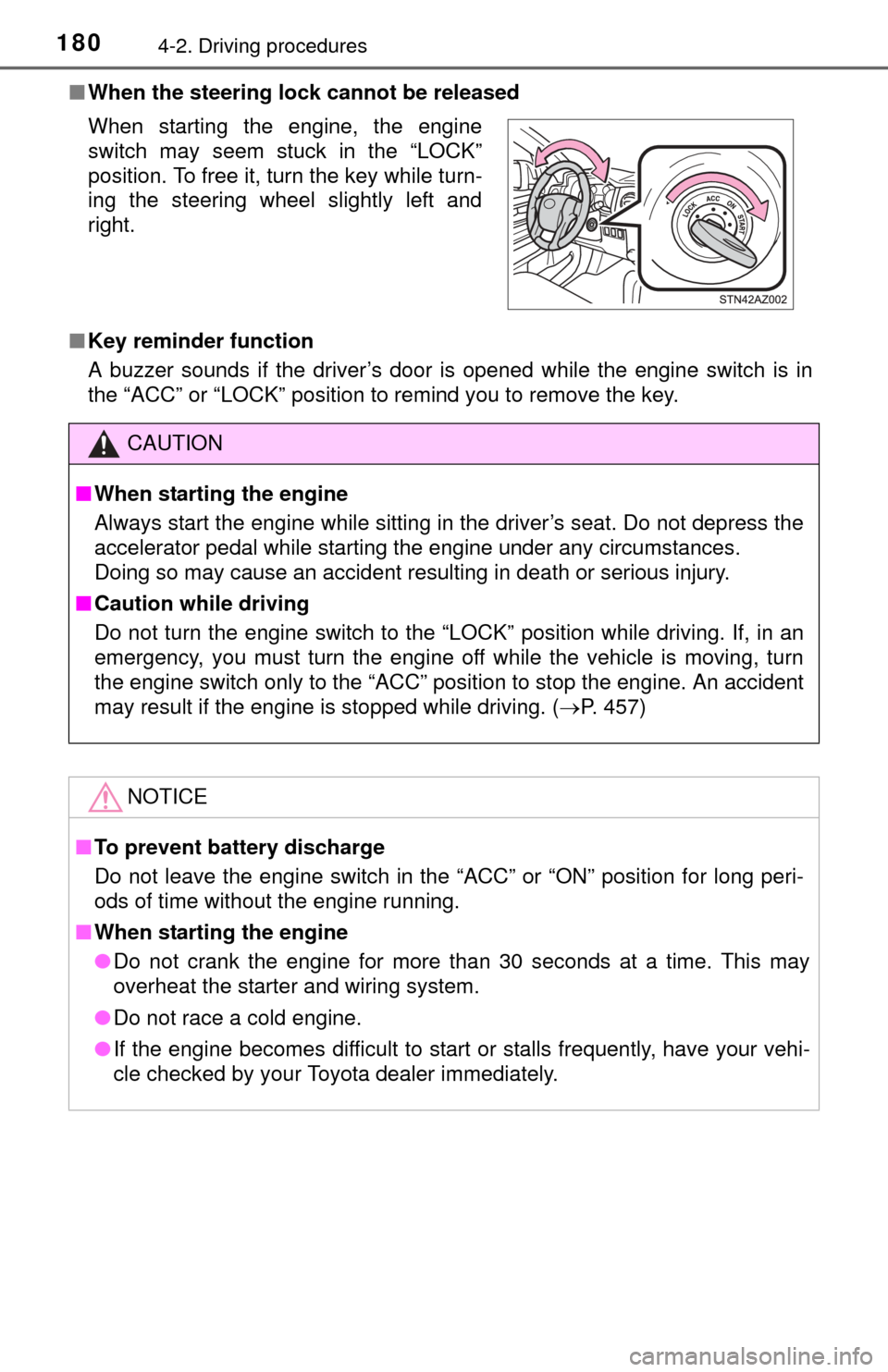
■When the steering lock cannot be released
■ Key reminder function
A buzzer sounds if the driver’s door is opened while the engine switch is in
the “ACC” or “LOCK” position to remind you to remove the key. When starting the engine, the engine
switch may seem stuck in the “LOCK”
position. To free it, turn the key while turn-
ing the steering wheel slightly left and
right.
CAUTION
■When starting the engine
Always start the engine while sitting in the driver’s seat. Do not depress the
accelerator pedal while starting the engine under any circumstances.
Doing so may cause an accident resulting in death or serious injury.
■ Caution while driving
Do not turn the engine switch to the “LOCK” position while driving. If, in an
emergency, you must turn the engine off while the vehicle is moving, turn
the engine switch only to the “ACC” position to stop the engine. A\
n accident
may result if the engine is stopped while driving. ( P. 457)
NOTICE
■To prevent battery discharge
Do not leave the engine switch in the “ACC” or “ON” position for long peri-
ods of time without the engine running.
■ When starting the engine
● Do not crank the engine for more than 30 seconds at a time. This may
overheat the starter and wiring system.
● Do not race a cold engine.
● If the engine becomes difficult to star t or stalls frequently, have your vehi-
cle checked by your Toyota dealer immediately.
Page 190 of 576
1904-3. Operating the lights and wipers
■Daytime running light system (if equipped)
●To make your vehicle more visible to other drivers, the daytime running
lights turn on automatically whenever the engine is started and the parking
brake is released. Daytime running lights are not designed for use at night.
● Compared to turning on the headlights, the daytime running light system
offers greater durability and consumes less electricity, so it can help improve
fuel economy.
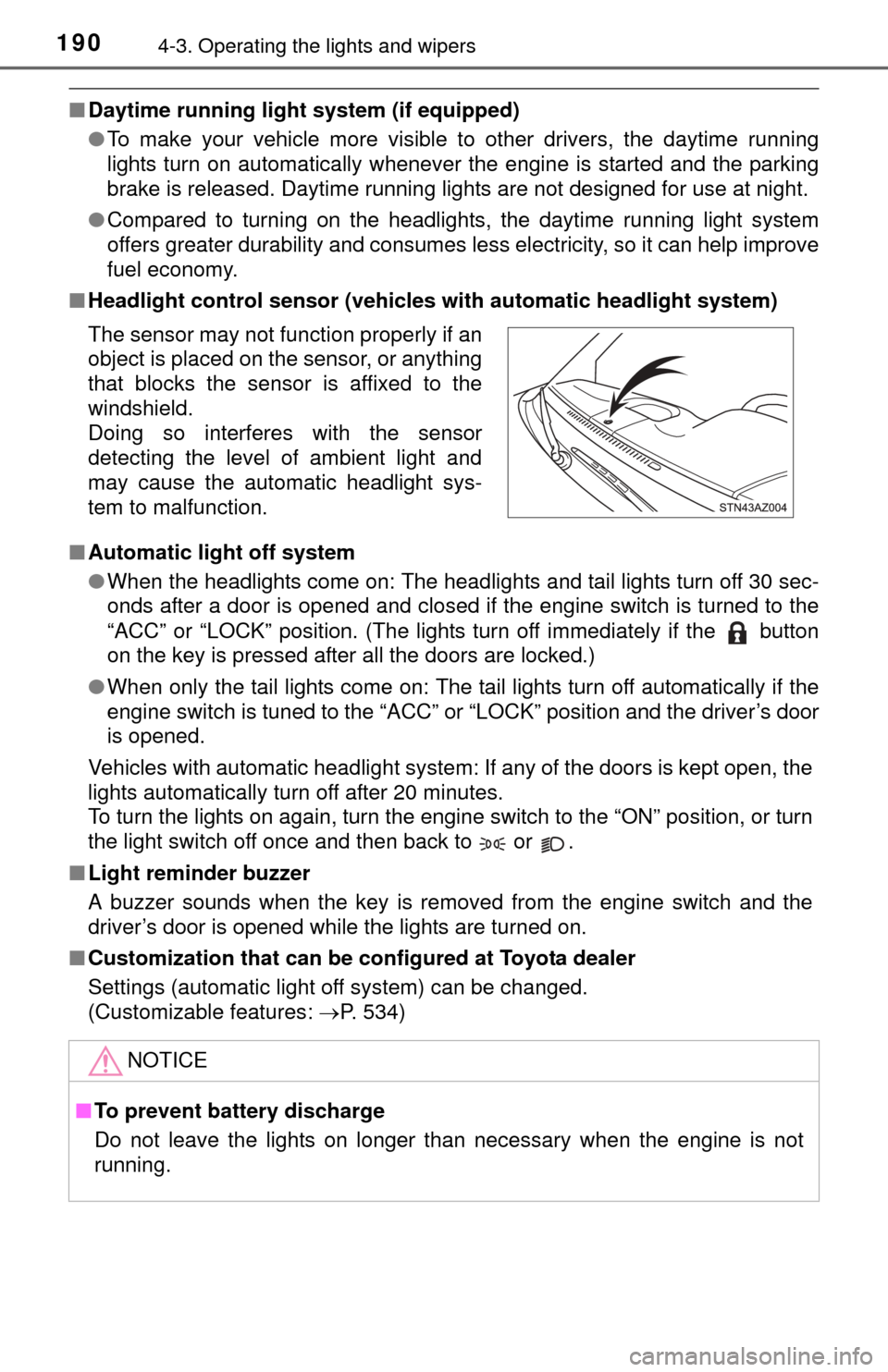
■ Headlight control sensor (vehicl es with automatic headlight system)
■ Automatic light off system
●When the headlights come on: The headlights and tail lights turn off 30 sec-
onds after a door is opened and closed if the engine switch is turned to the
“ACC” or “LOCK” position. (The lights turn off immediately if the button
on the key is pressed after all the doors are locked.)
● When only the tail lights come on: The tail lights turn off automatically if the
engine switch is tuned to the “ACC” or “LOCK” position and the driver’s door
is opened.
Vehicles with automatic headlight system: If any of the doors is kept open, the
lights automatically turn off after 20 minutes.
To turn the lights on again, turn the engine switch to the “ON” position, or turn
the light switch off once and then back to or .
■ Light reminder buzzer
A buzzer sounds when the key is removed from the engine switch and the
driver’s door is opened while the lights are turned on.
■ Customization that can be co nfigured at Toyota dealer
Settings (automatic light off system) can be changed.
(Customizable features: P. 534)
The sensor may not function properly if an
object is placed on the sensor, or anything
that blocks the sensor is affixed to the
windshield.
Doing so interferes with the sensor
detecting the level of ambient light and
may cause the automatic headlight sys-
tem to malfunction.
NOTICE
■
To prevent battery discharge
Do not leave the lights on longer than necessary when the engine is not
running.
Page 257 of 576
2575-2. Setup
5
Multimedia
General settings
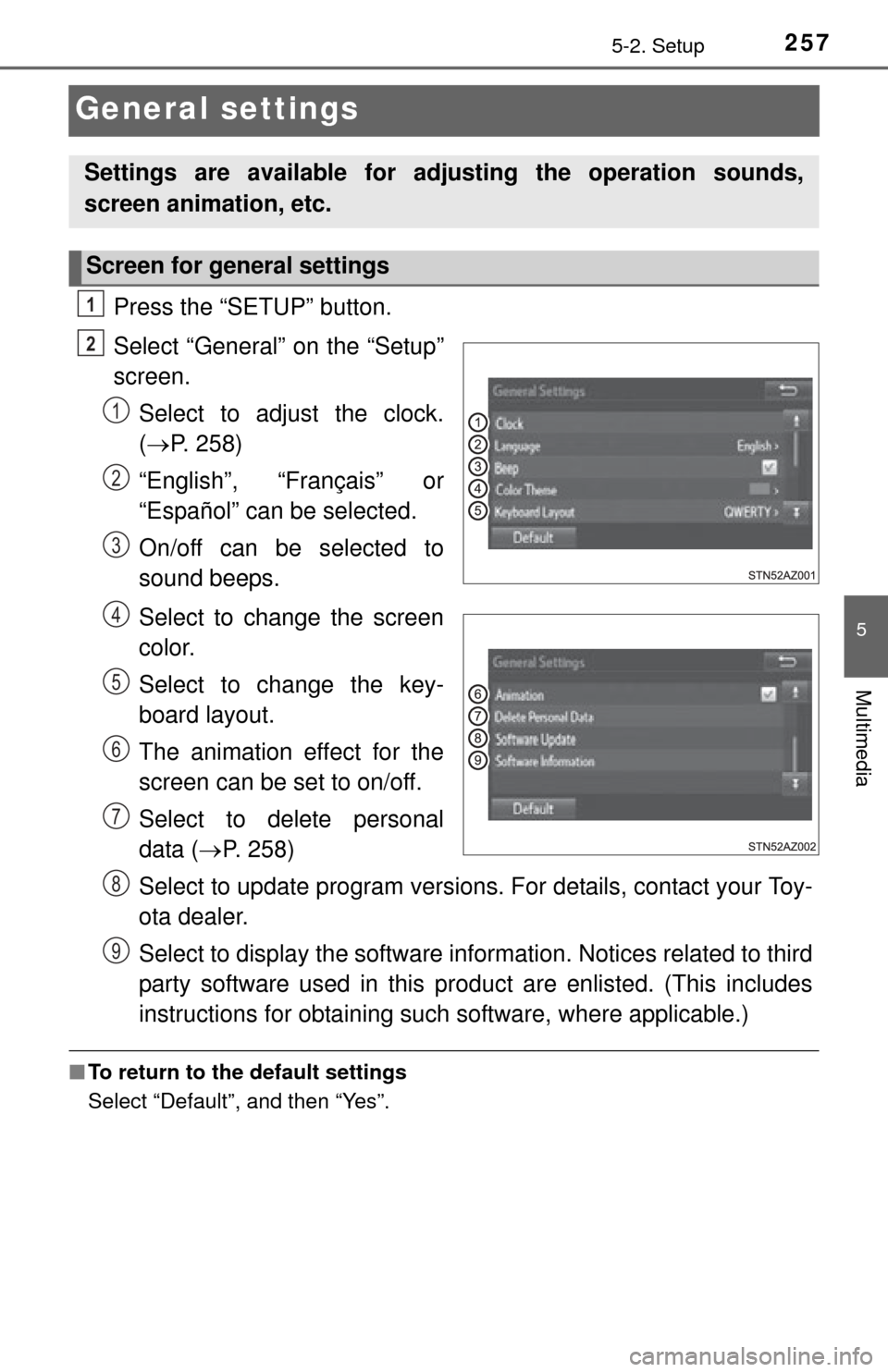
Press the “SETUP” button.
Select “General” on the “Setup”
screen.Select to adjust the clock.
( P. 258)
“English”, “Français” or
“Español” can be selected.
On/off can be selected to
sound beeps.
Select to change the screen
color.
Select to change the key-
board layout.
The animation effect for the
screen can be set to on/off.
Select to delete personal
data ( P. 258)
Select to update program versions. For details, contact your Toy-
ota dealer.
Select to display the software info rmation. Notices related to third
party software used in this pr oduct are enlisted. (This includes
instructions for obtaining such software, where applicable.)
■ To return to the default settings
Select “Default”, and then “Yes”.
Settings are available for adjusting the operation sounds,
screen animation, etc.
Screen for general settings
1
2
1
2
3
4
5
6
7
8
9
Page 434 of 576
4347-3. Do-it-yourself maintenance
■Use a CR2032 lithium battery
●Batteries can be purchased at your Toyota dealer, local electrical appliance
shops or camera stores.
● Replace only with the same or equivalent type recommended by the manu-
facturer.
● Dispose of used batteries according to local laws.
■ If the key battery is depleted
The following symptoms may occur:
●The wireless remote control will not function properly.
● The operational range will be reduced.
CAUTION
■Removed battery and other parts
Keep away from children. These parts are small and if swallowed by a child,
they can cause choking. Failure to do so could result in death or serious
injury.
NOTICE
■For normal operation after replacing the battery
Observe the following precautions to prevent accidents:
● Always work with dry hands.
Moisture may cause the battery to rust.
● Do not touch or move any other component inside the remote control.
● Do not bend either of the battery terminals.
Page 457 of 576
457
8
When trouble arises
8-1. Essential information
If your vehicle has to be stopped in an
emergency
Steadily step on the brake pedal wi th both feet and firmly depress it.
Do not pump the brake pedal repeatedly as this will increase the effort
required to slow the vehicle.
Shift the shift lever to N.
If the shift lever is shifted to N
After slowing down, stop the vehicle in a safe place by the road.
Stop the engine.
If the shift lever cannot be shifted to N
Keep depressing the brake pedal with both feet to reduce vehicle
speed as much as possible.
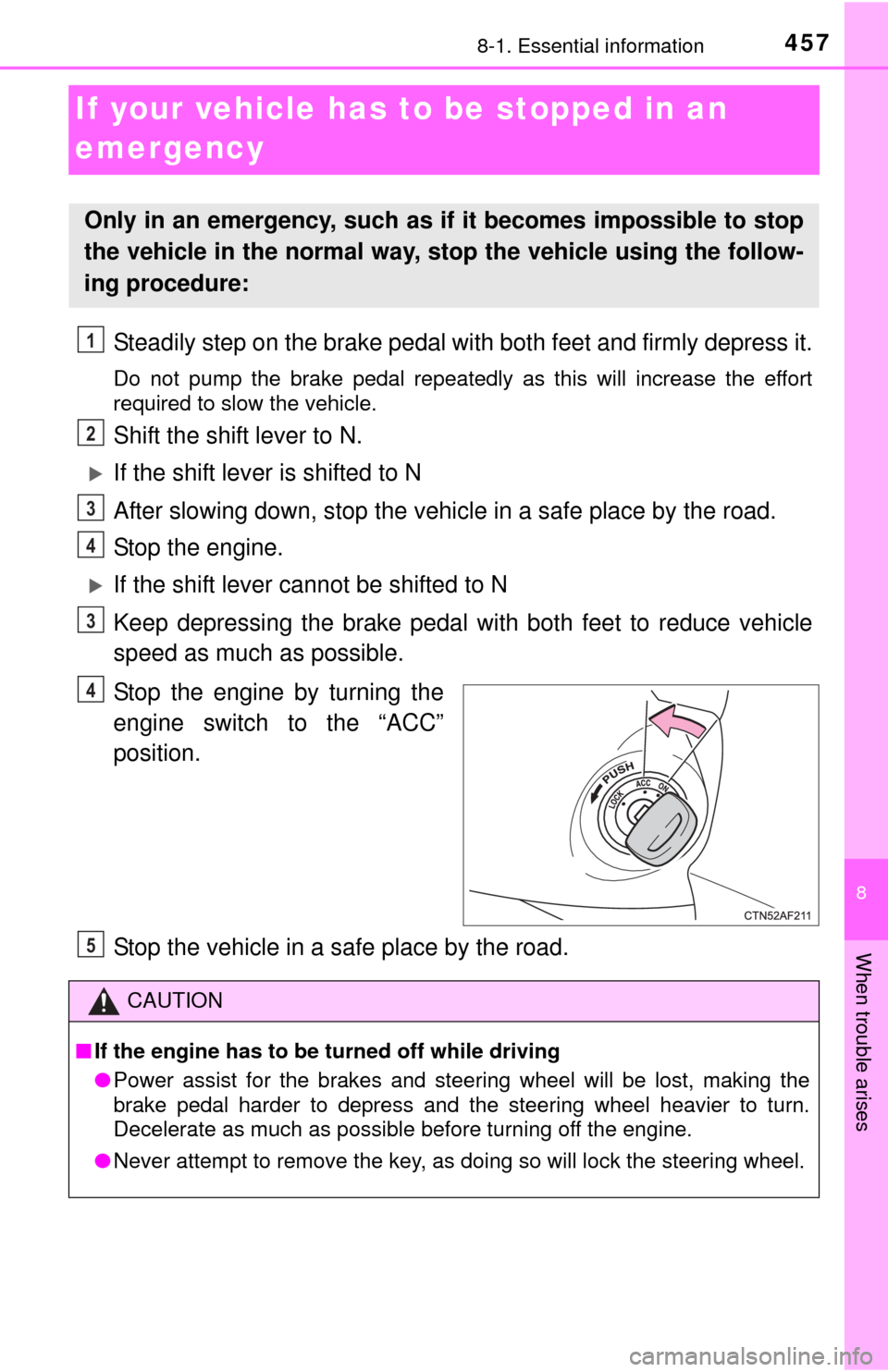
Stop the engine by turning the
engine switch to the “ACC”
position.
Stop the vehicle in a safe place by the road.
Only in an emergency, such as if it becomes impossible to stop
the vehicle in the normal way, st op the vehicle using the follow-
ing procedure:
1
2
3
4
3
4
CAUTION
■ If the engine has to be turned off while driving
● Power assist for the brakes and steering wheel will be lost, making the
brake pedal harder to depress and the steering wheel heavier to turn.
Decelerate as much as possible before turning off the engine.
● Never attempt to remove the key, as doing so will lock the steering wheel.
5
Page 462 of 576
4628-2. Steps to take in an emergency
NOTICE
■To prevent damage to the vehicle when towing using a wheel-lift type
truck
● Do not tow the vehicle from the rear when the engine switch is in the
“LOCK” position or the key is removed.
The steering lock mechanism is not strong enough to hold the front wheels
straight.
● 2WD models: When raising the vehicle from the rear, ensure adequate
ground clearance for towing at the opposite end of the raised vehicle.
Without adequate clearance, the vehicle could be damaged while being
towed from the rear.
● 4WD models: When raising the vehicle, ensure adequate ground clear-
ance for towing at the opposite end of the raised vehicle. Without ade-
quate clearance, the vehicle could be damaged while being towed.
Page 495 of 576

4958-2. Steps to take in an emergency
8
When trouble arises
Start the engine of the second vehicle. Increase the engine speed
slightly and maintain at that level for approximately 5 minutes to
recharge the batter y of your vehicle.
Maintain the engine speed of t he second vehicle and start the
engine of your vehicle.
Once the vehicle’s engine has started, remove the jumper cables in
the exact reverse order from which they were connected.
Once the engine starts, have the vehicle inspected at your Toyota
dealer as soon as possible.
■ Starting the engine when the battery is discharged
The engine cannot be started by push-starting.
■ To prevent battery discharge
●Turn off the headlights and the audio system while the engine is off.
● Turn off any unnecessary electrical components when the vehicle is running
at a low speed for an extended period, such as in heavy traffic.
■ When the battery is removed or discharged
●The moon roof must be initialized. ( P. 143)
● Flex-fuel vehicles: The information recorded in the computer will be cleared,
which may cause the engine to run roughly and reduce driving performance
for a while when the engine is first started. In this case, wait until the engine
runs normally.
If the vehicle is running on E85, the engine may stall.
In this case, restart the engine, repeatedly if necessary.
● Vehicles with alarm: Make sure that the key is not inside the vehicle when
recharging or replacing the battery. The key may be locked in the vehicle if
the alarm is activated. (P. 81)
■ Charging the battery
The electricity stored in the battery will discharge gradually even when the
vehicle is not in use, due to natural discharge and the draining effects of cer-
tain electrical appliances. If the vehicle is left for a long time, the battery may
discharge, and the engine may be unable to start. (The battery recharges
automatically during driving.)
3
4
5
Page 535 of 576
5359-2. Customization
9
Vehicle specifications
Select the setting to be changed. Change each setting.
For items that can be enabled/disabled, and for items with an
operating time that can be changed, select “On” or “Off”, or select
the desired operating time.
For items with sensor sensitivity that can be changed, select “+”
or “-” to choose the desired level, then select “OK”.
A message indicating that the settings are being saved will
appear. Do not perform any other operations while this message
is displayed.
■Changing by using the mu lti-information display
P. 9 2
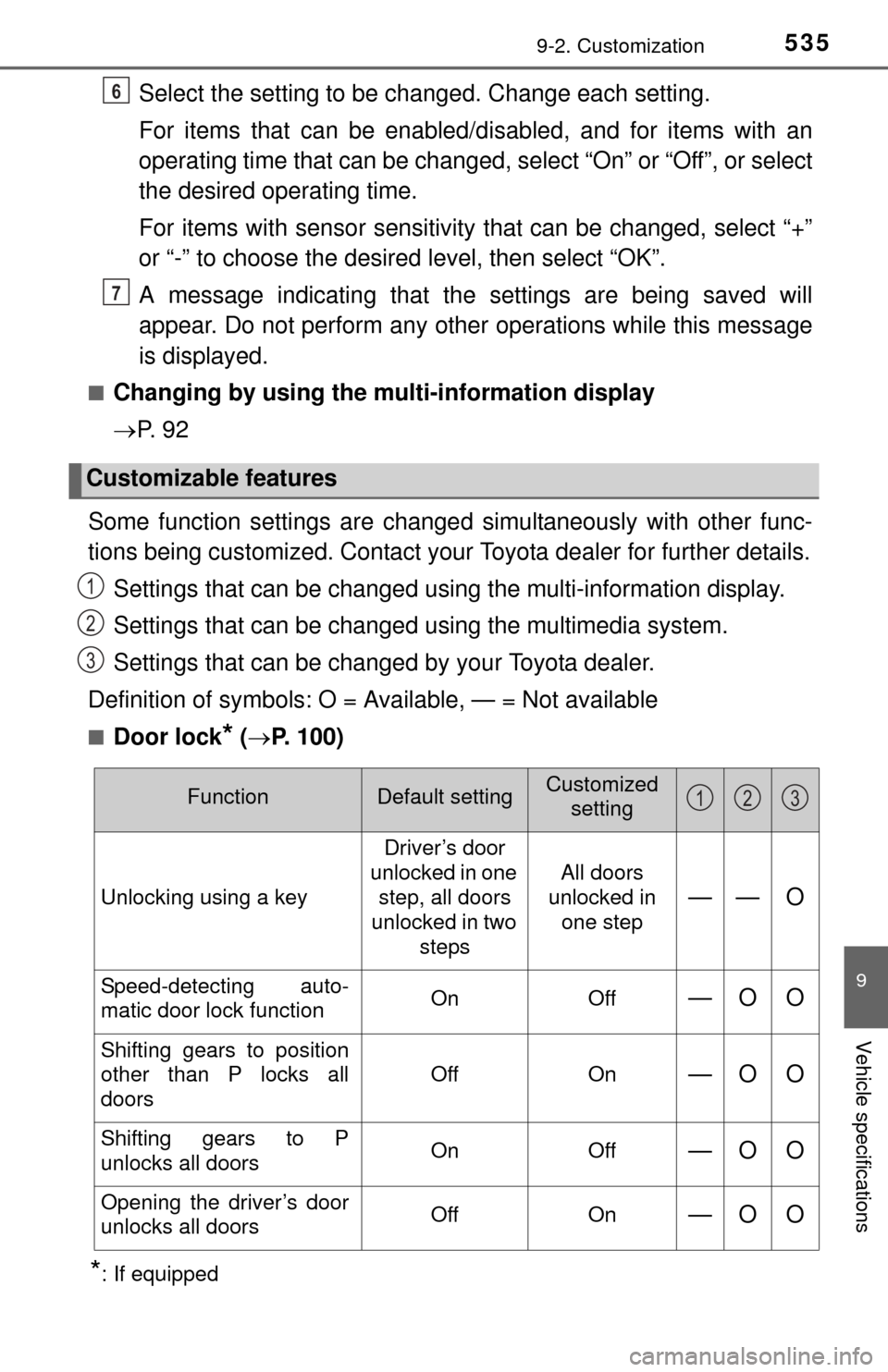
Some function settings are change d simultaneously with other func-
tions being customized. Contact your Toyota dealer for further details.
Settings that can be changed using the multi-information display.
Settings that can be changed using the multimedia system.
Settings that can be changed by your Toyota dealer.
Definition of symbols: O = Available, — = Not available
■Door lock* ( P. 100)
*: If equipped
Customizable features
6
7
1
2
3
FunctionDefault settingCustomized
setting
Unlocking using a key Driver’s door
unlocked in one step, all doors
unlocked in two steps All doors
unlocked in
one step—— O
Speed-detecting auto-
matic door lock function On Off—O O
Shifting gears to position
other than P locks all
doors Off On
—O O
Shifting gears to P
unlocks all doors
On Off—O O
Opening the driver’s door
unlocks all doors Off On—O O
123