2015 TOYOTA SIENNA key
[x] Cancel search: keyPage 132 of 664
132
SIENNA_OM_01999-08001_(U)
3-2. Opening, closing and locking the doors
Back door
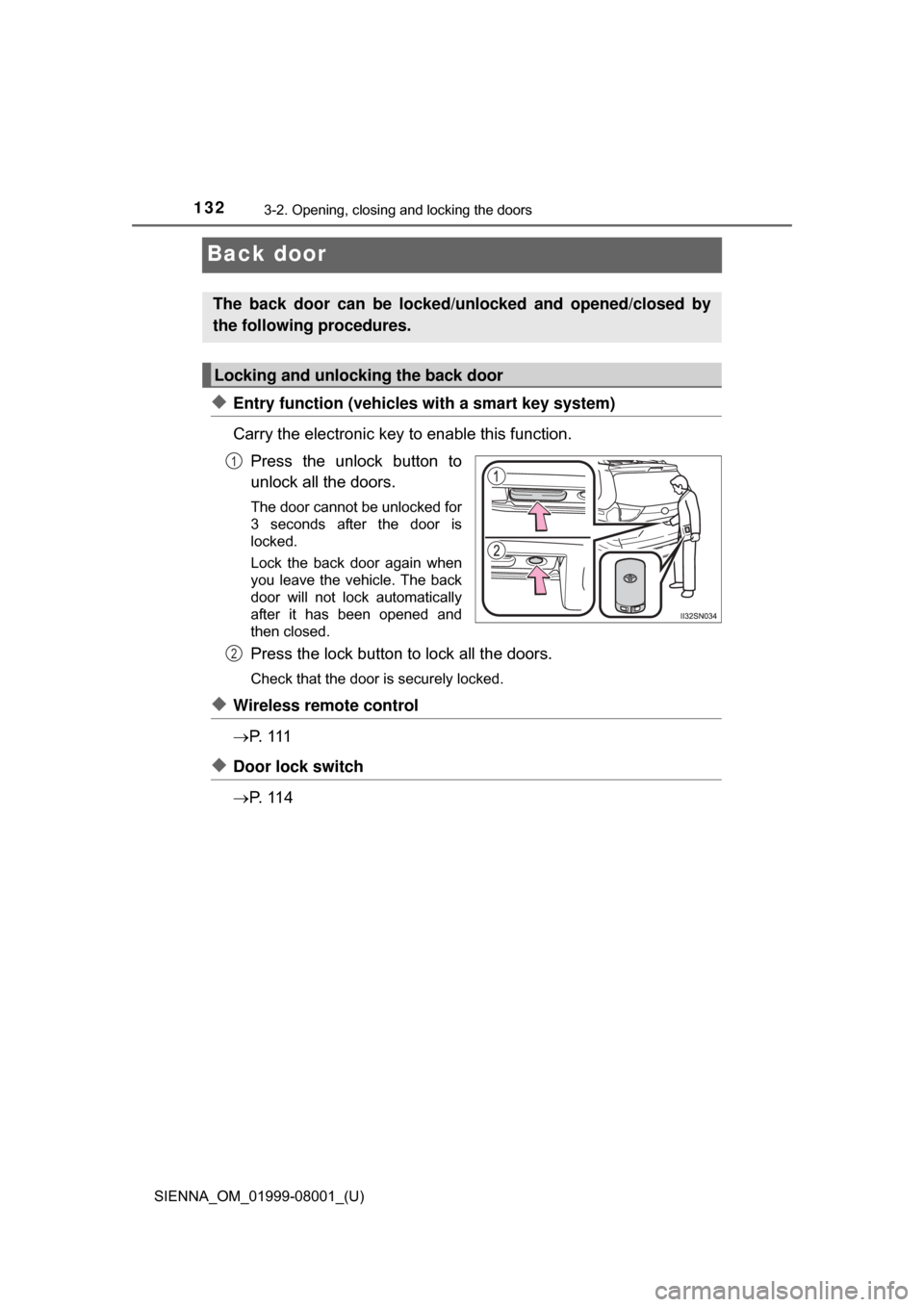
◆Entry function (vehicles with a smart key system)
Carry the electronic key to enable this function.Press the unlock button to
unlock all the doors.
The door cannot be unlocked for
3 seconds after the door is
locked.
Lock the back door again when
you leave the vehicle. The back
door will not lock automatically
after it has been opened and
then closed.
Press the lock button to lock all the doors.
Check that the door is securely locked.
◆Wireless remote control
P. 1 1 1
◆Door lock switch
P. 1 1 4
The back door can be locked/unl ocked and opened/closed by
the following procedures.
Locking and unlocking the back door
1
2
Page 134 of 664
134
SIENNA_OM_01999-08001_(U)
3-2. Opening, closing and locking the doors
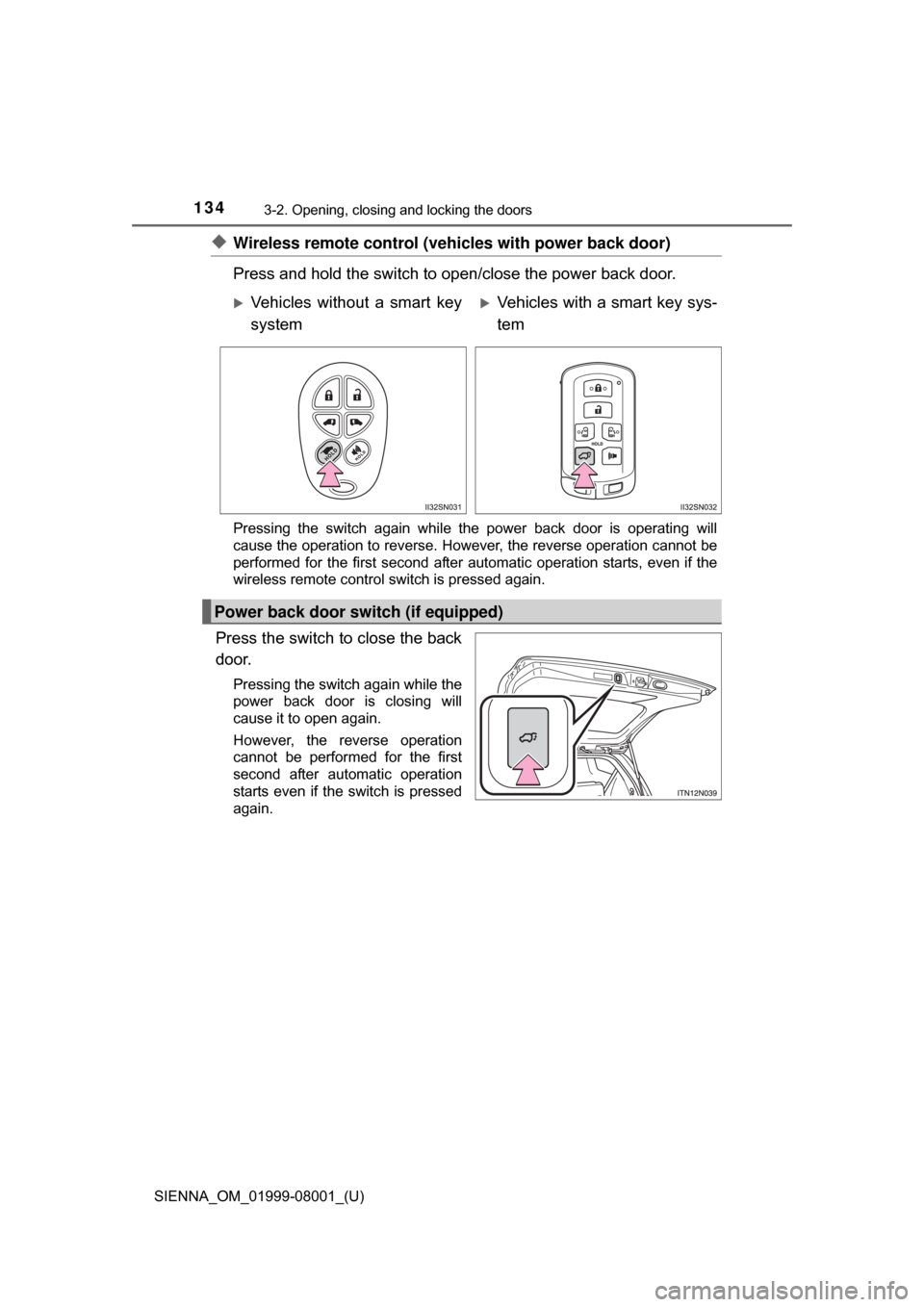
◆Wireless remote control (vehicles with power back door)
Press and hold the switch to open/close the power back door.
Pressing the switch again while the power back door is operating will
cause the operation to reverse. However, the reverse operation cannot be
performed for the first second after automatic operation starts, even if the
wireless remote control switch is pressed again.
Press the switch to close the back
door.
Pressing the switch again while the
power back door is closing will
cause it to open again.
However, the reverse operation
cannot be performed for the first
second after automatic operation
starts even if the switch is pressed
again.
Vehicles without a smart key
systemVehicles with a smart key sys-
tem
Power back door switch (if equipped)
Page 137 of 664
SIENNA_OM_01999-08001_(U)
1373-2. Opening, closing and locking the doors
3
Operation of each component
■The power back door can be operated when (vehicles with power back
door)
●The shift lever is in P.
● The back door is unlocked.
■ Power back door operation ( vehicles with power back door)
● A buzzer sounds and the emergency flashers flash twice to indicate that the
back door is opening/closing.
● The back door can be opened and closed manually even when the power
back door main switch is off.
■ Jam protection function (veh icles with power back door)
● If anything obstructs the power back door while it is closing or opening, the
back door will automatically operate in the opposite direction.
● If the jam protection function operates during two consecutive closing oper-
ations, the back door will be stopped at that position.
■ Back door closer (if equipped)
In the event that the back door is left slightly open, the back door closer will
automatically close it to the fully closed position.
■ When the battery is disconnected
●The back door will be automatically locked after the battery is reconnected.
● The power back door (if equipped) must be initialized in order to ensure
proper operation.
Unlock the back door with the wireless remote control or door lock switch.
Close the back door completely by hand.
■ Conditions affecting the operation of the smart key system or wireless
remote control
P. 1 1 8
1
2
Page 140 of 664

140
SIENNA_OM_01999-08001_(U)
3-2. Opening, closing and locking the doors
WARNING
●In the following situations, the power back door may detect an abnormality
and automatic operation may be stopped. In this case, the back door has
to be operated manually. Take extra care when on an incline, as the back
door may open or close abruptly.
• When the back door contacts an obstacle
• When the battery voltage suddenly drops, such as when the engine
switch is turned to the “ON” position (vehicles without a smart key sys-
tem) or IGNITION ON mode (vehicles with a smart key system) or the
engine is started during automatic operation
● If a bicycle carrier or similar heavy object is attached to the back door, the
power back door may not operate, causing itself to malfunction, or the
back door may move in the closing direction after being opened, causing
someone’s hands, head or neck to be caught and injured. When installing
an accessory part to the back door, ask your Toyota dealer for details.
■ Jam protection function (vehicles with power back door)
Observe the following precautions.
Failure to do so may cause death or serious injury.
● Although the back door stops closing when the jam protection function
detects an object, take extra care as you may still be injured if part of your
body is already caught.
● Never use any part of your body to intentionally activate the jam protection
function.
● The jam protection function may not work if something gets caught just
before the back door fully closes. Be careful not to catch fingers or any-
thing else.
● The jam protection function may not work depending on the shape of the
object that is caught. Be careful not to catch fingers or anything else.
Page 142 of 664
142
SIENNA_OM_01999-08001_(U)
3-2. Opening, closing and locking the doors
Smart key system
●Locks and unlocks the doors
• Front door handles ( P. 1 1 0 )
• Sliding door handles ( P. 121)
• Back door ( P. 132)
● Starts and stops the engine ( P. 226)
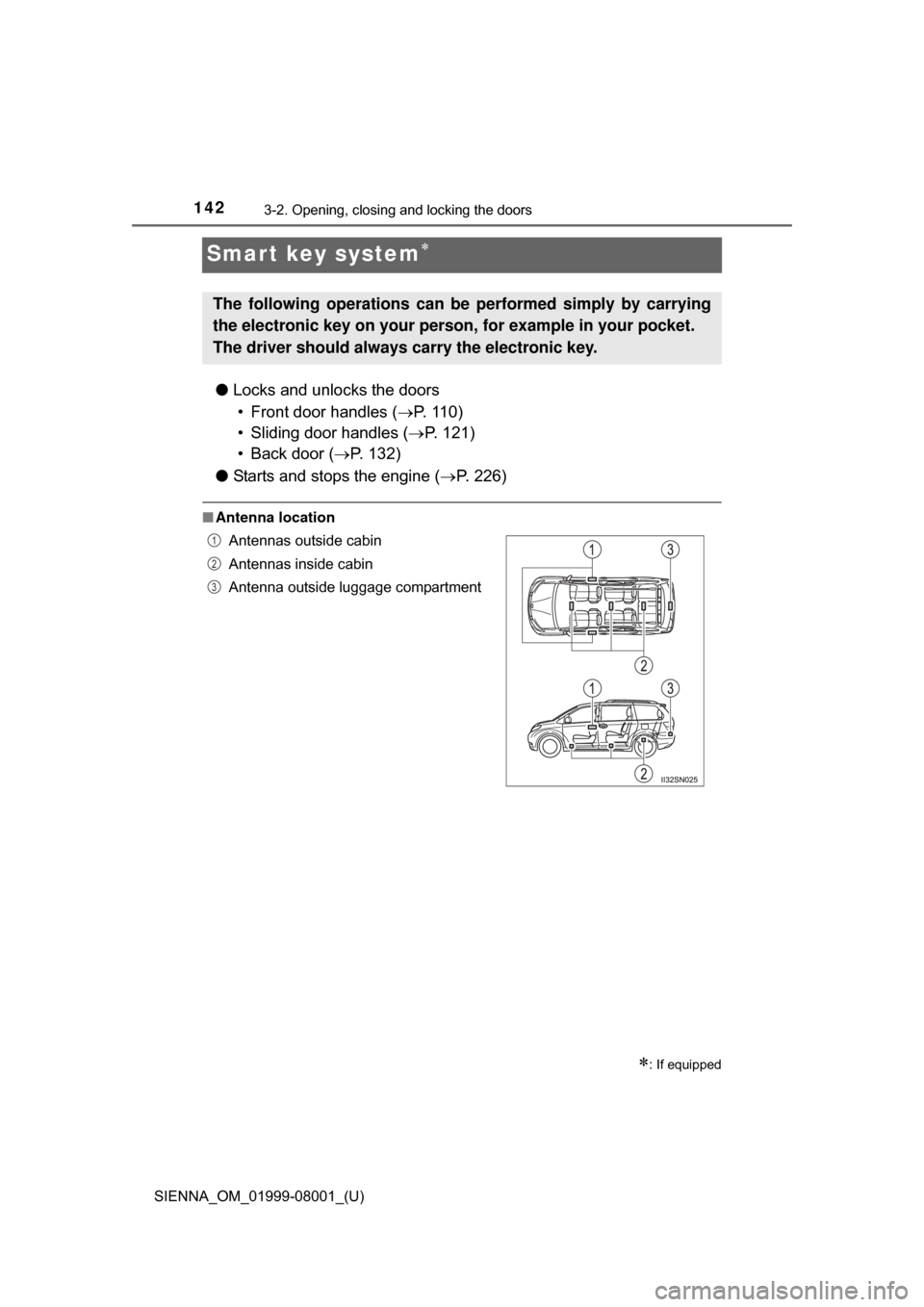
■Antenna location
: If equipped
The following operations can be performed simply by carrying
the electronic key on your person, for example in your pocket.
The driver should always carry the electronic key.
Antennas outside cabin
Antennas inside cabin
Antenna outside luggage compartment1
2
3
Page 143 of 664
SIENNA_OM_01999-08001_(U)
1433-2. Opening, closing and locking the doors
3
Operation of each component
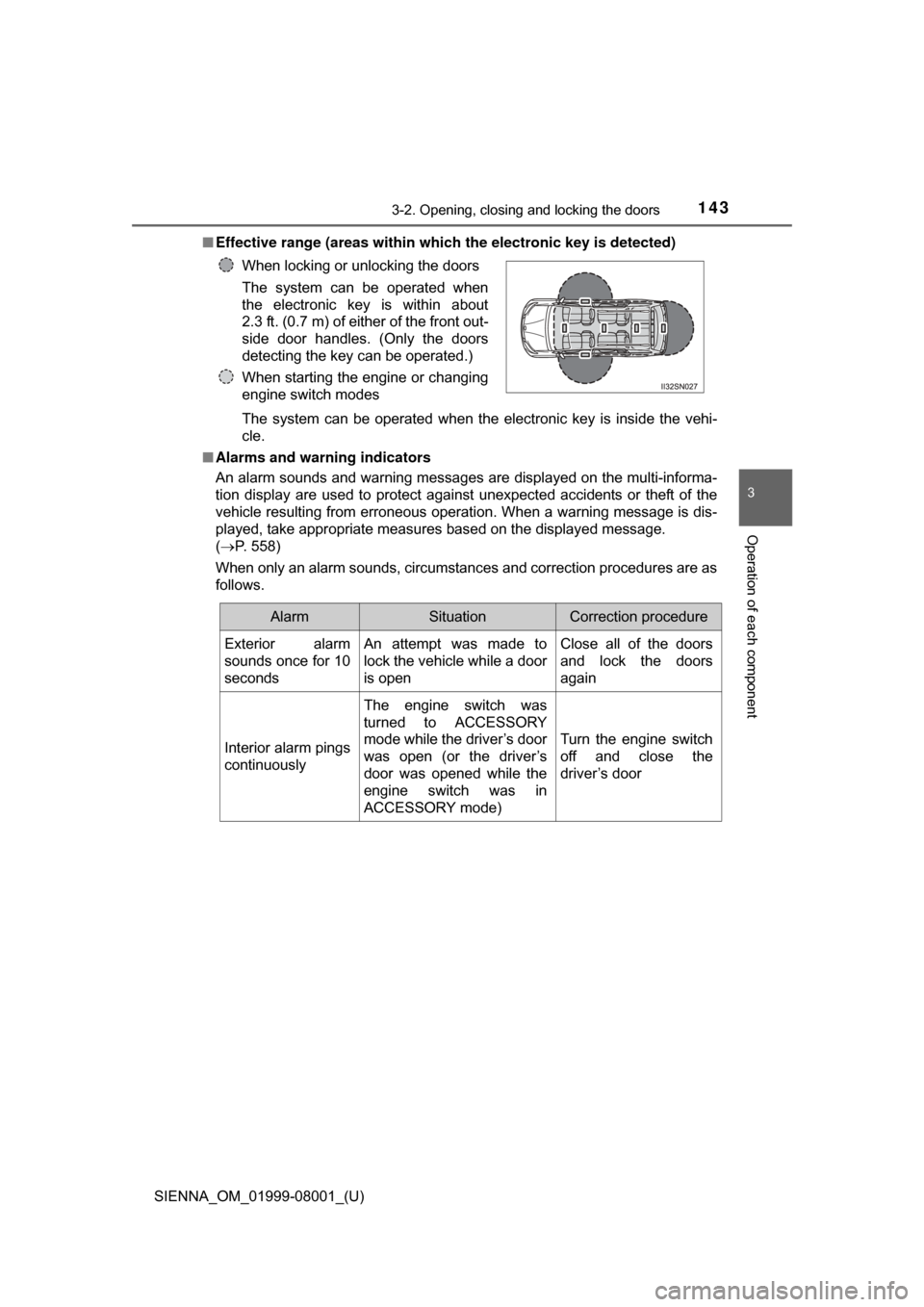
■Effective range (areas within whic h the electronic key is detected)
The system can be operated when the electronic key is inside the vehi-
cle.
■ Alarms and warning indicators
An alarm sounds and warning messages are displayed on the multi-informa-
tion display are used to protect against unexpected accidents or theft of the
vehicle resulting from erroneous operation. When a warning message is dis-
played, take appropriate measures based on the displayed message.
(P. 558)
When only an alarm sounds, circumstances and correction procedures are as
follows. When locking or unlocking the doors
The system can be operated when
the electronic key is within about
2.3 ft. (0.7 m) of either of the front out-
side door handles. (Only the doors
detecting the key can be operated.)
When starting the engine or changing
engine switch modes
AlarmSituationCorrection procedure
Exterior alarm
sounds once for 10
secondsAn attempt was made to
lock the vehicle while a door
is openClose all of the doors
and lock the doors
again
Interior alarm pings
continuously
The engine switch was
turned to ACCESSORY
mode while the driver’s door
was open (or the driver’s
door was opened while the
engine switch was in
ACCESSORY mode)
Turn the engine switch
off and close the
driver’s door
Page 144 of 664

144
SIENNA_OM_01999-08001_(U)
3-2. Opening, closing and locking the doors
■Battery-saving function
In the following circumstances, the entry function is disabled in order to pre-
vent the vehicle battery from discharging and the electronic key battery from
discharging.
●When the entry function has not been used for 5 days or more
● When the electronic key has been left within approximately 6 ft. (2 m) of the
vehicle for 10 minutes or more
● If the entry function has not been used for 14 days or more, the vehicle can-
not be unlocked by a door other than the driver’s door. To unlock the vehicle,
grip the driver’s door handle or use the wireless remote control or the
mechanical key.
The system will resume operation when...
● The vehicle is locked using the lock sensor when carrying the electronic key
on your person.
● The vehicle is locked/unlocked using the wireless remote control. ( P. 1 1 1 )
● The vehicle is locked/unlocked using the mechanical key. ( P. 581)
■ Conditions affecting operation
P. 1 1 9
■ Notes for the entry function
●Even when the electronic key is within the effective range (detection areas),
the system may not operate properly in the following cases.
• The electronic key is too close to the window or outside door handle, near
the ground, or in a high place when the doors are locked or unlocked.
• The electronic key is on the instrument panel, floor or in the glove box
when the engine is started or engine switch modes are changed.
● Do not leave the electronic key on top of the instrument panel or near the
door pockets when exiting the vehicle. Depending on the radio wave recep-
tion conditions, it may be detected by the antenna outside the cabin and the
door will become lockable from the outside, possibly trapping the electronic
key inside the vehicle.
● As long as the electronic key is within the effective range, the doors may be
locked or unlocked by anyone. However, only the doors detecting the elec-
tronic key can be used to unlock the vehicle.
● The doors may unlock or lock if a large amount of water splashes on the
door handle, such as in the rain or in a car wash when the electronic key is
within the effective range. (The doors will automatically be locked after
approximately 60 seconds if the doors are not opened and closed.)
● If the wireless remote control is used to lock the doors when the electronic
key is near the vehicle, there is a possibility that the door may not be
unlocked by the smart key system. (Use the wireless remote control to
unlock the doors.)
● If power slide door is unable to operate due to prohibition by the power slid-
ing door main switch, the door unlock and open operation will not be per-
formed. ( P. 124)
Page 145 of 664
SIENNA_OM_01999-08001_(U)
1453-2. Opening, closing and locking the doors
3
Operation of each component
■Note for locking the doors
●Touching the door lock sensor while wearing gloves may delay or prevent
lock operation. Remove the gloves and touch the lock sensor again.
● When the lock operation is performed using the lock sensor, recognition sig-
nals will be shown up to two consecutive times. After this, no recognition
signals will be given.
● If the door handle becomes wet while the electronic key is within the effec-
tive range, the door may lock and unlock repeatedly. Place the key in a posi-
tion 6 ft. (2 m) or more separate from the vehicle while the vehicle is being
washed. (Take care to ensure that the key is not stolen.)
● If the electronic key is inside the vehicle and a door handle becomes wet
during a car wash, a message may be shown on the multi-information dis-
play and a buzzer will sound outside the vehicle. To turn off the alarm, lock
all the doors.
● The lock sensor may not work properly if it comes into contact with ice,
snow, mud, etc. Clean the lock sensor and attempt to operate it again, or
use the lock sensor on the lower part of the door handle.
● Fingernails may scrape against the door during operation of the door han-
dle. Be careful not to injure fingernails or damage the surface of the door.
■ Notes for the unlocking function
●Gripping the front door handle when wearing a glove may not unlock or lock
the door.
● A sudden approach to the effective range or door handle operation may pre-
vent the doors from being unlocked. In this case, return the door handle to
the original position and check that the doors have unlocked before pulling
the door handle.
● If there is another electronic key in the detection area, it may take slightly
longer to unlock the doors after one of the front door handles is gripped or
one of sliding door handles is pulled.
■ When the vehicle is not driven for extended periods
●To prevent theft of the vehicle, do not leave the electronic key within 6 ft.
(2 m) of the vehicle.
● The smart key system can be deactivated in advance. ( P. 623)