2015 TOYOTA SIENNA key
[x] Cancel search: keyPage 146 of 664
146
SIENNA_OM_01999-08001_(U)
3-2. Opening, closing and locking the doors
■To operate the system properly
Make sure to carry the electronic key when operating the system. Do not get
the electronic key too close to the vehicle when operating the system from the
outside of the vehicle.
Depending on the position and holding condition of the electronic key, the key
may not be detected correctly and the system may not operate properly. (The
alarm may go off accidentally, or the door lock prevention may not operate.)
■ If the smart key system do es not operate properly
● Locking and unlocking the doors: Use the mechanical key. ( P. 581)
● Starting the engine ( P. 581)
■ Certification for the smart key system
For vehicles sold in the U.S.A.
FCC ID: HYQ14ADR FCC ID: HYQ14AEH
FCC ID: HYQ13CZM FCC ID: HYQ13CZN
FCC ID: NI4TMLF8-20
NOTE:
This device complies with part 15 of the FCC Rules. Operation is subject to
the following two conditions: (1) This device may not cause harmful interfer-
ence, and (2) this device must accept any interference received, including
interference that may cause undesired operation.
FCC WARNING:
Changes or modifications not expressly approved by the party responsible for
compliance could void the user’s authority to operate the equipment.
For vehicles sold in Canada
NOTE:
Operation is subject to the following two conditions: (1) this device may not
cause interference, and (2) this device must accept any interference, includ-
ing interference that may cause undesired operation of the device.
This device complies with Industry Canada licence-exempt RSS standard(s).
Operation is subject to the following two conditions: (1) this device may not
cause interference, and (2) this device must accept any interference, includ-
ing interference that may cause undesired operation of the device.
Page 147 of 664
SIENNA_OM_01999-08001_(U)
1473-2. Opening, closing and locking the doors
3
Operation of each component
■Customization
Settings (e.g. smart key system) can be changed.
(Customizable features: P. 622, 623)
■ If the smart key system has been deactivated in a customized setting
●Locking and unlocking the doors:
Use the wireless remote control or mechanical key. ( P. 111, 581)
● Starting the engine and changing engine switch modes: P. 581
● Stopping the engine: P. 2 2 7
WARNING
■Caution regarding interfer ence with electronic devices
● People with implantable cardiac pacemakers, cardiac resynchronization
therapy-pacemakers or implantable cardioverter defibrillators should keep
away from the smart key system antennas. ( P. 142)
The radio waves may affect the operation of such devices. If necessary,
the entry function can be disabled. Ask your Toyota dealer for details, such
as the frequency of radio waves and timing of the emitted radio waves.
Then, consult your doctor to see if you should disable the entry function.
● Users of any electrical medical device other than implantable cardiac
pacemakers, cardiac resynchronization therapy-pacemakers or implant-
able cardioverter defibrillators should consult the manufacturer of the
device for information about its operation under the influence of radio
waves. Radio waves could have unexpected effects on the operation of
such medical devices.
Ask your Toyota dealer for details for disabling the entry function.
Page 164 of 664
164
SIENNA_OM_01999-08001_(U)
3-3. Adjusting the seats
■Power third seat (vehicles with power third seat)
● If the indicator light above the switches flashes three times when the folding/
returning switch is pressed, the folding operation will not start. Make sure
the shift lever is in P.
● If any of the following conditions occur while the seat is operating, the seat
operation will stop. The indicator light above the switches will flash three
times and a beep will sound for about 10 seconds:
• An object is caught between the seatback and seat cushion.
• The stowing switch is released.
• Other power third seat switch is pushed while operating the stowing
switch.
• The shift lever is moved from P when the engine switch is turned to the “ON” position (vehicles without a smart key system) or IGNITION ON
mode (vehicles with a smart key system).
If the engine is started during operating, the seat operation may also be
stopped.
To continue the folding operation, the seatback must be returned to its orig-
inal position first.
■ AUTO ACCESS SEAT (if equipped)
The AUTO ACCESS SEAT cannot be removed.
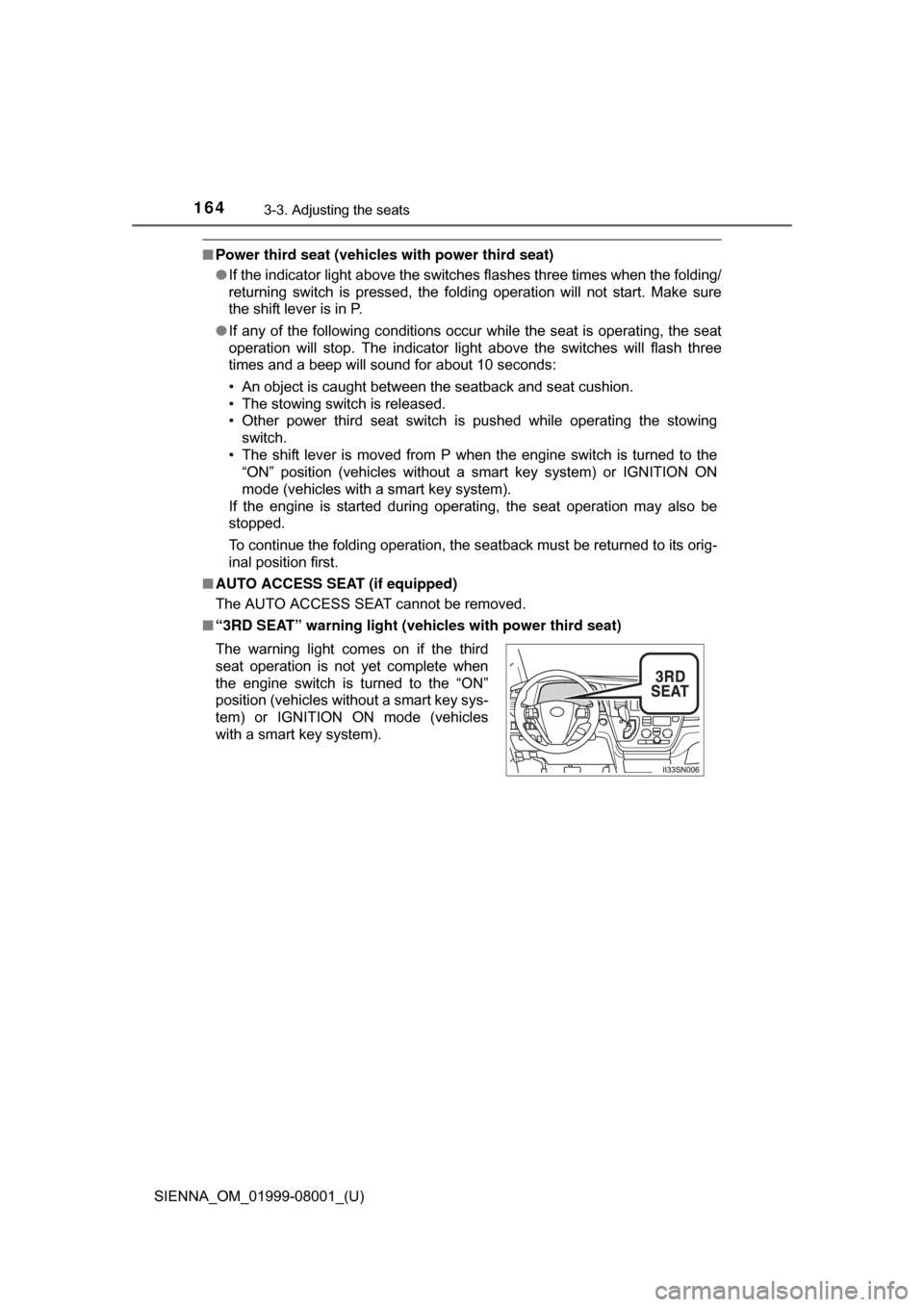
■ “3RD SEAT” warning light ( vehicles with power third seat)
The warning light comes on if the third
seat operation is not yet complete when
the engine switch is turned to the “ON”
position (vehicles without a smart key sys-
tem) or IGNITION ON mode (vehicles
with a smart key system).
Page 166 of 664
166
SIENNA_OM_01999-08001_(U)
3-3. Adjusting the seats
WARNING
■Stowing the third seats
● Make sure that the seat path is clear before moving the seat. Otherwise,
injury may result from contact with, or by being pinched by parts of the
seat.
● Manual third seats: Do not sit on the third seat when it is in the stowed
position with the seatback upright.
● Power third seats: Do not continue the stowing operation when the indica-
tor above the stowing switch and returning switch comes on or flashes. An
object or a person may be caught in the seat.
● Power third seats: During the stowing operation, to prevent the vehicle
from moving, do not shift the shift lever out of P with the engine switch in
the “ON” position (vehicles without a smart key system) or IGNITION ON
mode (vehicles with a smart key system).
■ When adjusting the seat position or the ottoman (vehicles with Otto-
man seats)
Make sure to leave enough space around the feet so as not to get them
caught.
■ When using the ottoman ( vehicles with Ottoman seats)
● Do not sit on the ottoman. Seat belts may not be properly worn which may
result in death or serious injury.
● Stow the ottoman when you get in and out of the vehicle or when the otto-
man is not in use to avoid stumbling over it.
● Do not use the ottoman feature when the vehicle is in motion. The ottoman
feature should only be used when the vehicle is stationary. If the ottoman
feature is in use during an accident the lap belt may slide past the hips.
This could also result in restraint forces being applied to the abdomen or
your neck may contact the shoulder belt, increasing the risk of death or
serious injury.
Page 170 of 664
170
SIENNA_OM_01999-08001_(U)
3-3. Adjusting the seats
■To stop the position recall operation part-way through
Perform any of the following:
●Press the “SET” button.
● Press button “1” or “2”.
● Operate any of the seat adjustment switches (only cancels seat position
recall).
■ Operating the driving position memory after turning the engine switch
off
Recorded seat positions can be activated up to 180 seconds after the driver’s
door is opened and another 60 seconds after it is closed again.
■ In order to correctly use the dr iving position memory function
If a seat position is already in the furthest possible position and the seat is
operated in the same direction, the recorded position may be slightly different
when it is recalled.
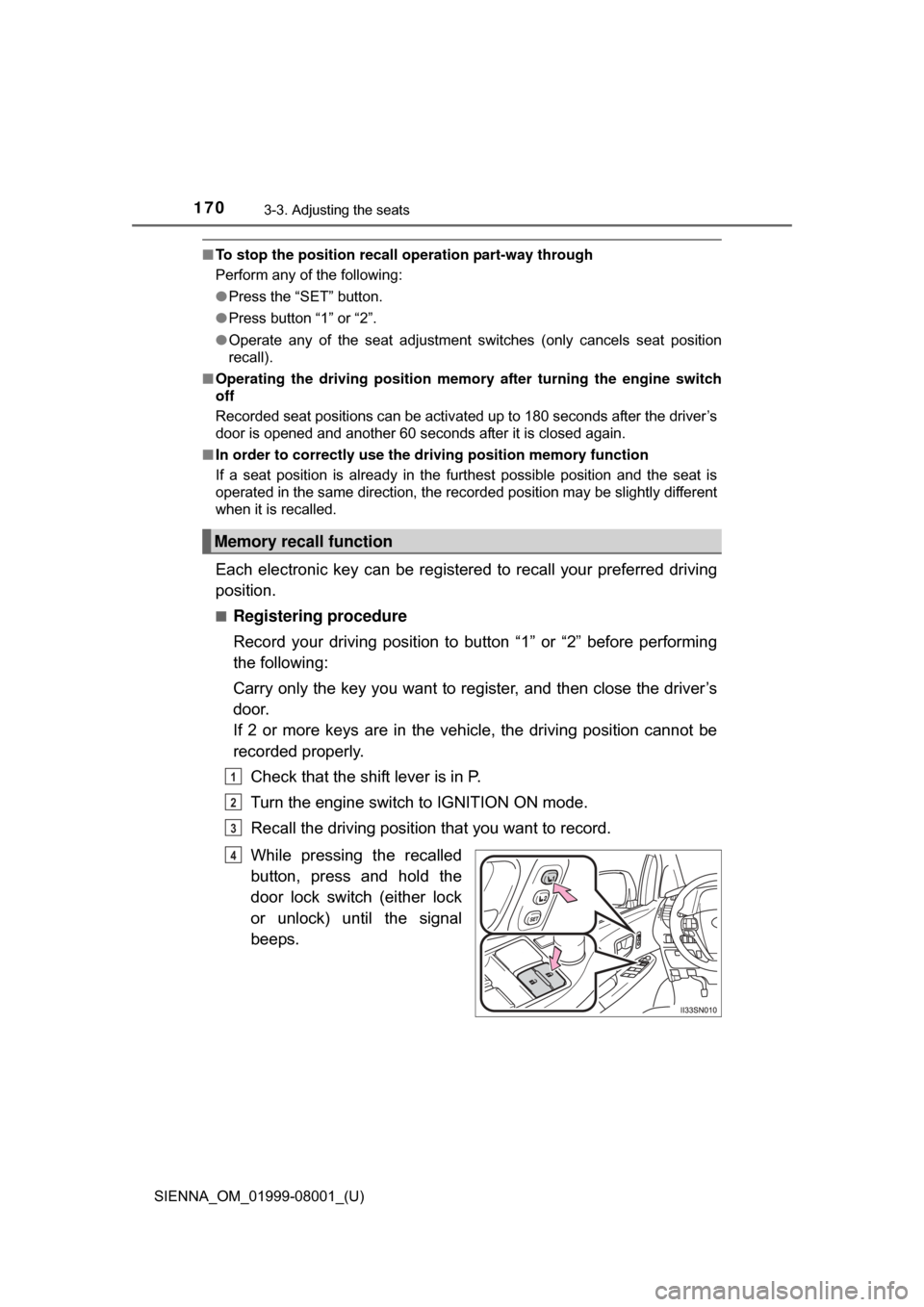
Each electronic key can be registered to recall your preferred driving
position.
■Registering procedure
Record your driving position to button “1” or “2” before performing
the following:
Carry only the key you want to re gister, and then close the driver’s
door.
If 2 or more keys are in the vehicle, the driving position cannot be
recorded properly.
Check that the shift lever is in P.
Turn the engine switch to IGNITION ON mode.
Recall the driving position that you want to record.
While pressing the recalled
button, press and hold the
door lock switch (either lock
or unlock) until the signal
beeps.
Memory recall function
1
2
3
4
Page 171 of 664
SIENNA_OM_01999-08001_(U)
1713-3. Adjusting the seats
3
Operation of each component
■Recall procedure
Carry the electronic key that has been registered to the driving
position, and then unlock and open the driver’s door using the
smart key system or wi reless remote control.
The driving position will move to the recorded position.
If the driving position is in a position that has already been recorded, the
seat and outside rear view mirrors will not move.
■
Cancelation procedure
Carry only the key you want to cancel and then close the driver’s
door.
If 2 or more keys are in the vehicle, the driving position cannot be
canceled properly.
Check that the shift lever is in P.
Turn the engine switch to IGNITION ON mode.
While pressing the “SET” button, press and hold the door lock
switch (either lock or unlock) until the signal beeps twice.
If the button could not be canceled, the signal beeps continuously for
approximately 3 seconds.
■Recalling the driving position us ing the memory recall function
● Different driving positions can be registered for each electronic key. There-
fore, the driving position that is recalled may be different depending on the
key being carried.
● If a door other than the driver’s door is unlocked with the smart key system,
the driving position cannot be recalled. In this case, press the driving posi-
tion button which has been set.
■ Customization
The unlock door settings of the memory recall function can be customized.
(Customizable features: P. 624)
WARNING
■Seat adjustment caution
Take care during seat adjustment so that the seat does not strike the rear
passenger or squeeze your body against the steering wheel.
1
2
3
Page 179 of 664
1793-4. Adjusting the steering wheel and mirrors
3
Operation of each component
SIENNA_OM_01999-08001_(U)
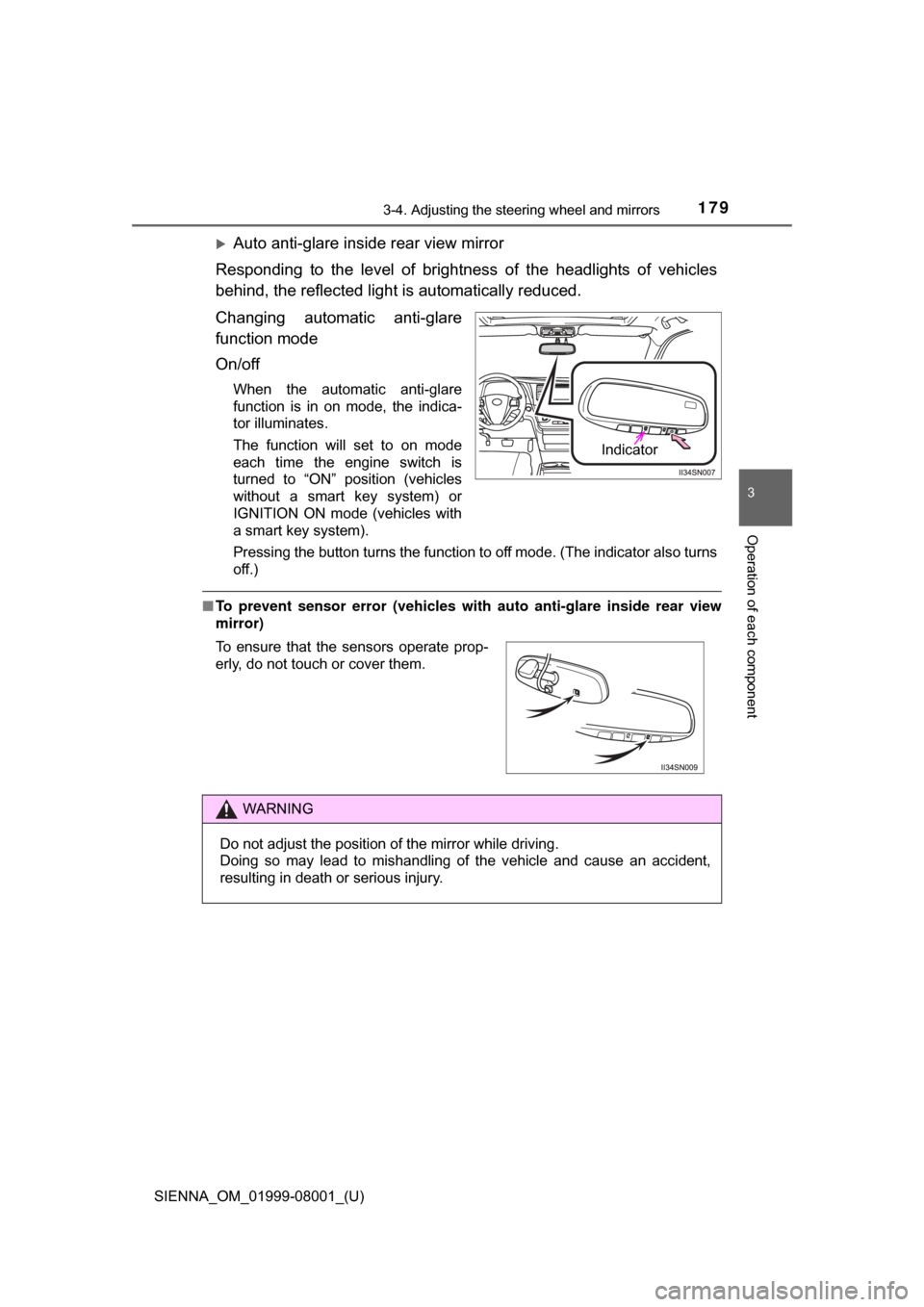
Auto anti-glare inside rear view mirror
Responding to the level of brightness of the headlights of vehicles
behind, the reflected light is automatically reduced.
Changing automatic anti-glare
function mode
On/off
When the automatic anti-glare
function is in on mode, the indica-
tor illuminates.
The function will set to on mode
each time the engine switch is
turned to “ON” position (vehicles
without a smart key system) or
IGNITION ON mode (vehicles with
a smart key system).
Pressing the button turns the function to off mode. (The indicator also turns
off.)
■ To prevent sensor error (vehicles with auto anti-glare inside rear view
mirror)
Indicator
To ensure that the sensors operate prop-
erly, do not touch or cover them.
WARNING
Do not adjust the position of the mirror while driving.
Doing so may lead to mishandling of the vehicle and cause an accident,
resulting in death or serious injury.
Page 182 of 664
1823-4. Adjusting the steering wheel and mirrors
SIENNA_OM_01999-08001_(U)
■Mirror angle can be adjusted when
Vehicles without a smart key system
The engine switch is in the “ACC” or “ON” position.
Vehicles with a smart key system
The engine switch is in ACCESSORY or IGNITION ON mode.
■ When the mirrors are fogged up (vehicles with outside rear view mirror
defoggers)
The outside rear view mirrors can be cleared using the mirror defoggers. Turn
on the rear window defogger to turn on the outside rear view mirror defog-
gers. ( P. 408)
■ Automatic adjustment of the mirror angle (vehicles with driving position
memory)
A desired mirror face angle can be entered to memory and recalled automati-
cally by the driving position memory. ( P. 168)
■ Auto anti-glare function (vehicles with auto anti-glare inside rear view
mirror)
When the anti-glare inside rear view mirr or is set to automatic mode, the out-
side rear view mirrors will activate in conjunction with the anti-glare inside
rear view mirror to reduce reflected light. ( P. 178)
WARNING
■When driving the vehicle
Observe the following precautions while driving.
Failing to do so may result in loss of control of the vehicle and cause an
accident, resulting in death or serious injury.
● Do not adjust the mirrors while driving.
● Do not drive with the mirrors folded.
● Both the driver and passenger side mirrors must be extended and properly
adjusted before driving.
■ When a mirror is moving
To avoid personal injury and mirror malfunction, be careful not to get your
hand caught by the moving mirror.
■ When the mirror defoggers are ope rating (vehicles with outside rear
view mirror defoggers)
Do not touch the rear view mirror surfaces, as they can become very hot
and burn you.