Page 230 of 664
230
SIENNA_OM_01999-08001_(U)
4-2. Driving procedures
WARNING
■When starting the engine
Always start the engine while sitting in the driver’s seat. Do not depress the
accelerator pedal while starting the engine under any circumstances.
Doing so may cause an accident resulting in death or serious injury.
■ Caution while driving
If the vehicle begins to slide due to engine failure or other circumstances, do
not lock or open the doors until the vehicle reaches a safe and complete
stop. Activation of the steering lock in this circumstance may lead to an
accident, resulting in death or serious injury.
■ Stopping the engine in an emergency
If you want to stop the engine in an emergency while driving the vehicle,
press and hold the engine switch for more than 2 seconds, or press it briefly
3 times or more in succession. ( P. 529)
However, do not touch the engine switch while driving except in an emer-
gency. Turning the engine off while driving will not cause loss of steering or
braking control, but the power assist to these systems will be lost. This will
make it more difficult to steer and brake, so you should pull over and stop
the vehicle as soon as it is safe to do so.
NOTICE
■ To prevent battery discharge
● Do not leave the engine switch in ACCESSORY or IGNITION ON mode
for long periods of time without the engine running.
● If the indicator on the engine switch is illuminated, the engine switch is not
off. When exiting the vehicle, always check that the engine switch is off.
● Do not stop the engine when the shift lever is in a position other than P. If
the engine is stopped in another shift lever position, the engine switch will
not be turned off but instead be turned to ACCESSORY mode. If the vehi-
cle is left in ACCESSORY mode, battery discharge may occur.
■ When starting the engine
● Do not race a cold engine.
● If the engine becomes difficult to start or stalls frequently, have the engine
checked immediately.
■ Symptoms indicating a malfunction with the engine switch
If the engine switch seems to be operating somewhat differently than usual,
such as the switch sticking slightly, there may be a malfunction.
Contact your Toyota dealer immediately.
Page 232 of 664
232
SIENNA_OM_01999-08001_(U)
4-2. Driving procedures
*1: Shifting to the D position allows the system to select a gear suitable forthe driving conditions. Setting the shift lever to the D position is recom-
mended for normal driving.
*2: Selecting shift ranges using S mode restricts the upper limit of the possi-ble gear ranges, controls engine braking forces, and prevents unneces-
sary upshifting.
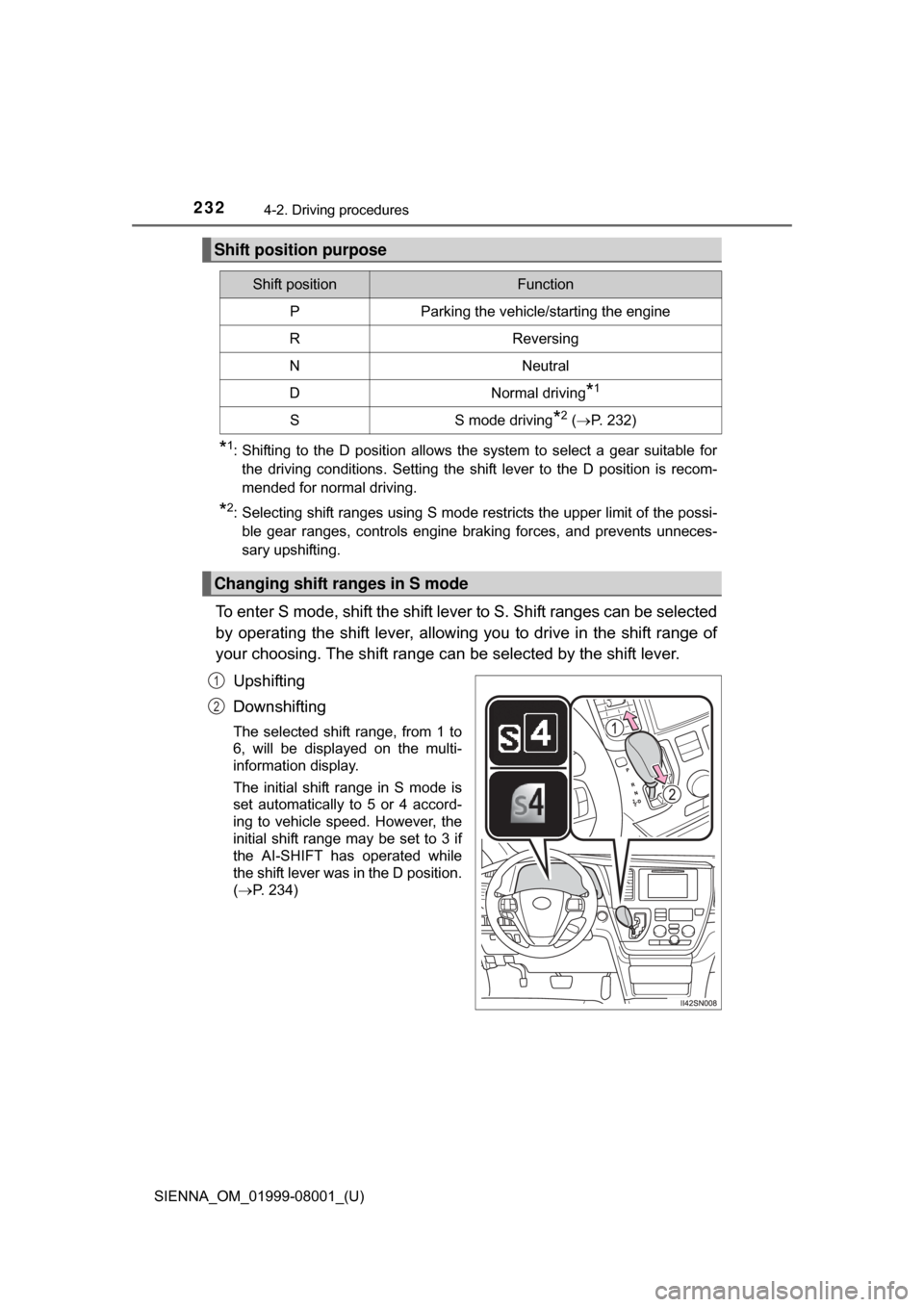
To enter S mode, shift the shift lever to S. Shift ranges can be selected
by operating the shift lever, allowing you to drive in the shift range of
your choosing. The shift range ca n be selected by the shift lever.
Upshifting
Downshifting
The selected shift range, from 1 to
6, will be displayed on the multi-
information display.
The initial shift range in S mode is
set automatically to 5 or 4 accord-
ing to vehicle speed. However, the
initial shift range may be set to 3 if
the AI-SHIFT has operated while
the shift lever was in the D position.
( P. 234)
Shift position purpose
Shift positionFunction
PParking the vehicle/starting the engine
RReversing
NNeutral
DNormal driving*1
SS mode driving*2 ( P. 232)
Changing shift ranges in S mode
1
2
Page 233 of 664

SIENNA_OM_01999-08001_(U)
2334-2. Driving procedures
4
Driving
■Shift ranges and their functions
●Automatically selecting gears bet ween 1 and 6 according to vehi-
cle speed and driving conditions. But, the gear is limited accord-
ing to selected shift range.
● You can choose from 6 levels of engine braking force.
● A lower shift range will provide gr eater engine braking force than
a higher shift range, and the engine speed will also increase.
■ S mode
●When the shift range is 5 or lower, holding the shift lever toward “+” sets the
shift range to 6.
● To prevent excessive engine speed, a function was adopted that automati-
cally selects a higher shift range before the engine speed becomes too high.
● To protect the automatic transaxle, a function is adopted that automatically
selects a higher shift range when the fluid temperature is high.
■ Downshift restriction wa rning buzzer (S mode)
To help ensure safety and driving performance, downshifting operation may
sometimes be restricted. In some circumstances, downshifting may not be
possible even when the shift lever is operated. (A buzzer will sound twice.)
■ When driving with the cr uise control or dynamic radar cruise control
activated (if equipped)
Even when performing the following actions with the intent of enabling engine
braking, engine braking will not activate while driving in S mode and down-
shifting to 5 or 4 because cruise control or dynamic radar cruise control will
not be canceled. ( P. 257, 261)
■ If the shift lever cannot be shifted from P
●P. 580
● Vehicles with AUTO ACCESS SEAT: If the AUTO ACCESS SEAT has not
been locked in place after being stowed, the shift lever cannot be shifted
from P.
For details, refer to “AUTO ACCESS SEAT OWNER’S MANUAL”.
Page 239 of 664
SIENNA_OM_01999-08001_(U)
2394-3. Operating the lights and wipers
4
Driving
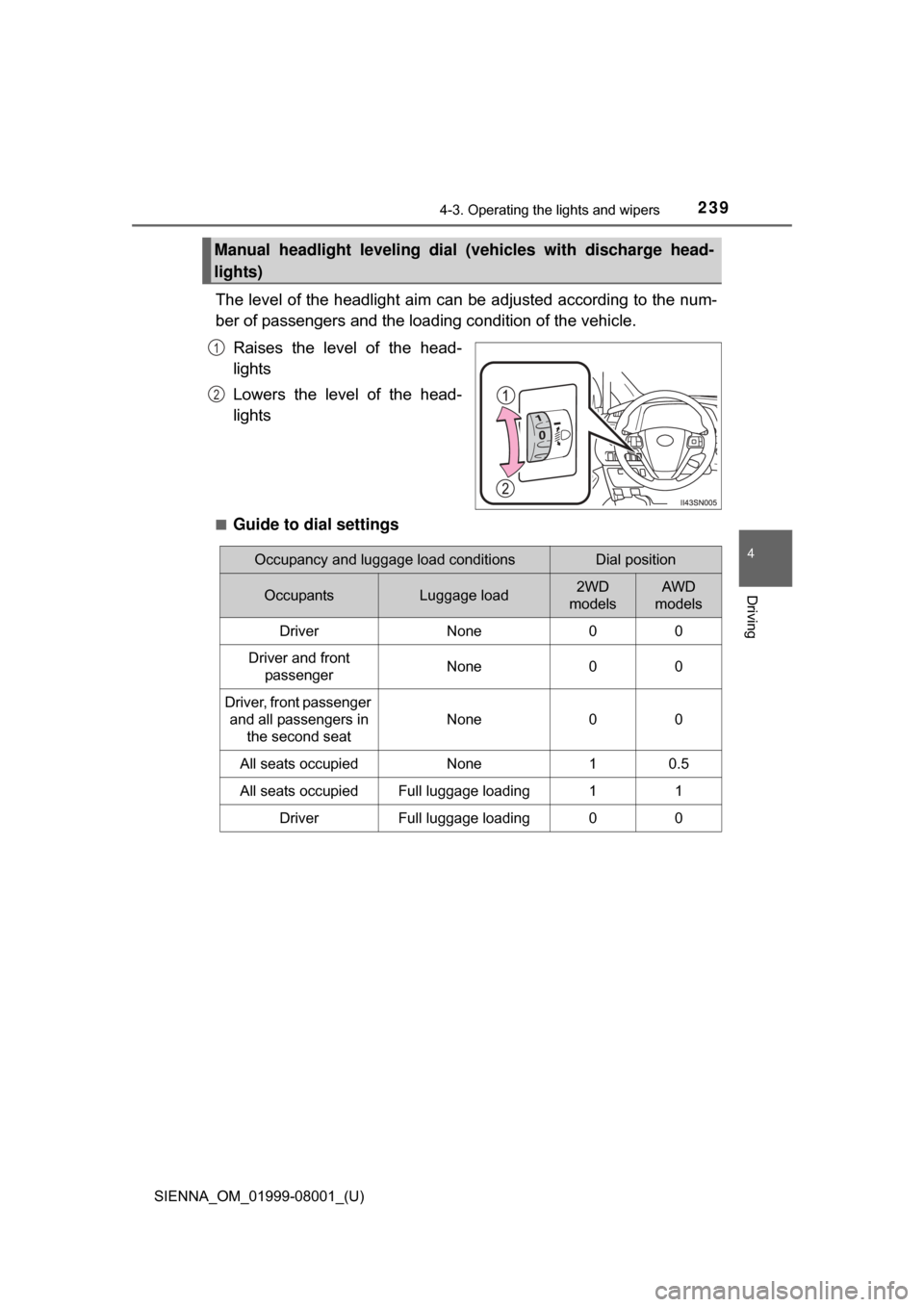
The level of the headlight aim can be adjusted according to the num-
ber of passengers and the loading condition of the vehicle.
Raises the level of the head-
lights
Lowers the level of the head-
lights
■Guide to dial settings
Manual headlight leveling dial (v ehicles with discharge head-
lights)
1
2
Occupancy and luggage load conditionsDial position
OccupantsLuggage load2WD
modelsAWD
models
DriverNone00
Driver and front
passengerNone00
Driver, front passenger and all passengers in the second seat
None00
All seats occupiedNone10.5
All seats occupiedFull luggage loading11
DriverFull luggage loading00
Page 251 of 664
SIENNA_OM_01999-08001_(U)
2514-3. Operating the lights and wipers
4
Driving
WARNING
■Caution regarding the use of windshield wipers in “AUTO” mode
The windshield wipers may operate unexpectedly if the sensor is touched or
the windshield is subject to vibration in “AUTO” mode. Take care that your
fingers etc. do not become caught in the windshield wipers.
■ Caution regarding the use of washer fluid
When it is cold, do not use the washer fluid until the windshield becomes
warm. The fluid may freeze on the windshield and cause low visibility. This
may lead to an accident, resulting in death or serious injury.
NOTICE
■When the windshield is dry
Do not use the wipers, as they may damage the windshield.
■ When the washer fluid tank is empty
Do not operate the switch continually as the washer fluid pump may over-
heat.
■ When a nozzle becomes blocked
In this case, contact your Toyota dealer.
Do not try to clear it with a pin or other object. The nozzle will be damaged.
Page 262 of 664
262
SIENNA_OM_01999-08001_(U)
4-5. Using the driving support systems
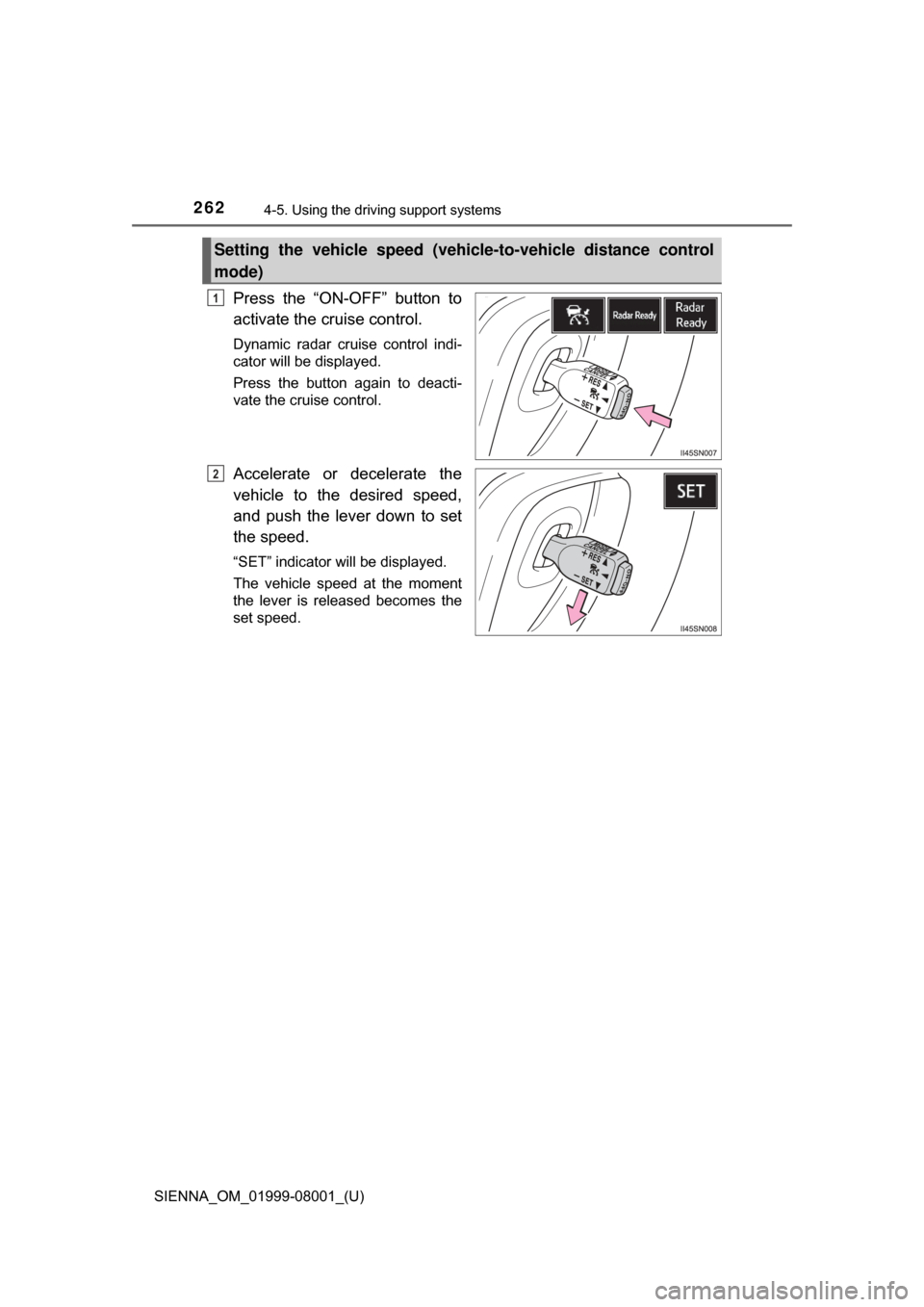
Press the “ON-OFF” button to
activate the cruise control.
Dynamic radar cruise control indi-
cator will be displayed.
Press the button again to deacti-
vate the cruise control.
Accelerate or decelerate the
vehicle to the desired speed,
and push the lever down to set
the speed.
“SET” indicator will be displayed.
The vehicle speed at the moment
the lever is released becomes the
set speed.
Setting the vehicle speed (vehicle-to-vehicle distance control
mode)
1
2
Page 263 of 664
SIENNA_OM_01999-08001_(U)
2634-5. Using the driving support systems
4
Driving
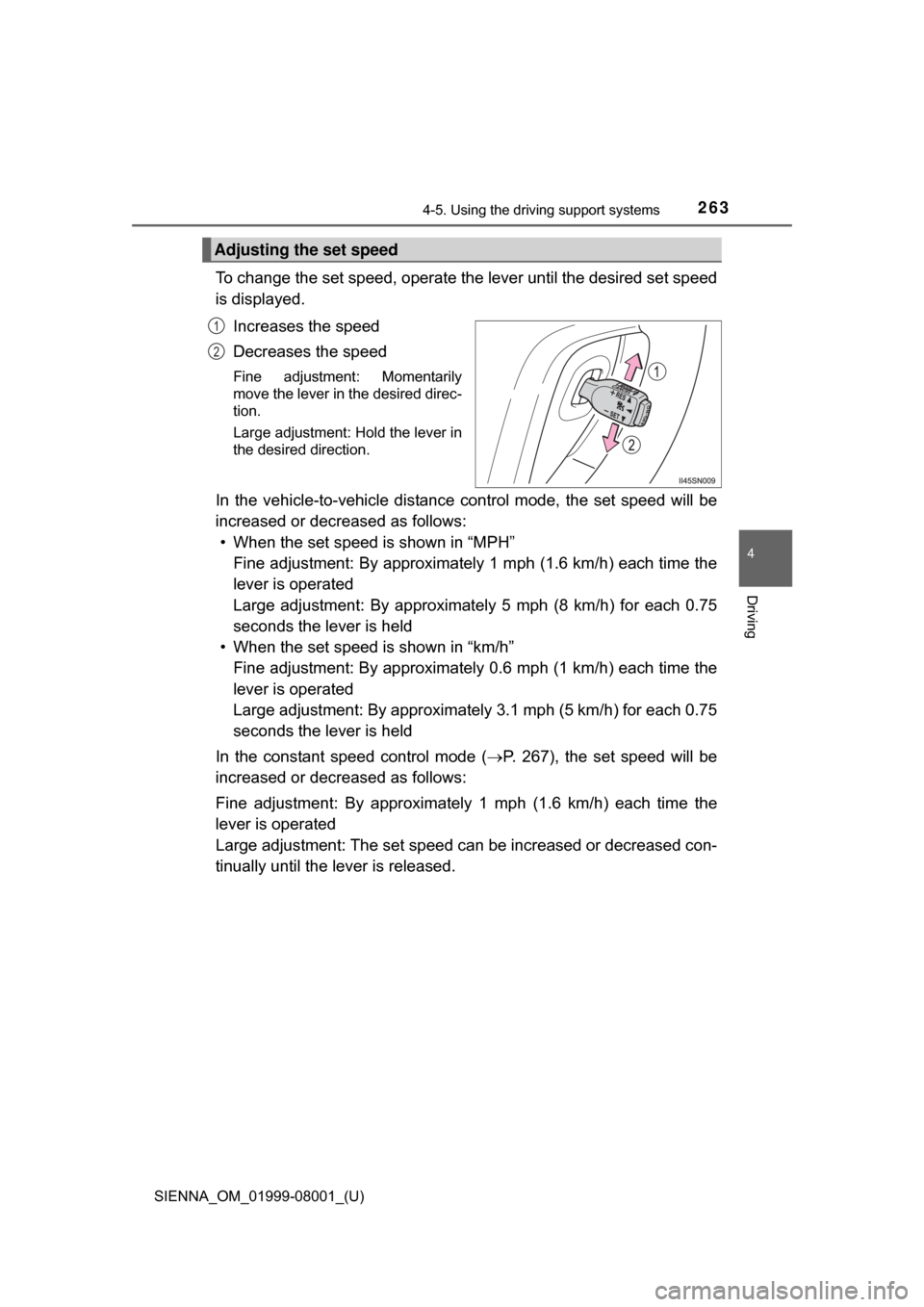
To change the set speed, operate the lever until the desired set speed
is displayed.
Increases the speed
Decreases the speed
Fine adjustment: Momentarily
move the lever in the desired direc-
tion.
Large adjustment: Hold the lever in
the desired direction.
In the vehicle-to-vehicle distance co ntrol mode, the set speed will be
increased or decreased as follows: • When the set speed is shown in “MPH”
Fine adjustment: By approximately 1 mph (1.6 km/h) each time the
lever is operated
Large adjustment: By approximat ely 5 mph (8 km/h) for each 0.75
seconds the lever is held
• When the set speed is shown in “km/h” Fine adjustment: By approximately 0.6 mph (1 km/h) each time the
lever is operated
Large adjustment: By approximately 3.1 mph (5 km/h) for each 0.75
seconds the lever is held
In the constant speed control mode ( P. 267), the set speed will be
increased or decreased as follows:
Fine adjustment: By approximately 1 mph (1.6 km/h) each time the
lever is operated
Large adjustment: The set speed can be increased or decreased con-
tinually until the lever is released.
Adjusting the set speed
1
2
Page 267 of 664
SIENNA_OM_01999-08001_(U)
2674-5. Using the driving support systems
4
Driving
Constant speed control mode differs from vehicle-to-vehicle distance
control mode. When cons tant speed control mode is selected, your
vehicle will maintain a set speed re gardless of whether or not there
are other vehicles in the lane ahead.
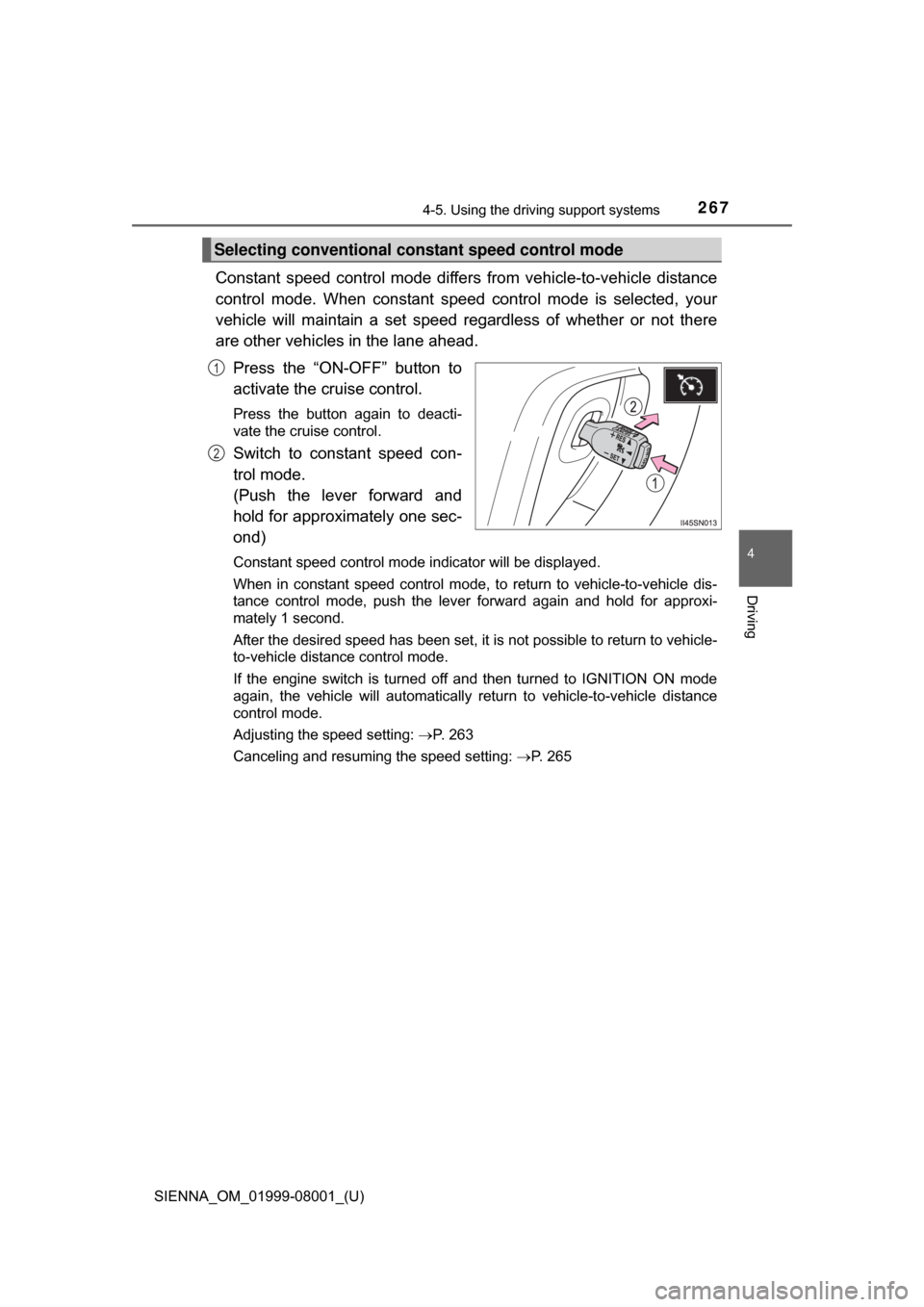
Press the “ON-OFF” button to
activate the cruise control.
Press the button again to deacti-
vate the cruise control.
Switch to constant speed con-
trol mode.
(Push the lever forward and
hold for approximately one sec-
ond)
Constant speed control mode indicator will be displayed.
When in constant speed control mode, to return to vehicle-to-vehicle dis-
tance control mode, push the leve r forward again and hold for approxi-
mately 1 second.
After the desired speed has been set, it is not possible to return to vehicle-
to-vehicle distance control mode.
If the engine switch is turned off and then turned to IGNITION ON mode
again, the vehicle will automatically return to vehicle-to-vehicle distance
control mode.
Adjusting the speed setting: P. 263
Canceling and resuming the speed setting: P. 265
Selecting conventional constant speed control mode
1
2