Page 90 of 316
1.84
VEHICLE SETTINGS CUSTOMISATION MENU
Adjusting the settings
Select the function to modify:
a) unlocking the driver’s door;
b) automatic locking of the doors while driving;
c) hands-free function;
d) indicator audio volume;
e) internal welcome sound;
f) external welcome;
g) reading lamp in automatic mode;
h) rear windscreen wiping in reverse gear;
i) configuration of the driving style indi- cator;
j) Active noise control.
Select “ON” or “OFF” to activate or de-
activate the function.
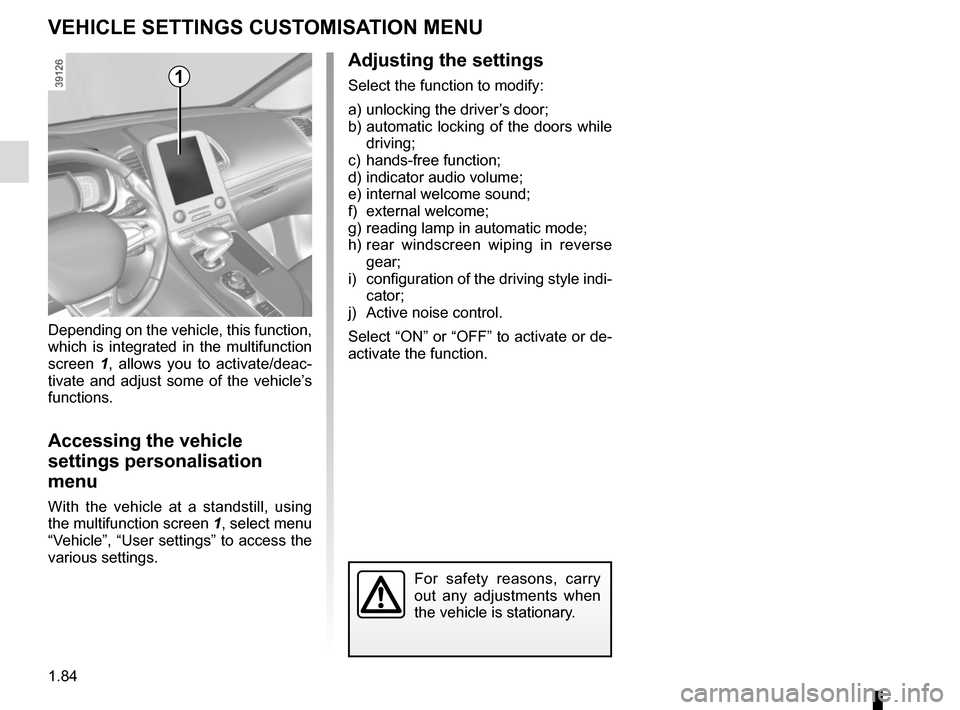
Depending on the vehicle, this function,
which is integrated in the multifunction
screen
1, allows you to activate/deac-
tivate and adjust some of the vehicle’s
functions.
Accessing the vehicle
settings personalisation
menu
With the vehicle at a standstill, using
the multifunction screen 1, select menu
“Vehicle”, “User settings” to access the
various settings.
1
For safety reasons, carry
out any adjustments when
the vehicle is stationary.
Page 110 of 316
1.104
FUEL TANK (1/3)
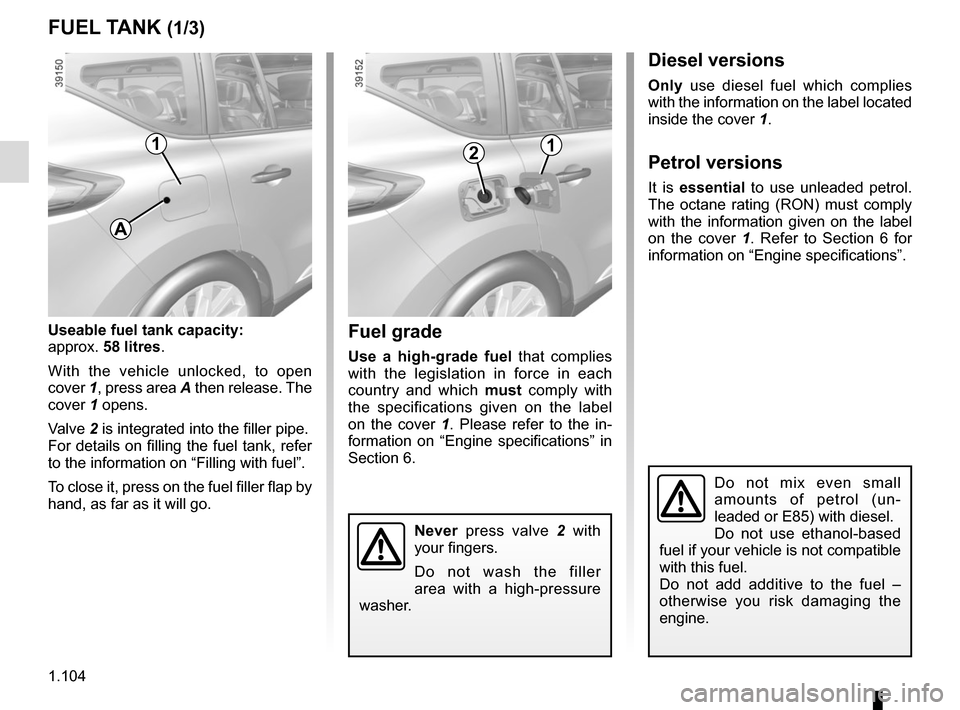
Useable fuel tank capacity:
approx. 58 litres.
With the vehicle unlocked, to open
cover 1, press area A then release. The
cover 1 opens.
Valve 2 is integrated into the filler pipe.
For details on filling the fuel tank, refer
to the information on “Filling with fuel”.
To close it, press on the fuel filler flap by
hand, as far as it will go.Fuel grade
Use a high-grade fuel that complies
with the legislation in force in each
country and which must comply with
the specifications given on the label
on the cover 1 . Please refer to the in-
formation on “Engine specifications” in
Section 6.
Never press valve 2 with
your fingers.
Do not wash the filler
area with a high-pressure
washer.
Do not mix even small
amounts of petrol (un-
leaded or E85) with diesel.
Do not use ethanol-based
fuel if your vehicle is not compatible
with this fuel.
Do not add additive to the fuel –
otherwise you risk damaging the
engine.
Diesel versions
Only use diesel fuel which complies
with the information on the label located
inside the cover 1.
Petrol versions
It is essential to use unleaded petrol.
The octane rating (RON) must comply
with the information given on the label
on the cover 1. Refer to Section 6 for
information on “Engine specifications”.
1
A
21
Page 121 of 316

2.9
STOP AND START FUNCTION (4/4)
Special feature of the automatic
engine re-start
Under certain conditions, the engine
can restart on its own in order to guar-
antee your safety and comfort.
This can occur especially when:
– the outdoor temperature is too low or too high (less than around 0 °C or
higher than around 30 °C);
– the “Clear View” function is activated (please see “Automatic Climate
Control” in Section 3);
– the battery is not sufficiently charged;
– the vehicle speed is above 3 mph (5 km/h) (downhill slope, etc.);
– repeated pressing on the brake pedal or braking system require-
ment;
– ...
1
2
Deactivating, activating the
function
Press switch 1 to deactivate the func-
tion. The message “Stop & Start deac-
tivated” will appear on the instrument
panel and the integrated warning light 2
on the switch will light up.
Pressing again will reactivate the
system. The message “Stop & Start ac-
tivated” will appear on the instrument
panel and the integrated warning light 2
on switch 1 will go out.
Note: With the engine on standby,
press switch 1 to automatically re-
start the engine.
The system reactivates automati-
cally each time the vehicle is started
using the start button (please refer
to “Starting, stopping the engine” in
Section 2).
Operating faults
When the message “Check Stop &
Start” appears on the instrument panel
and the integrated warning light 2 lights
up on the switch 1, the system is deac-
tivated.
Please consult an authorised dealer.
Before getting out of the
vehicle, you must switch
off the ignition by pressing
the engine stop (please see
“Starting, stopping the engine”).
Page 181 of 316
2.69
ASSISTED PARKING (1/4)
This function assists with parking ma-
noeuvres.
Take your hands off the steering wheel.
You only control the pedals and the
gear lever.
You can retake control at any time by
operating the steering wheel.Switching on
With the vehicle at a standstill or driv-
ing at less than 6 mph (10 km/h), press
switch 1. The warning light integrated
on switch 1 lights up and the 2 screen
appears on the multifunction screen.
1
2
Special features
Ensure that the ultrasonic sensors indi-
cated by arrows 3 are not obscured (by
dirt, mud, snow, etc.).
3
Page 187 of 316

2.75
To engage neutral
With the vehicle at a standstill, engine
running, depress the brake pedal and
move the selector 3 to the left:
– hold in place for about a second until a white N is displayed on the instru-
ment panel, then release;
or
– release immediately.
Note: If the current gear is R or D, it
is not necessary to depress the brake
pedal to engage position N.
AUTOMATIC GEARBOX (2/6)
To engage position P
(button 2)
With the vehicle at a standstill, engine
running or ignition on, press button 2 to
engage position P. The warning light for
button 2 lights up orange once the Park
position on the gearbox is engaged.
2
Check that warning light P
on the instrument panel and
the warning light integrated
on the button 2 are acti-
vated before leaving the vehicle.
Risk of loss of immobilisation of the
vehicle
To disengage position P
(button 2)
With the vehicle at a standstill, engine
running, depress the brake pedal and
move the selector to the desired posi-
tion R, N or D.
If the brake pedal is not fully depressed,
the message “Push brake pedal” the
warning light
� are displayed on the
instrument panel.
When position R or D is disengaged,
N is displayed on the instrument panel
and the warning light on button 2 goes
out.
Note:
– If the driver opens their door to leave the vehicle while position P has not
been engaged, a beep sounds and
the message “P not engaged” is dis-
played on the instrument panel.
– Warning light
� comes on each
time it is necessary to depress the
brake pedal to change the position
of the automatic gearbox.
In the event of the mes-
sage “Check auto gearbox”,
“Automatic gearbox posi-
tion P defective” or “Electric
failure DANGER”, or in the event of
a battery fault, immobilise the ve-
hicle using the electronic parking
brake.
3
Page 201 of 316
3.9
AUTOMATIC CLIMATE CONTROL (3/5)
Press button 6 – the integrated indica-
tor light comes on.
Press button 3 to stop the heated rear
screen operating, and the integrated in-
dicator goes out.
To adjust the ventilation speed: press
buttons 11 or 18 or slide your finger in
zone A.Clear View function
This function quickly demists and de-
ices the windscreen, the rear screen,
the front side windows, and the door
mirrors (depending on the vehicle). It
imposes automatic operation of the
air conditioning and rear screen de-ic-
ing and, depending on the vehicle, the
windscreen electric de-icer.
643
109
1811
8
A
To exit this function, press:
– button 4;
– again button 6;
– on button 8, 9 or 10.
Page 202 of 316

3.10
AUTOMATIC CLIMATE CONTROL (4/5)
Switching air conditioning on
or off
In automatic mode, the system switches
the air conditioning system on or off,
depending on the climate conditions.
Press button 17 to:
– activate the air conditioning (a warn- ing light in zone 14 comes on).
– deactivate the air conditioning (the warning light in zone 14 goes out)
4
17
19
14
Stopping the system
Press button 19 to activate or deacti-
vate the system (the operating warn-
ing light on button 19 notifies you of the
system status).
It is preferable to use one of the automatic programmes NORMAL, SOFT or
FAST.
In automatic mode (4 warning light is lit), all air conditioning functions are control-
led by the system.
You can still change the system selection. In this case, the warning ligh\
t on the
button 4 will go out and the changed function, which is no longer controlled by \
the
system, will be shown on the display.
To return to automatic mode, press one of programmes NORMAL, SOFT, or
FAST, or button 4.
Rear screen de-icing/
demisting
Press button 3 – the integrated indica-
tor light comes on. This function en-
ables rapid demisting or de-icing of the
rear screen and de-icing of the door
mirrors (on equipped vehicles).
To exit this function, press button 3
again. Demisting automatically stops.
3
Page 222 of 316
3.30
Heated seats
(depending on vehicle)
Side seats only
With the ignition on:
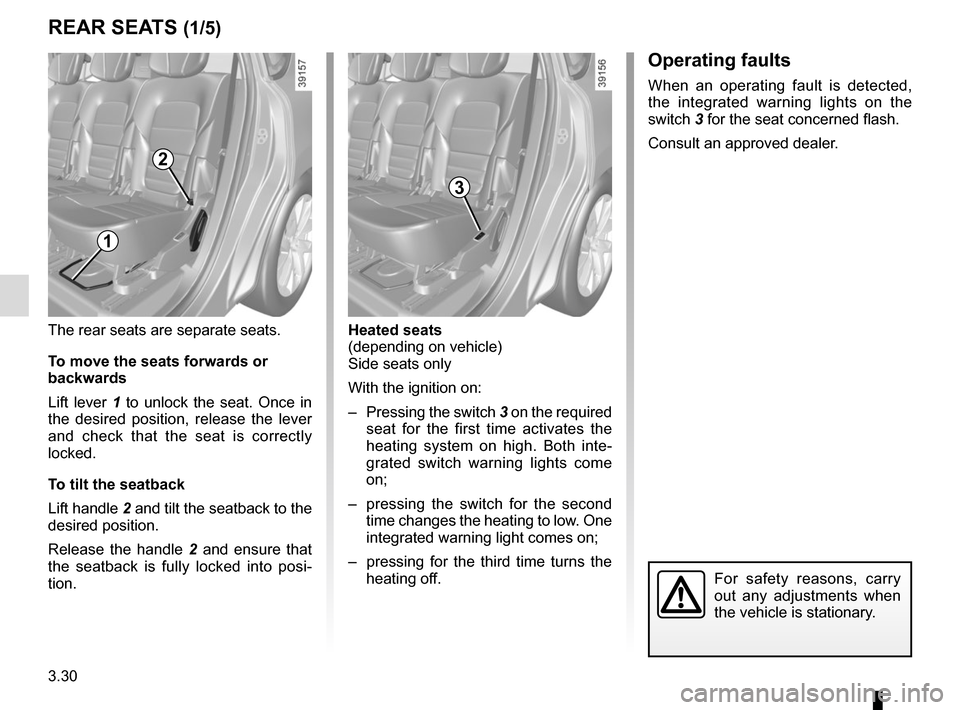
– Pressing the switch 3 on the required seat for the first time activates the
heating system on high. Both inte-
grated switch warning lights come
on;
– pressing the switch for the second time changes the heating to low. One
integrated warning light comes on;
– pressing for the third time turns the heating off.
For safety reasons, carry
out any adjustments when
the vehicle is stationary.
The rear seats are separate seats.
To move the seats forwards or
backwards
Lift lever 1 to unlock the seat. Once in
the desired position, release the lever
and check that the seat is correctly
locked.
To tilt the seatback
Lift handle 2 and tilt the seatback to the
desired position.
Release the handle 2 and ensure that
the seatback is fully locked into posi-
tion.
REAR SEATS (1/5)
1
2
3
Operating faults
When an operating fault is detected,
the integrated warning lights on the
switch 3 for the seat concerned flash.
Consult an approved dealer.