2015 RENAULT ESPACE engine
[x] Cancel search: enginePage 260 of 316
5.6
TYRE PRESSURE KIT (2/3)
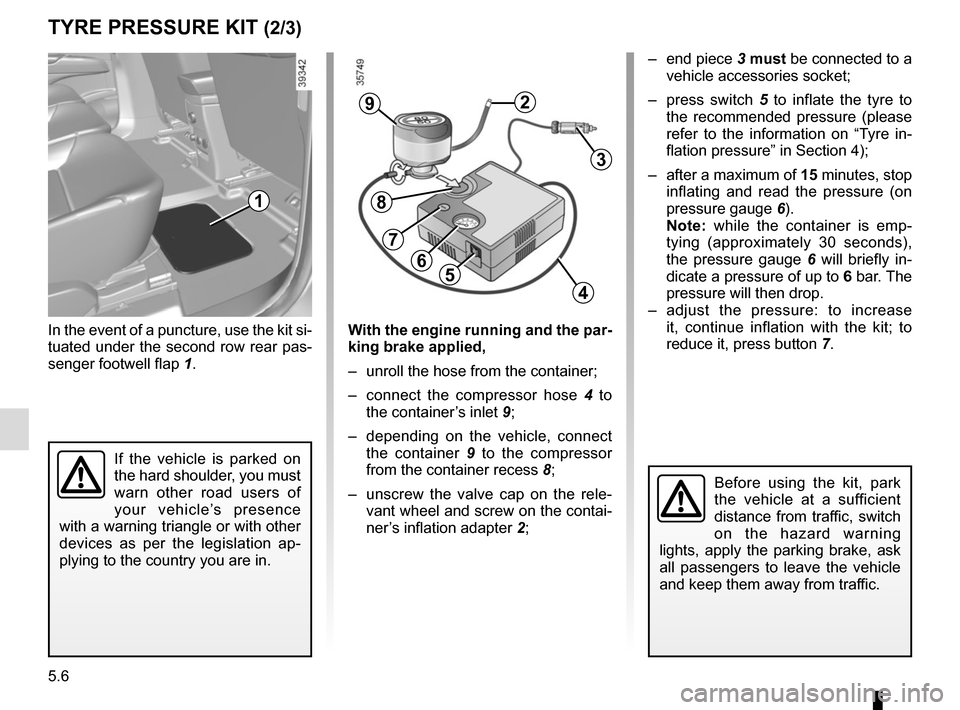
In the event of a puncture, use the kit si-
tuated under the second row rear pas-
senger footwell flap 1.
Before using the kit, park
the vehicle at a sufficient
distance from traffic, switch
on the hazard warning
lights, apply the parking brake, ask
all passengers to leave the vehicle
and keep them away from traffic.
56
29
3
4
8
7
– end piece 3 must be connected to a
vehicle accessories socket;
– press switch 5 to inflate the tyre to
the recommended pressure (please
refer to the information on “Tyre in-
flation pressure” in Section 4);
– after a maximum of 15 minutes, stop inflating and read the pressure (on
pressure gauge 6).
Note: while the container is emp-
tying (approximately 30 seconds),
the pressure gauge 6 will briefly in-
dicate a pressure of up to 6 bar. The
pressure will then drop.
– adjust the pressure: to increase it, continue inflation with the kit; to
reduce it, press button 7.
If the vehicle is parked on
the hard shoulder, you must
warn other road users of
your vehicle’s presence
with a warning triangle or with other
devices as per the legislation ap-
plying to the country you are in.
1
With the engine running and the par-
king brake applied,
– unroll the hose from the container;
– connect the compressor hose 4 to
the container’s inlet 9;
– depending on the vehicle, connect the container 9 to the compressor
from the container recess 8;
– unscrew the valve cap on the rele- vant wheel and screw on the contai-
ner’s inflation adapter 2;
Page 269 of 316

5.15
Main beam headlights 2
Please consult an authorised dealer.
Dipped beam headlights 3
Please consult an authorised dealer.
Direction indicators
You can replace this bulb. However, we
would advise you to have it replaced by
an authorised dealer if it proves difficult.
Access bulb holder 4 via the under-
neath of the vehicle, then unscrew it to
unclip. Replace the bulb.
Bulb type: PY21W.
Cleaning the headlights
Use a soft cloth. If this does not clean
it properly, moisten the cloth with soapy
water then rinse off.
Finally, carefully dry off with a soft dry
cloth.
Cleaning products containing alco-
hol must not be used.
FRONT HEADLIGHTS: changing bulbs
The bulbs are under pres-
sure and can break when
replaced.
Risk of injury.
The engine may be hot
when carrying out opera-
tions in close proximity. In
addition, the engine cooling
fan can come on at any moment.
Risk of injury.
Daytime running lights and
side lights 1
Please consult an authorised dealer.
To comply with current legislation,
or as a precaution, you can obtain
an emergency kit from an approved
dealer containing a set of spare
bulbs and fuses.
1
23
4
Page 277 of 316
5.23
BATTERY: troubleshooting (1/2)
To avoid all risk of sparks:
– Ensure that any consumers (cour-tesy lights, etc.) are switched off
before disconnecting or reconnect-
ing the battery;
– when charging, stop the charger before connecting or disconnecting
the battery;
– to avoid creating a short circuit be- tween the terminals, do not place
metal objects on the battery;
– always wait at least one minute after the engine has been switched off
before disconnecting a battery;
– make sure that you reconnect the battery terminals after refitting.
Connecting a battery charger
The battery charger must be com-
patible with a battery with nominal
voltage of 12 volts.
Do not disconnect the battery when the
engine is running. Follow the instruc-
tions given by the manufacturer of
the battery charger you are using.
Special procedures may be
required to charge some
batteries. Contact your au-
thorised dealer.
Avoid all risk of sparks which may
cause an immediate explosion, and
charge the battery in a well-venti-
lated area. Risk of serious injury.
Handle the battery with care
as it contains sulphuric acid,
which must not come into
contact with eyes or skin. If
it does, wash the affected area with
plenty of cold water. If necessary,
consult a doctor.
Ensure that naked flames, red hot
objects and sparks do not come into
contact with the battery as there is a
risk of explosion. There is a risk of
explosion.
The engine may be hot when car-
rying out operations in close prox-
imity. In addition, the engine cooling
fan can come on at any moment.
Risk of injury.
Before performing any
action in the engine com-
partment, the ignition must
be switched off by pressing
the engine stop button (please see
the information on “Starting, stop-
ping the engine” in Section 2).
Page 278 of 316

5.24
Starting the vehicle using the
battery from another vehicle
If you have to use the battery from an-
other vehicle to start, obtain suitable
jump leads (with a large cross section)
from an approved dealer or, if you al-
ready have jump leads, ensure that
they are in perfect condition.
The two batteries must have an iden-
tical nominal voltage of 12 volts. The
battery supplying the current should
have a capacity (amp-hours, Ah) which
is at least the same as that of the dis-
charged battery.
Ensure that there is no risk of contact
between the two vehicles (risk of short
circuiting when the positive terminals
are connected) and that the discharged
battery is properly connected. Switch
off your vehicle ignition.
Start the engine of the vehicle supply-
ing the current and run it at a moderate
speed.
BATTERY: troubleshooting (2/2)
3
B
A
1
Lift the red cover on box 1 located
behind the battery.
Connect the positive cable A to sup-
port 3 (+) located under the box
cover 1, then to terminal 5 (+) of the
battery supplying the current.
Connect the negative cable B to ter-
minal 4 (–) of the battery supplying the
current, then to the metal cable 2 (–).
Start the engine, and as soon as it starts
running, disconnect cables A and B in
reverse order ( 2 - 4 - 5 - 3).
2
54
2
Check that there is no con-
tact between leads A and B
and that the positive lead A
is not touching any metal
parts on the vehicle supplying the
current.
Risk of injury and/or damage to the
vehicle.
Page 281 of 316

5.27
WINDSCREEN WIPER BLADES: replacement (1/2)
Windscreen wiper blades 1
With the ignition on and the engine
switched off, lower the windscreen
wiper stalk fully: the blades stop slightly
away from the bonnet.
Lift wiper arm 3 , press button 2 to re-
lease the blade.
Refitting
Slide the blade along the arm until
it clips on. Check that it is correctly
locked in place. Lower the windscreen
wiper arm carefully.
1
2
3
With the ignition on, return the wind-
screen wiper stalk to the stop position.
The blade on the driver’s side must
always be above the passenger blade.
If this is not the case, a quick sweep of
the windscreen wipers should be per-
formed once the vehicle is travelling at
over 4 mph (7 km/h).
Note: Before restarting your vehicle,
lower the windscreen wiper blades
onto the windscreen to avoid any risk
of damaging the bonnet or the wipers.
– In frosty weather, make
sure that the wiper blades
are not stuck by ice (to
avoid the risk of the motor
overheating or damaging the
blades).
– Check the condition of the wiper
blades.
Replace the wiper blades as soon
as they begin to lose efficiency
(approximately once a year).
Whilst changing the blade, take care
not to drop the arm onto the window
after it has been removed as this
may break the window.
Page 283 of 316
5.29
TOWING: breakdown (1/2)
Before towing, put the gearbox in neu-
tral, unlock the steering column and re-
lease the parking brake.
For vehicles fitted with an automatic
gearbox, if it is not possible to put the
gear lever into position N, please con-
sult an authorised dealer.
Steering column unlocking
Press the engine starter button for ap-
proximately two seconds , without de-
pressing the pedals.
The column is unlocked, the acces-
sory functions are supplied: the vehi-
cle lights can be used (indicators, brake
lights etc.). Always switch on the lights
when driving at night.
Once you have finished towing, press
the engine start button twice (risk of
running down the battery). The speed specified by current legis-
lation for towing must always be ob-
served. If your vehicle is the towing
vehicle, do not exceed the maximum
towing weight for your vehicle (refer to
the information on “Weights” in
Section 6).
Towing a vehicle with an
automatic gearbox
Transport the vehicle on a trailer or tow
it with the front wheels off the ground.
In exceptional circumstances
, you
may tow it with all four wheels on the
ground, only in a forward gear, with the
gear in neutral position N over a maxi-
mum distance of 50 miles and not ex-
ceeding a speed of 15 mph (25 km/h).
Page 284 of 316
5.30
TOWING : breakdown (2/2)
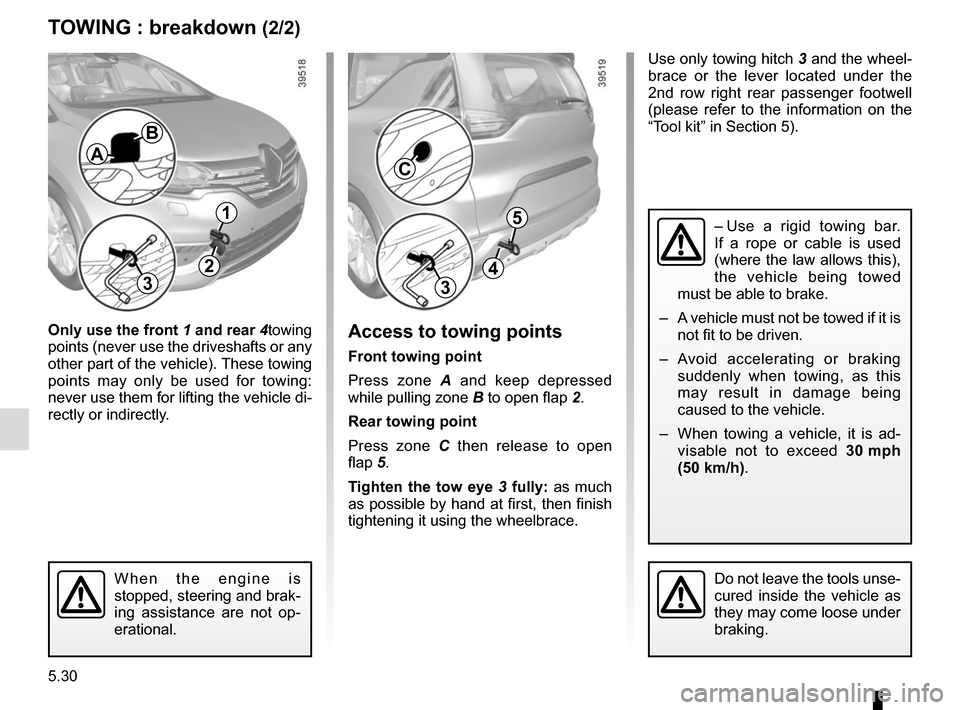
Only use the front 1 and rear 4towing
points (never use the driveshafts or any
other part of the vehicle). These towing
points may only be used for towing:
never use them for lifting the vehicle di-
rectly or indirectly.Access to towing points
Front towing point
Press zone A and keep depressed
while pulling zone B to open flap 2.
Rear towing point
Press zone C then release to open
flap 5.
Tighten the tow eye 3 fully: as much
as possible by hand at first, then finish
tightening it using the wheelbrace.
When the engine is
stopped, steering and brak-
ing assistance are not op-
erational.Do not leave the tools unse-
cured inside the vehicle as
they may come loose under
braking.
4
5
3
C
Use only towing hitch 3 and the wheel-
brace or the lever located under the
2nd row right rear passenger footwell
(please refer to the information on the
“Tool kit” in Section 5).
– Use a rigid towing bar.
If a rope or cable is used
(where the law allows this),
the vehicle being towed
must be able to brake.
– A vehicle must not be towed if it is not fit to be driven.
– Avoid accelerating or braking suddenly when towing, as this
may result in damage being
caused to the vehicle.
– When towing a vehicle, it is ad- visable not to exceed 30 mph
(50 km/h).
2
B
A
1
3
Page 285 of 316
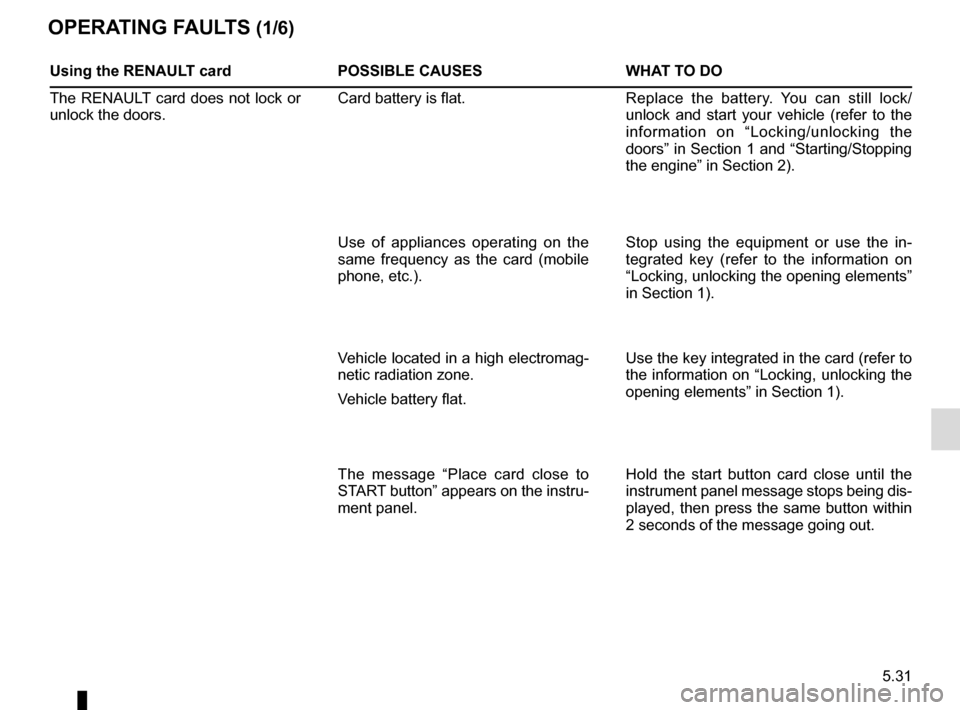
5.31
OPERATING FAULTS (1/6)
Using the RENAULT cardPOSSIBLE CAUSES WHAT TO DO
The RENAULT card does not lock or
unlock the doors. Card battery is flat.
Replace the battery. You can still lock/
unlock and start your vehicle (refer to the
information on “Locking/unlocking the
doors” in Section 1 and “Starting/Stopping
the engine” in Section 2).
Use of appliances operating on the
same frequency as the card (mobile
phone, etc.). Stop using the equipment or use the in-
tegrated key (refer to the information on
“Locking, unlocking the opening elements”
in Section 1).
Vehicle located in a high electromag-
netic radiation zone.
Vehicle battery flat. Use the key integrated in the card (refer to
the information on “Locking, unlocking the
opening elements” in Section 1).
The message “Place card close to
START button” appears on the instru-
ment panel. Hold the start button card close until the
instrument panel message stops being dis-
played, then press the same button within
2 seconds of the message going out.