2015 RENAULT ESPACE change time
[x] Cancel search: change timePage 21 of 316

1.15
If fitted on the vehicle, the tailgate locks
and unlocks at the same time as the
doors.
There are four modes to manoeuvre
the tailgate:
– using the RENAULT card remote control;
– using the controls on the tailgate;
– using the dashboard control;
– using the hands-free function.
AUTOMATIC TAILGATE (1/5)
Conditions of use
– Immobilise the vehicle.
– If there is any ice or snow prevent-ing the tailgate from opening, this ice
or snow must be removed to free the
tailgate.
– In the event that the battery is dis- charged or if it is changed, the tail-
gate should be closed (manually
if necessary) to restart the tailgate
motor.
Ensure that nobody is close
to the moving parts when
opening/closing the tail-
gate.
Risk of injury.
Opening/Closing
Activating the automatic tailgate open-
ing or closing using the dashboard
control or using the card, three beeps
sound just before the tailgate begins to
move.
When opening or closing the tail-
gate, ensure that nothing interferes
with the manoeuvre.
To avoid damaging the tailgate
system, do not manually force the
tailgate to open or close while it is
moving.
Page 28 of 316
1.22
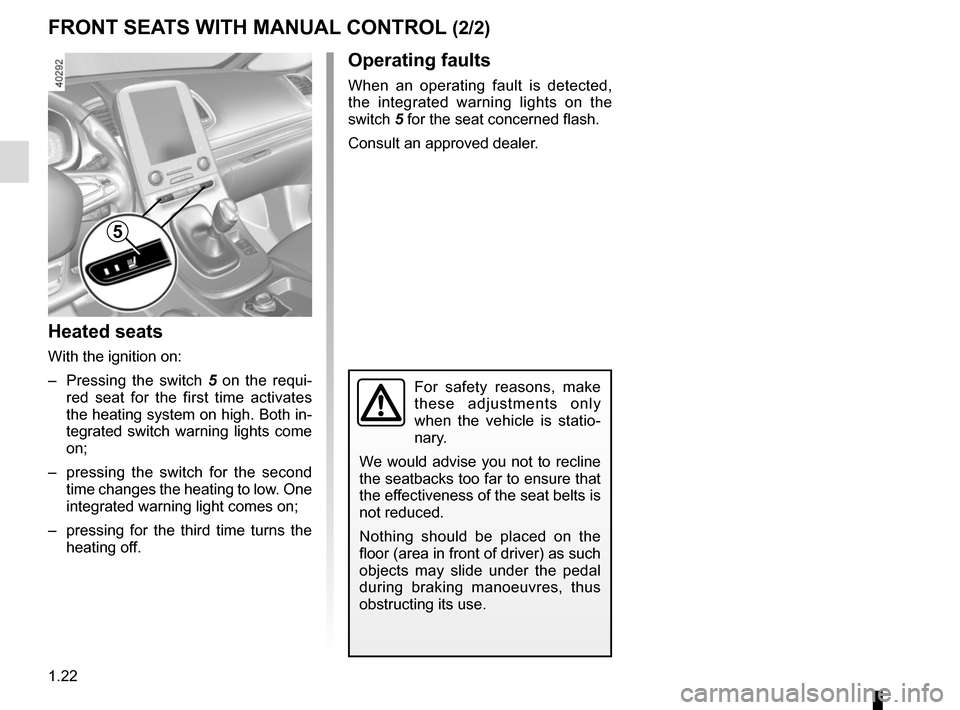
Heated seats
With the ignition on:
– Pressing the switch 5 on the requi-
red seat for the first time activates
the heating system on high. Both in-
tegrated switch warning lights come
on;
– pressing the switch for the second time changes the heating to low. One
integrated warning light comes on;
– pressing for the third time turns the heating off.
FRONT SEATS WITH MANUAL CONTROL (2/2)
For safety reasons, make
these adjustments only
when the vehicle is statio-
nary.
We would advise you not to recline
the seatbacks too far to ensure that
the effectiveness of the seat belts is
not reduced.
Nothing should be placed on the
floor (area in front of driver) as such
objects may slide under the pedal
during braking manoeuvres, thus
obstructing its use.
Operating faults
When an operating fault is detected,
the integrated warning lights on the
switch 5 for the seat concerned flash.
Consult an approved dealer.
5
Page 30 of 316
1.24
DRIVER’S SEAT WITH ELECTRIC CONTROLS (2/2)
5
Heated seats
With the ignition on:
– Pressing the switch 6 on the requi-
red seat for the first time activates
the heating system on high. Both in-
tegrated switch warning lights come
on;
– pressing the switch for the second time changes the heating to low. One
integrated warning light comes on;
– pressing for the third time turns the heating off.
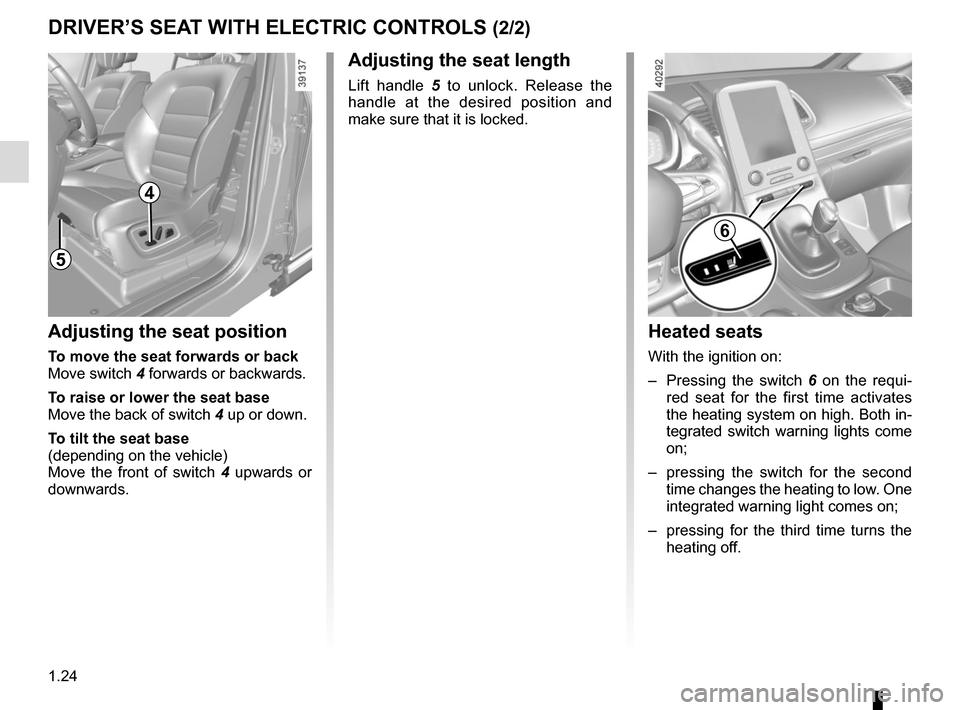
Adjusting the seat position
To move the seat forwards or back
Move switch 4 forwards or backwards.
To raise or lower the seat base
Move the back of switch 4 up or down.
To tilt the seat base
(depending on the vehicle)
Move the front of switch 4 upwards or
downwards.
Adjusting the seat length
Lift handle 5 to unlock. Release the
handle at the desired position and
make sure that it is locked.
6
4
Page 73 of 316

1.67
WARNING LIGHTS (4/6)
ÉPreheating warning light
(diesel version)
This should come on when the igni-
tion is switched on. It indicates that the
heater plugs are in operation.
It goes out when preheating is com-
plete. The engine can be started.
2 Door(s) open warning light
A
The display of information shown below DEPENDS ON THE VEHICLE EQUIPMENT \
AND COUNTRY.
åAir bag warning light
This warning light will be dis-
played on the instrument panel when
the ignition is switched on or the engine
is started, and will then go out after a
few seconds.
If it does not come on when the igni-
tion is switched on, or comes on when
the engine is running, there is a fault in
the system.
Contact your approved Dealer as soon
as possible.
ÓBrake pedal warning light
This lights up when the brake
pedal should be depressed. Refer to
the information on the “Automatic gear-
box” in Section 2.
Please refer to the information on
“Driving advice, Eco-driving” in
Section 2.
}Handbrake or electronic
parking brake warning light
Refer to the information on the “Assisted
parking brake” in Section 2.
Rear seat belt reminder
(depending
on vehicle)
Warning light
ß comes on, accom-
panied (depending on the vehicle) by
a message indicating the number of
fastened seat belts on the instrument
panel for approximately 30 seconds,
each time the vehicle is started, a door
is opened or a rear seat belt is fas-
tened/unfastened. Check that the rear
passengers are wearing seat belts and
that the number of seat belts shown as
fastened corresponds to the number of
rear seat places occupied.
Š ‰Gear change indicator
This lights up to advise you to
change to a higher gear (up arrow) or
lower gear (down arrow).
Please refer to the information on
“Driving advice, Eco-driving” in
Section 2.
Page 84 of 316

The display of information shown below DEPENDS ON THE VEHICLE EQUIPMENT \
AND COUNTRY.
Examples of selectionsInterpreting the display selected
On-board comp")
1.78
ON-BOARD COMPUTER: trip settings (3/5)
The display of information shown below DEPENDS ON THE VEHICLE EQUIPMENT \
AND COUNTRY.
Examples of selectionsInterpreting the display selected
On-board computer with mileage-
before-service message
c) Mileage before service or oil change.Mileage before service
With the ignition switched on, the engine not running and
the display set to “Service Intervals”, press button OK for ap-
proximately 5 seconds to display the mileage before service (dis-
tance or time to the next service). When the range approaches
its limit, there are several possible scenarios:
– distance/time remaining less than 900 miles (1,500 km) or
one month : the message “Service due in” is displayed along
with the nearest limit (distance or time);
– range equal to 0 km/miles or service date reached: the
message “Service required” is displayed accompanied by
warning light
©.
The vehicle requires a service as soon as possible.
Service Intervals
Service in
30 000 Kms / 12 mo
Service due in
300 Kms / 24 days
Service required
Resetting: to reset the distance before service, press and hold button 2 for approximately 10 seconds until the display shows
the mileage permanently.
NB: if a service is performed without changing the engine oil, only the mi\
leage before the next service should be reset. In the
event of an oil change, both the distance before the next service and th\
e next oil change should be reset.
Page 85 of 316

Examples of selectionsInterpreting the display selected
On-board computer")
1.79
The display of information shown below DEPENDS ON THE VEHICLE EQUIPMENT \
AND COUNTRY.
TRIP COMPUTER: trip settings (4/5)
Examples of selectionsInterpreting the display selected
On-board computer with distance before
next service message (cntd.)
c) Mileage before service or oil change.Mileage before service
With the ignition switched on and the engine not running ,
and the selected display is “Mileage before service”, press
button OK for about 5 seconds to display the mileage before
the next service, then press button 2 to view the mileage before
the next oil change (distance or time remaining before the next
service). When the range approaches its limit, there are several
possible scenarios:
– distance/time remaining less than 900 miles (1,500 km) or
one month : the message “Service due in” is displayed, ac-
companied by the nearest term (distance or time);
– range equal to 0 km/miles or service date reached: the
message “Service required” is displayed accompanied by
warning light
©.
The vehicle requires an oil change as soon as possible.
Service Intervals
Oil change in
30 000 Kms / 24 mo
Service due in
300 Kms / 24 days
Service required
Depending on the vehicle, the mileage before an oil change varies accord\
ing to the driving style (frequent driving at low speed ,
door-to-door journeys, extensive use at idling speed, towing a trailer, etc.). The distance remaining until the next oil change can
therefore decrease more quickly in some cases than the actual distance t\
ravelled.
Resetting: to reset the mileage before a service, press and hold button 2 for approximately 10 seconds until the display shows
the range permanently.
NB: if a service is performed without changing the engine oil, only the mi\
leage before the next service should be reset. In the
event of an oil change, both the distance before the next service and th\
e next oil change should be reset.
Page 102 of 316

1.96
Special note
When driving the vehicle, the wiping
speed slows down whenever the vehi-
cle stops. For example, fast wiping
speed will slow to normal wiping speed.
As soon as the vehicle moves off,
wiping will return to the speed originally
selected.
If stalk 1 is operated, it overrides and
cancels the automatic function.Vehicle fitted with intermittent
windscreen wipers
A single sweep
A short push will trigger one sweep
of the wipers.
B stop
C intermittent wiping
The wipers will pause for seve-
ral seconds between sweeps. It
is possible to change the time
between sweeps by turning ring 2.
D slow continuous wiping
E fast continuous wiping
Positions A, C and D are accessible
with the ignition on. Position E is
accessible only when the engine is
running.
1
A
B
C
D
WINDSCREEN WASH/WIPE (1/6)
E
Check the condition of the wiper
blades. You are responsible for their
service life:
– they must remain clean: clean the blades, windscreen and
rear screen regularly with soapy
water;
– do not use them when the winds- creen or rear screen are dry;
– free them from the windscreen or rear screen when they have not
been used for a long time.
In all cases, replace them as soon
as they begin to lose efficiency: ap-
proximately once a year.
Before using the rear wiper, check
that no object obstructs the travel of
the blade.
Do not use the wiper arm to open or
close the tailgate.
1
2
Page 103 of 316

1.97
Vehicle fitted with front
windscreen wiper rain sensor
The rain sensor is located on the winds-
creen, in front of the interior rear-view
mirror.
A single sweep
A short push will trigger one sweep
of the wipers.
B stop
When activating automatic wiping
or when increasing sensitivity, one
sweep of the blades is performed.
Note:
– the rain sensor is only intended
as a driving aid. In the event of re-
duced visibility, the driver should
manually activate the wipers. In
foggy weather or during snow-
falls, wiping is not automatically
triggered and remains under the
driver’s control;
– in the event of temperatures
below zero, automatic wiping is
not activated when the vehicle
is started. It is automatically acti-
vated as soon as the vehicle ex-
ceeds a certain speed (approxi-
mately 5 mph (8 km/h));
– do not activate automatic wiping
in dry weather;
– fully de-ice the windscreen before
activating automatic wiping.
1
A
B
C
D
2
G
F
1
E
WINDSCREEN WASH/WIPE (2/6)
C automatic wiper function
When this position is selected,
the system detects water on the
windscreen and triggers the wipers
at a suitable wiping speed. It is
possible to change the triggering
threshold and the time sweeps by
turning ring 2:
– F : minimum sensitivity
– G : maximum sensitivity
The higher the sensitivity, the quic-
ker the wipers will react and the
faster the wipe.