Page 2 of 341
StartStart
Mirror Scr een
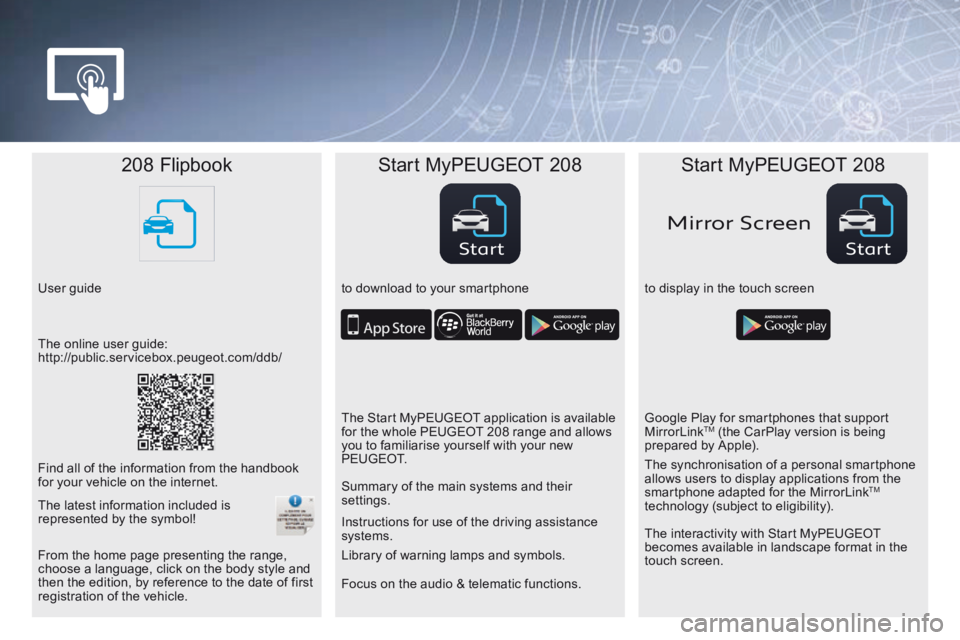
208 Flipbook Start MyPEUGEOT 208 Start MyPEUGEOT 208
User guide to download to your smartphoneto display in the touch screen
Focus on the audio & telematic functions. Instructions for use of the driving assistance
systems.
The online user guide:
http://public.servicebox.peugeot.com/ddb/
The Start MyPEUGEOT application is available
for the whole PEUGEOT 208 range and allows
you to familiarise yourself with your new
P E U G E O T.Google Play for smartphones that support
MirrorLink
TM (the CarPlay version is being
prepared by Apple).
Find all of the information from the handbook
for your vehicle on the internet. Summary of the main systems and their
settings.
The interactivity with Start MyPEUGEOT
becomes available in landscape format in the
touch screen. The synchronisation of a personal smartphone
allows users to display applications from the
smartphone adapted for the MirrorLink
TM
technology (subject to eligibility).
From the home page presenting the range,
choose a language, click on the body style and
then the edition, by reference to the date of first
registration of the vehicle. Library of warning lamps and symbols.
The latest information included is
represented by the symbol!
Page 20 of 341
18
208_en_Chap02_ Acces-Demarrage_ed01-2015
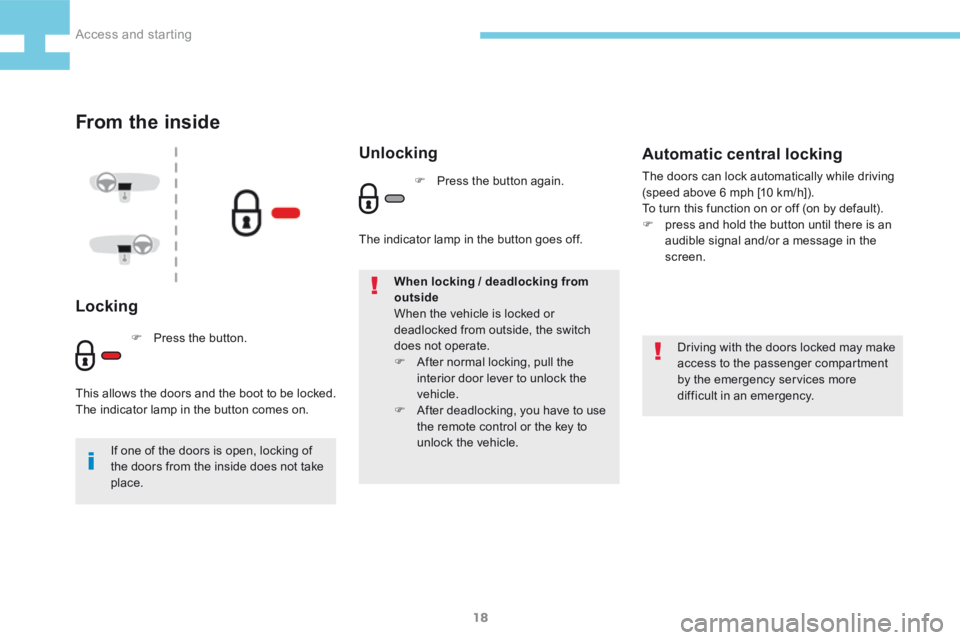
From the inside
Locking
Driving with the doors locked may make
access to the passenger compartment
by the emergency services more
difficult in an emergency.
If one of the doors is open, locking of
the doors from the inside does not take
place. When locking / deadlocking from
outside
When the vehicle is locked or
deadlocked from outside, the switch
does not operate.
F
After normal locking, pull the
interior door lever to unlock the
vehicle.
F After deadlocking, you have to use
the remote control or the key to
unlock the vehicle.
Automatic central locking
The doors can lock automatically while driving
(speed above 6 mph [10 km/h]).
To turn this function on or off (on by default).
F press and hold the button until there is an
audible signal and/or a message in the
screen.
F Press the button.
This allows the doors and the boot to be locked.
The indicator lamp in the button comes on.
Unlocking
F Press the button again.
The indicator lamp in the button goes off.
Access and starting
Page 21 of 341
19
208_en_Chap02_ Acces-Demarrage_ed01-2015
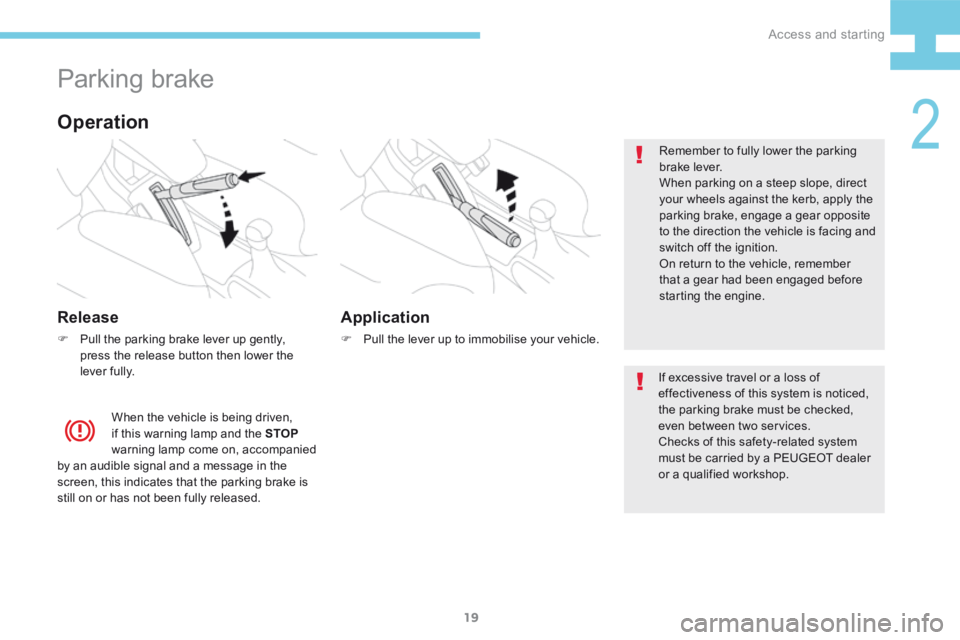
Parking brake
Release
F Pull the parking brake lever up gently,
press the release button then lower the
lever fully. Remember to fully lower the parking
brake lever.
When parking on a steep slope, direct
your wheels against the kerb, apply the
parking brake, engage a gear opposite
to the direction the vehicle is facing and
switch off the ignition.
On return to the vehicle, remember
that a gear had been engaged before
starting the engine.
When the vehicle is being driven,
if this warning lamp and the STOP
warning lamp come on, accompanied
by an audible signal and a message in the
screen, this indicates that the parking brake is
still on or has not been fully released.
Operation
If excessive travel or a loss of
effectiveness of this system is noticed,
the parking brake must be checked,
even between two services.
Checks of this safety-related system
must be carried by a PEUGEOT dealer
or a qualified workshop.
Application
F Pull the lever up to immobilise your vehicle.
2
Access and starting
Page 25 of 341
23
208_en_Chap02_ Acces-Demarrage_ed01-2015
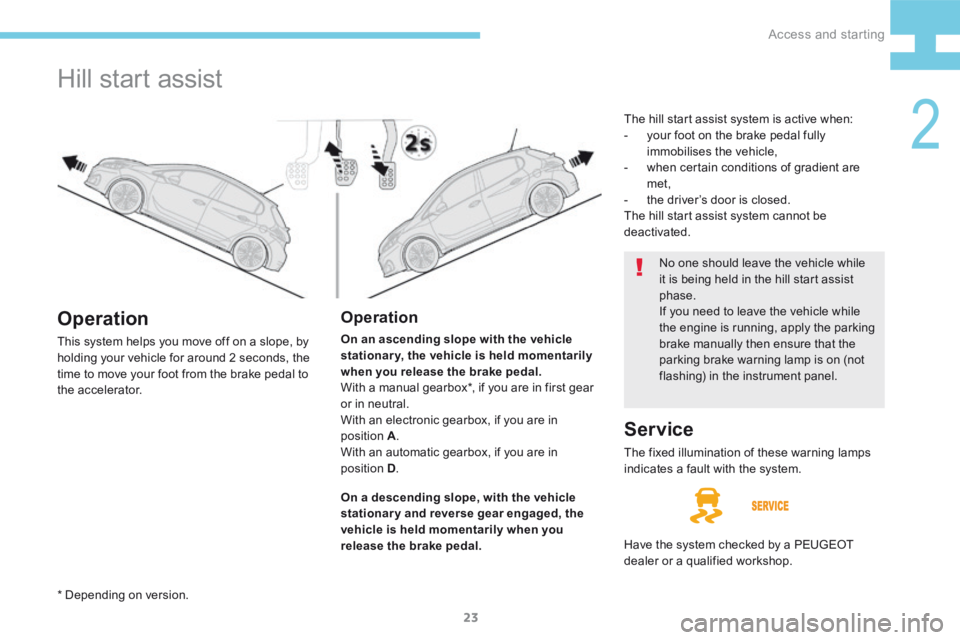
Hill start assist
Operation
On an ascending slope with the vehicle
stationary, the vehicle is held momentarily
when you release the brake pedal.
With a manual gearbox*, if you are in first gear
or in neutral.
With an electronic gearbox, if you are in
position A .
With an automatic gearbox, if you are in
position D .
Operation
This system helps you move off on a slope, by
holding your vehicle for around 2 seconds, the
time to move your foot from the brake pedal to
the accelerator.
On a descending slope, with the vehicle
stationary and reverse gear engaged, the
vehicle is held momentarily when you
release the brake pedal. No one should leave the vehicle while
it is being held in the hill start assist
phase.
If you need to leave the vehicle while
the engine is running, apply the parking
brake manually then ensure that the
parking brake warning lamp is on (not
flashing) in the instrument panel.
Service
The fixed illumination of these warning lamps
indicates a fault with the system.
Have the system checked by a PEUGEOT
dealer or a qualified workshop. The hill start assist system is active when:
-
your foot on the brake pedal fully
immobilises the vehicle,
- when certain conditions of gradient are
met,
- the driver’s door is closed.
The hill start assist system cannot be
deactivated.
* Depending on version.
2
Access and starting
Page 31 of 341
29
208_en_Chap02_ Acces-Demarrage_ed01-2015
The alarm provides the following types of monitoring:
Alarm
Monitoring
- Exterior perimeter
The system checks for opening of the vehicle.
The alarm is triggered if anyone tries to open a
door, the boot, the bonnet...
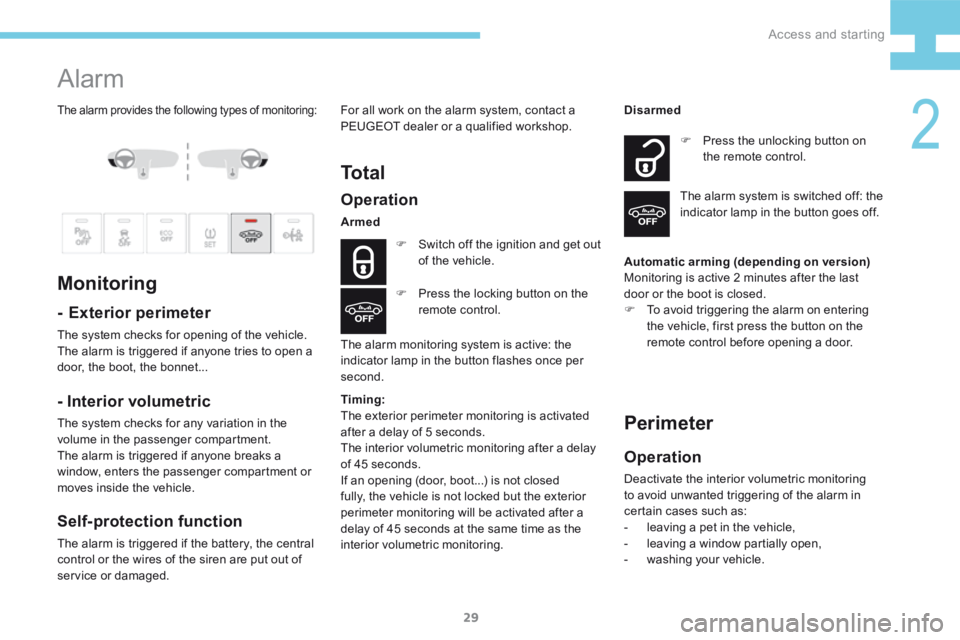
Operation
Armed
F Switch off the ignition and get out
of the vehicle.
The alarm monitoring system is active: the
indicator lamp in the button flashes once per
second. F
Press the unlocking button on
the remote control.
Disarmed
The alarm system is switched off: the
indicator lamp in the button goes off.
F Press the locking button on the
remote control.
- Interior volumetric
The system checks for any variation in the
volume in the passenger compartment.
The alarm is triggered if anyone breaks a
window, enters the passenger compartment or
moves inside the vehicle.
Self-protection function
The alarm is triggered if the battery, the central
control or the wires of the siren are put out of
service or damaged. For all work on the alarm system, contact a
PEUGEOT dealer or a qualified workshop.
To t a l
Automatic arming (depending on version)
Monitoring is active 2 minutes after the last
door or the boot is closed.
F
To avoid triggering the alarm on entering
the vehicle, first press the button on the
remote control before opening a door.
Perimeter
Operation
Deactivate the interior volumetric monitoring
to avoid unwanted triggering of the alarm in
certain cases such as:
- leaving a pet in the vehicle,
- leaving a window partially open,
- washing your vehicle.
Timing:
The exterior perimeter monitoring is activated
after a delay of 5 seconds.
The interior volumetric monitoring after a delay
of 45 seconds.
If an opening (door, boot...) is not closed
fully, the vehicle is not locked but the exterior
perimeter monitoring will be activated after a
delay of 45 seconds at the same time as the
interior volumetric monitoring.
2
Access and starting
Page 35 of 341
33
208_en_Chap02_ Acces-Demarrage_ed01-2015
Lost keys
Go to a PEUGEOT dealer with the vehicle's
registration document, your personal
identification documents and if possible the
key code label.
The PEUGEOT dealer will be able to look
up the key code and the transponder code
required to order a new key.
Remote control
The high frequency remote control is a
sensitive system; do not operate it while it is
in your pocket as there is a possibility that
it may unlock the vehicle, without you being
aware of it.
Do not repeatedly press the buttons of your
remote control out of range and out of sight
of your vehicle. You run the risk of stopping
it from working and the remote control
would have to be reinitialised.
No remote control can operate when the
key is in the ignition switch, even when
the ignition is switched off, except for
reinitialisation.
Anti-theft protection
Do not make any modifications to the
electronic engine immobiliser system; this
could cause malfunctions.
Locked vehicle
Driving with the doors locked may make
access to the passenger compartment by
the emergency services more difficult in an
emergency.
As a safety precaution, never leave children
alone in the vehicle, except for a very short
period.
In all cases, it is essential to remove the key
from the ignition switch when leaving the
vehicle.
Second-hand vehicle
Have the pairing of all of the keys in your
possession checked by a PEUGEOT dealer,
to ensure that only your keys can be used to
open and start the vehicle.
2
Access and starting
Page 36 of 341
34
208_en_Chap03_Indicateurs_ed01-2015
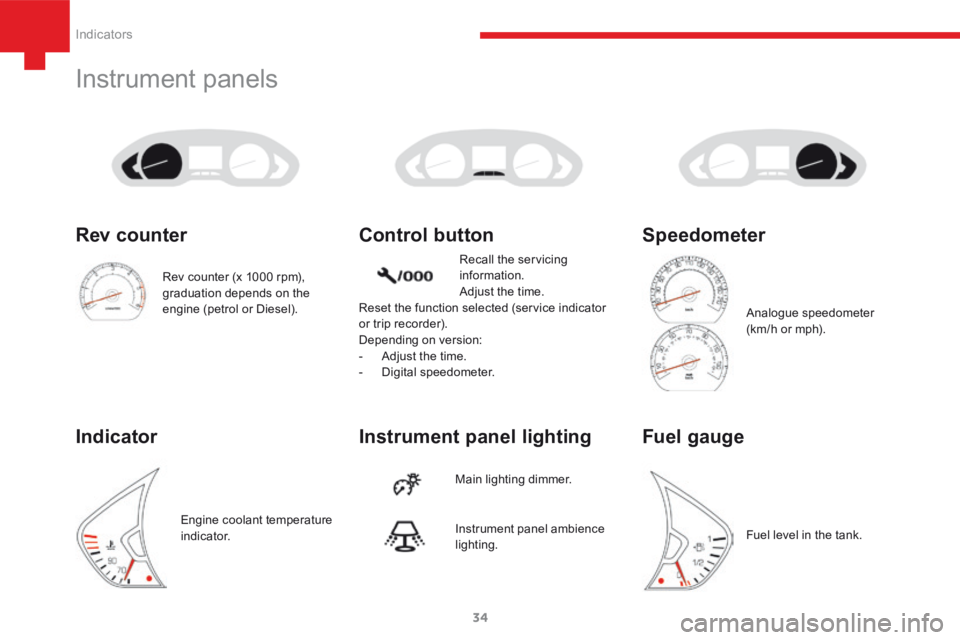
Instrument panels
Instrument panel lighting Control button
Main lighting dimmer.Recall the servicing
information.
Adjust the time.
Reset the function selected (service indicator
or trip recorder).
Depending on version:
- Adjust the time.
- Digital speedometer.
Instrument panel ambience
lighting.
Rev counter (x 1000 rpm),
graduation depends on the
engine (petrol or Diesel).
Rev counter
Indicator
Engine coolant temperature
i n d i c a t o r.
Speedometer
Analogue speedometer
(km/h or mph).
Fuel gauge
Fuel level in the tank.
Indicators
Page 37 of 341
35
208_en_Chap03_Indicateurs_ed01-2015
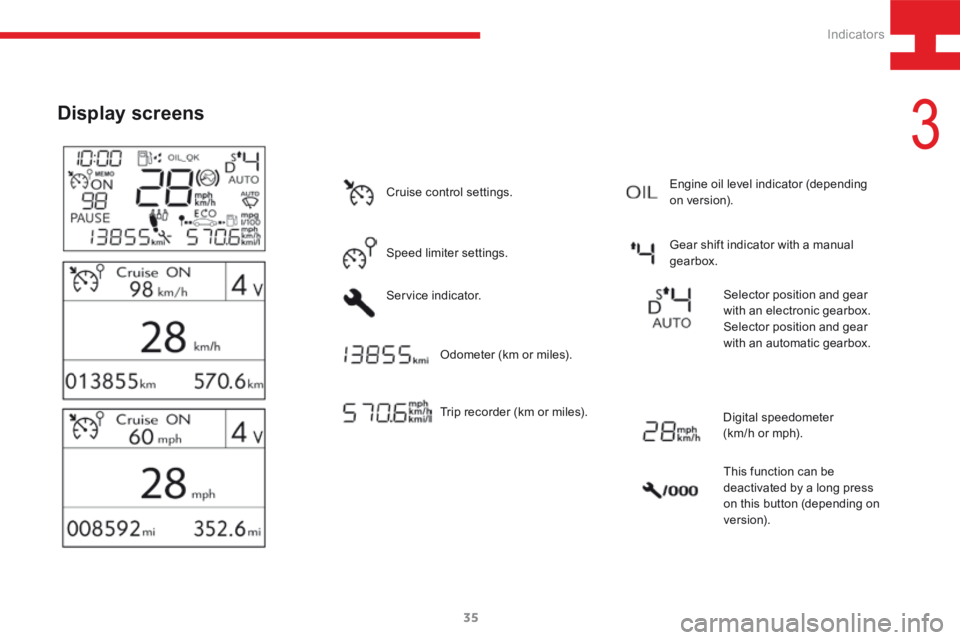
Display screens
Cruise control settings.
Speed limiter settings.
Service indicator.Trip recorder (km or miles). Gear shift indicator with a manual
gearbox.
Odometer (km or miles). Engine oil level indicator (depending
on version).
Selector position and gear
with an electronic gearbox.
Selector position and gear
with an automatic gearbox.
Digital speedometer
(km/h or mph). This function can be
deactivated by a long press
on this button (depending on
ve r s i o n).
3
Indicators