Page 311 of 340
309
2008_en_Chap12c_RDE2_ed01-2015
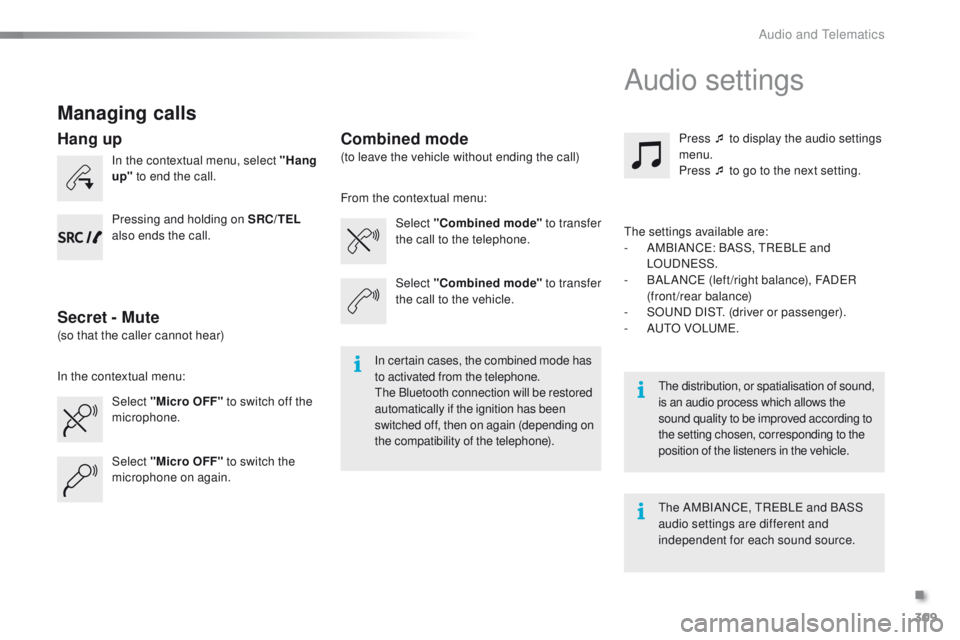
Managing calls
In the contextual menu, select "Hang
up" to end the call.
Select "Micro OFF" to switch off the
microphone. Select
"Combined mode " to transfer
the call to the telephone. Press ¯ to display the audio settings
menu.
Press ¯ to go to the next setting.
Select "Micro OFF" to switch the
microphone on again. Select
"Combined mode"
to transfer
the call to the vehicle.
In the contextual menu: From the contextual menu:
In certain cases, the combined mode has
to activated from the telephone.
The Bluetooth connection will be restored
automatically if the ignition has been
switched off, then on again (depending on
the compatibility of the telephone). The distribution, or spatialisation of sound,
is an audio process which allows the
sound quality to be improved according to
the setting chosen, corresponding to the
position of the listeners in the
vehicle.
Hang up
Secret - MuteCombined mode
Pressing and holding on SRC/TEL
also ends the call.
(so that the caller cannot hear) (to leave the vehicle without ending the call)
The settings available are:
-
A
MBIANCE: BASS, TREBLE and
LOUDNESS.
-
B
ALANCE (left /right balance), FADER
(front/rear balance)
-
S
OUND DIST. (driver or passenger).
-
A
UTO VOLUME.
The AMBIANCE, TREBLE and BASS
audio settings are different and
independent for each sound source.
Audio settings
.
Audio and Telematics
Page 313 of 340
311
2008_en_Chap12c_RDE2_ed01-2015
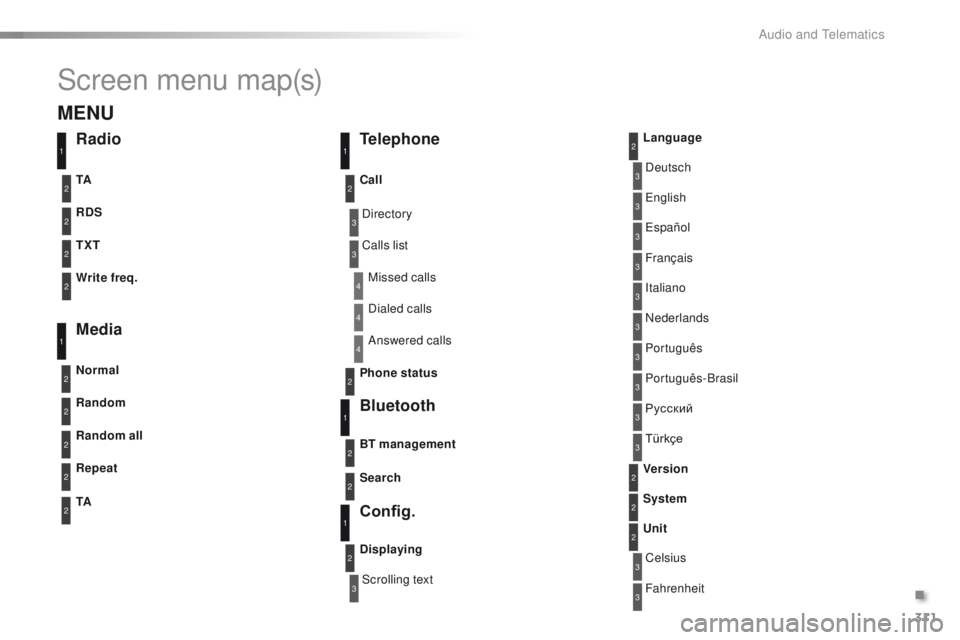
Screen menu map(s)
3
3
3
3
3
3
3
3
3
3
3
3
3
3
3
4
4
4
Directory
Scrolling textDeutsch
Italiano Español
Português
Русский
Celsius English
Nederlands Français
Português-Brasil
Türkçe
Fahrenheit
Calls list
Missed calls
Dialed calls
Answered calls
Radio Telephone
Bluetooth
Config.
RDS
TXT
Write freq.
Media
Normal
Random all TA Call
BT management
Unit
Search
Displaying Language
Version
System
Phone status
11
1
1
22
2
2
2
2
2
2
2
2
2
2
2
1
2
2
MENU
Random
Repeat
TA2
2
2
.
Audio and Telematics
Page 322 of 340
320
2008_en_Chap12d_RDE1_ed01-2015
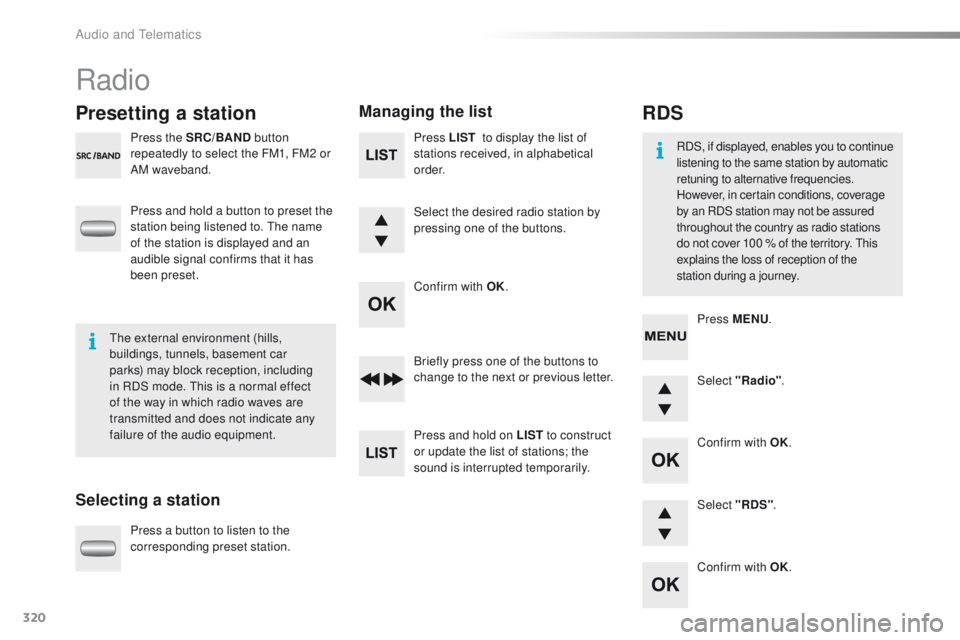
Radio
Presetting a station
Selecting a stationManaging the list
Press the SRC/BAND
button
repeatedly to select the FM1, FM2 or
AM waveband.
Press and hold a button to preset the
station being listened to. The name
of the station is displayed and an
audible signal confirms that it has
been preset.
Press a button to listen to the
corresponding preset station. Select "Radio"
.
Select "RDS" .
RDS
RDS, if displayed, enables you to continue
listening to the same station by automatic
retuning to alternative frequencies.
However, in certain conditions, coverage
by an RDS station may not be assured
throughout the country as radio stations
do not cover 100 % of the territory. This
explains the loss of reception of the
station during a journey.
The external environment (hills,
buildings, tunnels, basement car
parks) may block reception, including
in RDS mode. This is a normal effect
of the way in which radio waves are
transmitted and does not indicate any
failure of the audio equipment. Press MENU
.
Briefly press one of the buttons to
change to the next or previous letter.
Press and hold on LIST to construct
or update the list of stations; the
sound is interrupted temporarily. Press LIST
to display the list of
stations received, in alphabetical
o r d e r.
Select the desired radio station by
pressing one of the buttons.
Confirm with OK.
Confirm with OK.
Confirm with OK.
Audio and Telematics
Page 339 of 340
03-15
Labels are applied at various points on your
vehicle. They carry safety warnings as well
as vehicle identification information. Do not
remove them: they form an integral part of
your vehicle.
Automobiles PEUGEOT
declares, by
application of the provisions of the European
legislation (Directive 2000/53) relating
to End of Life Vehicles, that it achieves
the objectives set by this legislation and
that recycled materials are used in the
manufacture of the products that it sells.
Printed in the EU
Reproduction or translation of all or part of
this document is prohibited without written
authorisation from Automobiles PEUGEOT.
Anglais
For any work on your vehicle, use a qualified
workshop that has the technical information,
competence and equipment required, which
a PEUGEOT dealer is able to provide.
We draw your attention to the
following points:
- The fitting of electrical equipment or
accessories not listed by PEUGEOT
may cause faults and failures with the
electrical system of your vehicle. Contact
a PEUGEOT dealer for information on
the range of recommended accessories.
-
As a safety measure, access to the
diagnostic socket, used for the vehicle's
electronic systems, is reserved strictly
for PEUGEOT
dealers or qualified
workshops, equipped with the special
diagnostic tool required (risk of
malfunctions of the vehicle's electronic
systems that could cause breakdowns
or serious accidents). The manufacturer
cannot be held responsible if this advice
is not followed.
-
Any modification or adaptation not
intended or authorised by
Automobiles
PEUGEOT or carried out without
meeting the technical requirements
defined by the manufacturer would
lead to the suspension of the legal and
contractual warranties.