2015 PEUGEOT 2008 wheel
[x] Cancel search: wheelPage 60 of 340
58
2008_en_Chap03_confort_ed01-2015
Steering wheel adjustment
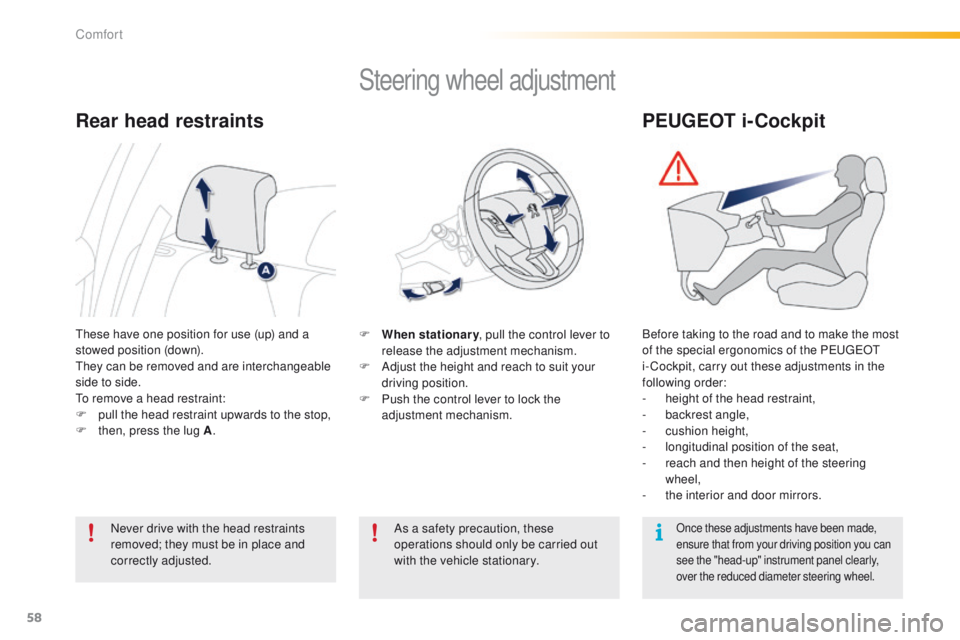
F When stationary, pull the control lever to
release the adjustment mechanism.
F
A
djust the height and reach to suit your
driving position.
F
P
ush the control lever to lock the
adjustment mechanism.
As a safety precaution, these
operations should only be carried out
with the vehicle stationary.
These have one position for use (up) and a
stowed position (down).
They can be removed and are interchangeable
side to side.
To remove a head restraint:
F
p
ull the head restraint upwards to the stop,
F
t
hen, press the lug A .
Rear head restraints
Never drive with the head restraints
removed; they must be in place and
correctly adjusted.
PEUGEOT i-Cockpit
Before taking to the road and to make the most
of the special ergonomics of the PEUGEOT
i- Cockpit, carry out these adjustments in the
following order:
-
h
eight of the head restraint,
-
b
ackrest angle,
-
c
ushion height,
-
l
ongitudinal position of the seat,
-
r
each and then height of the steering
wheel,
-
t
he interior and door mirrors.
Once these adjustments have been made,
ensure that from your driving position you can
see the "head-up" instrument panel clearly,
over the reduced diameter steering wheel.
Comfort
Page 80 of 340
78
2008_en_Chap05_conduite_ed01-2015
Driving recommendations
Observe the driving regulations and remain
vigilant whatever the traffic conditions.
Pay close attention to the traffic and keep your
hands on the wheel so that you are ready to
react at any time to any eventuality.
On a long journey, a break every two hours is
strongly recommended.
In difficult weather, drive smoothly, anticipate
the need to brake and increase the distance
from other vehicles.If you are obliged to drive through water:Important!
Driving on flooded
roads
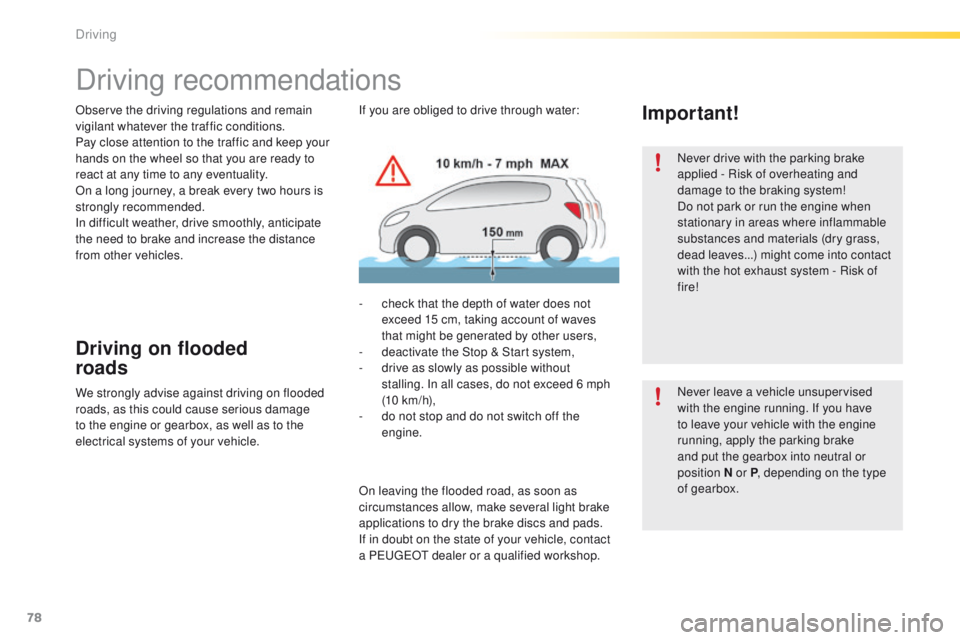
- check that the depth of water does not exceed 15 cm, taking account of waves
that might be generated by other users,
-
d
eactivate the Stop & Start system,
-
d
rive as slowly as possible without
stalling. In all cases, do not exceed 6 mph
(10
km/h),
-
d
o not stop and do not switch off the
engine.
We strongly advise against driving on flooded
roads, as this could cause serious damage
to the engine or gearbox, as well as to the
electrical systems of your vehicle.
On leaving the flooded road, as soon as
circumstances allow, make several light brake
applications to dry the brake discs and pads.
If in doubt on the state of your vehicle, contact
a PEUGEOT dealer or a qualified workshop. Never drive with the parking brake
applied - Risk of overheating and
damage to the braking system!
Do not park or run the engine when
stationary in areas where inflammable
substances and materials (dry grass,
dead leaves...) might come into contact
with the hot exhaust system - Risk of
fire!
Never leave a vehicle unsupervised
with the engine running. If you have
to leave your vehicle with the engine
running, apply the parking brake
and put the gearbox into neutral or
position
N or P, depending on the type
of gearbox.
Driving
Page 81 of 340
79
2008_en_Chap05_conduite_ed01-2015
Starting - Stopping the engine
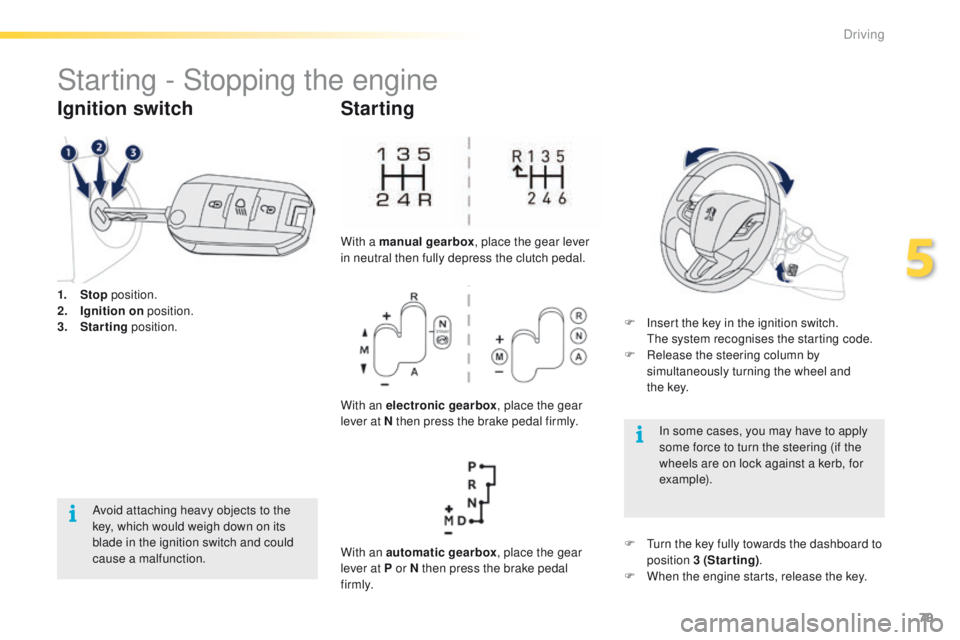
1. Stop position.
2. I gnition on position.
3.
S
tarting position.
Ignition switch
Avoid attaching heavy objects to the
key, which would weigh down on its
blade in the ignition switch and could
cause a malfunction.
Starting
With a manual gearbox , place the gear lever
in neutral then fully depress the clutch pedal.
With an electronic gearbox , place the gear
lever at N then press the brake pedal firmly.
With an automatic gearbox , place the gear
lever at P or N then press the brake pedal
f i r m l y. F
I
nsert the key in the ignition switch.
T
he system recognises the starting code.
F
R
elease the steering column by
simultaneously turning the wheel and
t h e
key.
In some cases, you may have to apply
some force to turn the steering (if the
wheels are on lock against a kerb, for
example).
F
T
urn the key fully towards the dashboard to
position 3 (Starting) .
F
W
hen the engine starts, release the key.
5
Driving
Page 82 of 340
80
2008_en_Chap05_conduite_ed01-2015
Key left in the "Ignition on"
position
On opening the driver's door, an alert
message is displayed, accompanied by an
audible signal, to remind you that the key is
still in the ignition switch at position 1 (Stop).
F Immobilise the vehicle.
F
T urn the key fully towards you to position 1
(Stop) .
F
R
emove the key from the ignition switch.
F
T
o lock the steering column, turn the wheel
until the lock engages.
Switching off
If the key has been left in the ignition
switch at position 2 (Ignition on) ,
the ignition will be switched off
automatically after one hour.
To switch the ignition back on, turn the
key to position 1 (Stop) , then back to
position 2 (Ignition on) .
Free-wheeling
For safety reasons, do not free-wheel.
Other wise, some vehicle functions will
no longer be active.
Switching off the engine leads to a loss
of braking assistance.
To facilitate unlocking of the steering
wheel, it is recommended that you
place the wheels in the straight ahead
position before switching off the engine.
Driving
Page 83 of 340
81
2008_en_Chap05_conduite_ed01-2015
Manual parking brake
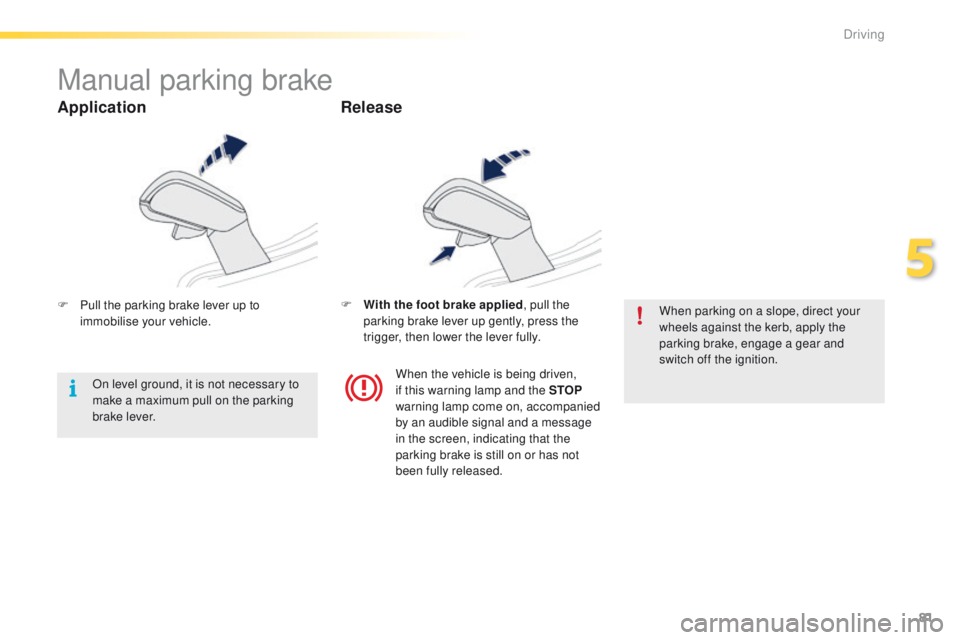
F Pull the parking brake lever up to immobilise your vehicle. F
W ith the foot brake applied
, pull the
parking brake lever up gently, press the
trigger, then lower the lever fully. When parking on a slope, direct your
wheels against the kerb, apply the
parking brake, engage a gear and
switch off the ignition.
When the vehicle is being driven,
if this warning lamp and the STOP
warning lamp come on, accompanied
by an audible signal and a message
in the screen, indicating that the
parking brake is still on or has not
been fully released.
On level ground, it is not necessary to
make a maximum pull on the parking
brake lever.
Application
Release
5
Driving
Page 85 of 340
83
2008_en_Chap05_conduite_ed01-2015
Five-speed electronically controlled gearbox
which offers a choice between the comfort of
automatic operation or the pleasure of manual
gear changing.
Three driving modes are offered:
-
a
utomated mode for automatic control
of the gears by the gearbox, without ant
action by the driver.
-
m
anual mode for sequential changing of
the gears by the driver, using the gear lever
or the steering mounted control paddles
-
a
uto sequential mode for overtaking, for
example, remaining in the automated mode
while using the functions of the sequential
mode.
5-speed electronic gearbox
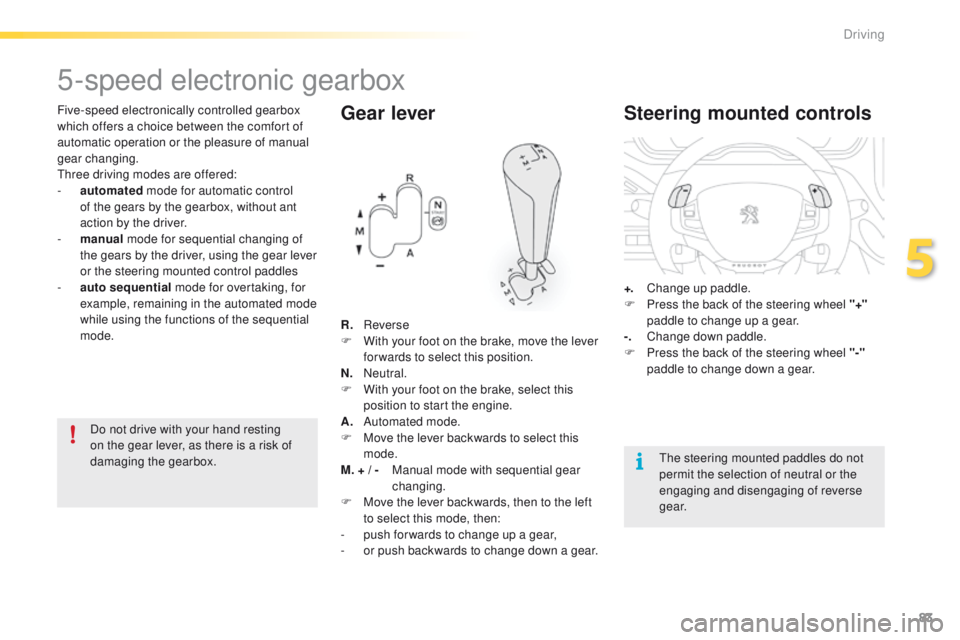
Gear lever
R. Reverse
F W ith your foot on the brake, move the lever
for wards to select this position.
N.
Neutral.
F
W
ith your foot on the brake, select this
position to start the engine.
A.
A
utomated mode.
F
M
ove the lever backwards to select this
mode.
M. + / -
M
anual mode with sequential gear
changing.
F
M
ove the lever backwards, then to the left
to select this mode, then:
-
p
ush for wards to change up a gear,
-
o
r push backwards to change down a gear.
Steering mounted controls
+. Change up paddle.
F P ress the back of the steering wheel "+"
paddle to change up a gear.
-.
C
hange down paddle.
F
P
ress the back of the steering wheel "-"
paddle to change down a gear.
The steering mounted paddles do not
permit the selection of neutral or the
engaging and disengaging of reverse
g e a r.
Do not drive with your hand resting
on the gear lever, as there is a risk of
damaging the gearbox.
5
Driving
Page 102 of 340
100
2008_en_Chap05_conduite_ed01-2015
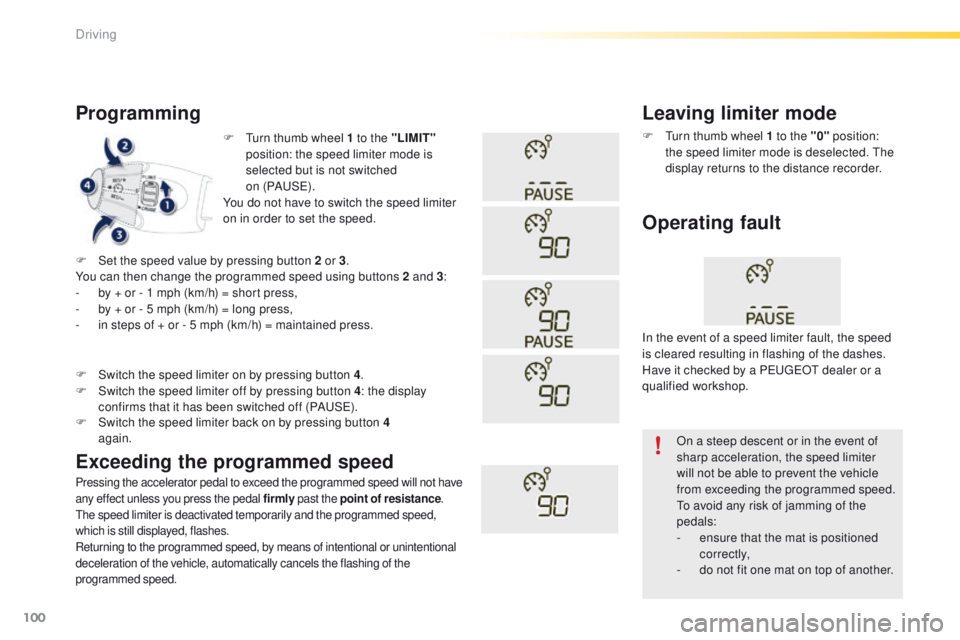
F Turn thumb wheel 1 to the "LIMIT"
position: the speed limiter mode is
selected but is not switched
on (PAUS E).
You do not have to switch the speed limiter
on in order to set the speed.
Programming
Pressing the accelerator pedal to exceed the programmed speed will not have
any effect unless you press the pedal firmly past the point of resistance.
The speed limiter is deactivated temporarily and the programmed speed,
which is still displayed, flashes.
Returning to the programmed speed, by means of intentional or unintentional
deceleration of the vehicle, automatically cancels the flashing of the
programmed speed.
Leaving limiter mode
F Turn thumb wheel 1 to the "0" position:
the speed limiter mode is deselected. The
display returns to the distance recorder.
Operating fault
F Set the speed value by pressing button 2 or 3 .
You can then change the programmed speed using buttons 2 and 3 :
-
b
y + or - 1 mph (km/h) = short press,
-
b
y + or - 5 mph (km/h) = long press,
-
i
n steps of + or - 5 mph (km/h) = maintained press.
Exceeding the programmed speed
F Switch the speed limiter back on by pressing button 4 again.
F
S
witch the speed limiter on by pressing button 4
.
F
S
witch the speed limiter off by pressing button 4
: the display
confirms that it has been switched off (PAUSE). In the event of a speed limiter fault, the speed
is cleared resulting in flashing of the dashes.
Have it checked by a PEUGEOT dealer or a
qualified workshop.
On a steep descent or in the event of
sharp acceleration, the speed limiter
will not be able to prevent the vehicle
from exceeding the programmed speed.
To avoid any risk of jamming of the
pedals:
-
e
nsure that the mat is positioned
c o r r e c t l y,
-
d
o not fit one mat on top of another.
Driving
Page 104 of 340
102
2008_en_Chap05_conduite_ed01-2015
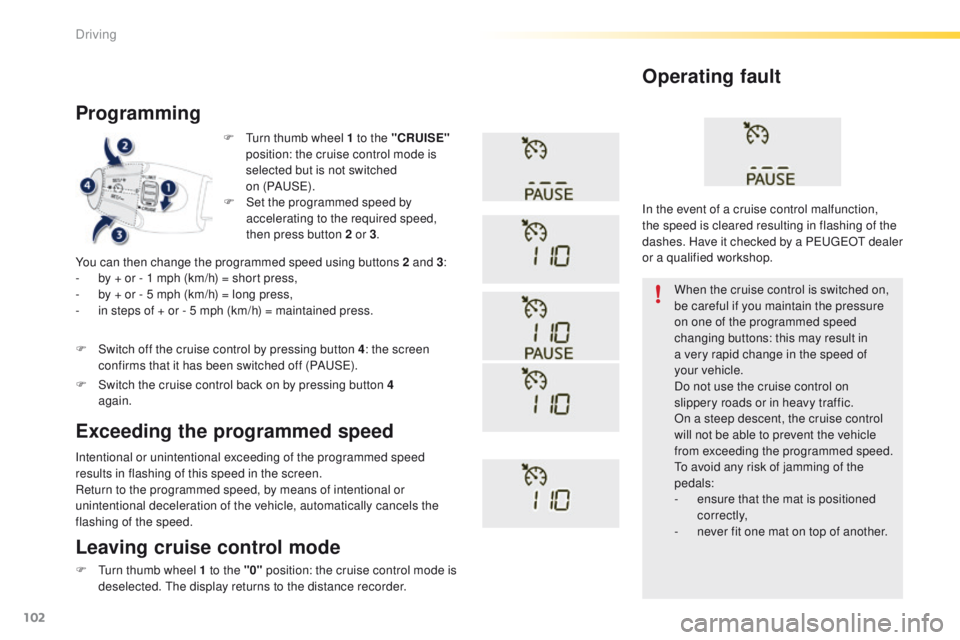
F Turn thumb wheel 1 to the "CRUISE"
position: the cruise control mode is
selected but is not switched
on (PAUS E).
Programming
You can then change the programmed speed using buttons 2 and 3 :
- b y + or - 1 mph (km/h) = short press,
-
b
y + or - 5 mph (km/h) = long press,
-
i
n steps of + or - 5 mph (km/h) = maintained press.
Intentional or unintentional exceeding of the programmed speed
results in flashing of this speed in the screen.
Return to the programmed speed, by means of intentional or
unintentional deceleration of the vehicle, automatically cancels the
flashing of the speed. When the cruise control is switched on,
be careful if you maintain the pressure
on one of the programmed speed
changing buttons: this may result in
a very rapid change in the speed of
your
vehicle.
Do not use the cruise control on
slippery roads or in heavy traffic.
On a steep descent, the cruise control
will not be able to prevent the vehicle
from exceeding the programmed speed.
To avoid any risk of jamming of the
pedals:
-
e
nsure that the mat is positioned
c o r r e c t l y,
-
n
ever fit one mat on top of another.
Operating fault
Leaving cruise control mode
F Turn thumb wheel 1 to the "0" position: the cruise control mode is
deselected. The display returns to the distance recorder.
Exceeding the programmed speed
F Set the programmed speed by accelerating to the required speed,
then press button 2 or 3 .
F
S
witch off the cruise control by pressing button 4 : the screen
confirms that it has been switched off (PAUSE).
F
S
witch the cruise control back on by pressing button 4
again. In the event of a cruise control malfunction,
the speed is cleared resulting in flashing of the
dashes. Have it checked by a PEUGEOT dealer
or a qualified workshop.
Driving