Page 311 of 340
309
2008_en_Chap12c_RDE2_ed01-2015
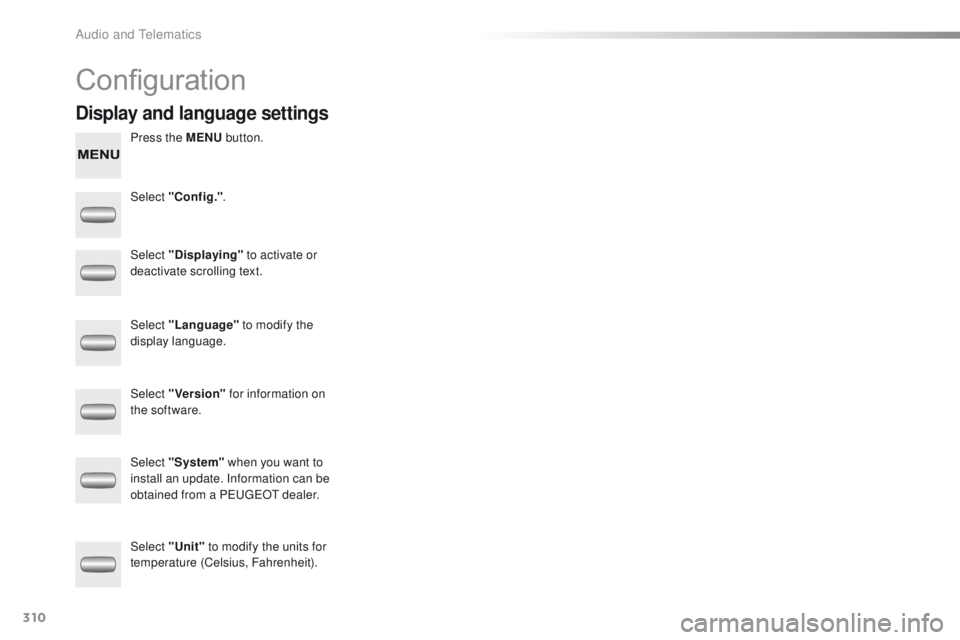
Managing calls
In the contextual menu, select "Hang
up" to end the call.
Select "Micro OFF" to switch off the
microphone. Select
"Combined mode " to transfer
the call to the telephone. Press ¯ to display the audio settings
menu.
Press ¯ to go to the next setting.
Select "Micro OFF" to switch the
microphone on again. Select
"Combined mode"
to transfer
the call to the vehicle.
In the contextual menu: From the contextual menu:
In certain cases, the combined mode has
to activated from the telephone.
The Bluetooth connection will be restored
automatically if the ignition has been
switched off, then on again (depending on
the compatibility of the telephone). The distribution, or spatialisation of sound,
is an audio process which allows the
sound quality to be improved according to
the setting chosen, corresponding to the
position of the listeners in the
vehicle.
Hang up
Secret - MuteCombined mode
Pressing and holding on SRC/TEL
also ends the call.
(so that the caller cannot hear) (to leave the vehicle without ending the call)
The settings available are:
-
A
MBIANCE: BASS, TREBLE and
LOUDNESS.
-
B
ALANCE (left /right balance), FADER
(front/rear balance)
-
S
OUND DIST. (driver or passenger).
-
A
UTO VOLUME.
The AMBIANCE, TREBLE and BASS
audio settings are different and
independent for each sound source.
Audio settings
.
Audio and Telematics
Page 312 of 340
310
2008_en_Chap12c_RDE2_ed01-2015
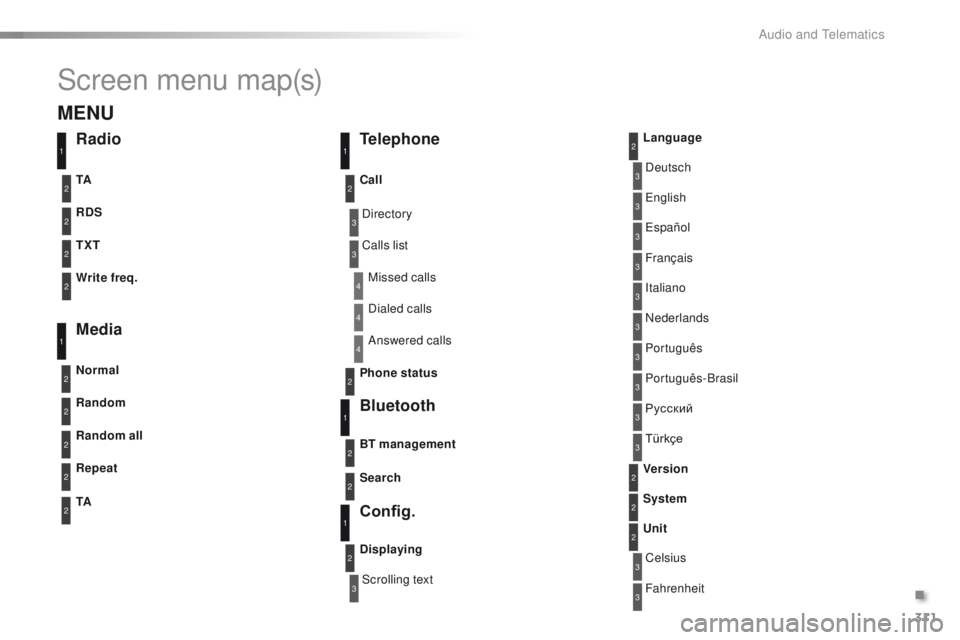
Configuration
Press the MENU button.
Select "Config." .
Select "Displaying"
to activate or
deactivate scrolling text.
Select "Language" to modify the
display language.
Select "Version" for information on
the software.
Select "Unit" to modify the units for
temperature (Celsius, Fahrenheit). Select "System" when you want to
install an update. Information can be
obtained from a PEUGEOT dealer.
Display and language settings
Audio and Telematics
Page 313 of 340
311
2008_en_Chap12c_RDE2_ed01-2015
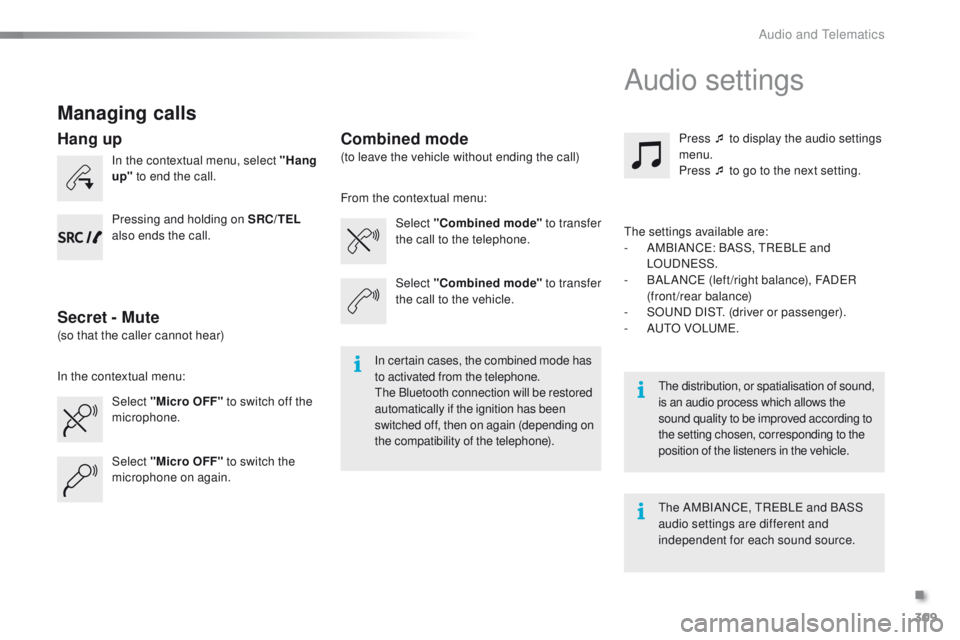
Screen menu map(s)
3
3
3
3
3
3
3
3
3
3
3
3
3
3
3
4
4
4
Directory
Scrolling textDeutsch
Italiano Español
Português
Русский
Celsius English
Nederlands Français
Português-Brasil
Türkçe
Fahrenheit
Calls list
Missed calls
Dialed calls
Answered calls
Radio Telephone
Bluetooth
Config.
RDS
TXT
Write freq.
Media
Normal
Random all TA Call
BT management
Unit
Search
Displaying Language
Version
System
Phone status
11
1
1
22
2
2
2
2
2
2
2
2
2
2
2
1
2
2
MENU
Random
Repeat
TA2
2
2
.
Audio and Telematics
Page 315 of 340
313
2008_en_Chap12c_RDE2_ed01-2015
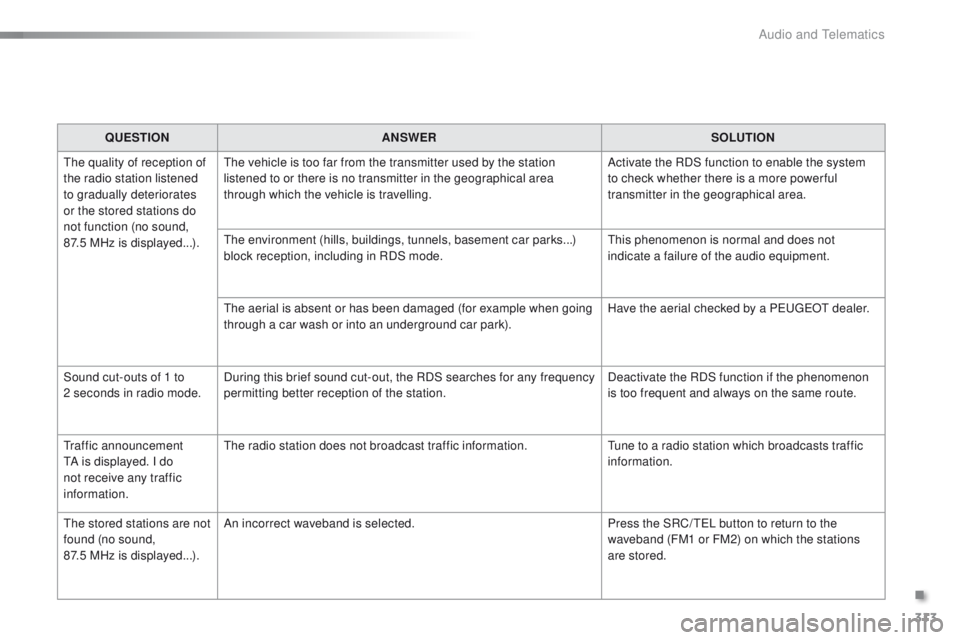
QUESTIONANSWER SOLUTION
The quality of reception of
the radio station listened
to gradually deteriorates
or the stored stations do
not function (no sound,
87.5
MHz is displayed...). The vehicle is too far from the transmitter used by the station
listened to or there is no transmitter in the geographical area
through which the vehicle is travelling.
Activate the RDS function to enable the system
to check whether there is a more power ful
transmitter in the geographical area.
The environment (hills, buildings, tunnels, basement car parks...)
block reception, including in RDS mode. This phenomenon is normal and does not
indicate a failure of the audio equipment.
The aerial is absent or has been damaged (for example when going
through a car wash or into an underground car park). Have the aerial checked by a PEUGEOT dealer.
Sound cut-outs of 1 to
2
seconds in radio mode. During this brief sound cut-out, the RDS searches for any frequency
permitting better reception of the station. Deactivate the RDS function if the phenomenon
is too frequent and always on the same route.
Traffic announcement
TA is displayed. I do
not receive any traffic
information. The radio station does not broadcast traffic information.
Tune to a radio station which broadcasts traffic
information.
The stored stations are not
found (no sound,
87.5 MHz is displayed...). An incorrect waveband is selected.
Press the SRC/ TEL button to return to the
waveband (FM1 or FM2) on which the stations
are stored.
.
Audio and Telematics
Page 316 of 340
314
2008_en_Chap12c_RDE2_ed01-2015
QUESTIONANSWER SOLUTION
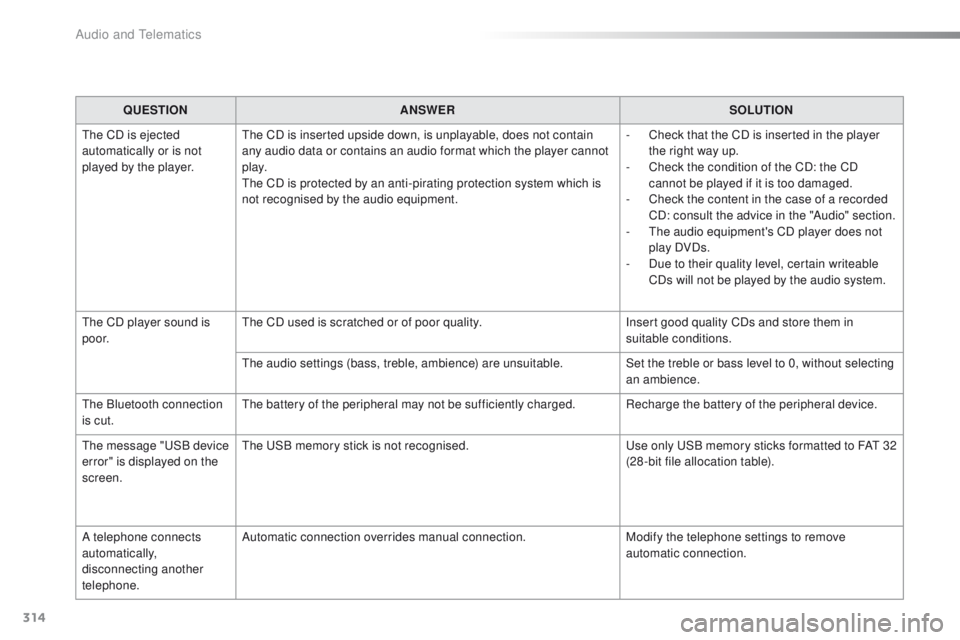
The CD is ejected
automatically or is not
played by the player. The CD is inserted upside down, is unplayable, does not contain
any audio data or contains an audio format which the player cannot
p l ay.
The CD is protected by an anti-pirating protection system which is
not recognised by the audio equipment. -
C
heck that the CD is inserted in the player
the right way up.
-
C
heck the condition of the CD: the CD
cannot be played if it is too damaged.
-
C
heck the content in the case of a recorded
CD: consult the advice in the "Audio" section.
-
T
he audio equipment's CD player does not
play DVDs.
-
D
ue to their quality level, certain writeable
CDs will not be played by the audio system.
The CD player sound is
p o o r. The CD used is scratched or of poor quality.
Insert good quality CDs and store them in
suitable conditions.
The audio settings (bass, treble, ambience) are unsuitable. Set the treble or bass level to 0, without selecting
an ambience.
The Bluetooth connection
is cut. The battery of the peripheral may not be sufficiently charged. Recharge the battery of the peripheral device.
The message "USB device
error" is displayed on the
screen. The USB memory stick is not recognised.
Use only USB memory sticks formatted to FAT
3
2
(28 -bit file allocation table).
A telephone connects
automatically,
disconnecting another
telephone. Automatic connection overrides manual connection.
Modify the telephone settings to remove
automatic connection.
Audio and Telematics
Page 317 of 340
315
2008_en_Chap12c_RDE2_ed01-2015
QUESTIONANSWER SOLUTION
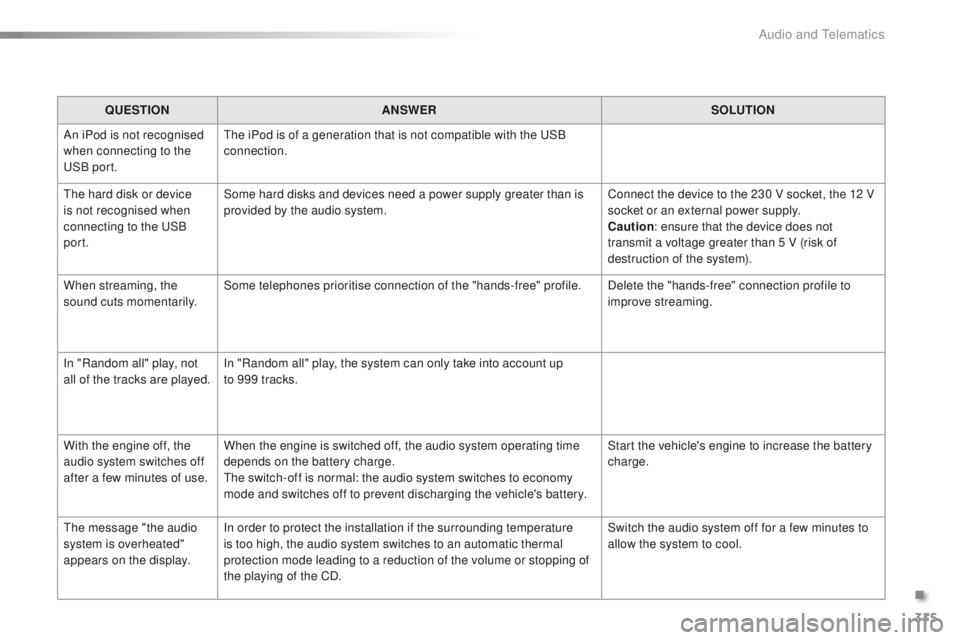
An iPod is not recognised
when connecting to the
USB port. The iPod is of a generation that is not compatible with the USB
connection.
The hard disk or device
is not recognised when
connecting to the USB
port. Some hard disks and devices need a power supply greater than is
provided by the audio system.
Connect the device to the 230 V socket, the 12 V
socket or an external power supply.
Caution
: ensure that the device does not
transmit a voltage greater than 5 V (risk of
destruction of the system).
When streaming, the
sound cuts momentarily. Some telephones prioritise connection of the "hands-free" profile.
Delete the "hands-free" connection profile to
improve streaming.
In "Random all" play, not
all of the tracks are played. In "Random all" play, the system can only take into account up
to 999 tracks.
With the engine off, the
audio system switches off
after a few minutes of use. When the engine is switched off, the audio system operating time
depends on the battery charge.
The switch-off is normal: the audio system switches to economy
mode and switches off to prevent discharging the vehicle's battery. Start the vehicle's engine to increase the battery
charge.
The message "the audio
system is overheated"
appears on the display. In order to protect the installation if the surrounding temperature
is too high, the audio system switches to an automatic thermal
protection mode leading to a reduction of the volume or stopping of
the playing of the CD. Switch the audio system off for a few minutes to
allow the system to cool.
.
Audio and Telematics
Page 320 of 340
318
2008_en_Chap12d_RDE1_ed01-2015
First steps
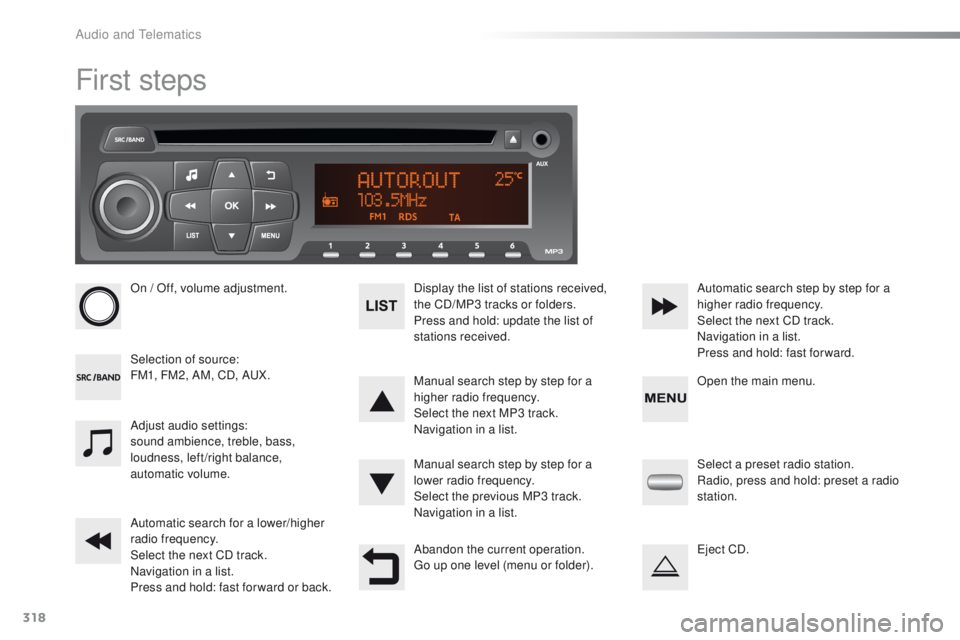
On / Off, volume adjustment.
Selection of source:
FM1, FM2, AM, CD, AUX.Display the list of stations received,
the CD/MP3 tracks or folders.
Press and hold: update the list of
stations received.
Manual search step by step for a
higher radio frequency.
Select the next MP3 track.
Navigation in a list.
Manual search step by step for a
lower radio frequency.
Select the previous MP3 track.
Navigation in a list.
Automatic search for a lower/higher
radio frequency.
Select the next CD track.
Navigation in a list.
Press and hold: fast for ward or back. Automatic search step by step for a
higher radio frequency.
Select the next CD track.
Navigation in a list.
Press and hold: fast for ward.
Adjust audio settings:
sound ambience, treble, bass,
loudness, left/right balance,
automatic volume.
Abandon the current operation.
Go up one level (menu or folder).Select a preset radio station.
Radio, press and hold: preset a radio
station.
Eject CD. Open the main menu.
Audio and Telematics
Page 322 of 340
320
2008_en_Chap12d_RDE1_ed01-2015
Radio
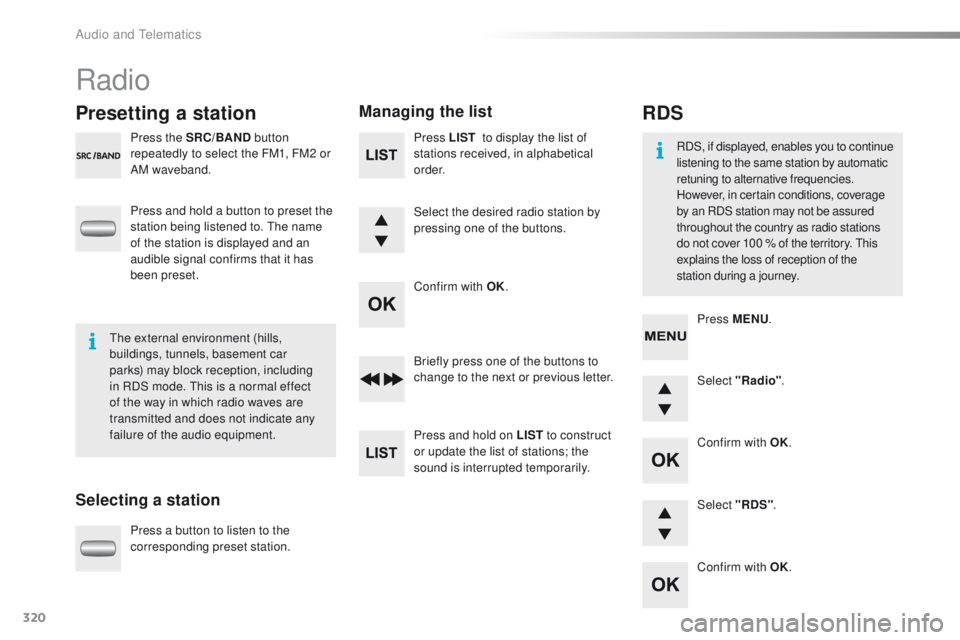
Presetting a station
Selecting a stationManaging the list
Press the SRC/BAND
button
repeatedly to select the FM1, FM2 or
AM waveband.
Press and hold a button to preset the
station being listened to. The name
of the station is displayed and an
audible signal confirms that it has
been preset.
Press a button to listen to the
corresponding preset station. Select "Radio"
.
Select "RDS" .
RDS
RDS, if displayed, enables you to continue
listening to the same station by automatic
retuning to alternative frequencies.
However, in certain conditions, coverage
by an RDS station may not be assured
throughout the country as radio stations
do not cover 100 % of the territory. This
explains the loss of reception of the
station during a journey.
The external environment (hills,
buildings, tunnels, basement car
parks) may block reception, including
in RDS mode. This is a normal effect
of the way in which radio waves are
transmitted and does not indicate any
failure of the audio equipment. Press MENU
.
Briefly press one of the buttons to
change to the next or previous letter.
Press and hold on LIST to construct
or update the list of stations; the
sound is interrupted temporarily. Press LIST
to display the list of
stations received, in alphabetical
o r d e r.
Select the desired radio station by
pressing one of the buttons.
Confirm with OK.
Confirm with OK.
Confirm with OK.
Audio and Telematics