Page 321 of 510
●call seven two four zero nine
● phonebook delete entry
● next entry
● dial star two one seven oh
● yes
● no
● select
● missed
● dial eight five six nine two
● Bluetooth on
● outgoing
● call three one nine oh two
● nine seven pause pause three oh eight
● cancel
● call back number
● call star two zero nine five
● delete phone
● dial eight three zero five one
● record name
● four three pause two nine pause zero ●
delete redial number
● phonebook list names
● call eight oh five four one
● correction
● connect phone
● dial seven four oh one eight
● previous entry
● delete
● dial nine seven two six six
● call seven six three oh one
● go back
● call five six two eight zero
● dial six six four three seven
MANUAL CONTROL
While using the voice recognition system, it is
possible to select menu options by using the
steering wheel controls instead of speaking voice
commands. This can be especially helpful if the
noise of driving makes it difficult for the voice
recognition system to accurately interpret com-
mands. The manual control mode does not allow
dialing a phone number by digits. The user may
select an entry from the Phonebook or Recent
Calls lists. To re-activate voice recognition, exit the manual control mode by pressing and holding
the PHONE/END (
) button. At that time,
pressing the PHONE/SEND (
) button will
start the Hands Free Phone System.
Operating tips
● To enter manual control mode, start the
voice recognition system and tilt the tuning
(
) switch up or down. The system will
speak �Showing Manual Options� when
manual controls are initially activated.
● To browse the menu options, tilt the tuning
(
) switch up or down. The system will
always speak the current menu option. De-
pending on the audio display, it will also
show the current menu option.
● To select the current menu option, press the
PHONE/SEND (
) button.
● To go back to the previous menu, press the
PHONE/END (
) button. If the current
menu is the Main Menu, pressing the
PHONE/END (
) button will exit the
Phone system.
● To exit the manual control mode, press and
hold the PHONE/END (
) button for
5 seconds.
4-120Monitor, climate, audio, phone and voice recognition systems
Page 324 of 510
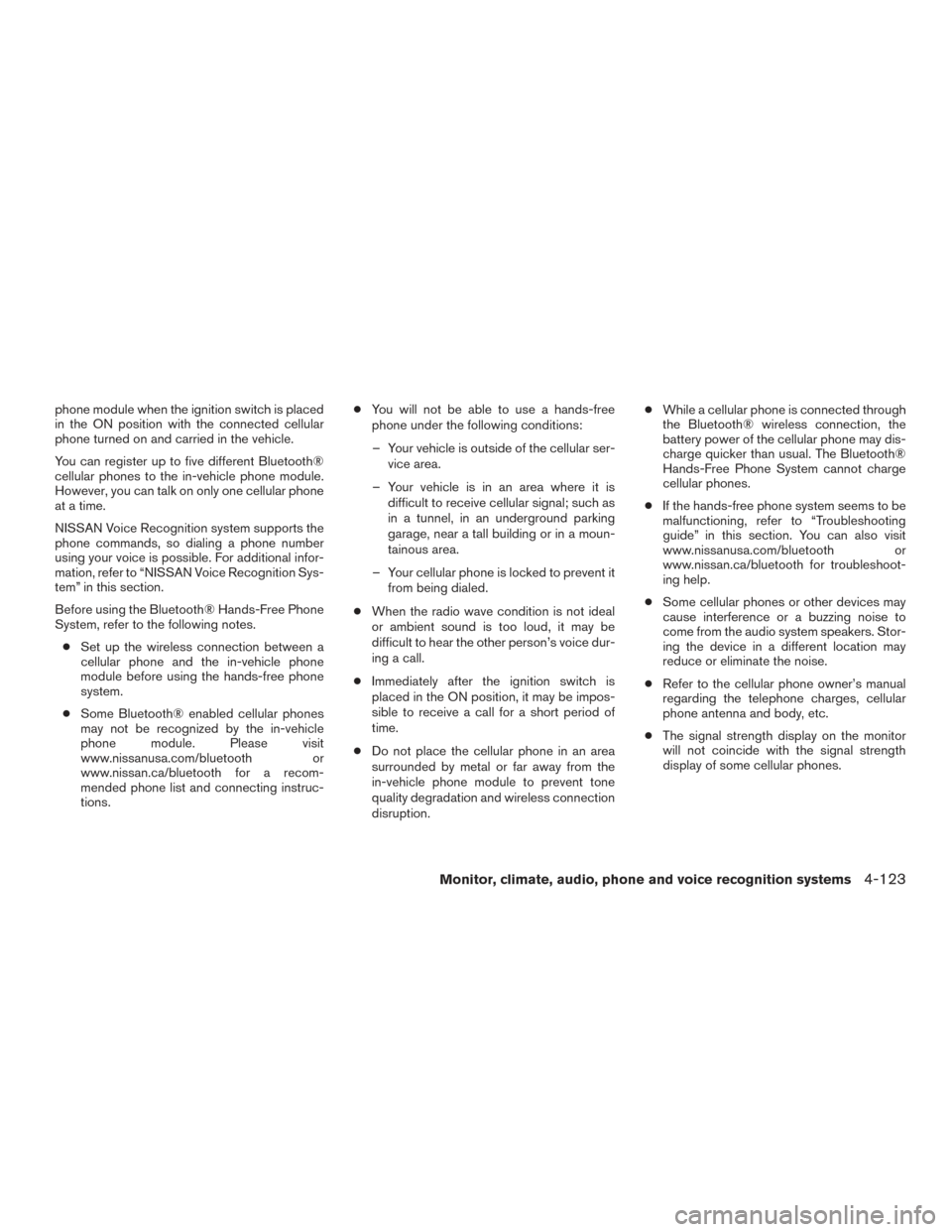
phone module when the ignition switch is placed
in the ON position with the connected cellular
phone turned on and carried in the vehicle.
You can register up to five different Bluetooth®
cellular phones to the in-vehicle phone module.
However, you can talk on only one cellular phone
at a time.
NISSAN Voice Recognition system supports the
phone commands, so dialing a phone number
using your voice is possible. For additional infor-
mation, refer to “NISSAN Voice Recognition Sys-
tem” in this section.
Before using the Bluetooth® Hands-Free Phone
System, refer to the following notes.● Set up the wireless connection between a
cellular phone and the in-vehicle phone
module before using the hands-free phone
system.
● Some Bluetooth® enabled cellular phones
may not be recognized by the in-vehicle
phone module. Please visit
www.nissanusa.com/bluetooth or
www.nissan.ca/bluetooth for a recom-
mended phone list and connecting instruc-
tions. ●
You will not be able to use a hands-free
phone under the following conditions:
– Your vehicle is outside of the cellular ser- vice area.
– Your vehicle is in an area where it is difficult to receive cellular signal; such as
in a tunnel, in an underground parking
garage, near a tall building or in a moun-
tainous area.
– Your cellular phone is locked to prevent it from being dialed.
● When the radio wave condition is not ideal
or ambient sound is too loud, it may be
difficult to hear the other person’s voice dur-
ing a call.
● Immediately after the ignition switch is
placed in the ON position, it may be impos-
sible to receive a call for a short period of
time.
● Do not place the cellular phone in an area
surrounded by metal or far away from the
in-vehicle phone module to prevent tone
quality degradation and wireless connection
disruption. ●
While a cellular phone is connected through
the Bluetooth® wireless connection, the
battery power of the cellular phone may dis-
charge quicker than usual. The Bluetooth®
Hands-Free Phone System cannot charge
cellular phones.
● If the hands-free phone system seems to be
malfunctioning, refer to “Troubleshooting
guide” in this section. You can also visit
www.nissanusa.com/bluetooth or
www.nissan.ca/bluetooth for troubleshoot-
ing help.
● Some cellular phones or other devices may
cause interference or a buzzing noise to
come from the audio system speakers. Stor-
ing the device in a different location may
reduce or eliminate the noise.
● Refer to the cellular phone owner’s manual
regarding the telephone charges, cellular
phone antenna and body, etc.
● The signal strength display on the monitor
will not coincide with the signal strength
display of some cellular phones.
Monitor, climate, audio, phone and voice recognition systems4-123
Page 326 of 510
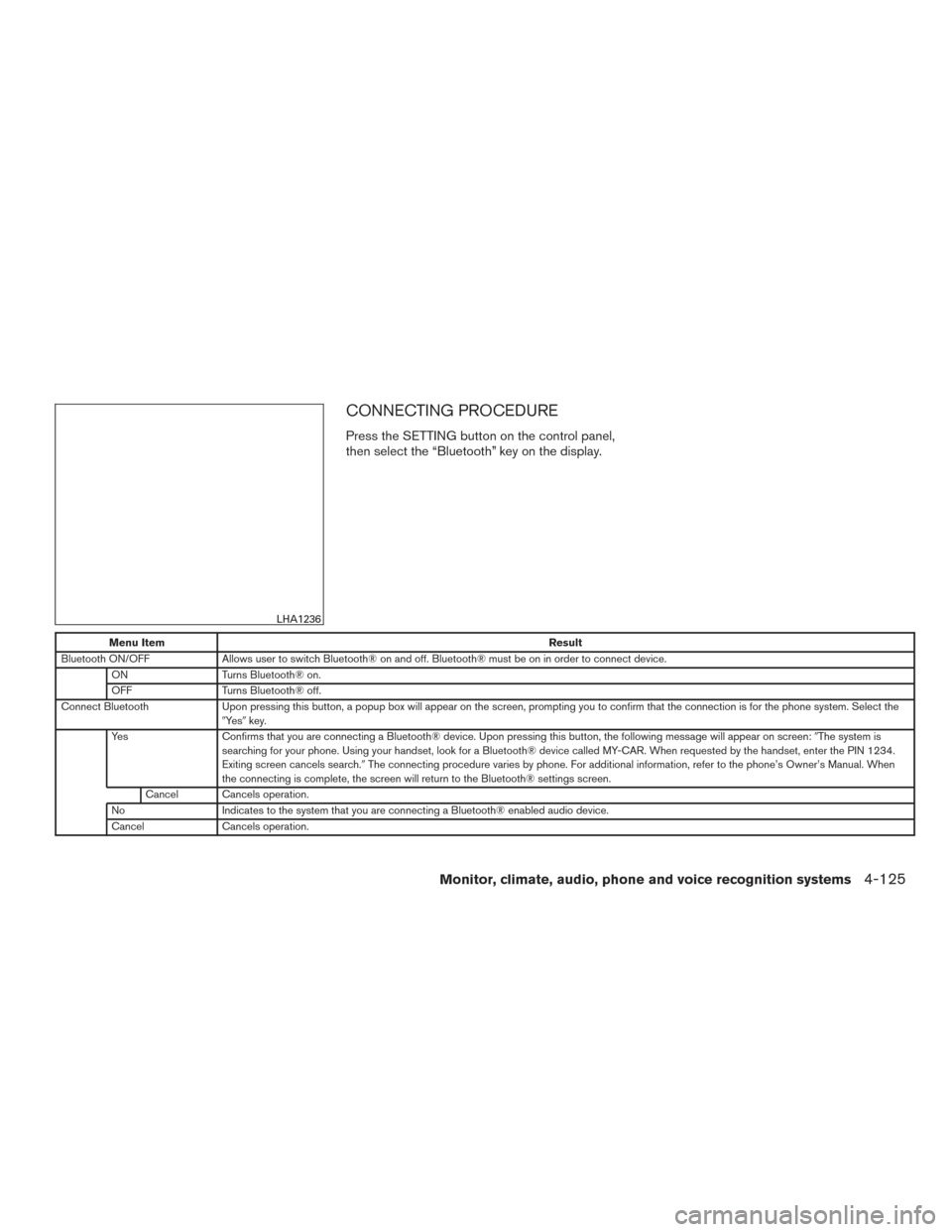
CONNECTING PROCEDURE
Press the SETTING button on the control panel,
then select the “Bluetooth” key on the display.
Menu ItemResult
Bluetooth ON/OFF Allows user to switch Bluetooth® on and off. Bluetooth® must be on in order to connect device.
ON Turns Bluetooth® on.
OFF Turns Bluetooth® off.
Connect Bluetooth Upon pressing this button, a popup box will appear on the screen, prompting you to confirm that the connection is for the phone system. Select the
�Ye s �key.
Yes Confirms that you are connecting a Bluetooth® device. Upon pressing this button, the following message will appear on screen: �The system is
searching for your phone. Using your handset, look for a Bluetooth® device called MY-CAR. When requested by the handset, enter the PIN 1234.
Exiting screen cancels search. �The connecting procedure varies by phone. For additional information, refer to the phone’s Owner’s Manual. When
the connecting is complete, the screen will return to the Bluetooth® settings screen.
Cancel Cancels operation.
No Indicates to the system that you are connecting a Bluetooth® enabled audio device.
Cancel Cancels operation.
LHA1236
Monitor, climate, audio, phone and voice recognition systems4-125
Page 328 of 510
Press thebutton on the steering wheel
and then select the �Vehicle Phonebook� key.
Next, select the desired entry from the displayed
list. Select the �Edit�key.Menu Item Result
Entry # Changes the displayed number of the selected entry
Name Edit the name of the entry using the keypad displayed on the screen
Number Edit the phone number using the keypad displayed on the screen
Type Select the icon from the icon list
Voicetag Confirm and store the voicetag. Voicetags allow easy dialing using the NISSAN Voice Recognition System. For additional information, refer to �NISSAN Voice Recognition System�in this section.
Monitor, climate, audio, phone and voice recognition systems4-127
Page 330 of 510
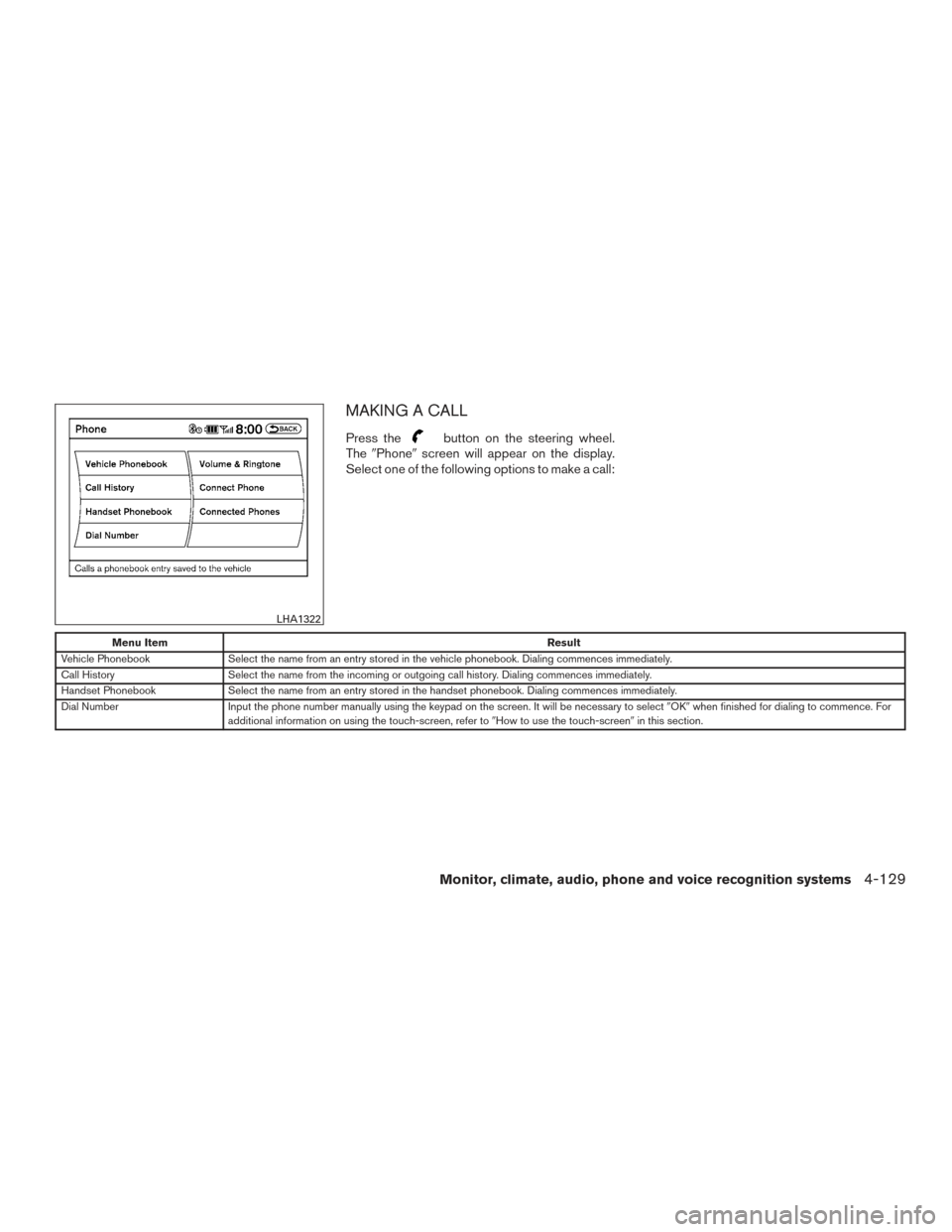
MAKING A CALL
Press thebutton on the steering wheel.
The �Phone� screen will appear on the display.
Select one of the following options to make a call:
Menu Item Result
Vehicle Phonebook Select the name from an entry stored in the vehicle phonebook. Dialing commences immediately.
Call History Select the name from the incoming or outgoing call history. Dialing commences immediately.
Handset Phonebook Select the name from an entry stored in the handset phonebook. Dialing commences immediately.
Dial Number Input the phone number manually using the keypad on the screen. It will be necessary to select �OK�when finished for dialing to commence. For
additional information on using the touch-screen, refer to �How to use the touch-screen�in this section.
LHA1322
Monitor, climate, audio, phone and voice recognition systems4-129
Page 331 of 510
RECEIVING A CALL
When you hear a phone ring, the display will
change to phone mode. To receive a call, follow
one of the procedures listed below:
Menu ItemResult
Press the
button on the steering
wheel Accept an incoming call to talk.
�Answer� key on the display Accept an incoming call to talk.
�Hold Call� key on the display Put an incoming call on hold.
�Reject Call� key on the display Reject an incoming call.
4-130Monitor, climate, audio, phone and voice recognition systems
Page 332 of 510
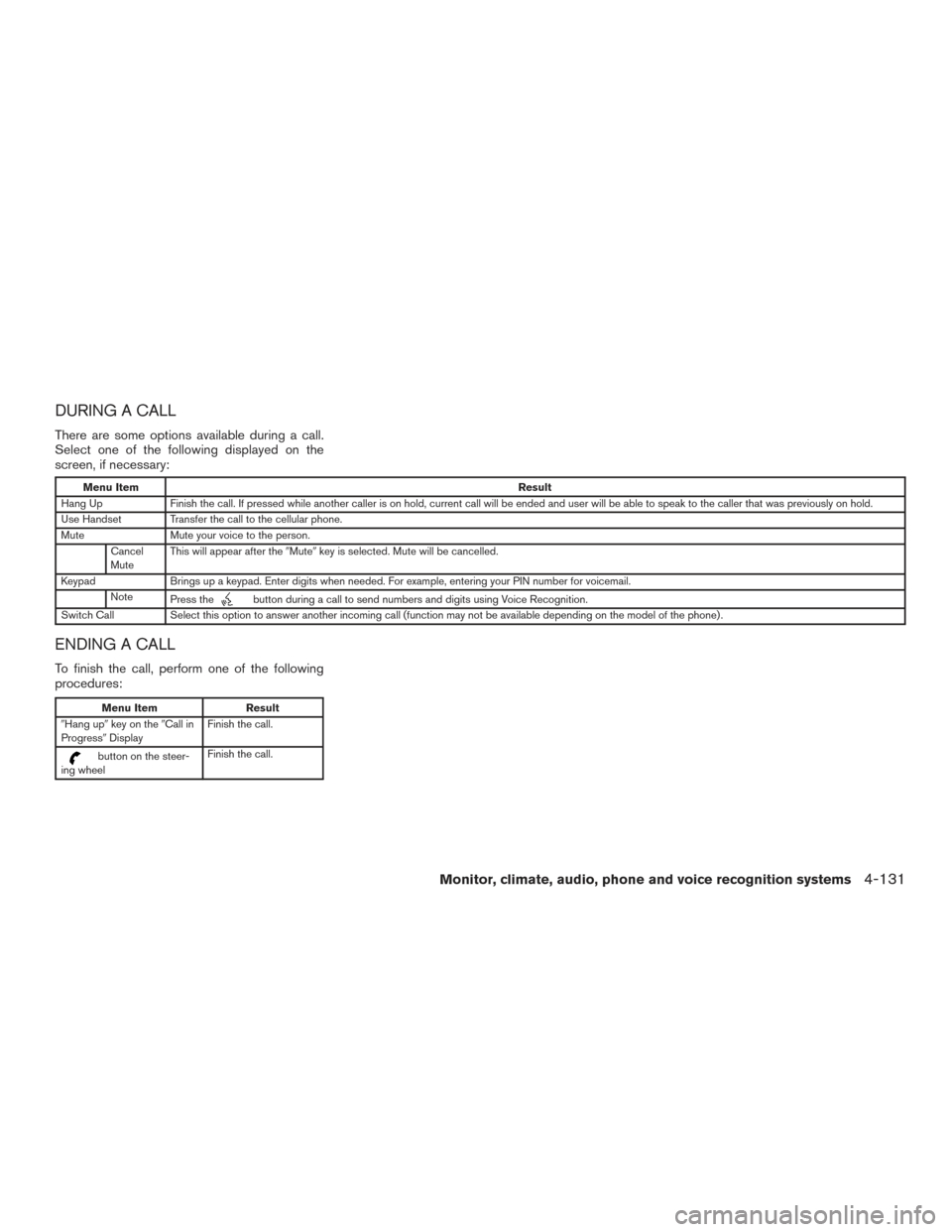
DURING A CALL
There are some options available during a call.
Select one of the following displayed on the
screen, if necessary:
Menu ItemResult
Hang Up Finish the call. If pressed while another caller is on hold, current call will be ended and user will be able to speak to the caller that was previously on hold.
Use Handset Transfer the call to the cellular phone.
Mute Mute your voice to the person.
Cancel
Mute This will appear after the
�Mute�key is selected. Mute will be cancelled.
Keypad Brings up a keypad. Enter digits when needed. For example, entering your PIN number for voicemail.
Note Press the
button during a call to send numbers and digits using Voice Recognition.
Switch Call Select this option to answer another incoming call (function may not be available depending on the model of the phone) .
ENDING A CALL
To finish the call, perform one of the following
procedures:
Menu Item Result
�Hang up� key on the �Call in
Progress� Display Finish the call.
button on the steer-
ing wheel Finish the call.
Monitor, climate, audio, phone and voice recognition systems4-131
Page 333 of 510
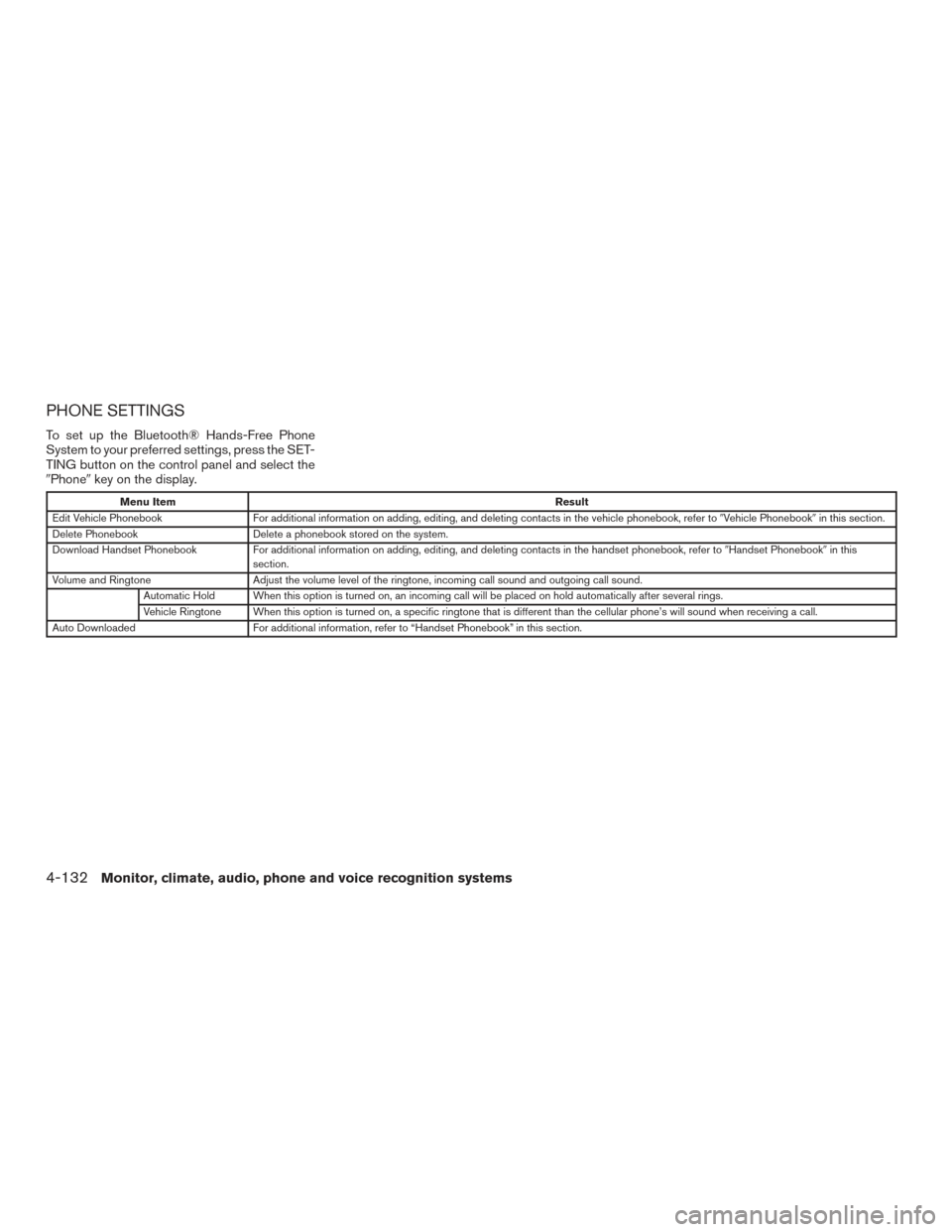
PHONE SETTINGS
To set up the Bluetooth® Hands-Free Phone
System to your preferred settings, press the SET-
TING button on the control panel and select the
�Phone�key on the display.
Menu Item Result
Edit Vehicle Phonebook For additional information on adding, editing, and deleting contacts in the vehicle phonebook, refer to �Vehicle Phonebook�in this section.
Delete Phonebook Delete a phonebook stored on the system.
Download Handset Phonebook For additional information on adding, editing, and deleting contacts in the handset phonebook, refer to �Handset Phonebook�in this
section.
Volume and Ringtone Adjust the volume level of the ringtone, incoming call sound and outgoing call sound.
Automatic Hold When this option is turned on, an incoming call will be placed on hold automatically after several rings.
Vehicle Ringtone When this option is turned on, a specific ringtone that is different than the cellular phone’s will sound when receiving a call.
Auto Downloaded For additional information, refer to “Handset Phonebook” in this section.
4-132Monitor, climate, audio, phone and voice recognition systems