2015 NISSAN ARMADA display
[x] Cancel search: displayPage 294 of 510
HOW TO USE THE DVD OSD MENU
This section describes how to set and adjust
settings using On-Screen Display (OSD) Menu.
You can use the OSD menu to adjust all the
settings. Follow the steps outlined below to se-
lect the desired function.
General Setup Page
Press the SETUP button on the remote control.
Use the
orand the
orbuttons to navigate the Setup Page.
Press ENTER to select and then
to
return to the sub–menu. To cancel the Setup
Display, press the SETUP button on the remote.
OSD Language
The OSD Lang sub-menu allows the user to
select the language for the on-screen display.
When the OSD Lang option is highlighted, press
the
button once and then use
the
orbuttons on the re-
mote control to select the desired language. The
user can select English, Simplified/Traditional
Chinese, French, German, Italian, Spanish, Por-
tuguese, or Korean for the OSD language. Press
ENTER to select and then the
button
to return the sub-menu.
LHA3851LHA3852
Monitor, climate, audio, phone and voice recognition systems4-93
Page 297 of 510
Audio
The Audio sub-menu allows the user to select the
audio stream in the desired language for play-
back. When the Audio option is highlighted,
press the
button once and then use
the
orbuttons on the re-
mote control to select the desired language. The
user can select English, French, Spanish, Chi-
nese, Japanese, German, Portuguese, Italian, Ko-
rean, Russian or Thai for the audio stream lan-
guage. Press ENTER to select and then
the
button to return to the sub-menu.
The DVD title must include the desired audio
stream in order for it to be heard during playback.
Subtitle
The Subtitle sub-menu allows the user to select
the subtitle in the desired language for playback.
When the Subtitle option is highlighted, press
the
button once and then use
the
orbuttons on the re-
mote control to select the desired language. The
user can select English, French, Spanish, Chi-
nese, Japanese, German, Portuguese, Italian, Ko-
rean, Russian, Thai or OFF for the subtitle lan-
guage. Press ENTER to select and then
the
button to return to the sub-menu.
The DVD title must include the desired audio
stream in order for it to be heard during playback.
Disc Menu
The Disc Menu sub-menu allows the user to
select the desired language of the DVD disc
menu. When the Disc Menu option is highlighted,
press the
button once and then use
the
orbuttons on the re-
mote control to select the desired language. The
user can select English, French, Spanish, Chi-
nese, Japanese, German, Portuguese, Italian, Ko-
rean, Russian or Thai for the Disc Menu language.
Press ENTER to select and then the
button to return to the sub-menu. The DVD title
must include the desired menu language in order
for it to be displayed during playback.
LHA3858LHA3859LHA3860
4-96Monitor, climate, audio, phone and voice recognition systems
Page 299 of 510
HOW TO USE THE MONITOR OSD
MENU
This section describes how to set and adjust the
following monitor settings using the monitor on-
screen display (OSD) Menu:● Press the PIX button on the remote control
to select between the options in the table
below.
● After selecting the desired option, use
the
orbuttons on the re-
mote control to adjust the setting.
Option Descrip-
tion Range Default
Brightness Adjust to
brighten or darken the picture. 0 — 100 50
Contrast Adjust to
increase or de-
crease
picture
contrast. 0 — 100 50
Saturation Adjust to
increase or de-
crease color
intensity. 0 — 100 50
Hue Adjust to
increase or de-
crease the color hue. 0 — 100 50Option
Descrip-
tion Range Default
Sharpness Adjust to
soften or sharpen the
picture. 0 — 100 50
IR Head- phone Select on
or off to
turn the IR head-
phone
audio out- putonor off. ON or
OFF ON
Language Set lan-
guage of
the moni- tor OSD menu. English,
French,
Spanish, Portu-guese English
Reset Resets the
monitorOSD
menu set- tings todefault
values. Press Up
or Down; “OK” will be
displayed.
LHA3863
4-98Monitor, climate, audio, phone and voice recognition systems
Page 300 of 510
PLAYING A CD
Insert a disc into the unit with label facing the rear
of vehicle and select monitor A mode (if using
monitor A) or monitor B mode (if using monitor B)
using the front controls or the remote control.
When playing an audio CD, the information
screen appears automatically. It can display the
current track number along with the amount of
time the track has been playing, the amount of
time remaining for the track playing, the total
amount of time elapsed so far, or the total amount
of time remaining.
Display
Press the DISPLAY button on the remote control
to select the desired type of display setting. The
single elapsed time of the current track is dis-
played by default.
Press DISPLAY (1x)
“Single Remain” is displayed along with the cur-
rent track playing and the amount of time remain-
ing for the current track.
Press DISPLAY (2x)
“Total Elapsed” is displayed along with the cur-
rent track playing and the total amount of elapsed
time.
Press DISPLAY (3x)
“Total Remain” is displayed along with the current
track playing and the total amount of time remain-
ing.
Press the DISPLAY button again to display the
elapsed time of the current track.
Skipping Tracks
Press the NEXT button on the remote control to
select to the next track. Press the PREV button
one time to select the beginning of the current
track. Press the PREV button two times to select
the previous track.
Repeat Modes
To access the repeat mode options, press the
REPEAT button on the remote control. The re-
peat mode options are as follows:●
REPEAT ALL: Repeat the entire disc
(default) .
●
REPEAT ONE: Repeat the current
track.
● REPEAT OFF: Playback stops after the disc
in its entirety.
Random Mode
You can choose what order the tracks will be
played. To access the random play mode, press
the RANDOM button on the remote control. All
tracks on the disc will playback in random order.
Press RANDOM again to cancel random mode.
Direct Track Access
Press the number keys on the remote control
(0–9) to access a track directly. For example, to
go to track 14, press “1”,”4”, then ENTER on the
remote control.
LHA3864
Monitor, climate, audio, phone and voice recognition systems4-99
Page 301 of 510
PLAYING AUDIO FILES
MP3 and WMA are formats for storing digital
audio. A CD quality song can be compressed into
the MP3 or WMA format with very little loss of
quality, while talking up much less storage space.
Encoded discs and USB devices that include
MP3 or WMA audio files can be played on this
system.
Insert a disc or USB device into the unit and
select monitor A mode (if using monitor A) or
monitor B (if using monitor B) using the front
panel controls or the remote control.
Using a USB Device
Insert a USB device into the USB connection
port. When inserting a USB device, the top side
of the devices should face upwards.
When an MP3/WMA encoded disc or USB de-
vice is inserted, the information screen appears
automatically and playback will begin.
Display
During audio file playback, press the DISPLAY
button on the remote control to select between
the file list and currently playing file.
Selecting Files
1. To change files when a file is playing, pressthe
orbuttons on the re-
mote control to display the file list, and then
press the
orbuttons to
select the desired file.
2. Once the desired file is highlighted, press the ENTER button on the remote control to
select it.
Selecting Folders
1. To select folders when a file is playing, press
the
button on the remote control
to display the list. Press the
orbuttons to select the desired
folder.
2. Press the
button to access the
previous level (go up one level) or, press
the
button to access the next level
(go down one level) .
3. Once the desired folder is highlighted, press the ENTER button on the remote control to
select it.
Skipping Files
Press the NEXT button on the remote control to
select to the next file. Press the PREV button one
time to select the beginning of the current file.
Press the PREV button two times to select the
previous file.
LHA3865
4-100Monitor, climate, audio, phone and voice recognition systems
Page 303 of 510
Repeat Modes
To access the repeat mode options, press the
REPEAT button on the remote control. The re-
peat mode options are as follows:●
REPEAT ALL: Repeat the entire disc
or USB device (default) .
●
REPEAT FOLDER: Repeat the cur-
rent folder
●
REPEAT ONE: Repeat the current
file.
● REPEAT OFF: Playback stops after the disc
or USB device is played in its entirety.
Thumbnail Views
1. Press the STOP button on the remote con- trol during the slideshow to display images
in thumbnail mode. Press the
orand theorbuttons on the remote control to select the
desired language.
2. Once the desired image is highlighted, press the ENTER button on the remote con-
trol to select it.
Rotating Images
During the slideshow, press thebutton
on the remote control to rotate the image 90°
clockwise. Press the
button to rotate
the image 90° counter-clockwise.
Inverting Images
During the slideshow, press thebutton
on the remote control to invert the image (Up-
Down) .
Mirroring Images
During the slideshow, press thebutton
on the remote control to mirror the image (Left-
Right) .
Direct File Access
Press the number keys on the remote control
(0–9) to access a file directly. For example, to go
to track 14, press “1”,”4”, then ENTER on the
remote control.
PLAYING VIDEO FILES
Insert a disc or USB device into the unit and
select monitor A mode (if using monitor A) or
monitor B (if using monitor B) using the front
panel controls or the remote control.
Using a USB Device
Insert a USB device into the USB connection
port. When inserting a USB device, the top side
of the device should face upwards.
LHA3867
4-102Monitor, climate, audio, phone and voice recognition systems
Page 305 of 510
The system provides priority for each of the fol-
lowing device inputs:1. External RCA A/V input
2. USB port
3. Disc playback
For example if a disc is playing and a USB device
is plugged in, the USB device will take priority
over disc playback. The external RCA A/V input
connections have priority over both USB port and
disc playback.
CONNECTING AN EXTERNAL A/V
MONITOR — OUTPUT
An external audio/video monitor may be con-
nected to the 3.5mm A/V connector (sold sepa-
rately) .
NOTE:
Use the 3.5mm A/V cable made specifically
for the device. An optional adapter (sold
separately) may be used to convert the
3.5mm A/V output to the standard RCA
jacks.
SELECTING MONITOR A OR B AS
THE SOURCE
It is possible to select monitor B as the source
from monitor A and vice versa. This will allow
content that is playing on monitor B to be dis-
played on monitor A.
Monitor A:
To select monitor B as the source for monitor A,
press the source button on the front panel or the
remote control until “MONITOR B” is displayed.
Monitor B:
To select monitor A as the source for monitor B,
press the source button on the front panel or the
remote control until “MONITOR A” is displayed.
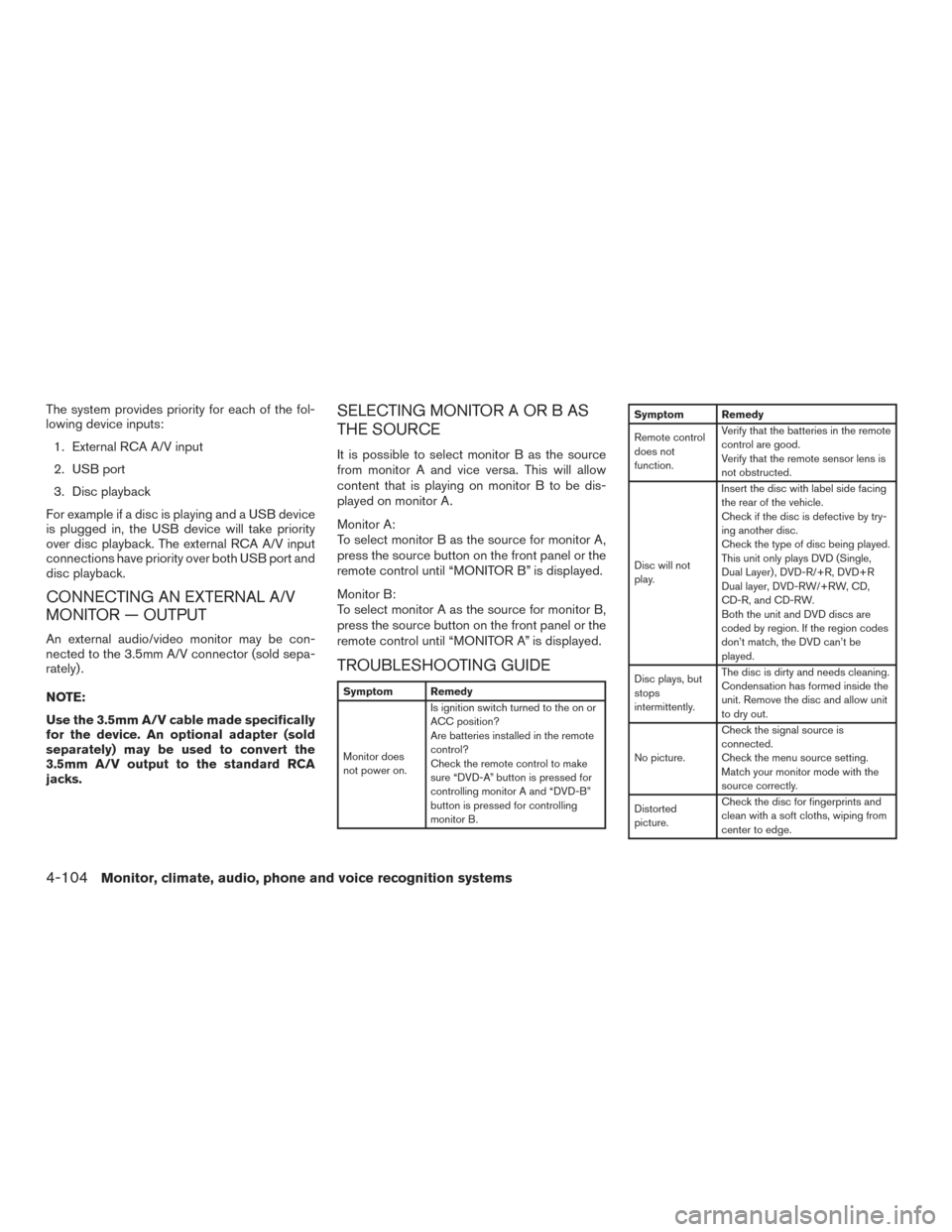
TROUBLESHOOTING GUIDE
Symptom Remedy
Monitor does
not power on. Is ignition switch turned to the on or
ACC position?
Are batteries installed in the remote
control?
Check the remote control to make
sure “DVD-A” button is pressed for
controlling monitor A and “DVD-B”
button is pressed for controlling
monitor B.
Symptom Remedy
Remote control
does not
function.
Verify that the batteries in the remote
control are good.
Verify that the remote sensor lens is
not obstructed.
Disc will not
play. Insert the disc with label side facing
the rear of the vehicle.
Check if the disc is defective by try-
ing another disc.
Check the type of disc being played.
This unit only plays DVD (Single,
Dual Layer) , DVD-R/+R, DVD+R
Dual layer, DVD-RW/+RW, CD,
CD-R, and CD-RW.
Both the unit and DVD discs are
coded by region. If the region codes
don’t match, the DVD can’t be
played.
Disc plays, but
stops
intermittently. The disc is dirty and needs cleaning.
Condensation has formed inside the
unit. Remove the disc and allow unit
to dry out.
No picture. Check the signal source is
connected.
Check the menu source setting.
Match your monitor mode with the
source correctly.
Distorted
picture. Check the disc for fingerprints and
clean with a soft cloths, wiping from
center to edge.
4-104Monitor, climate, audio, phone and voice recognition systems
Page 306 of 510
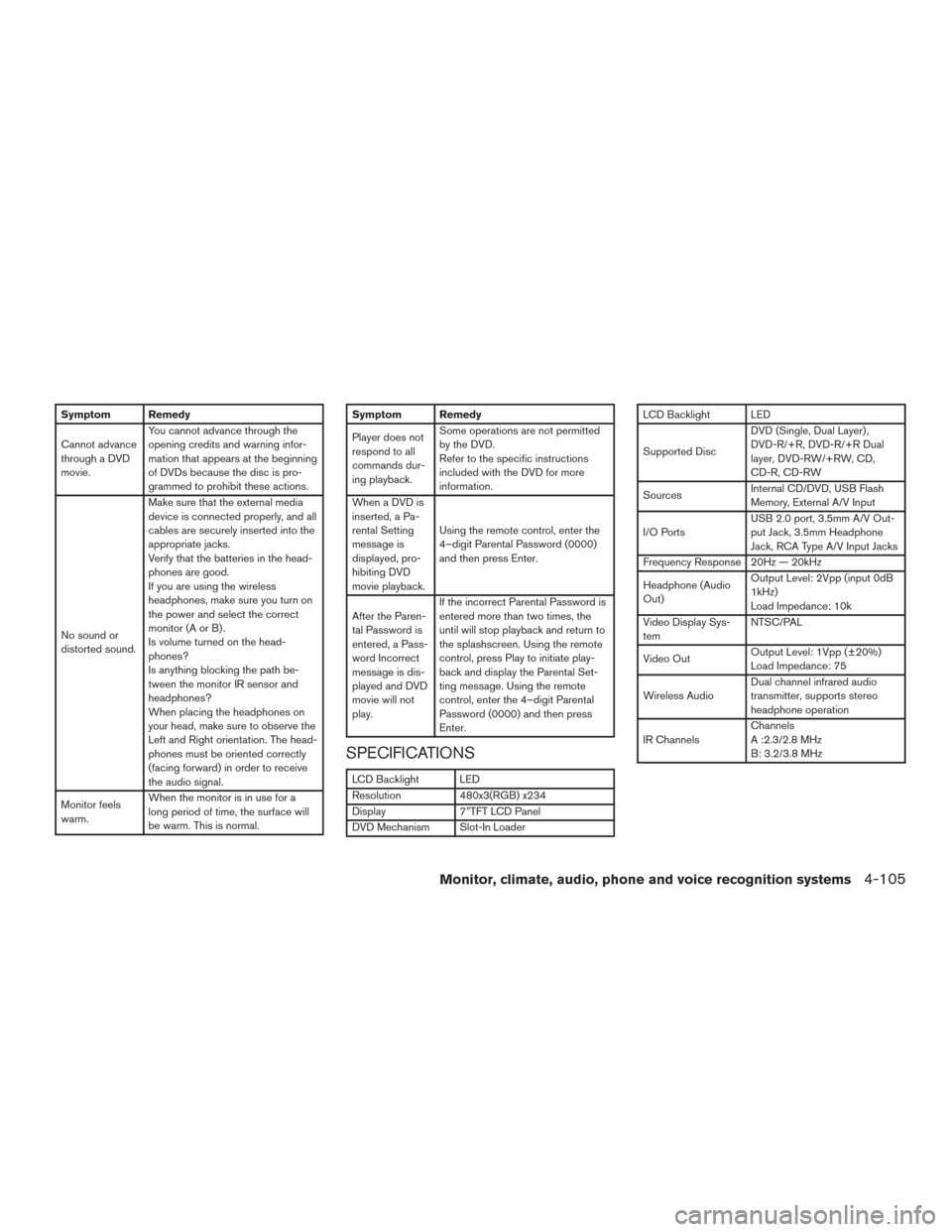
Symptom Remedy
Cannot advance
through a DVD
movie.You cannot advance through the
opening credits and warning infor-
mation that appears at the beginning
of DVDs because the disc is pro-
grammed to prohibit these actions.
No sound or
distorted sound. Make sure that the external media
device is connected properly, and all
cables are securely inserted into the
appropriate jacks.
Verify that the batteries in the head-
phones are good.
If you are using the wireless
headphones, make sure you turn on
the power and select the correct
monitor(AorB).
Is volume turned on the head-
phones?
Is anything blocking the path be-
tween the monitor IR sensor and
headphones?
When placing the headphones on
your head, make sure to observe the
Left and Right orientation. The head-
phones must be oriented correctly
(facing forward) in order to receive
the audio signal.
Monitor feels
warm. When the monitor is in use for a
long period of time, the surface will
be warm. This is normal.Symptom Remedy
Player does not
respond to all
commands dur-
ing playback.Some operations are not permitted
by the DVD.
Refer to the specific instructions
included with the DVD for more
information.
When a DVD is
inserted, a Pa-
rental Setting
message is
displayed, pro-
hibiting DVD
movie playback. Using the remote control, enter the
4–digit Parental Password (0000)
and then press Enter.
After the Paren-
tal Password is
entered, a Pass-
word Incorrect
message is dis-
played and DVD
movie will not
play. If the incorrect Parental Password is
entered more than two times, the
until will stop playback and return to
the splashscreen. Using the remote
control, press Play to initiate play-
back and display the Parental Set-
ting message. Using the remote
control, enter the 4–digit Parental
Password (0000) and then press
Enter.
SPECIFICATIONS
LCD Backlight LED
Resolution
480x3(RGB) x234
Display 7”TFT LCD Panel
DVD Mechanism Slot-In Loader
LCD Backlight LED
Supported Disc DVD (Single, Dual Layer) ,
DVD-R/+R, DVD-R/+R Dual
layer, DVD-RW/+RW, CD,
CD-R, CD-RW
Sources Internal CD/DVD, USB Flash
Memory, External A/V Input
I/O Ports USB 2.0 port, 3.5mm A/V Out-
put Jack, 3.5mm Headphone
Jack, RCA Type A/V Input Jacks
Frequency Response 20Hz — 20kHz
Headphone (Audio
Out) Output Level: 2Vpp (input 0dB
1kHz)
Load Impedance: 10k
Video Display Sys-
tem NTSC/PAL
Video Out Output Level: 1Vpp (±20%)
Load Impedance: 75
Wireless Audio Dual channel infrared audio
transmitter, supports stereo
headphone operation
IR Channels Channels
A :2.3/2.8 MHz
B: 3.2/3.8 MHz
Monitor, climate, audio, phone and voice recognition systems4-105