2015 MITSUBISHI LANCER EVOLUTION Dome light
[x] Cancel search: Dome lightPage 157 of 338

Multi-information display 5-96 Features and controls
5
N00561900012
The S-AWC operation status is displayed. Refer to “S-AWC control mode” on page 5-72.
N00556000015
This is displayed when you press the multi- information meter switch and switch thewarning display screen. This mark is also displayed if there is another warning other than the one displayed.
When the cause of the warning display is eliminated, the “!” warning goes out automat- ically.
N00556100104
This is displayed when the Active stabilitycontrol (ASC) is turned “OFF” with the “ASC OFF” switch.Also, if an abnormal condition is occurred in the ASC while driving, the “ASC OFF” dis- play illuminates.Refer to “ASC OFF switch” on page 5-77.
N00556200206
Each time you lightly press the multi-infor- mation meter switch, the display screen switches in the following order.
S-AWC control mode display screen “!” Warning display screen (With ignition switch in the “ON” position)
NOTE
When the “!” warning is displayed, the warn- ing display screen can be redisplayed on the information screen. Refer to “Information screen (With ignitionswitch in the “OFF” position)” on page 5-92. Refer to “Information screen (With ignition switch in the “ON” position)” on page 5-96.
“Active stability control (ASC) OFF” display screen
Information screen (With igni- tion switch in the “ON” posi- tion) 1-
Trip odometer
2-
Trip odometer
3- Service reminder 4- Driving range display, momentary fuel
consumption display
5- Average fuel consumption display,
momentary fuel consumption display
6- Average speed display, momentary fuel
consumption displayWhen there is no warning display
When there is a warning display
BK0210800US.bo
ok 96 ページ 2014年4月8日 火曜日 午前11時28分
Page 166 of 338

Multi-information display
Features and controls 5-105
5
N00557100101
The fuel consumption display unit can be changed. The distance, speed, and amount units are also changed to match the selectedfuel consumption unit. 1. Press and hold the multi-information meter switch (for about 2 seconds or more) to change from the setting modescreen to the menu screen. Refer to “Changing the function settings (With ignition switch in the “ON” posi-tion)” on page 5-103. 2. Lightly press the multi-information meter switch to select “AVG UNIT” (fuel con-sumption display unit setting).
3. Press and hold the multi-information meter switch (for about 2 seconds or more) to display “AVG UNIT” (fuel con-sumption display unit setting). 4. Lightly press the multi-information meter switch to switch in sequence from km/L L/100 km
mpg (US)
mpg (UK)
RETURN
km/L.
5. Press and hold the multi-information meter switch (for about 2 seconds or more) to change the setting to the selected unit.
The distance and speed units are also changed in the following combinations to match theselected fuel consumption unit.
NOTE
The average speed display and average fuel consumption display can be reset separately in both auto reset mode and manual reset mode. The average speed display memories and average fuel consumption memories for auto reset mode and manual reset mode are erasedif the battery is disconnected. The initial (default) setting is “Auto reset mode”.
Changing the fuel consumption display unit
NOTE
The display units for the driving range, the average fuel consumption, the average speedand the momentary fuel consumption are changed, but the units for the indicating nee- dle (speedometer), the odometer and the tripodometer will remain unchanged. If the battery is disconnected, the memory of the unit setting is erased and is automatically set to {mpg (US) or L/100 km}.Fuel economy
Distance(driving range)
Speed(average speed)
mpg (US) mile (s) mph mpg (UK) mile (s) mph km /L km km /hL /100 km km km /h
BK0210800US.book
105 ページ 2014年4月8日 火曜日 午前11時28分
Page 222 of 338

Interior lights
Features and controls 5-161
5
N00525300429
N00525801274
The dome light can be turned on by sliding the dome light switch.
CAUTION Be aware that using electronic equipment with the engine off may run the battery down. When the 12 V power outlet is not in use, be sure that the plug is installed. This will pre- vent the 12 V power outlet from becoming dirty and possibly short-circuiting. Be sure to use a “plug-in” type accessory operating at 12 V and 120 W or less.
Interior lights 1- Dome light (Rear) (if so equipped)
P.5-162
2- Dome light (Front)/Reading lights
P.5-161
Dome light (Front)/Reading lights Dome light (Front) 1- (DOOR)
The dome light comes on when any door is opened. After all doors are closed, the dome light will stay on for approximately 30 seconds and then go off.
However, the light goes off immedi- ately if: The door is closed while the igni- tion switch is in the “ON” position. The driver’s door is closed after all the other doors are closed while the lock knob of the driver’s door is in the lock position. The door is closed and the power door lock switch is used to lock the doors. The keyless entry system remote control transmitter is used to lock the doors. In vehicles equipped with the F.A.S.T.-key, the doors are locked using the F.A.S.T.-key.
NOTE
When the engine is started using the key while the doors are closed, if you remove thekey, the dome light will illuminate for approximately 30 seconds then go off. When the engine is started using the F.A.S.T.-key while the doors are closed, if the ignition switch is moved to the “LOCK” position, the dome light will illuminate for approximately 30 seconds and then go off. The time until the light goes off can be adjusted. See your authorized MitsubishiMotors dealer for details.
BK0210800US.book
161 ページ 2014年4月8日 火曜日 午前11時28分
Page 223 of 338

Interior lights 5-162 Features and controls
5
N00553800025
Regardless of the dome light switch position, when you press the lens, the light on the sidethat is pressed illuminates; when you press the lens again, the light goes out.
N00525401498
The dome light can be turned on by sliding the dome light switch.
N00526301465
If any of the interior lights are left on with the ignition switch in the “LOCK” position, the lights go off automatically after about 30minutes.
2-(OFF) The dome light goes off.
Reading lights Dome light (Rear)
(if so equipped)
1- (OFF)
The dome light turns off.
2- (
) The dome light comes on when any door is opened. After all doors are closed, the dome light will stay on for approximately 30 seconds and then go off. However, the light goes off imme-diately if: The door is closed while the igni- tion switch is in the “ON” position. The driver’s door is closed after all the other doors are closed while the lock knob of the driver’s door is inthe lock position. The door is closed and the power door lock switch is used to lock thedoors. The keyless entry system remote control transmitter is used to lockthe doors.
In vehicles equipped with the F.A.S.T.-key, the doors are lockedusing the F.A.S.T.-key.
NOTE
When the engine is started using the key while the doors are closed, if you remove the key, the dome light will illuminate forapproximately 30 seconds then go off. When the engine is started using the F.A.S.T.-key while the doors are closed, if the ignition switch is moved to the “LOCK” position, the dome light will illuminate forapproximately 30 seconds and then go off. The time until the light goes off can be adjusted. See your authorized Mitsubishi Motors dealer for details.3-(ON) The dome light comes on.
Interior light auto-cutout func- tion (dome light and other lights)
BK0210800US.book
162 ページ 2014年4月8日 火曜日 午前11時28分
Page 296 of 338

Fuses
Vehicle care and maintenance 9-25
9
* - Fusible link Some fuses may not be installed on your vehicle, depending on the vehicle modelor specifications. The table above shows the main equip- ment corresponding to each fuse.
Passenger compartment fuse loca- tion table No.
Sym- bol
Electrical system
Capac-ity
1 Heater 30 A
*
2
Stop lights (Brake lights)
15 A
3 Rear fog light 10 APassenger compartment fuse location
Main fuse block
Sub fuse block
4 Windshield wiper 30 A 5 Optional 10 A 6 Door locks 20 A 7Radio15 A8 Control unit relay 7.5 A 9
Interior lights (Dome lights)
15 A
10
Hazard warning
flasher
15 A
11 Rear window wiper 15 A 12 Gauges 7.5 A 13
Cigarette
lighter/Accessory
socket
15 A
14 Ignition switch 10 A 15 Sunroof 20 A 16
Outside rearview
mirrors
10 A
17
All-wheel drive system
10 A
18 Back-up lights 7.5 A 19 Accessory socket 15 ANo.
Sym- bol
Electrical system
Capac-ity
20
Power window
control
30 A
*
21 Defogger 30 A
*
22
Heated outside rearview mirrors
7.5 A
23 115V Power outlet 15 A24 Power seats
25 (20) A
25 Heated seats 30 ANo.
Sym- bol
Electrical system
Capac-ity
BK0210800US.bo
ok 25 ページ 2014年4月8日 火曜日 午前11時28分
Page 301 of 338

Replacement of light bulbs 9-30 Vehicle care and maintenance
9
N00950400558 N00901800105
1. When replacing th
e bulb on the driver’s
side, remove the bo
lt (A) holding down
the relay box and move the relay boxtoward the rear of the vehicle.
2. When replacing the bulb on the passen- ger’s side, lift up the coolant reserve tank (B). 3. Turn the bulb (C) counterclockwise, and then remove the headlight bulb withholder.
Description
Wattage
ANSI Trade No. or Bulb type
7- High-
mounted stop light
——
8- License plate
light
5 W W5W
9- Back-up light 21 W W21W 10- Tail light 5 W W5W11- Tail and stop
light
21/5 W W21/5W
12- Rear turn sig-
nal light
21 W W21W
13- Rear side-
marker light
5 W W5W
NOTE
The high-mounted stop light uses LEDs rather than bulbs. For repair and replace- ment, contact an authorized Mitsubishi Motors dealer or a repair facility of yourchoice.
Inside
Description
Wattage
1- Trunk area light 5 W2- Dome light (rear) (if so
equipped)
8 W
3- Dome light (front)/Reading
light
8 W
Headlights (low beam, except for vehicles with high intensity discharge headlights)
* - Front of the vehicle * - Front of the vehicle
BK0210800US.bo
ok 30 ページ 2014年4月8日 火曜日 午前11時28分
Page 309 of 338

Replacement of light bulbs 9-38 Vehicle care and maintenance
9
2. Remove the socket and bulb assembly together by turning it counterclockwise. 3. Remove the bulb by pulling it out.4. To install the bulb, perform the removal steps in reverse.
N00944500264
1. Insert a screwdriver into the notch of thelight assembly. Gently pry to remove the lens.
2. While holding down
the tab (A), pull out
the bulb.
Dome light (front)/Reading lights
NOTE
Wrap a cloth around the tip of the screw- driver to keep from scratching the lens.
BK0210800US.bo
ok 38 ページ 2014年4月8日 火曜日 午前11時28分
Page 310 of 338
Replacement of light bulbs
Vehicle care and maintenance 9-39
9
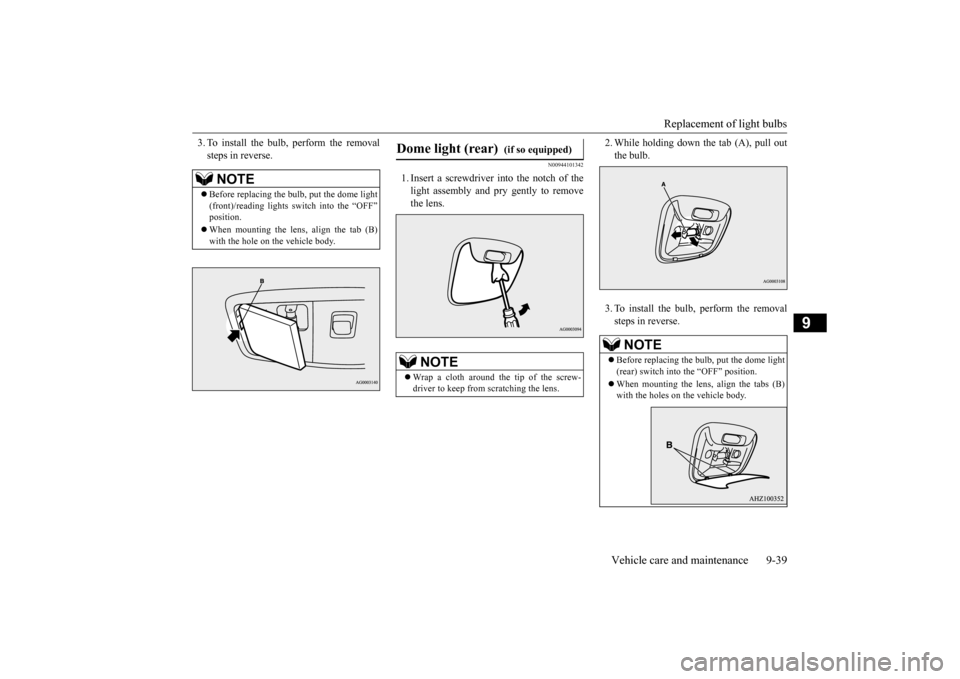
3. To install the bulb, perform the removal steps in reverse.
N00944101342
1. Insert a screwdriver into the notch of thelight assembly and pry gently to removethe lens.
2. While holding down
the tab (A), pull out
the bulb. 3. To install the bulb, perform the removal steps in reverse.
NOTE
Before replacing the bulb, put the dome light (front)/reading lights switch into the “OFF”position. When mounting the lens, align the tab (B) with the hole on the vehicle body.
Dome light (rear)
(if so equipped)
NOTE
Wrap a cloth around the tip of the screw- driver to keep from scratching the lens.
NOTE
Before replacing the bulb, put the dome light (rear) switch into the “OFF” position. When mounting the lens, align the tabs (B) with the holes on
the vehicle body.
BK0210800US.bo
ok 39 ページ 2014年4月8日 火曜日 午前11時28分