2015 MERCEDES-BENZ SLS AMG GT ROADSTER child lock
[x] Cancel search: child lockPage 91 of 290
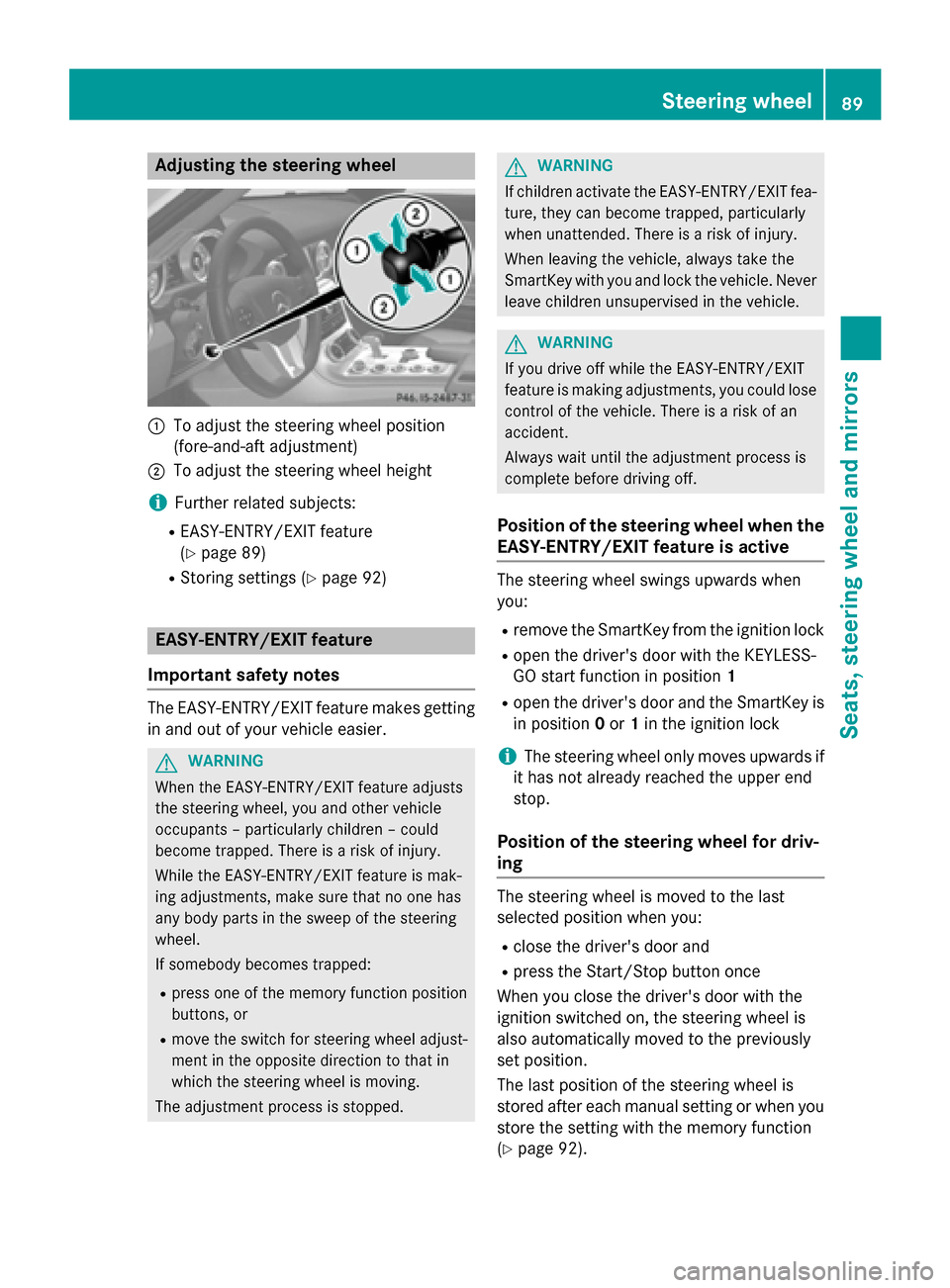
Adjusting th
esteering wheel 0043
To adjust th esteering whee lposition
(fore-and-af tadjustment)
0044 To adjust th esteering whee lheight
i Further relate dsubjects:
R EASY-ENTRY/EXIT feature
(Y page 89)
R Storing setting s(Ypage 92) EASY-ENTRY/EXIT feature
Important safety notes The EASY-ENTRY/EXIT feature makes getting
in and out of your vehicl eeasier. G
WARNING
When th eEASY-ENTRY/EXIT feature adjusts
th es teering wheel, you and other vehicle
occupant s–particularly children –could
become trapped .There is ariskofi njury.
Whil ethe EASY-ENTRY/EXIT feature is mak-
ing adjustments ,makes uret hatnoo nehas
any body part sintheswee poft hesteering
wheel.
If somebod ybecome strapped:
R press on eofthememory function position
buttons ,or
R mov ethe switch for steering whee ladjust-
men tint heopposit edirection to that in
whic hthe steering whee lismoving.
The adjustmen tprocess is stopped. G
WARNING
If children activat ethe EASY-ENTRY/EXIT fea-
ture, they can become trapped ,particularly
when unattended. There is ariskofi njury.
When leaving th evehicle, always tak ethe
SmartKey wit hyou and loc kthe vehicle. Never
leav echildren unsupervised in th evehicle. G
WARNING
If you drive off while th eEASY-ENTRY/EXIT
feature is making adjustments ,you could lose
control of th evehicle. There is ariskofan
accident.
Always wait until th eadjustmen tprocess is
complete before drivin goff.
Position of th esteering wheel when the
EASY-ENTRY/EXIT feature is active The steering whee
lswings upward swhen
you:
R remove th eSma rtKey from th eignition lock
R open th edriver' sdoor wit hthe KEYLESS-
GO start function in position 1
R open th edriver' sdoor and th eSmartKey is
in position 0or 1in th eignition lock
i The steering whee
lonlym oves upward sif
it has no talready reached th eupper end
stop.
Position of th esteering wheel for driv-
ing The steering whee
lismoved to th elast
selected position when you:
R close th edriver' sdoor and
R press th eStart/Sto pbutto nonce
When you close th edriver' sdoor wit hthe
ignition switched on ,the steering whee lis
also automatically moved to th epreviously
set position.
The last position of th esteering whee lis
store dafter eac hmanual setting or when you
store th esetting wit hthe memory function
(Y page 92). Steering wheel
89Seats,steering wheel and mirrors Z
Page 94 of 290
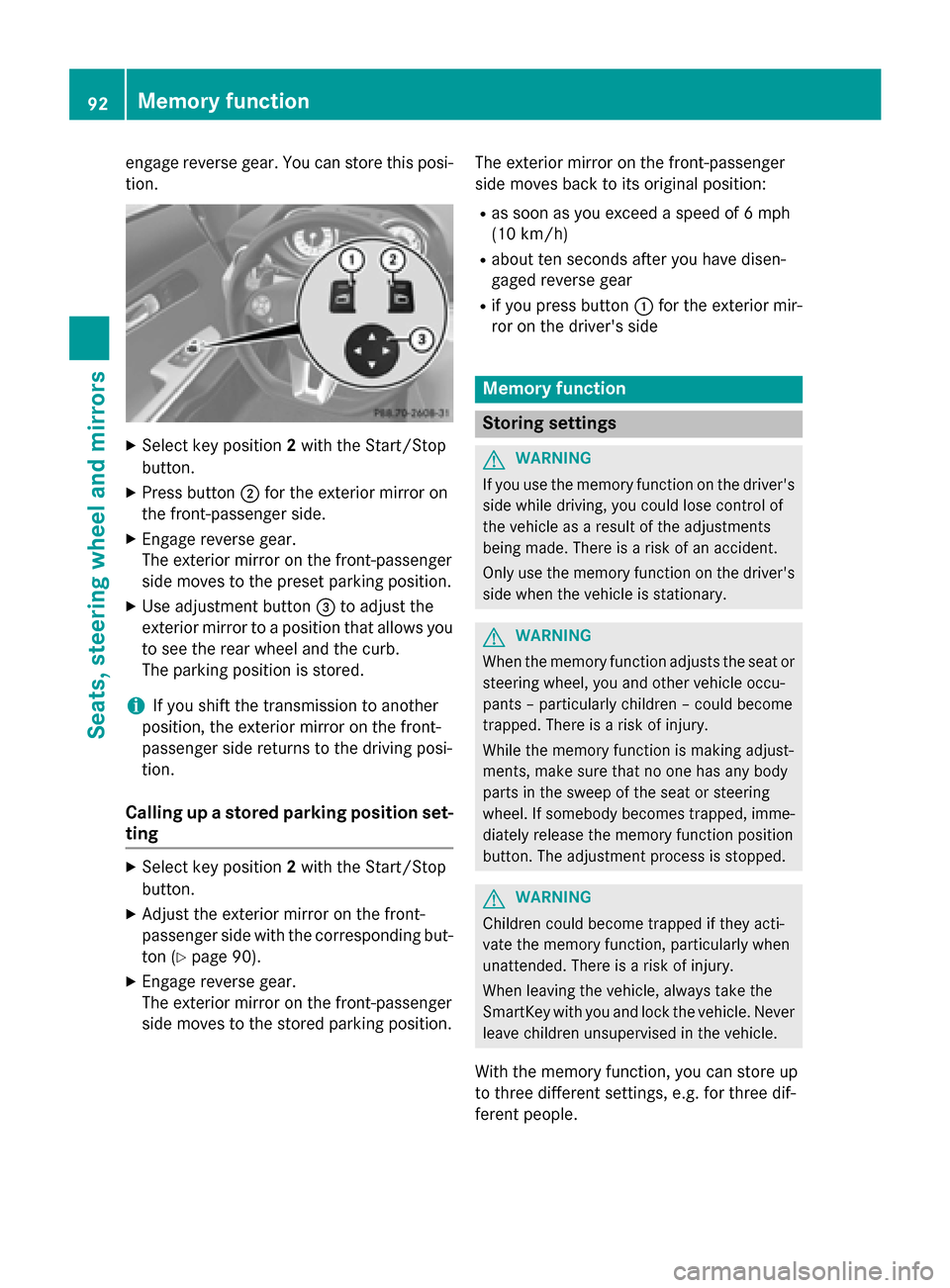
engage revers
egear. You can stor ethis posi-
tion. X
Select key position 2with the Start/Stop
button.
X Press button 0044for the exterior mirror on
the front-passenger side.
X Engage revers egear.
The exterior mirror on the front-passenger
side moves to the preset parkin gposition.
X Use adjustment button 0087to adjust the
exterior mirror to aposition that allows you
to see the rear wheel and the curb.
The parkin gposition is stored.
i If you shift the transmission to another
position ,the exterior mirror on the front-
passenger side return stothe driving posi-
tion.
Calling up astored parking position set-
ting X
Select key position 2with the Start/Stop
button.
X Adjust the exterior mirror on the front-
passenger side with the correspondin gbut-
ton (Y page 90).
X Engage revers egear.
The exterior mirror on the front-passenger
side moves to the stored parkin gposition. The exterior mirror on the front-passenger
side moves back to its original position:
R as soon as you exceed aspeed of 6mph
(10 km/h)
R about ten seconds after you have disen-
gaged revers egear
R if you press button 0043for the exterior mir-
ror on the driver's side Memor
yfunction Storing settings
G
WARNING
If you use the memory function on the driver's side while driving, you could lose control of
the vehicle as aresult of the adjustments
being made. There is arisk of an accident.
Only use the memory function on the driver's
side when the vehicle is stationary. G
WARNING
When the memory function adjusts the seat or steering wheel, you and other vehicle occu-
pants –particularly children –could become
trapped. There is arisk of injury.
While the memory function is makin gadjust-
ments, make sure that no one has any body
parts in the sweep of the seat or steering
wheel. If somebody becomes trapped, imme-
diately release the memory function position
button .The adjustment process is stopped. G
WARNING
Children could become trapped if they acti-
vate the memory function ,particularly when
unattended. There is arisk of injury.
When leaving the vehicle, alway stake the
SmartKey with you and lock the vehicle. Never leave children unsupervised in the vehicle.
With the memory function ,you can stor eup
to three differen tsettings, e.g. for three dif-
feren tpeople. 92
Memor
yfunctionSeats, steering wheel and mirrors
Page 122 of 290
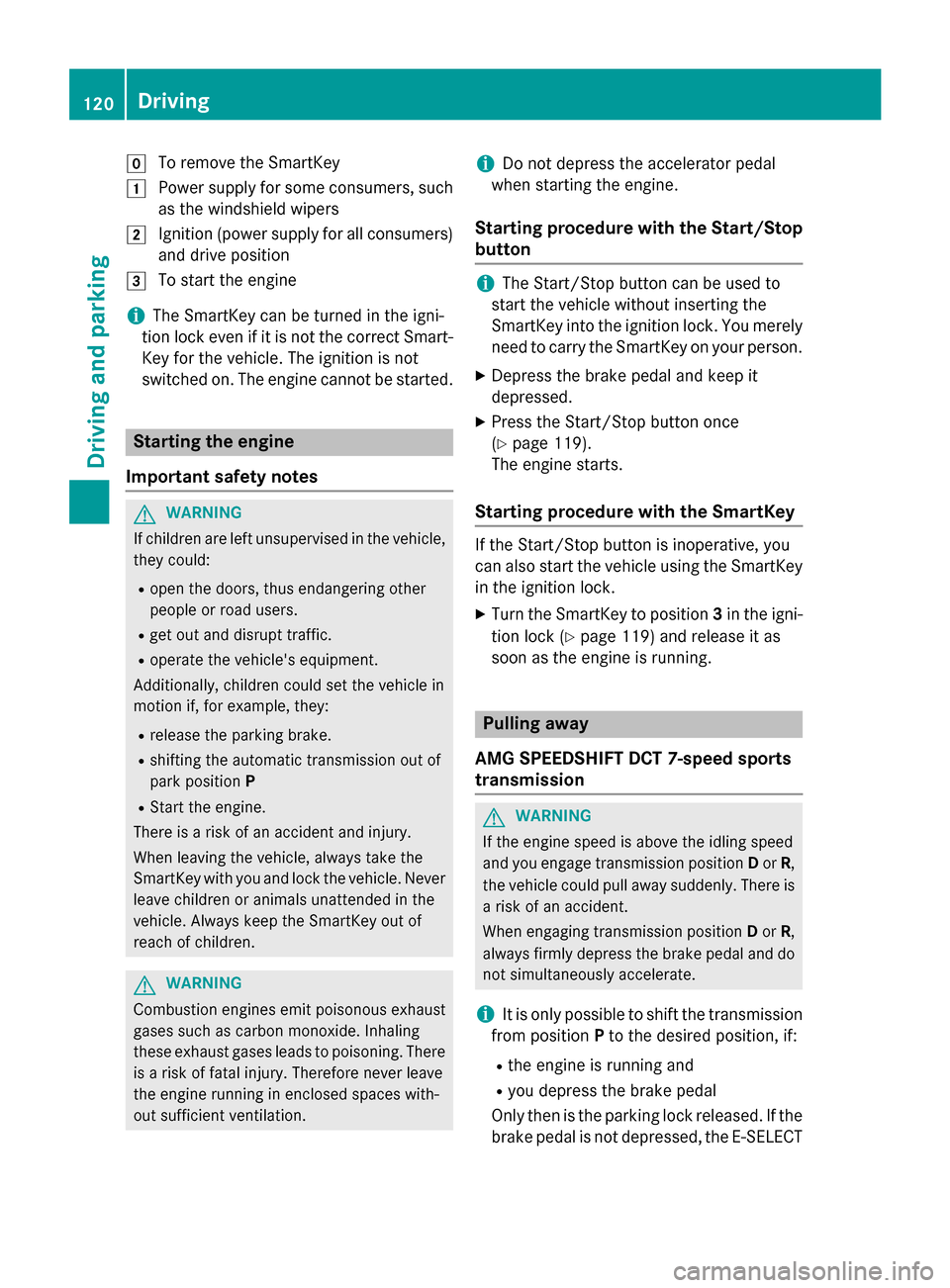
005A
To remove the SmartKey
0047 Power supply for some consumers, such
as the windshield wipers
0048 Ignition (power supply for all consumers)
and drive position
0049 To start the engine
i The SmartKey can be turned in the igni-
tion lock even if it is not the correc tSmart-
Key for the vehicle. The ignition is not
switched on. The engine cannot be started. Starting the engine
Important safety notes G
WARNING
If children are left unsupervised in the vehicle, they could:
R open the doors, thus endangerin gother
people or road users.
R get out and disrupt traffic.
R operate the vehicle's equipment.
Additionally, children could set the vehicle in
motion if, for example, they:
R release the parking brake.
R shiftin gthe automatic transmission out of
park position P
R Start the engine.
There is arisk of an accident and injury.
When leaving the vehicle, alway stake the
SmartKey with you and lock the vehicle. Never
leave children or animals unattended in the
vehicle. Always keep the SmartKey out of
reach of children. G
WARNING
Combustion engines emit poisonous exhaust
gases such as carbon monoxide. Inhaling
these exhaust gases leads to poisoning. There is ar isk of fatal injury. Therefore never leave
the engine runnin ginenclosed spaces with-
out sufficient ventilation. i
Do not depress the accelerator pedal
when starting the engine.
Starting procedure with the Start/Stop
button i
The Start/Stop button can be used to
start the vehicle without inserting the
SmartKey into the ignition lock. You merely
need to carry the SmartKey on your person.
X Depress the brake pedal and keep it
depressed.
X Press the Start/Stop button once
(Y page 119).
The engine starts.
Starting procedure with the SmartKey If the Start/Stop button is inoperative, you
can also start the vehicle using the SmartKey
in the ignition lock.
X Turn the SmartKey to position 3in the igni-
tion lock (Y page 119) and release it as
soon as the engine is running. Pulling away
AMG SPEEDSHIF TDCT 7-speed sports
transmission G
WARNING
If the engine speed is above the idling speed
and you engage transmission position Dor R,
the vehicle could pull away suddenly. There is ar isk of an accident.
When engaging transmission position Dor R,
alway sfirmly depress the brake pedal and do
not simultaneously accelerate.
i It is only possible to shift the transmission
from position Pto the desired position, if:
R the engine is runnin gand
R you depress the brake pedal
Only then is the parking lock released. If the
brake pedal is not depressed, the E-SELECT 120
DrivingDriving and parking
Page 131 of 290
You must avoid fire, open flames
,creating
spark sand smoking. Switch off the engine
and, if applicable, the auxiliary heatin gbefore
refueling. G
WARNING
Fuel is poisonous and hazardous to health.
There is arisk of injury.
You must make sure that fuel does not come int oc ontac twith your skin ,eyes or clothing
and that it is not swallowed. Do not inhale fuel
vapors .Keep fuel away from children.
If you or others com eintoc ontac twith fuel,
observ ethe following:
R Wash away fuel from skin immediately
using soap and water.
R If fuel comes int ocontac twith your eyes,
immediately rinse the mthoroughly with
clean water. Seek medical assistanc ewith-
out delay.
R If fuel is swallowed, seek medical assis-
tance without delay. Do not induc evomit-
ing.
R Immediately change out of clothing which
has com eintoc ontac twith fuel. G
WARNING
Electrostatic buildup can create spark sand
ignit efuel vapors .There is arisk of fire and
explosion.
Always touc hthe vehicle body befor eopening
the fuel filler flap or touching the fuel pump
nozzle. An yexisting electrostatic buildup is
thereby discharged.
! Do not use diesel to refuel vehicles with a
gasolin eengine. Do not switc honthe igni-
tion if you accidentally refuel with the
wron gfuel. Otherwise, the fuel will enter
the fuel system. Even small amount softhe
wron gfuel could result in damage to the
fuel syste mand the engine. Notify aquali-
fied specialis tworkshop and have the fuel
tan kand fuel lines draine dcompletely. !
Overfilling the fuel tan
kcould damage the
fuel system.
! Take care not to spill any fuel on painted
surfaces. You could otherwise damage the paintwork.
! Use
afilter when refuelin gfrom afuel can.
Otherwise, the fuel lines and/or injection
syste mcould be blocked by particles from
the fuel can.
If you overfill the fuel tank, fuel could spray
out when the fuel pump nozzle is removed.
Further information on fuel and on fuel grades can be foun dinthe "Fuel" section
(Y page 282). Refueling
Fuel filler flap When you open or close the vehicle with the
SmartKey, the fuel filler flap is automatically
unlocked or locked.
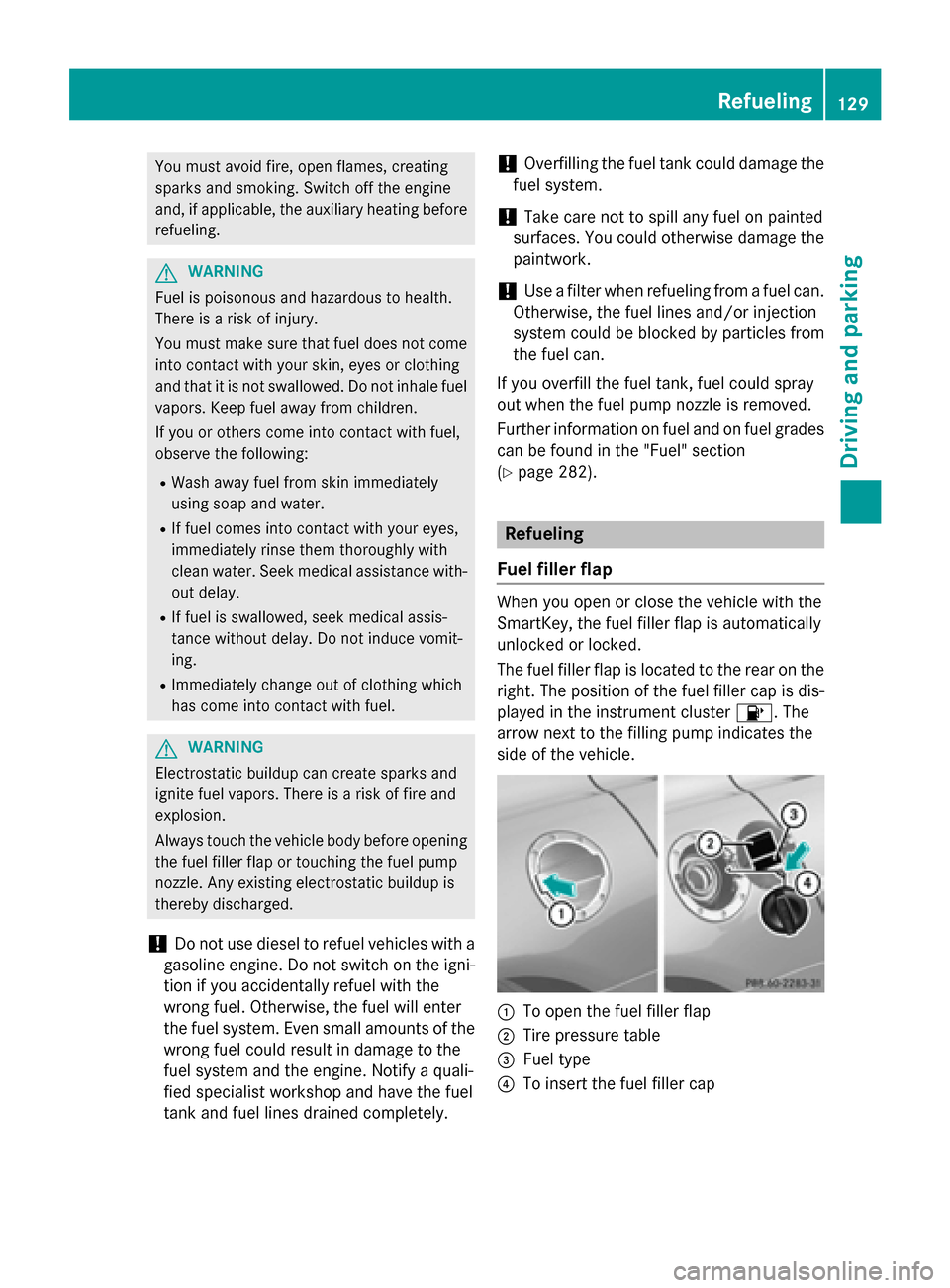
The fuel filler flap is located to the rear on the right .The position of the fuel filler cap is dis-
played in the instrumen tcluster 00B6.T he
arrow nex ttothe filling pump indicates the
side of the vehicle. 0043
To open the fuel filler flap
0044 Tire pressure table
0087 Fuel type
0085 To inser tthe fuel filler cap Refueling
129Driving and parking Z
Page 133 of 290
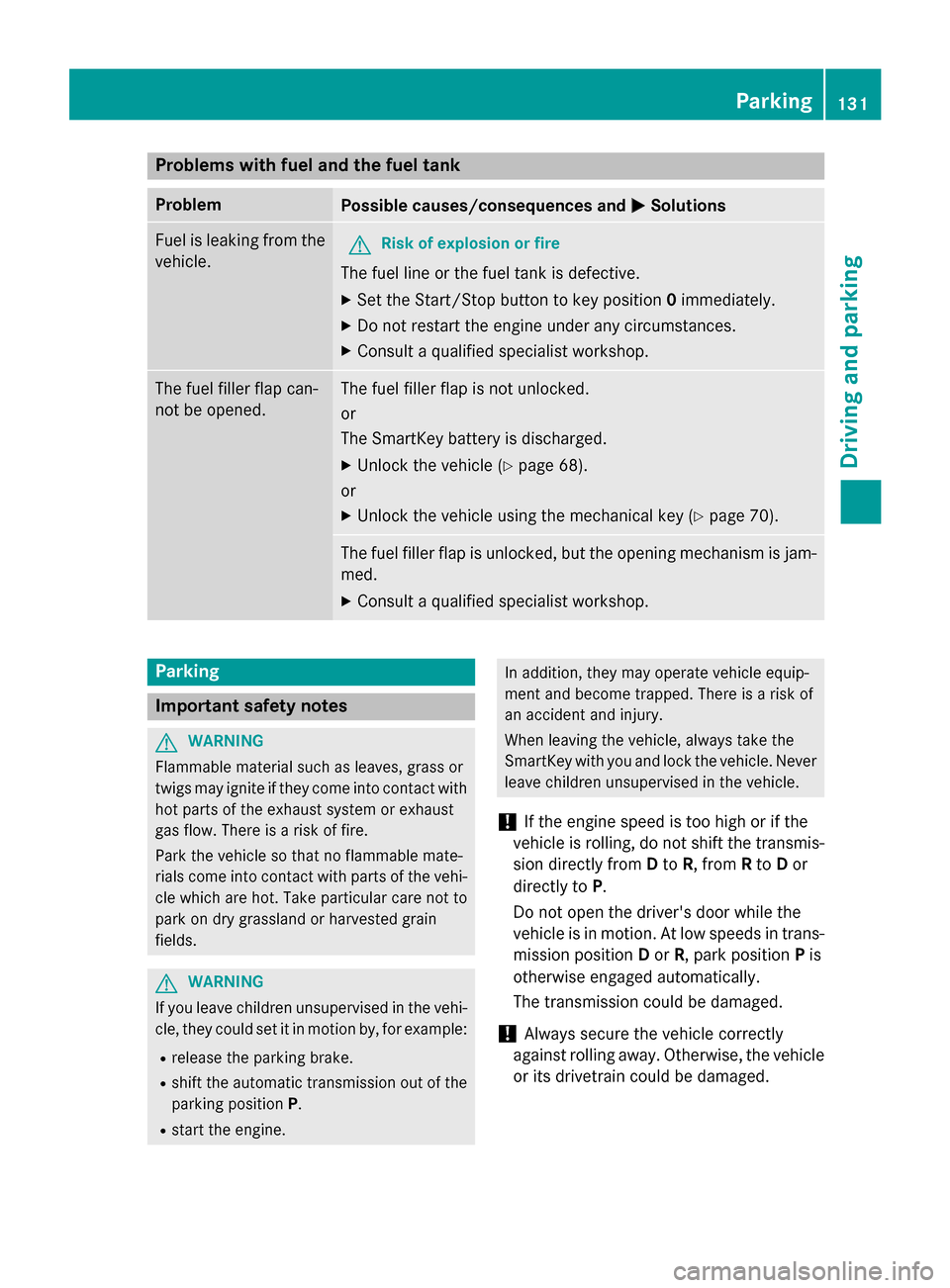
Problems with fuel and the fuel tank
Problem
Possible causes/consequences and
0050
0050Solutions Fuel is leaking from the
vehicle. G
Risk of explosion or fire
The fuel line or the fuel tank is defective.
X Set the Start/Stop button to key position 0immediately.
X Do not restart the engine under any circumstances.
X Consult aqualified specialist workshop. The fuel filler flap can-
not be opened. The fuel filler flap is not unlocked.
or
The SmartKey battery is discharged.
X Unlock the vehicle (Y page 68).
or X Unlock the vehicle using the mechanical key (Y page 70).The fuel filler flap is unlocked, but the opening mechanism is jam-
med.
X Consult aqualified specialist workshop. Parking
Important safety notes
G
WARNING
Flammable material such as leaves, grass or
twigs may ignite if they come into contact with hot parts of the exhaust system or exhaust
gas flow. There is arisk of fire.
Park the vehicle so that no flammable mate-
rials come into contact with parts of the vehi- cle which are hot. Take particular care not to
park on dry grassland or harvested grain
fields. G
WARNING
If you leave children unsupervised in the vehi- cle, they could set it in motion by, for example:
R release the parking brake.
R shift the automatic transmission out of the
parking position P.
R start the engine. In addition, they may operate vehicle equip-
ment and become trapped. There is
arisk of
an accident and injury.
When leaving the vehicle, always take the
SmartKey with you and lock the vehicle. Never leave children unsupervised in the vehicle.
! If the engine speed is too high or if the
vehicle is rolling, do not shift the transmis-
sion directly from Dto R,f rom Rto Dor
directly to P.
Do not open the driver's door while the
vehicle is in motion. At low speeds in trans-
mission position Dor R,p ark position Pis
otherwise engaged automatically.
The transmission could be damaged.
! Always secure the vehicle correctly
against rolling away.O therwise, the vehicle
or its drivetrain could be damaged. Parking
131Driving and parking Z
Page 135 of 290
The transmission remains in
Nif:
R the SmartKey is in the ignition lock and
R you use the E ‑SELECT lever to shift the
transmission to Nbefore switchin gthe
engine off
This still applies if you open the driver's or
front-passenger door.
Further information on transmission posi-
tion Nwhen operating with aSmartKey is
available in the "Car wash" section
(Y page 223). Electric parking brake
General notes G
WARNING
If you leave children unsupervised in the vehi- cle, they could set it in motion by, for example:
R release the parking brake.
R shift the automatic transmission out of the
parking position P.
R start the engine.
In addition, they may operate vehicle equip-
ment and become trapped. There is arisk of
an accident and injury.
When leaving the vehicle, alway stake the
SmartKey with you and lock the vehicle. Never
leave children unsupervised in the vehicle.
The function of the electric parking brake is
dependent on the on-board voltage. If the on-
board voltage is low or there is amalfunction
in the system, it may not be possible to apply
the released parking brake.
X If this is the case, only park the vehicle on
level ground and secure it to prevent it roll- ing away.
X Shift the automatic transmission to posi-
tion P.
It may not be possible to release an applied
parking brake, if the on-board voltage is low
or there is amalfunction in the system. Con-
tact aqualified specialist workshop. Applying/releasing manually
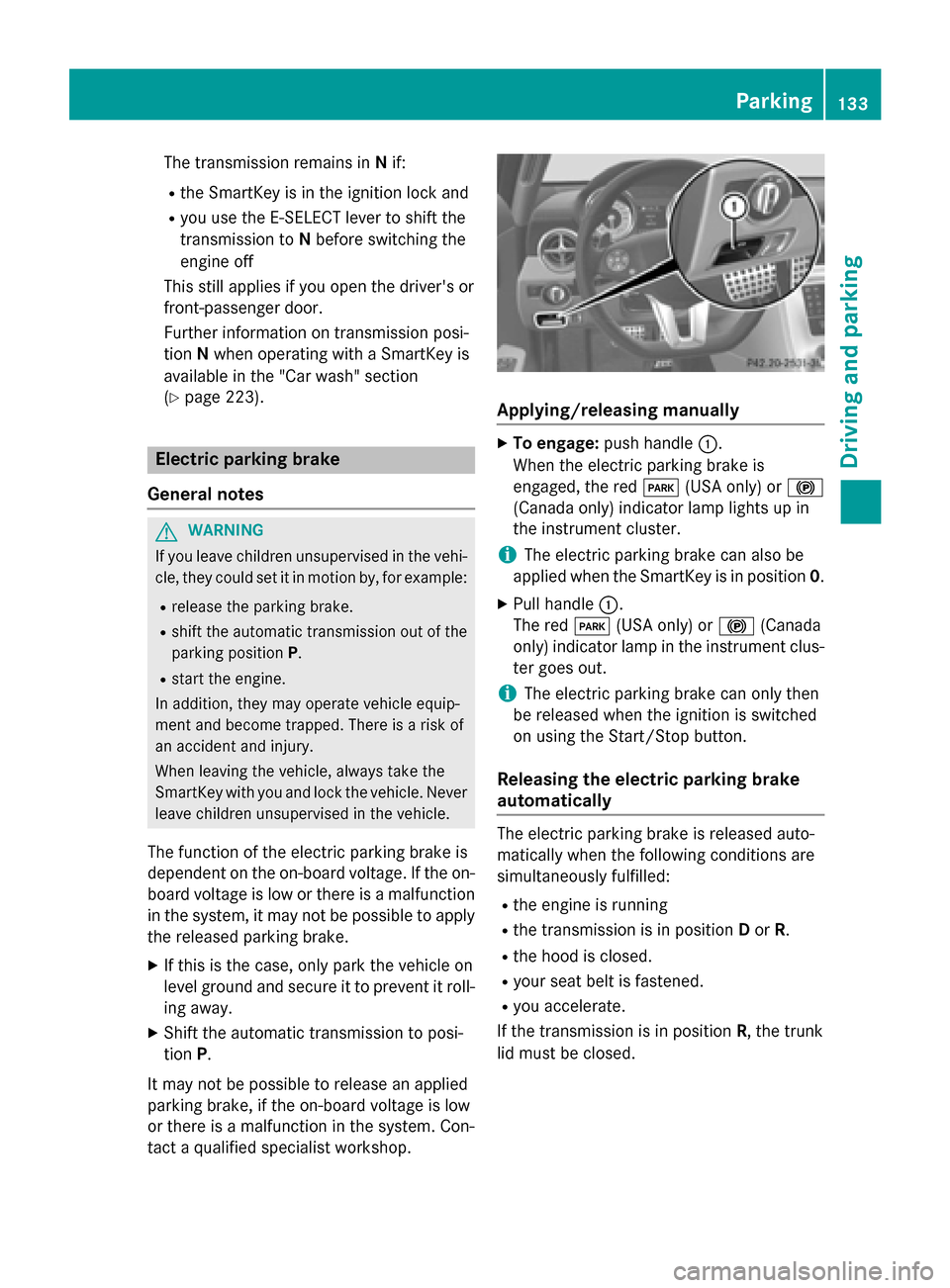
X
To engage: push handle 0043.
When the electric parking brake is
engaged, the red 0049(USA only) or 0024
(Canada only) indicator lamp lights up in
the instrument cluster.
i The electric parking brake can also be
applied when the SmartKey is in position 0.
X Pull handle 0043.
The red 0049(USA only) or 0024(Canada
only) indicator lamp in the instrument clus- ter goes out.
i The electric parking brake can only then
be released when the ignition is switched
on using the Start/Stop button.
Releasing the electric parking brake
automatically The electric parking brake is released auto-
matically when the following conditions are
simultaneously fulfilled:
R the engine is running
R the transmission is in position Dor R.
R the hood is closed.
R your seat belt is fastened.
R you accelerate.
If the transmission is in position R,the trunk
lid must be closed. Parking
133Driving and parking Z
Page 161 of 290
the exterior lighting goes ou
tafter
60 second s.
If you activate the Locator
Locator Lighting:
Lighting: func-
tion, the following lightu p:
R the parking lamps
R the low-beam headlamps
R the license plate lamp
R the surround lighting in the exterior mirrors
X Press the 0059or0065 button on the steer-
ing wheeltos elect theSettings
Settings menu.
X Press the 0064or0063 button to select the
LIGHTS
LIGHTS submenu.
X Press 0076to confirm.
X Press the 0064or0063 button to select the
Locator Lighting:
Locator Lighting: function.
You wills ee the selected setting: Enabled
Enabled
or Disabled
Disabled.
X Press the 0076button to save the setting.
Deactivating the delayed switch-off tempora-
rily:
X Select key position 0with the Start/Stop
button before leaving the vehicle.
X Select key position 2and then key position
0 again with the Start/Stop button
The delayed shut-off is deactivated.
The delayed shut-off is reactivated the next
time you start the engine.
Activating/deactivating the interio rlight-
ing delayed switch-off
If you select key position 0with the Start/
Stop button when the Light. delay
Light. delay func-
tion is activated, the interior lighting lights up
for approximately 20 seconds if it is dark.
X Press the 0059or0065 button on the steer-
ing wheeltos elect theSettings Settings menu.
X Press the 0064or0063 button to select the
Light
Light submenu.
X Press 0076to confirm.
X Press the 0064or0063 button to select the
Light. delay
Light. delay function.
You wills ee the selected setting: on
onoroff
off.
X Press the 0076button to save the setting. Vehicle Activating/deactivating the automatic
door locking mechanism
If you select the
Automatic Door Lock: Automatic Door Lock:
function, the vehicle is centrally locked above
as peed of around 9mph(15 km/h).
i For further information on the automatic
locking feature, see (Y page 70).
X Press the 0059or0065 button on the steer-
ing wheeltos elect theSettings
Settings menu.
X Press the 0064or0063 button to select the
Vehicle
Vehicle submenu.
X Press the 0076button to confirm.
X Press the 0064or0063 button to select the
Automatic door locks
Automatic door locks function.
You wills ee the selected setting: Enabled
Enabled
or Disabled Disabled.
X Press the 0076button to save the setting.
Convenience Activating/deactivating the EASY-
ENTRY/EXIT feature
G
WARNING
When the EASY-ENTRY/EXIT feature adjusts
the steering wheel, you and other vehicle
occupants –particularly childre n–could
become trapped .There is arisk of injury.
Whilet he EASY-ENTRY/EXIT feature is mak-
ing adjustments, make sure that no one has
any body parts in the sweep of the steering
wheel.
If somebod ybecomes trapped:
R press one of the memory function position
buttons, or
R move the switch for steering wheela djust-
ment in the opposite direction to that in
which the steering wheelism oving.
The adjustment process is stopped.
You can use the Easy
Easy Entry/Exit: Entry/Exit: function
to activate or deactivate the EASY-ENTRY/
EXIT feature (Y page 89). Menus and submenus
159On-board computer and displays Z
Page 212 of 290
Extendable rea
rspoiler
The rear spoiler improve sthe handlin gofthe
vehicle .Itadapt sthe vehicle's aerodynamics
to th eoperatin gconditions, dependen tonthe
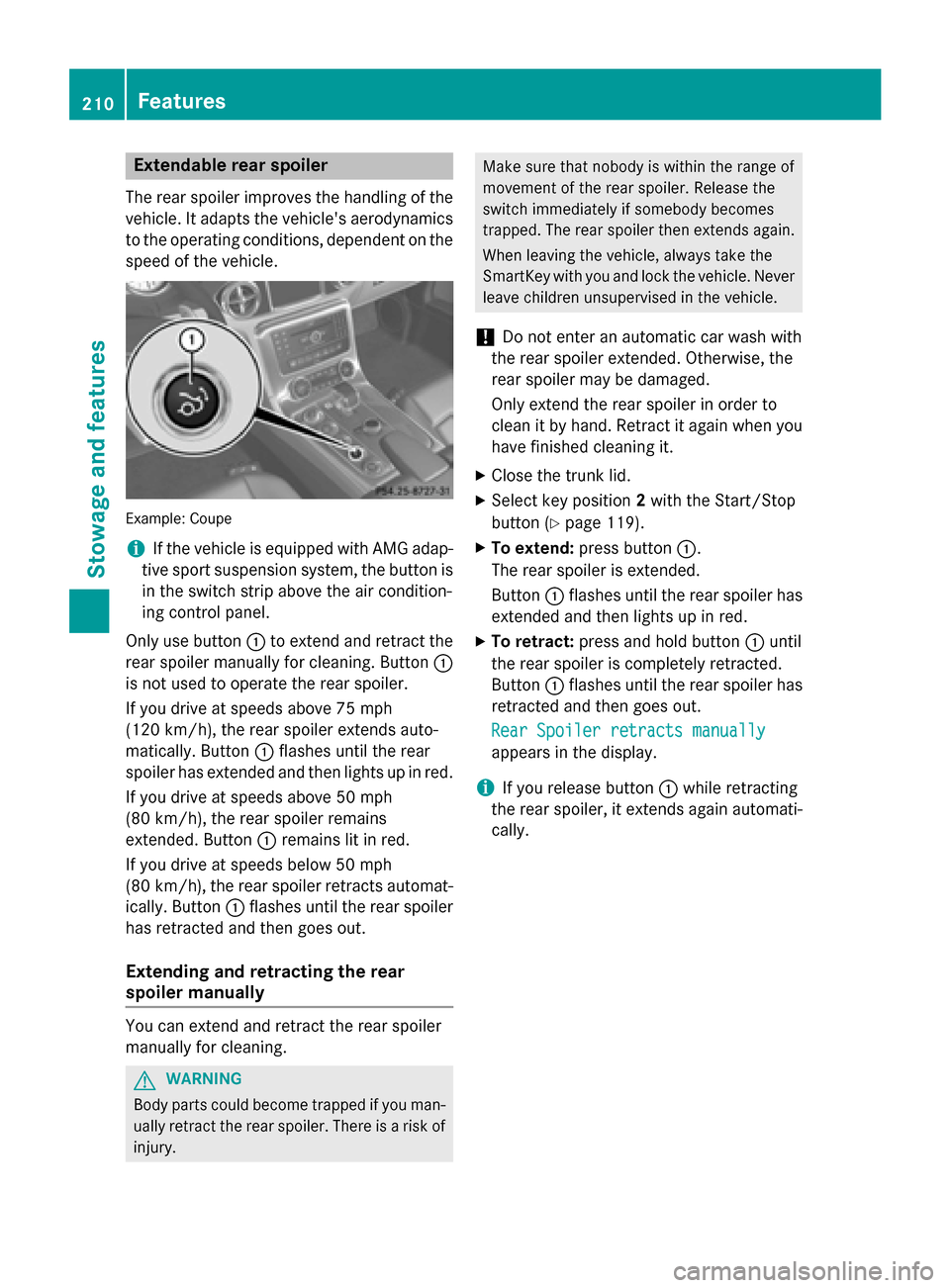
spee doft hevehicle. Example
:Coupe
i If th
evehicle is equippe dwith AM Gadap-
tiv es por tsuspension system, th ebutton is
in th eswitch strip above th eair condition-
ing control panel.
Only use button 0043to exten dand retrac tthe
rear spoiler manually for cleaning. Button 0043
is no tused to operate th erear spoiler.
If you driv eatspeeds above 75 mph
(12 0km/ h),t he rear spoiler extends auto-
matically. Button 0043flashes until the rear
spoiler has extended and then lights up in red.
If you drive at speeds above 50 mph
(8 0k m/ h),t he rear spoiler remains
extended. Button 0043remain slit in red.
If you drive at speeds below 50 mph
(8 0k m/ h),t he rear spoiler retract sautomat-
ically. Button 0043flashes until the rear spoiler
has retracted and then goes out.
Extending and retracting ther ear
spoiler manually You can extend and retract the rear spoiler
manually for cleaning. G
WARNING
Body parts could becom etrappe difyou man-
ually retract the rear spoiler. There is arisk of
injury. Make sure that nobody is within the range of
movement of the rear spoiler. Release the
switc himmediately if somebod ybecomes
trapped. The rear spoiler then extends again.
When leaving the vehicle, always tak ethe
SmartKe ywith you and lock the vehicle. Never
leave children unsupervised in the vehicle.
! Do not enter an automatic car wash with
the rear spoiler extended. Otherwise, the
rear spoiler may be damaged.
Only extend the rear spoiler in order to
clean it by hand. Retrac titagain when you
have finished cleanin git.
X Close the trunk lid.
X Selec tkey position 2with the Start/Stop
button (Y page 119).
X To extend: press button 0043.
The rear spoiler is extended.
Button 0043flashes until the rear spoiler has
extended and then lights up in red.
X To retract: press and hold button 0043until
the rear spoiler is completely retracted.
Button 0043flashes until the rear spoiler has
retracted and then goes out.
Rear Spoiler retracts manually Rear Spoiler retracts manually
appears in the display.
i If you release button
0043while retracting
the rear spoiler, it extends again automati-
cally. 210
FeaturesStowage and features