2015 MERCEDES-BENZ SLS AMG GT ROADSTER ESP
[x] Cancel search: ESPPage 167 of 202
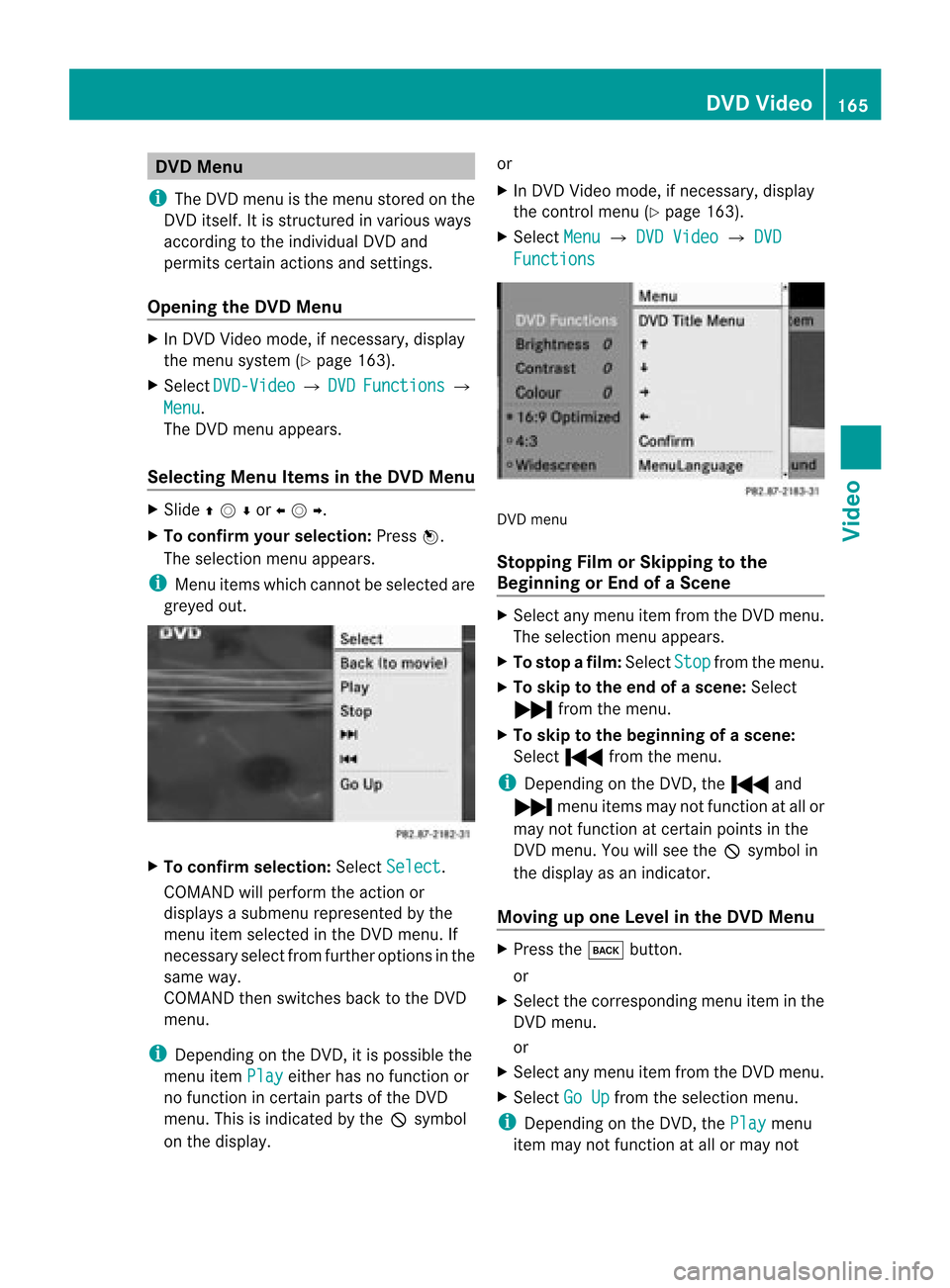
DVD
Menu
i The DVDm enu isthe menu storedon the
DVD itself. Itis str uctured invarious ways
accor dingtothe individual DVDand
permit scert ainaction sand settings.
Opening theDVD Menu X
In DVD Video mode, ifnec essary, display
the menu system (Ypage 163).
X Select DVD-Vid eo £
DVD Functio
ns £
Menu .
The DVD menu appears.
Selecting MenuItems inthe DVD Menu X
Slide qmror omp.
X To confi rm your selecti on:Pre ssn.
The selecti onmenu appe ars.
i Menu items which canno tbeselect edare
greyed out. X
To confirm selection: SelectSelect .
COMAND willperform theaction or
displays asubmenu representedbythe
menu itemselect edinthe DVD menu. If
nec essary selectfromfurtheroption sin the
same way.
COMAND thenswitch esback tothe DVD
menu.
i Depen dingonthe DVD ,it is possible the
menu itemPlay either
hasnofunc tion or
no func tion incert ainparts ofthe DVD
menu. Thisisindicat edbythe 7symbol
on the display. or
X In DVD Video mode, ifnec essary, display
the control menu (Ypage 163).
X Select Menu £
DVD Video £
DVD Functio
ns DVD
menu
Stopp ingFilm orSkipp ingtothe
Beginning orEnd ofaS cene X
Se lec tany men uitem fromthe DVD menu .
Th ese lectio nm enu appears.
X To stop afilm: Select Stop from
themenu.
X To skip tothe end ofascene: Select
Ô fromthemenu.
X To skip tothe beginning ofas cene:
Sel ect Ó from themen u.
i Depen dingon theDV D,theÓ and
Ô menuite ms may notfunc tion atall or
may notfun ction atcer tainpoin tsinthe
DV Dm enu. Youwillsee the7symbol in
the display asan indicat or.
Moving upone Level inthe DVD Menu X
Press thek button .
or
X Select thecorr espondin gmenu iteminthe
DVD menu.
or
X Select anymenu itemfrom theDVD menu.
X Select GoUp from
theselect ionmenu.
i Depen dingonthe DVD ,the Play menu
item maynotfunc tion atall ormay not DVD
Video
165Video Z
Page 168 of 202

function
atcertain points inthe DVD menu.
You willsee the7symb olinthe disp lay
as an indi cator.
Back tothe Movi e X
Press thek button repeatedl yuntil you
see thefilm.
or
X Select thecorresp ondingmenuiteminthe
DVD menu.
X Select theBack (tomovie) menu
item
from thesele ction menu.
i Dependi ngon the DVD, theBack (to movie) menu
itemmaynotfunction in
genera lor may notfunction atcertain
poi nts inthe DVD menu. Setting
theLang uage andAudio
Fo rmat
i This function isnot available onallDVDs.
Where available ,you can setthe DVD menu
la ngua geand theaudio langua georaudio
format. Thenumbe rofpossible settings is
dependent onthe DVD content. Itis
possible thatthesettings may alsobe
accessed inthe DVD menu (Ypage 165).
X Display themenu system ifnecessary
(Y page 163).
X Select DVD-Video £
DVD Functions .
X Select MenuLanguage or
Audio Language .
Both ofthese willbring upaselection menu
after afew seconds. TheRdot infront of
an entr yindicates thecurrent lyselected
language.
X To change thesetting: Rotateymzor
slide qmrunt ilth edesi redsetting is
reac hed.
X To sav eth eset ting:Pre ssn. Sub
titl es and Cam eraAngle
i Thes efun ction sare nota vail ableon all
DVDs. Thenumber ofsub title langu ages
and camera anglesava ilable depe ndson
the content ofthe DVD. Thesettings may
als obe accesse din the DVD menu
(Y pag e165).
X Displ aythe menu system ifnecessa ry
(Y pag e163).
X Select DVD-Vid eo £
DVD Functio ns .
X Select Subtitl es or
Camera Angle .
Both ofthese willbring upasele ction
menu. TheRdot infront ofan entry
indica testhe current setting.
X To chang ethe setting :Rota teymzor
slide qmrunt ilth edesi redsetting is
reac hed.
X To sav eth eset ting:Pre ssn. Int
era ctiv eCont ent
DV Ds may have interac tive conten t(e. g.a
vide ogame ).
In avide ogame ,for example ,you can control
th eplay bysele cting ortrigge ringact ions.The
typ eand num berofact ionsis depe ndento n
the DVD.
X To select an actio n:Slide qmror
omp .
X To trig gera naction: Pressn.
A menu appears andthefirst entry,
Select ,
is highlighted.
X Press n.
or
X In DVD Video mode, ifneces sarydisplay
the control menu (Ypage 163).
X Select Menu £
DVD-Vide o £
DVD Function
s .
X Select adirect ionalarrow toselect or
trigger anaction . 166
DVD
VideoVideo
Page 172 of 202

COMAN
Dfea tures
Thes eOper atingIn st ruc tions desc ribeall
st andar dand optionalequipm enta vail able
for you rCOMAND systematthe time of
purcha se.Cou ntry-specifi cdeviation sare
possible. Pleasenotethat your COMAND
system maynotbeequipped withallthe
features described. Overview
Opera
tingSafet y G
WARN
ING
Please devote youratten tionfirst and
foremo stto the traff icsituation youarein.
While thesystem permitshands- freephone
operation ,atten tiontotraff icmay bedivert ed
not only byphysical operation ofaphone, but
also bythe distrac tionofaphone
con versat ionwhile driving. Assuch, forsafety
reasons, weenco urage thedriver tostop the
vehicle inasafe place before answering or
placing aphone call.
For safety reasons, youshould onlyselect a
destin ationwhen thevehicle isstat ionary.
While thenavigation systemprovides
direct ionalassistanc e,the driver mustremain
focused onsafe driving behavior, especially
pay atten tiontotraff icand street signs, and
should utilizethesystem's audiocueswhile
driving.
The navigation systemdoesnotsupply any
infor mation onstop signs, yieldsigns, traffic
regulations ortraff icsafety rules.Their
observan cealway sremains inthe driver's
person alrespon sibility. DVDmaps donot
cover allareas norallroutes withinanarea.
Traffic regulations alwayshave priority over
any route recom mendat ionsgiven.
Bear inmind thatataspeed ofjust 30mph
(approximat ely50km/ h),your vehicle is
cover ingadistanc eof 44 feet (approximat ely
14 m)every second. G
WARN
ING
Navigation announcementsare intended to
direct youwhile driving without divertingyour
atten tionfrom theroad anddriving.
Please alwaysuse this feature instead of
con sulting themap display fordirect ions.
Consultin gthe symbols ormap display for
direct ionsmay cause youtodivert your
atten tionfrom driving andincrease yourrisk
of an acciden t. G
WARN
ING
Please donot use theVoice ControlSystem
in an emergen cy,asthe toneof your voice
may change inastr essful situation .This could
cause adelay incompleting yourphone call
in atimely manner. Thiscould distract youin
an emergency situationandcause youtobe
involved inan accident. Symbols
OnlyUsed inthis Chapter
The following symbolsindicate:
s thatyouhave tosay something
t thatthere isavoice output fromthe
voice control
u thatthesystem showsinformation on
the displa y. Usage
You canusethevoice controlsystem to
operate thefollowing systemsdepending on
the equipment inyour vehicle:
R Phone
R Navigation
R Address book
R Audio (radio, satellite radio,DVDchanger,
memory card,music register, media
interface)
Say thecommands withoutpausingbetween
individua lwords. Ifyou enter acommand that
does notexist orisincorrec t,the voice
cont rolsystem asksyouforanew command 170
OverviewVoice
Control
Page 176 of 202

If
it is not possi bletodia l,voice control issues
a messag eto this effect.
i You canstillopera teyou rphone using the
keypad. Commands
“Phone” Use
the“Phone” command toselect the
phone application. Usethiscommand ifyou
wish thedigits entered tobe shown onthe
displa y.
“Help Phone” Voice
controlhas anexten sivehelp funct ion.
Using the“Help Phone” command, youcan
have allthe essential commands forthe
phone readout(Ypage 190).
“Dial number” You
canusethe“Dial number” command to
dial aphone number.
The digits 0to9a nd the word“Pl us”ar e
pe rmi tted .
“Pl us”rep laces theinte rnational dialing cod e,
e.g .“00” .
Say thephone num berin the form ofa
conti nuousstri ngofdigits or as blocks of
di gits, e.g.three tofive digits.
Voice controlrepeats thedigits itrecogniz es
after each block ofdigits (withapause of
about halfasecond between eachblock of
digits) andwaits foryou tocont inue speaking.
Example ofdialog :
s Dialnumber
t Please saythenumber
s Zeroonethree zero
t Zeroonethree zero
s Fivezero zero five
t Fivezero zero five
s Okay
t Dialing number i
You canalso dialthespecified numberif
you press the6 button onthe multi-
funct ionsteering wheelinstead ofthe
conc luding command “Okay”.
“Confirm” While
youareenterin ganumber, youcan use
the “Confirm” command tohave allthe
spoken digitsrepeated byvoice control.
Voice controlwill then prompt youto
cont inue withtheentr y.
Example ofdialog :
s Dialnumber
t Please saythenumber
s Zeroonethree zero
t Zeroonethree zero
s Confirm
t Zeroonethree zero.Please continue.
s Fivezero zero five
t Fivezero zero five
s Okay
t Dialing number
i You canalso dialthespecified numberif
you press the6 button onthe multi-
funct ionsteering wheelinstead ofthe
conc luding command Okay .
“Correction” While
youareenterin ganumber, youcan use
the “Correction” commandtocorrect the
block ofdigits lastspoken. Whenyouinput
this command, voicecontroldeletes thelast
block ofdigits andrepeats thedigits inputup
to this point. Voicecontrolwill then prompt
you tocont inue withtheentr y.
Example ofdialog :
s Dialnumber
t Please saythenumber
s Zeroonethree zero
t Zeroonethree zero
s Fivezero zero five
t Fivezero zero five 174
PhoneVoice
Control
Page 177 of 202
s
Correction
t Zerooneth ree zero. Pleas econt inue.
s Fivezero zerofive
t Fivezero zerofive
s Okay
t Dialing number
“Dele te” While
youareenter inganumber, youcan use
the “Delete” commandto delete allthe digits
which havebeen entered.Afteryou have
input thiscomman d,voice controlprompts
you toenter additional digitsorcomman ds.
Ex ample ofdialog:
s Dialnumber
t Please saythenumber
s Zeroonethree zero
t Zeroonethree zero
s Fivezero zerofive
t Fivezero zerofive
s Delete
t Number deleted, pleasesaythe
number again
s Zerothree seven three
t Zerothree seven three
s Threenineone
t Threenineone
s Okay
t Dialing number
“Save Name”(Address Book) (Y
page 183)
“Dial Name”(Address Book) (Y
page 183)
“Dele teNam e”(Address Book) (Y
page 184) “Read
outPhone Book”and“Dialing a
Phone Number” You
canusethe“Read outphone book”
comman dto listen toall entr iesinthe phone
book inwhich aphone number isalso stored
and, ifrequired, selectanentr y.
Ex ample ofdialog:
s Readoutphone book
The system readsoutallthe address
book entrieswith phone numbers. If
the listcont ains more than30entr ies,
the system asksyoutosay thename
from which thereading shallbe
start ed.
u Thesystem showsthelistofphone
book entriesbeing readout.
X To select anentry: Pressthe? button
immediately afterthedesired entryhas
been readout.
i Ifthere ismore thanonephone number
for anentr y,voice controlqueries this.
t Doyou want tocall Smith ?
s Home
t Smithhome. Dialing.
X To cancel thedialog: Pressthe%
button .
The system confirms byresponding
“Cancel”.
“Redial” You
canusethe“Redia l”comman dto redial
the number mostrecent lycalled.
Managing AnnouncementServices or
Voice Mail You
canalso usevoice controltomanage
your voice mailorrecorded announcement
services. Phone
175VoiceControl Z
Page 178 of 202

X
Press the? button whileaphone callis
in progress.
An acoustic signalconfirms thatthesystem
is activat ed.
X Say therequired digits(“zero” to“nine”).
or
X Say therequired words“Star” or“Hash”.
X Say theconc luding comman d“Okay”.
The system dialsthenumber entered. Naviga
tion G
WARNIN
G
For safety reasons, youshould onlyselect a
destinat ionwhen thevehicle isstation ary.
While thenavigation systemprovides
direction alassistanc e,the driver mustremain
focused onsafe driving behavior, especially
pay atten tiontotraff icand street signs,and
should utilizethesystem's audiocueswhile
driving.
The navigation systemdoesnotsupply any
inform ationonstop signs, yieldsigns, traffic
regulations ortraff icsafety rules.Their
observanc ealway sremains inthe driver's
personal responsibility. DVDmaps donot
cover allareas norallroutes withinanarea.
Traffic regulations alwayshave priority over
any route recomm endation sgiven. Bearin
mind thatataspeed ofjust 30mph
(approximately 50km/ h),your vehicle is
coverin gadistanc eof 44 feet (approximately
14 m)every second.
During routeguidance, youwillnotreceive
inform ationon:
R traff iclights
R stop andyield signs
R parking orstopping zones
R one-way streets
R narrow bridges
R other trafficregulation data
You should thereforealway sstric tlyobserve
traff icregulations whiledriving. Drive carefully
andalway sobey trafficlaws and
road signs, evenifthey contradict navigation
system instruction s. G
WARNIN
G
Please donot use theVoice ControlSystem
in an emergenc y,as the toneof your voice
may change inastress fulsituation. Thiscould
cause adelay incomplet ingyour phone call
in atimely manner .This could distract youin
an emergency situationandcause youtobe
involved inan accident. Operat
ion
You canusevoice controlto:
R enter astate
R enter aprovince
R enter acity
R enter adistrict (center)
R enter astreet
R enter anintersec tion
R enter ahouse number
R enter anentire address
R enter azip code
R find address
R enter apoint ofinterest
R select oneofyour previous destinations
R call uproute information
R store adestination
R displa ythe map
R enlarge/reduce thesize ofthe map
R listen tothe destination memory
R start andstop route guidance
R switch theguida nceinstruct ionsonand off
X To select thenavigation application press
the ? button onthe multifunction
steering wheel.
X Give the“Navigation” command.
X Press the? button.
X Give oneofthe navigation commands
explained below. 176
Navigat
ionVoiceControl
Page 184 of 202

“Zoom
In<0019000F000D0010000C000500140005000C001B0018002200480037000F000F
000DF Out
Completely” You
canusethese comman dstoset the map
display directly tothe smallest orlargest
scale.
“Read OutDestination Memory” You
canusethe“Read outdestinat ion
memory” commandto listen tothe entr ies
from theaddress book’sdestinat ionmemory
and, ifrequired, navigatetoone ofthem.
Ex ample ofdialog:
s Readoutdestinat ionmemory
The system readsoutallentr ies, from
the address bookdestinat ionmemory.
If the listcont ains more than30
entr ies,thesystem asksyoutosay the
name fromwhich thereading shallbe
start ed.
i Ifyou donot say aname, voicecontrol
reads outalldestinat ionentr ies.
X To select anentry andsetanadd ress:
Press the? button atthe selected
entr y.
t Ifthere ismore thanoneaddress, the
system asks“Navigate to:home or
work?”
s Home
The system startsroute guidance.
X To cancel thedialog: Pressthe%
button .
You have canceled thedialog. Thesystem
conf irms byresponding “Cancel”. Addr
essBook G
WARNIN
G
Please devote youratten tionfirst and
foremost tothe traffic situation youarein.
Before yourjourney, pleasefamiliarize
yourself withtheaddress bookfunctions. Only
usetheVoice Control System whenroad
and traffic conditionspermit youtodo so.
Otherwise youcould beinvolved inan
accident inwhich youorothers couldbe
injured. Overview
The address bookgives youtheoption of
storin ginform ationabout people inthe form
of entr ies.
Using voicecontrol,you can dialaphone
number storedinthe address bookorstart
route guidance forastored address.
Apart fromthespeaker-depen dentvoice
names storedinthe address book,voice
cont rolcan recogn izeallthe entr iesinthe
name fieldsofthe address book.Recognition
of the entr iesinthe address bookdepends on
the text that wasenter ed.Tomake acall you
must saythetext ofthe entr y.
Check theaddress bookentriesforthe
following:
R The name entries, e.g. lastname andfirst
name, areinthe right fields.
R Do not use abbreviations oracronyms.
R Avoid unnecessary spaces innames.
R Do not use special characters.
You canimprove voicerecogn itionbysaving
a speaker-depen dentvoice name foraddress
book entries.
Use aspeaker-depen dentvoice name:
R for names whicharedifficult topronounc e
R to distinguish nameswhichsound similar
R for names whicharenot pronounc edas
they arewritten
Voice controlcan store upto50 ofthese
address bookentriesbymeans ofaspeaker-
dependent voicename. 182
Addr
essBookVoice Control
Page 186 of 202

Say
thesurnam efir st and then thefirst name
if both areenter edinthe addre ssboo k.
Examp leof dialog:
s Dialname
t Plea se saythe name
s Smith
If there ismore thanone phone
numb erfor anentry ,voi ce control
qu eri es this :
t Doyouwa ntto make awo rkcal lor a
hom ecal l?
or
Pl ea se select aline numb er
s Work
t Smithwork. Dia ling numb er.
“F indN ame” Use
the“Find name” command tosea rch for
a name inthe address book. Voicecontrol
then asks whataction youwa ntitto per form:
for exa mpl ecal lthe selected number,star t
rou teguidance tothe saved addre ssorope n
the entry .
Examp leof dialog:
s Findname
t Plea se saythe name
s Smith
u Thesystem showsanumb eredlist in
the displ ay.
t Plea se select aline numb er.
s Linenumb er1...
t Linenumb er1acce pted.
The system opensthe firstentry onthe
li st.
If the selecte dentry containsatleas t
one phone num bero rana ddress,
voice controlasks whether youwant
to dial thenumber ornavigat eto the
stor edaddress. “Find
Address” (Y
page 181)
“Delete Name” Use
the“Delet ename” commandtodelete a
voice name fromyouraddress book.
Ex ample ofdialog:
s Deletename
t Please saythename
s Smith
t Doyou want todelete Smith?
s Yes
t Thevoice name hasbeen deleted
“Read OutAddr essBook” You
canusethe“Read outaddress book”
comm andtolisten toall names andvoice
names inthe address book.Youcanselect an
ent ryduring this.
If no name isent ered inthe name fieldofthe
address book,thephone number orthe
address isread out.Aname canbeentered
late rint he name field.
Example ofdialog :
s Readoutaddress book
The system readsoutalladdress book
entr ies.Ifthere aremore than30entr ies,the
system asksfrom which entryit should start
the reading.
i Ifyou donot say aname, voicecontrol
reads outalladdress bookentries.
X To selec tan addr essbook entry:
Press the? button atthe selected
entr y.
The entryis selected andshown onthe
displa y.Voice controlasks whether the
selected entryshould becalled, navigated
to or opened.
X To cancel thedialog:
Press the% button.
You have cancelled thedialog .The system
confirm sby responding “Cancel”.184
Addr
essBookVoice Control