2015 MERCEDES-BENZ SLK-CLASS ROADSTER check engine light
[x] Cancel search: check engine lightPage 7 of 358

AUTO lightsDisplay message ............................ 228
see Lights
Automatic car wash (care) ...............286
Automatic engine start (ECO start/
stop function) ................................... .146
Automatic engine switch-off (ECO
start/stop function) .......................... 144
Automatic headlamp mode .............. 108
Automatic transmission
Accelerator pedal position ............. 152
Automatic drive program .............. .154
Changing gear ............................... 152
Display message ............................ 238
Driving tips ................................... .152
Emergency running mode .............. 158
Kickdown ....................................... 153
Manual drive program .................... 154
Manual drive program (vehicles
with Sports package AMG) ............ 155
Overview ........................................ 151
Problem (malfunction) ................... 158
Program selector button ................ 153
Pulling away ................................... 142
Releasing the parking lock man-
ually ............................................... 158
Selector lever ................................ 151
Starting the engine ........................ 142
Steering wheel paddle shifters ...... 154
Transmission position displa y........ 151
Transmission positions .................. 152
Automatic transmission emer-
gency mode ....................................... 158
B
Backup lamp
Changing bulb s.............................. 117
BAS (Brake Assist System) ................. 62
BAS PLUS (Brake Assist System
PLUS) .................................................... 62
Battery (SmartKey)
Checking .......................................... 75
Important safety notes .................... 74
Replacing ......................................... 75
Battery (vehicle)
Charging ........................................ 301
Display message ............................ 229 Important safety notes .................. 299
Jump starting ................................. 303
Overview ........................................ 299
Belt
see Seat belts
Blind Spot Assist
Activating/deactivating ................. 203
Display message ............................ 232
Notes/function .............................. 189
Brake Assist
see BAS (Brake Assist System)
Brake fluid
Display message ............................ 219
Notes ............................................. 352
Brake force distribution
see EBD (electronic brake force
distribution)
Brake lamps
Display message ............................ 226
Brakes
ABS .................................................. 61
BAS .................................................. 62
BAS PLUS ........................................ 62
Brake fluid (notes) ......................... 352
Display message ............................ 213
EBD .................................................. 66
High-performance brake system .... 168
Important safety notes .................. 166
Maintenance .................................. 167
Parking brake ................................ 162
Riding tips ...................................... 166
Warning lamp ................................. 246
Breakdown
see Flat tire
see Towing away
Brightness control (instrument
cluster lighting) ................................... 31
Bulbs
see Replacing bulbs
C
CaliforniaImportant notice for retail cus-
tomers and lessees .......................... 23
Calling up a malfunction
see Display messages
Index5
Page 9 of 358

COMAND displayCleaning ........................................ .290
Combination switch .......................... 110
Compass
Calibrating ..................................... 276
Calling up ....................................... 275
Setting .......................................... .276
Consumption statistics (on-board
computer) .......................................... 197
Convenience closing feature .............. 85
Convenience opening feature
see Side windows
Coolant (engine)
Checking the level ......................... 283
Display message ............................ 228
Filling capacity ............................... 353
Important safety notes .................. 352
Temperature (on-board com-
puter) ............................................. 208
Temperature gauge ........................ 194
Warning lamp ................................. 252
Cooling
see Climate control
Copyright ............................................. 28
Cornering light function
Display message ............................ 225
Function/notes ............................ .111
Crash-responsive emergency light-
ing ....................................................... 114
Cruise control
Cruise control lever ....................... 170
Deactivating ................................... 171
Display message ............................ 235
Driving system ............................... 169
Function/notes ............................ .169
Important safety notes .................. 169
Setting a speed .............................. 170
Storing and maintaining current
speed ............................................. 170
Cup holder
Center console .............................. 261
Important safety notes .................. 260
Customer Assistance Center
(CAC) ..................................................... 26
Customer Relations Department ....... 26D
Dashboard
see Instrument cluster
Data
see Technical data
Daytime running lamps
Display message ............................ 227
Function/notes ............................ .108
Switching on/off (on-board com-
puter) ............................................. 205
Declarations of conformity ................. 25
Delayed switch-off
Exterior lighting (on-board com-
puter) ............................................. 206
Interior lighting .............................. 206
Diagnostics connection ......................25
Digital speedometer .........................198
Display messages
ASSYST PLUS ................................ 284
Calling up (on-board computer) ..... 212
Driving systems ............................ .231
Engine ............................................ 228
General notes ................................ 212
Hiding (on-board computer) ........... 212
KEYLESS-GO .................................. 242
Lights ............................................. 225
Safety systems .............................. 213
SmartKey ....................................... 242
Tires ............................................... 236
Vehicle .......................................... .238
Distance recorder
see Trip odometer
Distance warning (warning lamp) .... 254
DISTRONIC PLUS
Cruise control lever ....................... 173
Deactivating ................................... 178
Display message ............................ 233
Displays in the multifunction dis-play................................................ 177
Driving tips .................................... 178
Function/note s............................. 171
Important safety notes .................. 172
Setting the specified minimum
distance ......................................... 176
Warning lamp ................................. 254
Index7
Page 11 of 358

Deactivating/activating ................. 147
General information ....................... 144
Important safety notes.................. 143
Introduction ................................... 143
Electronic Stability Program
see ESP ®
(Electronic Stability Program)
Emergency
Automatic measures after an acci-
dent ................................................. 57
Emergency release
Driver's door .................................... 80
Trunk ............................................... 83
Vehicle ............................................. 80
Emergency spare wheel
General notes ................................ 343
Important safety notes .................. 343
Removing ....................................... 344
Stowing .......................................... 344
Technical data ............................... 346
Emergency Tensioning Devices
Activation ......................................... 54
Emissions control
Service and warranty information .... 22
Engine
Check Engine warning lamp ........... 252
Display message ............................ 228
ECO start/stop function ................ 143
Engine number ............................... 349
Irregular running ............................ 149
Jump-starting ................................. 303
Starting problems .......................... 149
Starting the engine with the
SmartKey ....................................... 142
Starting with KEYLESS-GO ............. 142
Switching off .................................. 162
Tow-starting (vehicle) ..................... 307
Engine electronics
Problem (malfunction) ................... 149
Engine oil
Adding ........................................... 282
Additives ........................................ 352
Checking the oil level ..................... 281
Checking the oil level using the
dipstick .......................................... 281
Display message ............................ 230
Filling capacity ............................... 352
Notes about oil grade s................... 351
Notes on oil level/consumption .... 281 Temperature (on-board com-
puter) ............................................. 208
Viscosity ........................................ 352
ESP ®
(Electronic Stability Pro-
gram)
AMG menu (on-board computer) ... 209
Characteristics ................................. 64
Deactivating/activating (AMG
vehicles) .......................................... 65
Deactivating/activating (notes;
except AMG vehicles) ...................... 64
Display message ............................ 213
ETS .................................................. 63
Function/note s................................ 63
General notes .................................. 63
Important safety information ........... 64
Warning lamp ................................. 248
ETS (Electronic Traction System) ....... 63
Exhaust check ................................... 165
Exhaust pipe (cleaning instruc-
tions) .................................................. 289
Exterior lighting
Setting options .............................. 108
see Lights
Exterior mirrors
Adjusting ....................................... 103
Dipping (automatic) ....................... 104
Folding in when locking (on-board
computer) ...................................... 208
Folding in/out (automatically )....... 104
Folding in/out (electrically) ........... 104
Out of position (troubleshooting) ... 104
Storing settings (memory func-
tion) ............................................... 106
Storing the parking position .......... 105
Eyeglasses compartment ................. 259
F
Filler cap
see Fuel filler flap
Filling capacities (Technical data) ... 349
Flat tire
MOExtended tire s.......................... 295
Preparing the vehicle ..................... 295
TIREFIT kit ...................................... 296
see Emergency spare wheel
Floormats ........................................... 276
Index9
Page 63 of 358
Driving safety systems
Overview of driving safety systems
In this section, you will find information aboutthe following driving safety systems:
R ABS ( Anti-lock Braking System)
( Y page 61)
R BAS ( Brake Assist System) ( Ypage 62)
R BAS PLUS ( Brake Assist System Plus)
( Y page 62)
R ESP ®
(E lectronic Stability Program)
( Y page 63)
R EBD ( Electronic Brake force Distribution)
( Y page 66)
R ADAPTIVE BRAKE ( Ypage 67)
R PRE-SAFE ®
Brake ( Ypage 67)
Important safety notes
If you fail to adapt your driving style or if you
are inattentive, the driving safety systems can
neither reduce the risk of an accident nor
override the laws of physics. Driving safety
systems are merely aids designed to assist
driving. You are responsible for maintaining
the distance to the vehicle in front, for vehicle
speed, for braking in good time, and for stay- ing in lane. Always adapt your driving style to
suit the prevailing road and weather condi-
tions and maintain a safe distance from the
vehicle in front. Drive carefully.
The driving safety systems described only
work as effectively as possible when there is
adequate contact between the tires and the
road surface. Please pay special attention to
the notes on tires, recommended minimum
tire tread depths, etc. ( Ypage 312).
In wintry driving conditions, always use winter
tires (M+S tires) and if necessary, snow
chains. Only in this way will the driving safety systems described in this section work as
effectively as possible.
ABS (Anti-lock Braking System)
General information
ABS regulates brake pressure in such a way
that the wheels do not lock when you brake.
This allows you to continue steering the vehi- cle when braking.
The yellow !ABS warning lamp in the
instrument cluster lights up when the ignition is switched on. It goes out when the engine is
running.
Important safety notes
iObserve the "Important safety notes" sec-
tion ( Ypage 61).
GWARNING
If ABS is faulty, the wheels could lock when
braking. The steerability and braking charac-
teristics may be severely impaired. Addition-
ally, further driving safety systems are deac-
tivated. There is an increased danger of skid-
ding and accidents.
Drive on carefully. Have ABS checked imme-
diately at a qualified specialist workshop.
When ABS is malfunctioning, other systems,
including driving safety systems, will also
become inoperative. Observe the information on the ABS warning lamp ( Ypage 246) and
display messages which may be shown in the
instrument cluster ( Ypage 213).
ABS works from a speed of about 5 mph
(8 km/ h), regardless of road-surface condi-
tions. ABS works on slippery surfaces, even if
you only brake gently.
Braking
X If ABS intervenes: continue to depress the
brake pedal vigorously until the braking sit- uation is over.
X To make a full brake application:
depress the brake pedal with full force.
If ABS intervenes when braking, you will feel a pulsing in the brake pedal.
Driving safety systems61
Safety
Z
Page 75 of 358
The SmartKey centrally locks/unlocks:R the doors
R the trunk lid
R the stowage compartment in the center
console
R the fuel filler flap
The turn signals flash once when unlocking
and three times when locking.
You can also set an audible signal to confirm that the vehicle has been locked. The audible
signal can be activated and deactivated using the on-board computer ( Ypage 207).
When it is dark, the surround lighting also
comes on if it is activated in the on-board
computer ( Ypage 206).
KEYLESS-GO
General notes
Bear in mind that the engine can be started by
any of the vehicle occupants if there is a KEY- LESS-GO key in the vehicle.
Locking/unlocking centrally
You can start, lock or unlock the vehicle using
KEYLESS-GO. To do this, you only need carry
the SmartKey with you. You can combine the functions of KEYLESS-GO with those of a con-
ventional SmartKey. Unlock the vehicle by
using KEYLESS-GO, for instance, and lock it
using the &button on the SmartKey.
When locking or unlocking with KEYLESS-GO,
the distance between the key and the corre-
sponding door handle must not be greater
than 3 ft (1 m).
A check which periodically establishes a radio
connection between the vehicle and the
SmartKey determines whether a valid Smart- Key is in the vehicle. This occurs, for example:
R when the external door handles aretouched
R when starting the engine
R while the vehicle is in motion
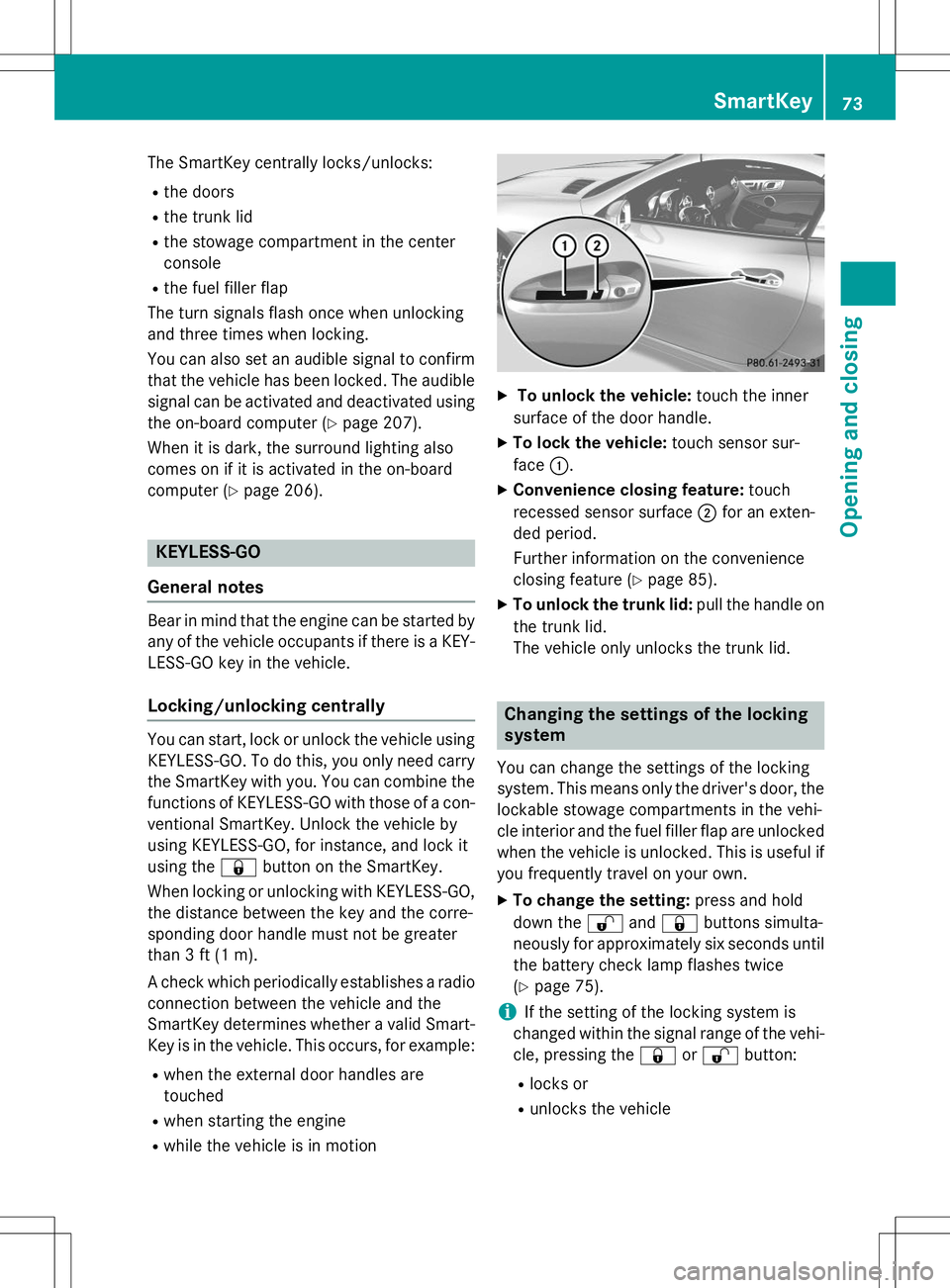
X To unlock the vehicle: touch the inner
surface of the door handle.
X To lock the vehicle: touch sensor sur-
face :.
X Convenience closing feature: touch
recessed sensor surface ;for an exten-
ded period.
Further information on the convenience
closing feature ( Ypage 85).
X To unlock the trunk lid: pull the handle on
the trunk lid.
The vehicle only unlocks the trunk lid.
Changing the settings of the locking system
You can change the settings of the locking
system. This means only the driver's door, the
lockable stowage compartments in the vehi-
cle interior and the fuel filler flap are unlocked when the vehicle is unlocked. This is useful if
you frequently travel on your own.
X To change the setting: press and hold
down the %and& buttons simulta-
neously for approximately six seconds until the battery check lamp flashes twice( Y page 75).
iIf the setting of the locking system is
changed within the signal range of the vehi- cle, pressing the &or% button:
R locks or
R unlocks the vehicle
SmartKey73
Opening and closing
Z
Page 80 of 358
ProblemPossible causes/consequences andMSolutions
The engine can no lon-
ger be started using the
SmartKey.The on-board voltage is too low.
X Switch off non-essential consumers, e.g. seat heating or interior
lighting, and try to start the engine again.
If this does not work:
X Check the starter battery and charge it if necessary (Y page 301).
or
X Jump-start the vehicle ( Ypage 303).
or
X Consult a qualified specialist workshop.
The engine can no lon-
ger be started using
KEYLESS-GO. The
SmartKey is in the vehi-
cle.The vehicle is locked.
X Unlock the vehicle and try to start the vehicle again.
There is interference from a powerful source of radio waves.
X Start your vehicle with the SmartKey in the ignition lock.
Doors
Important safety notes
GWARNING
If children are left unsupervised in the vehicle,
they could:
R open the doors, thus endangering other
people or road users.
R get out and disrupt traffic.
R operate the vehicle's equipment.
Additionally, children could set the vehicle in
motion if, for example, they:
R release the parking brake.
R shift the automatic transmission out of park
position P or shift manual transmission into
neutral.
R start the engine.
There is a risk of an accident and injury.
When leaving the vehicle, always take the
SmartKey with you and lock the vehicle. Never leave children or animals unattended in the
vehicle. Always keep the SmartKey out of
reach of children.
Unlocking and opening doors from
the inside
!
The side windows will not open/close if
the battery is discharged or if the side win- dows have iced up. It will then not be pos-
sible to close the door. Do not attempt to
force the door closed. You could otherwise
damage the door or the side window.
You can open a door from inside the vehicle
even if it has been locked.
If the vehicle was previously locked with the
SmartKey or with KEYLESS-GO, opening the
vehicle from the inside will activate the anti-
theft alarm system. Switch off the alarm( Y page 69).
78Doors
Opening and closing
Page 98 of 358
Useful information
iThis Operator's Manual describes all
models and all standard and optional equip- ment of your vehicle available at the time of
publication of the Operator's Manual.
Country-specific differences are possible.
Please note that your vehicle may not be
equipped with all features described. This
also applies to safety-related systems and
functions.
iRead the information on qualified special-
ist workshops ( Ypage 25).
Correct driver's seat position
GWARNING
You could lose control of your vehicle if you do
the following while driving:
R adjust the driver's seat, head restraint,
steering wheel or mirrors
R fasten the seat belt
There is a risk of an accident.
Adjust the driver's seat, head restraint, steer-
ing wheel and mirror and fasten your seat belt before starting the engine.
X Observe the safety guidelines on seat
adjustment ( Ypage 97).
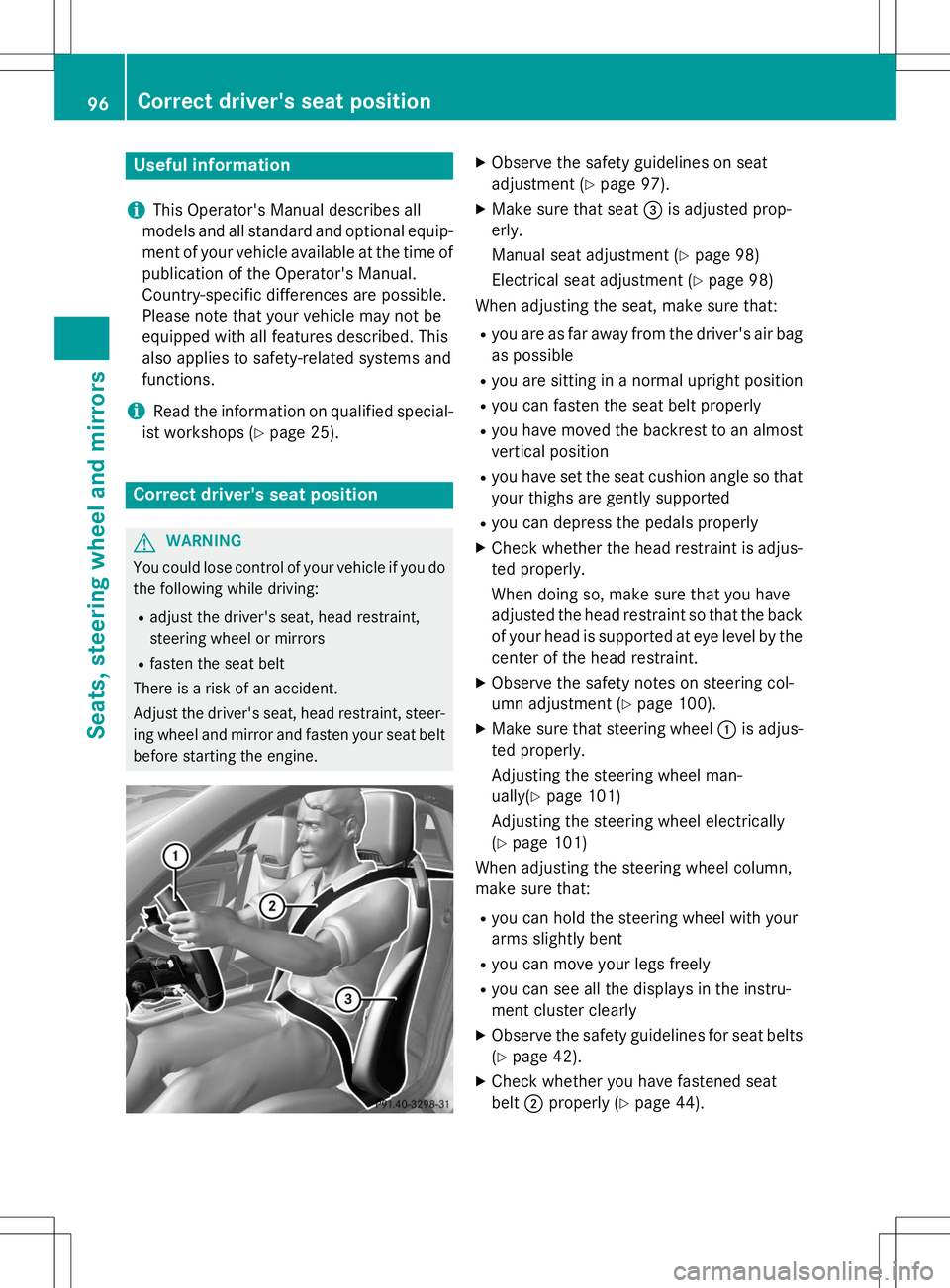
X Make sure that seat =is adjusted prop-
erly.
Manual seat adjustment ( Ypage 98)
Electrical seat adjustment ( Ypage 98)
When adjusting the seat, make sure that:
R you are as far away from the driver's air bag
as possible
R you are sitting in a normal upright position
R you can fasten the seat belt properly
R you have moved the backrest to an almost
vertical position
R you have set the seat cushion angle so that
your thighs are gently supported
R you can depress the pedals properly
X Check whether the head restraint is adjus-
ted properly.
When doing so, make sure that you have
adjusted the head restraint so that the back of your head is supported at eye level by the center of the head restraint.
X Observe the safety notes on steering col-
umn adjustment ( Ypage 100).
X Make sure that steering wheel :is adjus-
ted properly.
Adjusting the steering wheel man-
ually( Ypage 101)
Adjusting the steering wheel electrically( Y page 101)
When adjusting the steering wheel column,
make sure that:
R you can hold the steering wheel with your
arms slightly bent
R you can move your legs freely
R you can see all the displays in the instru-
ment cluster clearly
X Observe the safety guidelines for seat belts
( Y page 42).
X Check whether you have fastened seatbelt ;properly ( Ypage 44).
96Correct driver's seat position
Seats, steering wheel and mirrors
Page 116 of 358
The interior lighting automatically switches
on if you: Runlock the vehicle
R open a door
R remove the SmartKey from the ignition lock
The interior light is activated for a short while when the SmartKey is removed from the igni-
tion lock. You can activate this delayed
switch-off using the on-board computer( Y page 206).
Manual interior lighting control
X
To switch the interior lighting on/off:
press the cbutton.
X To switch the reading lamps on/off:
press the pbutton.
Crash-responsive emergency lighting
The interior lighting is activated automatically
if the vehicle is involved in an accident.
X To switch off the crash-responsive
emergency lighting: press the hazard
warning lamp button.
or X Lock and then unlock the vehicle using the
SmartKey.
Replacing bulbs
Important safety notes
Xenon bulbs
GDANGER
Xenon bulbs carry a high voltage. You can get an electric shock if you remove the cover of
the Xenon bulb and touch the electrical con-
tacts. There is a risk of fatal injury.
Never touch the parts or the electrical con-
tacts of the Xenon bulb. Always have work on
the Xenon bulbs carried out at a qualified spe-
cialist workshop. If your vehicle is equipped with Xenon bulbs,
you can recognize this by the following: the
cone of light from the Xenon bulbs moves
from the top to the bottom and back again
when you start the engine. For this to be
observed, the lights must be switched on
before starting the engine.
Bulbs and lamps are an important aspect of
vehicle safety. You must therefore make sure
that these function correctly at all times.
Have the headlamp setting checked regularly.
Other bulbs
GWARNING
Bulbs, lamps and connectors can get very hotwhen operating. If you change a bulb, you
could burn yourself on these components.
There is a risk of injury.
Allow these components to cool down beforechanging a bulb.
Do not use a bulb that has been dropped or if
its glass tube has been scratched.
The bulb may explode if: R you touch it
R it is hot
R you drop it
R you scratch it
Only operate bulbs in enclosed lamps
designed for that purpose. Only install spare
bulbs of the same type and the specified volt- age.
Marks on the glass tube reduce the service
life of the bulbs. Do not touch the glass tube
with your bare hands. If necessary, clean the
glass tube when cold with alcohol or spirit and
rub it off with a lint-free cloth.
Protect bulbs from moisture during opera-
tion. Do not allow bulbs to come into contact
with liquids.
There are bulbs other than the Xenon bulbs
that you cannot replace. Replace only the
bulbs listed ( Ypage 115). Have the bulbs that
you cannot replace yourself changed at a
qualified specialist workshop.
114Replacing bulbs
Lights and windshield wipers