2015 MERCEDES-BENZ S-Class operating temperature
[x] Cancel search: operating temperaturePage 174 of 502
however, continues to be controlled automat-
ically. When the manually set function
switches back to automatic mode, the indi-
cator lamp on the Ãrocker switch lights
up again.
Controlling rear climate control auto-
matically using the front control panel Observe the notes on controlling the rear-
compartment climate control using the front
control panel (Y page 169).
X Turn the SmartKey to position 2in the igni-
tion lock (Y page 189).
X Press the trocker switch up or down.
The COMAND climate control menu opens.
X Select "Rear adjustment" in the air-condi-
tioning setting bar (see the separate
COMAND operating instructions).
You can control the rear-compartment cli-
mate control using the front control panel
or COMAND.
X Set the desired temperature using the
w rocker switch on the front control
unit.
or
X Set the desired temperature using
COMAND (see the separate operating
instructions).
X To activate: press theÃrocker switch
on the front control unit up or down.
or X Activate automatic mode via the air-condi-
tioning setting bar in COMAND (see the
separate operating instructions).
The indicator lamp in the Ãrocker
switch lights up.
i Select the temperature and automatic
mode immediately thereafter. Otherwise,
you will have to select "Rear adjustment"
again from the air-conditioning setting bar
before activating automatic mode. X
To switch to manual operation: press the
t rocker switch up or down.
The COMAND climate control menu opens.
X Select "Rear adjustment" in the air-condi-
tioning setting bar (see the separate
COMAND operating instructions).
X Use the air-conditioning setting bar to
deactivate automatic mode.
or X Set the air distribution using rocker switch
I orM on the rear control panel
(Y page 165).
or X Set the airflow using rocker switch Kon
the rear control panel (Y page 165).
The AUTO
AUTO indicator on the rear display goes
out.
If you adjust the rear airflow or air distribution
manually using COMAND when in automatic
mode, the AUTO AUTOindicator on the rear display
goes out. The function which has not been
changed manually, however, continues to be
controlled automatically. When the manually
set function switches back to automatic
mode, the AUTO AUTOdisplay reappears in the rear-
compartment display.
Controlling rear climate control auto-
matically using the rear control panel X
Turn the SmartKey to position 2in the igni-
tion lock (Y page 189).
X Set the desired temperature using rocker
switches Hand N(Ypage 165).
X To activate: press rocker switch Jup or
down (Y page 165).
The indicator lamp in rocker switch J
lights up.
X To deactivate: press rocker switch Jup
or down (Y page 165).
The indicator lamp in rocker switch Jgoes
out.
If you adjust the airflow or air distribution
manually when in automatic mode, the AUTO AUTO
display in the rear-compartment display goes 172
Operating the climate control systemsClimate control
Page 175 of 502

out. The function which has not been changed
manually, however, continues to be control-
led automatically. When the manually set
function switches back to automatic mode,
the AUTO
AUTO display reappears in the rear-com-
partment display. Adjusting the climate mode settings
In automatic mode you can select the follow-
ing airflow settings for the driver's and front-
passenger areas:
FOCUS high airflow that is set slightly cooler
MEDIUM medium airflow, standard setting
DIFFUSE low airflow that is set slightly warmer and with less of a draft
X To set: set the climate mode using
COMAND (see the separate operating
instructions). Setting the temperature
General notes You can set the temperature separately for
the following areas on vehicles with rear-com-
partment climate control:
R front footwells, left and right
R driver and front passenger area
R rear compartment, left and right You can set the temperature separately for
the following areas on vehicles without rear-
compartment climate control:
R front footwells, left and right
R driver and front passenger area
Setting the temperature in the front
compartment using the front control
panel X
Turn the SmartKey to position 2in the igni-
tion lock (Y page 189).
X To increase/reduce: press thew
rocker switch up or down.
or X Set the temperature using COMAND (see
the separate operating instructions).
Only change the temperature setting in
small increments. Start at 72 ‡ (22 †).
Setting the temperature in the rear
compartment using the front control
panel Observe the notes on controlling the rear-
compartment climate control using the front
control panel (Y page 169). Operating the climate control systems
173Climate control
Page 176 of 502
X
Turn the SmartKey to position 2in the igni-
tion lock (Y page 189).
X Press the trocker switch up or down.
The COMAND climate control menu opens.
X Select "Rear adjustment" in the air-condi-
tioning setting bar (see the separate
COMAND operating instructions).
You can control the rear-compartment cli-
mate control using the front control panel
or COMAND.
X To increase/reduce: press thew
rocker switch on the front control panel up
or down.
or
X Set the temperature using COMAND (see
the separate operating instructions).
Only change the temperature setting in
small increments. Start at 72 ‡ (22 †).
Setting the temperature in the rear
compartment using the rear control
panel X
Turn the SmartKey to position 2in the igni-
tion lock (Y page 189).
X To increase/reduce: press rocker
switch HorN up or down (Y page 165).
Only change the temperature setting in
small increments. Start at 72 ‡ (22 †).
Setting the footwell temperature The footwell temperature for the driver and
front passenger can be set separately using
COMAND (see the separate operating
instructions). Setting the air distribution
Air distribution settings ¯
Directs air through the defroster vents
P Directs air through the center and side
air vents
O Directs air through the footwell air
vents S
Directs air through the center, side and
footwell vents
a Directs air through the defroster and
footwell vents
W Sets the air distribution to automatic
Setting the air distribution in the front/
rear compartment using COMAND The air distribution for the left and right sides
of the front and rear compartment can be
adjusted using COMAND (see the separate
operating instructions).
Setting the air distribution in the rear
compartment using the rear control
panel X
Turn the SmartKey to position 2in the igni-
tion lock (Y page 189).
X Press rocker switch IorM up or down
repeatedly (Y page 165) until the desired
air distribution symbol is shown in the dis-
play. Setting the airflow
General notes You can select different airflow settings for
the driver's and front-passenger sides as well as for the rear compartment (only vehicles
with rear compartment climate control).
Observe the notes on controlling the rear-
compartment climate control using the front
control panel (Y page 169).
Setting the front-compartment airflow
using the front control panel X
Turn the SmartKey to position 2in the igni-
tion lock (Y page 189).
X To increase/reduce: press theK
rocker switch up or down.
or
X Set the airflow using COMAND (see the
separate operating instructions). 174
Operating the climate control systemsClimate control
Page 177 of 502
Setting the rear compartment airflow
using the front control panel X
Turn the SmartKey to position 2in the igni-
tion lock (Y page 189).
X Press the top or bottom section of the t
rocker switch.
The COMAND climate control menu opens.
X Select "Rear adjustment" in the air-condi-
tioning setting bar (see the separate
COMAND operating instructions).
You can control the rear-compartment cli-
mate control using the front control panel
or COMAND.
X To increase/reduce: press theK
rocker switch on the front control panel up or down.
or
X Set the airflow using COMAND (see the
separate operating instructions).
Setting the rear compartment airflow
using the rear control panel X
Turn the SmartKey to position 2in the igni-
tion lock (Y page 189).
X To increase/reduce: press rocker switch
K up or down (Y page 165). Switching the synchronization func-
tion on/off
Climate control can be set centrally using the synchronization function. The settings for
temperature, air distribution and airflow on
the driver's side are adopted for the front-
passenger side and the rear compartment
(vehicles with rear-compartment air condi-
tioning).
X To activate/deactivate: switch the syn-
chronization function on or off using COMAND (see the separate operating
instructions).
Vehicles with rear-compartment air condi-
tioning: the
SYNC SYNCdisplay appears on the
rear-compartment display.
The synchronization function is deactivated:
R if the settings for the front-passenger side
are changed
R vehicles with rear-compartment air condi-
tioning: the settings for the rear compart-
ment are changed Defrosting the windshield
You can use this function to defrost the wind-
shield or to clear a fogged up windshield or
front side windows on the inside.
Switch off the "Windshield defrosting" func-
tion as soon as the windshield is clear again.
X Turn the SmartKey to position 2in the igni-
tion lock (Y page 189).
X To activate: press the¬rocker switch
on the front control unit up or down.
The indicator lamp in the ¬rocker
switch lights up.
The climate control system switches to the
following functions:
R high airflow
R high temperature
R air distribution to the windshield and
front side windows
R air-recirculation mode off
R windshield heating on
X To deactivate: press the¬rocker
switch up or down.
The indicator lamp in the ¬rocker
switch goes out. The previously selected
settings are restored. Air-recirculation
mode remains deactivated.
or
X Press the Ãrocker switch up or down. Operating the climate control systems
175Climate control
Page 179 of 502
Problems with the rear window defroster
Problem
Possible causes/consequences and
M
MSolutions The rear window
defroster has deactiva-
ted prematurely or can-
not be activated. The battery has not been sufficiently charged.
X Switch off any consumers that are not required, e.g. reading
lamps, interior lighting or the seat heating.
When the battery is sufficiently charged, the rear window
defroster can be activated again. Activating/deactivating air-recircula-
tion mode
General notes You can also temporarily deactivate the flow
of fresh air manually if unpleasant odors are
entering the vehicle from outside. The air
already inside the vehicle will then be recir-
culated.
If you switch on air-recirculation mode, the
windows can fog up more quickly, in particu-
lar at low temperatures. Only use air-recircu-
lation mode briefly to prevent the windows
from fogging up.
Activating/deactivating X
Turn the SmartKey to position 2in the igni-
tion lock (Y page 189).
X To activate: press thegrocker switch
up or down.
The indicator lamp in the grocker
switch lights up.
Air-recirculation mode is automatically acti-
vated at high levels of pollution or at high out- side temperatures. The indicator lamp in the
g rocker switch is not lit when automatic
air-recirculation mode is activated. Outside
air is added after about 30 minutes.
X To deactivate: press thegrocker
switch up or down.
The indicator lamp in the grocker
switch goes out. Air-recirculation mode deactivates automati-
cally:
R after approximately five minutes at outside
temperatures below approximately 41 ‡
(5 †)
R after approximately five minutes if cooling
with air dehumidification is deactivated
R after approximately 30 minutes at outside
temperatures above approximately 41 ‡
(5 †) if the "Cooling with air dehumidifica-
tion" function is activated Activating/deactivating the residual
heat function
General notes Vehicles with rear-compartment climate
control:
once the engine is switched off, it is
possible to make use of the residual heat of
the engine to continue heating or ventilating
the rear and front compartment of the vehicle
for approximately 15 minutes. If the "Residual
heat" function is set for only the front or only
the rear compartment, it is possible to con-
tinue heating or ventilating for approximately
30 minutes.
Vehicles without rear-compartment cli-
mate control: once the engine is switched
off, it is possible to make use of the residual
heat of the engine to continue heating or ven- tilating the front compartment of the vehicle
for approximately 30 minutes.
The heating or ventilation time depends on
the temperature that has been set. Operating the climate control systems
177Climate control
Page 180 of 502
Front control panel
X
Turn the SmartKey to position 0in the igni-
tion lock or remove it (Y page 189).
X To activate: press theÁrocker switch
up or down.
The indicator lamp in the Árocker
switch lights up.
The blower will run at a low speed regardless
of the airflow setting.
If you activate the residual heat function at
high temperatures, only the ventilation will be activated. The blower runs at medium speed.
X To deactivate: press theÁrocker
switch up or down.
The indicator lamp in the Árocker
switch goes out.
Rear control panel X
Turn the SmartKey to position 0in the igni-
tion lock or remove it (Y page 189).
REST appears in the rear compartment dis-
play.
X To activate: press rocker switch Lup or
down (Y page 165).
The indicator lamp in rocker switch L
lights up.
X To deactivate: press rocker switch Lup
or down (Y page 165).
The indicator lamp in rocker switch Lgoes
out. REST goes out on the rear compart-
ment display.
i If you do not activate the residual heat
function, REST goes out automatically after
five minutes on the rear compartment dis-
play.
Residual heat is deactivated automatically:
R after approximately 30 minute sif the resid-
ual heat function is activated in the front or
rear compartment
R after approximately 15 minutes if the resid-
ual heat function is activated in the front
and rear compartments R
when the ignition is switched on
R if the battery voltage drops perfume atomizer
Operating the perfume atomizer G
WARNING
If children open the perfume vial, they could
drink the perfume or it could come into con-
tact with their eyes. There is a risk of injury. Do not leave children unsupervised in the vehicle.
If the perfume liquid has been drunk, consult
a doctor. If perfume comes into contact with
your eyes or skin, rinse the eyes with clean
water. If you continue to experience difficul-
ties, consult a doctor. H
Environmental note Full perfume vials must not
be disposed of with house-
hold rubbish. They must be
collected separately and
recycled to protect the envi-
ronment.
Dispose of full perfume vials
in an environmentally
responsible manner and
take them to a special waste
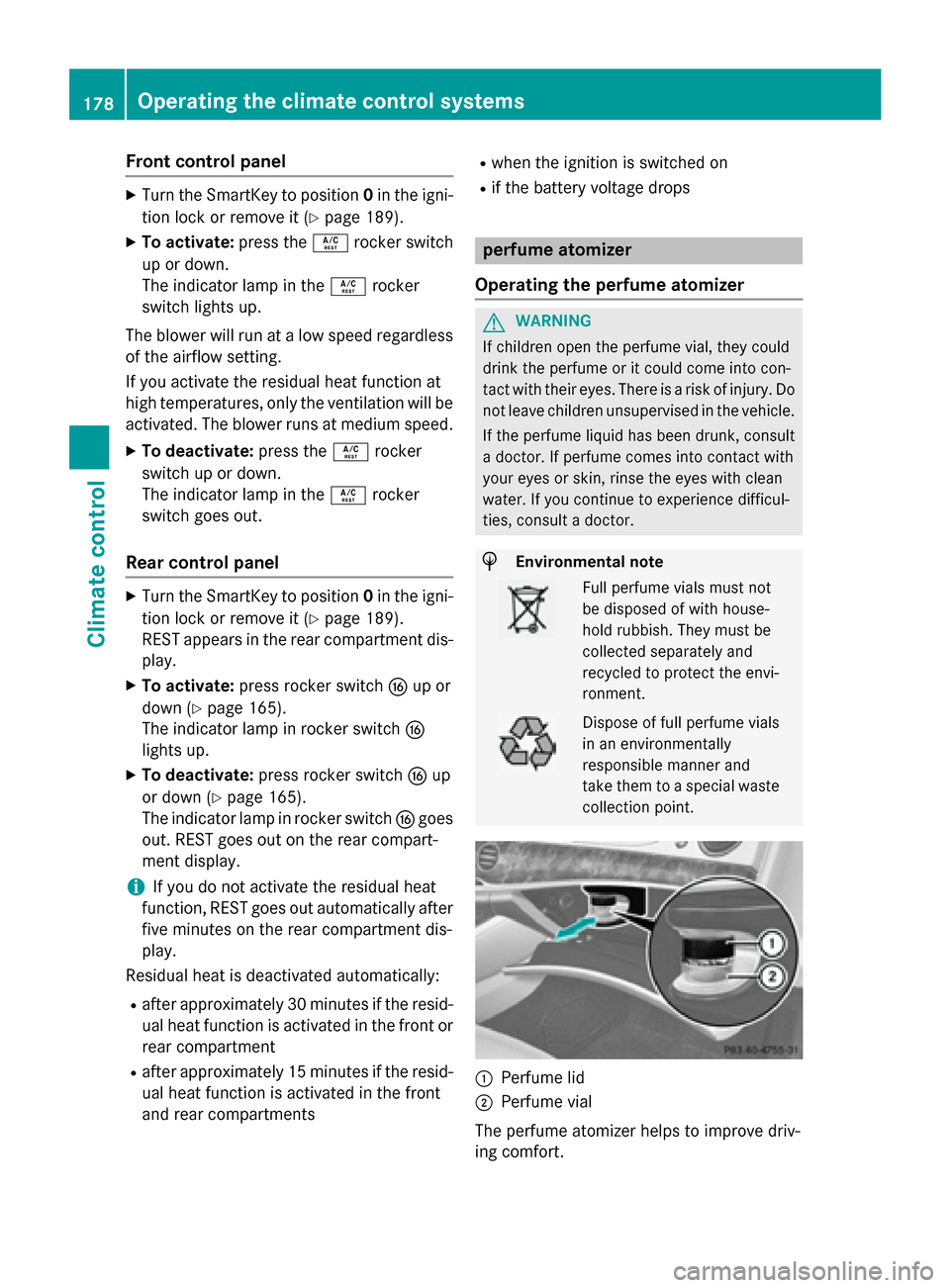
collection point. :
Perfume lid
; Perfume vial
The perfume atomizer helps to improve driv-
ing comfort. 178
Operating the climate control systemsClimate control
Page 181 of 502
Using COMAND, you can:
R switch the perfume atomizer on and off
R regulate the perfume intensity
See the separate operating instructions.
The following conditions can affect your per-
ception of the perfume intensity:
R operating mode of the automatic climate
control
R interior temperature
R time of year/day
R air humidity
R physiological condition of occupants, e.g.
fatigue or hunger
The perfume atomizer can only be operated
when the automatic climate control is
switched on and is only active when the glove box is closed.
The perfume atomizer is provided with a pre-filled perfume vial. You can also choose froma variety of filled perfume vials and an empty
vial which you can fill yourself.
If you refill an empty perfume vial, observe the separate information sheet attached to the
vial.
! If you do not use genuine Mercedes-Benz
interior perfumes, observe the manufactur-
ers' safety notices on the perfume packag- ing.
Do not refill the pre-filled perfume vial when it
is empty. Dispose of the used vial after use.
X To insert the perfume vial: open the glove
box (Y page 373).
X Slide the perfume vial into the holder as far
as it will go.
X To remove the perfume vial: pull out the
perfume vial.
X To refill the perfume vial: unscrew the lid
of the empty perfume vial to refill it your-
self.
X Refill the vial with a maximum of 15 ml of
the desired liquid perfume.
X Screw the lid back on to the vial. !
Only refill the vial when you are outside
the vehicle. Otherwise, liquid perfume
could drip into the interior and contaminate
it.
Always refill the empty refillable vial with the
same perfume. Otherwise, you might not ach-
ieve optimum results from the perfume atom- izer. Operating the climate control systems
179Climate control Z
Page 185 of 502
When the vehicle is heated, the following
functions are activated:
R Climate control system
R Blower
R Seat heating
R Steering wheel heating
R Armrest heating
R Exterior mirror heating
R Rear window defroster
i In contrast to the rest of the climate con-
trol functions, the seat heating/ventilation,
steering wheel heating and armrest heating only switch on if required.
If you have switched on the perfume atomizer or the ionization using COMAND, these will beactivated together with the "Pre-entry climate control at departure time".
Activating the perfume atomizer/ionization
(see separate COMAND operating instruc-
tions).
Setting the departure time You can set the departure time using the
instrument cluster or via the "Vehicle Home-
page" (Y
page 220). The activation of the
"Pre-entry climate control at departure time"
function can be linked to this departure time.
Your vehicle will then be cooled or heated
until the desired temperature is reached in
time for the set departure time. "Pre-entry
climate control at departure time" will be acti- vated a maximum of 55 minutes before
departure. If the departure is delayed, the
vehicle will be heated or cooled for a further
five minutes.
X To set the departure time: set the depar-
ture time via the instrument cluster. To set the departure time via the "Vehicle Home-
page" (Y page 220).
X To activate/deactivate "Pre-entry cli-
mate control at departure time": acti-
vate/deactivate "Pre-entry climate control
at departure time" via COMAND (see sep-
arate operating instructions). To activate/ deactivate the "Pre-entry climate control at
departure time" function via the Vehicle
Homepage (Y page 220).
When activating the "Pre-entry climate con-
trol at departure time" function: you can
select whether only the driver's area or the
whole vehicle interior should be heated or
cooled.
The "Pre-entry climate control at departure
time" function switches off automatically
when the vehicle is started. The following
functions remain active:
R Seat heating
R Seat ventilation
R Armrest heating
R Steering wheel heating
R Perfume atomizer
R Ionization
Switching off "Pre-entry climate control
at departure time": the activated "Pre-entry
climate control at departure time" can be
switched off using the rocker switch
(Y page 183).
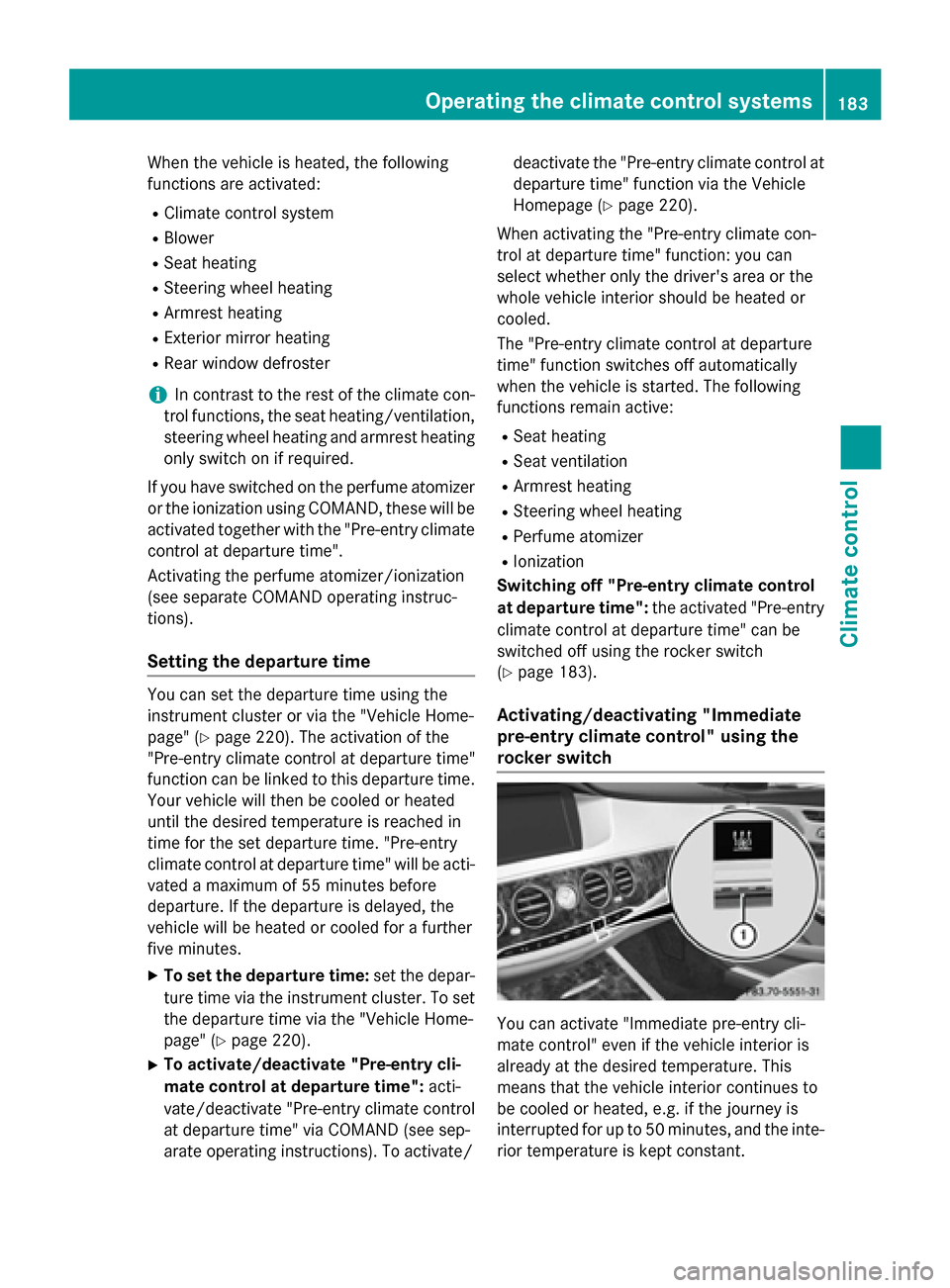
Activating/deactivating "Immediate
pre-entry climate control" using the
rocker switch You can activate "Immediate pre-entry cli-
mate control" even if the vehicle interior is
already at the desired temperature. This
means that the vehicle interior continues to
be cooled or heated, e.g. if the journey is
interrupted for up to 50 minutes, and the inte-
rior temperature is kept constant. Operating the climate control systems
183Climate control Z