2015 MERCEDES-BENZ E-CLASS CABRIOLET instrument cluster
[x] Cancel search: instrument clusterPage 201 of 349
section of road in the wrong direction triggers a
warning. Traffic Sign Assist detects traffic signs with camera system :attached behind the top
of the windscreen. The data and general traffic
regulations stored in the navigation system are
also used to determine the current speed limit.
If a traffic sign that is relevant to your vehicle is passed, the display of the speed limits and over-
taking restrictions is updated.
The display can also be updated without a visible
traffic sign if:
R the vehicle changes roads (e.g. motorway exit
or slip road)
R a village or town boundary is passed which is
stored in the digital map
R the last traffic sign detected by the camera
has not been repeated
If a sign indicating the end of a restriction (speed
limit or overtaking restriction) is passed, the
sign is displayed for five seconds. The currently applicable traffic regulation continues to be
shown in the assistance graphic display.
The camera also detects traffic signs with a
restriction indicated by an additional sign (e.g. in
wet conditions).
The traffic signs are only displayed with the
restrictions if:
R the regulation must be observed with the
restriction, or
R Traffic Sign Assist is unable to determine
whether the restriction applies
If Traffic Sign Assist is unable to determine a
maximum permitted speed from any of the avail- able sources, no speed limit is displayed in the
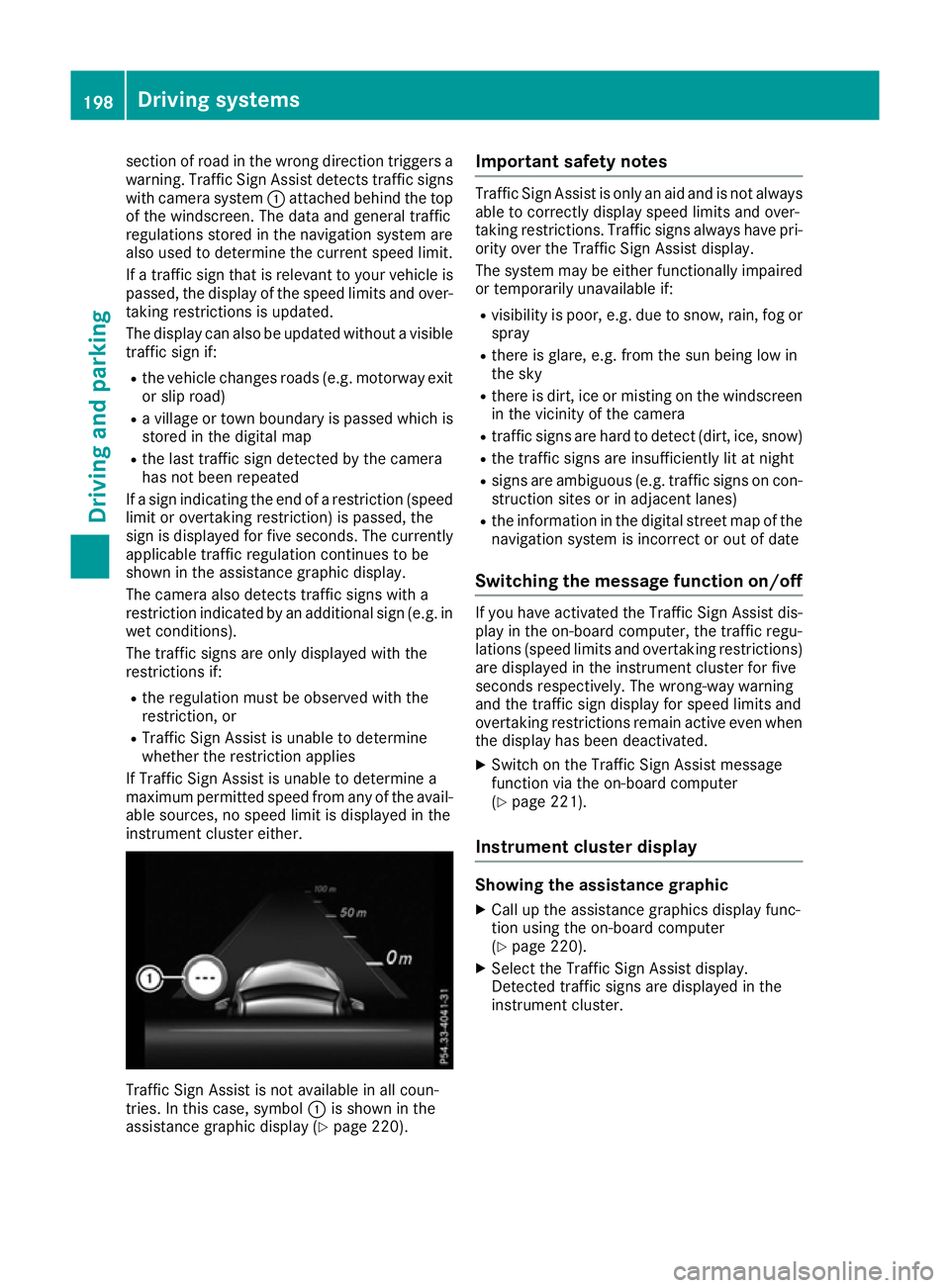
instrument cluster either. Traffic Sign Assist is not available in all coun-
tries. In this case, symbol :is shown in the
assistance graphic display (Y page 220).Important safety notes Traffic Sign Assist is only an aid and is not always
able to correctly display speed limits and over-
taking restrictions. Traffic signs always have pri-
ority over the Traffic Sign Assist display.
The system may be either functionally impaired
or temporarily unavailable if:
R visibility is poor, e.g. due to snow, rain, fog or
spray
R there is glare, e.g. from the sun being low in
the sky
R there is dirt, ice or misting on the windscreen
in the vicinity of the camera
R traffic signs are hard to detect (dirt, ice, snow)
R the traffic signs are insufficiently lit at night
R signs are ambiguous (e.g. traffic signs on con-
struction sites or in adjacent lanes)
R the information in the digital street map of the
navigation system is incorrect or out of date
Switching the message function on/off If you have activated the Traffic Sign Assist dis-
play in the on-board computer, the traffic regu-
lations (speed limits and overtaking restrictions)
are displayed in the instrument cluster for five
seconds respectively. The wrong-way warning
and the traffic sign display for speed limits and
overtaking restrictions remain active even when
the display has been deactivated.
X Switch on the Traffic Sign Assist message
function via the on-board computer
(Y page 221).
Instrument cluster display Showing the assistance graphic
X Call up the assistance graphics display func-
tion using the on-board computer
(Y page 220).
X Select the Traffic Sign Assist display.
Detected traffic signs are displayed in the
instrument cluster. 198
Driving systemsDriving and parking
Page 203 of 349

The speed limit no longer applies
:.
i The unit for the speed limit (km/h or mph)
depends on the country in which you are driv-
ing. It is generally neither shown on the traffic
sign nor on the instrument cluster but must be
taken into account when observing the max-
imum permitted speed.
No entry (wrong-way warning) If no entry signs are passed, a warning message
is displayed in the instrument cluster should
Traffic Sign Assist detect that you are driving in the wrong direction. You will then also hear a
warning tone. You should immediately check
your direction of travel in order to avoid danger
to yourself and other road users.
i This function is not available in all countries. Lane Tracking package
General notes The Lane Tracking package consists of Blind
Spot Assist (Y page 200) and Lane Keeping
Assist (Y page 202).
Blind Spot Assist General notes
Blind Spot Assist uses a radar sensor system to
monitor the areas on both sides of your vehicle.
It supports you from speeds of 30 km/h. A
warning display in the exterior mirrors draws
your attention to vehicles detected in the moni- tored area. If you then switch on the corre-
sponding turn signal to change lanes, you will
also receive an optical and audible collision
warning. For monitoring, Blind Spot Assist uses
sensors in the rear bumper. Important safety notes G
WARNING
Blind Spot Assist does not react to vehicles:
R overtaken too closely on the side, placing
them in the blind spot area
R when the difference in the speed of
approach and overtaking is too great
As a result, Blind Spot Assist cannot warn
drivers in these situations. There is a risk of an accident.
Always pay careful attention to the traffic sit- uation and maintain a safe distance at the side
of the vehicle.
Blind Spot Assist is only an aid. It may fail to
detect some vehicles and is no substitute for
attentive driving. Always ensure that there is
sufficient distance to the side for other road
users and obstacles. Monitoring range of the sensors
In particular, the detection of obstacles can be
impaired in the case of:
R dirt on the sensors or obscured sensors
R poor visibility, e.g. due to fog, heavy rain,
snow or spray
R narrow vehicles, e.g. motorcycles or bicycles
R very wide lanes
R narrow lanes
R vehicles not driving in the middle of their lane
R barriers or other road boundaries
Vehicles in the monitoring range are then not
indicated. 200
Driving systemsDriving and parking
Page 216 of 349

Important safety notes
G
WARNING
Operating the integrated information systems and communications equipment in the vehicle
while driving will distract you from traffic con-
ditions. You could then lose control of the
vehicle. There is a risk of an accident.
Only operate these devices if road traffic con-
ditions permit. If you are unsure about the
surrounding conditions, pull over to a safe
location and make entries only while the vehi-
cle is stationary.
You must observe the legal requirements for the country in which you are currently driving whenoperating the on-board computer. G
WARNING
If the instrument cluster has failed or mal-
functioned, you may not recognise function
restrictions relevant to safety. The operating
safety of your vehicle may be impaired. There is a risk of an accident.
Drive on carefully. Have the vehicle checked
at a qualified specialist workshop immedi-
ately.
The on-board computer only shows messages or warnings from certain systems in the multifunc-tion display. You should therefore make sure
your vehicle is operating safely at all times.
If the operating safety of your vehicle is
impaired, park the vehicle safely as soon as pos- sible. Contact a qualified specialist workshop.
For an overview; see the instrument cluster illus-
tration (Y page 31). Displays and operation
Speedometer with segments
The segments in the speedometer indicate
which speed range is available.
R Cruise control activated (Y page 163):
The segments light up from the stored speed to the type-tested maximum speed.
R Variable SPEEDTRONIC activated
(Y page 165): The segments light up from the start of the
scale to the selected limit speed.
R DISTRONIC PLUS activated (Y page 168):
One or two segments in the set speed range
light up.
R DISTRONIC PLUS detects a vehicle in front:
The segments between the speed of the vehi-
cle in front and the stored speed light up. Rev counter
! Do not drive in the overrevving range. Doing
so will damage the engine.
The red band in the rev counter indicates the
engine's overrevving range.
The fuel supply is interrupted to protect the
engine when the red band is reached. Outside temperature display
You should pay special attention to road condi-
tions when temperatures are around freezing
point.
Bear in mind that the outside temperature dis-
play indicates the measured air temperature
and not the road surface temperature.
The outside temperature display is in the multi-
function display (Y page 215).
The multifunction display shows changes in the
outside temperature with a delay. Coolant temperature gauge
G
WARNING
If you open the bonnet while the engine is
overheating or while there is a fire in the
engine compartment, you could come into
contact with hot gases or other leaking ser-
vice products. There is a danger of injury.
Allow an overheating engine to cool down
before opening the bonnet. If there is a fire in the engine compartment, leave the bonnet
closed and notify the fire brigade.
The coolant temperature gauge is in the instru-
ment cluster on the left-hand side (Y page 31). Displays and operation
213On-board computer and displays Z
Page 224 of 349
The assistance graphic shows you the status
and further information on the following driv-
ing systems or driving safety systems:
R Traffic Sign Assist (Y page 197)
R DISTRONIC PLUS (Y page 168)
R PRE-SAFE ®
Brake (Y page 69)
R COLLISION PREVENTION ASSIST PLUS
(Y page 64)
R ATTENTION ASSIST (Y page 196)
R Lane Keeping Assist (Y page 202)
R Active Lane Keeping Assist (Y page 206)
X Press :to display the ATTENTION ASSIST
assessment.
Traffic Sign Assist You can activate or deactivate the warning func-
tion of Traffic Sign Assist in the Traffic
Traffic Sign Sign
Assist
Assist menu. When the message function is
activated, detected traffic signs and information appear in the multifunction display for five sec-
onds.
X Press the =or; button on the steering
wheel to select the Assist.
Assist.menu.
X Using 9or:, select Traffic Sign
Traffic Sign
Assist
Assist.
X Press ato confirm.
The current selection appears.
X To activate/deactivate the message func-
tion: press aagain.
Further information about Traffic Sign Assist
(Y page 197).
Deactivating/activating ESP ®i
Observe the important safety notes on ESP ®
(Y page 67). G
WARNING
If you deactivate ESP ®
, ESP ®
no longer sta-
bilises the vehicle. There is an increased risk
of skidding and an accident.
Only deactivate ESP ®
in the situations descri-
bed in the following.
It may be best to deactivate ESP ®
in the follow-
ing situations:
R when using snow chains
R in deep snow
R on sand or gravel For further information about ESP
®
, see
(Y page 67).
X Start the engine.
X Press the =or; button on the steering
wheel to select the Assist.
Assist. menu.
X Press 9or: to select ESP ESP.
X Press ato confirm.
The current selection appears.
X To activate/deactivate: pressaagain.
ESP ®
is deactivated if the åwarning lamp in
the instrument cluster lights up continuously
when the engine is running.
If the ÷ warning lamp and the åwarning
lamp are lit continuously, ESP ®
is not available
due to a malfunction.
Observe the information on warning lamps
(Y page 256).
Observe the information on display messages
(Y page 230).
Activating/deactivating PRE-SAFE ®
Brake PRE
‑SAFE ®
Brake is only available for vehicles
with the Driving Assistance package.
X Press the =or; button on the steering
wheel to select the Assist. Assist.menu.
X Press the 9or: button to select PRE-
PRE-
SAFE Brake
SAFE Brake.
X Press ato confirm.
The current selection appears.
X To activate/deactivate: press theabut-
ton again.
When PRE-SAFE ®
Brake is deactivated, the
assistance graphic shows the æsymbol in
the multifunction display.
For more information on PRE ‑SAFE®
Brake, see
(Y page 69).
Activating/deactivating COLLISION
PREVENTION ASSIST PLUS X
Press the =or; button on the steering
wheel to select the Assist. Assist.menu.
X Press the 9or: button to select Col‐
Col‐
lision Prevent.
lision Prevent.. Menus and submenus
221On-board computer and displays Z
Page 226 of 349
R
Checking the tyre pressure electronically
(Y page 326)
R Calling up the service due date
(Y page 294) Settings menu
Introduction Depending on the equipment fitted in the vehi-
cle, In the
Settings Settings menu you have the follow-
ing options:
R Changing the instrument cluster settings
(Y page 223)
R Changing the light settings (Y page 223)
R Changing the vehicle settings (Y page 225)
R Changing the heating settings (Y page 226)
R Changing the convenience settings
(Y page 227)
R Restoring the factory settings (Y page 228)
Instrument cluster Selecting the distance unit
The Display unit Speed-/odometer:
Display unit Speed-/odometer: func-
tion allows you to choose whether certain dis-
plays appear in kilometres or miles in the mul-
tifunction display.
X Press the =or; button on the steering
wheel to select the Settings Settingsmenu.
X Press the :or9 button to select the
Instrument cluster
Instrument cluster submenu.
X Press ato confirm.
X Press the :or9 button to select the
Display unit Speed-/odometer
Display unit Speed-/odometer function.
You will see the selected setting: km
kmormiles
miles.
X Press the abutton to save the setting.
The selected unit of measurement for distance
applies to the: R the digital speedometer in the Trip
Trip menu
R the total distance recorder and trip meter
R the trip computer
R the current consumption and the range
R the navigation instructions in the Navi
Navi menu
R cruise control
R SPEEDTRONIC
R DISTRONIC PLUS
R ASSYST PLUS service interval display Switching the additional speedometer
on/off
Vehicles for the United Kingdom: this function is unavailable.
Only vehicles with manual transmission have
this function.
If the additional speedometer is switched on,
the speed is shown in the status bar of the mul-tifunction display instead of the outside tem-
perature.
The speed display is inverse to your speedome-
ter.
X Press the =or; button on the steering
wheel to select the Sett.
Sett. menu.
X Press the :or9 button to select the
Instrument cluster Instrument cluster submenu.
X Press ato confirm.
X Press the :or9 button to select the
Dig. speedo [mph]:
Dig. speedo [mph]: orDig. speedo
Dig. speedo
[km/h]:
[km/h]: function.
You will see the selected setting: on
on oroff
off .
X Press the abutton to save the setting.
Selecting permanent display
Vehicles for the United Kingdom: this function is unavailable.
The Permanent display: Permanent display: function allows you
to choose whether the multifunction display
always shows the outside temperature or the
speed.
The speed display is inverse to your speedome-
ter.
X Press the =or; button on the steering
wheel to select the Settings Settingsmenu.
X Press the :or9 button to select the
Instrument cluster
Instrument cluster submenu.
X Press ato confirm.
X Press the :or9 button to select the
Permanent display:
Permanent display: function.
The current setting, outside temperature
outside temperature
or Addit. speedo [mph]:
Addit. speedo [mph]: , appears.
X Press the abutton to save the setting.
Lights Setting the brightness for the instrument
cluster lighting and switches
The lighting in the instrument cluster, in the dis- plays and the controls in the vehicle interior can Menus and submenus
223On-board computer and displays Z
Page 227 of 349

be adjusted with the
Brightness Display/
Brightness Display/
switches:
switches: function.
X Press the =or; button on the steering
wheel to select the Settings
Settings menu.
X Press the :or9 button to select the
Lights
Lights submenu.
X Press ato confirm.
X Press the :or9 button to select the
Brightness Display/switches:
Brightness Display/switches: function.
The current setting appears.
X Press ato confirm.
X Press the :or9 button to adjust the
brightness to any level from Level 1
Level 1 to
Level 5
Level 5 (bright).
X Press the aor% button to save the
setting.
If the light switch is set to the Ã,Tor
L position, the brightness is dependent
upon the brightness of the ambient light.
i The light sensor in the instrument cluster
automatically controls the brightness of the
multifunction display.
In daylight, the displays in the instrument
cluster are not illuminated.
Switching the daytime driving lights
on/off
X Press the =or; button on the steering
wheel to select the Settings
Settings menu.
X Press the :or9 button to select the
Lights
Lights submenu.
X Press ato confirm.
X Press the :or9 button to select the
Day lights
Day lights function.
If the Day Daylights
lights function has been switched
on, the cone of light and the Wsymbol in
the multifunction display are shown in
orange.
X Press the abutton to save the setting.
Further information on daytime driving lights
(Y page 114).
Switching the Intelligent Light System
on/off
X Press the =or; button on the steering
wheel to select the Settings Settingsmenu.
X Press the :or9 button to select the
Lights Lights submenu.
X Press ato confirm. X
Press the :or9 button to select the
Intell. Light System
Intell. Light System function.
If the Intell. Light Sys. Intell. Light Sys. function has
been switched on, the cone of light and the
L symbol in the multifunction display are
shown in orange.
X Press the abutton to save the setting.
When you switch the Intell. Light Sys. Intell. Light Sys.
function on, you activate the following func-
tions:
R Motorway mode
R Active light function
R Cornering light function
R Extended range foglamps
If you set the dipped-beam headlamps for driv-
ing on the right/left, the multifunction display
shows the Intell. Light System: system
Intell. Light System: system
inoperative Inactive for left-side inoperative Inactive for left-side
traffic traffic orIntell.
Intell. Light
LightSystem:
System: system
system
inoperative Inactive for right-side
inoperative Inactive for right-side
traffic traffic display message instead of the
Intell.
Intell. Light
LightSystem
System function in the Lights
Lights
submenu (Y page 224). This display message
will only appear if the setting for driving on the
left/right is set opposite to your vehicle's coun-
try version.
Observe the additional information on the Intel-
ligent Light System (Y page 116).
Setting the dipped-beam headlamps for
driving on the left/right
This function is only available in vehicles with
the Intelligent Light System.
You can use this function to switch between
symmetrical and asymmetrical dipped beam
(Y page 114).
X Press the =or; button on the steering
wheel to select the Settings Settingsmenu.
X Press the :or9 button to select the
Lights
Lights submenu.
X Press ato confirm.
X Press the :or9 button to select the
Dipped beams Setting for:
Dipped beams Setting for: function.
You will see the selected setting: Right-
Right-
side traffic
side traffic orLeft-side traffic
Left-side traffic.
X Press the abutton to save the setting.
If you change the setting, conversion does not
take place until the next time the vehicle is
stationary.
If you set the dipped-beam headlamps for driv-
ing on the right/left, then motorway mode and 224
Menus and submenusOn-board computer and displays
Page 233 of 349

Safety systems
Display messages
Possible causes/consequences and
M
MSolutions !÷
currently unavaila‐
currently unavaila‐
ble ble See
SeeOwner's
Owner's Man‐
Man‐
ual
ual ABS (Anti-lock Braking System) and ESP
®
(Electronic Stability Pro-
gram) are temporarily unavailable.
Other driving and driving safety systems may also be faulty.
In addition, the ÷,åand! warning lamps light up in the
instrument cluster.
For example, the on-board voltage may be insufficient.
G WARNING
The brake system continues to function normally, but without the
functions listed above. The wheels could therefore lock if you brake
hard, for example.
The steerability and braking characteristics may be severely affected. The braking distance may increase in an emergency braking situation.
If ESP ®
is not operational, ESP ®
is unable to stabilise the vehicle.
There is an increased danger of skidding and risk of an accident.
X Drive on carefully.
If the display message disappears, the functions mentioned above
are available again.
If the multifunction display still shows the display message: X Drive on carefully.
X Consult a qualified specialist workshop immediately. !÷
inoperative inoperative See SeeOwn‐
Own‐
er's Manual
er's Manual ABS and ESP
®
are faulty.
Other driving and driving safety systems may also be faulty.
In addition, the J,÷, åand! warning lamps light up in
the instrument cluster.
G WARNING
The brake system continues to function normally, but without the
functions listed above. The wheels could therefore lock if you brake
hard, for example.
The steerability and braking characteristics may be severely affected. The braking distance may increase in an emergency braking situation.
If ESP ®
is not operational, ESP ®
is unable to stabilise the vehicle.
There is an increased danger of skidding and risk of an accident.
X Drive on carefully.
X Consult a qualified specialist workshop immediately. 230
Display messagesOn-board computer and displays
Page 234 of 349

Display messages
Possible causes/consequences and
M
MSolutions ÷
inoperative inoperative
See
SeeOwn‐
Own‐
er's Manual
er's Manual ESP
®
is faulty.
Other driving and driving safety systems may also be faulty.
In addition, the ÷andå warning lamps light up in the instru-
ment cluster.
The self-diagnosis function, for example, may not be complete.
G WARNING
The brake system continues to function normally, but without the
functions listed above.
The braking distance may thus increase in an emergency braking sit-
uation.
If ESP ®
is not operational, ESP ®
is unable to stabilise the vehicle.
There is an increased danger of skidding and risk of an accident.
X Drive on carefully.
X Consult a qualified specialist workshop immediately. T!
÷
inoperative inoperative See SeeOwn‐
Own‐
er's Manual
er's Manual EBD (electronic brake force distribution), ABS and ESP
®
are faulty.
Other driving and driving safety systems may also be faulty.
In addition, the ÷,åand! warning lamps light up in the
instrument cluster and a warning tone sounds.
G WARNING
The brake system continues to function normally, but without the
functions listed above. The front and rear wheels could therefore lock, for example, if you brake hard.
The steerability and braking characteristics may be severely affected.The braking distance may increase in an emergency braking situation.
If ESP ®
is not operational, ESP ®
is unable to stabilise the vehicle.
There is an increased danger of skidding and risk of an accident.
X Drive on carefully.
X Consult a qualified specialist workshop immediately. J
Brake immediately Brake immediately A malfunction has occurred while the HOLD function is active.
or
With the HOLD function activated, you have:
R opened the driver's door and released the seat belt or
R switched off the engine
A tone may also sound at regular intervals. If you attempt to lock the
vehicle, the tone becomes louder.
You cannot start the engine.
X Paying attention to the traffic situation, immediately depress the
brake pedal firmly and hold until the display message disappears.
X Safeguard the vehicle against rolling away (Y page 157).
You can restart the engine. Display
messages
231On-board computer and displays Z