2015 MERCEDES-BENZ E-CLASS CABRIOLET lock
[x] Cancel search: lockPage 15 of 349

Coolan
t.......................................... 259
Engine diagnostics ......................... 259
Indicator lamps
Display message ............................ 236
see Warning and indicator lamps
Indicators
see Turn signals
Insect protection on the radiator .... 291
Instrument cluster
Overview .......................................... 31
Setting s......................................... 223
Warning and indicator lamps ........... 31
Instrument cluster lighting .............. 223
Intelligent Light System
Activating/deactivating ................. 224
Display message ............................ 236
Overview ........................................ 116
Setting the dipped-beam head-
lamps for driving on the right/left .. 224
Interior lighting
Automatic control system .............. 118
Delayed switch-off (on-board
computer) ...................................... 225
Overview ........................................ 118
Reading lamp ................................. 118
Setting brightness for display/
switches (on-board computer) ....... 223
Interior motion sensor
Deactivating ..................................... 73
Function ........................................... 72
Priming ............................................ 73
Switching off .................................... 73
iPod ®
See also Digital Owner's Manua l... 263
ISOFIX child seat securing system .... 51J
Jack Storage location ............................ 305
Using ............................................. 330
Jump starting (engine) ...................... 313K
Key Changing the battery ....................... 77
Checking the battery ....................... 77 Display message ............................ 252
Door central locking/unlocking ....... 74
Emergency key element ................... 76
Important safety notes .................... 74
Loss ................................................. 79
Modifying the programming ............. 76
Opening/closing soft top ................. 90
Overview .......................................... 74
Positions (ignition lock) ................. 139
Problem (malfunction) ..................... 79
Starting the engine ........................ 141
Key positions
Key ................................................ 139
KEYLESS GO .................................. 139
KEYLESS-GO
Deactivation ..................................... 75
Display message ............................ 253
Locking ............................................ 75
Removing the Start/Stop button ... 140
Start/Stop button .......................... 139
Starting the engine ........................ 141
Unlocking ......................................... 75
Kickdown
Driving tips .................................... 150
Manual drive progra m.................... 153
Kneebag ............................................... 43 L
Lamps see Warning and indicator lamps
Lane Keeping Assist
Activating/deactivating ................. 222
Display message ............................ 242
Function/information .................... 202
Lane package ..................................... 200
Lashing eyelets ................................. 276
Licence plate lamp (display mes-
sage) ................................................... 236
Light sensor (display message) ....... 237
Lighting
see Lights
Lights
Activating/deactivating the Intel-
ligent Light System ........................ 224
Activating/deactivating the inte-
rior lighting delayed switch-off ....... 225
Active light function ....................... 117 12
Index
Page 16 of 349

Adaptive Highbeam Assist PLUS .... 117
Automatic headlamp mode ............ 114
Cornering light function ................. 117
Dipped-beam headlamps ............... 115
Driving abroad ............................... 114
Foglamps (extended range) ........... 117
Hazard warning lamps ..................
.116
Headlamp flasher ........................... 116
Light switch ................................... 114
Main-beam headlamps ................... 116
Motorway mode ............................ .117
Parking lamps ................................ 115
Rear foglamp ................................. 115
Setting brightness for display/
switches (on-board computer) ....... 223
Side lamps ..................................... 115
Switching the daytime driving
lights on/off (on-board com-
puter) ............................................. 224
Switching the exterior lighting
delayed switch-off on/off (on-
board computer) ............................ 225
Switching the surround lighting
on/off (on-board computer) .......... 225
Turn signals ................................... 116
see Interior lighting
see Replacing bulbs
LIM indicator lamp
Cruise control ................................ 163
DISTRONIC PLUS ........................... 169
Variable SPEEDTRONIC ................. 166
Limiting the speed
see SPEEDTRONIC
LINGUATRONIC
see Separate operating instructions
Loading guidelines ............................ 272
Locking
see Central locking
Locking (doors)
Automatic ........................................ 82
Emergency locking ........................... 82
From inside (central locking but-
ton) ................................................. .81
Locking centrally
see Central locking
Locking verification signal (on-
board computer) .............................. .226 Luggage cover
see Boot separator
Lumbar support
Adjusting the 4-way lumbar sup-
port ................................................ 104 M
M+S tyres .......................................... .323
Main-beam headlamps
Adaptive Highbeam Assist PLUS .... 117
Changing bulbs .............................. 120
Display message ............................ 236
Switching on/off ........................... 116
Maintenance
see ASSYST PLUS
Manual transmission
Engaging reverse gear ................... 146
Gear leve r...................................... 146
Pulling away ................................... 141
Shift recommendation ................... 147
Starting the engine ........................ 141
Matt finish (cleaning instructions) .. 297
Media Interface
USB port in the armrest of the
centre console ............................... 274
see Separate operating instructions
Memory card (audio) ......................... 218
Memory function ............................... 112
Mercedes-Benz Contact
Display message ............................ 232
Mercedes-Benz emergency call
system
Switch in the overhead control
panel .............................................. 281
Mercedes-Benz Intelligent Drive
360°camera .................................. 192
Active Blind Spot Assist ................. 203
Active Lane Keeping Assist ............ 206
Active Parking Assist ..................... 183
ATTENTION ASSIST ........................ 196
Blind Spot Assist ............................ 200
Cruise control ................................ 163
DISTRONIC PLUS ........................... 168
DISTRONIC PLUS with Steering
Assist and Stop&Go Pilot ............... 176
General notes ................................ 162
Lane Keeping Assist ...................... 202 Index
13
Page 21 of 349
Skibag
................................................ 275
SMS
See also Digital Owner's Manual ... 263
Snow chains ...................................... 324
Sockets
General notes ................................ 280
Rear compartment .........................2 81
Soft top
AIRCAP ............................................ 95
Cleaning ......................................... 298
Closing manually in an emer-
gency ............................................... 90
Display message ............................ 252
Draught stop ................................... .94
Fitting/removing the AIRCAP
draught stop .................................... 96
Important safety notes .................... 88
Opening/closing (with key) .............. 90
Opening/closing (with soft-top
switch) ............................................. 89
Problem (malfunction) ..................... 98
Re-locking ........................................ 94
Soft-top switch .................................... 89
Sound
Switching on/off ........................... 264
Specialist workshop ............................ 27
Speed, controlling
see Cruise control
Speedometer
Activating/deactivating the addi-
tional speedometer ........................ 223
Digital ............................................ 216
In the Instrument cluster ................ .31
Segments ...................................... 213
Selecting a display uni t.................. 223
SPEEDTRONIC
Deactivating variable ..................... 167
Display message ............................ 244
Function/note s............................. 165
Important safety notes .................. 165
LIM indicator lamp ......................... 166
Permanent ..................................... 168
Selecting ........................................ 166
Storing the current speed .............. 166
Variabl e......................................... 166
Start/stop function
see ECO start/stop function Starting (engine)
................................ 140
STEER CONTROL .................................. 71
Steering
Display message ............................ 251
Steering Assist and Stop&Go Pilot
(DISTRONIC PLUS)
Activating/deactivating ................. 222
Display message ............................ 245
Steering assistant STEER CON-
TROL
see STEER CONTROL
Steering wheel
Adjusting (electrically) ................... 107
Adjusting (manually) ...................... 107
Button overview ............................... 32
Buttons (on-board computer) ......... 214
Cleaning ......................................... 302
Gearshift paddle s........................... 151
Important safety notes .................. 106
Steering wheel heating .................. 107
Storing settings (memory func-
tion) ............................................... 112
Steering wheel gearshift paddles .... 151
Steering wheel heating
Problem (malfunction) ................... 109
Switching on/of f........................... 107
Stowage areas ................................... 272
Stowage compartments
Armrest (under) ............................. 274
Centre console .............................. 273
Cup holde r..................................... 277
Glove compartment ....................... 273
Important safety information ......... 272
Under driver's seat/front-
passenger sea t.............................. 274
Stowage net ....................................... 274
Stowage space
Stowage net ................................... 274
Stowage well beneath the boot
floor .................................................... 277
Summer tyres .................................... 323
Sun visor ............................................ 279
Surround lighting (on-board com-
puter) .................................................. 225
Switching on media mode
Via the device list .......................... 270 18
Index
Page 23 of 349
Trailer
Folding the ball coupling in/out ..... 210
Trailer coupling
see Towing a trailer
Trailer towing
7-pin connector ............................. 212
Blind Spot Assist ............................ 202
Cleaning the trailer tow hitch ......... 301
Coupling up a traile r...................... 211
Decoupling a trailer ....................... 211
Driving tips .................................... 209
Folding in the ball coupling ............ 211
Folding out the ball coupling .......... 210
Important safety notes .................. 208
Lights display message .................. 236
Mounting dimensions .................... 343
Parktronic ...................................... 181
Power supply ................................. 211
Trailer load s................................... 344
Transmission
see Automatic transmission
see Manual transmission
Transmission position display ......... 147
Transmission position display
(DIRECT SELECT lever) ...................... 147
Transporting the vehicle .................. 317
Trim pieces (cleaning instruc-
tions) .................................................. 302
Trip computer (on-board com-
puter) .................................................. 216
Trip meter
Calling up ....................................... 215
Resetting (on-board computer) ...... 216
Turn signals
Switching on/of f........................... 116
TV
Operating (on-board computer) ..... 219
see Separate operating instructions
Two-way radio
Frequencies ................................... 335
Installation ..................................... 335
Transmission output (maximum) .... 335
Type identification plate
see Vehicle identification plate
Tyre changing tool kit ....................... 305
Tyre inflation compressor
see TIREFIT kit Tyre pressure
Calling up (on-board computer) ..... 326
Display message ............................ 246
Not reached (TIREFIT) .................... 309
Reached (TIREFIT) .......................... 309
Recommended ............................... 324
Tyre pressure loss warning
General notes ................................ 325
Important safety notes .................. 326
Restarting ...................................... 326
Tyre pressure monitor
Checking the tyre pressure elec-
tronically ........................................ 327
Function/note s............................. 326
General notes ................................ 326
Important safety notes .................. 327
Restarting ...................................... 328
Warning lamp ................................. 262
Warning message .......................... 328
Tyres
Changing a whee l.......................... 328
Checking ........................................ 321
Direction of rotation ...................... 329
Display message ............................ 246
Important safety notes .................. 321
Information on driving .................... 321
MOExtended tyre s......................... 323
Replacing ....................................... 329
Service life ..................................... 322
Storing ........................................... 329
Tyre size (data ).............................. 333
Tyre tread ...................................... 322
Wheel and tyre combinations ........ 333
see Flat tyre U
Unlocking Emergency unlocking ....................... 82
From inside the vehicle (central
unlocking button) ............................. 81
USB devices
Connecting to the Media Inter-
face ............................................... 271 V
Vanity mirror (in sun visor) .............. 27920
Index
Page 24 of 349
Variable SPEEDTRONIC
see SPEEDTRONIC
Vehicle
Correct use ...................................... 27
Data acquisition ............................... 27
Display message ............................ 248
Electronics ..................................... 335
Equipment ....................................... 25
Implied warranty .............................. 27
Individual settings .......................... 223
Leaving parked up ......................... 159
Locking (in an emergency) ............... 82
Locking (key) ................................... 74
Lowering ........................................ 332
Pulling away ................................... 141
Raising ........................................... 330
Registration ..................................... 27
Securing from rolling away ............ 330
Tow-starting ................................... 315
Towing away .................................. 315
Transporting .................................. 317
Unlocking (in an emergency) ........... 82
Unlocking (key) ................................ 74
Vehicle data ................................... 342
Vehicle data ....................................... 342
Vehicle dimensions ........................... 342
Vehicle emergency locking ................ 82
Vehicle identification number
see VIN
Vehicle identification plate .............. 336
Vehicle tool kit .................................. 305
Video
Operating the DVD ......................... 218
See also Digital Owner's Manua l... 263
VIN
Seat ............................................... 337
Type plate ...................................... 336 W
Warning and indicator lamps ABS ................................................ 256
Brakes ........................................... 255
Distance warning signal ................. 261
ESP ®
.............................................. 256
ESP ®
OFF ....................................... 257
Fuel tank ........................................ 259
General notes ................................ 253 LIM (cruise control) ........................ 163
LIM (DISTRONIC PLUS) .................. 169
LIM (variable SPEEDTRONIC) ......... 166
Overview .......................................... 31
PASSENGER AIR BAG OFF ............... 38
Reserve fue l................................... 259
Seat belt ........................................ 254
Tyre pressure monitor ................... 262
Warning triangle ................................ 304
Washer fluid
Display message ............................ 252
Wheel and tyre combinations
Tyres .............................................. 333
Wheel bolt tightening torque ........... 332
Wheel chock ...................................... 330
Wheels
Changing a whee l.......................... 328
Changing/replacing ....................... 329
Checking ........................................ 321
Cleaning ......................................... 299
Emergency spare wheel ................. 333
Fitting a new wheel ........................ 332
Fitting a wheel ............................... 329
Important safety notes .................. 321
Information on driving .................... 321
Removing a whee l.......................... 331
Storing ........................................... 329
Tightening torque ........................... 332
Wheel size/tyre size ...................... 333
Wind deflector (cleaning instruc-
tions) .................................................. 298
Windows
Cleaning ......................................... 299
see Side windows
Windscreen
Demisting ...................................... 129
Windscreen washer fluid
see Windscreen washer system
Windscreen washer system
Important safety notes .................. 342
Topping up ..................................... 293
Windscreen wipers
Problem (malfunction) ................... 122
Replacing the wiper blades ............ 120
Switching on/of f........................... 120
Winter operation
Important safety notes .................. 323
Radiator cover ............................... 291 Index
21
Page 29 of 349

Always have work on electrical and electronic
components carried out at a qualified special-ist workshop.
If you make any changes to the vehicle elec-
tronics, the general operating permit is ren-
dered invalid.
! There is a risk of damage to the vehicle if:
R the vehicle becomes stuck, e.g. on a high
kerb or an unpaved road
R you drive too fast over an obstacle, e.g. a
kerb or a pothole in the road
R a heavy object strikes the underbody or
parts of the chassis
In situations like this, the body, the under-
body, chassis parts, wheels or tyres could be
damaged without the damage being visible.
Components damaged in this way can unex-
pectedly fail or, in the case of an accident, no
longer withstand the strain they are designed for.
If the underbody panelling is damaged, com-
bustible materials such as leaves, grass or
twigs can gather between the underbody and
the underbody panelling. If these materials
come in contact with hot parts of the exhaust
system, they can catch fire.
In such situations, have the vehicle checked
and repaired immediately at a qualified spe-
cialist workshop. If, upon continuing your
journey, you notice that driving safety is
impaired, pull over and stop the vehicle imme- diately, paying attention to road and traffic
conditions. In such cases, consult a qualified
specialist workshop. Declarations of conformity
Wireless vehicle components The following information applies to all compo-
nents of the vehicle and the information sys-
tems and communication devices integrated
into the vehicle which receive and/or transmit
radio waves:
The components of this vehicle that receive
and/or transmit radio waves are compliant with
the basic requirements and all other relevant
conditions of Directive 1999/5/EC. You can
obtain further information from any Mercedes-
Benz Service Centre. Electromagnetic compatibility The electromagnetic compatibility of the vehicle
components has been checked and certified
according to the currently valid version of Reg-
ulation ECE-R 10. Diagnostics connection
The diagnostics connection is only intended for the connection of diagnostic equipment at a
qualified specialist workshop. G
WARNING
If you connect equipment to a diagnostics
connection in the vehicle, it can affect the
operation of the vehicle systems. This may
affect the operating safety of the vehicle.
There is a risk of an accident.
Do not connect any equipment to a diagnos-
tics connection in the vehicle. G
WARNING
Objects in the driver's footwell may restrict
the clearance around the pedals or block a
depressed pedal. This jeopardises the oper-
ating and road safety of the vehicle. There is a risk of an accident.
Stow all objects securely in the vehicle so that
they do not get into the driver's footwell.
Always fit the floormats securely and as pre-
scribed in order to ensure that there is always sufficient room for the pedals. Do not use
loose floormats and do not place several floor-mats on top of one another.
! If the engine is switched off and equipment
on the diagnostics connection is used, the
starter battery may discharge.
Connecting equipment to the diagnostics con-
nection can lead to emissions monitoring infor-
mation being reset, for example. This may lead
to the vehicle failing to meet the requirements of
the next emissions test during the main inspec- tion. 26
Operating safetyIntroduction
Page 32 of 349
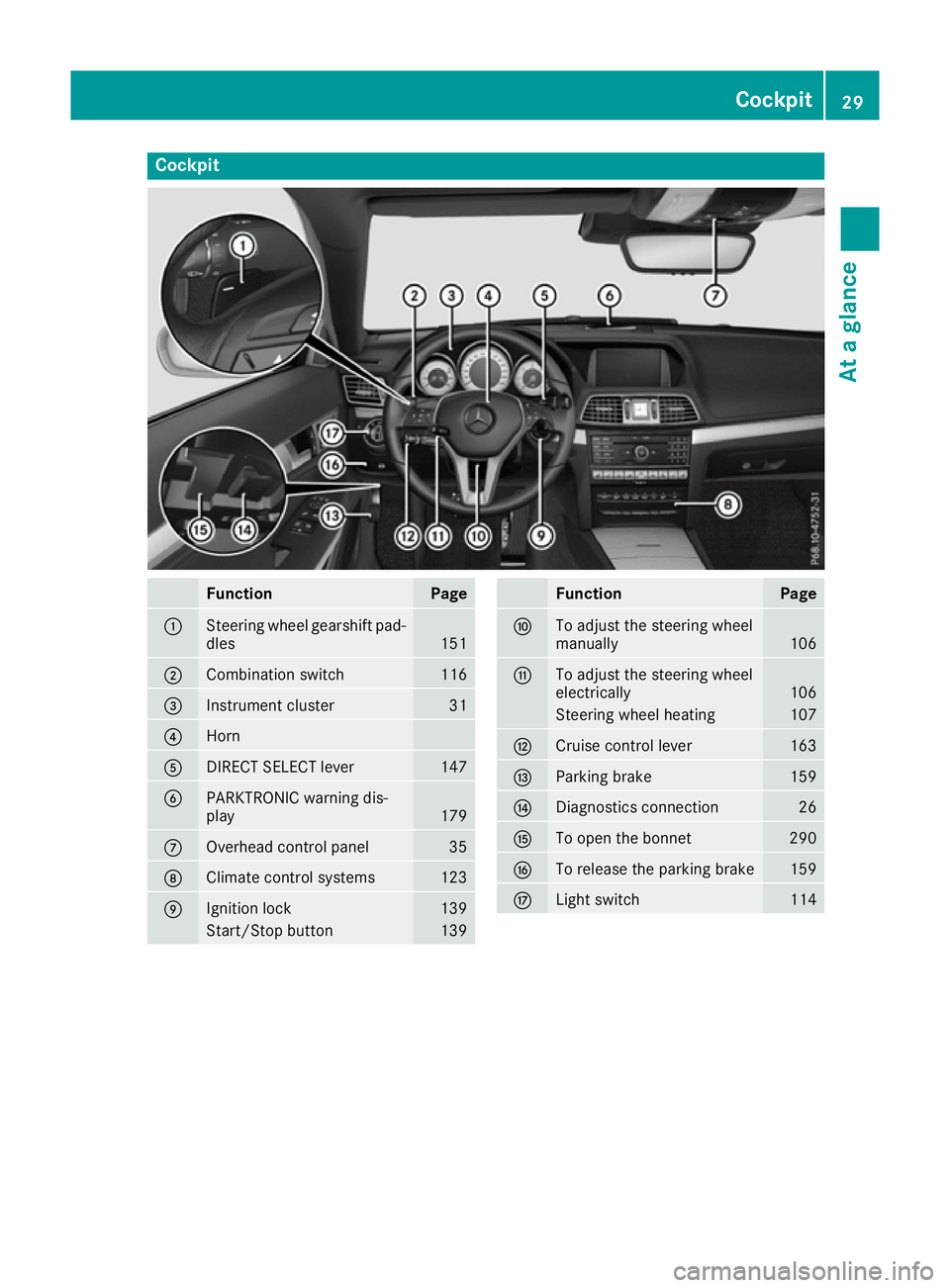
Cockpit
Function Page
:
Steering wheel gearshift pad-
dles 151
;
Combination switch 116
=
Instrument cluster 31
?
Horn
A
DIRECT SELECT lever 147
B
PARKTRONIC warning dis-
play
179
C
Overhead control panel 35
D
Climate control systems 123
E
Ignition lock 139
Start/Stop button 139 Function Page
F
To adjust the steering wheel
manually
106
G
To adjust the steering wheel
electrically
106
Steering wheel heating 107
H
Cruise control lever 163
I
Parking brake 159
J
Diagnostics connection 26
K
To open the bonnet 290
L
To release the parking brake 159
M
Light switch 114Cockpit
29At a glance
Page 33 of 349
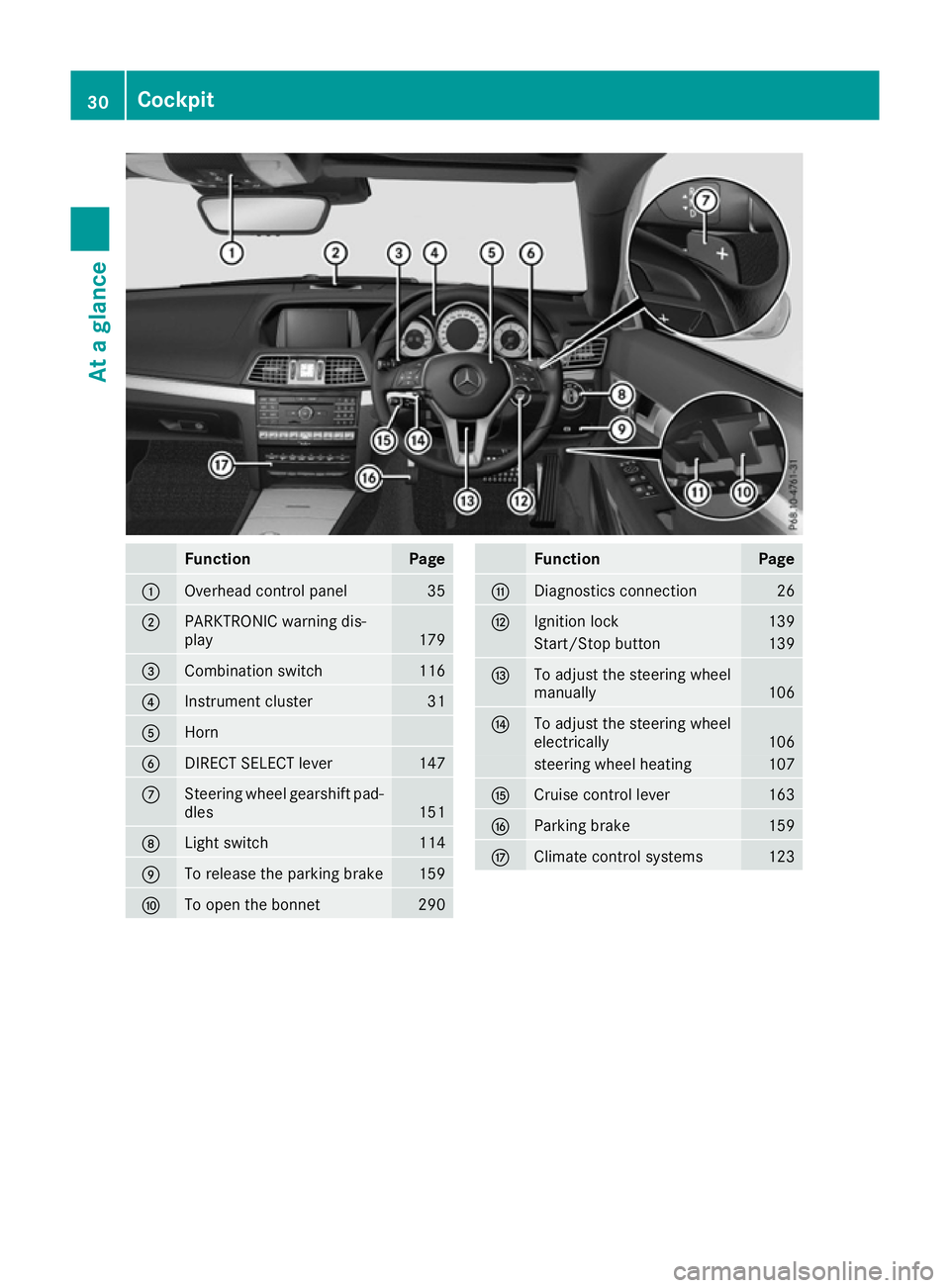
Function Page
:
Overhead control panel 35
;
PARKTRONIC warning dis-
play
179
=
Combination switch 116
?
Instrument cluster 31
A
Horn
B
DIRECT SELECT lever 147
C
Steering wheel gearshift pad-
dles 151
D
Light switch 114
E
To release the parking brake 159
F
To open the bonnet 290 Function Page
G
Diagnostics connection 26
H
Ignition lock 139
Start/Stop button 139
I
To adjust the steering wheel
manually
106
J
To adjust the steering wheel
electrically
106
steering wheel heating 107
K
Cruise control lever 163
L
Parking brake 159
M
Climate control systems 12330
CockpitAt a glance