2015 MERCEDES-BENZ B-CLASS HATCHBACK ECU
[x] Cancel search: ECUPage 138 of 293

To avoid hazardous situations, observe the
following:
R Only connect the charging cable to a wall-
box:
- which has been properly installed and
- which has been inspected by a qualified
electrician
R For safety reasons, only use charging
cables that have been tested and approved
by the manufacturer for charging the high-
voltage battery in an electric vehicle.
R Never use damaged charging cables.
R Do not extend the charging cable.
R Never use adapters.
R Observe the safety notes in the operating
instructions for the wallbox.
The vehicle's high-voltage electrical system is
under high voltage.
R Do not handle high-voltage components or
the orange cables of the vehicle's high-volt-
age electrical system.
R Do not touch high-voltage components or the
orange cables of the high-voltage electrical
system when a vehicle has been involved in a
crash.
R Do not touch any damaged components or
damaged orange cables of the vehicle's high-
voltage electrical system.
R Do not remove the covers of the high-voltage
electrical system components that are
marked with a warning sticker. Notes on the charging cable
Handling the charging cable and charg-
ing cable controls Do not leave the charging cable controls
(Y page 140) hanging loose from a mains
socket. Otherwise, this could result in a poor
contact with the mains socket and malfunctions
when charging the vehicle. To ensure that the brackets within the charging
cable controls are not subjected to incorrect
loads, observe the following:
R never lift or carry the controls by the charging
cable connector or the mains plug
R to transport the charging cable, the coiled
part can be:
- wrapped around the controls or
- secured to the housing of the controls
Heat generated by the charging cable
and charging cable connector Observe the important safety notes
(Y
page 134).
During the charging process, the charging cable
and charging cable connector may heat up.
The charging cable and charging cable connec-
tor will only heat up within the permissible lim-
iting values, provided that:
R the mains power supply and the charging
cable are not damaged
R the instructions for handling the charging
cable and controls on the charging cable are
observed
Should the permissible heating temperature lim-
its be exceeded, have the mains power supply
checked.
Protection device against overvoltage !
Voltage surges in the mains supply can dam-
age the vehicle. The vehicle is therefore
equipped with a device which protects it from voltage surges in the mains supply. This
device may be triggered during severe thun-
derstorms, for example, and may lead to the
building's fuse being tripped and an interrup-
tion in the power supply. These functions pro-
tect the vehicle. After the building fuse is
switched on again, the charging process
resumes automatically. Following an interrup-
tion in the power supply without tripping of
the building's fuse, it may take up to
15 minutes for charging to resume automat-
ically.
Switch on the building's fuse again after the
protection device against overvoltage has been triggered. Otherwise, the charging process can-not be continued. The high-voltage battery will
not be charged and you may not be able to drive
the vehicle. High-voltage battery
135Driving and parking Z
Page 139 of 293

If other devices are protected by the same pro-
tective device, these are switched off as well
when the protective device is triggered. Ensure
that these other devices are still operational
after reactivating the protection device. Influences on the charging behaviour
and the charge state of the high-volt-
age battery
Terms of use Observe the following notes:
R information on exceptions and limitations in
warranty documentation and in the related
Service Booklet
R maintenance notes for the high-voltage bat-
tery in the Service Booklet
Operation The vehicle is equipped with a high-voltage bat-
tery for driving. The high-voltage battery stores
the energy needed to operate the electric motor and releases it again.
The electric motor uses energy that has been
stored in the high-voltage battery when pulling
away, accelerating and during the journey.
In overrun mode (except D+), kinetic energy is
converted by means of energy recuperation into
electrical energy and stored in the high-voltage
battery.
The high-voltage battery can be charged as fol-
lows:
R through energy recuperation while the vehicle
is in motion
R with the charging cable at a mains socket
while the vehicle is stationary
R with the charging cable at a charging station/
wallbox while the vehicle is stationary
The high-voltage battery can be charged in a
single-phase nominal voltage range from 100 V to 240 V. The corresponding three-phase nom-
inal voltage range enables charging up to 400 V.
If the charge status drops to less than 13%, the
high-voltage battery reserve indicator lamp
lights up in the instrument cluster. Charge the
high-voltage battery as soon as possible.
Below a charge status of 5%, the performance of the vehicle is reduced. The vehicle's high-volt- age electrical system switches off at a charge
status of 0%.
Use of the pre-entry climate control function
may mean that the high-voltage battery is not
fully charged.
High and low outside temperatures Low outside temperatures
The efficiency of the high-voltage battery is sig-
nificantly reduced at very low outside tempera-
tures. The high-voltage battery is then no longer
able to provide the normal electrical power out- put.
High outside temperatures
To prevent damage to the high-voltage battery
due to very high outside temperatures, the max-imum power output of the high-voltage battery
is reduced automatically.
The E-CELL display indicates the maximum
amount of power available (Y page 173).
Notes on battery care Avoid storing or transporting the vehicle in high
temperatures over a long period (e.g. container
transport).
If you park the vehicle and leave it stationary for longer periods, connect it to a power supply.
Temperatures below Ò25 † and over 40 †,
which affect the vehicle for a period of more
than seven days, can cause irreversible damage.
Discharged battery The vehicle's high-voltage electrical system
switches off if the high-voltage battery is com-
pletely discharged. 30 seconds prior to this, you
are informed of the switch-off by the Battery Battery
level
level too
toolow.
low. Stop
Stopand
andcharge
charge immedi‐
immedi‐
ately
ately message. This protects the battery from
exhaustive discharge.
It is not possible to restart the drive system until after charging.
Do not leave the vehicle parked for longer than
14 days with a high-voltage battery charge sta-
tus below 20%.
You can check the charge status in the charge
level display (Y page 174).
Further information on the "Energy flow display" can be found in the "Trip" menu (Y page 177).136
High-voltage batteryDriving and parking
Page 140 of 293
Energy consumption and range
This range is reduced by:
R high and low outside temperatures
R a non-anticipatory driving style
R switching on consumers, e.g. air-conditioning
system or heating.
The battery's physical characteristics are such
that leaving the vehicle parked for an extended
period at low outdoor temperatures without
charging it can lead to:
R a reduction in battery performance
R longer charge times
In extreme cases, this could mean that the vehi- cle cannot be started. For this reason, connect
the charging cable when leaving the vehicle
parked for long periods at low outdoor temper-
atures.
As a result of its basic characteristics, the
amount of energy available from the high-volt-
age battery decreases over the course of its life.
This reduces:
R the maximum range that can be achieved by
the vehicle
R the maximum output (acceleration) of the
vehicle
You can actively reduce the energy consump-
tion of your vehicle in a number of ways, for
example, by:
R an anticipatory driving style
R reducing the use of electrical consumers
R having the vehicle regularly maintained
The charging time of the high-voltage battery
may change over the course of its life.
Observe the displays on energy usage
(Y page 178) and range (Y page 178).
RANGE PLUS If you activate RANGE PLUS, the operating win-
dow of the battery will be extended at the next
charging process. An extended driving range will
be available to you for the next journey.
Using RANGE PLUS shortens the service life of
the battery. Therefore, only use RANGE PLUS if, for example:
R long journeys are planned or
R the availability of charging stations at the des-
tination is limited The more often RANGE PLUS is used, the more
the extended range is reduced.
Therefore always check the range display for
every journey (Y
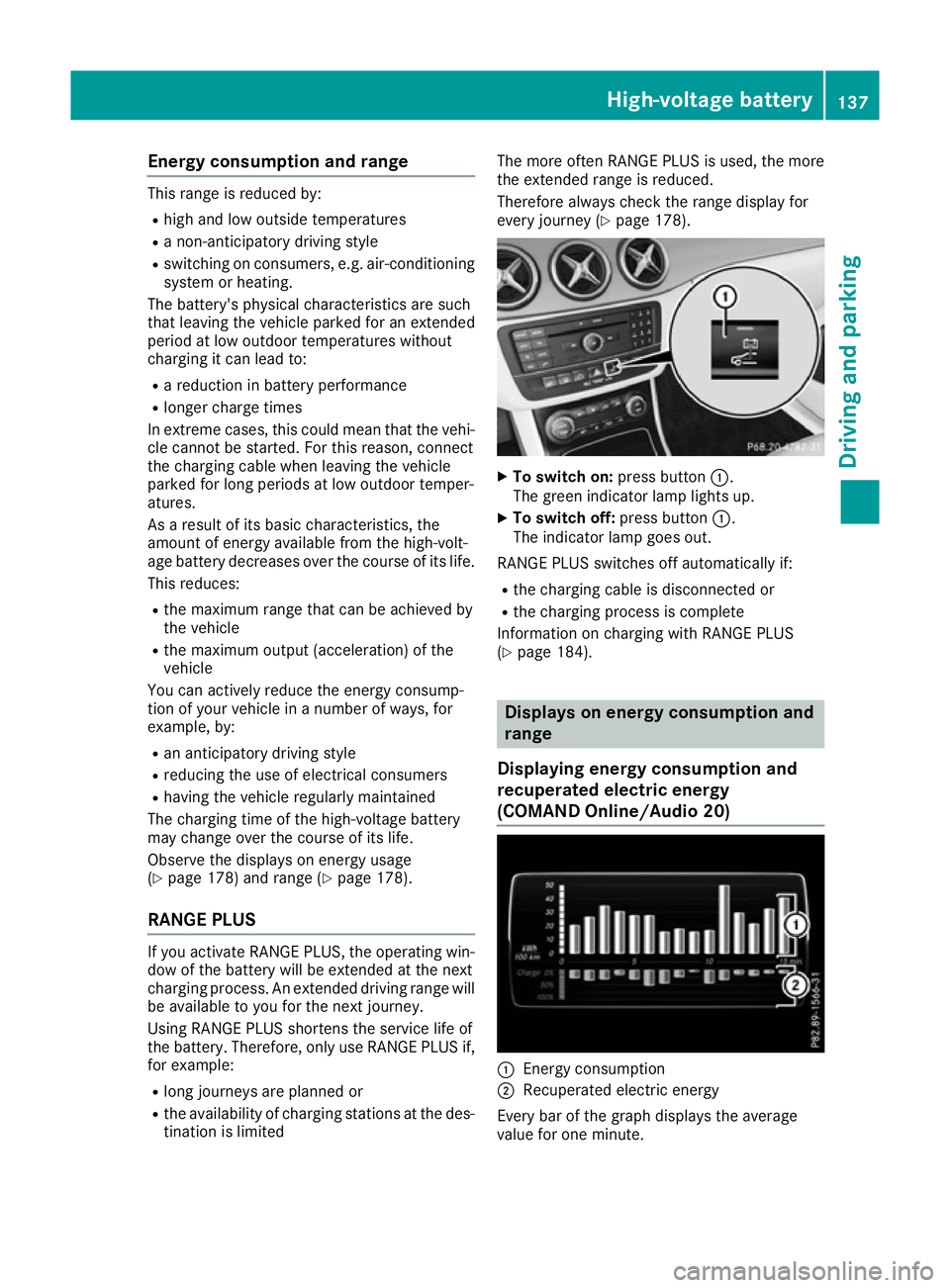
page 178). X
To switch on: press button:.
The green indicator lamp lights up.
X To switch off: press button:.
The indicator lamp goes out.
RANGE PLUS switches off automatically if:
R the charging cable is disconnected or
R the charging process is complete
Information on charging with RANGE PLUS
(Y page 184). Displays on energy consumption and
range
Displaying energy consumption and
recuperated electric energy
(COMAND Online /Audio 20) :
Energ y consumption
; Recuperated electric energy
Every bar of the graph displays the average
value for one minute. High-voltage battery
137Driving and parking Z
Page 141 of 293

Energy consumption indicator
:may differ
from the indicator in the From start
From start
(Y page 176) trip computer in the Trip
Trip menu.
Displaying energy consumption and recu-
perated electric energy:
X Switch on Audio 20/COMAND Online (see
the separate operating instructions).
X To select Vehicle
Vehicle from the main function bar:
turn and press the controller.
The vehicle menu appears.
X To select Consumption
Consumption: turn and press the
controller.
Energy consumption :and recuperated
electric energy ;for the last 15 minute s of
the journey are shown.
Exiting the vehicle settings: X Press the %button on the controller.
or X To select %: slide 6and press the con-
troller.
To reset values: the values are reset From
From
start start along with the trip computer
(Y page 178).
Displaying range on the map
(COMAND Online/Audio 20) :
Current vehicle position
; Range
= Range when route guidance is active (dark
blue)
The range can be displayed on the navigation
map for electric vehicles. The range is shown as
a circle around the current vehicle position.
When route guidance is active, the range is also
shown along the calculated route. This is done
by respective colouring of the blue route on the
navigation map. The range display on the Audio 20/
COMAND Online navigation map is available on
the 2D map display and a scale of 2 km to
100 km.
X To switch to navigation mode: press the
ß button.
X To show the menu: slide6the controller.
X To select Options Options: turn and press the con-
troller.
X Select Map content
Map content.
X Select Range on map
Range on map .
Switch the display in the map on Oor off ª.
X To return to navigation mode: Press the
% button on the controller twice.
e-Navigator App (COMAND Online/
Audio 20) :
Current vehicle position
; Route when route guidance is active
= View level displayed: charging stations
(example)
? Range (80%)
A Range (100%)
In addition to a simple circular display of the
range, you can display the range taking desti-
nation accessibility into account. The foreseea-
ble range with destination accessibility is then
coloured in.
When the range is shown in colour, a distinction
is made between two areas:
R Pale area: 100% of range
R Dark area: 80% of range
When route guidance is active, the route is
marked in colour.
The range display with destination accessibility
on the COMAND Online/Audio 20 navigation
map is available on the 2D map display and a
scale of 50 metres to 500 km. 138
High-voltage batteryDriving and parking
Page 143 of 293

Stowing the charging cable
The charging cable can be stowed in a bag in the
boot of the vehicle. To do so, the bag must be
secured to the lashing eyelets using the retain-
ing strap provided.
Controls on the charging cable :
A/C status indicator
; Control/protection system indicator
= Charge current indicator
? Charge current setting button
When displays :and ;on the charging cable
light up, this means the following: Display
:
: Lights up
green The external mains supply
connection is working prop-
erly. The high-voltage battery
can be charged.
Flashes red A fault has been detected in
the external mains supply.
The high-voltage battery is
recharged as soon as the
electricity signal registers
normal values.
Lights up red There is a malfunction. The
charging cable must be
removed from the mains
socket and then re-inserted.
Display
; ; Lights up
green There are no faults. The high-
voltage battery can be
charged.
Lights up red There is a malfunction. The
high-voltage battery cannot
be charged. For information on problems relating to the
charging process, see (Y
page 144).
Setting the maximum charge current G
WARNING
If the charge current draw via a mains socket is too high during the charging process, the
external mains supply may overheat. There isa risk of fire.
Before charging, check the maximum permis-
sible charge current available at the location.
If necessary, contact a qualified specialist
company for assistance.
Adjust your vehicle's settings, if necessary.
! If the charge current is too high, the fuse
could be tripped or the external mains supply could overheat. Check if the external mains
supply is equipped to handle the programmed charge current. If necessary, reduce the pro-
grammed charge current or use a different
mains socket.
You can set a limit for the values of the charge
current used in charging the high-voltage bat-
tery. This acts as a means of preventing the
mains supply from overloading. You can set this
limit by using the controls on the charging cable
or in the on-board computer's menu. Only set
the maximum charge current in the on-board
computer menu if there are no charge current
settings on the charging cable.
The default standard value is the minimum
charge current setting. This corresponds to the
minimum available charge current from the
mains supply.
i The value of the maximum setting and the
relevant adjustment values may vary depend-
ing on the country.
Before charging the high-voltage battery, have
the maximum permissible charge current for the relevant power socket checked by an electri-
cian.
X To adjust the setting: press button?
repeatedly until the desired setting is selec-
ted in display =.
R Two LEDs are flashing: minimum setting
R All LEDs are flashing: maximum setting
Information about the charging time
(Y page 284) 140
High-voltage batteryDriving and parking
Page 148 of 293
Parking
Important safety notes
G
WARNING
If you release the parking brake on uphill or
downhill gradients, the vehicle can begin to
move when in park position P. There is a risk
of an accident.
To avoid hazardous situations:
R prevent the parked vehicle from rolling on
uphill or downhill gradients by always
applying the parking brake.
R do not park the vehicle on uphill or downhill
gradients if the parking brake is malfunc-
tioning. G
WARNING
If you leave children unattended in the vehi-
cle, they may be able to set the vehicle in
motion, for example, if they:
R release the parking brake
R shift the transmission out of park position P
R start the vehicle's drive system
In addition, they may operate vehicle equip-
ment. There is a risk of an accident and injury.
When leaving the vehicle, always take the key
with you and lock the vehicle. Never leave
children unattended in the vehicle.
! while the vehicle is rolling, do not shift the
transmission directly from Dto R, from Rto D
or directly to P.
Do not open the driver's door while the vehi-
cle is in motion. Otherwise, at low speeds in
transmission position Dor R, park position P
is engaged automatically and the electrical
parking brake is applied.
The transmission could be damaged.
! Always secure the vehicle correctly against
rolling away. Otherwise, the vehicle or its driv-
etrain could be damaged.
To ensure that the vehicle is safeguarded
against rolling away unintentionally: R the electric parking brake must be applied.
R the transmission must be in position P.R
the key must be turned to position 0in the
ignition lock and then removed from the igni-
tion lock or the Start/Stop button must be
pressed
R on uphill or downhill gradients, turn the front
wheels towards the kerb. Switching off the drive system
G
WARNING
If you switch off the ignition while the vehicle
is in motion, safety-relevant functions are
restricted or not available. This can affect the power steering function and the brake boost-
ing effect, for example. You will then require
considerably more force to steer and brake.
There is a risk of an accident.
Do not switch off the ignition while the vehicle is in motion.
X Shift the DIRECT SELECT lever to position P.
X With the key: turn the key to position 0in the
ignition lock and remove it.
The immobiliser is activated.
X With the Start/Stop button: press the
Start/Stop button (Y page 126).
The drive system and all the indicator lamps in
the instrument cluster go out.
When the driver's door is closed, this corre-
sponds to key position 1. When the driver's
door is open, this corresponds to key position
0: "key removed".
If you switch the drive system off with the trans- mission in position Ror D, the transmission
automatically shifts to N.
With the key: if you then open the driver's door
or the front-passenger door or remove the key
from the ignition, the transmission automati-
cally shifts to P.
With the Start/Stop button: if you then open
the driver's door or the front-passenger door,
the transmission automatically shifts to P.
If you want the transmission to remain in neutral
N, e.g. when having the vehicle cleaned in an
automatic car wash with a towing system: Parking
145Driving and parking Z
Page 149 of 293

With the key:
X Switch the ignition on.
X Depress the brake pedal and keep it
depressed.
X Shift to neutral N.
X Release the brake pedal.
X Release the electric parking brake.
X Switch off the ignition and leave the key in the
ignition lock.
With the Start/Stop button:
X Remove the Start/Stop button from the igni-
tion lock.
X Insert the key into the ignition lock.
X Switch the ignition on.
X Depress the brake pedal and keep it
depressed.
X Shift to neutral N.
X Release the brake pedal.
X Release the electric parking brake.
X Switch off the ignition and leave the key in the
ignition lock. Electric parking brake
General notes G
WARNING
If you leave children unattended in the vehi-
cle, they may be able to set the vehicle in
motion, for example, if they:
R release the parking brake
R shift the transmission out of park position P
R start the vehicle's drive system
In addition, they may operate vehicle equip-
ment. There is a risk of an accident and injury.
When leaving the vehicle, always take the key
with you and lock the vehicle. Never leave
children unattended in the vehicle. The function of the electric parking brake and
the parking lock is dependent on the on-board
voltage. If the on-board voltage is low or if there
is a malfunction in the system, it may not be
possible to apply the released parking brake or
to shift the transmission to the Pposition.
X If this is the case, only park the vehicle on
level ground and secure it to prevent it from
rolling away.
X Shift the transmission to position P.
It may not be possible to release an applied
parking brake if the on-board voltage is low or if
there is a malfunction in the system. Contact a
qualified specialist workshop.
The electric parking brake carries out a function check at regular intervals when the drive system
is switched off. Noises that occur are normal.
Applying or releasing manually X
To apply: push handle :.
When the electric parking brake is applied,
the ! red indicator lamp lights up in the
instrument cluster.
The electric parking brake can also be applied
when the key is removed.
X To release: pull handle:.
The red !indicator lamp in the instrument
cluster goes out.
The electric parking brake can only be
released:
R when the key is in position 1or 2in the
ignition lock (Y page 126) or
R if the ignition was switched on using the
Start/Stop button 146
ParkingDriving and parking
Page 151 of 293

Drive sensibly – save energy
Observe the following tips to save energy:
R The tyres should always be inflated to the rec-
ommended tyre pressure.
R Remove unnecessary loads.
R Remove roof racks when they are not needed.
R Avoid frequent acceleration or braking.
Energy consumption also increases when driv-
ing in low or high outside temperatures, in stop-
start traffic, on short journeys and in hilly ter-
rain. ECO display
The ECO display provides feedback on how eco-
nomical your driving characteristics are. The
ECO display assists you in achieving the most
economical driving style for the selected set-
tings and prevailing conditions. Consumption
can be significantly influenced by your driving
style.
The ECO display consists of three bars:
R Acceleration Acceleration
R Constant
Constant
R Coasting
Coasting
The percentage count is the mean value of the
three bar values. The three bars and the mean
value begin at the value of 50%. A higher per-
centage count indicates a more economical
driving style.
The ECO display does not indicate the actual fuel
consumption. A fixed percentage count in the
ECO display does not indicate a fixed consump- tion.
In addition to driving style, the consumption is
affected by many other factors, such as:
R load
R tyre pressure
R cold start
R choice of route
R the use of electrical consumers These factors are not included in the ECO dis-
play.
The evaluation of your driving style takes the
following three categories into consideration:
R Acceleration
Acceleration (evaluation of all acceleration
processes):
- the bar fills up: moderate acceleration,
especially at higher speeds
- the bar empties: sporty acceleration
R Constant Constant (assessment of driving behaviour
at all times:)
- the bar fills up: constant speed and avoid-
ance of unnecessary acceleration and
deceleration
- the bar empties: fluctuations in speed
R Coasting Coasting (assessment of all deceleration
processes):
- the bar fills up: anticipatory driving, keep-
ing your distance and early release of the
accelerator. The vehicle can coast without
use of the brakes.
- the bar empties: frequent braking
To achieve a higher value in the categories
Acceleration Acceleration andConstant
Constant, drive the vehicle
in drive program E+orE.
On long journeys at a constant speed, e.g. on the motorway, only the bar for Constant
Constant will
change.
The ECO display summarises the driving char-
acteristics from the start of the journey to its
completion. Therefore, there are dynamic
changes in the bars at the start of a journey.
During a prolonged driving time, these changes are smaller. For more dynamic changes, per-
form a manual reset.
Further information on the ECO display
(Y page 176). Brakes
Important safety notes G
WARNING
If you increase the recuperation level on slip- pery road surfaces, the drive wheels may lose
their traction. This increases the risk of skid-
ding and having an accident.
Do not increase the recuperation level on slip-
pery road surfaces. 148
Driving tipsDriving and pa
rking