Page 165 of 878

When driving
2
1652-1. Driving procedures
Driving the vehicle.................. 166
Power (ignition) switch .......... 177
EV drive mode.......................... 183
Hybrid transmission ............... 186
Turn signal lever ....................... 193
Parking brake ........................... 195
Horn ............................................ 196
2-2. Instrument cluster
Gauges and meters ................ 197
Indicators and warning
lights ......................................... 201
Multi-information display .... 206
Head-up display ...................... 212
2-3. Operating the lights and
windshield wipers
Headlight switch...................... 217
Fog light switch ........................ 221
Windshield wipers and
washer ................................... 223
Rear window wiper and
washer .................................... 229
Headlight cleaner switch...... 231 2-4. Using other driving
systems
Cruise control......................... 232
Dynamic radar cruise
control .................................... 236
Intuitive parking assist .......... 248
Rear view monitor system
(rear view mirror-attached
type) ........................................ 258
Rear view monitor system
(vehicles with the Lexus
Display Audio system) ....... 266
Driving assist systems ............. 271
Hill-start assist control .......... 276
Pre-Collision System ............ 278
BSM
(Blind Spot Monitor) .......... 286
2-5. Driving information
Utility vehicle
precautions ........................... 292
Cargo and luggage ............... 296
Vehicle load limits ................... 301
Winter driving tips ................. 302
Tr a i l e r t o w i n g ( AW D m o d e l s
with towing package)......... 306
Trailer towing (without
towing package).................. 323
Dinghy towing ......................... 324
Page 191 of 878

1912-1. Driving procedures
2
When driving ■
AI-SHIFT
AI-SHIFT automatically selects the suitable gear according to driver performance
and driving conditions.
AI-SHIFT automatically operates when the sh ift lever is in the D position. (Shifting
the shift lever to the S posi tion cancels the function.)■
When driving with cruise control or radar cruise control activated
Even when performing the following acti ons with the intent of enabling engine
braking, engine braking will not activate because cruise control or radar cruise
control will not be canceled. ●
While driving in D or S mode, downshifting to 5 or 4. ( P. 232, 236)●
When switching the driving mode to sport mode while driving in D position.
( P. 1 8 9 )■
If the shift lever cannot be shifted from P
P. 7 7 9■
If S does not come on even after shifting the shift lever to S
This may indicate a malfunction in the hybr id transmission system. Have the vehicle
inspected by your Lexus dealer immediately.
(In this situation, the hybrid transmission will operate in the same as manner as when
the shift lever is in D.)■
Downshift restriction warning buzzer (S mode)
To help ensure safety and driving perfor mance, downshifting operation may some-
times be restricted. In some circumstances, downshifting may not be possible even
when the shift lever is operated. (The buzzer will sound twice.)
Page 201 of 878
2012-2. Instrument cluster
2
When driving Indicators and warning lights The indicator and warning lights on th e instrument cluster, center panel
and outside rear view mirrors inform the driver of the status of the vehicle’s
various systems.
For the purpose of explanation, the following illustration displays all indica-
tors and warning lights illuminated.
■ Instrument cluster
■ Center panel
With a navigation system
Page 203 of 878
2032-2. Instrument cluster
2
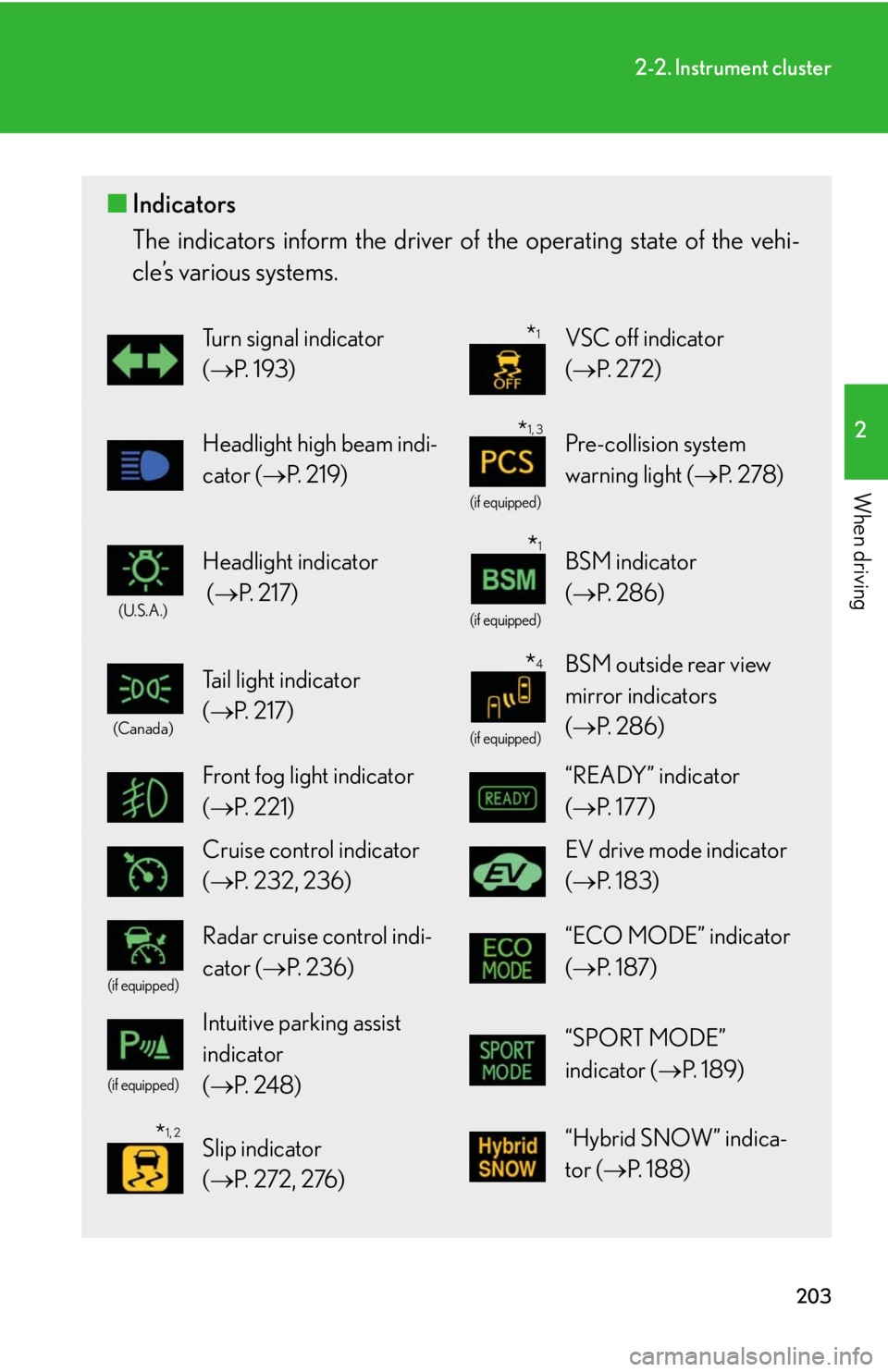
When driving ■ Indicators
The indicators inform the driver of th e operating state of the vehi-
cle’s various systems. Turn signal indicator
( P. 1 9 3 ) VSC off indicator
( P. 2 7 2 )
Headlight high beam indi-
cator ( P. 2 1 9 ) (if equipped)
Pre-collision system
warning light ( P. 2 7 8 )(U.S.A.)
Headlight indicator
( P. 2 1 7 ) (if equipped)
BSM indicator
( P. 2 8 6 )(Canada)
Tail light indicator
( P. 2 1 7 ) (if equipped)
BSM outside rear view
mirror indicators
( P. 2 8 6 )
Front fog light indicator
( P. 221) “READY” indicator
( P. 1 7 7 )
Cruise control indicator
( P. 232, 236) EV drive mode indicator
( P. 1 8 3 )(if equipped)
Radar cruise control indi-
cator ( P. 2 3 6 ) “ECO MODE” indicator
( P. 1 8 7 )(if equipped)
Intuitive parking assist
indicator
( P. 2 4 8 ) “SPORT MODE”
indicator ( P. 1 8 9 )
Slip indicator
( P. 2 7 2 , 2 76 ) “Hybrid SNOW” indica-
tor ( P. 1 8 8 ) * 1
* 1, 3
* 1
* 4
* 1, 2
Page 205 of 878
2052-2. Instrument cluster
2
When driving
CAUTION■
If a safety system warning light does not come on
Should a safety system light such as the ABS and SRS warning light not come on
when you start the hybrid system, this could mean that these systems are not avail-
able to help protect you in an accident, wh ich could result in death or serious injury.
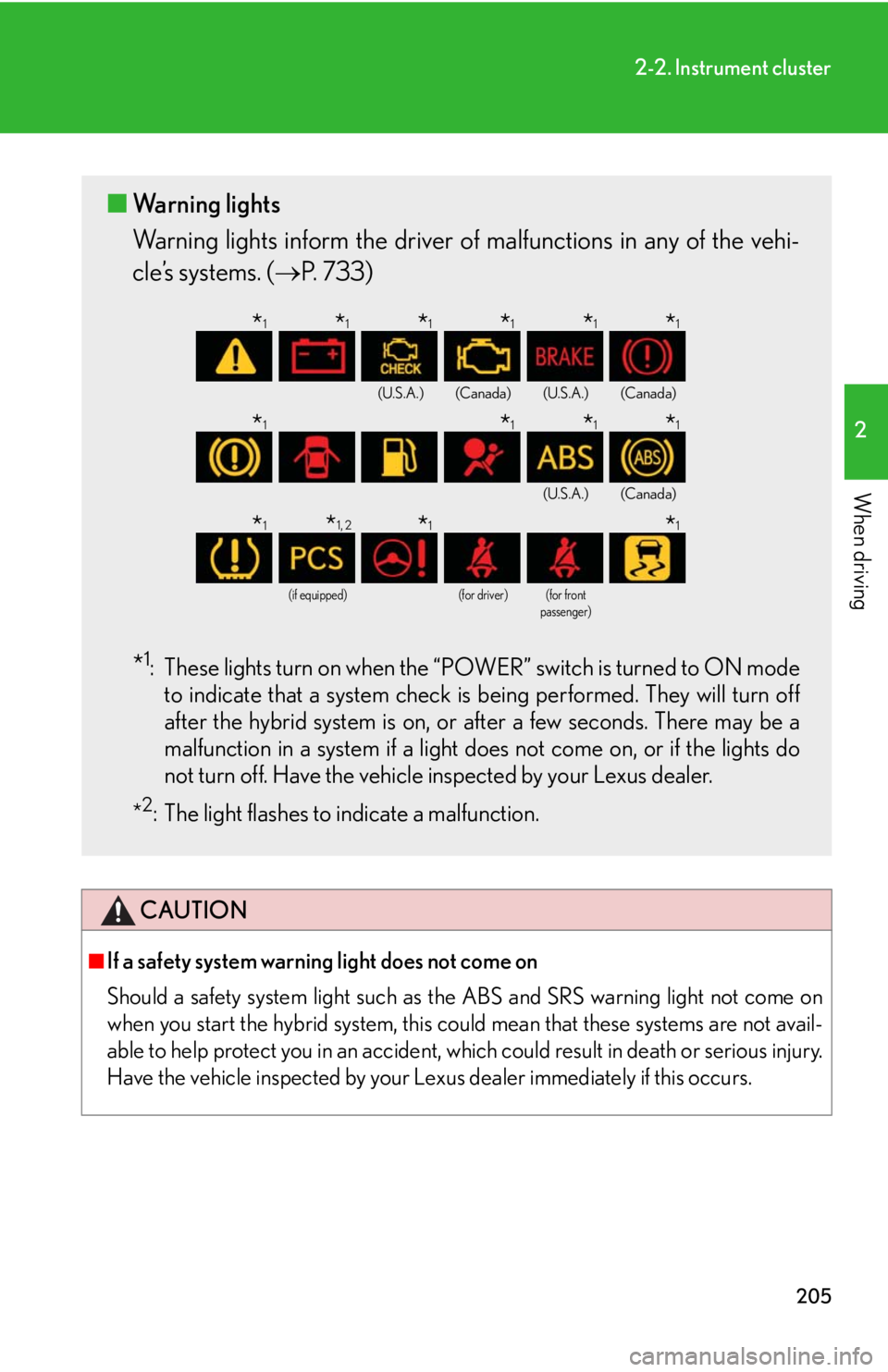
Have the vehicle inspected by your Lexus dealer immediately if this occurs.■ Warning lights
Warning lights inform the driver of malfunctions in any of the vehi-
cle’s systems. ( P. 733)
* 1
: These lights turn on when the “POWER” switch is turned to ON mode
to indicate that a system check is being performed. They will turn off
after the hybrid system is on, or after a few seconds. There may be a
malfunction in a system if a light do es not come on, or if the lights do
not turn off. Have the vehicle inspected by your Lexus dealer.
* 2
: The light flashes to indicate a malfunction. (U.S.A.) (Canada) (U.S.A.) (Canada)
(U.S.A.) (Canada)
(if equipped) (for driver) (for front
passenger)
* 1
* 1
* 1
* 1
* 1
* 1
* 1
* 1
* 1
* 1
* 1
* 1, 2
* 1
* 1
Page 210 of 878

2102-2. Instrument cluster
■ Average vehicle speed
Displays the average vehicle speed since the function was reset The function can be reset by pushing the “ENTER” switch for longer than
one second when the average vehicle speed is displayed.
■ Cruising range
Displays the estimated maximum distan ce that can be driven with the
quantity of fuel remaining • This distance is computed based on your average fuel consumption. As
a result, the actual distance that can be driven may differ from that dis-
played.
• When only a small amount of fuel is added to the tank, the display may
not be updated.
When refueling, turn the “POWER” switch off. If the vehicle is refueled
without turning the “POWER” switch off, the display may not be
updated.
■ Tire inflation pressure
Displays inflation pressure of each tire. There is no correlation between
the order of the displayed values and the tire positions. If the inflation pressure of any tire drops a certain amount below the tire infla-
tion pressure value currently memorized in the system, the displayed values
will be highlighted.
It may take a few minutes to display the tire inflation pressure after the
“POWER” switch is turned to ON mode. It may also take a few minutes to
display the tire inflation pressure after inflation pressure has been adjusted.
If the tire pressure warning light is on or flashing, a message describing the
situation will be displayed.
Page 211 of 878

2112-2. Instrument cluster
2
When driving ■
Electronic features control can be turned on/off when
The “POWER” switch is in ON mode.■
Conditions for ending electronic features control
In the following situations, the electronic features control will end: ●
The menu switch is pressed.●
The dynamic radar cruise control is operated (if equipped).●
Intuitive parking assist starts operating (if equipped).●
No action is performed for some time after the electronic features control
screen is displayed.●
A warning message appears after the electronic features control screen is dis-
played.■
Outside temperature display
In the following situations, the correct outside temperature may not be displayed, or
the display may take longer than normal to change. ●
When stopped, or driving at low speeds (less than 16 mph [25 km/h])●
When the outside temperature has changed suddenly (at the entrance/exit of a
garage, tunnel, etc.)■
The multi-information display at low temperatures
Allow the interior of the vehicle to warm up before using the liquid crystal informa-
tion display. At extremely low temperatures, the information display monitor may
respond slowly, and display changes may be delayed. ■
Customization
Settings (e.g. available la nguages) can be changed.
(Customizable features P. 825)
CAUTION
■
Caution while driving
When operating the electronic features control while driving, take extra notice of
the vehicle's surrounding area.
Page 213 of 878
2132-2. Instrument cluster
2
When driving ■ Head-up display contents
In addition to vehicle sp eed, the following informa tion will be displayed:
Audio display Displays audio information for
approximately 3 seconds when
the audio system is operated
Shift position and shift range
display Displays the selected shift posi-
tion or selected shift range
( P. 1 8 6 )
Dynamic radar cruise con-
trol display (if equipped) Displays the approach warning
message ( P. 74 8 )
Pre-collision system dis-
play (if equipped) Displays the brake warning
( P. 74 8 )
Turn-by-turn navigation
display*
Displays a notification of
upcoming intersections during
navigation system route guid-
ance
Vehicle speed display
*: Refer to the “Navigation System
Owner’s Manual”.