Page 244 of 878

2442-4. Using other driving systems
■
Radar sensor and grille cover
Always keep the sensor and grille cover clean to ensure that the vehicle-to-vehicle
distance control operates properly. (Some obstructions, such as snow, ice and plas-
tic objects, cannot be detected by the obstruction sensor.)
Dynamic radar cruise control is canc eled if an obstruction is detected.
■
Warning lights, messages and buzzer s for dynamic radar cruise control
Warning lights, messages and buzzers are us ed to indicate a system malfunction or
to inform the driver of the need for caution while driving. ( P. 74 8 )■
Certification
For vehicles sold in the U.S.A.
FCC ID: HYQDNMWR004
This device complies with part 15 of the FCC Rules. Operation is subject to the fol-
lowing two conditions: (1) This device may not cause harmful interference, and (2)
this device must accept any interference received, including interference that may
cause undesired operation.
FCC WARNING
Changes or modifications not expressly approved by the party responsible for
compliance could void the user’s authority to operate the equipment.
Radiofrequency radiation exposure Information:
This equipment complies with FCC radiatio n exposure limits set forth for an uncon-
trolled environment.
This equipment should be installed and op erated with minimum distance of 20 cm
between the radiator (a ntenna) and your body.
This transmitter must not be co-located or operating in conjunction with any other
antenna or transmitter. Grille cover
Radar sensor
Page 247 of 878

2472-4. Using other driving systems
2
When driving CAUTION■
Conditions under which the vehicle-to-vehicle distance control may not function
correctly
Apply the brakes as necessary in the foll owing conditions as the radar sensor may
not be able to correctly detect vehicles ahead, and a fatal or serious accident may
result: ●
When water or snow thrown up by the surrounding vehicles hinders the function-
ing of the sensor●
When your vehicle is pointing upwards (caused by a heavy load in the luggage
compartment etc.)●
When the road curves or when the lanes are narrow●
When steering wheel operation or your position in the lane is unstable●
When the vehicle ahead of you decelerates suddenly■
Handling the radar sensor
Observe the following to ensure the cruise control system can function effectively.
Otherwise, the system may not function co rrectly and could result in an accident.●
Keep the sensor and grille cover clean at all times.
Clean the sensor and grille cover with a soft cloth so you do not mark or damage
them.●
Do not subject the sensor or surrounding area to a strong impact.
If the sensor moves even slightly off position, the system may malfunction. If the
sensor or surrounding area is subject to a strong impact, always have the area
inspected and adjusted by your Lexus dealer.●
Do not disassemble the sensor.●
Do not attach accessories or stickers to the sensor, grille cover or surrounding
area.
●
Do not modify or paint the sensor and grille cover.
●
Do not replace them with non-genuine parts.
Page 256 of 878

2562-4. Using other driving systems
■
Sensor detection information ●
Certain vehicle conditions and the su rrounding environment may affect the
ability of a sensor to correctly detect an obstacle. Particular instances where this
may occur are listed below.
• There is dirt, snow or ice on a sensor.
• A sensor is frozen.
• A sensor is covered in any way.
• The vehicle is leaning considerably to one side.
• On an extremely bumpy road, on an incline, on gravel, or on grass
• The vicinity of the vehicle is noisy due to vehicle horns, motorcycle engines,
air brakes of large vehicles, or other loud noises producing ultrasonic waves.
• There is another vehicle equipped with parking assist sensor s in the vicinity.
• A sensor is coated with a sheet of spray or heavy rain.
• The vehicle is equipped with a fender pole or radio antenna.
• Towing eyelets are installed.
• A bumper or sensor receives a strong impact.
• The vehicle is approaching a tall or right-angled curb.
• In harsh sunlight or intense cold weather.
• A non-genuine Lexus suspension (low ered suspension, etc.) is installed.
In addition to the examples above, there are instances in which, because of their
shapes, signs and other objects may be judg ed by a sensor to be closer than they
are. ●
The shape of the obstacle may prevent a sensor from detecting it. Pay particular
attention to the following obstacles:
• Wires, fences, ropes, etc.
• Cotton, snow and other materi als that absorb sound waves
• Sharply-angled objects
•Low obstacles
• Tall obstacles with upper sections projec ting outwards in the direction of your
vehicle
■
If a message is displayed
P. 74 3
Page 263 of 878
2632-4. Using other driving systems
2
When driving ■
Rear view monitor system camera
■
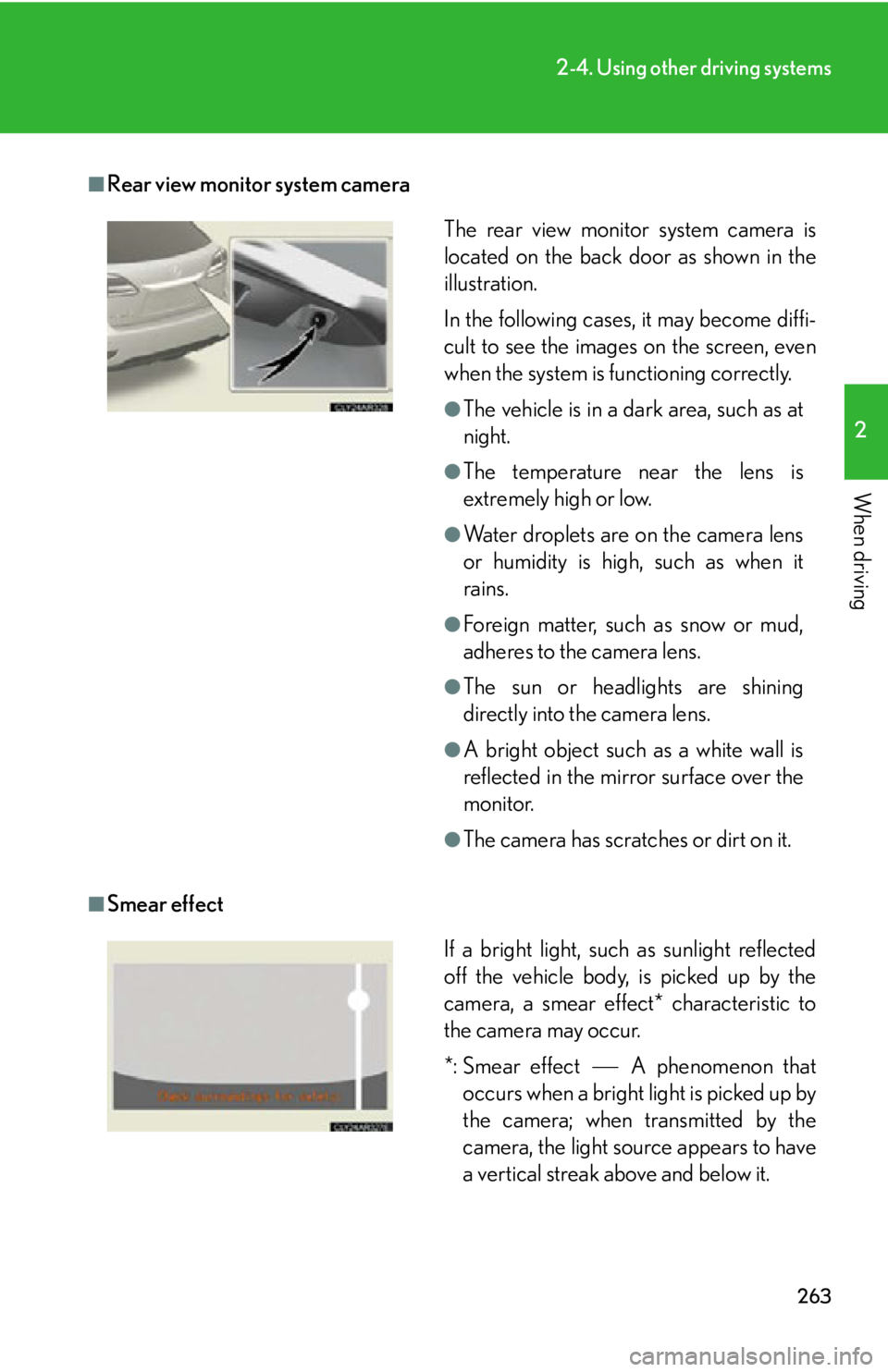
Smear effect The rear view monitor system camera is
located on the back door as shown in the
illustration.
In the following cases, it may become diffi-
cult to see the images on the screen, even
when the system is functioning correctly. ●
The vehicle is in a dark area, such as at
night. ●
The temperature near the lens is
extremely high or low. ●
Water droplets are on the camera lens
or humidity is high, such as when it
rains. ●
Foreign matter, such as snow or mud,
adheres to the camera lens. ●
The sun or headlights are shining
directly into the camera lens. ●
A bright object such as a white wall is
reflected in the mirror surface over the
monitor. ●
The camera has scratches or dirt on it.
If a bright light, such as sunlight reflected
off the vehicle body, is picked up by the
camera, a smear effect* characteristic to
the camera may occur.
*: Smear effect A phenomenon that
occurs when a bright light is picked up by
the camera; when transmitted by the
camera, the light source appears to have
a vertical streak above and below it.
Page 264 of 878

2642-4. Using other driving systems
■
Flicker effect
When the camera is used under fluorescent light, sodium lights, or mercury lights
etc., the lights and the illuminated areas may appear to flicker.
CAUTION■
When using the rear view monitor system, observe the following precautions to
avoid an accident that could result in death or serious injuries: ●
Never depend solely on the monitor system when reversing.●
Always check visually and with the mirrors to confirm your intended path is clear.●
Use your own eyes to confirm the vehicle’s surroundings, as the displayed image
may become faint or dark, and moving imag es will be distorted, or not entirely
visible when the outside temperature is low. When backing up, be sure to check
behind and all around the vehicle visually and with the mirrors before proceeding.●
Always check the vehicle surrounding area, because the guide lines are ancillary
lines.●
The guide lines are ancillary lines and do not change even if the steering wheel is
turned.●
Depicted distances between objects and flat surfaces differ from actual dis-
tances.●
Do not use the system if the back door is open.
Page 265 of 878

2652-4. Using other driving systems
2
When driving NOTICE■
Conditions which may affect the rear view monitor system ●
If the back of the vehicle has been hit, the camera’s position and mounting angle
may have changed. Have the vehicle inspected by your Lexus dealer.●
Rapid temperature changes, such as when hot water is poured on the vehicle in
cold weather, may cause the system to function abnormally.●
If the camera lens is dirty, it cannot transmit a clear image. Rinse with water and
wipe with a soft cloth. If extremely dirty, wash with a mild cleanser and rinse.●
The displayed image may be darker and mo ving images may be slightly distorted
when the system is cold.■
Camera precautions ●
As the camera has a water proof constr uction, do not detach, disassemble or
modify it. This may cause incorrect operation.●
Do not subject the camera to a strong impact.●
If the camera lens becomes dirty, it cannot transmit a clear image. If water drop-
lets, snow, or mud adhere to the lens, rinse with water and wipe wi th a soft cloth. If
the lens is extremely dirty, wash it with a mild cleanser and rinse. Do not rub hard.●
Do not allow organic solvent, car wax, window cleaner or glass coat to adhere to
the camera. If this happens, wipe it off as soon as possible.●
Do not strongly rub the camera lens. If the camera lens is scratched, it cannot
transmit a clear image.●
When washing the vehicle, do not apply intensive bursts of water to the camera
or camera area. Doing so may result in the camera malfunctioning.●
When replacing tires, please consult your Lexus dealer. If you replace the tires,
the area displayed on the screen may change.
Page 268 of 878
2682-4. Using other driving systems
■
Rear view monitor system camera
■
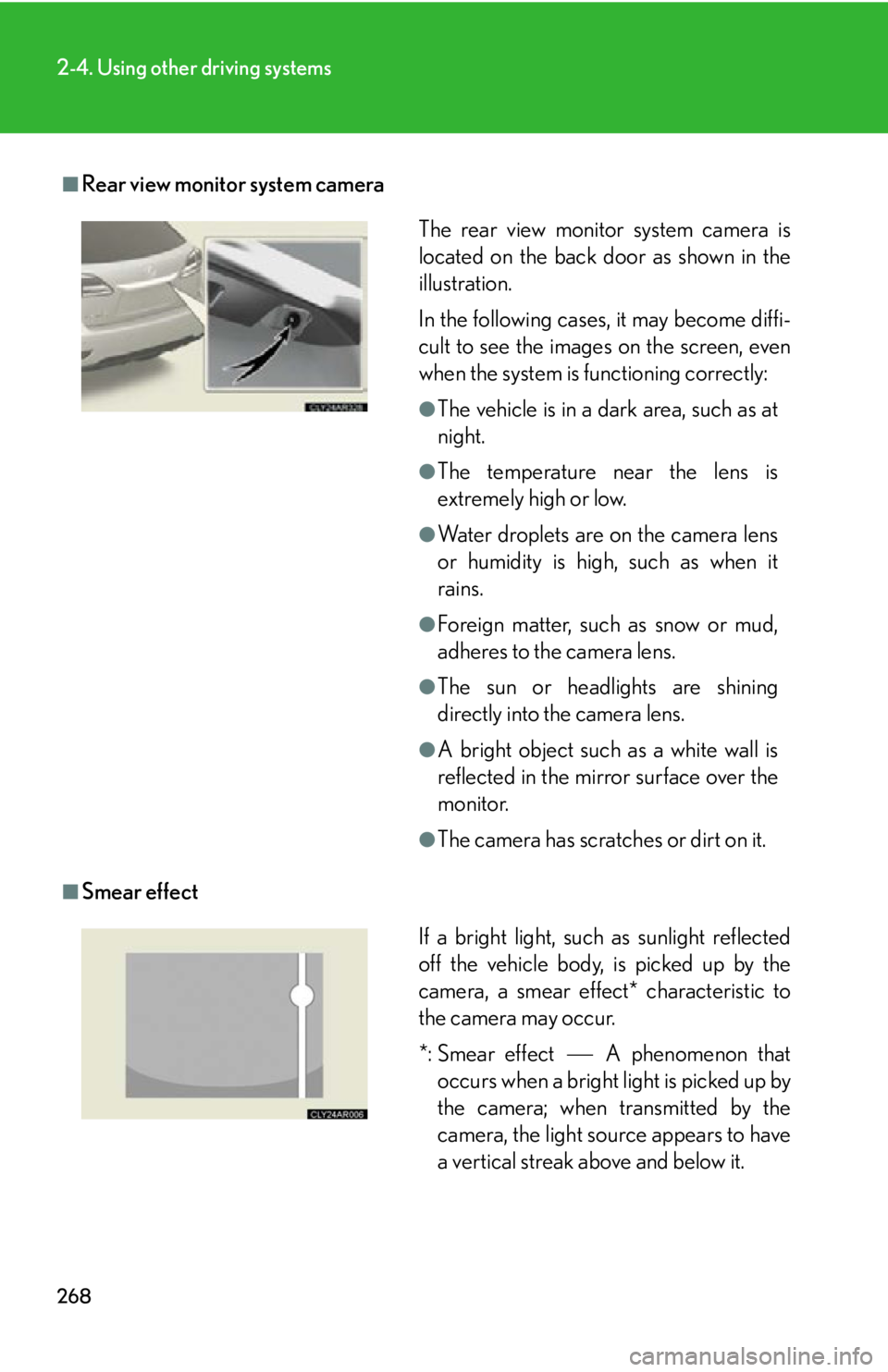
Smear effect The rear view monitor system camera is
located on the back door as shown in the
illustration.
In the following cases, it may become diffi-
cult to see the images on the screen, even
when the system is functioning correctly: ●
The vehicle is in a dark area, such as at
night. ●
The temperature near the lens is
extremely high or low. ●
Water droplets are on the camera lens
or humidity is high, such as when it
rains. ●
Foreign matter, such as snow or mud,
adheres to the camera lens. ●
The sun or headlights are shining
directly into the camera lens. ●
A bright object such as a white wall is
reflected in the mirror surface over the
monitor. ●
The camera has scratches or dirt on it.
If a bright light, such as sunlight reflected
off the vehicle body, is picked up by the
camera, a smear effect* characteristic to
the camera may occur.
*: Smear effect A phenomenon that
occurs when a bright light is picked up by
the camera; when transmitted by the
camera, the light source appears to have
a vertical streak above and below it.
Page 269 of 878
2692-4. Using other driving systems
2
When driving ■
Flicker effect
When the camera is used under fluoresc ent lights, sodium lights, mercury lights
etc., the lights and the illuminated areas may appear to flicker.
CAUTION■
When using the rear view monitor system, observe the following precautions to
avoid an accident that could resu lt in death or serious injuries:●
Never depend solely on the monitor system when reversing.●
Always check visually and with the mirrors to confirm your intended path is clear.●
Use your own eyes to confirm the vehicle’s surroundings, as the displayed image
may become faint or dark, and moving imag es will be distorted, or not entirely
visible when the outside temperature is low. When backing up, be sure to check
behind and all around the vehicle visually and with the mirrors before proceeding.●
Depicted distances between objects and flat surfaces differ from actual dis-
tances.●
Do not use the system if the back door is open.
