2015 LEXUS LS600H lane assist
[x] Cancel search: lane assistPage 5 of 620

3
1
8 7
6
5
4
3
2
9
LS600hL_U(OM50E41U)3-5. Opening, closing the
windows and moon roof
Power windows ............................ 189
Moon roof .......................................192
4-1. Before driving Driving the vehicle ..................... 198
Cargo and luggage................... 209
Vehicle load limits ........................213
Trailer towing .................................214
Dinghy towing ...............................215
4-2. Driving procedures Power (ignition) switch ..............216
EV drive mode .............................. 221
Hybrid transmission .................. 223
Turn signal lever ...........................227
Parking brake .............................. 228
Brake Hold .....................................231
Horn ................................................ 233
4-3. Operating the lights and wipers
Headlight switch ........................ 234
Automatic High Beam............. 238
Fog light switch ........................... 243
Windshield wipers and washer ..........................................244
Headlight cleaner switch........ 248 4-4. Refueling
Opening the fuel tank cap .................................................249
4-5. Using the driving support systems
Cruise control ............................. 253
Dynamic radar cruise control with full-speed
range .............................................257
LKA (Lane-Keeping Assist) ...........273
Driving mode select switch ........................................... 283
Electronically modulated air suspension............................287
Driving assist systems .............. 289
PCS (Pre-Collision System) ......... 296
BSM (Blind Spot Monitor) .............308
• The Blind Spot Monitor function ......................................312
• The Rear Cross Traffic Alert function ..........................315
Lexus night view .......................... 318
4-6. Driving tips Hybrid vehicle driving tips ................................................. 323
Winter driving tips ..................... 325
4Driving
Page 24 of 620

22Pictorial index
LS600hL_U(OM50E41U)Audio remote control switches
*1
Back switch*1
Ta l k s w i t c h*1
Phone switches*1
“DISP” button. . . . . . . . . . . . . . . . . . . . . . . . . . . . . . . . . . . . . . . . . . . . . . . . . . . . . . . . .P
. 106
Vehicle-to-vehicle distance button
*2. . . . . . . . . . . . . . . . . . . . . . . . . . . . . . . P. 260
Cruise control switch
Cruise control
*2 . . . . . . . . . . . . . . . . . . . . . . . . . . . . . . . . . . . . . . . . . . . . . . . . . . . P. 253
Dynamic radar cruise control with full-speed range
*2 . . . . . . . . . . . . . . P. 257
LKA (Lane-Keeping Assist) switch
*2. . . . . . . . . . . . . . . . . . . . . . . . . . . . . . . P. 275
Brake hold switch . . . . . . . . . . . . . . . . . . . . . . . . . . . . . . . . . . . . . . . . . . . . . . . . . . . . P. 231
1
2
3
4
5
6
7
8
9
Page 99 of 620
972. Instrument cluster
2
Instrument cluster
LS600hL_U(OM50E41U)
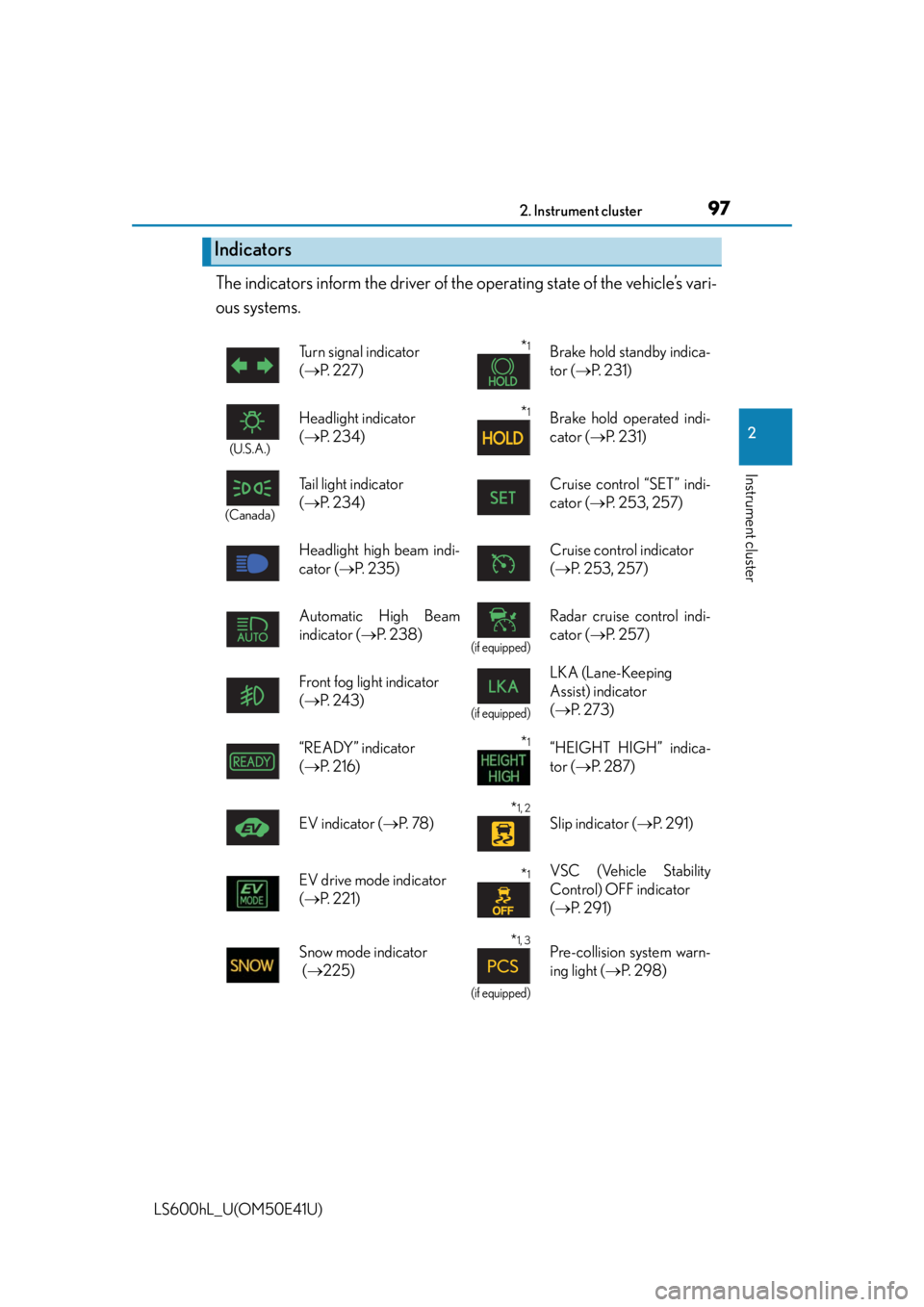
The indicators inform the driver of the operating state of the vehicle’s vari-
ous systems.
Indicators
Turn signal indicator
( P. 2 2 7 )*1Brake hold standby indica-
tor ( P. 2 3 1 )
(U.S.A.)
Headlight indicator
( P. 2 3 4 )*1Brake hold operated indi-
cator ( P. 2 3 1 )
(Canada)
Tail light indicator
( P. 2 3 4 ) Cruise control “SET” indi-
cator (
P. 2 5 3 , 2 5 7 )
Headlight high beam indi-
cator ( P. 235) Cruise control indicator
(
P. 2 5 3 , 2 5 7 )
Automatic High Beam
indicator ( P. 2 3 8 )
(if equipped)
Radar cruise control indi-
cator ( P. 2 5 7 )
Front fog light indicator
( P. 2 4 3 )
(if equipped)
LKA (Lane-Keeping
Assist) indicator
( P. 2 7 3 )
“READY” indicator
( P. 2 1 6 )
*1“HEIGHT HIGH” indica-
tor ( P. 2 8 7 )
EV indicator ( P. 7 8 )
*1, 2
Slip indicator ( P. 2 9 1 )
EV drive mode indicator
( P. 2 2 1 )
*1VSC (Vehicle Stability
Control) OFF indicator
( P. 2 9 1 )
Snow mode indicator
( 225)
*1, 3
(if equipped)
Pre-collision system warn-
ing light ( P. 2 9 8 )
Page 107 of 620

1052. Instrument cluster
2
Instrument cluster
LS600hL_U(OM50E41U)
The multi-information display presents the driver with a variety of driving-
related data.
●Trip information ( P. 1 0 6 )
Displays driving range, fuel consump-
tion and other cruising related infor-
mation
●
Drive monitor ( P. 1 0 8 )
Displays either the average fuel con-
sumption after refueling or the driving
range
●
Intuitive parking assist display*
(Refer to “NAVIGATION AND
MULTIMEDIA SYSTEM
OWNER’S MANUAL”.)
●Dynamic radar cruise control
with full-speed range display
* (if
equipped) ( P. 257)
●LKA (Lane-Keeping Assist) dis-
play
* (if equipped) ( P. 277)
●Warning messages ( P. 503)
Automatically displayed when a mal-
function occurs in one of the vehicle’s
systems. Display can be switched by
pressing the “DISP” button. ( P. 1 0 6 )
*: Automatically displayed when the sys-
tem is used. Display can be switched
by pressing the “DISP” button.
( P. 1 0 6 )
Multi-information display
Display contents
Page 199 of 620

197
Driving4
LS600hL_U(OM50E41U)4-1. Before driving
Driving the vehicle ......................198
Cargo and luggage .................. 209
Vehicle load limits ....................... 213
Trailer towing ................................. 214
Dinghy towing............................... 215
4-2. Driving procedures Power (ignition) switch.............. 216
EV drive mode ............................. 221
Hybrid transmission ..................223
Turn signal lever .......................... 227
Parking brake ...............................228
Brake Hold ..................................... 231
Horn.................................................233
4-3. Operating the lights and wipers
Headlight switch .........................234
Automatic High Beam ............ 238
Fog light switch............................ 243
Windshield wipers and washer.......................................... 244
Headlight cleaner switch ........248 4-4. Refueling
Opening the fuel tank cap....................................... 249
4-5. Using the driving support systems
Cruise control ............................. 253
Dynamic radar cruise control with full-speed
range ............................................ 257
LKA (Lane-Keeping Assist) ...........273
Driving mode select switch ........................................... 283
Electronically modulated air suspension ........................... 287
Driving assist systems............... 289
PCS (Pre-Collision System).......... 296
BSM (Blind Spot Moni tor)............. 308
• The Blind Spot Monitor function ..................................... 312
• The Rear Cross Traffic Alert function.......................... 315
Lexus night view .......................... 318
4-6. Driving tips Hybrid vehicle driving tips ................................................. 323
Winter driving tips ..................... 325
Page 268 of 620

2664-5. Using the driving support systems
LS600hL_U(OM50E41U)Adjusting the speed setting:
P. 2 5 9
Canceling and resuming the speed
setting: P. 2 6 2
■Dynamic radar cruise control with full-speed range can be set when
●The shift lever is in D or range 4 or higher of S has been selected.
●Vehicle speed is above approximately 30 mph (50 km/h).
■Accelerating after setting the vehicle speed
The vehicle can accelerate normally. After acceleration, the set speed resumes.
However, during vehicle-to-vehicle distance control mode, the vehicle speed may
decrease below the set speed in order to maintain the distance to the vehicle ahead.
■Automatic cancelation of vehicle-to-vehicle distance control
Vehicle-to-vehicle distance control driving is automatically canceled in the following
situations:
●Actual vehicle speed falls below approximately 25 mph (40 km/h) when there are
no vehicle ahead.
●The preceding vehicle leaves the lane when your vehicle is following at a speed
below 25 mph (40 km/h).
●VSC is activated.
●TRAC is activated for a period of time.
●When the VSC or TRAC system is turn ed off by pressing the VSC OFF switch.
●The sensor cannot operate correctly because it is covered in some way.
●The windshield wipers are operating at hi gh speed (when the wiper switch is set to
the “AUTO” mode or the high speed wiper operation position).
●When snow mode is set.
●The parking brake is operated.
●The vehicle is stopped by system control on a steep incline.
●Pre-collision brake assist is activated.
●The following are detected when the vehi cle has been stopped by system control:
• The driver is not wearing a seat belt.
• The driver’s door is opened.
• The trunk or hood is opened.
• The vehicle has been stopped for about 3 minutes.
If vehicle-to-vehicle distance control driv ing is automatically canceled for any other
reason, there may be a malfunction in the system. Contact your Lexus dealer.
Page 269 of 620
2674-5. Using the driving support systems
4
Driving
LS600hL_U(OM50E41U)
■Automatic cancelation of constant speed control
The cruise control will stop maintaining the vehicle speed in the following situations:
●Actual vehicle speed is more than approximately 10 mph (16 km/h) below the set
vehicle speed.
At this time, the memorized set speed is not retained.
●Actual vehicle speed falls below approximately 25 mph (40 km/h).
●VSC is activated.
●TRAC is activated for a period of time.
●When the VSC or TRAC system is turn ed off by pressing the VSC OFF switch.
■When the LKA (Lane-Keeping Assist) will be activated (if equipped)
Using the radar cruise control in vehicle-to-vehicle distance control mode, lane
keeping assistance control is activated.
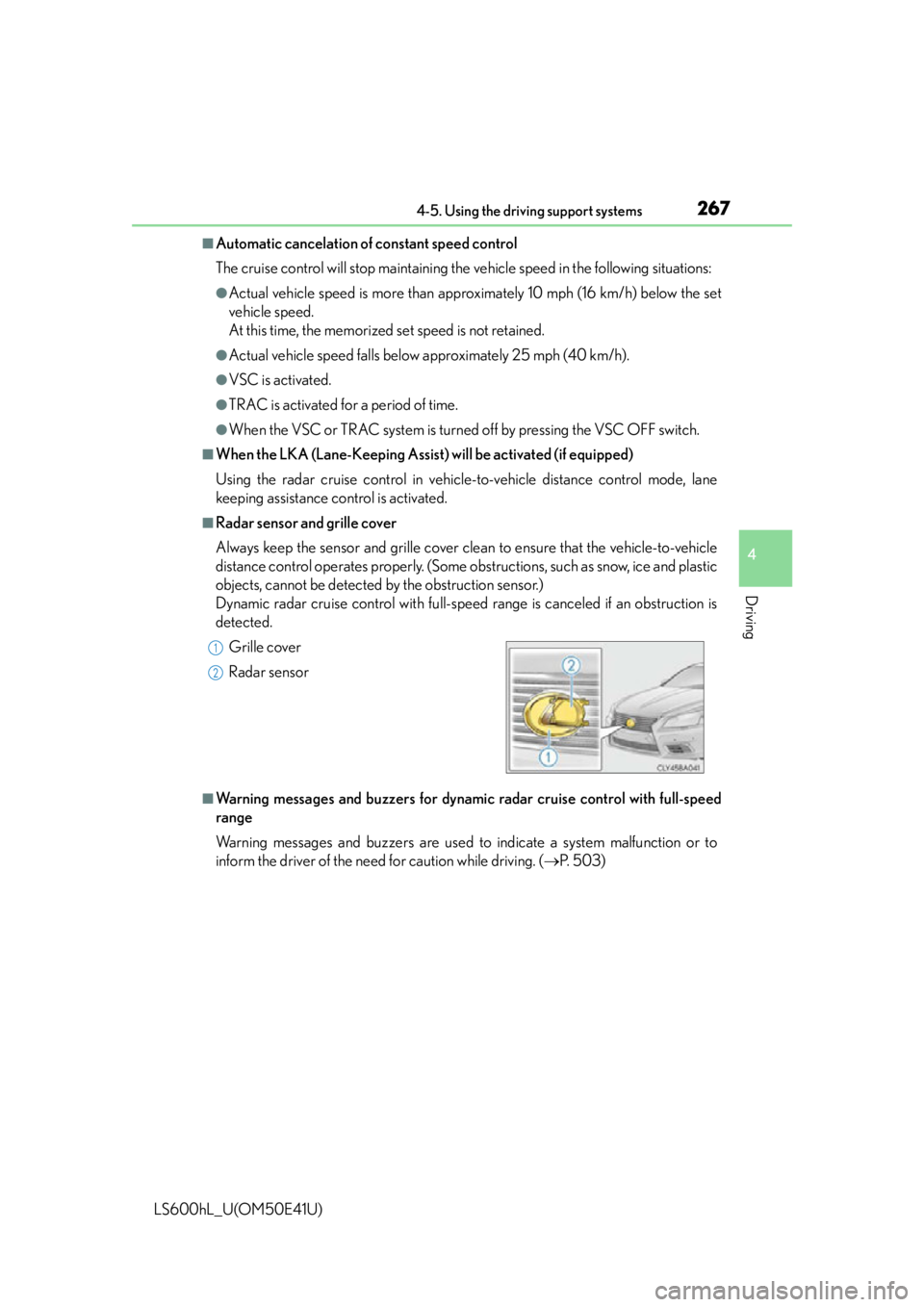
■Radar sensor and grille cover
Always keep the sensor and grille cover clean to ensure that the vehicle-to-vehicle
distance control operates properly. (Some ob structions, such as snow, ice and plastic
objects, cannot be detected by the obstruction sensor.)
Dynamic radar cruise control with full-speed range is canceled if an obstruction is
detected.
■Warning messages and buzzers for dynami c radar cruise control with full-speed
range
Warning messages and buzzers are used to indicate a system malfunction or to
inform the driver of the need for caution while driving. ( P. 5 0 3 )
Grille cover
Radar sensor
1
2
Page 275 of 620
2734-5. Using the driving support systems
4
Driving
LS600hL_U(OM50E41U)
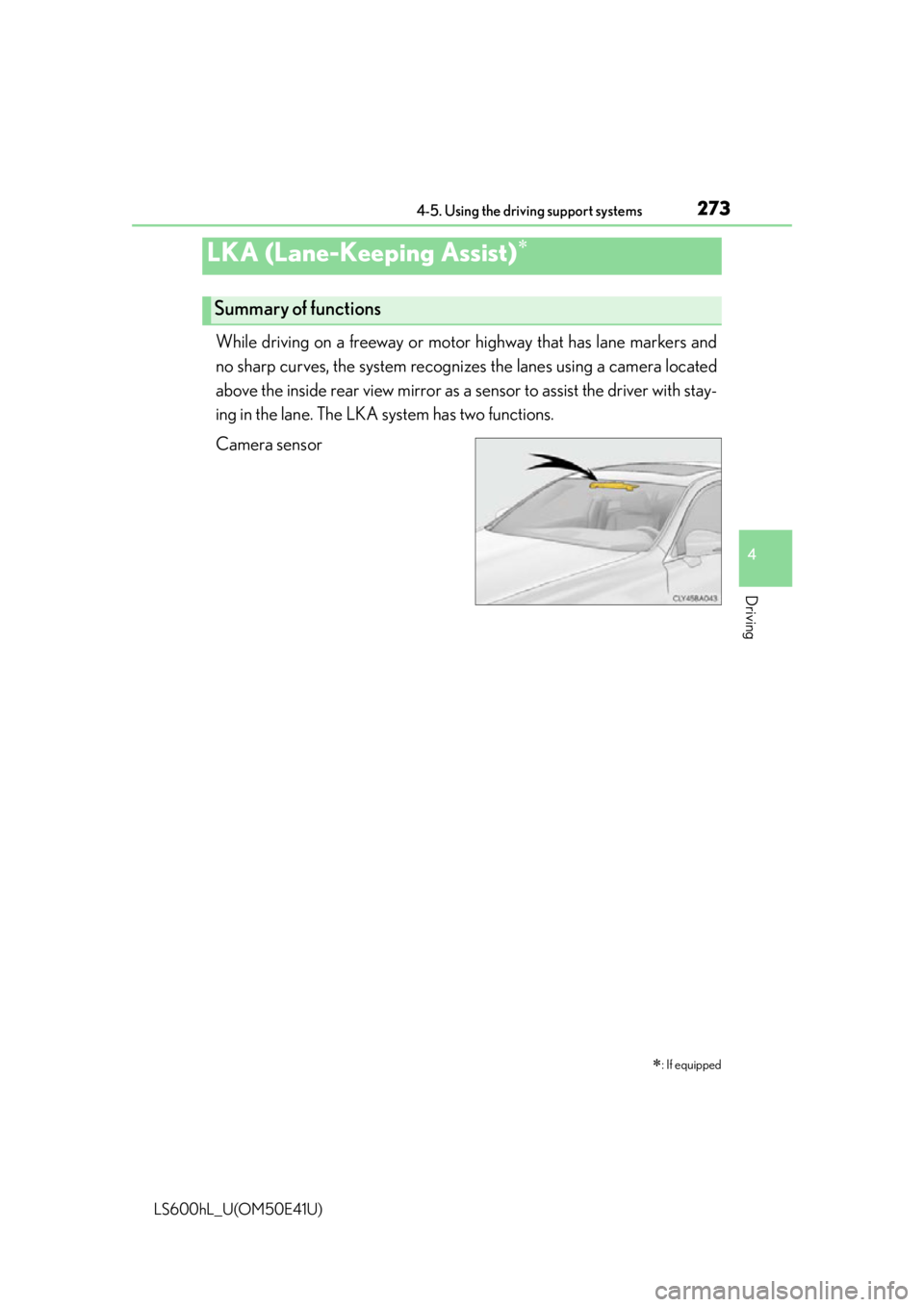
While driving on a freeway or motor highway that has lane markers and
no sharp curves, the sy stem recognizes the lane s using a camera located
above the inside rear view mirror as a sensor to assist the driver with stay-
ing in the lane. The LKA system has two functions.
Camera sensor
LKA (Lane-Keeping Assist)
: If equipped
Summary of functions