Page 79 of 615
GS350_OM_OM30F69U_(U)
772. Instrument cluster
2
Instrument cluster
◆Outside rear view mirrors (vehicles with BSM)
Warning lights inform the driver of malfunctions in the indicated vehicle’s
systems.
Warning lights
*1
(U.S.A.)
Brake system warning light
( → P. 4 6 8 )*1
(U.S.A.)
ABS warning light
(→ P. 4 6 9 )
*1
(Canada)
Brake system warning light
(→ P. 4 6 8 )*1
(Canada)
ABS warning light
(→ P. 4 6 9 )
*1Charging system warning
light ( →P. 4 6 9 )*1Electric power steering
system warning light
(→ P. 4 6 9 )
*1
(U.S.A.)
Malfunction indicator
lamp ( →P. 4 6 9 )*1
Slip indicator ( →P. 4 7 0 )
*1
(Canada)
Malfunction indicator
lamp ( →P. 4 6 9 )*1, 2
(if equipped)
“AFS OFF” indicator
(→ P. 4 7 0 )
*1SRS warning light
(→ P. 4 6 9 )*2
(U.S.A.)
Parking brake indicator
(→ P. 4 7 0 )
GS350_OM_OM30F69U_(U).book Page 77 Monday, January 19, 2015 2:53 PM
Page 80 of 615
78
GS350_OM_OM30F69U_(U)
2. Instrument cluster
*1: These lights turn on when the engine switch is turned to IGNITION ON mode toindicate that a system check is being performed. They will turn off after the engine
is on, or after a few seconds. There may be a malfunction in a system if the lights
do not come on, or turn off. Have the vehicle inspected by your Lexus dealer.
*2: The light flashes to indicate a malfunction.
*2
(Canada)
Parking brake indicator
(→ P. 4 7 0 )*1Seat belt reminder light
(→ P. 4 7 1 )
*1Brake system warning light
(→ P. 4 7 0 )*1Master warning light
(→ P. 4 7 1 )
*1
Open door warning light
(→ P. 4 7 1 )*1, 2
(if equipped)
“PCS” warning light
(→ P. 470, 480)
*1Low fuel level warning light
(→ P. 4 7 1 )*1Tire pressure warning light
(→ P. 4 7 2 )
GS350_OM_OM30F69U_(U).book Page 78 Monday, January 19, 2015 2:53 PM
Page 81 of 615

GS350_OM_OM30F69U_(U)
792. Instrument cluster
2
Instrument cluster
The indicators inform the driver of the operating state of the vehicle’s vari-
ous systems.
Indicators
Turn signal indicator
(→ P. 1 9 0 )*1
(if equipped)
Intuitive parking assist
indicator
(U.S.A.)
Headlight indicator
(→ P. 1 9 6 )*2
(if equipped)
“AFS OFF” indicator
(→ P. 1 9 8 )
(Canada)
Tail light indicator
(→ P. 1 9 6 ) *2, 3Slip indicator
(→ P. 250, 256)
Headlight high beam
indicator ( →P. 1 9 7 )
*2VSC OFF indicator
(→ P. 2 5 1 )
(if equipped)
Front fog light indicator
(→ P. 2 0 1 )*2, 4
(if equipped)
“PCS” warning light
(→ P. 260)
Cruise control indicator
( → P. 214, 218)
(U.S.A.)
Parking brake indicator
(→ P. 1 9 2 )
(if equipped)
Radar cruise control
indicator ( →P. 2 1 8 )
(Canada)
Parking brake indicator
(→ P. 192)
Cruise control “SET”
indicator ( →P. 214, 218)
*5
(if equipped)
BSM (Blind Spot Monitor)
outside rear view mirror
indicators ( →P. 2 6 7 )
(if equipped)
LKA (Lane-Keeping
Assist) indicator
(→ P. 2 3 3 )*2“A I R B A G
ON/OFF”
indicator ( →P. 4 7 )
GS350_OM_OM30F69U_(U).book Page 79 Monday, January 19, 2015 2:53 PM
Page 86 of 615
84
GS350_OM_OM30F69U_(U)
2. Instrument cluster
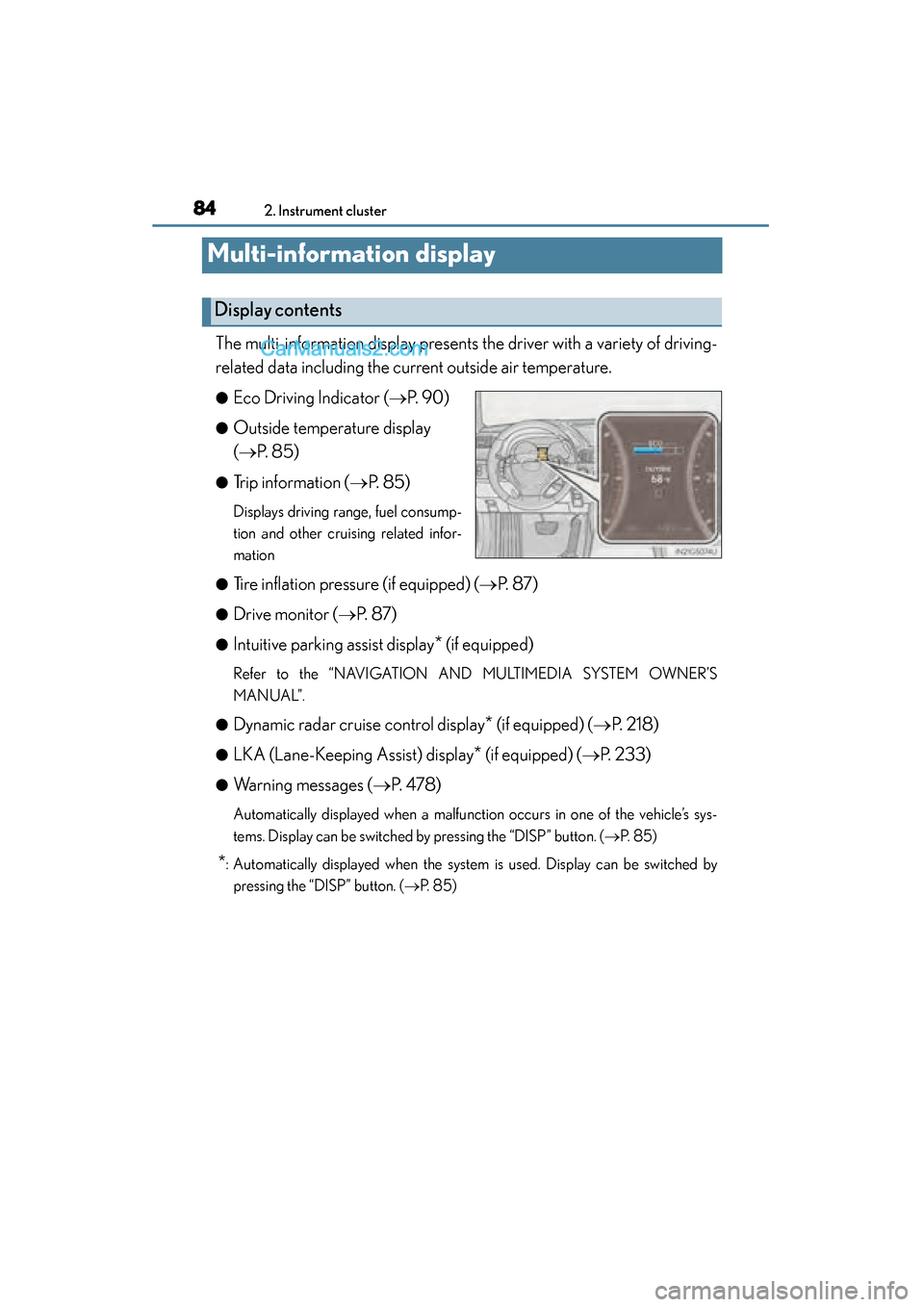
Multi-information display
The multi-information display presents the driver with a variety of driving-
related data including the current outside air temperature.
●Eco Driving Indicator (→P. 9 0 )
●Outside temperature display
(→ P. 8 5 )
●Trip information ( →P. 8 5 )
Displays driving range, fuel consump-
tion and other cruising related infor-
mation
●
Tire inflation pressure (if equipped) ( →P. 8 7 )
●Drive monitor ( →P. 8 7 )
●Intuitive parking assist display* (if equipped)
Refer to the “NAVIGATION AND MULTIMEDIA SYSTEM OWNER’S
MANUAL”.
●
Dynamic radar cruise control display* (if equipped) (→ P. 2 1 8 )
●LKA (Lane-Keeping Assist) display* (if equipped) (→P. 233)
●Warning messages ( →P. 4 7 8 )
Automatically displayed when a malfunction occurs in one of the vehicle’s sys-
tems. Display can be switched by pressing the “DISP” button. (→ P. 8 5 )
*: Automatically displayed when the system is used. Display can be switched by
pressing the “DISP” button. ( →P. 8 5 )
Display contents
GS350_OM_OM30F69U_(U).book Page 84 Monday, January 19, 2015 2:53 PM
Page 93 of 615

GS350_OM_OM30F69U_(U)
912. Instrument cluster
2
Instrument cluster
■Tire inflation pressure (if equipped)
●It may take a few minutes to display the tire inflation pressure after the engine
switch is turned to IGNITION ON mode. It may also take a few minutes to display
the tire inflation pressure after inflation pressure has been adjusted.
●“---” may be displayed if the tire information cannot be determined due to unfavor-
able radio wave conditions.
●Tire inflation pressure changes with temperature. The displayed values may also be
different from the values measured using a tire pressure gauge.
■Liquid crystal display
Small spots or light spots may appear on the display. This phenomenon is character-
istic of liquid crystal displays, and there is no problem continuing to use the display.
■Customization
Setting of available languages can be changed. (Customizable features: →P. 559)
CAUTION
■The information display at low temperatures
Allow the interior of the vehicle to warm up before using the liquid crystal informa-
tion display. At extremely low temperatures, the information display monitor may
respond slowly, and display changes may be delayed.
For example, there is a lag between the driver’s shifting and the new gear number
appearing on the display. This lag could cause the driver to downshift again, caus-
ing rapid and excessive engine braking and possibly an accident resulting in death
or injury.
■Cautions during setting up the display
As the engine needs to be running during setting up the display, ensure that the
vehicle is parked in a place with adequate ventilation. In a closed area such as a
garage, exhaust gases including harmful carbon monoxide (CO) may collect and
enter the vehicle. This may lead to death or a serious health hazard.
NOTICE
■During setting up the display
To prevent battery discharge, ensure that the engine is running while setting up the
display features.
GS350_OM_OM30F69U_(U).book Page 91 Monday, January 19, 2015 2:53 PM
Page 107 of 615

GS350_OM_OM30F69U_(U)
1053-1. Key information
3
Operation of each component
■When required to leave the vehicle’s key with a parking attendant
Turn the trunk opener main switch off, lock the glove box and armrest door as cir-
cumstances demand. (→P. 1 2 8 , 3 3 2 , 3 5 5 )
Remove the mechanical key for your own use and provide the attendant with the
electronic key only.
■If you lose your mechanical keys
New genuine mechanical keys can be made by your Lexus dealer using the other
mechanical key and the key number stamped on your key number plate. Keep the
plate in a safe place such as your wallet, not in the vehicle.
■When riding in an aircraft
When bringing an electronic key onto an aircraft, make sure you do not press any
buttons on the electronic key while inside the aircraft cabin. If you are carrying an
electronic key in your bag etc., ensure that the buttons are not likely to be pressed
accidentally. Pressing a button may cause the electronic key to emit radio waves that
could interfere with the operation of the aircraft.
GS350_OM_OM30F69U_(U).book Page 105 Monday, January 19, 2015 2:53 PM
Page 109 of 615

107
GS350_OM_OM30F69U_(U)3-2. Opening, closing and locking the doors and trunk
3
Operation of each component
Smart access system with push-button start
The following operations can be performed simply by carrying the elec-
tronic key on your person, for example in your pocket. (The driver should
always carry the electronic key.)
■Operation signals
A buzzer sounds and the emergency flashers flash to indicate that the doors have
been locked/unlocked. (Locked: once; Unlocked: twice)
■Security feature
If a door is not opened within approximately 60 seconds after the vehicle is
unlocked, the security feature automatically locks the vehicle again.
■Welcome light illumination control
The side marker, parking, tail and license plate lights automatically turn on at night
when the doors are unlocked using the entry function or wireless remote control if
the light switch is in the “AUTO” position.
Function summary
Locks and unlocks the doors ( →P. 1 0 8 )
Opens the trunk ( →P. 1 0 8 )
Starts the engine ( →P. 177)1
2
3
GS350_OM_OM30F69U_(U).book Page 107 Monday, January 19, 2015 2:53 PM
Page 132 of 615

130
GS350_OM_OM30F69U_(U)
3-2. Opening, closing and locking the doors and trunk
■Internal trunk release lever
■Using the mechanical key
The trunk can be also opened using the mechanical key. (→P. 5 2 1 )
■When leaving a key to the vehi cle with a parking attendant
→ P. 1 0 5
■Customization
The trunk unlocking operation can be changed. (Customizable features: →P. 559)
The trunk lid can be opened by pulling the
glow-in-the-dark lever located on the inside
of the trunk lid to the side.
The lever will continue to glow for some time
after the trunk lid is closed.
CAUTION
Observe the following precautions.
Failure to do so may result in death or serious injury.
■Before driving
●Make sure that the trunk lid is fully closed. If the trunk lid is not fully closed, it may
open unexpectedly while driving and hit near-by objects or luggage in the trunk
may be thrown out, causing an accident.
●Do not allow children to play in the trunk.
If a child is accidentally locked in the trunk, they could suffer from heat exhaus-
tion, suffocation or other injuries.
●Do not allow a child to open or close the trunk lid.
Doing so may cause the trunk lid to open unexpectedly, or cause the child’s
hands, head, or neck to be caught by the closing trunk lid.
■Important points while driving
Never let anyone sit in the trunk. In the event of sudden braking or a collision, they
are susceptible to death or serious injury.
GS350_OM_OM30F69U_(U).book Page 130 Monday, January 19, 2015 2:53 PM

