Page 161 of 1210

Features of your vehicle
80
4
Immobilizer indicator
Without smart key system This indicator illuminates when the
immobilizer key is inserted and turned to
the ON position to start the engine.
At this time, you can start the engine. The
indicator goes out after the engine is run-ning.
If this indicator blinks when the ignition
switch is in the ON position before start-
ing the engine, we recommend that the
system be checked by an authorized Kia
dealer. With smart key system
If any of the following occurs in a vehicle
equipped with the smart key, the immobi-
lizer indicator illuminates, blinks or goes
off.
• When the smart key is in the vehicle, if
the engine start/stop button is in the
ACC or ON position, the indicator will
illuminate for approximately 30 sec-
onds to indicate that you are able to
start the engine. However, when the
smart key is not in the vehicle, if the
engine start/stop button is pressed, the
indicator will blink for a few seconds to
indicate that you are not be able to
start the engine.
• If the indicator illuminates only for 2 seconds and goes out when the
engine start/stop button is turned to
ON position with the smart key in the
vehicle, we recommend that the sys-
tem be checked by an authorized Kia
dealer.
• When the battery is weak, if the engine start/stop button is pressed, the indica-
tor will blink and you are not able to
start the engine. However, you are able
to start the engine by pressing the
engine start/stop button directly with
the smart key. Also, if the smart key
system related parts have a problem,
the indicator will blink.
Tailgate open warning light
This warning light illuminates when the
tailgate is not closed securely.
Low fuel level warning
This warning light indicates the fuel tank
is nearly empty. When it comes on, you
should add fuel as soon as possible.
Driving with the fuel level warning light on
or with the fuel level below “O/E” cancause the engine to misfire and damage
the catalytic converter (if equipped).
JD eng 4a.QXP 3/4/2015 4:26 PM Page 80
Page 171 of 1210

Features of your vehicle
90
4
LCD DISPLAY WARNINGS AND INDICATORS (INSTRUMENT PANEL DISPLAY)
Calendar / Clock / Outside ambi-
ent Temperature (if equipped)
The monitor will display the outside ambi-
ent temperature, date and time. To change the date, time or temperatureunit(°C
� °F), press the SET (2) button
for more than 1 seconds.
Then you will enter the set-up mode and
mode changes in the following order as
you press the SET (2) button less than 1second. HOUR → MINUTE → YEAR → MONTH
→ DAY → 12H/24H → TEMPERATURE
UNIT CHANGE → Escape set-up mode
Press the SET (2) button less than 1 sec- ond to select the mode and set the data
using the UP (1, ) and DOWN (1, )
button while the selected setting mode
blinks.
To cancel the SET UP mode, do one of
the following :
- Press the SET button less than 1 sec- ond in set-up temperature unit change mode
- Press the SET button more than 1 sec- ond in any set-up mode
- After 15 seconds without any key press
- Ignition is On or OFF in Set-up mode
- Battery is disconnected Door and tailgate open display
The monitor will display the correspon- ding door or tailgate that is not closed
securely.
OJD042142
OJD042145
OJD042143
JD eng 4a.QXP 3/4/2015 4:26 PM Page 90
Page 233 of 1210

Features of your vehicle
152
4
Center console storage
To open the center console storage, push
the lever and then lift up the cover. Sliding armrest (if equipped)
To move forward
Grab the front portion of the armrest (1)
then pull it forward
To move rearward
Push the armrest rearward with your palm.
STORAGE COMPARTMENT
WARNING
- Flammable
materials
Do not store cigarette lighters,
propane cylinders, or other flamma-
ble/explosive materials in the vehi-
cle. These items may catch fire
and/or explode if the vehicle is
exposed to hot temperatures for
extended periods.
CAUTION
• To avoid possible theft, do not leave valuables in the storagecompartment.
• Always keep the storage com- partment covers closed while
driving. Do not attempt to placeso many items in the storagecompartment that the storagecompartment cover can not close
securely.
OJD042130OJD042131
WARNING
Do not grab the front portion of the
armrest (1) when moving the arm-
rest rearward. It may pinch your fin-
gers.
JD eng 4a.QXP 3/4/2015 4:31 PM Page 152
Page 238 of 1210

4 157
Features of your vehicle
Cup holder✽NOTICE
• Keep your drinks sealed while driving to prevent spilling your drink. If liq-
uid spills, it may get into the vehicle's
electrical/electronic system and dam-
age electrical/electronic parts.
• When cleaning spilled liquids, do not dry the cup holder at high tempera-
ture. This may damage the cup holder.
Cups or small beverage cans may be
placed in the cup holders.
Type B
To use the cup holder, open the cover.
WARNING - Hot liquids
• Do not place uncovered cups of hot liquid in the cup holder while
the vehicle is in motion. If the hot
liquid spills, you may burn your-
self. Such a burn to the driver
could lead to loss of control of
the vehicle.
• To reduce the risk of personal injury in the event of sudden stop
or collision, do not place uncov-
ered or unsecured bottles, glass-
es, cans, etc., in the cup holder
while the vehicle is in motion.
WARNING
Keep cans and bottles out of direct
sunlight. Placing them in a hot vehi-
cle can cause them to explode.
OJD042137
OJD042138
■ Front
• Type A
• Type B
CAUTION
Do not place uncovered cups in the
cup holder while the vehicle is in motion. If the liquid spills, electricsystems may malfunction.
JD eng 4a.QXP 3/4/2015 4:32 PM Page 157
Page 240 of 1210
4 159
Features of your vehicle
✽NOTICE
Close the vanity mirror cover securely
and return the sunvisor to its original
position after use.
❈ To learn how to use the vanity mirror
lamp, refer to "Interior light" in this
chapter.
CAUTION - Vanity mirror
lamp (if equipped)
Always have the switch in the off position when the vanity mirror lamp is not in use. If the sunvisor is
closed without the lamp off, it may discharge the battery or damagethe sunvisor.
WARNING
For your safety, do not obstruct your
vision when using the sunvisor.
OJD042140
OJD042154
■ Front
• Type A
• Type B
OJD042155
OJD042243
■Rear (if equipped)
• Type A
• Type B
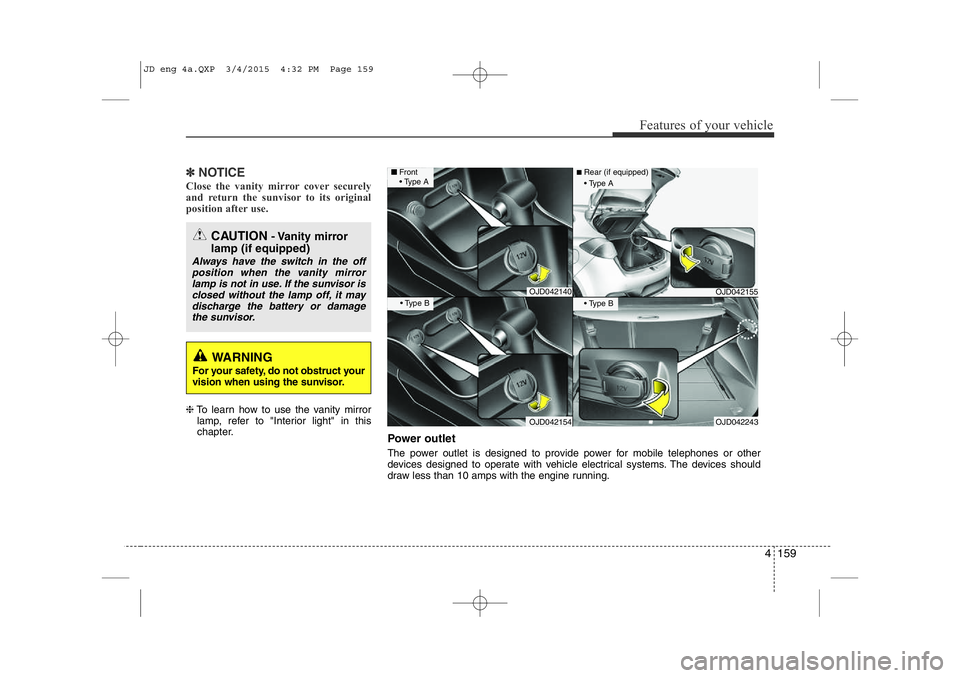
Power outlet
The power outlet is designed to provide power for mobile telephones or other
devices designed to operate with vehicle electrical systems. The devices should
draw less than 10 amps with the engine running.
JD eng 4a.QXP 3/4/2015 4:32 PM Page 159
Page 242 of 1210

4 161
Features of your vehicle
Clothes hanger Floor mat anchor(s) (if equipped)When using a floor mat on the front floor
carpet, make sure it attaches to the floor
mat anchor(s) in your vehicle. This keeps
the floor mat from sliding forward.
OED040354
CAUTION
• Do not hang heavy clothes, sincethose may damage the hook.
• Be careful when opening and clos- ing the doors. Clothes, etc. mayget caught between the door gap.
WARNING
The following must be observed when installing ANY floor mat to
the vehicle.
• Ensure that the floor mats are securely attached to the vehicle’s
floor mat anchor(s) before driving
the vehicle.
• Do not use ANY floor mat that cannot be firmly attached to the
vehicle’s floor mat anchors.
• Do not stack floor mats on top of one another (e.g. all-weather rub- ber mat on top of a carpeted floor
mat). Only a single floor mat
should be installed in each posi-tion.
IMPORTANT – Your vehicle was manufactured with driver’s side
floor mat anchors that are
designed to securely hold the
floor mat in place. To avoid any
interference with pedal operation,Kia recommends that the Kia
floor mat designed for use in your
vehicle be installed.
OGDE041219
■
Type A ■Type B
JD eng 4a.QXP 3/4/2015 4:32 PM Page 161
Page 245 of 1210
Features of your vehicle
164
4
To install the barrier net
1. Open the cover (if equipped) for the
holder position (1) or (2) you want to install.
2. Compress the one side net upper shaft to length direction before insert the net upper shaft into the large hole (3) and
then secure by sliding into the small hole (4).
3. Hang the net strap hooks in the corre-sponding hook holders on the floorbehind the front seat or rear seat. This symbol indicates theposition of the hook holderson the floor behind the rearseat.
OJD043500OJD032057
OGDE042302
JD eng 4a.QXP 3/4/2015 4:33 PM Page 164
Page 246 of 1210

4 165
Features of your vehicle
4. Fasten the straps, by using theadjuster (1).
To remove the barrier net
1. Loosen the straps by using the strapadjusters and remove the strap hooks
from the hook holders.
2. Remove the net upper shaft by pulling it through the large holes.
3. Remove the barrier net.
OGDE042303
WARNING
• Make sure that there is no slack in the barrier net by fastening the
strap securely when installing the
net. The strap should be fastenedafter confirming that the hook is
inserted into the upper hook
holder securely.
• Make sure that the seatbacks are locked securely.
WARNING
• Do not put passengers in the rear seat or cargo area behind the bar- rier net.
• Do not put passenger in the rear centre seat when the barrier netis installed behind the rear seats.
The barrier net may interfere with
use of the rear centre safety belt.
• Do not load cargo in the area higher than the barrier net'supper end.
• Do not load heavy cargo in the area higher than the seatback to
avoid accident even if the barriernet is installed.
• Do not load cargo which has sharp edge that can pass through the barrier net.
• Do not apply excessive force to the barrier net by hanging on to
the net or by suspending heavy
cargo and so on.
JD eng 4a.QXP 3/4/2015 4:33 PM Page 165