Page 330 of 678

WARNING!(Continued)
•Do not leave the Key Fob in or near the vehicle, or
in a location accessible to children, and do not
leave a vehicle equipped with Keyless Enter-N-
Go™in the MAR/RUN mode. A child could operate
power windows, other controls, or move the ve-
hicle.
•Be sure the parking brake is fully disengaged
before driving; failure to do so can lead to brake
failure and a collision.
•Always fully apply the parking brake when leav-
ing your vehicle, or it may roll and cause damage or
injury. Also be certain to leave the transmission in
PARK. Failure to do so may allow the vehicle to roll
and cause damage or injury.
CAUTION!
If the Brake System Warning Light remains on with
the parking brake released, a brake system malfunc-
tion is indicated. Have the brake system serviced by
an authorized dealer immediately.
If exceptional circumstances should make it necessary to
engage the EPB while the vehicle is in motion, maintain
upward pressure on the EPB switch for as long as
engagement is desired. The brake warning lamp could
illuminate in case of the hydraulic system is not available.
The rear stop lamps will also be illuminated automati-
cally while the vehicle remains in motion.
To disengage the EPB while the vehicle is in motion,
release the switch. If the vehicle is brought to a complete
stop using the EPB, when the vehicle reaches approxi-
mately 1.9 mph (3 km/h) the EPB will remain engaged.
328 STARTING AND OPERATING
Page 335 of 678
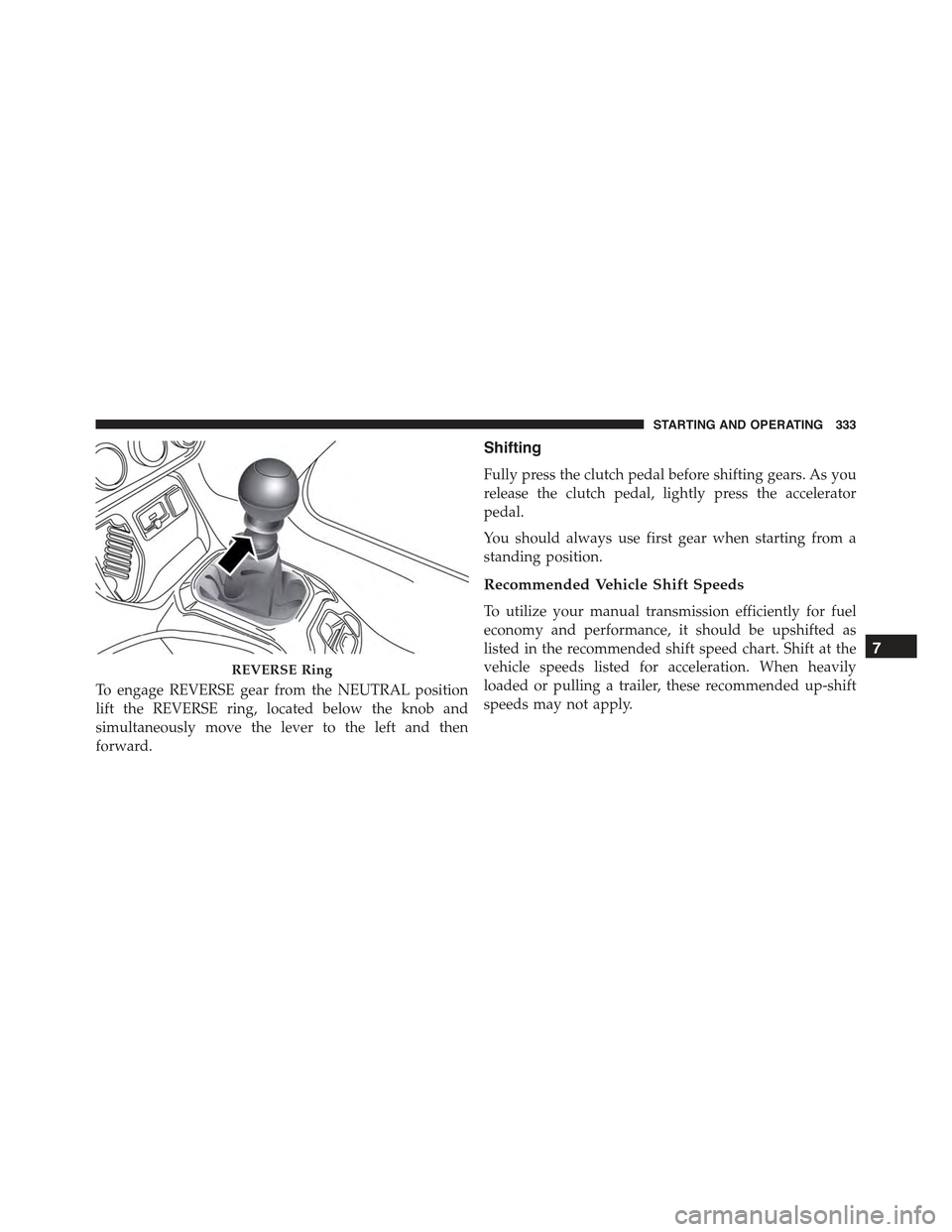
To engage REVERSE gear from the NEUTRAL position
lift the REVERSE ring, located below the knob and
simultaneously move the lever to the left and then
forward.
Shifting
Fully press the clutch pedal before shifting gears. As you
release the clutch pedal, lightly press the accelerator
pedal.
You should always use first gear when starting from a
standing position.
Recommended Vehicle Shift Speeds
To utilize your manual transmission efficiently for fuel
economy and performance, it should be upshifted as
listed in the recommended shift speed chart. Shift at the
vehicle speeds listed for acceleration. When heavily
loaded or pulling a trailer, these recommended up-shift
speeds may not apply.
REVERSE Ring
7
STARTING AND OPERATING 333
Page 347 of 678

If the transmission becomes extremely hot, the “Trans-
mission Temperature Warning Light” may illuminate and
the transmission may operate differently until the trans-
mission cools down.
During cold temperatures, transmission operation may
be modified depending on engine and transmission
temperature as well as vehicle speed. This feature im-
proves warm up time of the engine and transmission to
achieve maximum efficiency. Engagement of the torque
converter clutch, and shifts into 8th or 9th gear, are
inhibited until the transmission fluid is warm (refer to the
“Note” under “Torque Converter Clutch” in this section).
Normal operation will resume once the transmission
temperature has risen to a suitable level.
AutoStick
AutoStick is a driver-interactive transmission feature
providing manual shift control, giving you more control
of the vehicle. AutoStick allows you to maximize engine
braking, eliminate undesirable upshifts and downshifts,
and improve overall vehicle performance. This system
can also provide you with more control during passing,
city driving, cold slippery conditions, mountain driving,
trailer towing, and many other situations.
Operation
When the shift lever is in the AutoStick position (beside
the DRIVE position), it can be moved forward and
rearward. This allows the driver to manually select the
transmission gear being used. Moving the shift lever
forward (-) triggers a downshift, and rearward (+) an
upshift. The current gear is displayed in the instrument
cluster.
NOTE:In AutoStick mode, the transmission will only
shift up or down when the driver moves the shift lever
rearward (+) or forward (-), except as described below.
•The transmission will automatically upshift when nec-
essary to prevent engine over-speed.
7
STARTING AND OPERATING 345
Page 349 of 678

Transmission Limp Home Mode
Transmission function is monitored for abnormal condi-
tions. If a condition is detected that could result in
transmission damage, Transmission Limp Home Mode is
activated. In this mode, the transmission remains in
fourth gear regardless of which forward gear is selected.
PARK, REVERSE, and NEUTRAL will continue to oper-
ate. The Malfunction Indicator Light (MIL) may be illu-
minated. Limp Home Mode allows the vehicle to be
driven to an authorized dealer for service without dam-
aging the transmission.
In the event of a momentary problem, the transmission
can be reset to regain all forward gears by performing the
following steps:
1. Stop the vehicle.
2. Shift the transmission into PARK.
3. Turn the ignition switch to the STOP/OFF position.
4. Wait approximately 10 seconds.
5. Restart the engine.
6. Shift into the desired gear range. If the problem is no
longer detected, the transmission will return to normal
operation.
NOTE:Even if the transmission can be reset, we recom-
mend that you visit your authorized dealer at your
earliest possible convenience. Your authorized dealer has
diagnostic equipment to determine if the problem could
recur. If the transmission cannot be reset, authorized
dealer service is required.
Key Ignition Park Interlock
Vehicles Equipped With Keyless Enter-N-Go™:
This vehicle is equipped with a Key Ignition Park Inter-
lock which requires the transmission to be in PARK
before the ignition can be turned to the STOP/OFF
7
STARTING AND OPERATING 347
Page 351 of 678
NOTE:
•In order to ensure proper operation, the Electronic
Speed Control System has been designed to shut down
if multiple Speed Control functions are operated at the
same time. If this occurs, the Electronic Speed Control
System can be reactivated by pushing the Electronic
Speed Control ON/OFF button and resetting the de-
sired vehicle set speed.
•The Electronic Speed Control function will not work in
4WD Low Range.
To Activate
Push the ON/OFF button to activate the Electronic Speed
Control. The Cruise Indicator Light in the Electronic
Vehicle Information Center (EVIC) or Driver Information
Display (DID) will illuminate. To turn the system off,
push the ON/OFF button a second time. The Cruise
Electronic Speed Control Buttons
1—ON/OFF4—SET-/DECEL2—SET+/ACCEL5—CANCEL3—RESUME
7
STARTING AND OPERATING 349
Page 352 of 678
Indicator Light will turn off. The system should be
turned off when not in use.
WARNING!
Leaving the Electronic Speed Control system on
when not in use is dangerous. You could accidentally
set the system or cause it to go faster than you want.
You could lose control and have an accident. Always
leave the system OFF when you are not using it.
To Set A Desired Speed
Turn the Electronic Speed Control ON.
NOTE:The vehicle should be traveling at a steady speed
and on level ground before pushing the SET (+) or SET (-)
button.
When the vehicle has reached the desired speed, push the
SET (+) or SET (-) button and release. Release the
accelerator and the vehicle will operate at the selected
speed.
To Deactivate
A soft tap on the brake pedal, pushing the CANCEL
button, or normal brake pressure while slowing the
vehicle will deactivate the Electronic Speed Control with-
out erasing the set speed from memory.
Pushing the ON/OFF button or turning the ignition
switch OFF erases the set speed from memory.
To Resume Speed
To resume a previously set speed, push the RES button
and release. Resume can be used at any speed above
20 mph (32 km/h).
350 STARTING AND OPERATING
Page 354 of 678
The drivers preferred units can be selected through the
Uconnect® system if equipped. Refer to ”Uconnect®
Settings” in “Multimedia” for more information. The
speed increment shown is dependant on the chosen
speed unit of U.S. (mph) or Metric (km/h):
U.S. Speed (mph)
•Pushing the SET-button once will result ina1mph
decrease in set speed. Each subsequent tap of the
button results in a decrease of 1 mph.
•If the button is continually pushed, the set speed will
continue to decrease until the button is released, then
the new set speed will be established.
Metric Speed (km/h)
•Pushing the SET-button once will result in a 1 km/h
decrease in set speed. Each subsequent tap of the
button results in a decrease of 1 km/h.
•If the button is continually pushed, the set speed will
continue to decrease until the button is released, then
the new set speed will be established.
To Accelerate For Passing
Push the accelerator as you would normally. When the
pedal is released, the vehicle will return to the set speed.
Using Electronic Speed Control On Hills
The transmission may downshift on hills to maintain the
vehicle set speed.
NOTE:The Electronic Speed Control system maintains
speed up and down hills. A slight speed change on
moderate hills is normal.
On steep hills, a greater speed loss or gain may occur so
it may be preferable to drive without Electronic Speed
Control.
352 STARTING AND OPERATING
Page 358 of 678
Active Drive With Low Control — (Trailhawk models
only)
The 4WD LOW mode helps to improve the off-road
performance in all modes. To enable 4WD Low please
follow the steps below:
Enabling 4WD LOW
With the vehicle stationary, the ignition in the MAR/
RUN or with the engine running, shift the transmission
into DRIVE, REVERSE or NEUTRAL and press the
button once 4WD LOW. The EVIC/DID will display the
message#4WD LOW#once the shift is complete.
NOTE:The lights on the Selec-Terrain™ switch may
blink until the shift is complete.
Disabling 4WD LOW
To disable the 4WD LOW mode, the vehicle must be
stationary and the transmission shifted into NEUTRAL.
Press the 4WD LOW button once.
Selec-Terrain™ Switch (Trailhawk)
356 STARTING AND OPERATING