2015 HYUNDAI TUCSON ESP
[x] Cancel search: ESPPage 91 of 653
3-5
Convenient features of your vehicle
3
Remote key precautions
The remote key will not work if any of
the following occur:
The key is in the ignition switch.
You exceed the operating distancelimit (about 90 feet [30 m]).
The remote key battery is weak.
Other vehicles or objects may be blocking the signal.
The weather is extremely cold.
The remote key is close to a radio transmitter such as a radio station
or an airport which can interfere
with normal operation of the remote
key.
When the remote key does not work
correctly, open and close the door
with the mechanical key. If you have
a problem with the remote key, con-
tact an authorized HYUNDAI dealer. (Continue)(Continue)
If the remote key is in close proximi-
ty to your mobile phone, the signal
could be blocked by your mobile
phones normal operational signals.
This is especially important when the
phone is active such as making and
receiving calls, text messaging,
and/or sending/receiving emails.
Avoid placing the remote key and
your mobile phone in the same pants
or jacket pocket and always try tomaintain an adequate distance
between the two devices.
This device complies with Part 15of the FCC rules.
Operation is subject to the following
two conditions:
1. This device may not cause harm-
ful interference, and
2. This device must accept any inter- ference received, including inter-
ference that may cause undesired
operation.
✽✽ NOTICE
Changes or modifications not
expressly approved by the party
responsible for compliance could
void the user's authority to operate
the device.
Page 96 of 653
3-10
Convenient features of your vehicle
Smart key precautions
The smart key will not work if any of
the following occur:
The smart key is close to a radiotransmitter such as a radio station
or an airport which can interfere
with normal operation of the trans-
mitter.
The smart key is near a mobile two way radio system or a cellular
phone.
Another vehicle’s smart key is being operated close to your vehi-
cle.
When the smart key does not work
correctly, open and close the door
with the mechanical key. If you have
a problem with the smart key, contact
an authorized HYUNDAI dealer. (Continue)(Continue)
If the smart key is in close proximity
to your mobile phone, the signal
could be blocked by your mobile
phones normal operational signals.
This is especially important when the
phone is active such as making and
receiving calls, text messaging,
and/or sending/receiving emails.
Avoid placing the smart key and yourmobile phone in the same pants or
jacket pocket and always try to main-
tain an adequate distance between
the two devices.
This device complies with Part 15of the FCC rules.
Operation is subject to the following
two conditions:
1. This device may not cause harm-
ful interference, and
2. This device must accept any inter- ference received, including inter-
ference that may cause undesired
operation.
✽✽ NOTICE
Changes or modifications not
expressly approved by the party
responsible for compliance could
void the user's authority to operate
the device.
Page 98 of 653
3-12
Convenient features of your vehicle
This device complies with Part 15 of the FCC rules.
Operation is subject to the following
two conditions:
1. This device may not cause harm-ful interference, and
2. This device must accept any inter- ference received, including inter-
ference that may cause undesired
operation.
✽✽ NOTICE
Changes or modifications not
expressly approved by the party
responsible for compliance could
void the user's authority to operate
the device. The transponder in your igni-
tion key is an important part of
the immobilizer system. It is
designed to give years of trou-
ble-free service, however you
should avoid exposure to mois-
ture, static electricity and rough
handling. Immobilizer system
malfunction could occur.
CAUTION
In order to prevent theft of your
vehicle, do not leave spare keys
anywhere in your vehicle. Your
immobilizer password is a cus-
tomer unique password andshould be kept confidential.
WARNING
Page 139 of 653
3-53
Convenient features of your vehicle
3
Erasing HomeLink®
buttons
Individual buttons cannot be erased.
However, to erase all three pro-
grammed buttons:
1. Press and hold the two outer
HomeLink ®
buttons until the indi-
cator light begins to flash-after 20
seconds.
2. Release both buttons. Do not hold for longer than 30 seconds.
The Integrated HomeLink ®
Wireless
Control System is now in the training
(learn) mode and can be pro-
grammed at any time following the
appropriate steps in the Programming
chapters above. NVS ®
is a registered trademark and
Z-Nav™ is a trademark of the Gentex
Corporation, Zeeland, Michigan.HomeLink ®
is a registered trademark
owned by Johnson Controls,
Incorporated, Milwaukee, Wisconsin.
FCC ID: NZLZTVHL3
IC: 4112A-ZTVHL3 This device complies with Part 15 of the FCC Rules.
Operation is subject to the following
two conditions:
1. This device may not cause harm-
ful interference, and
2. This device must accept any inter- ference received, including inter-
ference that may cause undesired
operation.
Electric chromic mirror (ECM)
with HomeLink ®
system,
compass and Blue Link ®
(if equipped)
Your vehicle may be equipped with a
Gentex Automatic-Dimming Mirror
with a Z-Nav™ Electronic Compass
Display and an Integrated HomeLink ®
Wireless Control System. During
nighttime driving, this feature willautomatically detect and reduce
rearview mirror glare while the com-
pass indicates the direction the vehi-
cle is pointed. The HomeLink ®
Universal Transceiver allows you to
activate your garage door(s), electric
gate, home lighting, etc.
The transceiver has been testedand complies with FCC and
Industry Canada rules. Changes
or modifications not expressly
approved by the party responsi-
ble for compliance could voidthe user's authority to operate
the device.
WARNING
Page 147 of 653
3-61
Convenient features of your vehicle
3
FCC ID: NZLTLMHL4
IC: 4112A-TLMHL4
This device complies with Part 15 of the FCC Rules.
Operation is subject to the following
two conditions:
1. This device may not cause harm-ful interference, and
2. This device must accept any inter- ference received, including inter-
ference that may cause undesired
operation.Outside rearview mirrors
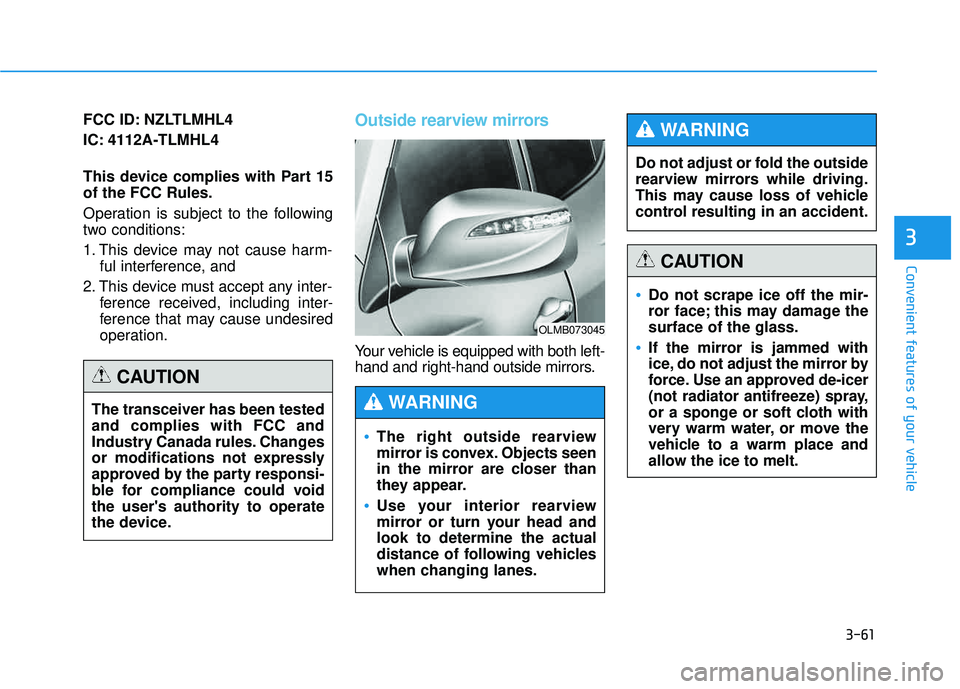
Your vehicle is equipped with both left-
hand and right-hand outside mirrors.
OLMB073045
The right outside rearview
mirror is convex. Objects seen
in the mirror are closer than
they appear.
Use your interior rearview
mirror or turn your head andlook to determine the actual
distance of following vehicles
when changing lanes.
WARNING
Do not adjust or fold the outside
rearview mirrors while driving.
This may cause loss of vehicle
control resulting in an accident.
WARNING
Do not scrape ice off the mir-
ror face; this may damage thesurface of the glass.
If the mirror is jammed with
ice, do not adjust the mirror by
force. Use an approved de-icer
(not radiator antifreeze) spray,
or a sponge or soft cloth with
very warm water, or move the
vehicle to a warm place and
allow the ice to melt.
CAUTION
The transceiver has been tested and complies with FCC and
Industry Canada rules. Changes
or modifications not expressly
approved by the party responsi-
ble for compliance could voidthe user's authority to operate
the device.
CAUTION
Page 164 of 653
3-78
Convenient features of your vehicle
✽✽NOTICE
Make sure to refuel your vehicle according to the "Fuel
Requirements" suggested in the
Introduction chapter.
Do not spill fuel on the exterior surfaces of the vehicle. Any type of
fuel spilled on painted surfaces
may damage the paint.
(Continued)
Do not use matches or a lighter and do not smoke or
leave a lit cigarette in your
vehicle while at a gas station,
especially during refueling.
Do not over-fill or top-off your
vehicle tank, which can cause
gasoline spillage.
If a fire breaks out during refu-
eling, leave the vicinity of the
vehicle, and immediately con-
tact the manager of the gasstation and then contact the
local fire department. Follow
any safety instructions they
provide.
If pressurized fuel sprays out,
it can cover your clothes or
skin and thus subject you to
the risk of fire and burns.
Always remove the fuel cap
carefully and slowly. If the cap
is venting fuel or if you hear a
hissing sound, wait until the
condition stops before com-
pletely removing the cap.
(Continued)
(Continued)
Always check that the fuel cap
is installed securely to pre-
vent fuel spillage in the eventof an accident.
If the fuel filler cap requires
replacement, use only a gen-
uine HYUNDAI cap or the equiv-
alent specified for your vehicle.An incorrect fuel filler cap canresult in a serious malfunctionof the fuel system or emission
control system.
CAUTION
(Continued)
When using an approved
portable fuel container, be sureto place the container on the
ground prior to refueling. Static
electricity discharge from the
container can ignite fuel vapors
causing a fire. Once refueling
has begun, contact between
your bare hand and the vehicleshould be maintained until the
filling is complete.
Use only approved portable
plastic fuel containers designed
to carry and store gasoline.
When refueling, always move
the shift lever to the P (Park)
position, set the parking
brake, and place the ignition
switch to the LOCK/OFF posi-
tion. Sparks produced byelectrical components relatedto the engine can ignite fuel
vapors causing a fire.
(Continued)
Page 166 of 653
3-80
Convenient features of your vehicle
AUTO light position
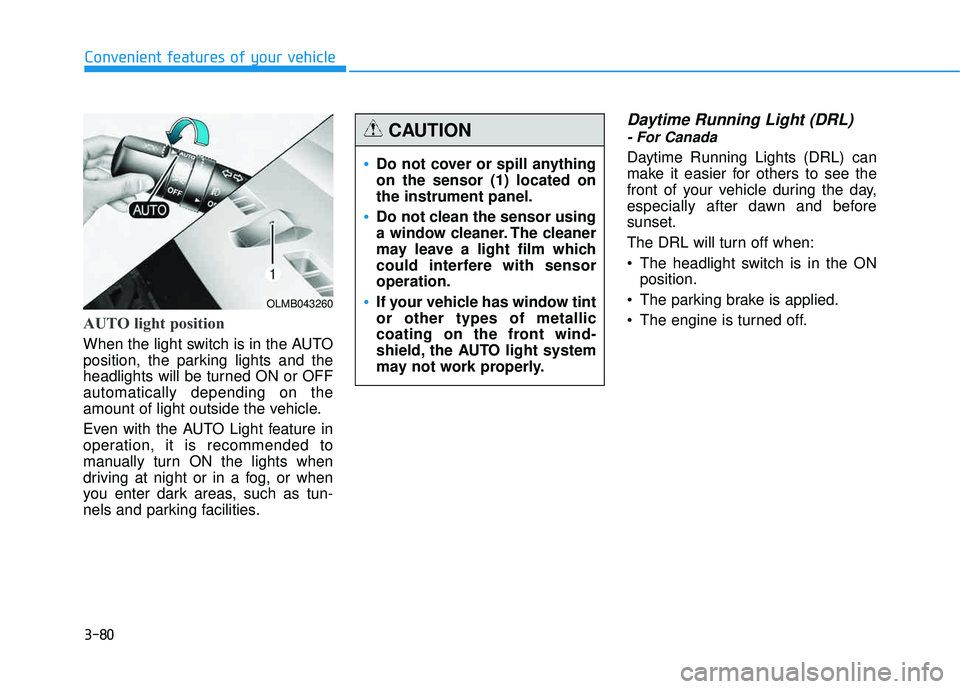
When the light switch is in the AUTO
position, the parking lights and the
headlights will be turned ON or OFFautomatically depending on the
amount of light outside the vehicle.
Even with the AUTO Light feature in
operation, it is recommended to
manually turn ON the lights when
driving at night or in a fog, or when
you enter dark areas, such as tun-
nels and parking facilities.
Daytime Running Light (DRL)
- For Canada
Daytime Running Lights (DRL) can
make it easier for others to see the
front of your vehicle during the day,
especially after dawn and beforesunset.
The DRL will turn off when:
The headlight switch is in the ONposition.
The parking brake is applied.
The engine is turned off.
OLMB043260
Do not cover or spill anything on the sensor (1) located onthe instrument panel.
Do not clean the sensor using
a window cleaner. The cleaner
may leave a light film which
could interfere with sensoroperation.
If your vehicle has window tint or other types of metallic
coating on the front wind-
shield, the AUTO light system
may not work properly.
CAUTION
Page 173 of 653
3-87
Convenient features of your vehicle
3
WWIIPP EERR SS AA NN DD WW AASSHH EERR SS
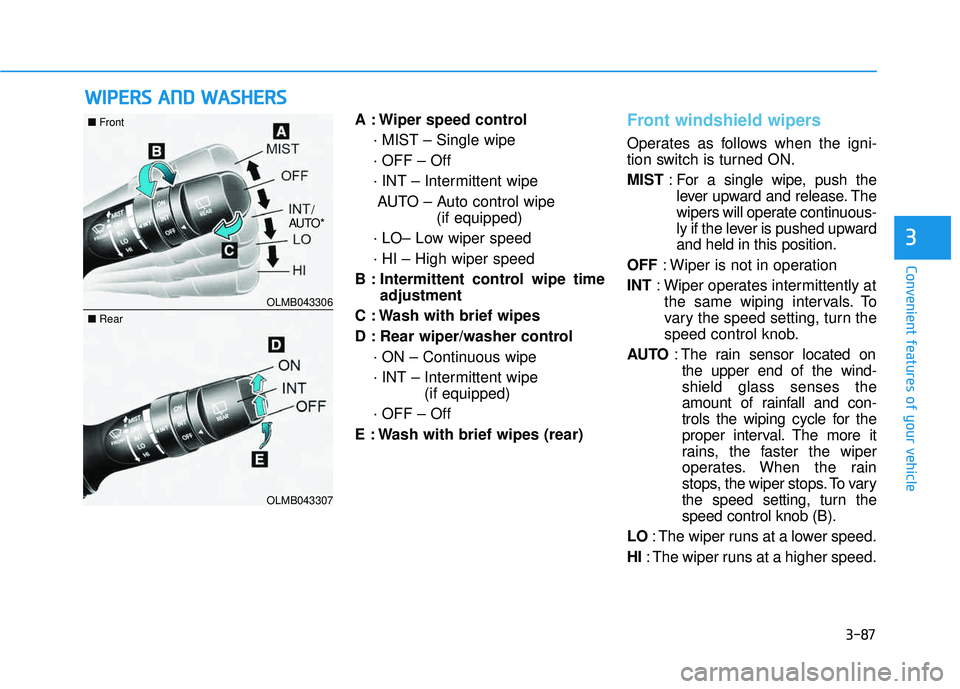
A : Wiper speed control
· MIST – Single wipe · OFF – Off
· INT – Intermittent wipeAUTO – Auto control wipe (if equipped)
· LO– Low wiper speed· HI – High wiper speed
B : Intermittent control wipe time adjustment
C : Wash with brief wipes
D : Rear wiper/washer control · ON – Continuous wipe
· INT – Intermittent wipe (if equipped)
· OFF – Off
E : Wash with brief wipes (rear)Front windshield wipers
Operates as follows when the igni-
tion switch is turned ON. MIST : For a single wipe, push the
lever upward and release. The
wipers will operate continuous-
ly if the lever is pushed upwardand held in this position.
OFF : Wiper is not in operation
INT : Wiper operates intermittently at
the same wiping intervals. To
vary the speed setting, turn the
speed control knob.
AU TO : The rain sensor located on
the upper end of the wind-shield glass senses the
amount of rainfall and con-
trols the wiping cycle for the
proper interval. The more it
rains, the faster the wiper
operates. When the rain
stops, the wiper stops. To vary
the speed setting, turn thespeed control knob (B).
LO : The wiper runs at a lower speed.
HI : The wiper runs at a higher speed.
OLMB043306
OLMB043307
■Front
■Rear
/
AU TO*