2015 HYUNDAI TUCSON ESP
[x] Cancel search: ESPPage 186 of 653
3-100
Convenient features of your vehicle
✽✽NOTICE
When using the air conditioning system, monitor the engine temper-
ature gauge closely while driving
up hills or in heavy traffic when
outside temperatures are high. Air
conditioning system operation may
cause engine overheating.
Continue to use the blower fan but
turn the air conditioning system off
if the engine temperature gauge
indicates engine overheating.
When opening the windows in humid weather, air conditioning
may create water droplets inside
the vehicle. Since excessive water
droplets may cause damage to
electrical equipment, air condi-
tioning should only be operated
with the windows closed. Air conditioning system operation
tips
If the vehicle has been parked in
direct sunlight during hot weather,
open the windows for a short time
to let the hot air inside the vehicle
escape.
To help reduce moisture inside of the windows on rainy or humid
days, decrease the humidity inside
the vehicle by operating the airconditioning system.
During air conditioning system operation, you may occasionallynotice a slight change in enginespeed as the air conditioning com-
pressor cycles. This is a normal
system operation characteristic.
Use the air conditioning system every month for a few minutes to
ensure maximum system perform-
ance. When using the air conditioning
system, you may notice clear water
dripping (or even puddling) on the
ground under the passenger side
of the vehicle. This is a normal sys-
tem operation characteristic.
Operating the air conditioning sys- tem in the recirculated air position
provides maximum cooling, how-
ever, continual operation in this
mode may cause the air inside the
vehicle to become stale.
During cooling operation, you may occasionally notice a misty air flow
because of rapid cooling and
humid air intake. This is a normal
system operation characteristics.
Page 198 of 653
3-112
Convenient features of your vehicle
For maximum defrosting, set thetemperature control to the maxi-
mum clockwise setting (hot), and
the fan speed control to the highestspeed.
If warm air to the floor is desired while defrosting or defogging, setthe mode to the floor-defrost posi-tion.
Before driving, clear all snow and ice from the windshield, rear win-
dow, outside rear view mirrors, and
all side windows.
Clear all snow and ice from the hood and air inlet in the cowl grill to
improve heater and defroster effi-ciency and to reduce the probabili-
ty of fogging up the inside of thewindshield.Manual climate control system
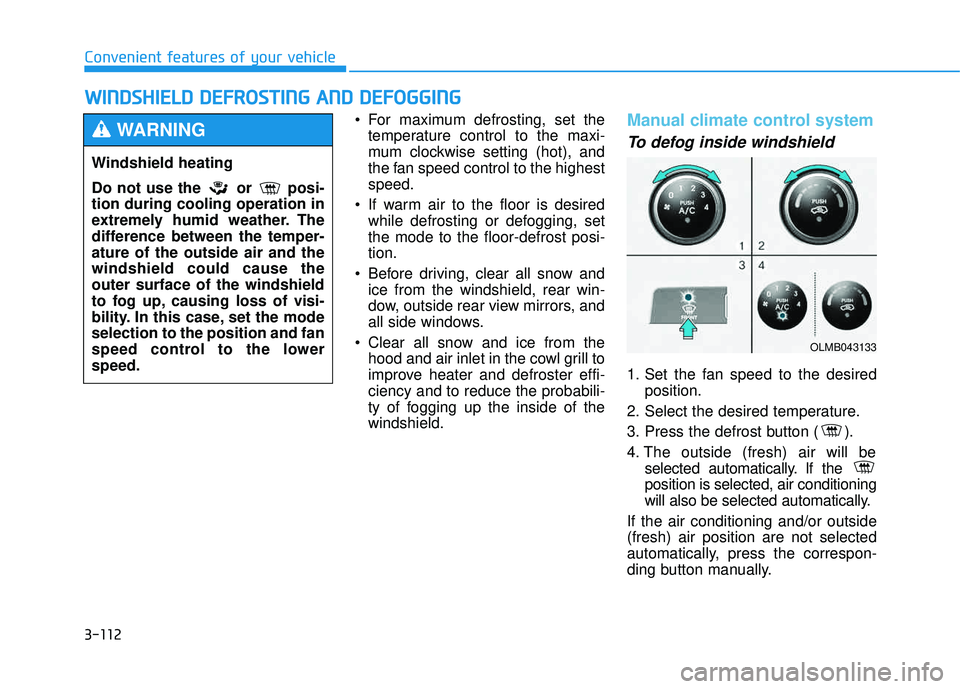
To defog inside windshield
1. Set the fan speed to the desired position.
2. Select the desired temperature.
3. Press the defrost button ( ).
4. The outside (fresh) air will be selected automatically. If the position is selected, air conditioning
will also be selected automatically.
If the air conditioning and/or outside(fresh) air position are not selected
automatically, press the correspon-
ding button manually.
WW IINN DDSSHH IIEE LLDD DD EEFFRR OO SSTT IINN GG AA NN DD DD EEFFOO GGGGIINN GG
Windshield heating
Do not use the or posi- tion during cooling operation in
extremely humid weather. The
difference between the temper-ature of the outside air and thewindshield could cause theouter surface of the windshield
to fog up, causing loss of visi-
bility. In this case, set the modeselection to the position and fan
speed control to the lowerspeed.
WARNING
OLMB043133
Page 199 of 653
3-113
Convenient features of your vehicle
3
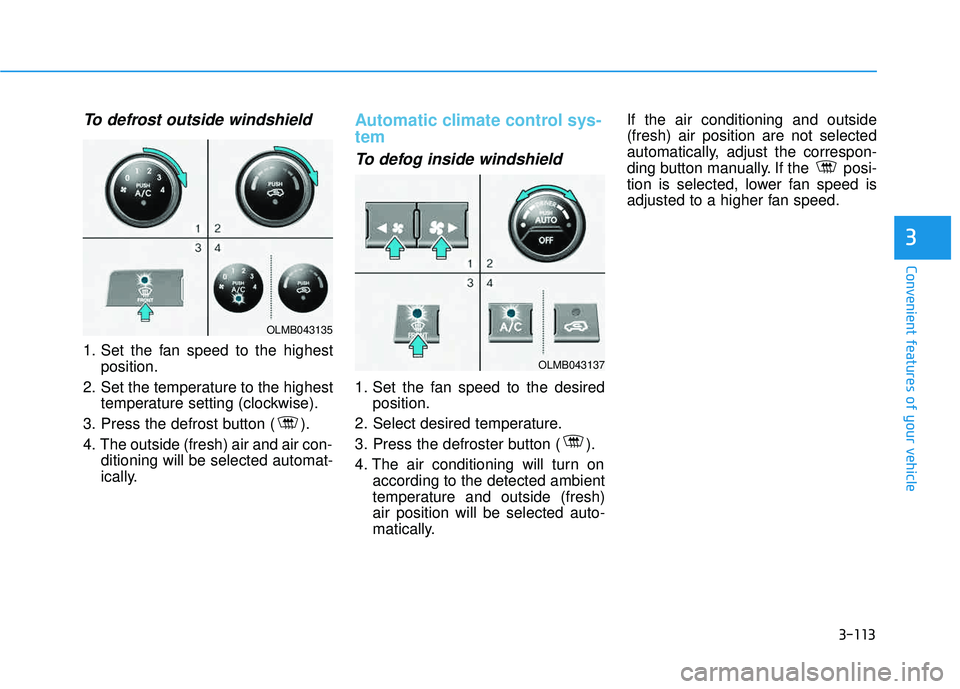
To defrost outside windshield
1. Set the fan speed to the highestposition.
2. Set the temperature to the highest temperature setting (clockwise).
3. Press the defrost button ( ).
4. The outside (fresh) air and air con- ditioning will be selected automat-
ically.
Automatic climate control sys- tem
To defog inside windshield
1. Set the fan speed to the desiredposition.
2. Select desired temperature.
3. Press the defroster button ( ).
4. The air conditioning will turn on according to the detected ambient
temperature and outside (fresh)air position will be selected auto-
matically. If the air conditioning and outside(fresh) air position are not selected
automatically, adjust the correspon-
ding button manually. If the posi-
tion is selected, lower fan speed is
adjusted to a higher fan speed.
OLMB043135
OLMB043137
Page 211 of 653
3-125
Convenient features of your vehicle
3
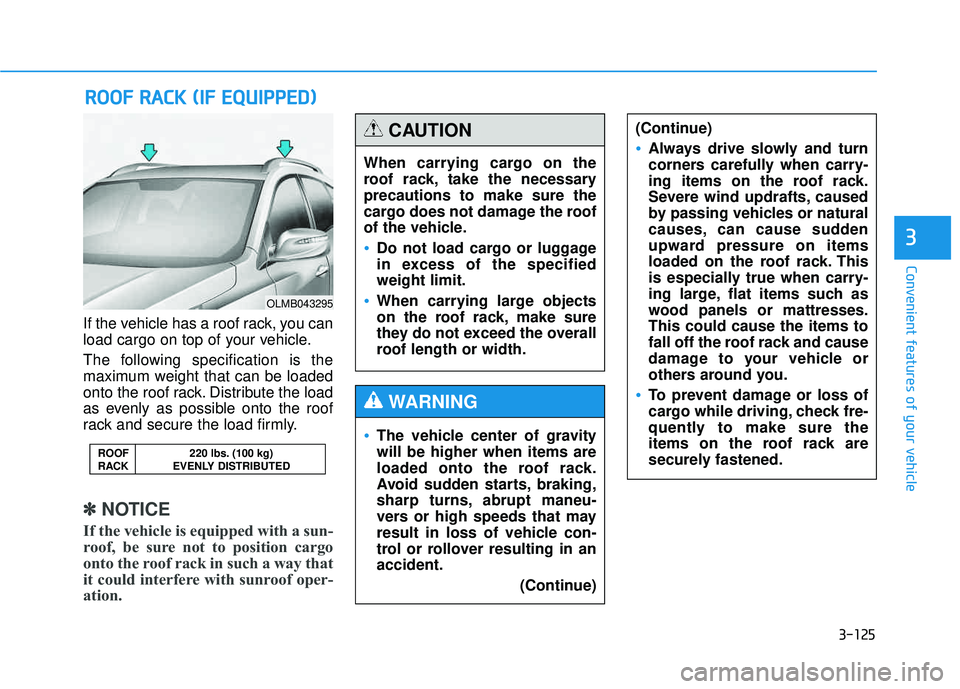
If the vehicle has a roof rack, you can
load cargo on top of your vehicle.
The following specification is the
maximum weight that can be loaded
onto the roof rack. Distribute the load
as evenly as possible onto the roof
rack and secure the load firmly.
✽✽NOTICE
If the vehicle is equipped with a sun-
roof, be sure not to position cargo
onto the roof rack in such a way that
it could interfere with sunroof oper-
ation.
RR OO OOFF RR AA CCKK (( IIFF EE QQ UUIIPP PPEEDD ))
ROOF 220 lbs. (100 kg)
RACK EVENLY DISTRIBUTED
OLMB043295
When carrying cargo on the
roof rack, take the necessaryprecautions to make sure the
cargo does not damage the roof
of the vehicle.
Do not load cargo or luggage
in excess of the specifiedweight limit.
When carrying large objects
on the roof rack, make sure
they do not exceed the overall
roof length or width.
CAUTION
The vehicle center of gravity will be higher when items are
loaded onto the roof rack.
Avoid sudden starts, braking,
sharp turns, abrupt maneu-
vers or high speeds that may
result in loss of vehicle con-
trol or rollover resulting in anaccident.
(Continue)
WARNING
(Continue)
Always drive slowly and turn
corners carefully when carry-
ing items on the roof rack.
Severe wind updrafts, caused
by passing vehicles or natural
causes, can cause sudden
upward pressure on items
loaded on the roof rack. This
is especially true when carry-
ing large, flat items such as
wood panels or mattresses.This could cause the items to
fall off the roof rack and cause
damage to your vehicle or
others around you.
To prevent damage or loss of
cargo while driving, check fre-
quently to make sure the
items on the roof rack are
securely fastened.
Page 223 of 653
4-12
✽✽NOTICE - Bluetooth®
Wireless Technology
The Bluetooth ®
word mark and
logos are registered trademarks
owned by Bluetooth SIG, lnc. and
any use of such marks is under
license.
A Bluetooth ®
enabled call phone is
required to use Bluetooth®
wire-
less technology.
Bluetooth ®
Wirelss Technology
phone compatibility can be checked
by visiting www
. hyundaiusa.com
and under the SERVICE & PARTS
- BLUETOOTH COMPATIBILI- TY menu.
Multimedia System
(Continued)
When connecting iPod ®
with the
iPod ®
Power Cable, insert the
connector to the multimedia
socket completely. If not insert-
ed completely, communications
between iPod ®
and audio may
be interrupted.
When adjusting the sound effects of the iPod ®
and the
audio system, the sound effects
of both devices will overlap and
might reduce or distort the
quality of the sound.
Deactivate (turn off) the equal- izer function of an iPod ®
when
adjusting the audio system’s
volume, and turn off the equal-
izer of the audio system when
using the equalizer of an iPod ®
.
When not using iPod ®
with car
audio, detach the iPod ®
cable
from iPod ®
. Otherwise, iPod ®
may remain in accessory mode,
and may not work properly.
Driving while distracted can
result in a loss of vehicle con-
trol that may lead to an acci-
dent, severe personal injury,
and death. The driver’s primary
responsibility is in the safeand legal operation of a vehi-
cle, and use of any handheld
devices, other equipment, or
vehicle systems which take
the driver’s eyes, attention and
focus away from the safe oper-
ation of a vehicle or which are
not permissible by law should
never be used during opera-
tion of the vehicle.
WARNING
Page 225 of 653
4-14
Multimedia System
(Continued)
Park the vehicle when connectingthe head unit with the mobile
phone.
Bluetooth ®
connection may
become intermittently disconnect-
ed in some mobile phones. Follow
these steps to try again.
1. Within the mobile phone, turn the Bluetooth ®
function off/on
and try again.
2. Turn the mobile phone power Off/On and try again.
3. Completely remove the mobile phone battery, reboot, and then
again.
4. Reboot the Audio System and try again.
5. Delete all paired devices, pair and try again.
Handsfree call quality and volume may differ depending on the
model of your mobile phone. ✽✽
NOTICE - USING THE
Voice Recognition
When using the voice recognition feature, only commands listed
within the user's manual are sup-
ported.
Be aware that during the opera- tion of the voice recognition sys-
tem, pressing any key other than
the key terminate voice recog-
nition mode.
For superior voice recognition performance, position the micro-
phone used for voice recognition
above the head of the driver’s seat
and maintain a proper position
when saying commands.
Within the following situations, voice recognition may not function
properly due to external sound.
- When the windows and sunroofare open
- When the wind of the cooling / heating device is strong
- When entering and passing through tunnels (Continued)(Continued)
- When driving on rugged anduneven roads
- During severe rain (heavy rains, windstorms)
Phone related voice commands can be used only when a
Bluetooth ®
Wireless Technology
device is connected.
When making calls by stating a name, the corresponding contact
must be downloaded and stored
within the audio system.
After downloading the Bluetooth®
Wireless Technology phone book,
it may take some time to convert
the phone book data into voice
information. During this time,
voice recognition may not proper-
ly operate.
Pronounce the voice commands naturally and clearly as if in a nor-
mal conversation.
Page 234 of 653
![HYUNDAI TUCSON 2015 Owners Manual 4-23
Multimedia System
4
SSYY SSTT EEMM SS EE TT TT IINN GGSS
Press the key Select [System] through tune knob or
key Select menu through TUNEknob
Memory Information
Displays currently used memory](/manual-img/35/56202/w960_56202-233.png "HYUNDAI TUCSON 2015 Owners Manual 4-23
Multimedia System
4
SSYY SSTT EEMM SS EE TT TT IINN GGSS
Press the key Select [System] through tune knob or
key Select menu through TUNEknob
Memory Information
Displays currently used memory")
4-23
Multimedia System
4
SSYY SSTT EEMM SS EE TT TT IINN GGSS
Press the key Select [System] through tune knob or
key Select menu through TUNEknob
Memory Information
Displays currently used memory and
total system memory.
Select [Memory Information] OK
The currently used memory is dis-
played on the left side while the total
system memory is displayed on the
right side.
Prompt Feedback
This feature is used to change voice
command feedback between Normal
and Expert modes.
Select [Prompt Feedback] Set
through TUNE knob
This mode is for beginner
users and provides detailed
instructions during voice command
operation. This mode is for expert users
and omits some information during
voice command operation. (When
using Expert mode, guidance
instructions can be heard through
the [Help] or [Menu] commands.
Language
This menu is used to set the display
and voice recognition language.
Select [Language] Set through TUNE knob ❈ The system will reboot after the language is changed.
❈ Language support by region
- English, Francais, Espanol
5
SETUP
CLOCK
Page 235 of 653
4-24
Multimedia System
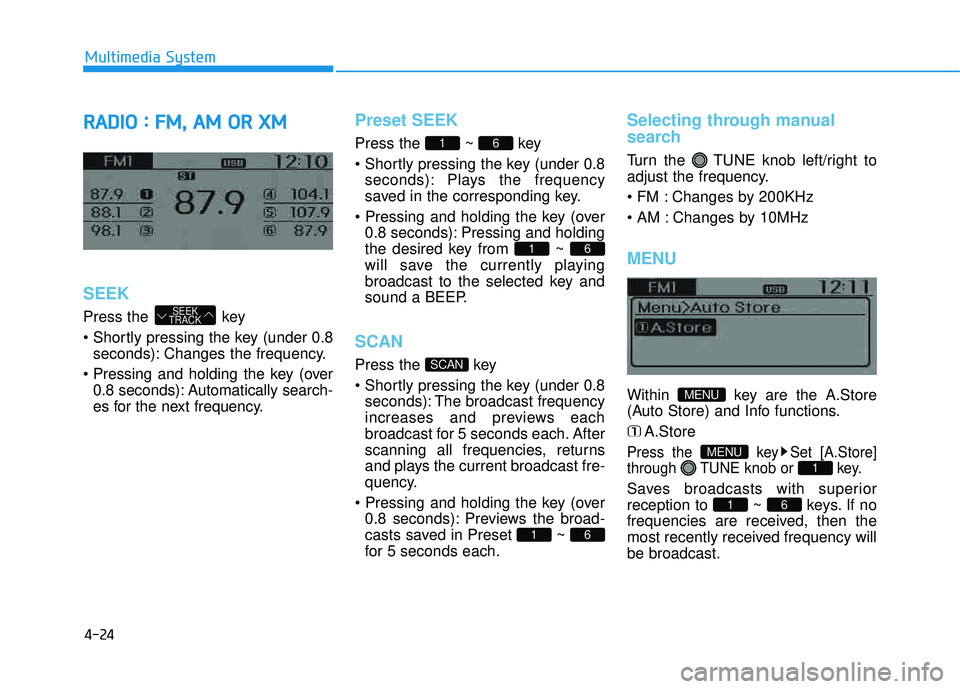
RRAA DDIIOO :: FF MM ,, AA MM OO RR XX MM
SEEK
Press the key
seconds): Changes the frequency.
0.8 seconds): Automatically search-
es for the next frequency.
Preset SEEK
Press the ~ key
seconds): Plays the frequency
saved in the corresponding key.
0.8 seconds): Pressing and holding
the desired key from ~
will save the currently playing
broadcast to the selected key and
sound a BEEP.
SCAN
Press the key
seconds): The broadcast frequency
increases and previews each
broadcast for 5 seconds each. After
scanning all frequencies, returns
and plays the current broadcast fre-
quency.
0.8 seconds): Previews the broad-
casts saved in Preset ~
for 5 seconds each.
Selecting through manual
search
Turn the TUNE knob left/right to
adjust the frequency.
Changes by 200KHz
Changes by 10MHz
MENU
Within key are the A.Store
(Auto Store) and Info functions.
A.Store
Press the key Set [A.Store]
through TUNE knob or key.
Saves broadcasts with superiorreception to ~ keys. If no
frequencies are received, then the
most recently received frequency willbe broadcast.61
1
MENU
MENU
61
SCAN
61
61
SEEK
TRACK