Page 143 of 573
142
Controls
Interior Lights/Interior Convenience Items
Interior Lights
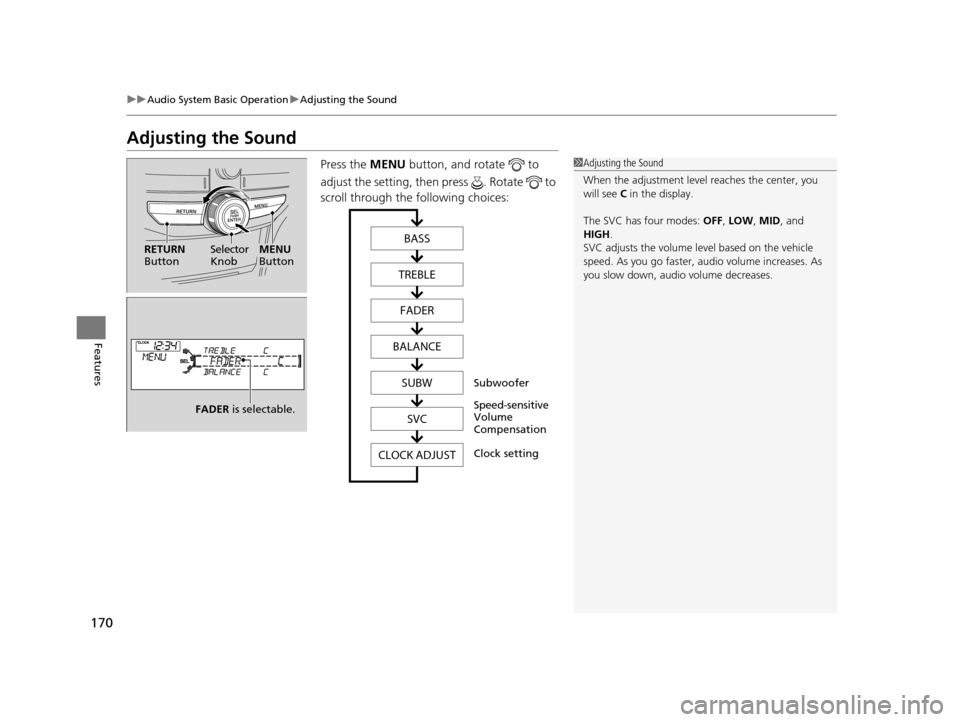
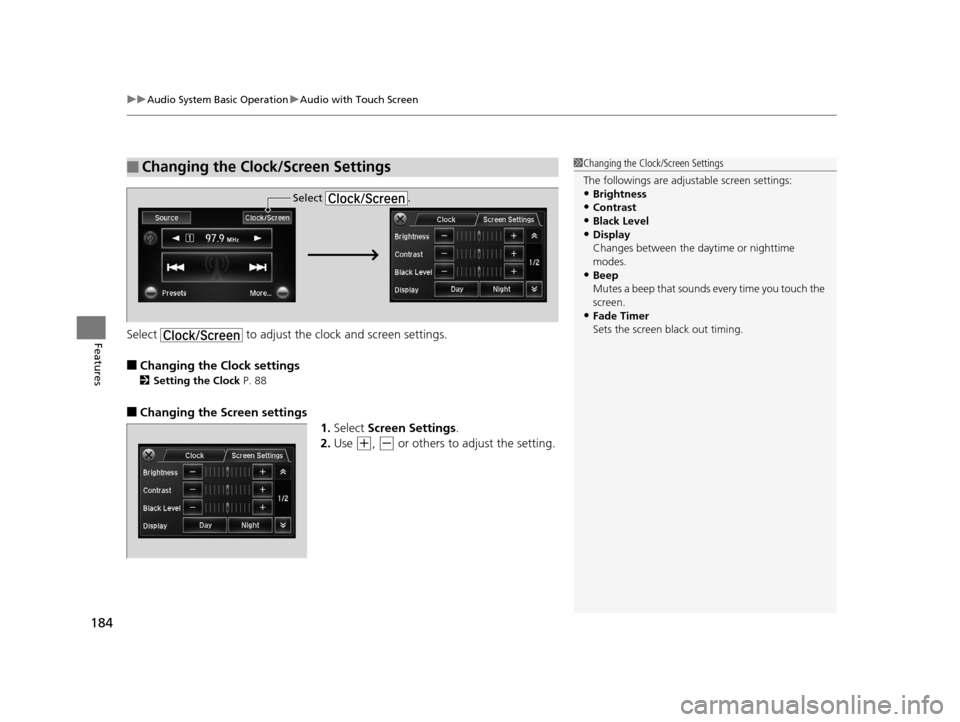
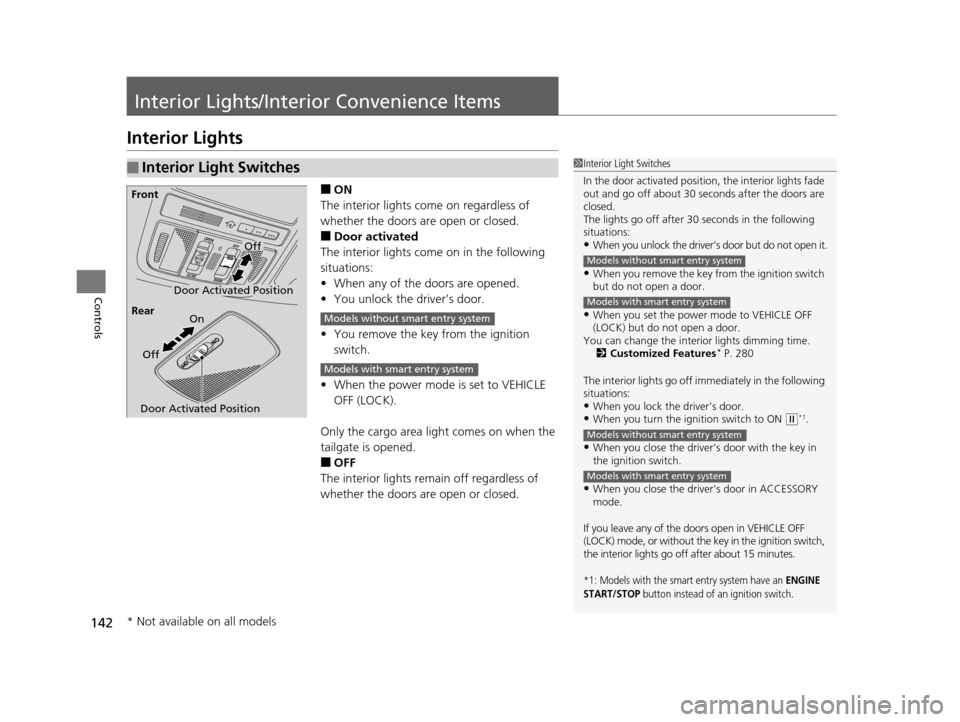
■ON
The interior lights come on regardless of
whether the doors are open or closed.
■Door activated
The interior lights come on in the following
situations:
• When any of the doors are opened.
• You unlock the driver’s door.
• You remove the key from the ignition
switch.
• When the power mode is set to VEHICLE
OFF (LOCK).
Only the cargo area light comes on when the
tailgate is opened.
■OFF
The interior lights remain off regardless of
whether the doors are open or closed.
■Interior Light Switches1 Interior Light Switches
In the door activated position, the interior lights fade
out and go off about 30 se conds after the doors are
closed.
The lights go off after 30 seconds in the following
situations:
•When you unlock the driver’s door but do not open it.
•When you remove the key from the ignition switch
but do not open a door.
•When you set the power mode to VEHICLE OFF
(LOCK) but do not open a door.
You can change the interi or lights dimming time.
2 Customized Features
* P. 280
The interior lights go off i mmediately in the following
situations:
•When you lock the driver’s door.•When you turn the ignition switch to ON ( w*1.
•When you close the driver’s door with the key in
the ignition switch.
•When you close the driver’s door in ACCESSORY
mode.
If you leave any of the doo rs open in VEHICLE OFF
(LOCK) mode, or without the key in the ignition switch,
the interior lights go off after about 15 minutes.
*1: Models with the smart entry system have an ENGINE
START/STOP button instead of an ignition switch.
Models without smart entry system
Models with smart entry system
Models without smart entry system
Models with smart entry system
Door Activated Position
Off
Front
Door Activated Position On
Off
Rear
Models without smart entry system
Models with smart entry system
* Not available on all models
15 CROSSTOUR-31TP66500.book 142 ページ 2014年7月31日 木曜日 午後3時23分
Page 145 of 573
144
uuInterior Lights/Interior Convenience Items uInterior Convenience Items
Controls
Interior Convenience Items
Pull the handle to open the glove box. You
can lock the glove box with the master key or
the built-in key.
■Glove Box1Glove Box
3WARNING
An open glove box can cause serious injury
to your passenger in a crash, even if the
passenger is wearing the seat belt.
Always keep the glove box closed while
driving.
Glove Box
To Lock
15 CROSSTOUR-31TP66500.book 144 ページ 2014年7月31日 木曜日 午後3時23分
Page 170 of 573
169
Features
Audio System Basic Operation
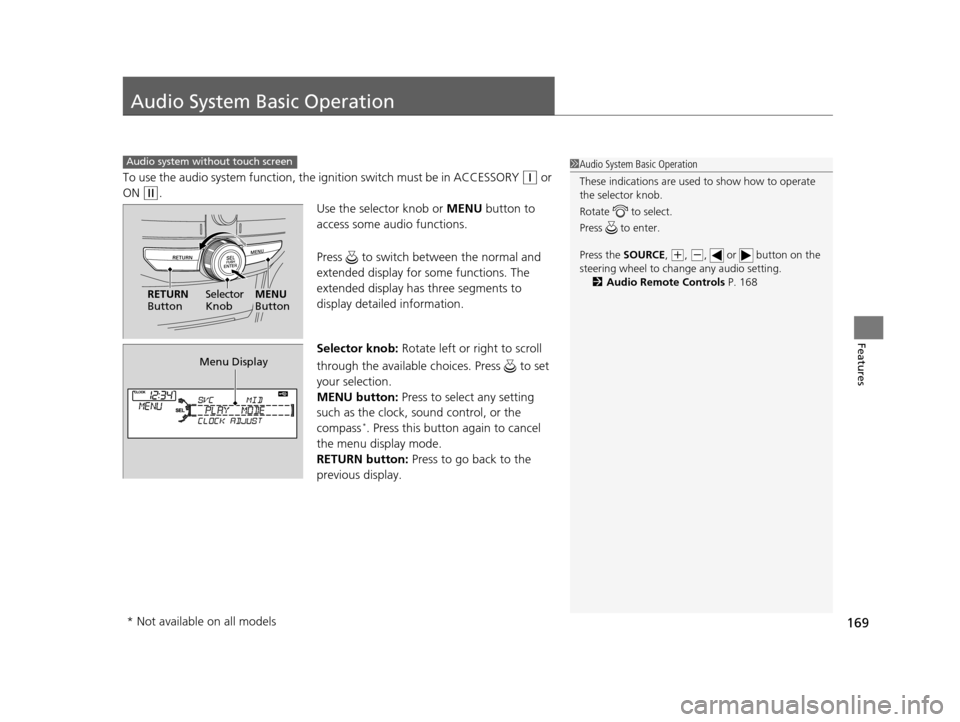
To use the audio system function, the ignition swit ch must be in ACCESSORY (q or
ON
(w.
Use the selector knob or MENU button to
access some audio functions.
Press to switch between the normal and
extended display for so me functions. The
extended display has three segments to
display detailed information.
Selector knob: Rotate left or right to scroll
through the available ch oices. Press to set
your selection.
MENU button: Press to select any setting
such as the clock, sound control, or the
compass
*. Press this button again to cancel
the menu display mode.
RETURN button: Press to go back to the
previous display.
Audio system without touch screen1 Audio System Basic Operation
These indications are used to show how to operate
the selector knob.
Rotate to select.
Press to enter.
Press the SOURCE,
( +, ( -, or button on the
steering wheel to cha nge any audio setting.
2 Audio Remote Controls P. 168
RETURN
Button Selector
KnobMENU
Button
Menu Display
* Not available on all models
15 CROSSTOUR-31TP66500.book 169 ページ 2014年7月31日 木曜日 午後3時23分
Page 171 of 573
170
uuAudio System Basic Operation uAdjusting the Sound
Features
Adjusting the Sound
Press the MENU button, and rotate to
adjust the setting, then press . Rotate to
scroll through the following choices:1 Adjusting the Sound
When the adjustment leve l reaches the center, you
will see C in the display.
The SVC has four modes: OFF, LOW , MID, and
HIGH .
SVC adjusts the volume level based on the vehicle
speed. As you go faster, audio volume increases. As
you slow down, audi o volume decreases.
Selector
KnobMENU
Button
RETURN
ButtonBASS
TREBLE FADER
BALANCE
SUBWSVC
CLOCK ADJUST
Speed-sensitive
Volume
Compensation Subwoofer
Clock settingFADER is selectable.
15 CROSSTOUR-31TP66500.book 170 ページ 2014年7月31日 木曜日 午後3時23分
Page 185 of 573
uuAudio System Basic Operation uAudio with Touch Screen
184
FeaturesSelect to adjust the clock and screen settings.
■Changing the Clock settings
2Setting the Clock P. 88
■Changing the Screen settings
1.Select Screen Settings .
2. Use
(+, (- or others to adjust the setting.
■Changing the Clock/Screen Settings1Changing the Clock/Screen Settings
The followings are adjustable screen settings:
•Brightness
•Contrast
•Black Level•Display
Changes between the da ytime or nighttime
modes.
•Beep
Mutes a beep that sounds every time you touch the
screen.
•Fade Timer
Sets the screen black out timing.
Select .
15 CROSSTOUR-31TP66500.book 184 ページ 2014年7月31日 木曜日 午後3時23分
Page 187 of 573
186
uuAudio System Basic Operation uAudio/Information Screen
Features
Audio/Information Screen
Displays the audio status and wallpaper. From this screen, you can go to various
setup options.
Press the (display) butto n to change the display.
■Switching the Display
Using the display button
(Display) ButtonAudio Trip Computer
(Current Drive)
Clock/Wallpaper Trip Computer
(History of Trip A)
Audio/Information Screen
15 CROSSTOUR-31TP66500.book 186 ページ 2014年7月31日 木曜日 午後3時23分
Page 189 of 573

188
uuAudio System Basic Operation uAudio/Information Screen
Features
■Info
Shows the Trip Computer or Clock/Wallpaper information.
Press , rotate to select an item, then press .
Info menu items
Current Drive (Trip computer)
Shows the range, and instant and average fu el economy of the current trip, as well
as the average fuel economy from your last trip.
History of Trip A (Trip computer)
Shows the range, average fuel economy an d distance traveled for the current trip,
as well as the average fuel economy and distances traveled during the last three
driving cycles.
Each time you reset the trip meter A, the information on the display updates. The
history of the previous th ree driving cycles is kept.
Delete History
1. Rotate to select Delete History, then press .
2. You will receive a confirmation message on the screen. Rotate to select Yes,
then press .
Clock/Wallpaper
Shows the current clock type and wallpaper
Clock/Wallpaper Change
Enters the clock and wallpaper setting menu screen.
15 CROSSTOUR-31TP66500.book 188 ページ 2014年7月31日 木曜日 午後3時23分
Page 190 of 573
Continued189
uuAudio System Basic Operation uAudio/Information Screen
Features
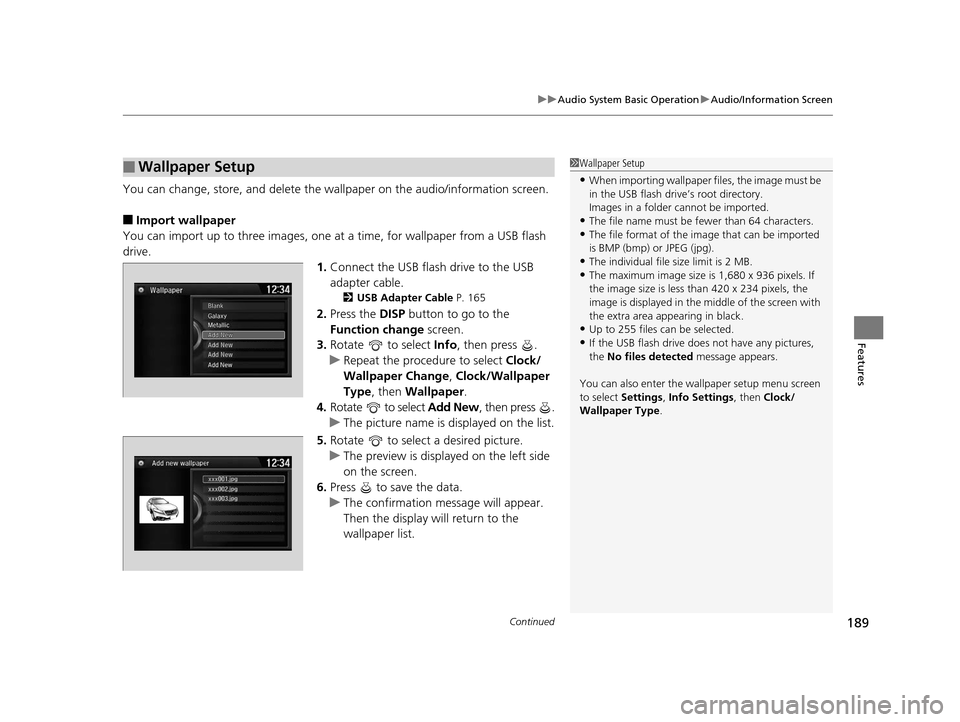
You can change, store, and delete the wa llpaper on the audio/information screen.
■Import wallpaper
You can import up to three images, one at a time, for wallpaper from a USB flash
drive.
1.Connect the USB flash drive to the USB
adapter cable.
2 USB Adapter Cable P. 165
2.Press the DISP button to go to the
Function change screen.
3. Rotate to select Info, then press .
u Repeat the procedure to select Clock/
Wallpaper Change , Clock/Wallpaper
Type, then Wallpaper.
4. Rotate to select Add New, then press .
u The picture name is displayed on the list.
5. Rotate to select a desired picture.
u The preview is displayed on the left side
on the screen.
6. Press to save the data.
u The confirmation message will appear.
Then the display will return to the
wallpaper list.
■Wallpaper Setup1Wallpaper Setup
•When importing wallpaper files, the image must be
in the USB flash drive’s root directory.
Images in a folder cannot be imported.
•The file name must be fewer than 64 characters.•The file format of the im age that can be imported
is BMP (bmp) or JPEG (jpg).
•The individual file size limit is 2 MB.•The maximum image size is 1,680 x 936 pixels. If
the image size is less than 420 x 234 pixels, the
image is displayed in the middle of the screen with
the extra area appearing in black.
•Up to 255 files can be selected.
•If the USB flash drive doe s not have any pictures,
the No files detected message appears.
You can also enter the wallpaper setup menu screen
to select Settings, Info Settings , then Clock/
Wallpaper Type .
15 CROSSTOUR-31TP66500.book 189 ページ 2014年7月31日 木曜日 午後3時23分