Page 300 of 573
299
uuCustomized Features*u
Continued
Features
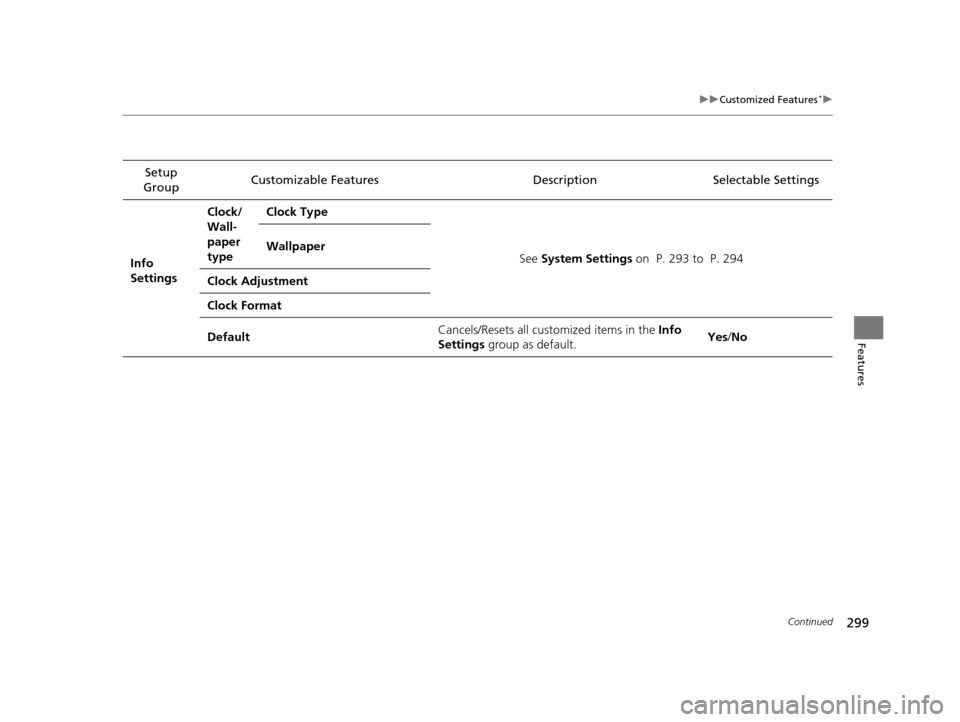
Setup
Group Customizable Features
DescriptionSelectable Settings
Info
Settings Clock/
Wall-
paper
type
Clock Type
See System Settings on P. 293 to P. 294
Wallpaper
Clock Adjustment
Clock Format
Default Cancels/Resets all customized items in the
Info
Settings group as default. Yes
/No
15 CROSSTOUR-31TP66500.book 299 ページ 2014年7月31日 木曜日 午後3時23分
Page 305 of 573
304
uuCustomized Features*u
Features
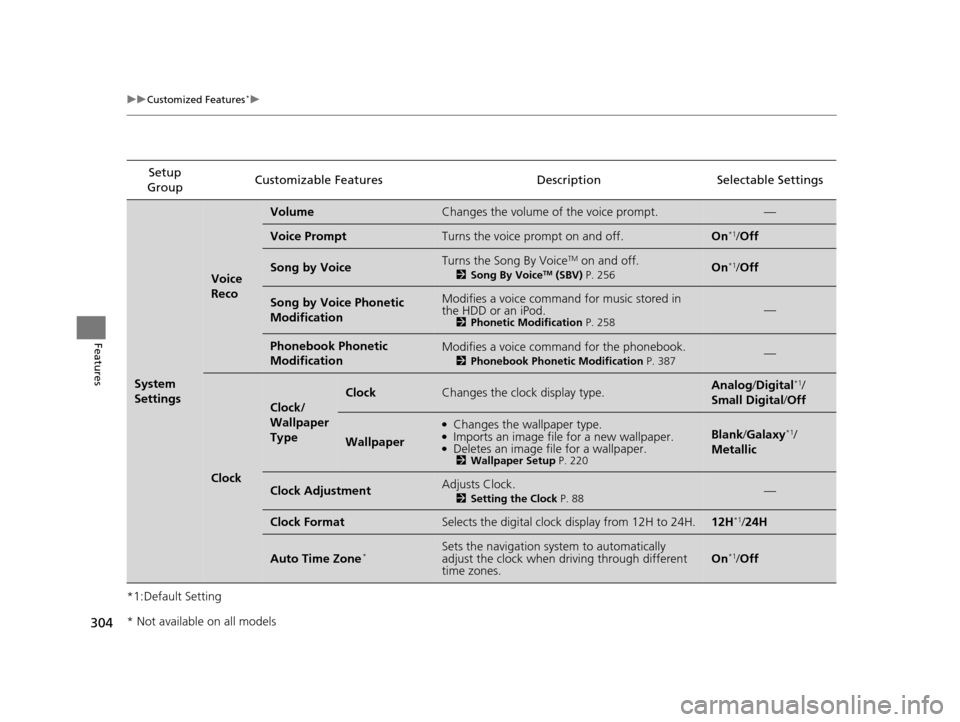
*1:Default SettingSetup
Group Customizable Features Descri
ption Selectable Settings
System
Settings
Voice
Reco
VolumeChanges the volume of the voice prompt.—
Voice PromptTurns the voice prompt on and off.On*1/Off
Song by VoiceTurns the Song By VoiceTM on and off.
2 Song By VoiceTM (SBV) P. 256On*1/Off
Song by Voice Phonetic
ModificationModifies a voice command for music stored in
the HDD or an iPod.
2 Phonetic Modification P. 258—
Phonebook Phonetic
ModificationModifies a voice command for the phonebook.
2Phonebook Phonetic Modification P. 387—
Clock
Clock/
Wallpaper
Type
ClockChanges the clock display type.Analog/Digital*1/
Small Digital /Off
Wallpaper
●Changes the wallpaper type.●Imports an image file for a new wallpaper.●Deletes an image file for a wallpaper.2 Wallpaper Setup P. 220
Blank/Galaxy*1/
Metallic
Clock AdjustmentAdjusts Clock.
2 Setting the Clock P. 88—
Clock FormatSelects the digital clock display from 12H to 24H.12H*1/24H
Auto Time Zone*Sets the navigation sy stem to automatically
adjust the clock when driving through different
time zones.On*1/ Off
* Not available on all models
15 CROSSTOUR-31TP66500.book 304 ページ 2014年7月31日 木曜日 午後3時23分
Page 306 of 573
305
uuCustomized Features*u
Continued
Features
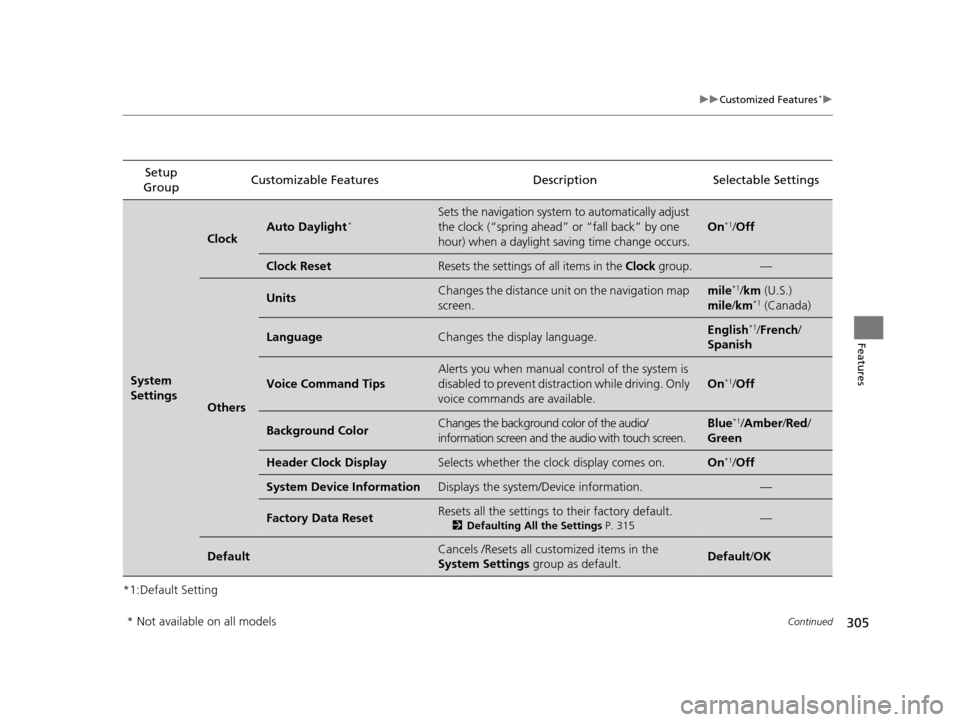
*1:Default SettingSetup
Group Customizable Features Description Selectable Settings
System
Settings
ClockAuto Daylight*Sets the navigation system to automatically adjust
the clock (“spring ahead”
or “fall back” by one
hour) when a daylight saving time change occurs.
On*1/ Off
Clock ResetResets the settings of all items in the Clock group.—
Others
UnitsChanges the distance unit on the navigation map
screen.mile*1/km (U.S.)
mile /km*1 (Canada)
LanguageChanges the display language.English*1/ French /
Spanish
Voice Command Tips
Alerts you when manual co ntrol of the system is
disabled to prevent distraction while driving. Only
voice commands are available.
On*1/ Off
Background ColorChanges the background color of the audio/
information screen and the audio with touch screen.Blue*1/Amber /Red /
Green
Header Clock DisplaySelects whether the clock display comes on.On*1/ Off
System Device InformationDisplays the system/Device information.—
Factory Data ResetResets all the settings to their factory default.
2 Defaulting All the Settings P. 315—
DefaultCancels /Resets all cust omized items in the
System Settings group as default.Default/OK
* Not available on all models
15 CROSSTOUR-31TP66500.book 305 ページ 2014年7月31日 木曜日 午後3時23分
Page 308 of 573
307
uuCustomized Features*u
Continued
Features
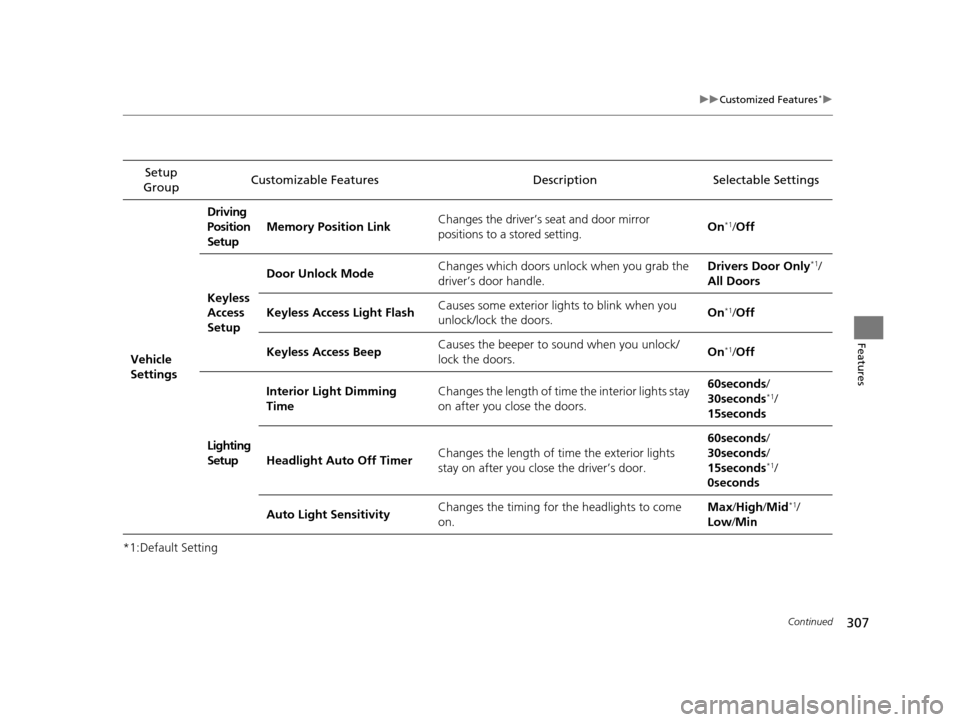
*1:Default SettingSetup
Group Customizable Features Description Selectable Settings
Vehicle
Settings Driving
Position
Setup
Memory Position Link
Changes the driver’s seat and door mirror
positions to a stored setting. On
*1/
Off
Keyless
Access
Setup Door Unlock Mode
Changes which doors unlock when you grab the
driver’s door handle. Drivers Door Only
*1/
All Doors
Keyless Access Light Flash Causes some exterior lights to blink when you
unlock/lock the doors. On
*1/
Off
Keyless Access Beep Causes the beeper to
sound when you unlock/
lock the doors. On
*1/
Off
Lighting
Setup Interior Light Dimming
Time
Changes the length of time the interior lights stay
on after you close the doors. 60seconds
/
30seconds
*1/
15seconds
Headlight Auto Off Timer Changes the length of time the exterior lights
stay on after you close the driver’s door. 60seconds
/
30seconds /
15seconds
*1/
0seconds
Auto Light Sensitivity Changes the timing for the headlights to come
on. Max
/High /Mid
*1/
Low /Min
15 CROSSTOUR-31TP66500.book 307 ページ 2014年7月31日 木曜日 午後3時23分
Page 309 of 573
308
uuCustomized Features*u
Features
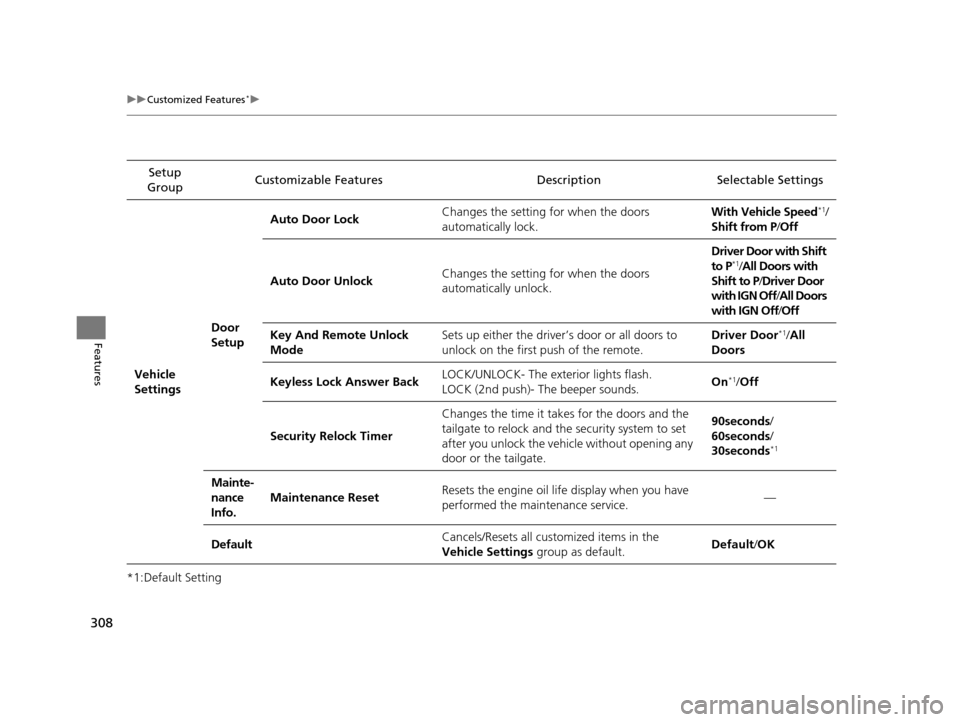
*1:Default SettingSetup
Group Customizable Features Descri
ption Selectable Settings
Vehicle
Settings Door
SetupAuto Door Lock
Changes the setting for when the doors
automatically lock. With Vehicle Speed
*1/
Shift from P/ Off
Auto Door Unlock Changes the setting for when the doors
automatically unlock. Driver Door with Shift
to P
*1/
All Doors with
Shift to P /Driver Door
with IGN Off /All Doors
with IGN Off /Off
Key And Remote Unlock
Mode Sets up either the driver
’s door or all doors to
unlock on the first push of the remote. Driver Door
*1/
All
Doors
Keyless Lock Answer Back LOCK/UNLOCK- The exterior lights flash.
LOCK (2nd push)- The beeper sounds. On
*1/
Off
Security Relock Timer Changes the time it takes for the doors and the
tailgate to relock and the security system to set
after you unlock the vehicle without opening any
door or the tailgate. 90seconds/
60seconds/
30seconds
*1
Mainte-
nance
Info.
Maintenance Reset
Resets the engine oil life display when you have
performed the maintenance service. —
Default Cancels/Resets all cust
omized items in the
Vehicle Settings group as default. Default
/OK
15 CROSSTOUR-31TP66500.book 308 ページ 2014年7月31日 木曜日 午後3時23分
Page 314 of 573
313
uuCustomized Features*u
Features
*1:Default SettingSetup
Group Customizable Features Description Selectable Settings
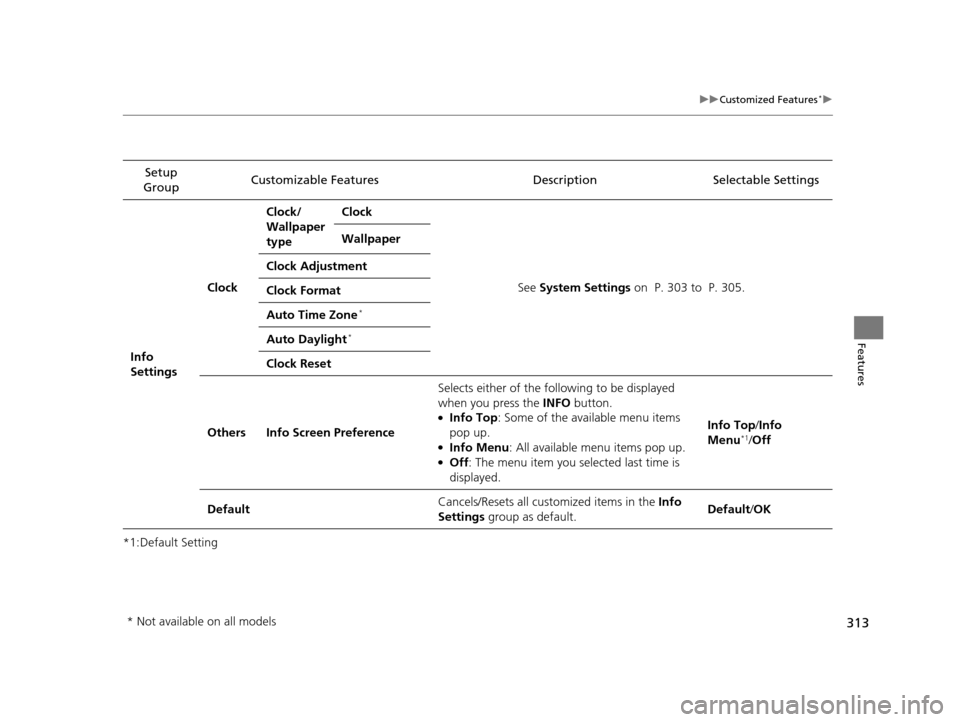
Info
Settings Clock
Clock/
Wallpaper
type
Clock
See System Settings on P. 303 to P. 305.
Wallpaper
Clock Adjustment
Clock Format
Auto Time Zone
*
Auto Daylight*
Clock Reset
Others Info Screen Preference Selects either of the following to be displayed
when you press the INFO
button.
●Info Top: Some of the available menu items
pop up.
●Info Menu : All available menu items pop up.●Off: The menu item you selected last time is
displayed. Info Top
/Info
Menu
*1/ Off
Default Cancels/Resets all customized items in the
Info
Settings group as default. Default/
OK
* Not available on all models
15 CROSSTOUR-31TP66500.book 313 ページ 2014年7月31日 木曜日 午後3時23分
Page 330 of 573
Continued329
uuBluetooth ® HandsFreeLink ®u HFL Menus
Features
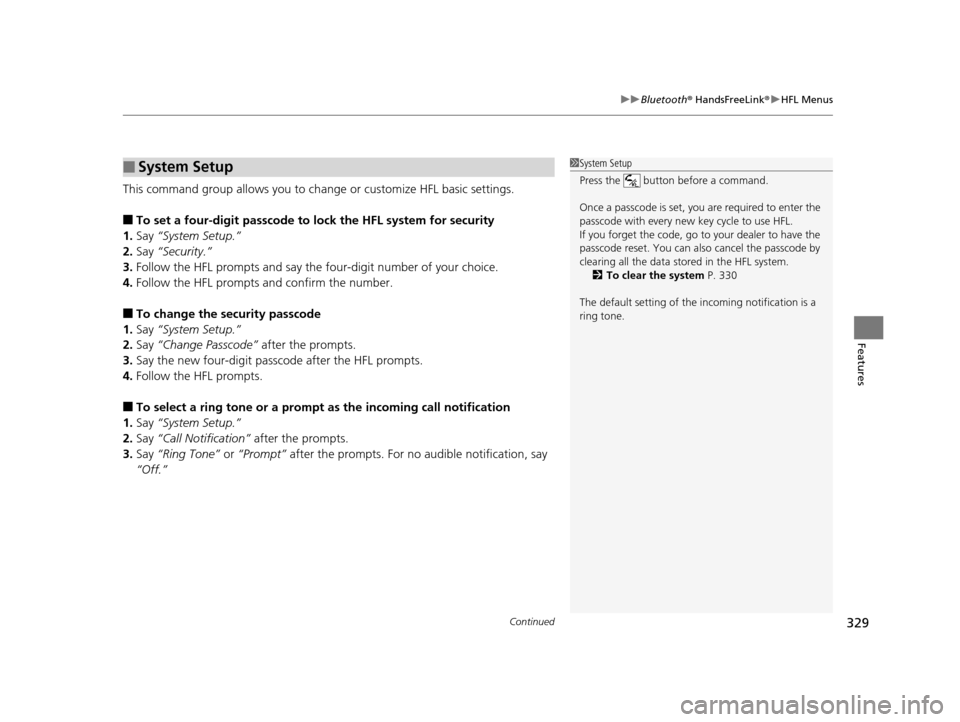
This command group allows you to ch ange or customize HFL basic settings.
■To set a four-digit passcode to lock the HFL system for security
1. Say “System Setup.”
2. Say “Security.”
3. Follow the HFL prompts and say the four-digit number of your choice.
4. Follow the HFL prompts and confirm the number.
■To change the security passcode
1. Say “System Setup.”
2. Say “Change Passcode” after the prompts.
3. Say the new four-digit passcode after the HFL prompts.
4. Follow the HFL prompts.
■To select a ring tone or a prompt as the incoming call notification
1. Say “System Setup.”
2. Say “Call Notification” after the prompts.
3. Say “Ring Tone” or “Prompt” after the prompts. For no audible notification, say
“Off.”
■System Setup1 System Setup
Press the button before a command.
Once a passcode is set, y ou are required to enter the
passcode with every new key cycle to use HFL.
If you forget the code, go to your dealer to have the
passcode reset. You can also cancel the passcode by
clearing all the data stored in the HFL system. 2 To clear the system P. 330
The default setting of the incoming notification is a
ring tone.
15 CROSSTOUR-31TP66500.book 329 ページ 2014年7月31日 木曜日 午後3時23分
Page 410 of 573
409
Driving
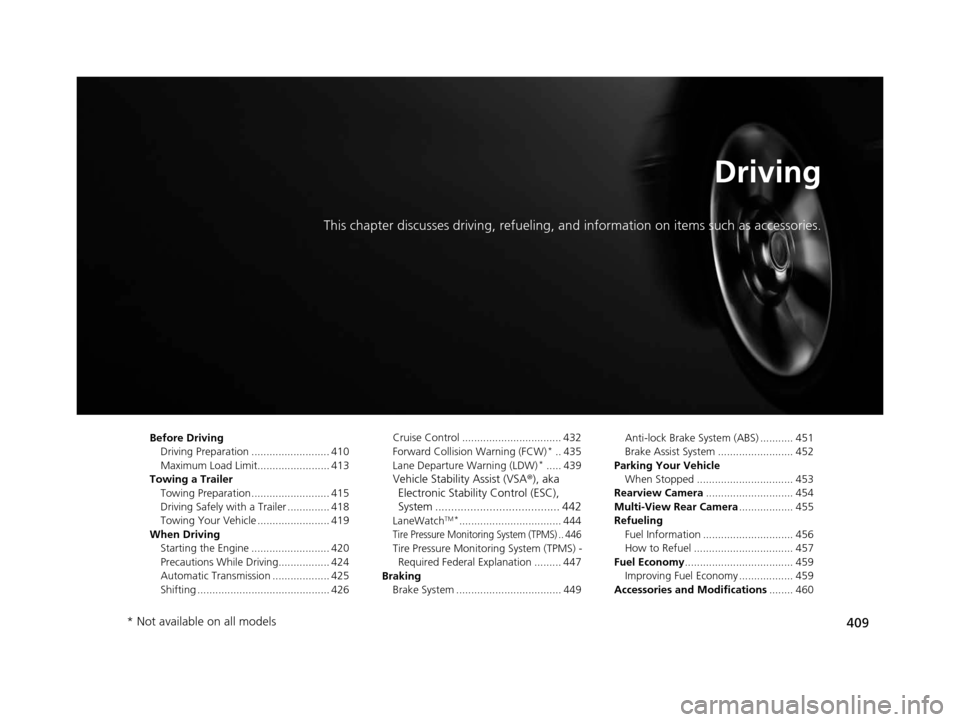
This chapter discusses driving, refueling, and information on items such as accessories.
Before Driving
Driving Preparation .......................... 410
Maximum Load Limit........................ 413
Towing a Trailer Towing Preparation .......................... 415
Driving Safely with a Trailer .............. 418
Towing Your Vehicle ........................ 419
When Driving Starting the Engine .......................... 420
Precautions While Driving................. 424
Automatic Transmission ................... 425
Shifting ............................................ 426 Cruise Control ................................. 432
Forward Collision Warning (FCW)*.. 435
Lane Departure Warning (LDW)*..... 439
Vehicle Stability Assist (VSA ®), aka
Electronic Stability Control (ESC),
System ....................................... 442
LaneWatchTM*.................................. 444
Tire Pressure Monitoring System (TPMS) .. 446
Tire Pressure Monitoring System (TPMS) -
Required Federal Explanation ......... 447
Braking Brake System ................................... 449 Anti-lock Brake System (ABS) ........... 451
Brake Assist System ......................... 452
Parking Your Vehicle When Stopped ................................ 453
Rearview Camera ............................. 454
Multi-View Rear Camera .................. 455
Refueling Fuel Information .............................. 456
How to Refuel ................................. 457
Fuel Economy .................................... 459
Improving Fuel Economy .................. 459
Accessories and Modifications ........ 460
* Not available on all models
15 CROSSTOUR-31TP66500.book 409 ページ 2014年7月31日 木曜日 午後3時23分